
iZotope Insight 2 is a metering suite plug-in: seven meters in one window, from loudness with broadcast target presets to a dialogue Intelligibility meter, for anything from stereo up to 7.1.2. It's still sold at $199 (US store price on October 23, 2026), and it's part of iZotope Pro but not Plus. Buy it when your work ships against a written loudness spec or in surround; for stereo music, cheaper tools cover most of the job.
My rule is simple. I'd buy Insight 2 when a delivery spec names an integrated target, a gate and a true-peak ceiling, because that's where the twelve target presets, the dialogue gate and the Intelligibility meter save time on every deliverable. For stereo music I'd skip it and pair Tonal Balance Control 3 or a free LUFS meter with the loudness meter Sound Forge already has. Insight 2 has no Spotify, Apple Music or YouTube preset, and four of the seven published verdicts below judge its value at a sale or bundle price. Buy it for what it does now: the current build is 2.6.0 from April 2025, and the last new measurement features arrived in 2019.
What iZotope Insight 2 is, and whether it's still sold
Insight 2 sits on the metering shelf of iZotope's plug-in lineup, next to Tonal Balance Control. The Insight 2 product page describes a metering and analysis plug-in for loudness, intelligibility and spectral balance in music and post-production work, with support from stereo to 7.1.2 Atmos. It runs only as a plug-in, so it always needs a host.
Seven modules share the window: Loudness, Levels, Sound Field, History, Intelligibility, Spectrum and Spectrogram. You can show one, several or all of them at once.
The original Insight fed its Spectrogram through small Meter Tap plug-ins, as the original Insight help file describes. Version 2 replaced Meter Tap with Relay and added the Intelligibility meter, a dialogue gate and 7.1.2 metering. Plenty of older pages that rank for "iZotope Insight" describe version 1, so check the version before you trust a screenshot or a CPU figure.
The Insight 2 release notes show where development went after the big features landed:
- February 2019 (listed as 2.10): the Dialogue Loudness Gate, the Loudness Target Controls panel, LRA targets and the Netflix preset. These were the last new measurement features.
- August 2023 (2.4.0): native Apple silicon installs, preset tabs, Relay as a separate download, and a fix for a wrong true-peak value in the Loudness meter when Levels was set to K-System.
- February 2024 (2.5.0): iLok Enterprise support.
- April 28, 2025 (2.6.0): Windows HiDPI support and updated DAW and NLE versions. This is the current build.
Ownership changed in 2026. Boris FX announced its acquisition of iZotope on July 2, 2026 and says all iZotope products, licenses and subscriptions remain fully active. That covers an Insight 2 license. The statement doesn't name an Insight update, so judge the plug-in on what 2.6.0 does today.
What each Insight 2 meter shows
Each module answers one question. Momentary, Short-term, Integrated and LRA mean the same thing here as in Sound Forge's own loudness meter, so this section covers what Insight adds rather than the definitions. The module details come from the Insight 2 help.
Loudness: does the program hit the target?
The Loudness meter follows ITU-R BS.1770. It shows Momentary (400 ms), Short-term (3 s), Integrated, Momentary Max, Loudness Range and True Peak Max, which is the highest true peak across all channels in dBTP. Integrated follows the Gate setting, and LRA follows it too when Dialogue is selected; Momentary and Short-term are never gated. Select the Dialogue gate and a Dialogue Content percentage readout appears as well.
Levels: where are the peaks, channel by channel?
Levels shows true-peak and RMS per channel, up to 10 channels for a 7.1.2 bed. Switch it to K-System (K-12, K-14 or K-20) if you mix to a K scale. Peak hold runs from 5 ms to infinite. Anyone still on a build older than 2.4.0 with K-System selected should update, because 2.4.0 fixed a wrong true-peak value in the Loudness meter in that mode.
History: when did it go over?
History draws Integrated, Short-term and Momentary loudness over time against the integrated target, so you can see where a passage went over instead of only that it did. From Global Options > Loudness you can export the history as a CSV file with timestamps, or send Loudness overflow (0 or 1) and Integrated loudness to the host as automation. One catch for dialogue work: the CSV's Integrated column doesn't reflect the dialogue gate, so take the gated figure from the meter itself.
Sound Field: will it survive mono?
In stereo, Sound Field is a vectorscope with Polar Sample, Polar Level and Lissajous modes, plus a Balance meter and a Correlation meter. Its correlation readout answers the same question as the free phase correlation meter on this site, live inside the session. The help reads it plainly: +1 is in phase, -1 is out of phase, and brief dips below zero aren't necessarily serious. A long stretch below zero is a mono-compatibility problem worth tracing to its source. In surround, the module becomes a Surround Scope that doesn't draw signals below -60 dB RMS.
Spectrum and Spectrogram: where is the energy?
Spectrum shows the balance right now, in Linear, 1/3 Octave, Full Octave or Critical Bands view, with a cursor readout of frequency and amplitude. Reading it works the same way as any audio spectrum analyzer. The Spectrogram shows the balance over time, in 2D or 3D, and it can draw up to eight Relay sources at once in separate colors. That's the view for seeing two stems compete for the same frequency range across a whole section.
Intelligibility: will the dialogue be understood?
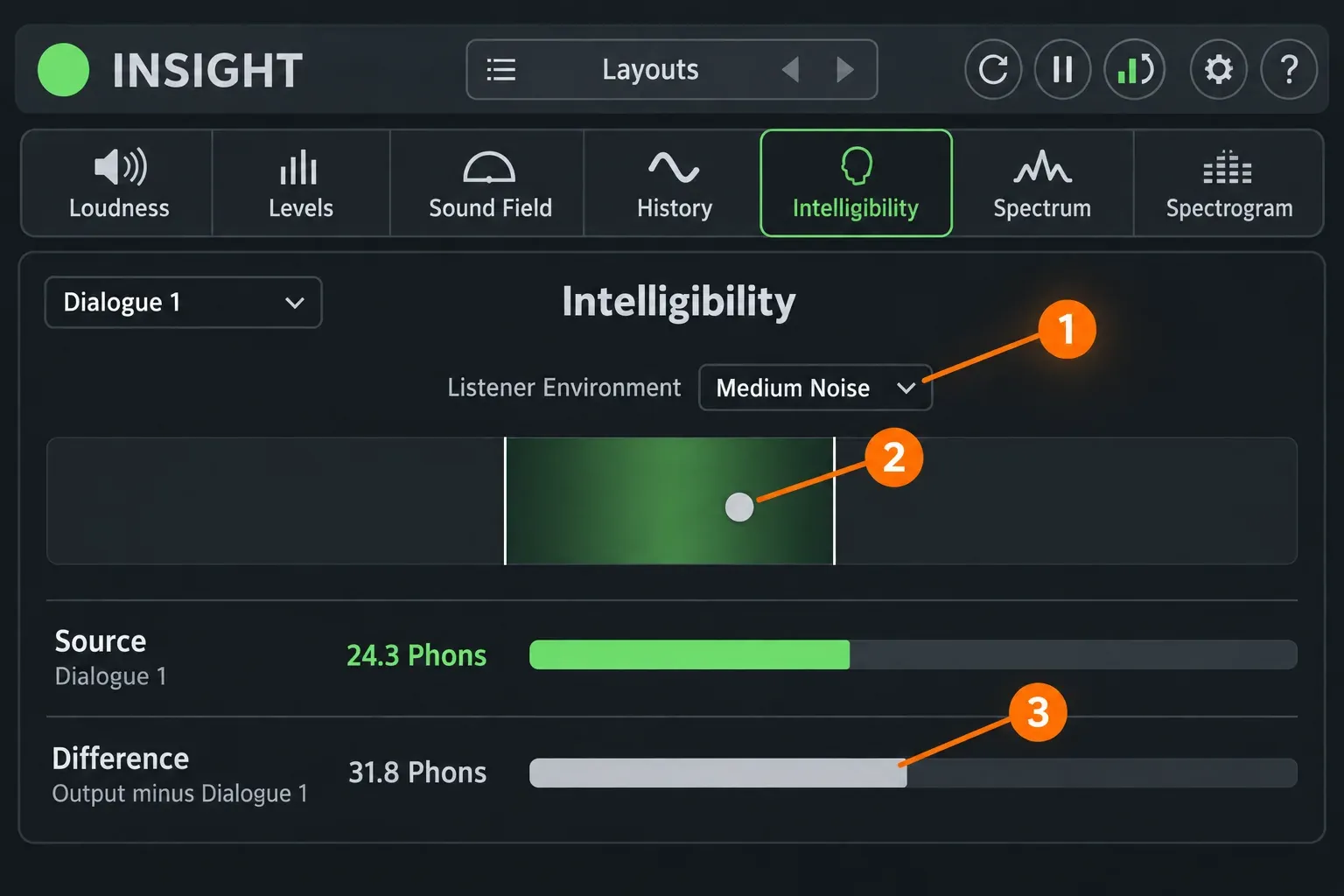
Intelligibility needs Relay on the dialogue bus (the setup is below). It draws a dot for estimated intelligibility against a green recommended zone, and the zone follows the Listener Environment you pick: Low Noise, Medium Noise or High Noise. Under it, the Source meter shows the dialogue's perceived loudness in phons, and the Difference meter shows the output minus that dialogue source.
Layouts: one window for music, another for post
The Layouts preset manager saves which meters are visible and how each is set, so a music layout and a post layout sit one click apart. Loudness targets aren't part of a layout. They save with the host session, so switching layouts never changes your delivery numbers.
How to set a delivery target in Insight 2
Set the target before the first full playback. The order below follows the Insight 2 help.
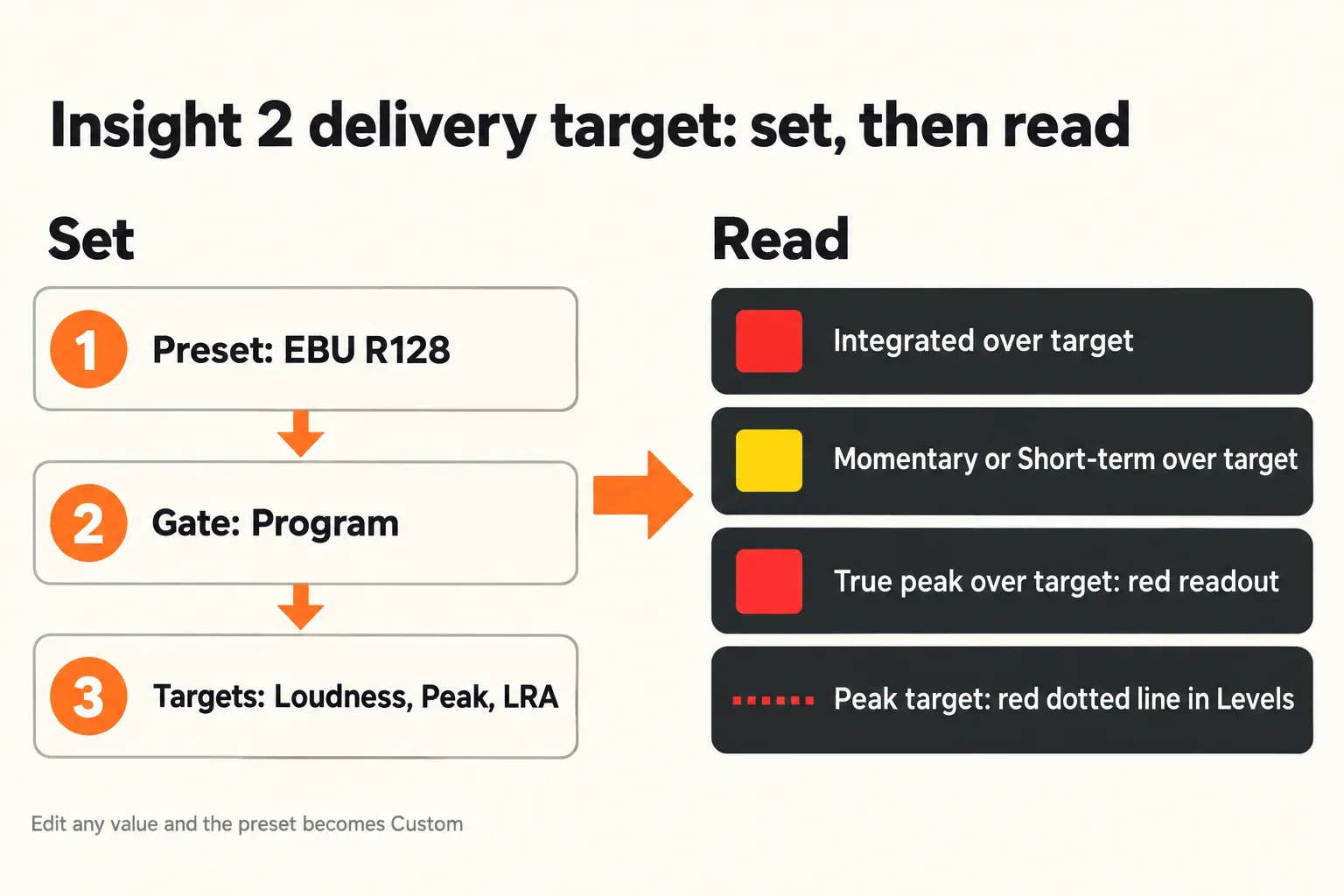
- Pick the preset. Open the preset menu at the bottom of the Loudness meter and choose the standard your delivery spec names. The preset fills in the integrated target, tolerance, gate and true-peak ceiling.
- Check the gate. Program is the -10 LU relative gate that BS.1770-2, -3 and -4 require. Dialogue measures detected speech only and needs at least 2 seconds of audio before it draws. Off is plain BS.1770-1 without the relative gate.
- Set the targets. Open the Targets panel with the button left of the preset menu, then enter the Loudness target and tolerance, the Peak target, and an LRA range anywhere from 0 to 30 LU. The Peak target is a true-peak ceiling in dBTP, not a sample-peak limit. Editing any value renames the preset Custom.
- Choose Hold or Reset. With Hold off, readings reset on every transport change. Turn Hold on for a pass with stops, and press Reset before the final run.
- Play the whole program and read the colors. Integrated over target turns red. Momentary or Short-term over target turns yellow. A true peak over the Peak target turns the True Peak readout red, and Levels draws the Peak target itself as a red dotted line. An LRA outside the range turns red.
- Keep a record. Export the History CSV, or record the automation data, when a client wants proof of the pass.
To read distance from the target instead of absolute loudness, switch the scale from Absolute (LUFS) to Relative (LU). The range options include BS1771, EBU +9 and EBU +18.
The twelve loudness presets
Insight 2 ships twelve factory presets. The values below are the ones the Insight 2 help lists; the release notes since then add no presets.
| Preset | Integrated | Tolerance | Gate | True peak | Region or use |
|---|---|---|---|---|---|
| AES TD1006 | -16 LUFS | ±2.0 LU | Program | -1 dBTP | Over-the-top and online video |
| AGCOM 219/09/CSP | -24 LUFS | ±0.5 LU | Program | -2 dBTP | Italy |
| ARIB TR-B32 | -24 LKFS | ±2.0 LU | Program | -1 dBTP | Japan |
| ATSC A/85 | -24 LKFS | ±2.0 LU | Program | -2 dBTP | USA, Canada, Puerto Rico |
| BS.1770-1 | -24 LKFS | ±2.0 LU | Off | -2 dBTP | International |
| BS.1770-2/3/4 | -24 LKFS | ±2.0 LU | Program | -2 dBTP | International |
| EBU R128 | -23 LUFS | ±0.5 LU | Program | -1 dBTP | Europe |
| EBU R128 DPP | -23 LUFS | ±0.5 LU | Program | -3 dBTP | Europe |
| EBU R128 (South Africa) | -23 LUFS | ±1.0 LU | Program | -2 dBTP | South Africa |
| OP-59 | -24 LKFS | ±1.0 LU | Program | -2 dBTP | Australia, New Zealand |
| Portaria 354 | -23 LUFS | ±0.5 LU | Program | -2 dBTP | Brazil |
| Netflix | -27 LKFS | ±0.5 LU | Dialogue | -2 dBTP | Dialogue LRA of 7 LU or less; based on Netflix spec v1.0 |
Treat the Netflix row as a starting point, not a current requirement. The help says the preset follows version 1.0 of Netflix's audio mix specification, so confirm the current Netflix delivery spec before a deliverable and edit the target if the numbers differ.
None of the twelve covers a music streaming service. For Spotify, Apple Music or YouTube you type the number yourself and the preset becomes Custom; streaming loudness standards lists what each platform does at playback. A podcast target is a custom target too, and the podcast loudness standard guide explains which number to start from.
Relay: how Insight 2 hears dialogue and stems
Relay is what lets Insight 2 see individual tracks instead of only the master. It's a free utility plug-in with its own channel-strip controls: high-pass filter, phase and mono, pan and width, and delay time. Since Insight 2.4.0, Relay installs separately and is still authorized by the Insight 2 license. The Relay release notes list 1.7.0, from June 11, 2025, as the current build.
- Put Insight 2 on the master bus.
- Put Relay in the last insert slot of the dialogue bus that feeds the master. Both need the same channel configuration, so a 5.1 master wants a 5.1 dialogue submix.
- In the Intelligibility meter, select that Relay instance as the source.
- For the Spectrogram, add Relay to the stems you want to compare and select up to eight of them.
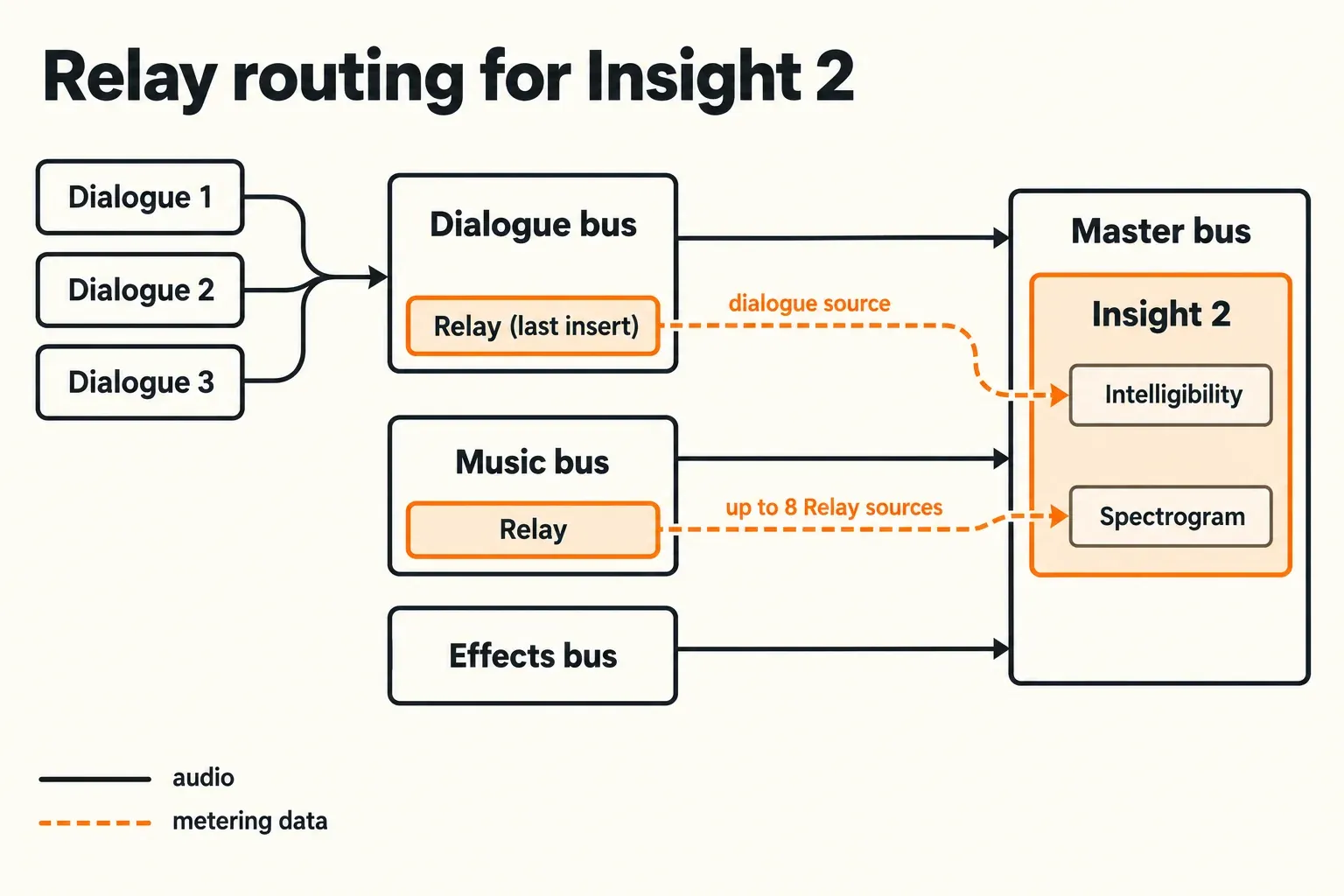
Without Relay in the session, Intelligibility has no dialogue source and the Spectrogram shows only what Insight hears on its own insert. The same Relay instances also feed Tonal Balance Control, the Neutron Masking meter and Visual Mixer, and Nectar's Unmask.
Ozone doesn't send audio to Insight 2 directly. Insight's source lists contain Relay instances and nothing else, so "Insight and Ozone integration" means Relay on the tracks and Insight on the master, with Ozone doing its own work in between. On a master bus, I'd put Insight 2 after Ozone so it reads what you'll deliver.
Insight 2 price: license, iZotope Pro, bundles and sales
Five routes include Insight 2, and the cheapest one depends on what else you need. These are iZotope US store prices; Plugin Boutique lists the same $199 with no discount.
| Route | Price | What it covers |
|---|---|---|
| Insight 2 license | $199 | Perpetual license; Relay is authorized by it |
| Insight 2 EDU | $99.50 | Education license |
| iZotope Pro subscription | $25 a month or $250 a year | Insight 2 and Tonal Balance Control 3 among the Pro tools |
| Music Production Suite 9 | $799 | Music bundle that includes Insight 2 |
| RX Post Production Suite 9 | $1,799 | Post bundle that includes Insight 2 and Relay |
| Everything Bundle | $2,999 | Full catalog bundle |
The iZotope subscriptions page puts Insight 2 in Pro only. Plus, at $15 a month or $150 a year, doesn't include it. Subscriptions start with a 7-day trial, install through Native Access and revert to read-only mode after they expire. The same page says perpetual licenses will stay available.
The arithmetic is short. One year of Pro at $250 already costs more than the $199 license, so Pro only pays off if you'd use other Pro tools. Insight 2 plus Tonal Balance Control 3 bought outright comes to $328 ($199 plus $129), which is where a year of Pro at $250 starts to look better, as long as you keep paying. If you need RX as well, compare the suites in the iZotope bundle comparison before buying Insight on its own.
iZotope's own US store lists only the standard and EDU versions, with no upgrade price from the original Insight. Plugin Boutique, though, sells an Insight 2 upgrade from Insight 1 for $99, which puts Insight 1 owners $100 under the full license. Sales do happen: the iZotope Summer Sale from June 2 to June 30, 2026 took 25% off Insight 2, and the deals page tracks current offers.
In December 2025 iZotope gave Insight 2 away as a holiday gift. That offer has ended, so a "free Insight 2" page today isn't an official route. Claimed copies came with a serial, and the installer still downloads only after you log in on the Insight downloads page.
Without a serial, Insight 2 runs as a full trial with no restrictions for 10 days. After that it drops into Demo mode and stops working as a usable meter, so plan the trial around a real session.
Insight 2 test results: what seven published verdicts say
No current lab or editorial review publishes Insight 2 measurements, so this composite counts verdicts from seven sources: Plugin Boutique reviews and rating, a Cakewalk forum thread, four Reddit threads and a 2018 Production Expert usage guide.
| Finding | Sources |
|---|---|
| Positive overall or worth having | 6 of 7 |
| Value judged at a sale, promo or bundle price | 4 of 7 |
| Heavy on CPU or adds noticeable latency | 2 of 7 |
| Run as a single instance on the master | 2 of 7 |
| Relay with Intelligibility or Spectrogram in music mixes | 1 of 7 |
Six of seven verdicts are positive. Plugin Boutique shows 4.7 out of 5 from about 1,300 ratings, and one reviewer there calls it a "Superb Analyser, Just a bit CPU hungry." A member of the Cakewalk giveaway thread called it "pretty comprehensive" and "one of the more useful giveaways from iZotope." The seventh source is lukewarm: an r/iZotopeAudio user says "It's not bad" and keeps a single instance at the end of the master chain.
Four of seven tie the value to a lower price. Two r/AudioProductionDeals threads and an r/dnbproduction post judged it at a sale price, and one deals-thread commenter found it worth it "especially if you do a lot of work on headphones or your monitors aren't super accurate." A Plugin Boutique reviewer "got it on promo."
Two of seven flag the cost in CPU or latency. The only numbers come from one Cakewalk user on one system: 49 ms of added latency in Sonar and spikes to about 9% audio processing, against 2–4% for five other loudness meters on the same machine. Sample rate, buffer size and processor weren't stated, so read that as one user's result rather than a benchmark.
The music-mix use has one source. Nick Messitte's 2018 Production Expert guide, written by an iZotope contributor, puts Relay on the vocal bus for the Intelligibility meter and on drum and other submixes for the Spectrogram.
The pattern is clear enough to act on. People like what Insight 2 measures, they run one instance on the master rather than several, and most of them bought it discounted. I'd plan for both: one instance at the end of the chain, and a purchase timed to a sale unless a job needs it this week. Praise for the original Insight, such as Designing Sound's 2013 review and SonicScoop's 2013 review, describes version 1 on 2013 hardware, so it isn't counted here.
Insight 2 vs Tonal Balance Control 3
They answer different questions. Insight 2 asks whether the program meets a delivery spec. Tonal Balance Control 3 asks whether the mix's spectral balance matches a genre target or a reference, and for stereo music that's usually the more useful question.
| Job | Insight 2 | Tonal Balance Control 3 |
|---|---|---|
| Main question | Loudness, true peak and LRA against a delivery target | Spectral balance against a target |
| Targets | Twelve broadcast and delivery presets, plus custom values | 30+ genre targets or your own references |
| Dialogue | Intelligibility meter fed by Relay | Vocal Balance meter, no intelligibility meter |
| Standalone app | No, plug-in only | Yes, alongside the plug-in |
| US store price | $199 | $129 |
| Subscription | iZotope Pro, not Plus | iZotope Pro, not Plus |
They don't exchange data either. The list of connected plug-ins in the TBC3 help names Ozone, Neutron, Nectar, Neoverb and Relay, not Insight. For stereo music I'd take TBC3 at $129 plus a free LUFS meter; Insight 2 earns its place once a deliverable comes with a written spec.
Who should buy Insight 2, and who should skip it
The decision comes down to the kind of deliverable.
- Buy it for broadcast or OTT programs with dialogue: pick the preset, use the Dialogue gate where the spec asks for it, and put Relay on the dialogue bus.
- Buy it for surround mixes up to 7.1.2, where Levels shows up to 10 channels and Sound Field switches to the Surround Scope.
- Install it now if you already pay for iZotope Pro, because it's in the plan.
- Skip it on iZotope Plus unless you'd buy the license separately. Plus includes Relay, which is free anyway, but not Insight 2.
- Pass on it for stereo music aimed at streaming. There's no streaming preset, and TBC3 answers the balance question for less.
- Skip it if the budget is zero. Free metering plug-ins such as Youlean cover loudness, spectrum and correlation separately.
- Use a free tool if you only need integrated LUFS and true peak on a finished bounce. A free in-browser LUFS meter gives you both numbers without a license.
- Look elsewhere if you want a standalone meter app. Insight 2 runs only inside a host.
Using Insight 2 in Sound Forge
Sound Forge isn't on iZotope's list of tested hosts. The Insight 2 system requirements name Logic Pro 11, Pro Tools 2024, Ableton Live 12, Cubase 14, Nuendo 14, Studio One 7, Reaper 7, FL Studio 2024, Audition 2025, Premiere Pro 2025, DaVinci Resolve 19 and Reason 12.5. The current Sound Forge download is a 64-bit Windows build, and both editions host third-party VST3 and VST2 plug-ins, so Insight 2 can be loaded there, just without iZotope listing the combination. I'd run the 10-day trial inside Sound Forge before paying and check every meter you plan to rely on.
Once it loads, put it last. Sound Forge's Plug-In Chain (View > Plug-In Chain) runs effects in series, so Insight 2 in the final slot reads the processed signal. When it doesn't show up in the plug-in list after install, work through the Sound Forge VST checks before reinstalling. When the serial won't authorize, the iZotope authorization fixes apply to Insight too.
Expect the single-file workflow to limit two modules. Intelligibility needs a separate dialogue bus feeding the master, and the multi-source Spectrogram needs Relay on several stems; a file editor has neither. In Sound Forge you're paying mainly for Loudness, Levels, History, Sound Field and Spectrum.
Check what Sound Forge already measures before you buy for it alone. Its loudness meters already read LUFS and true peak, and the Sound Forge spectrum analysis tool covers frequency checks. For a stereo file that has to hit one number, that's often enough.
- Windows: Windows 10 (22H2) or Windows 11 (24H2).
- Mac: macOS Sonoma 14.7.x, Sequoia 15.7.x or Tahoe 26.1.x, on Intel or Apple silicon, native or under Rosetta.
- Formats: AAX, AU, VST3 and VST2. On Apple silicon Macs, VST2 appears only in hosts opened under Rosetta. There's no standalone app.
Verdict: buy it for delivery specs
My verdict: Insight 2 at $199 is worth buying when your work ships against a written loudness spec, carries dialogue that has to stay intelligible, or runs in surround up to 7.1.2. The presets, the Dialogue gate and the Relay-fed Intelligibility meter do work no free meter does in one window. For stereo music, Tonal Balance Control 3 plus a free LUFS meter covers more of the job for less. Already on iZotope Pro? Install it, because it's in the plan. Otherwise wait for a sale unless a deliverable needs it this week, and spend the 10-day trial in the host you'll use.
FAQ
Is iZotope Insight 2 free?
No. iZotope gave it away in December 2025, but that offer has ended and the license costs $199 on the US store. You can run the full version free for 10 days before it drops into Demo mode. Relay, the plug-in that feeds Intelligibility and the Spectrogram, is free.
Is Insight 2 included in iZotope Plus?
Only in Pro. Insight 2 is in iZotope Pro ($25 a month or $250 a year), not in Plus ($15 a month or $150 a year).
Does Insight 2 have a standalone version?
No. It ships only as an AAX, AU, VST3 and VST2 plug-in and needs a host. Tonal Balance Control 3 is the iZotope meter that also has a standalone app.
Does Insight 2 work with Ozone?
Not directly. Ozone doesn't send audio to Insight 2; the bridge is Relay, which feeds Insight's Intelligibility meter and Spectrogram from individual tracks or buses. On a master bus, put Insight 2 after Ozone so it meters the final signal.
Does Insight 2 have a Spotify or YouTube preset?
No. The twelve presets cover broadcast and delivery standards such as EBU R128, ATSC A/85, AES TD1006 and Netflix v1.0. For a streaming platform, type a custom integrated target and true-peak ceiling.
Is Insight 2 still updated?
The current build is 2.6.0 from April 28, 2025, which added Windows HiDPI support and updated host versions. The last new measurement features arrived in 2019. Boris FX, which bought iZotope in 2026, says existing licenses remain active.
Where is the Insight 2 manual?
iZotope publishes the Insight 2 help online as a single printable page. It covers every meter, the preset table, the gate options and the Relay setup.