
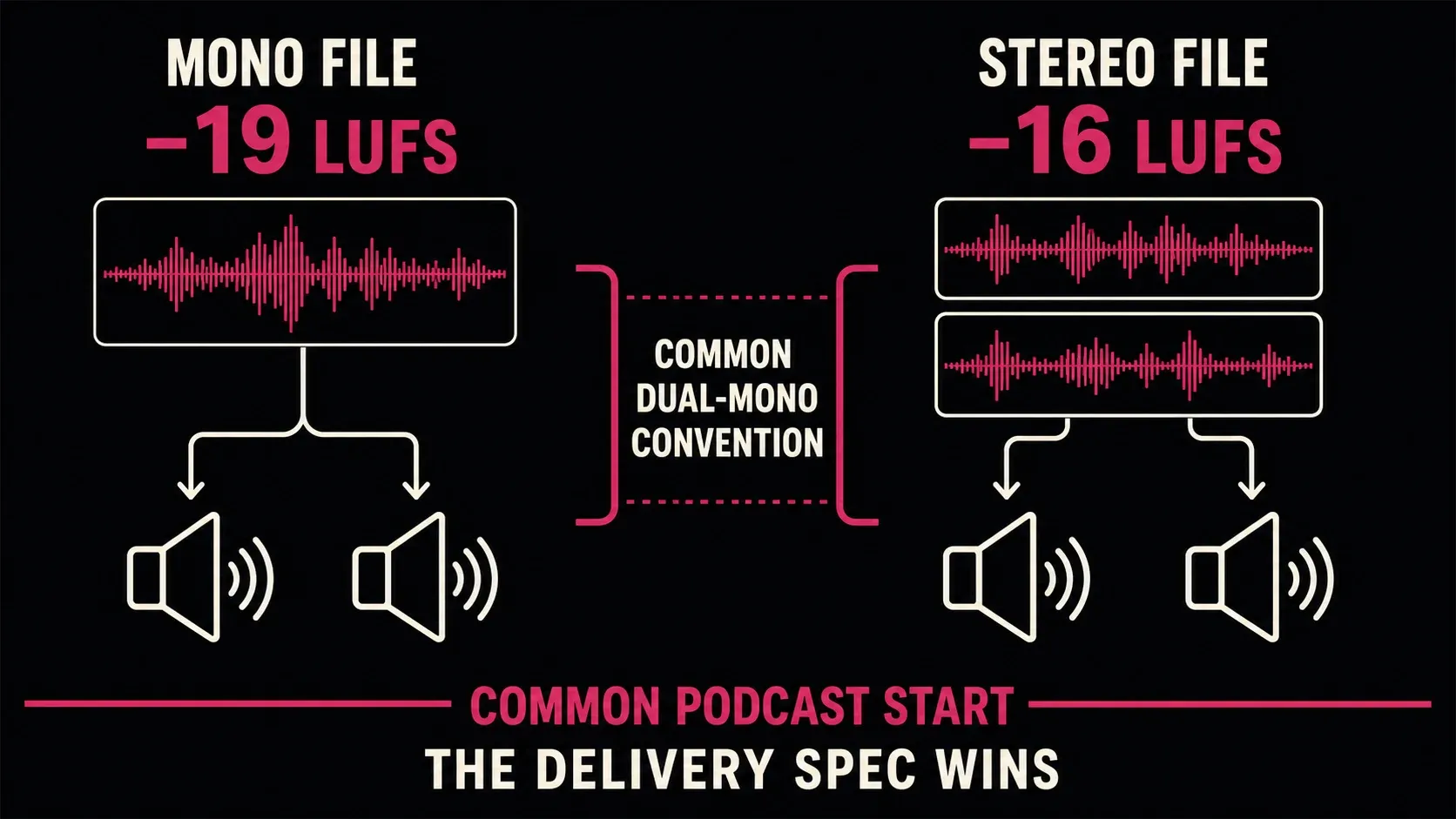
If you need one practical starting point, finish a stereo podcast near −16 LUFS integrated and keep true peak at or below −1 dBTP. For a mono file, −19 LUFS is a common dual-mono convention rather than a universal upload rule. The platform or client specification still wins.
That distinction is the part most loudness charts blur. Apple Podcasts currently recommends overall loudness around −16 dB LKFS with a ±1 dB tolerance and a true-peak value that does not exceed −1 dB FS. Spotify’s public −14 LUFS documentation describes music playback normalization and mastering guidance; it isn't proof that every podcast file must be delivered at −14 LUFS.
Podcast loudness targets at a glance
| Destination or workflow | Integrated loudness | True peak | What the number means |
|---|---|---|---|
| Apple Podcasts recommendation | Around −16 LKFS, ±1 dB | Does not exceed −1 dB FS | Documented preparation guidance for podcast audio |
| Common stereo podcast start | −16 LUFS | At or below −1 dBTP | Widely used convention; confirm the host or client brief |
| Common mono dual-mono convention | −19 LUFS | At or below −1 dBTP | Three LU lower than the stereo convention; playback handling matters |
| PRX recommendation | −16 to −19 LUFS | Follow the production brief | PRX explicitly says there is no single set industry standard |
These aren't four competing truths. Apple publishes a platform recommendation, PRX publishes a working range, and the −16/−19 pair is a production convention built around channel playback. None of them turns a poor mix into a compliant episode merely because the integrated number lands on target.
There is no single enforced podcast loudness standard
Podcast delivery is less uniform than broadcast delivery. A host may publish a recommendation, a network may provide a production sheet, and a player may apply its own optional playback processing. Those are three different things.
Apple’s current page is unusually specific: around −16 dB LKFS, ±1 dB, with the true peak kept at or below its stated ceiling and measured under ITU-R BS.1770-5. Apple also accepts both mono and stereo MP3 for subscriber audio and RSS distribution. Its page doesn't say that every mono RSS file must be −19 LUFS.
For music playback, our streaming loudness comparison explains Spotify’s Normal, Loud and Quiet settings and the exceptions for web players and third-party devices. The official music guidance linked above is the source for those settings; neither that page nor the comparison establishes a podcast-upload requirement.
My rule is simple: label each number by its scope. Is it an upload requirement, a production recommendation, a playback reference, or just your own repeatable house target? If the source doesn't say, don't promote the number to a rule.
Why mono is often quoted at −19 LUFS
A true mono file has one measured channel. Many listeners hear it through two speakers. If the player copies the mono signal to both channels without reducing each by about 3 dB, the common −19 LUFS mono convention compensates for that extra combined power relative to a −16 LUFS stereo target. This is a channel-playback convention, not a guarantee of equal loudness on every device.
The catch is implementation. Auphonic’s technical explanation notes that playback devices do not all apply the expected dual-mono offset consistently. That is why “mono always equals −19” is too confident.
- If the client says −19 LUFS mono, deliver −19 and document the measurement.
- If the host says around −16 LKFS for all podcast audio, do not silently substitute −19.
- If no one specifies a target, I'd choose one convention, test it on the actual player path, and keep every episode consistent.
Duplicating one mono channel into identical left and right channels also changes what the file is. A two-channel dual-mono export is stereo as far as many encoders and meters are concerned, even though the content is the same in both channels. Check the delivered file rather than the session label.
Read Integrated LUFS and true peak together
ITU-R BS.1770-5 defines measurement algorithms for program loudness and true-peak signal level. It doesn't tell every podcast where to land; it makes measurements comparable.
LUFS and LKFS name the same loudness scale; no conversion is needed when the measurement method, channel layout and measured region are the same. LU expresses a difference: moving from −20 to −16 LUFS is a rise of 4 LU. These are digital program measurements, not sound-pressure readings at the listener’s ears.
- Integrated LUFS (I) accumulates the gated loudness of the measured program. Reset the meter and measure the complete episode or the exact program region named by the brief.
- True peak (dBTP) estimates peaks in the reconstructed signal, including values between stored samples. Compare that measured maximum with the delivery ceiling; it is not an average-loudness target.
- Short-term loudness (S) uses a three-second window in EBU Mode and helps locate passages that jump forward or disappear.
- Momentary loudness (M) uses a 400 ms window. These windows follow the definitions in EBU Tech 3341; momentary loudness reacts quickly enough to diagnose individual phrases.
- Loudness range (LRA) describes gated variation across the program. There is no universal “good podcast LRA” that replaces listening.
A file can pass integrated loudness and still be hard to follow. One painfully loud intro and several quiet interviews may average to the requested LUFS. The meter reports the program; it won't edit the conversation for you.
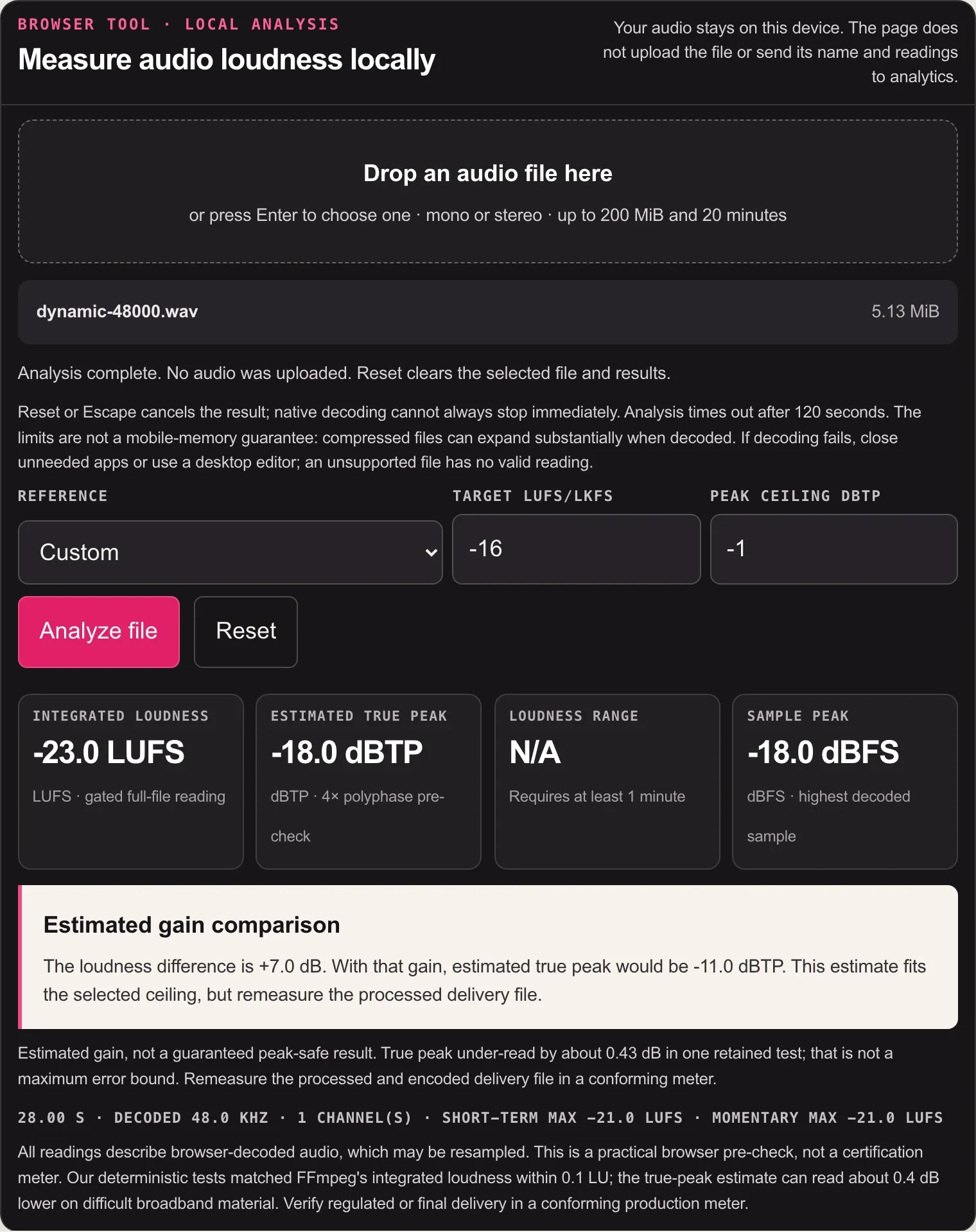
You can measure a local file in the SoundForgePro LUFS Meter; the audio stays on the device. Use it for editorial and delivery pre-checks. If a broadcaster, network or contract requires a certified measurement path, use the specified conforming tool. The current browser tool accepts mono or stereo files up to 20 minutes and 200 MiB. For a longer episode, use a desktop meter on the complete delivery file; do not average LUFS readings from separate chunks.
Normalization does not fix uneven dialogue
Constant-gain loudness normalization moves a measured program toward a target without changing its internal dynamics. Some automatic normalization tools also apply limiting or other processing; check their options. If an episode measures −20 LUFS and the target is −16, a first estimate is +4 dB. For an unclipped linear gain change, true peak rises by the same 4 dB. If the original true peak is −3 dBTP, that predicts +1 dBTP—2 dB above a −1 dBTP ceiling. Only +2 dB fits under that ceiling without peak control, leaving the loudness near −18 LUFS. Constant gain alone cannot satisfy both targets; fix the peaks or dynamics and measure again.
Repeating a clean gain calculation is not inherently destructive. Repeated lossy exports, clipping or additional dynamics processing can be. If the target and peak ceiling conflict, I'd return to the lossless working master and address that conflict instead of repeatedly encoding the episode.
- Use clip gain or automation to correct isolated speakers and phrases.
- Use compression only as much as needed to narrow uncomfortable level swings.
- Apply the required loudness gain before a final true-peak limiter, or use a coordinated loudness/peak process. Adding positive gain after a limiter raises its output above the previous ceiling.
- Measure integrated loudness and true peak again after that processing.
- If either result fails, revise the gain/dynamics settings and remeasure both; do not approve an unmeasured final gain move.
If you work in Sound Forge, the Peak, RMS and LUFS normalization guide separates a constant gain move from compression and limiting. For the full edit before this stage, use the Sound Forge podcast workflow.
Five steps from finished edit to delivery file
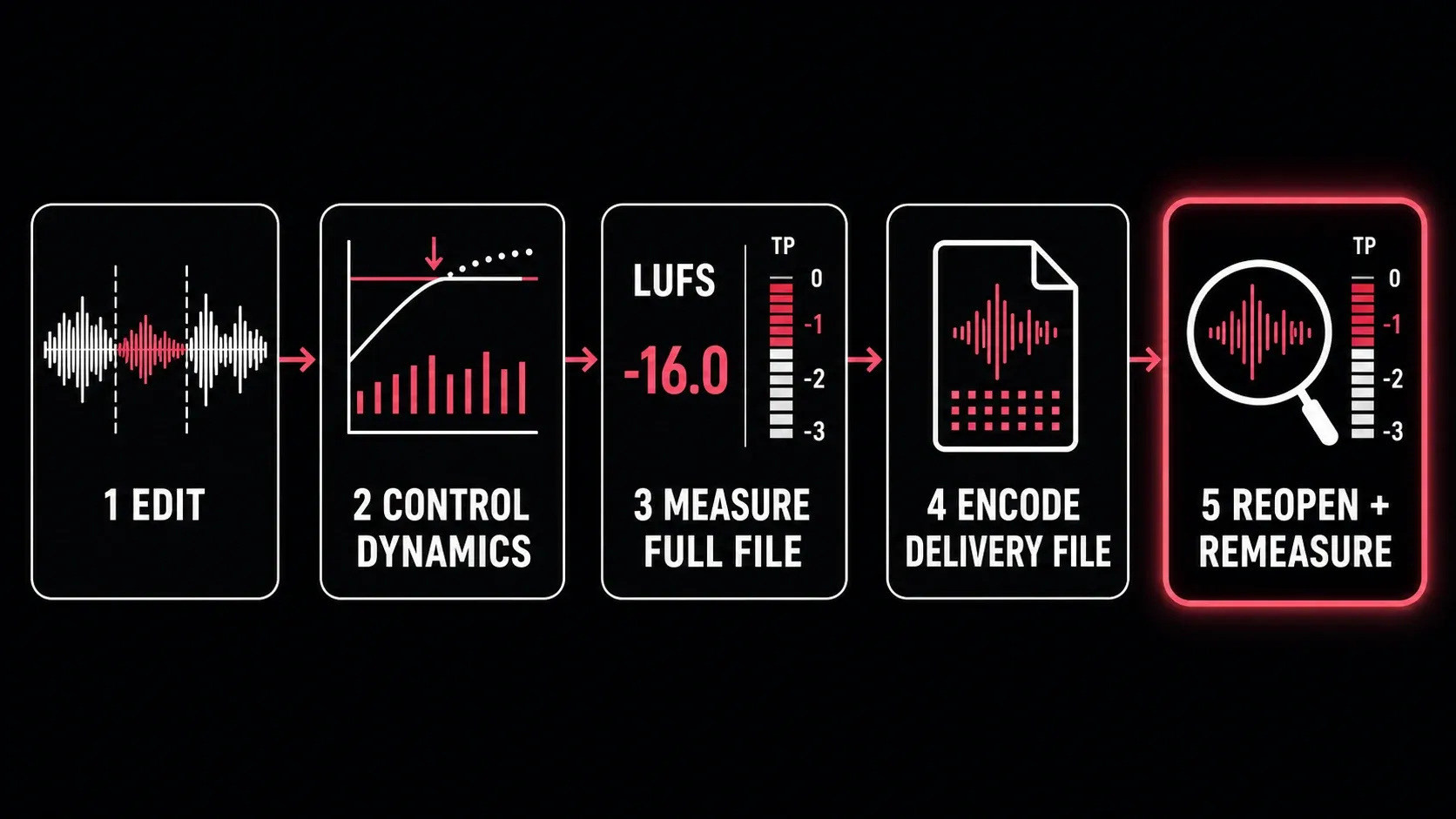
1. Finish the editorial and restoration work
I wouldn't set final loudness while cuts, noise reduction or music balances are still changing. Every material edit invalidates the measurement.
2. Control the internal level differences
Listen to the quietest usable sentence, the loudest sentence, the intro and any inserted ad or music. Fix the distracting differences before chasing an integrated number.
3. Reset and measure the full program
Include the exact start, silence, credits and tail that will be delivered. Compare Integrated LUFS and true peak with the chosen delivery specification. If either fails, adjust gain or dynamics on the lossless working copy as described above, then reset and measure the complete program again. Encode only after both checks pass.
4. Encode the actual delivery file
Keep a lossless archive master. Create the MP3 or AAC using the host’s current channel, sample-rate and bitrate requirements. Apple’s current RSS guidance accepts MP3 or AAC and recommends AAC in an MP4 container for efficient streaming and accurate seeking.
5. Reopen, remeasure and listen
Lossy encoding can change reconstructed peak behavior. Measure the uploaded-format file, then audition the opening, the loudest passage, a quiet dialogue section and the end. The file you send is the file that must pass.
Four loudness mistakes that survive a green meter
Measuring only the loudest minute
That gives a useful short diagnostic rather than the integrated result of a 45-minute episode. Reset and run the complete program.
Using peak normalization as loudness matching
Two files can share the same sample peak and sound radically different. Peak normalization sets the highest sample amplitude; it doesn't equalize perceived program loudness.
Treating playback normalization as an upload gate
A player may turn material down, leave it unchanged, or behave differently by device and listener setting. Playback references aren't automatically delivery specifications.
Checking the WAV but not the MP3 or AAC
The archive master is not what the listener downloads. Reopen the encoded file and verify it after the codec.
Podcast loudness FAQ
What is the standard LUFS for a podcast?
−16 LUFS integrated for stereo is the most useful general starting point, usually paired with a true-peak ceiling around −1 dBTP. It is a convention and, in Apple’s case, close to a documented platform recommendation—not one universally enforced upload rule.
Should a mono podcast be −19 LUFS?
−19 LUFS is a common dual-mono convention because it sits 3 LU below the familiar −16 stereo target. Use it when the host or client asks for it, or when your tested playback workflow expects the offset. Do not override a written −16 specification merely because the file is mono.
Does Spotify require podcasts at −14 LUFS?
Spotify’s current public −14 LUFS page documents music playback normalization and artist mastering guidance. It does not establish a universal −14 LUFS podcast-upload requirement. Follow the podcast host or production brief and label Spotify’s number by its actual scope.
What true peak should a podcast use?
−1 dBTP is a practical common ceiling and aligns closely with Apple’s current podcast guidance. A stricter client specification wins. True peak is a maximum reconstructed peak, not the episode’s average volume.
Can loudness normalization replace compression?
Constant-gain normalization cannot replace compression: it changes overall gain without evening out speakers or phrases. Some normalization tools include a limiter or leveler, so inspect the enabled processing. If peaks prevent the gain move from reaching the target, control those peaks and remeasure both loudness and true peak.
Should I measure before or after exporting?
Both. Measure the lossless master to approve the mix, then reopen and measure the encoded delivery file because MP3 or AAC processing can change peak behavior.
Measure the complete final episode, confirm the channel format, and check the publisher’s current loudness and peak requirements.