

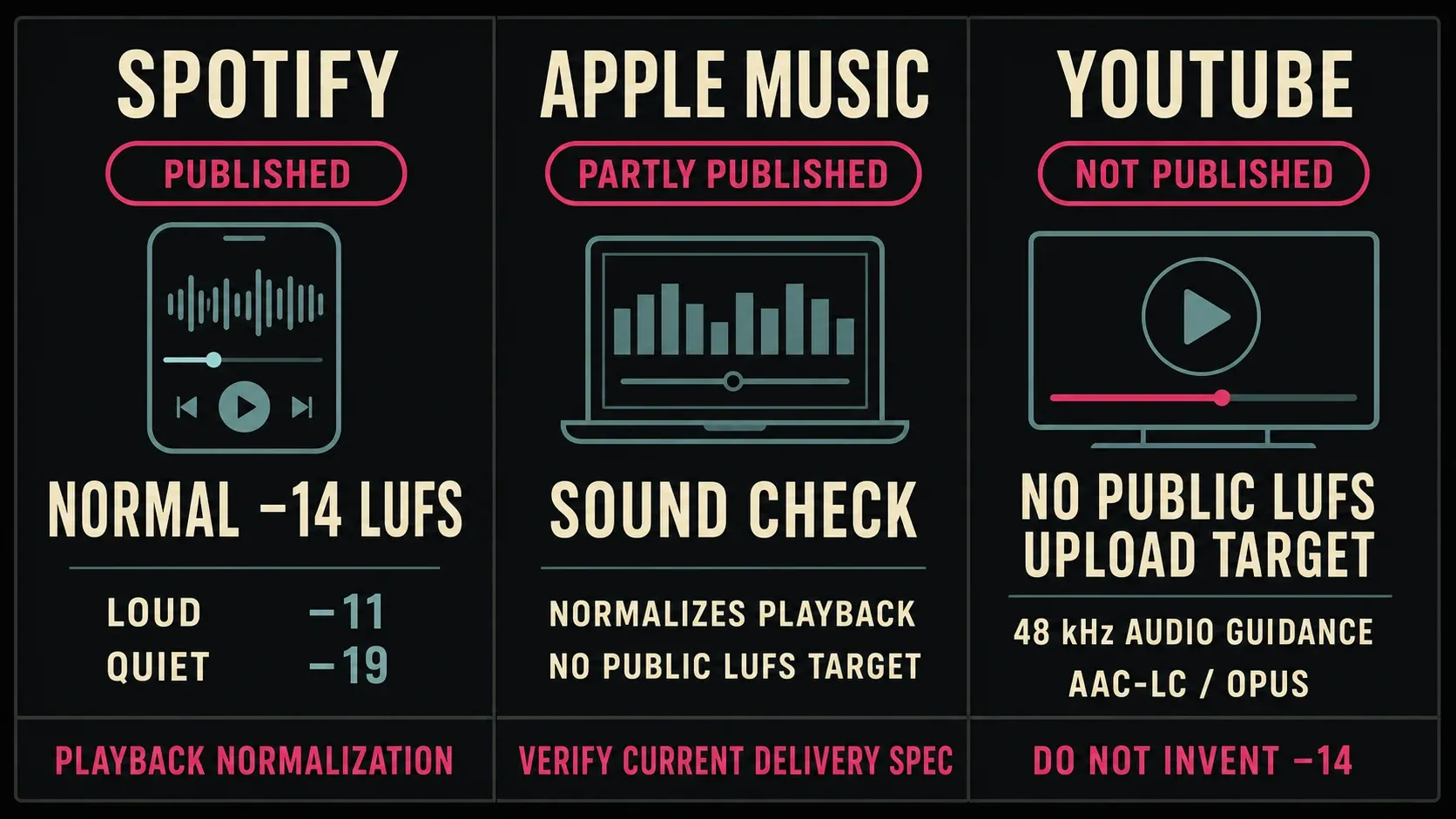
There is no universal streaming loudness standard. Spotify publishes a −14 LUFS Normal playback reference for music. Apple documents Sound Check but doesn't give one public LUFS delivery target on its current consumer page. YouTube publishes codec, channel and sample-rate guidance, yet the encoding page cited below doesn't declare a −14 LUFS requirement.
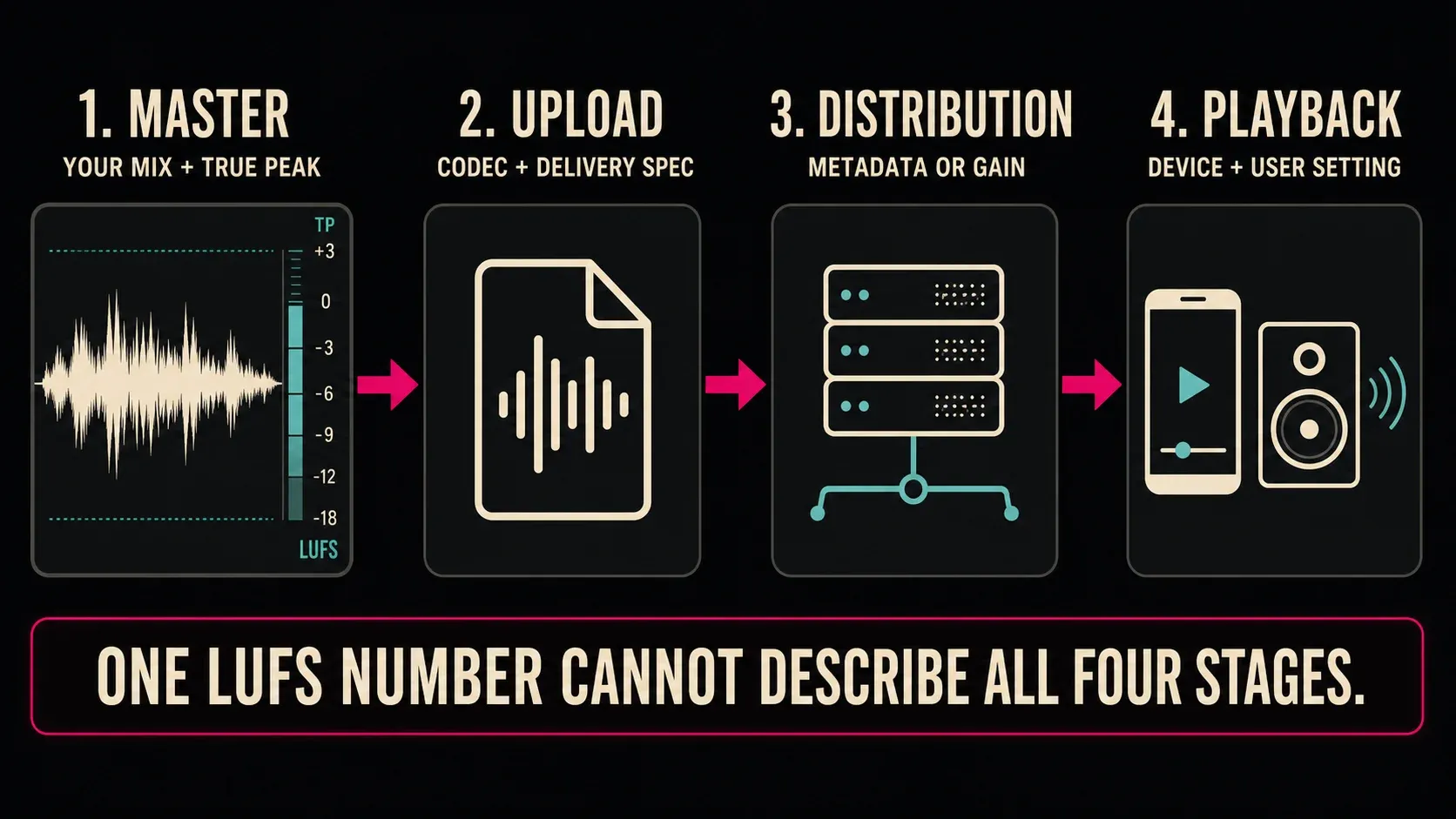
A master loudness, an upload specification, a distributor’s normalization target and the level a listener gets from a particular device are four separate facts. A chart that puts all four under one “platform target” heading looks useful and can still send you in the wrong direction.
Practical answer: keep a clean master at its native resolution, follow any written delivery specification, measure Integrated LUFS and true peak together, and check the encoded file. A platform’s playback number tells you how it handles gain. It doesn't give you permission to crush every master down to that number.
Streaming loudness guidance at a glance
Swipe horizontally to compare every column →
| Service or standard | Published loudness information | True-peak information | What it actually governs |
|---|---|---|---|
| Spotify music | Normal −14 LUFS; Premium Loud −11 and Quiet −19 | Mastering guidance: below −1 dBTP at −14 LUFS; below −2 dBTP when louder than −14 | Playback normalization and mastering advice, not a universal upload rejection threshold |
| Apple Music Sound Check | Normalizes songs toward a similar playback loudness; no public numeric target on the current consumer page | Separate Apple Digital Masters advice: leave at least 1 dB of headroom and check the AAC encode | Optional playback matching plus a separate mastering/delivery workflow |
| YouTube upload guidance | No public LUFS upload target stated on the current encoding page | No numeric true-peak upload ceiling stated there | Content Manager partner encoding page: MP4, 48 kHz, stereo plus optional 5.1/Eclipsa workflows |
| AES77-2023 / public AESTD1008 | Separate documents; the public 2021 TD1008 examples include −18 assorted/speech, −16 track-normalized music and −14 album-loudest-track | Public TD1008 recommends no more than −1 dBTP at lossy codec input | Industry guidance for distributors, not a promise that every consumer service implements it |
| EBU R 128 S2 v3 | −23 LUFS with correct metadata; −20 to −16 is a conditional interim range, not a general target (see the v3 footnote below) | Device-side true-peak limiting where a higher playback target leaves insufficient headroom | Broadcaster streaming and reproduction strategy |
Master, upload, distribution and playback are different stages
I'd start by naming the stage attached to a number. Your master might measure −10 LUFS. A distributor may store that file unchanged, write loudness metadata, or calculate a gain offset. The player may then apply that offset, ignore it, offer several normalization modes or change behavior by device.
Spotify measures loudness at upload and applies normalization during playback, including compressed and lossless formats. Its Normal reference is −14 LUFS under ITU 1770. The same artist-support page leaves the web player and third-party devices such as TVs or speakers out of normalization, so don't expect identical playback everywhere.
Apple’s current Sound Check support page describes the feature without a numeric target: Sound Check adjusts loudness between songs so they play at a similar volume. That backs up the statement “Apple Music can normalize playback.” It gives no support at all to “Apple rejects anything that is not −16 LUFS.”
The cited YouTube encoding page carries a notice limiting its features to Studio Content Manager partners. It lists stereo, stereo plus 5.1 and stereo plus Eclipsa Audio, with 48 kHz audio and AAC-LC, Opus or Eclipsa codecs. That's all this format summary covers; it doesn't say every ordinary upload has to be stereo only.
What Spotify’s −14 LUFS number does—and does not—mean
On Spotify’s Normal setting, a −9 LUFS track needs roughly −5 dB of playback gain to land near −14 LUFS. A −14 LUFS track needs no loudness gain move. A −18 LUFS track could theoretically receive up to +4 dB, but available headroom can prevent the full lift.
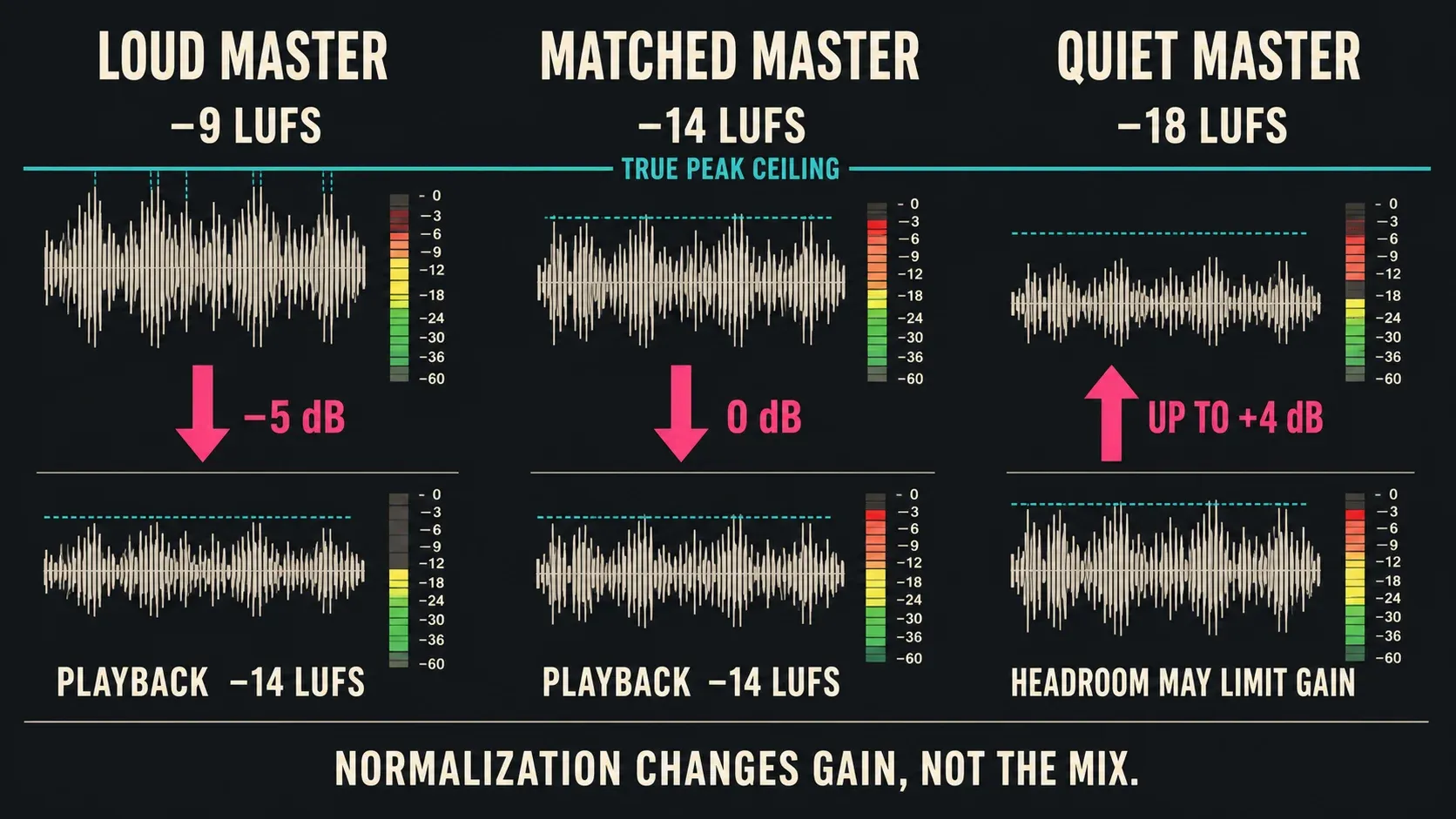
Spotify states that louder material is turned down without adding distortion. For softer material, it considers headroom and leaves 1 dB for lossy encoding; its example stops a −20 LUFS file with a −5 dBFS true peak at −16 LUFS rather than forcing it to −14. Premium users can also select Loud at −11 or Quiet at −19 LUFS. Loud mode uses a limiter, while the web player and some third-party playback paths remain exceptions.
So the lesson isn't “master everything at −14.” A dynamic master below −14 may stay under the nominal target when positive gain would run out of headroom, and a dense master above −14 usually gets turned down. Neither outcome fixes an over-limited mix.
Album example: say a quiet interlude sits 6 LU below the next track on purpose. Spotify describes one shared gain adjustment during album playback, which keeps that gap intact. In shuffle or a mixed playlist it adjusts tracks individually, so the relationship can change. I'd compare both paths before touching the interlude, and I wouldn't normalize every album track separately just to make the meter line up.
Apple Music and YouTube: document the unknowns
Apple Music
Apple documents that Sound Check can match playback loudness and can keep album relationships intact. Its Apple Digital Masters technology brief recommends leaving at least 1 dB of headroom, avoiding clipping and auditioning the AAC encode. That headroom advice isn't a published numeric Sound Check target. Apple also treats loudness as a creative decision, so use the encode check to catch damage rather than to make every song equally dense.
YouTube
YouTube’s Stable volume and Voice boost controls can change a listening comparison. Stable volume balances loud and quiet passages; it is unavailable on some videos and off for YouTube Music and official music videos. Voice boost, where available on computer or TV, emphasizes dialogue and reduces background sounds; enabling it switches Stable volume off. Record these settings when comparing an upload with your master. Neither feature is an upload LUFS requirement.
Where AES77 and EBU R 128 S2 fit
ITU-R BS.1770-5 defines how program loudness and true peak are measured. It doesn’t choose one creative master level for Spotify, Apple Music and YouTube; AES and EBU documents build distribution strategies on top of those measurements.
The AES catalog lists AES77-2023 as a recommended practice for internet streaming and on-demand distribution. The examples below come from its separately published 2021 technical predecessor, not an independent review of every clause in the paid standard. The freely available AESTD1008 technical document covers audio-only distribution, not sound accompanying video. Its examples show why a single number is inadequate: its table distinguishes assorted speech-anchored content at −18 LUFS, track-normalized music at −16 and album-loudest-track normalization at −14. It also recommends a maximum true peak no higher than −1 dBTP at the input to a lossy codec.
EBU R 128 S2 v3 recommends streaming −23 LUFS programs unchanged with correct loudness metadata. Without that metadata, it describes an interim −20 to −16 LUFS range for when the broadcaster wants to control dynamic treatment. But page 4, footnote 2 says revised device standards now make it possible to treat streaming like broadcast, so the higher range shouldn't be presented as the default. This is a broadcaster's distribution strategy. It doesn't require every independent music master to measure −23 LUFS.
True peak is the second half of the decision
Integrated LUFS tells you the measured program loudness. True peak estimates reconstructed peaks between samples. A gain move that raises loudness also raises true peak by roughly the same amount until a limiter intervenes.
Spotify’s current mastering guidance says to keep a −14 LUFS master below −1 dBTP and a louder master below −2 dBTP because louder material is more susceptible to distortion after encoding. AES TD1008 recommends no more than −1 dBTP at the lossy codec input. I'd treat these as defensible references, but the written destination specification still wins.
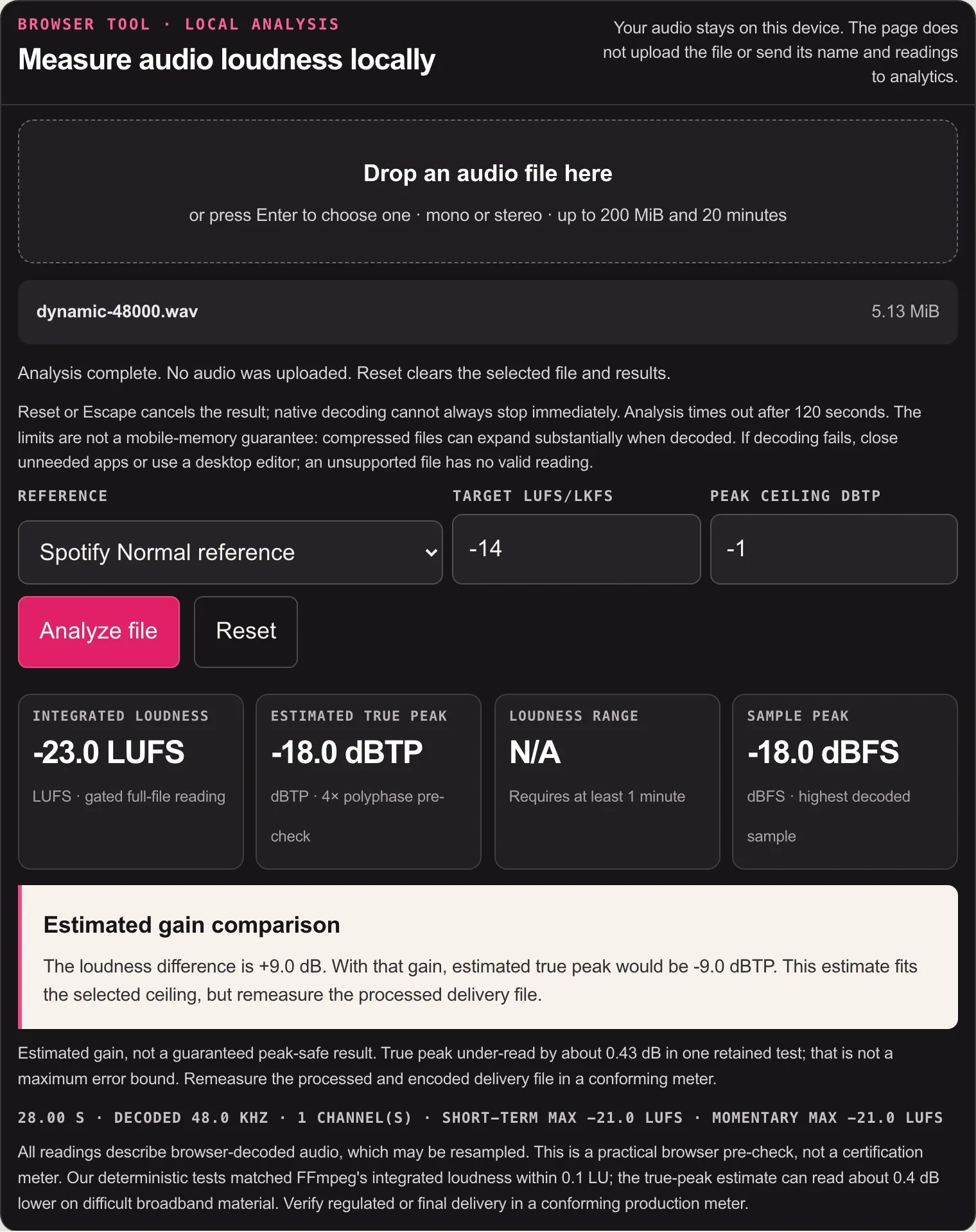
The SoundForgePro LUFS Meter measures local audio without uploading it. The current browser tool accepts mono or stereo files up to 20 minutes and 200 MiB. For a longer program, measure the complete file with a desktop meter, and don't average LUFS readings from separate chunks. It's a practical pre-check. A meter or measurement mode named in a contract still takes priority.
A six-step streaming loudness workflow
1. Name the exact destination and content type
Music track, album, podcast, live stream and video each count as a different delivery class. Note the platform, distributor, client and intended player path.
2. Save an unconstrained archive master
Keep the best lossless version before any destination-specific gain, codec or limiter changes, and keep its native resolution: Apple explicitly advises against upsampling or padding a 16-bit file to 24-bit to claim a higher-resolution source. Spotify says one high-quality stereo master per track covers its compressed and lossless playback, so you don't need a separate master for every playback format.
3. Measure the complete program
Reset the meter, play the full file and record Integrated LUFS, maximum true peak and channel layout. For an album, preserve the intended relationship between tracks.
4. Simulate the likely gain move
Subtract measured loudness from the documented reference, then add that gain to the measured true peak. A −18 LUFS file with a −3 dBTP maximum, for example, needs +4 dB to reach −14 LUFS, which predicts +1 dBTP. With a −1 dBTP ceiling, only +2 dB fits without peak control. If the destination really does require both targets, fix the offending peaks or dynamics and measure the full file again before encoding. If the number is only a playback reference, I wouldn't force the master to hit it.
5. Encode the actual delivery file
Use the current codec, sample rate and channel requirements. If you need a gain correction in Sound Forge, the Peak, RMS and LUFS normalization workflow separates a constant gain move from dynamics processing.
6. Reopen, remeasure and audition
Check the encoded file as well as the lossless session. Listen to the loudest transient, a quiet passage, the opening and the ending. Where a platform offers a preview or unlisted upload, compare that playback too, keeping in mind that one device doesn't speak for all of them.
For Sound Forge’s own meter routes and reset sequence, use the Sound Forge LUFS and true-peak guide. That tool-specific page covers the interface; the cross-platform decision lives here.
Streaming loudness standards FAQ
Is −14 LUFS the standard for every streaming service?
No. Spotify publishes −14 LUFS for its Normal music-playback setting, but other services document different behavior or do not publish one public numeric target. An upload requirement, distribution recommendation and playback target are not the same thing.
Does Spotify reject music that is not −14 LUFS?
Spotify’s current documentation describes measuring files during upload and applying gain during playback. Louder masters are normally turned down; softer masters may be raised only as far as headroom allows. That is not a simple −14 LUFS rejection gate.
What LUFS target does Apple Music use?
Apple publicly documents that Sound Check matches playback loudness, but its current consumer support page does not state one universal LUFS target. Follow current distributor requirements, avoid clipping and audition the encoded Apple delivery path.
Does YouTube require −14 LUFS?
The cited YouTube encoding page publishes no -14 LUFS upload requirement and carries a Content Manager partner notice. Its format recommendations include 48 kHz audio, AAC-LC/Opus/Eclipsa and stereo or specified surround combinations. Player processing, including Stable volume where available, is a separate issue.
Should I master louder so streaming normalization turns the track down?
Only if that sound is the artistic choice. Downward normalization changes gain; it does not undo clipping, limiting or lost transient contrast. Compare level-matched versions before choosing the denser master.
What true peak should I use for streaming?
There is no universal ceiling, but −1 dBTP is a common defensible starting point for lossy delivery. Spotify advises below −1 dBTP around −14 LUFS and below −2 dBTP for louder masters. A written platform, distributor or client specification overrides the general starting point.
Use the destination’s current delivery instructions and keep playback normalization separate from a required mastering target.