
Neutron 5 is worth buying if you want one mixing suite with deep, linkable modules on every track. The reason is its three new modules and two new channel modes, not the Mix Assistant. Six of the seven published sources counted here treat the Assistant as a starting point that still needs your ears, and in a three-song comparison a human engineer's mix won twice and drew once while the Neutron 5 mix won none. The US store price on October 21, 2026 is $299, or $199 as an update or crossgrade.
My reasoning starts with what you keep using after the first week. The Assistant gets a track close in seconds, but three of the seven sources caught it overprocessing and two caught it misreading the instrument, so I would not pay $299 for the Assistant alone. The modules are a different matter. Clipper in Transient/Sustain mode can add power to bass plucks without touching the held notes, Density lifts quiet material with upward compression, and Phase lines up two related tracks in time. If you only want guided results on single tracks, Neutron 5 Elements at $55 is the sensible buy. If you own Neutron 4 and rarely reach for clipping, upward compression or phase alignment, I would wait for a sale.
- Buy Neutron 5 ($299) if you mix your own multitrack sessions and want Clipper, Density, Phase, Unmask, Visual Mixer and Relay.
- Buy Elements ($55) if you want the Assistant's guided result on individual tracks and never plan to open the modules.
- Take the $199 update if you own an earlier full Neutron and will use the new modules or channel modes.
- Skip it if you need reverb or delay from the same suite, or if your real job is mastering.
This page is the verdict. For where Neutron sits next to Ozone, RX and Nectar, start at the iZotope plugin hub.
Neutron 5 review: the short verdict
Neutron 5 is a mature, fairly priced channel-strip suite, and its best features are the ones you control by hand. Sound On Sound's review called it a worthwhile evolution and good value for money. Mix's real-world review called it an excellent value and the upgrade well worth it for owners of any earlier Neutron. MusicRadar gave it 4 out of 5. It is also still the current version: on October 21, 2026, iZotope's Neutron 5 page and documentation are for Neutron 5, with no successor listed.
| Item | Neutron 5 |
|---|---|
| Version | Neutron 5, the current release on iZotope's site (October 21, 2026) |
| What you get | 11 plugins: the Neutron mothership plus 10 component modules, with Visual Mixer and Relay. Sound On Sound and the Neutron 5 manual also list Tonal Balance Control 2 in the package |
| New modules | Clipper, Density, Phase |
| New channel modes | Transient/Sustain and Mid/Side, on selected modules |
| Formats | AAX, AU, VST3; 64-bit hosts only |
| US store price, Oct 21, 2026 | $299; $199 update or crossgrade; $245 from Elements; Elements on its own $55 |
| Trial | 10 days without restriction |
| Best for | Mixing multitrack sessions track by track |
| Main catches | The Assistant needs checking; CPU load when used on every track; no reverb or delay |
What changed from Neutron 4
Three new modules and two channel modes are the update; the rest is refinement. The Neutron 5 documentation index marks Clipper, Density and Phase as new and labels the other seven modules and the mothership as improved. The full suite is 11 plugins: the mothership plus ten component modules, namely Clipper, Density, Phase, Compressor, Equalizer, Exciter, Gate, Sculptor, Transient Shaper and Unmask.
iZotope's Neutron 5 compare chart adds Transient/Sustain and Mid/Side processing to several modules. It also puts a Delta button on all ten, so you can hear only what a module adds or removes, and lists improved visualizations across the board. Visual Mixer and Relay remain part of the full suite.
The Assistant improved in judgment rather than speed. Mix compared both versions on drums, electric piano, vocals, electric bass and a full mix. Its reviewer timed about six seconds per setting in Neutron 4 and Neutron 5 alike on an M2 Mac mini, found the Neutron 5 results better overall, and noted that Neutron 4 sometimes guessed the wrong instrument.
Owners of any earlier full Neutron pay $199 to update (US store price on October 21, 2026); Elements owners are excluded from that path. If you were looking for Neutron 6, iZotope's product page and documentation are for Neutron 5, which is the current version.
How good is the Mix Assistant?
The Mix Assistant is good at a first draft and unreliable as a finisher. It analyzes a track, picks an instrument target and builds a signal chain. iZotope describes this as automating technical tasks such as gain staging and EQ balancing, and on its own product page positions the Assistant as a starting point you refine with instrument profiles, your own references and macro controls.
Two features make that draft easier to steer. First, you can aim the Assistant at your own sound: the Assistant documentation explains that custom reference targets are created by importing audio files into the Target Library, and Mix got a better acoustic-guitar result from a custom reference file than from the built-in target. Second, the Assistant View reduces the chain to a few macros, each tied to one deeper control:
| Assistant View section | Macro | What it moves in the Detailed View |
|---|---|---|
| Tone | Equalizer | Equalizer Mix |
| Tone | Sculptor | Sculptor Amount |
| Dynamics | Density | Density Range |
| Dynamics | Compressor | Compressor Mix |
| Saturation | Drive, Processing Mode (Classic/Trash), XY pad, Tone | Exciter Drive, Exciter Processing Mode, Exciter XY Pad, Exciter Tone |
| Width | Amount | Width in the I/O panel |
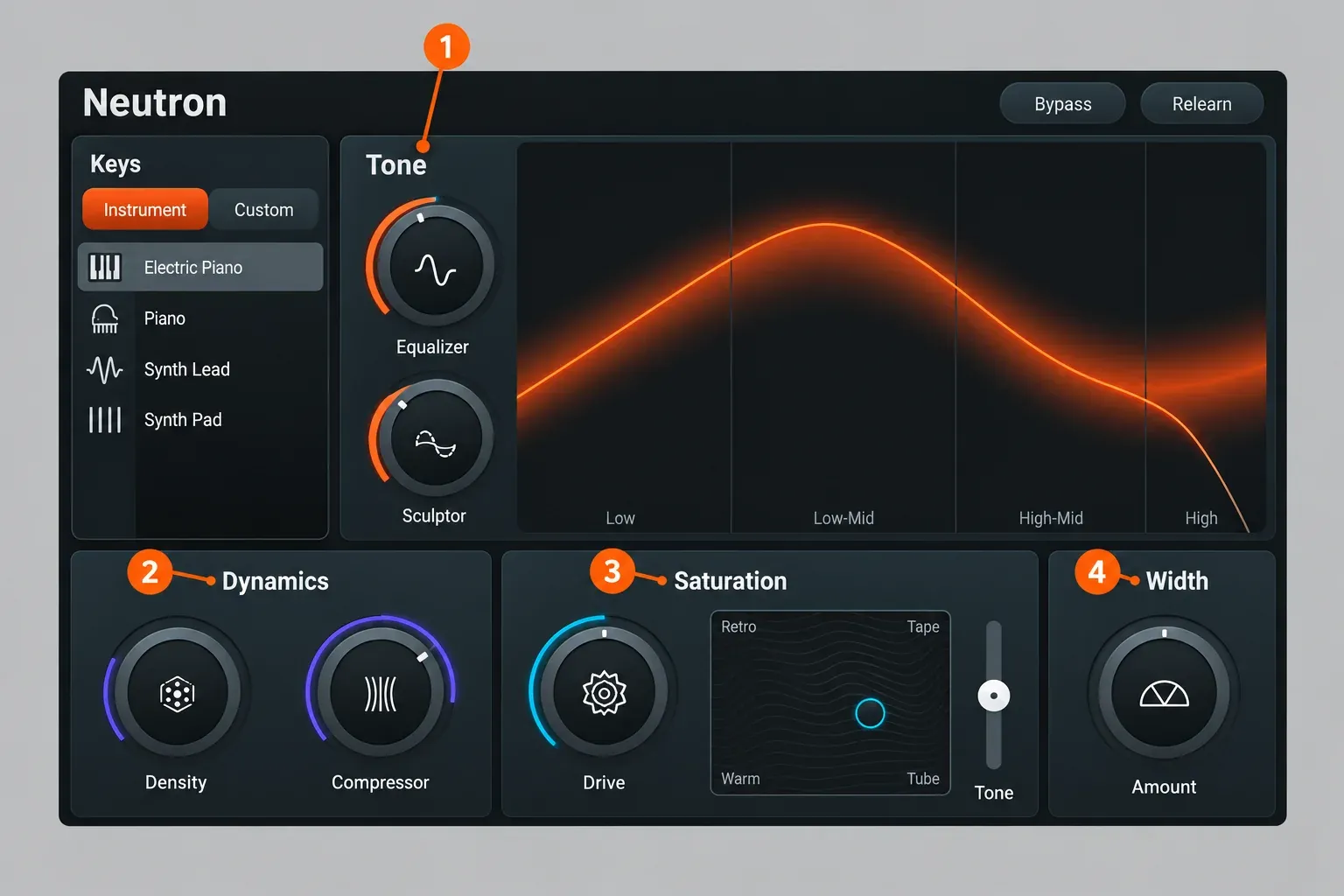
These Intent controls exist only in the Assistant View of the mothership plugin, not in the component plugins or Visual Mixer. That matters later: if you build a chain from separate modules, you give up the macros.
The reviews agree on where the draft goes wrong:
- Sound On Sound found the suggestions impressive in the vast majority of cases and mostly restrained, but the drum-bus results less successful and sometimes too aggressive, which the macros reined back easily.
- Mix found the Assistant frequently added too much saturation on clean sources, in Neutron 4 and Neutron 5, easily dialled back in the Assistant View.
- MusicRadar's AI-versus-engineer comparison found instrument recognition not foolproof, with synths a weak spot, and one vocal setting very harsh, while still calling the individual processors excellent.
- Plugin Noise found the Assistant hit-or-miss, with drum overheads read as cymbals, but useful for jump-starting a mix.
- Making A Scene's deep-dive review advises using it to beat the blank page, not to finish the mix.
So my routine would be short. Check which instrument the Assistant chose before you judge the result. On clean recordings, pull the Saturation macros down first. On a drum bus, check the Dynamics section before anything else. On vocals the record is mixed, and iZotope presents Nectar 4 as its vocal mixing suite, so compare that product if vocals are the main job.
Test results: what seven published sources found
This composite counts seven independent sources: Sound On Sound's review (January 2025), MusicRadar's review (October 2024), MusicRadar's AI-versus-engineer comparison (December 2024), Mix (February 2025), Plugin Noise (2025, updated December 2025), Making A Scene (October 2025) and a KVR forum thread from the October to November 2024 launch. Few of them publish comparable numbers, so the composite result is a count of verdicts, and each number below stays with its single source.
| Finding | Sources | Count |
|---|---|---|
| The Assistant is a starting point that still needs ears and macros | Sound On Sound, MusicRadar review, MusicRadar comparison, Mix, Plugin Noise, Making A Scene | 6 of 7 |
| Clipper, Density, Phase and the channel modes are the main gain | Sound On Sound, MusicRadar review, Mix, Plugin Noise, Making A Scene, KVR thread | 6 of 7 |
| Recommended or good value | Sound On Sound, MusicRadar review, MusicRadar comparison, Mix, Plugin Noise, Making A Scene | 6 of 7 |
| Easy for less experienced mixers | Sound On Sound, MusicRadar review, Mix, Plugin Noise | 4 of 7 |
| The Assistant overprocesses at times | Sound On Sound (drum bus), Mix (saturation), MusicRadar comparison (a harsh vocal) | 3 of 7 |
| Instruments misidentified | MusicRadar comparison (synths), Plugin Noise (overheads as cymbals) | 2 of 7 |
| The upgrade is worth it | Sound On Sound, Mix | 2 of 7 |
| The upgrade price is questioned | Plugin Noise, KVR thread | 2 of 7 |
| CPU load grows on many tracks | Sound On Sound, Making A Scene | 2 of 7 |
| The new modules are not unique | MusicRadar review, Plugin Noise | 2 of 7 |
The hard numbers each come from one publication. MusicRadar's review rated Neutron 5 4 out of 5, praising the Transient/Sustain and Mid/Side modes and the ease of use. In MusicRadar's three-song comparison, the human engineer's mix was preferred on two songs, one was a draw and the Neutron 5 mix won none. Mix timed the Assistant at about six seconds per setting in both versions, a figure its reviewer described as anecdotal.
| Published result | Source and date | Conditions | Result |
|---|---|---|---|
| Review rating | MusicRadar, Si Truss, October 2024 | Full Neutron 5 review | 4 out of 5 |
| Assistant mix vs human engineer | MusicRadar, Stuart Adams, December 2024 | Acoustic duo, EDM and full-band songs; effects, edits and automation carried over from the human mixes; Neutron adjusted only with the Assistant's macros | Human 2, draw 1, Neutron 0 |
| Assistant time per setting | Mix, Mike Levine, February 2025 | M2 Mac mini; drums, electric piano, vocals, bass and a full mix | About 6 s in Neutron 5 and about 6 s in Neutron 4 |
My reading of the composite is clear. No source counted here says the Assistant replaces a mixer, and six of seven say the suite is worth its price. That is why I judge Neutron 5 on Clipper, Density, Phase and the channel modes, and treat the Assistant as a quick first pass you keep only after checking the instrument it chose and the saturation it added.
The modules that matter: Clipper, Density, Phase and Unmask
Clipper, Density and Phase are new, and together with Unmask they are the reasons to choose the full suite over Elements. Each multiband module supports up to three bands, according to the general controls documentation.
Clipper
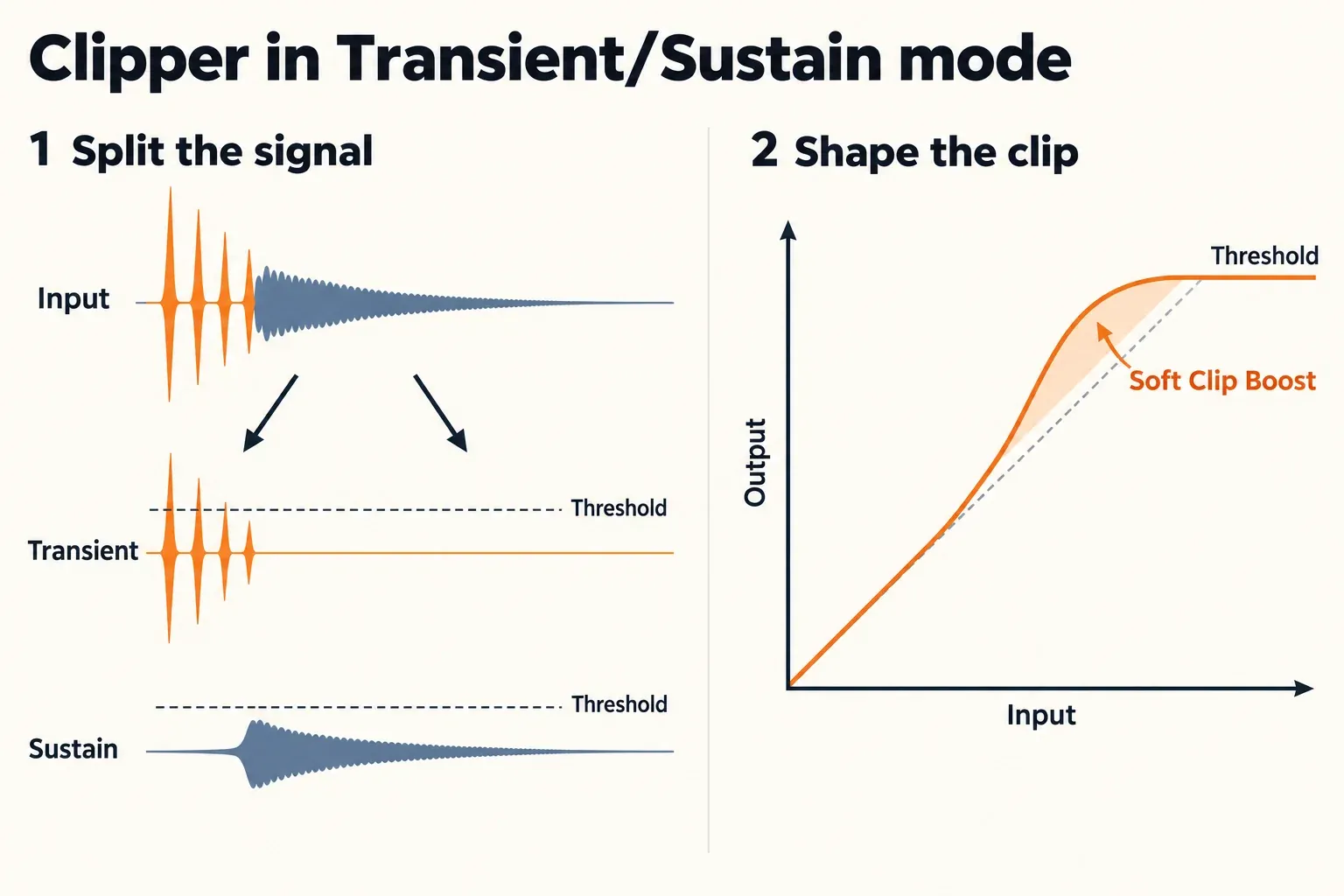
Neutron 5's Clipper soft-clips across multiple bands, mid/side channels and transient/sustain content. Soft Clip Boost sets the soft-clip knee in dB and drives the signal into the hard-clip Threshold. iZotope's own example for Transient/Sustain mode is adding power to bass plucks without touching the drawn-out notes. This is deliberate, controlled clipping inside the mix; repairing clipping already printed into a recording is a different job, covered in fixing clipped audio in Sound Forge.
Density
Density is upward compression. It raises material below the threshold and leaves anything above it unaffected, with up to 20 dB of gain range, the reverse of a conventional compressor, which turns down what crosses the threshold. Its Speed control runs from 1 ms for fast action to about 300 ms for a slow, smooth response.
Phase
Phase does two jobs. Rotation corrects asymmetrical waveforms, which frees headroom on the mix bus. Time Delay aligns two related elements in time. Learn can set both, but Delay needs a sidechain signal routed to the plugin. If you are unsure whether you have a phase problem in the first place, the guide to the phase correlation meter explains what to look for before you reach for Phase.
Unmask
Unmask is a dynamic sidechain tool. It applies spectral attenuation where two tracks mask each other, with Amount and Sensitivity as its main controls. iZotope names it, with Sculptor, as one of the features aimed at professionals.
Compressor, output limiter and what is missing
Sound On Sound describes the Compressor with three styles, Punch, Modern and Vintage, and up to three bands, and it is the only module you can add to one chain twice. The output stage is a BS.1770-2/3-compliant true peak limiter with a Ceiling from 0 to −20 dB. Treat it as a safety stage for the mix rather than a reason to master with Neutron; if the two stages blur together, start with compressor vs limiter.
Two reviewers make a fair counterpoint. Plugin Noise notes that upward compression and phase alignment exist in other plugins, and MusicRadar's review said the new modules add little that is truly innovative. What Neutron adds is having them in one linked chain with Delta listening. There is no reverb or delay module, and Sound On Sound lists the missing ambience treatment as a con.
Which modules get Transient/Sustain and Mid/Side
The channel modes are not universal. This is how iZotope's compare chart assigns them:
| Module | Transient/Sustain | Mid/Side | Delta |
|---|---|---|---|
| Clipper | Yes | Yes | Yes |
| Density | No | Yes | Yes |
| Phase | No | No | Yes |
| Unmask | Listed by iZotope | Yes | Yes |
| Sculptor | Yes | Yes | Yes |
| Transient Shaper | No | Yes | Yes |
| Equalizer | Yes | Yes | Yes |
| Exciter | No | No | Yes |
| Gate | No | No | Yes |
| Compressor | No | No | Yes |
One entry needs care: iZotope's chart ticks Transient/Sustain for Unmask, while Mix's review lists Unmask with Stereo and Mid/Side only. iZotope's own Mid/Side example is a Transient Shaper working only on the sides of a drum bus. Wide Mid/Side moves are worth a mono compatibility check afterwards.
Visual Mixer and Relay: a level balance, not a mix
The Visual Mixer Assistant sets static levels across your tracks and nothing else. It works on tracks that host the Neutron 5 mothership, a Neutron 5 component or Relay. Visual Mixer and Relay come only with the full Neutron 5, and the Neutron downloads page says Relay is free even during a trial. The Assistant runs in five stages: Setup, Waiting, Listening, Audition and Adjust, and Accept.
- Leave your DAW faders at unity gain and put Visual Mixer on the master bus. Visual Mixer does not process audio itself.
- Decide whether to balance buses or individual tracks. iZotope advises one or the other, not both.
- In Setup, choose at least one Focus track, and do not play music yet.
- In Waiting, put the playhead at the start of the arrangement and start the transport.
- When the song has played, click Go To Results; otherwise the Assistant keeps listening.
- In Audition and Adjust, trim the Focus, Voice, Bass, Percussion and Musical group sliders by up to ±12 dB. The unprocessed mix is gain-matched to the processed one, so the comparison is fair.
- Click Accept to write the levels to each source plugin. Once you close the Assistant, you cannot return to the group sliders without running it again.

One gap matters. The documentation lists the plugins the Visual Mixer Assistant can listen to and adjust: the mothership, Compressor, Equalizer, Exciter, Gate, Transient Shaper, Sculptor, Unmask and Relay. Clipper, Density and Phase are not on that list. If a track carries only one of those new modules, I would add Relay to it so the track still takes part in the balance.
The reviews split on how easy this is. Making A Scene calls Relay plus Visual Mixer genuinely useful for an initial balance, while Sound On Sound says the Visual Mixer workflows could be better explained.
Latency and CPU: when Neutron gets heavy
One instance is light; a mothership on every track of a dense session is not. Sound On Sound calls the per-instance load not particularly onerous but warns there could be quite a load on the CPU when Neutron runs on every track of a complex project. Making A Scene gives the same warning and suggests freezing tracks or using the component modules instead. Early posters in a KVR launch thread doubted that Phase on many drum tracks was worth the resources.
Latency depends mostly on the output limiter mode. iZotope lists these figures at 48 kHz:
| Limiter mode | Latency at 48 kHz | In milliseconds |
|---|---|---|
| IRC II | 3446 samples | about 72 ms |
| Hard | 198 samples | about 4.1 ms |
| IRC LL | 120 samples | 2.5 ms |
| Zero-L | 0 samples | 0 ms |
Zero Latency mode goes further. It disables limiter mode selection, Sculptor and Unmask, and locks the multiband crossovers in Compressor, Transient Shaper and Exciter to Zero Latency (Analog). Sound On Sound adds that Neutron introduces some latency and that the module plugins offer a zero-latency option. For tracking or live monitoring, I would switch to Zero Latency or a low-latency limiter mode and keep IRC II for mixing. To convert these figures for your own session rate, use the audio latency calculator.
Neutron 5 Elements vs Neutron 5
Elements is the Mix Assistant and nothing else; the full version is the suite. The compare chart gives Elements the Mix Assistant only, with none of the individual modules, Visual Mixer or Relay. The Neutron Elements documentation explains that its Intent controls link to Detailed View parameters you can open only in full Neutron 5, and recommends Elements for individual track processing. On the Neutron 5 Elements page, iZotope pitches the full version as the step up for anyone who wants to tweak every parameter of every module.
| Feature | Neutron 5 Elements | Neutron 5 |
|---|---|---|
| US store price, Oct 21, 2026 | $55 ($27.50 EDU) | $299 ($149.50 EDU) |
| Mix Assistant | Yes | Yes |
| Editable modules | No | 10, each also a separate plugin |
| Visual Mixer and Relay | No | Yes |
| Best for | Guided results on single tracks | Mixing whole sessions by hand |
The arithmetic decides it. Elements plus the later $245 upgrade comes to $300, one dollar more than buying Neutron 5 outright at $299 (US store prices on October 21, 2026). If you already suspect you will want the modules, buy the full version now. Sound On Sound calls Elements a low-cost option that can get you started, and at $55 it is exactly that for someone who only wants the guided result.
Price, upgrades and the subscription option
Most buyers pay $299 or $199. These are the US store prices on October 21, 2026, from iZotope's Neutron 5 store page:
| Buyer | Path | US store price, Oct 21, 2026 |
|---|---|---|
| New buyer | Neutron 5 | $299 |
| Owner of any earlier full Neutron | Update | $199 |
| Owner of another paid iZotope product | Crossgrade | $199 |
| Owner of Neutron Elements or Elements Suite | Upgrade | $245 |
| Eligible education buyer (per iZotope) | Neutron 5 EDU | $149.50 |
| Guided results only | Neutron 5 Elements | $55 ($27.50 EDU) |
At launch, reviews listed Neutron 5 at $249 and Elements at $49; today's US store prices are higher. Sales matter more than the list price. The price tracker plugindeals.net's Neutron 5 price history, which follows 11 stores, shows a typical price of $233.90 and one sale in the 12 months to October 2026, starting in November 2025, that reached $175.69. Its Black Friday lows were $222.41 in 2024 at Best Service and $165.75 in 2025 at Gear4Music, a store whose prices the tracker shows without VAT, so that last figure is not directly comparable with a US list price. If you are not in a hurry, check the iZotope Black Friday guide and current audio software deals before paying $299.
If you also master, the Mix & Master Bundle Standard pairs Neutron 5 with Ozone 12 Standard for $429. The Advanced bundle contains Ozone 12 Advanced, Neutron 5, Tonal Balance Control 3, Neoverb and Nectar 4 Advanced for $599, or $449 as a crossgrade from Ozone Standard, Nectar Standard or Neutron. Music Production Suite 9 sits above both at $799, or $499 as a crossgrade from Ozone Advanced, Nectar Advanced or Neutron.
Neutron 5 is also in both iZotope Plus and Pro subscriptions:
- iZotope Plus: $15 a month or $150 a year, with Ozone 12 Standard, Nectar 4 Standard and RX 12 Elements.
- iZotope Pro: $25 a month or $250 a year, with Ozone 12 Advanced, RX 12 Standard and Nectar 4 Advanced.
Both start with a 7-day free trial. When a subscription expires, the tools go read-only: saved settings stay, but you cannot edit the controls. Subscriptions need a Native Access check once a month, and iZotope says perpetual licenses remain available. Two years of Plus on the annual plan cost $300, about the price of Neutron 5 outright. If you want Neutron alone and will mix with it for years, I would buy the perpetual license; if you also want Ozone and Nectar, the subscription costs far less up front. The iZotope price and upgrade guide applies the same logic across the catalog.
Trial, system requirements and the manual
Use the trial before you buy. Neutron 5 runs without restriction for 10 days, then switches to Demo mode, which inserts silence at regular intervals; the subscriptions add their own 7-day trial. iZotope's genuinely free tools are collected in the free iZotope plugins roundup, and other free options and trials are in the free plugins hub.
Neutron 5 runs as AAX, AU and VST3 in 64-bit hosts only; if the formats are new to you, read what a VST plugin is. On the Mac, iZotope lists macOS Sonoma (14.7), Sequoia (15.7) and Tahoe (26.2), on Intel and Apple silicon, native and under Rosetta. On the PC it lists Windows 10 and Windows 11. Its tested hosts are Logic Pro 12, Pro Tools 2025, Ableton Live 12, Cubase 15, Nuendo 15, Fender Studio Pro 8 (Studio One 7), Reaper 7, FL Studio 2025, Adobe Audition 2025, Adobe Premiere 2025, DaVinci Resolve 19 and Reason 13.
Sound Forge Pro is not on that list. That does not mean Neutron fails there, only that iZotope does not certify it, so run the 10-day trial in your own Sound Forge version before you pay. The guide to plugins in Sound Forge explains how VST3 effects load, and VST plugins not showing in Sound Forge Pro covers the case where Neutron does not appear.
If Neutron installs but will not authorize or load, start with the iZotope authorization and install fixes. The manual is online: iZotope publishes the Neutron 5 documentation as HTML pages, and every module control described in this review is defined there.
Who should buy Neutron 5, and who should skip it
Buy it if you mix multitrack sessions yourself and want one suite on every channel; skip it if you mainly master or need effects it does not have. iZotope says Neutron 5 is designed for beginners, through the Assistant, and for professionals, through tools such as Unmask and Sculptor, and the reviews broadly agree it serves both.
- Buy if you mix your own songs and want a fast first balance you then refine by hand.
- Buy if you want Transient/Sustain and Mid/Side clipping, upward compression and phase alignment in one chain.
- Update for $199 if you own an earlier full Neutron and will use the new modules.
- Skip if mastering is your main job: Neutron's limiter is a safety stage, not a mastering chain.
- Skip if you need reverb or delay in the same suite: Neutron has neither.
- Wait for a sale if you own Neutron 4 and rarely clip, use upward compression or align phase.
Neutron works on individual tracks and buses while you mix; Ozone works on the finished stereo mix. If your end goal is a finished master rather than a balanced mix, read the Ozone 12 review before you spend $299 on a mixing suite, and remember that the Mix & Master Bundle Standard buys both for $429; Neutron 5 vs Ozone 12 shows where the two overlap. For vocal-only work, iZotope's Nectar 4 page presents it as the company's vocal mixing suite, which makes it the closer comparison.
My verdict: Neutron 5 is a strong buy at $299 for anyone who mixes, and the $199 update is worth it if the new modules fit how you work. Buy it for Clipper, Density, Phase and the channel modes, use the Assistant to get started, and keep your ears on every decision it makes.