

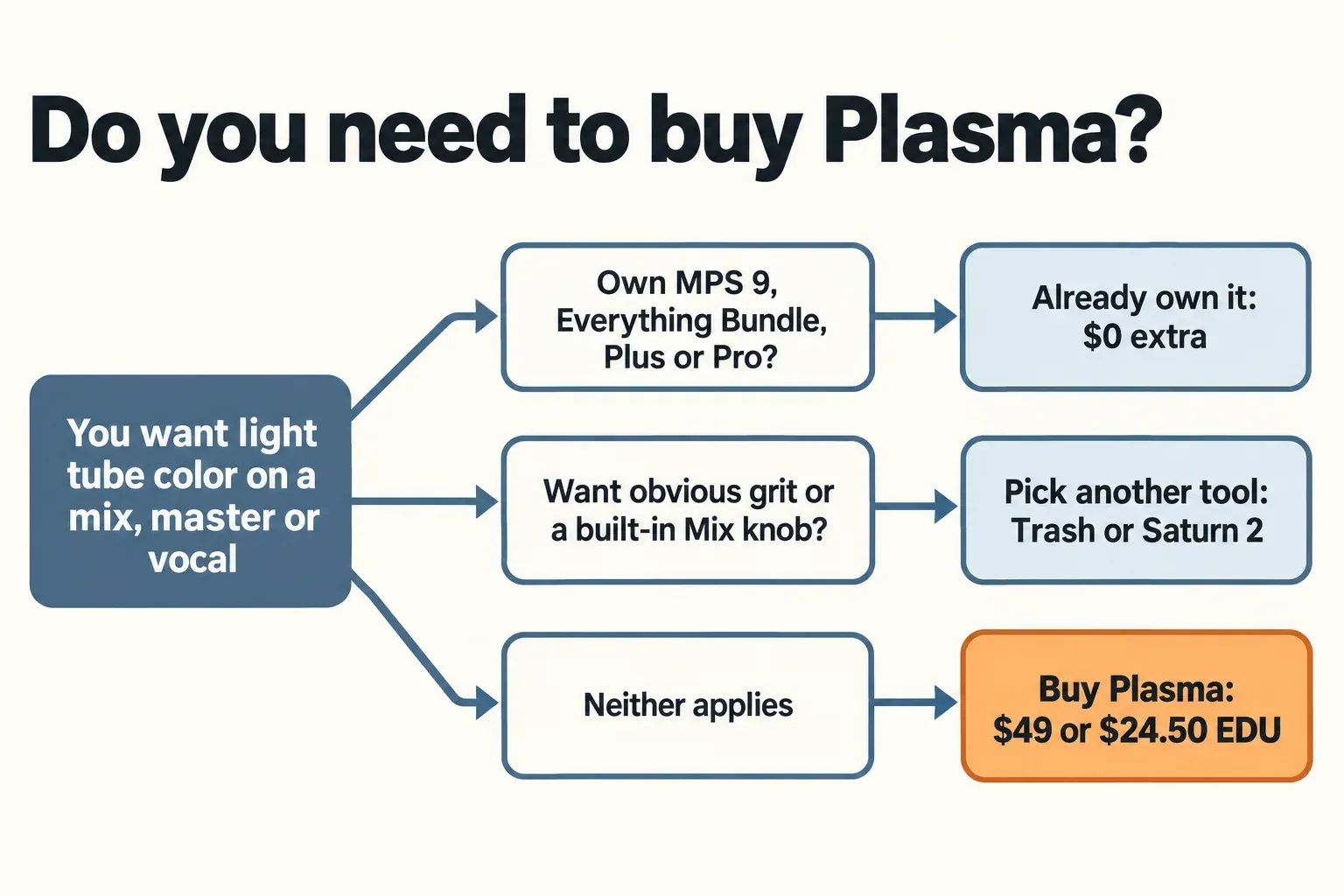
iZotope Plasma is a saturation plug-in that adds tube harmonics only where the spectrum needs them, pulling the sound toward a Tuning Profile instead of coloring the whole signal. Buy it for light, frequency-selective warmth on a master, a bus or a vocal, where Delta and the Difference meter show exactly what it added. Skip it if you want obvious grit, need a Mix knob (the manual lists none), or already pay for iZotope Plus or Pro, which include it. It costs $49 ($24.50 EDU, iZotope US store price on October 23, 2026).
I would buy Plasma for one situation: a mix or vocal that's balanced but flat, where you want density without hearing a distortion effect. The design aims straight at that job. The first half of the Flux Saturate range is subtle on purpose, the four master-bus profiles exist for it, and Delta lets you hear only what Plasma adds. I'd skip it for drums you want to break up, because Trash does that more directly, and I wouldn't pay $49 at all if Music Production Suite 9, the Everything Bundle or a subscription already puts it in your account.
- Buy Plasma if you master your own tracks or want gentle color on vocals and buses, and no bundle or subscription covers it yet.
- You already own it if you have Music Production Suite 9, the Everything Bundle, iZotope Plus or iZotope Pro.
- Pick another tool if you want audible distortion (Trash) or a multiband saturator whose bands you place yourself (FabFilter Saturn 2).
- Skip it if you need a dry/wet Mix or output trim inside the plug-in; the manual documents neither.
Buyer ratings back that up: Plugin Boutique shows 4.9 out of 5 from 67 ratings, and none of its six written reviews goes below four stars. This page covers Plasma alone; for where it sits among Ozone, Neutron, Nectar and RX, start at the iZotope plug-in hub.
What iZotope Plasma does
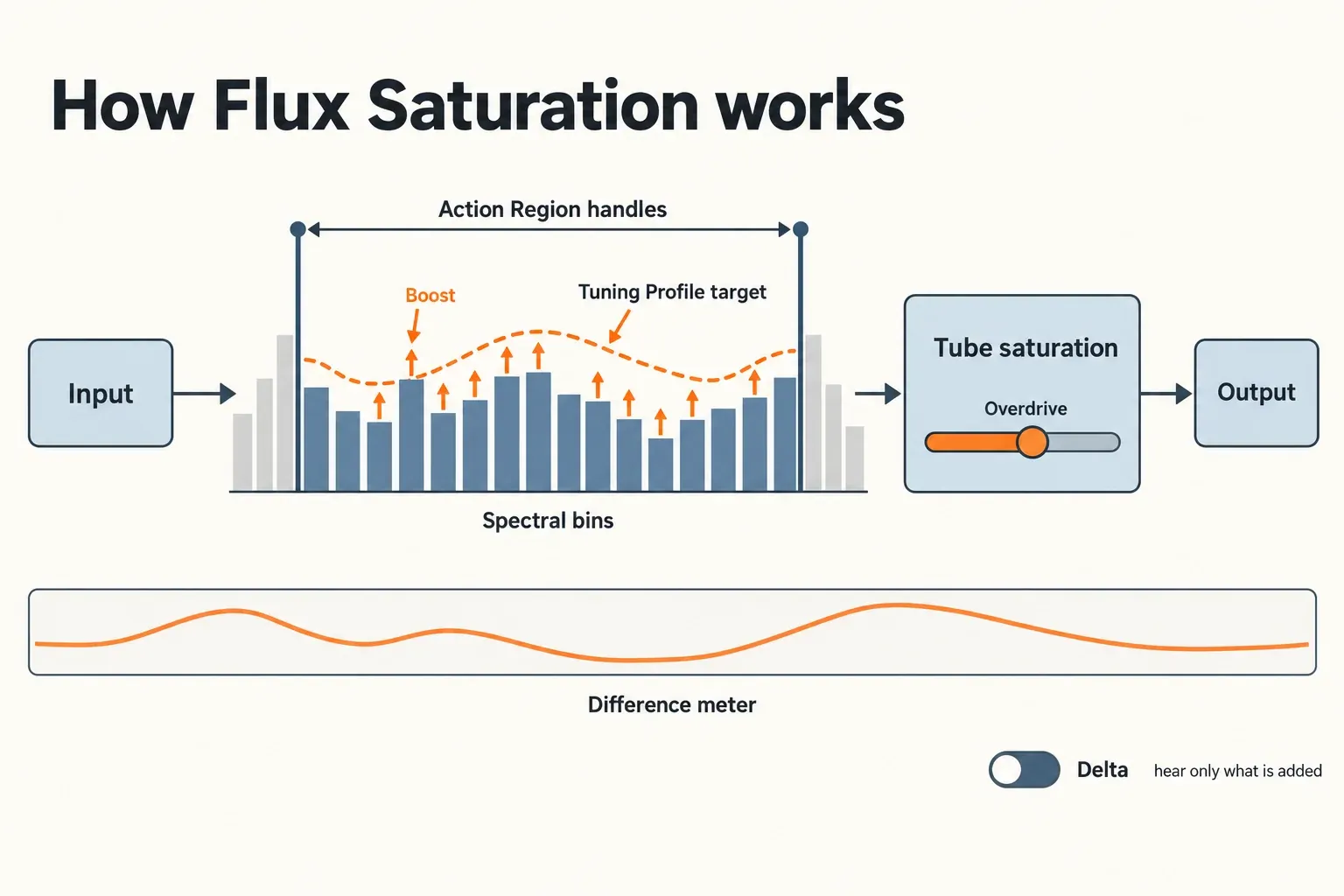
Plasma is a spectral saturator, and the Plasma manual explains the mechanism in four steps. The signal is split into many spectral bins. The level in each bin decides whether that bin gets boosted. Boosted bins pass through a tube saturation circuit. That circuit can be overdriven. The result, in the manual's words, is harmonic enhancement "where it's needed" without distorting the rest of the signal.
The Tuning Profile defines what "needed" means. It tells the algorithm which frequencies to boost, so it works as a target the sound is pulled toward. The manual lists four master-bus styles, Balanced, Bright, Warm and Scooped, plus profiles for individual mix elements. On the product page iZotope markets them as 24 Target Profiles and counts 49 presets. The company calls the whole process Flux Saturation, and its launch article on Plasma says it uses the same technology that tames resonance in Ozone's Stabilizer, Clarity and Spectral Shaper modules.
Plasma opened iZotope's Catalyst Series, which now has five plug-ins; in release order they are Plasma, Aurora, Cascadia, Velvet and FXEQ. Version 1.0.0 came out on September 11, 2024, and the Plasma release notes list 1.1.0, released on July 22, 2025, as the current build. Searches for "Plasma" also turn up Dimethoxy's free Plasma distortion plug-in and Gamechanger Audio's high-voltage Plasma pedal; neither is related.
Every Plasma control, and where to start
Plasma has five main controls, a Difference meter with Action Region handles, a Channel Processing mode selector, and a header with monitoring and preset tools. The names below are the manual's.
| Control | What it does |
|---|---|
| Tuning Profile | Tells Flux Saturation which frequencies to boost. Four master-bus styles (Balanced, Bright, Warm, Scooped) plus profiles for mix elements. |
| Flux Saturate | The overall amount. The first half of the range is subtle and suits mastering; the second half changes the tone radically. Scaled roughly in decibels. |
| Attack (ms) | How fast the processor adapts. Fast attack shapes transients; slow attack mostly leaves them alone. |
| Release (ms) | How fast processing returns to baseline. Long release lets boosts linger; very fast release can sound watery. |
| Overdrive | Gain-staging into the tube stage. Low settings stay mostly clean; high settings turn into audible distortion. |
| Action Region handles | Upper and lower frequency limits. Bins outside them are deactivated. |
| Difference meter | The tonal change being applied, read like an EQ curve that keeps adapting. |
| Delta | Plays only the difference between input and output. |
| Header | Bypass, Preset selector with previous and next arrows, Reset, Options, Help (?). |
I'd start with the Tuning Profile, not the knob. The profile decides which frequencies Plasma chases, so a Warm master style and a vocal profile push the same material in different directions before Flux Saturate moves at all. Then raise Flux Saturate inside the first half of its range. iZotope's launch article puts 0–6 on the knob in subtle territory and 6–10 in creative territory, which matches the manual's split. Because the scale is roughly in decibels, a setting of 3 means Plasma boosts any frequency by about 3 dB at most. The manual calls that an approximation, since the saturation reacts to input level.
Set Attack and Release with Delta switched on, the use iZotope's article gives for it. You hear only what Plasma adds, so a Release that's too short shows up as a watery layer long before it's obvious in the full mix. Overdrive comes last. iZotope describes it as "gain-compensated to some degree", and the article's author finds it more useful on instruments than on the stereo bus.
Two readings on the Difference meter look like faults and aren't. The curve keeps moving, because Flux Saturation adapts its spectral contour over time instead of holding a fixed EQ shape. And with heavy Flux Saturate plus high Overdrive, the meter can show activity at very low frequencies even after you raise the lower Action Region handle. The manual traces that to slight waveform asymmetry from the tube stage's even harmonics.
Stereo, Mid/Side or Transient/Sustain?
Stay in Stereo unless you have a reason to split. Stereo applies the same processing to left and right. Mid/Side encodes the input, gives the Mid and Side channels separate parameter sets, and decodes back to stereo at the output. Transient/Sustain separates the attack of each sound from its sustained part, processes each with its own settings and mixes them back together. With no processing applied, the manual says the two recombine into exactly the same signal.
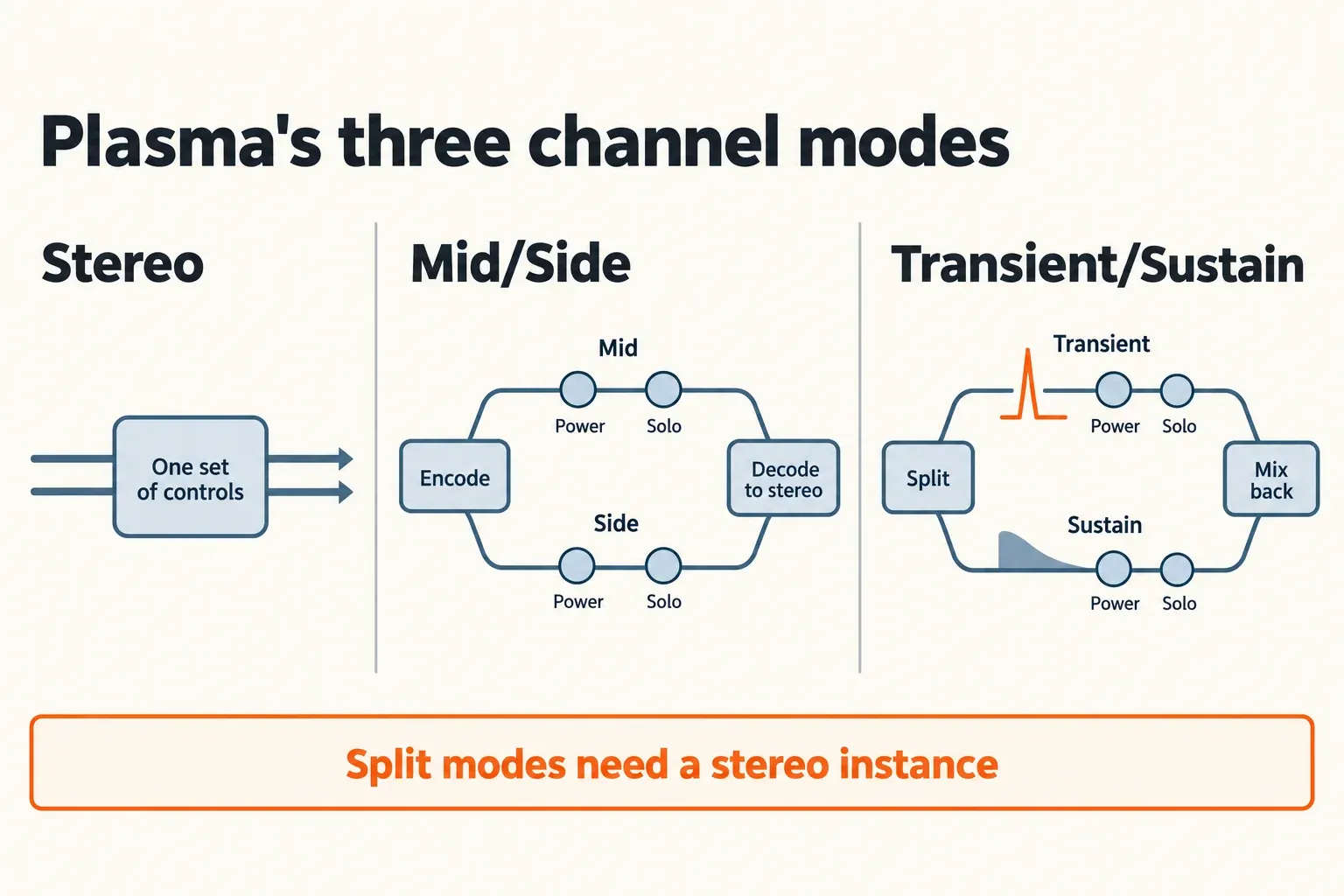
Each split channel has a Power button and Solo, and the Mid/Transient and Side/Sustain selectors aren't available in Stereo mode. Both split modes need Plasma instantiated in stereo; the manual warns that they won't work as expected on a mono instance.
When a master needs more air at the edges without a thicker center, I'd try Mid/Side and give the Side channel more Flux Saturate than the Mid. Transient/Sustain suits bass and vocals: saturate the Sustain channel for body and keep the Transient channel low so the attack holds its shape. Solo each channel before you commit, since it's the quickest way to hear what each half of the split is doing.
What buyers and forums report about Plasma
Buyers rate Plasma highly, and the one dissenting thread argues about novelty rather than sound. The published verdicts are buyer ratings and forum posts, so this composite counts verdicts across four independent sources: Plugin Boutique's buyer reviews, a Cakewalk forum thread on whether Plasma is hype, Gearnews' launch preview and a Native Instruments Community thread about installing Plasma.
Plugin Boutique shows an average of 4.9 from 67 buyer ratings. Its six written reviews, posted between May 4 and October 20, 2026, split four 5-star and two 4-star, with none lower. Three of the four sources describe frequency-selective saturation as Plasma's defining trait, though the Cakewalk thread argues multiband saturators already do it. One buyer puts it plainly: Plasma adds saturation "only to some frequency areas and not constantly", and the Mid/Side and Transient/Sustain options make it fast to use. Another calls it "superb value for money".
| Source | Type | What it reports |
|---|---|---|
| Plugin Boutique rating | Buyer ratings (67) | Average 4.9 out of 5 |
| Plugin Boutique written reviews | Buyer reviews (6), May–October 2026 | Four 5-star, two 4-star; praise for clarity on single tracks, versatility and the split modes |
| Cakewalk forum | Forum thread | Skeptical: FabFilter Saturn and MeldaProduction MDistortionMB already apply distortion to specific frequencies; one poster calls the marketing "amorphous" |
| Gearnews | Launch preview, no score | The interface "may seem limited at first" but gives "more than enough control" for a saturator |
| NI Community | Forum thread, February 2025 | Two Windows users couldn't install Plasma, Aurora and Cascadia through Native Access; no fix posted |
iZotope's own before-and-after demos are level-matched within 0.1 LUFS-I and described as intentionally subtle, so the differences in them come from tone, not loudness. iZotope publishes no latency or CPU figure for Plasma in the manual, on the product page or in the release notes.
For your decision, the composite says two things. Buyers rate it well for targeted, gentle color, with no written review below four stars. And if you already own a multiband saturator, the Cakewalk skeptics have a point: you can reach frequency-specific saturation by hand. Plasma's case rests on doing it adaptively, guided by a profile, with Delta to check the result.
Where Plasma works best
Plasma is built for the master bus first. iZotope's launch article calls it "more of a mastering tool than a mixing tool", and the four master-bus Tuning Profiles plus the subtle first half of Flux Saturate point the same way. On a master, the job is density and a little lift in the frequencies the profile says are short, at a level that's hard to hear without Delta.
On single tracks, the same article suggests four uses:
- Filling out frequency gaps in vocals or guitars.
- Pushing Plasma hard after a reverb to add bite to a spring or a plate.
- Running it hard in parallel to lift a lead instrument.
- Sending the Delta output into a doubler, phaser, reverb or delay for new textures.
For mastering inside Sound Forge, Sound Forge Pro for mastering covers the chain Plasma would sit in. For vocals, the guide to the best iZotope plug-ins for vocals compares the tools that do the heavier work.
Plasma's limits before you buy
The biggest gap is level and blend control. Plasma's manual, dated September 2024, documents no Mix (dry/wet) or output-gain control. Blend on a parallel bus in your host, and match level with the host's gain before you judge, because Overdrive is only "gain-compensated to some degree".
The other limits come from pushing too far, and the manual names each artifact:
- Very fast Release times cause spectral-processing artifacts that sound watery, close to lossy data compression.
- High Overdrive turns saturation into audible distortion, "fuzzy" with "blown-out" transients.
- Mid/Side and Transient/Sustain won't work as expected on a mono instance.
Installation is the one practical problem users have reported. In a February 2025 Native Instruments Community thread, two Windows users saw Native Access stop with "Installation failed: Review your location preferences" for Plasma, Aurora and Cascadia while other iZotope plug-ins installed, and the thread ends without a fix. If an install or authorization stalls, the iZotope install, sign-in and authorization fixes cover the account-side checks.
Plasma vs Trash, Saturn 2, Neutron and Ozone
Plasma is the gentle, automatic option in iZotope's line; the alternatives give you more obvious character or more manual control.
- Trash is iZotope's distortion workshop, with over 600 distortion types and impulse responses. The free Trash Lite shows whether that character suits you.
- FabFilter Saturn 2 splits the signal into up to six bands you set yourself; iZotope vs FabFilter compares it with Trash.
- Neutron 5 has an Exciter module inside a full mixing suite; the Neutron 5 review covers when the suite pays off.
- Ozone 12 carries the resonance-taming technology iZotope says Plasma shares, in Stabilizer, Clarity and Spectral Shaper; the Ozone 12 review weighs the editions.
Price, bundles and subscriptions
Buy Plasma on its own unless a bundle or subscription already covers it. iZotope's store sells only the full version and the EDU version, with no upgrade or crossgrade price. Native Instruments also sells Plasma at $49, and buying there creates an iZotope account with the serial added. At launch, Gearnews reported a 20% discount for existing iZotope owners that ran until September 26, 2024.
| Route | iZotope US store price | Includes Plasma |
|---|---|---|
| Plasma | $49 (EDU $24.50) | Yes |
| Music Production Suite 9 | $799 (EDU $399.50) | Yes |
| Everything Bundle | $2,999 | Yes |
| iZotope Plus | $15 a month or $150 a year | Yes, with Ozone 12 Standard and Trash |
| iZotope Pro | $25 a month or $250 a year | Yes, with Ozone 12 Advanced and Trash |
| Mix & Master Bundle Advanced | $599 | No |
| Mix & Master Bundle Standard | $429 | No |
| Elements Suite 12 | $149 | No |
The arithmetic is short. A year of iZotope Plus costs $150, about three Plasma licenses, so subscribing for Plasma alone makes no sense. Plus starts to pay if you also want Ozone 12 Standard and Trash, which it includes. I'd buy Plasma outright unless you were going to subscribe for Ozone anyway; iZotope's subscription terms also ask you to connect through Native Access once a month to verify the plan.
Subscriptions start with a 7-day free trial and then renew automatically; they are serviced through Native Instruments and can be cancelled at any time, and perpetual licenses remain on sale. Plasma has its own trial too. Load it in your host and choose the free trial: it runs for 10 days with export disabled, then switches to Demo mode and inserts silence at regular intervals.
Bundle maths across the whole range live in iZotope bundles compared, suite upgrade prices in the iZotope upgrade price guide, and past seasonal discounts in iZotope Black Friday.
Compatibility: formats, systems and hosts
Plasma runs as AAX, AU and VST3 in 64-bit hosts; there's no VST2 version. iZotope's system requirements list macOS Sonoma 14.7.x, Sequoia 15.7.x or Tahoe 26.1.x on Intel or Apple silicon (native and Rosetta), and Windows 10 22H2 or Windows 11 24H2.
The vendor host list names Logic Pro 10.8–11, Pro Tools 2024–2025, Ableton Live 12, Cubase 14, Nuendo 14, Studio One 7, Reaper 7, FL Studio 2024 and Reason 13. Native Instruments' Plasma page adds Audition CC 2025, Premiere Pro CC 2025 and Maschine 3.
Update before you troubleshoot. Version 1.1.0 fixed an iLok license not being recognized on Apple silicon Macs and wrong interface scaling on Windows HiDPI displays set to anything other than 100% or 200%, and it raised the minimum macOS and DAW versions. iZotope's macOS Tahoe compatibility statement requires 1.1.0, and its macOS compatibility table lists 1.0.1 as the minimum for Apple silicon and for Ventura, Sonoma and Sequoia. The Options window shows the installed version and license, and Remove Authorization frees the plug-in so you can authorize it with another serial number.
Does Plasma work in Sound Forge?
Plasma should load in Sound Forge as a VST3 on Windows, but that's a format match, not a host on iZotope's list. Sound Forge's system requirements list Windows 11, and both Sound Forge editions support VST2, VST3 and ARA plug-ins. Plasma ships as VST3, yet neither iZotope's nor Native Instruments' host list names Sound Forge.
After installing, open Options > Preferences > VST Effects in Sound Forge, check that the folder holding Plasma is in the scanned list, and click Refresh; the Sound Forge VST Effects preferences help describes both. Then add Plasma to a Plug-In Chain on the data window, where it plays in real time. On a mono voice file, keep it in Stereo mode.
If Plasma still doesn't appear, the Sound Forge VST plugin fixes run the checks in order, and the Plug-In Chainer guide shows how to build and save the chain. Sound Forge Pro 18 plugins lists what each edition already includes. One company now owns both products: Boris FX acquired iZotope in July 2026, iZotope products, licenses and subscriptions remain active, and Boris FX also owns Sound Forge.
Should you buy iZotope Plasma?
My verdict: buy Plasma at $49 if you want light, frequency-selective tube color on masters, buses or vocals and value hearing exactly what it adds through Delta and the Difference meter. Check your account first, because Music Production Suite 9, the Everything Bundle, iZotope Plus and iZotope Pro all include it. Skip it if you need a Mix knob or output trim inside the plug-in, since the manual documents neither, or if you want grit you can hear on the first pass, where Trash or Saturn 2 is the better buy.
Start with the 10-day trial on a finished mix, keep Flux Saturate in the first half of its range, and switch Delta on before you decide.
iZotope Plasma FAQ
Is there a free trial of iZotope Plasma?
Yes. Plasma runs in Trial mode for 10 days with export disabled, then switches to Demo mode and inserts silence at regular intervals. iZotope Plus and Pro have a separate 7-day subscription trial.
Is Plasma included in iZotope Plus?
Yes. Both iZotope Plus and iZotope Pro include Plasma, along with Trash and Ozone 12: Standard in Plus, Advanced in Pro.
Does Plasma work on mono tracks?
Stick to Stereo mode on a mono track. The manual says Mid/Side and Transient/Sustain require Plasma instantiated in stereo and won't work as expected on a mono instance.
Where does Plasma save user presets?
In Documents/iZotope/Plasma/Presets inside your user folder, on both macOS and Windows. The Preset selector can create, update, rename and delete user presets; factory presets are locked.