
Start by choosing the right app for your license. iZotope subscriptions have installed and authorized in Native Access since April 30, 2025, so Product Portal is now the tool for perpetual licenses. For a sign-in loop, use the "Take me to Native ID login" link and type your email and password by hand. For a missing product, relaunch Product Portal with SHIFT held, check the eye icon and sign in with the account that made the purchase. For installer and authorization errors, find your exact message in the tables below. If Product Portal itself refuses to work, the "Install without Product Portal" installer on your iZotope account page, or Native Access, still gets the plug-in onto your computer.
My rule is simple: confirm which account and which app own the license before reinstalling anything. In the 19 support threads summarized below, sign-in failures and a partial or wrong library in Native Access made up 5 threads each, 10 of 19 together. A full removal and clean reinstall fixed the problem in only 3. Reinstalling first often repeats a download that was never the problem.
This page covers Product Portal and Native Access for every iZotope product, from RX and Ozone to Neutron and Nectar. For an overview of the product line and editions, start at the iZotope guide hub. If the activation trouble is in Sound Forge itself rather than an iZotope plug-in, follow the separate Sound Forge activation fixes.
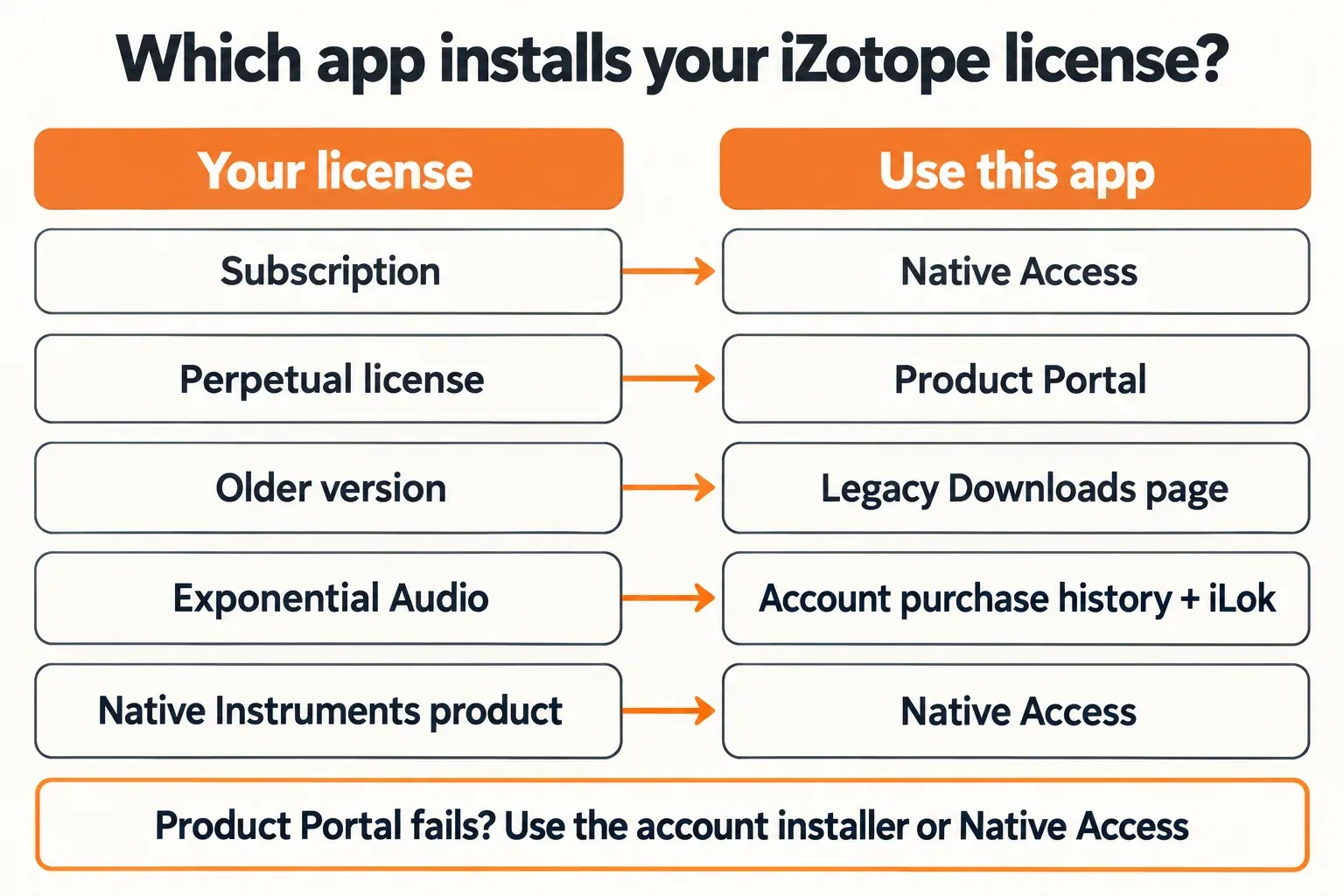
Product Portal or Native Access: which app handles your license
One login now covers both apps, because Product Portal sign-in uses a Native ID. The app that installs and authorizes a product still depends on the license type, and choosing the wrong one explains many "my products are gone" reports.
| What you own | Install and authorize in | Fallback or note |
|---|---|---|
| iZotope subscription (iZotope Plus or Pro, formerly Music Production Suite Pro) | Native Access, per iZotope's note on subscriptions moving to Native Access | Sign in to Native Access and open the Subscriptions tab |
| Perpetual license, current version | Product Portal | "Install without Product Portal" on account.izotope.com, or Native Access |
| Older version Product Portal does not offer | The Legacy Downloads page, linked from iZotope's downloads page | Manual or offline authorization; ask iZotope Support for very old products |
| Exponential Audio plug-in | Never listed in Product Portal; find it in your account's purchase history | iLok License Manager, with no iLok USB required |
| Native Instruments product bought in the iZotope shop | Native Access only | Not shown in Product Portal by design |
Two fallbacks matter more than any reinstall. iZotope's macOS 27 note documents an installer that skips Product Portal entirely: sign in at account.izotope.com, open My Products, click Install & Activate and choose "Download the installer" under "Install without Product Portal". And according to iZotope's can't-download-or-install article, Native Access can download every current iZotope product, with single installers on the downloads pages when Product Portal installs fail. Take installers only from iZotope or Native Instruments, not from the download mirrors that also rank for Product Portal.
Install Product Portal and add a serial
Product Portal runs on Windows 10 and 11 and on macOS Ventura 13.7, Sonoma 14.7, Sequoia 15.7 and Tahoe 26.1, according to iZotope's Product Portal welcome article. On Apple silicon Macs it needs Rosetta 2, Apple's Intel translation layer.
That Rosetta dependency now has a date attached. iZotope's macOS 27 note, updated October 16, 2026, reports that Apple has named macOS 27 as the last version to support Rosetta 2. On macOS 27 itself Product Portal keeps working: a Rosetta compatibility warning may appear, but it does not stop you from installing, authorizing or managing products. If you would rather avoid Rosetta altogether, the same note points to the account installer described above. I would not reinstall anything because of the warning alone.
- Download Product Portal for Mac or PC from iZotope's redeem page and install it.
- Launch it and sign in with your Native ID, the email linked to your iZotope account.
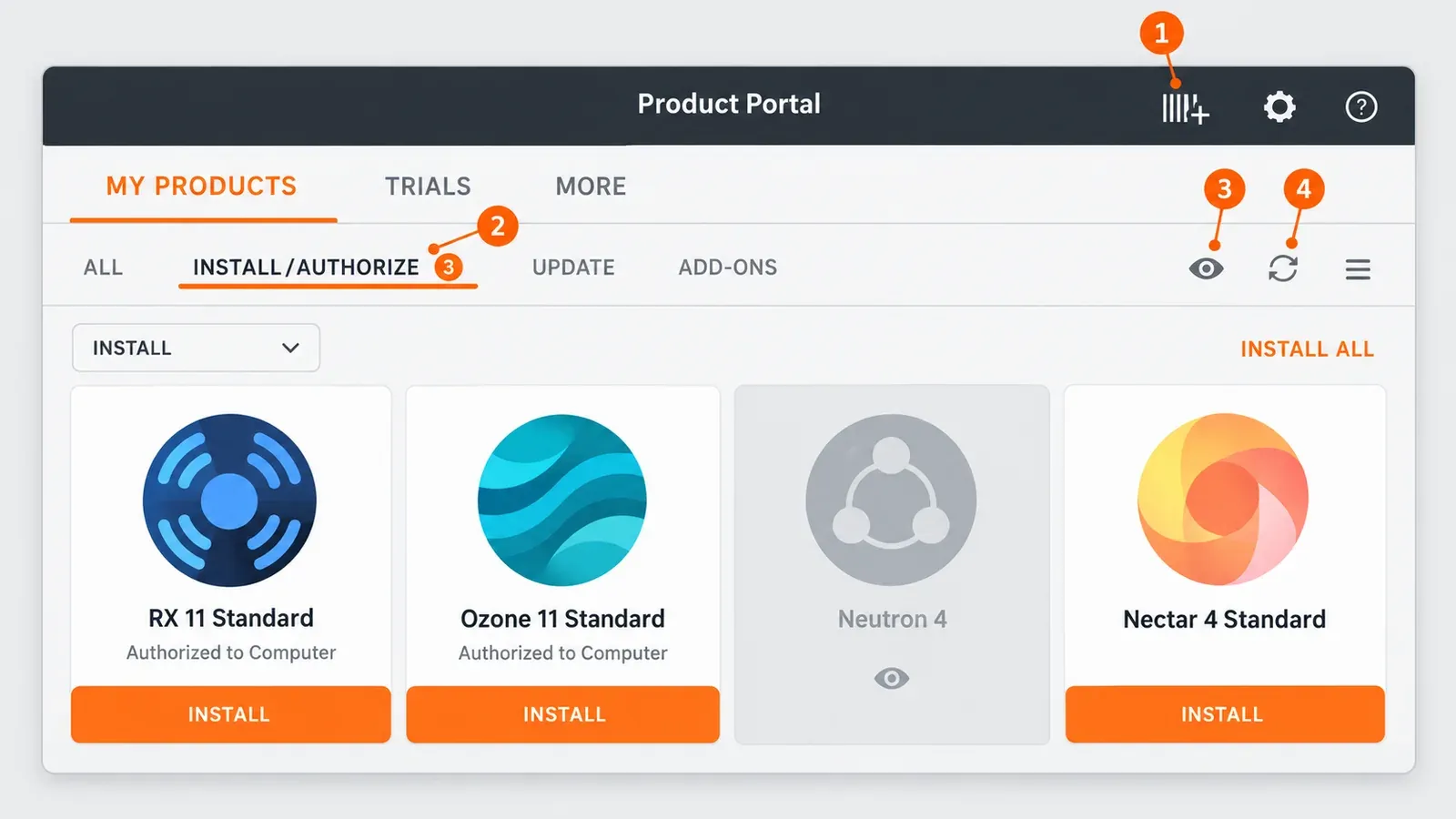
- Click the Add Serial button at the top right, marked with a barcode and a plus sign, and enter the serial. iZotope serials follow the pattern SN-PRODUCTNAME-XXXX-XXXX-XXXX-XXXX.
- Open MY PRODUCTS, choose the INSTALL/AUTHORIZE filter and click INSTALL on one product, or INSTALL ALL for everything listed.
- Install legacy products one at a time; some do not support INSTALL ALL.
- Open your DAW and rescan plug-ins. Product Portal installs and authorizes, but it does not launch the plug-in for you.
Sign-in fails or the Product Portal window stays blank
A sign-in failure is an account problem, not an install problem, so reinstalling will not fix it. Work through these in order:
- In the Product Portal sign-in window, scroll to the bottom and click the blue "Take me to Native ID login" link; iZotope's Native ID login article notes that it may sit below the visible area.
- Delete any autofilled email and password and type both by hand. iZotope's login troubleshooting article advises against autofill on its login page.
- If the iZotope login page does nothing in Firefox, switch Content Blocking from Strict to Normal, reload, then clear cookies and cache, as iZotope's page-not-loading article describes.
- Check your inbox. NI and iZotope block a login whose email-and-password pair appeared in a public data breach elsewhere and email the account owner, according to iZotope's data-breach login article.
- Reset the password from the account login page with "Don't remember your password?", following iZotope's password reset steps, then type the new one by hand.
The login change does not touch authorization. iZotope states that Product Portal, iLok and serial numbers already in a product keep working, so a sign-in failure is not a reason to deauthorize or reinstall anything.
If Product Portal opens to an empty window, close it and relaunch it while holding SHIFT. That forces a fresh sign-in and is iZotope's first fix for a blank Portal. If it stays blank, close the app again and delete the contents of the ProductPortal_cookies folder: ~/Library/Application Support/iZotope/ProductPortal_cookies on a Mac, %APPDATA%\iZotope\ProductPortal_cookies on Windows.
When all of that fails, open a ticket with iZotope Support rather than repeating the same steps. In 3 of the 5 sign-in threads summarized below, the original poster was still locked out when the thread ended.
A purchased product is missing from Product Portal
A missing product is usually hidden, on another account or deliberately excluded. Check in this order:
- Refresh. The toolbar's Refresh button reloads the view of products and authorizations, per the welcome article. The SHIFT relaunch from the previous section is the stronger version.
- Hidden items. The eye icon at the top right toggles hidden products. A greyed tile is unhidden with the small eye icon that appears under it on hover, as iZotope's hidden products article shows. One KVR thread about plug-ins that seemed deleted ended at exactly this icon.
- The purchase account. Many owners have two accounts. Sign in with the one that made the purchase, add retail serials with the plus button, and ask iZotope Support to merge accounts or move products if needed, as iZotope's Product Portal FAQ explains.
- How products get listed. A product appears after a demo download, a direct iZotope purchase, a serial added in Product Portal or on izotope.com, or an earlier install on the computer.
- Unsupported legacy titles. Product Portal does not support Ozone 5 and below, RX 3 and below, Nectar 1 and Nectar 1 Elements, Iris 1, Trash 1, Music and Speech Cleaner 1 and 2, Spectron, T-Pain Effect, M7 Control, pHATmatik PRO or Vocal Eraser.
- The full license list. Every license, legacy ones included, is listed under Purchase History in the Options menu at the top right of Product Portal.
- Duplicates. Several licenses of the same product appear as one tile, because a product version installs once per computer.
- Exponential Audio and NI products. Exponential Audio plug-ins never appear in Product Portal, and Native Instruments products bought from iZotope install only through Native Access.
If the product shows as installed but you cannot open it, check what kind of product it is. iZotope's after-installation article notes that most of its products are plug-ins only; standalone apps ship only with Ozone Standard and Advanced 9 and earlier, RX (except RX 10 Elements) and Iris 2. Everything else opens inside a DAW after a rescan, and the guide to iZotope plug-ins not showing in your DAW covers the scan side.
Installer errors on Windows and macOS
Update Product Portal before anything else; it is iZotope's first step for failed installs, and the app also reports an error when there is no internet connection. Then match the message:
| Message or symptom | System | Cause | Fix |
|---|---|---|---|
| "Program ended with an error exit code" | Windows | Usually antivirus or OneDrive interfering | Pause both during the install and run the installer as administrator, per iZotope's exit-code article |
| "It seems you are trying to overwrite resources that are currently in use" | macOS | Leftover files from an earlier install | Delete the product's AAX, AU and VST3 plug-ins, its Documents/iZotope folder and its program data, then reinstall; iZotope's overwrite-resources article lists every location |
| Installer "can't be opened because it is from an unidentified developer" | macOS | Gatekeeper blocking the download | Click Open Anyway in the security settings, as iZotope's unidentified-developer article describes; the wording differs between macOS versions |
| Install or preset errors with Desktop and Documents in iCloud | macOS | iCloud Drive syncing the Documents folder | Turn that sync off, or give ~/Documents/iZotope Read and Write permission and apply it to enclosed items, per iZotope's Documents folder article |
| Install fails with no clear message | Both | Outdated Product Portal or no connection | Update Product Portal and confirm you are online |
Two details save time on the macOS rows. Neutron 4, Ozone 10 and RX 10 and 11 keep their data files under a shared "Pro" name, so search for that as well as the product name when you clear leftovers. And before you switch off iCloud Desktop and Documents sync, I would make a local backup of those folders first.
The reinstall order that wastes the least time
- Update Product Portal.
- Hover over the INSTALLED product, click the trash icon to uninstall it, then install it again, as iZotope's reinstall article shows.
- If it still fails, sign in to an administrator account and reinstall in Safe Mode, which keeps other apps and drivers out of the way.
- To remove Product Portal itself, use the uninstaller in Library/Application Support/iZotope/Product Portal on the Mac startup disk, or Add or Remove Programs on Windows.
- If Product Portal installs keep failing, switch route: the account installer or Native Access.
One Windows case sits outside iZotope's documentation. In a Native Instruments forum thread about Windows 11 25H2, several users reported between February and July 2026 that older 32-bit iZotope installers stopped with "Unknown tag <stringParameter> ... project.xml". The thread stayed unresolved, a forum expert's clean 25H2 virtual machine installed a range of iZotope products, including the same Product Portal and Insight 2 versions, without trouble, and iZotope's support site does not list it as a known issue. In the same thread one user fixed a failed Ozone 11 Advanced update by uninstalling fully from Product Portal and reinstalling from it. If you hit this message, send the exact text to iZotope Support instead of trying registry or installer tweaks. A plug-in that installs but then crashes is a different problem; the guide to RX crashing or not opening covers that.
Authorization error messages and what each one means
Authorization messages appear inside the plug-in, the standalone app or Product Portal. The exact wording points to the cause, so copy it before closing the window.
| Message | What it means | Fix |
|---|---|---|
| "Invalid Serial" | Most often a space at the start or end of a pasted serial | Click at the end of the field, delete stray spaces and retry, per iZotope's Invalid Serial article |
| "No purchase matched this authorization request" or "no remaining Challenge/Response codes" | The authorization limit is reached; iZotope's article on this message cites a 5-authorization limit | Contact iZotope Support to allow more authorizations |
| "This serial is in use by another account" | The email in the authorization window differs from the account email | Use the purchase account's email; iZotope's serial-in-use article covers the details |
| "This serial number belongs to a different application" | The serial is for another product; the prefix identifies it, for example SN-RX7ELE for RX 7 Elements | Find the matching serial in your purchase history, per iZotope's different-application article |
| "iLok authorization is not available for this product" | The product has no iLok support (Vinyl, for example), or no physical iLok USB is in use | Authorize the serial to your computer; for iLok-capable products, assign the license to an iLok USB in iLok License Manager, per iZotope's iLok-not-available article |
| "Unable to connect to the license server" (authorization window) | Usually a firewall or antivirus block; very old legacy products have no server left | Allow the connection, or use offline authorization for legacy products, per iZotope's license-server article |
| "Unable to connect to the license server" (Product Portal) | The firewall is blocking Product Portal | Allow Product Portal through the firewall; on Windows its executable usually sits in a win32 folder inside iZotope's Product Portal folder under Program Files (x86), as iZotope's Product Portal firewall article explains |
| "The software required to validate the license for this product is not running" | An iLok message | Ignore it if you are not authorizing with iLok, per iZotope's iLok error messages article |
| "purchaseHistory.errorMessages.Failed to call API" | The serial went to iLok before it was registered on your account, or you are signed in to the wrong account | Register the serial on your iZotope account first, then check you are on the right account |
| "Your serial number does not support iLok authorization or is already authorized with an iLok" | The license is in your iLok account but not assigned | In iLok License Manager, drag it from Available to the iLok USB, or to the computer icon for Exponential Audio products |
| Product Portal shows "Authorized to iLok", but the plug-in opens in trial | The license was deposited to an iLok account only | Assign it to an iLok USB in iLok License Manager |
One message is not always a real problem. For Ozone 12 and Neutron 5 owners, iZotope's authorization troubleshooting article says "No purchase matched" is only a cosmetic issue: the plug-ins open in the DAW without activation problems. If you own either, load the plug-in in your DAW first; contact support only if it opens in trial.
"License Not Found" and the RX 12 sign-in screen
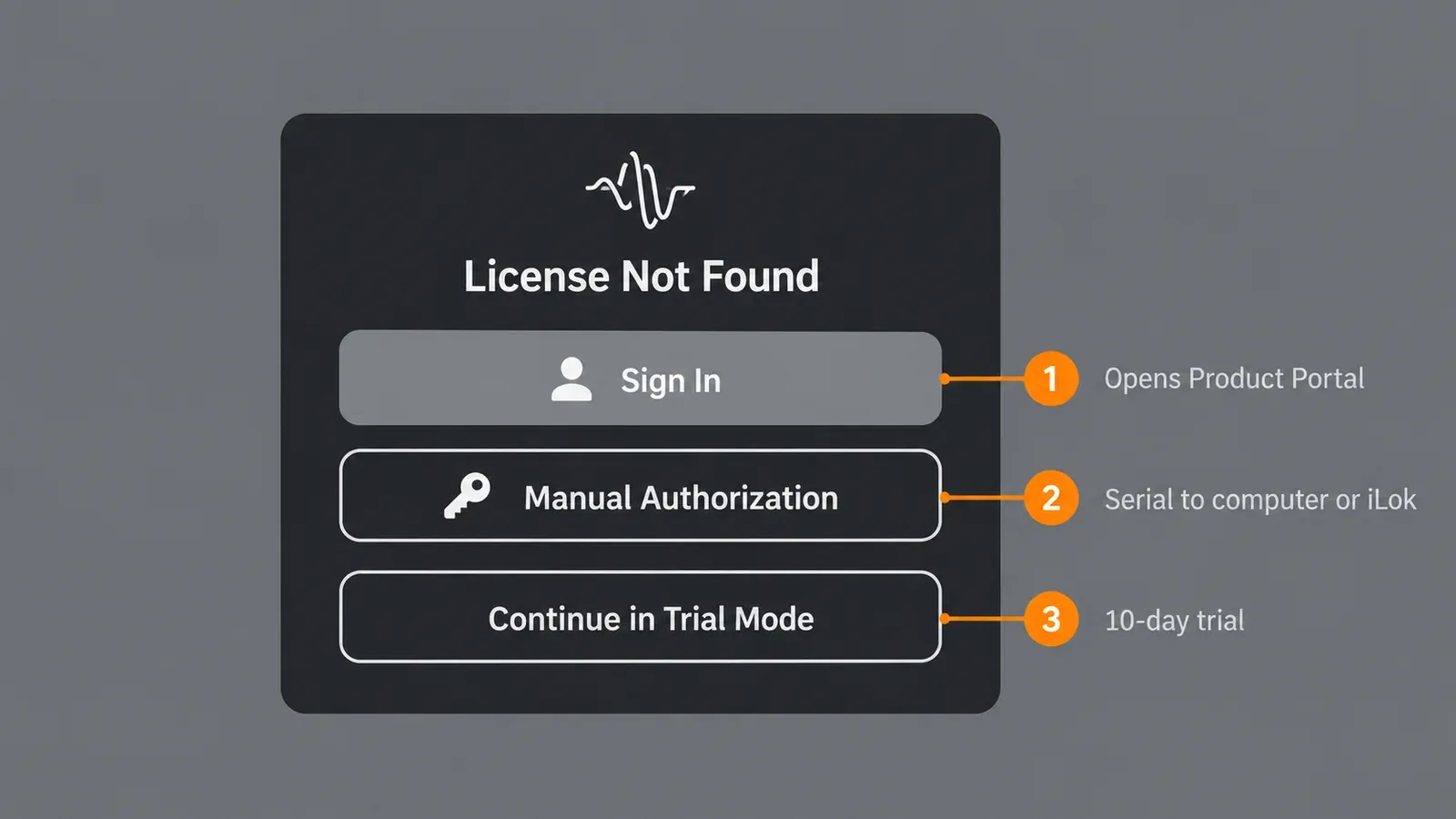
The "License Not Found" window offers three routes, according to iZotope's License Not Found article. Sign In opens Product Portal, where you authorize a perpetual license to the computer or an iLok. Manual Authorization sends a serial straight to the computer or an iLok. Continue in Trial Mode appears when a trial file is present and runs the product for 10 days.
A subscription trial adds one trap: during it, a product cannot be authorized with a purchased serial, and iZotope's instruction is to cancel the subscription first. In RX 12, the RX 12 manual's authorization page describes Sign In as opening Product Portal when it is installed, or the Product Portal download page when it is not. After the 10-day trial, DEMO keeps sessions playing back but disables all RX 12 controls until you enter a serial. Edition and license choices for RX itself are covered in the iZotope RX guide hub.
Offline authorization, USB storage and iLok
For a studio computer that never goes online, iZotope offers challenge and response. iZotope's authorization guide lists the steps:
- In the authorization window, enter your serial, name and email.
- Choose the challenge and response option to get a challenge code.
- Send the code to iZotope Customer Support, which returns a response file.
- Load the file with Choose File to finish authorization.
The same guide's summary says users generate the response file from their iZotope account, while its numbered steps say support generates it. I would follow the numbered steps and open a support request, because that route is documented end to end.
The guide also covers portable licenses: in the authorization window, click Advanced, choose "Store response on disk" and pick a formatted USB or portable drive the system recognizes. iLok is optional for iZotope software but works only on an iLok USB; iZotope's iLok article says Cloud and Computer locations are not supported. Exponential Audio is the exception: it requires iLok but no USB. Activation resets for iLok licenses are requested through iLok itself, as iZotope's iLok reset article explains.
Native Access and subscription problems
If a subscription plug-in shows Missing Authorization or Trial Mode while Product Portal says it is authorized, the license is in the other app. iZotope's subscription authorization article gives the fix: sign in to Native Access with your Native ID and open the Subscriptions tab. Three conditions from iZotope's subscriptions page are worth checking before you troubleshoot further:
- Subscription tools run offline once installed, but Native Access must connect once a month to verify the subscription.
- Installs need the latest Native Access on macOS Sonoma 14.7.x, Sequoia 15.7.x or Tahoe 26.1.x, or on Windows 10 22H2 or Windows 11 24H2. These are Native Access floors, not Product Portal's.
- After a subscription is canceled and expires, its tools turn read-only and keep their last saved settings.
Native Access shows the wrong iZotope library
Native Access showing only part of an iZotope library, or the wrong state, was the second large group in the test results below: 5 of 19 threads. In two of them an older Ozone 10 license could not be downloaded from Native Access or Product Portal. For an older version, check the Legacy Downloads page first, then send iZotope Support the serial and the exact version you need.
A false "Repair" status for products you already uninstalled has a user-reported workaround. In a 2025 Native Instruments forum thread about iZotope products in Native Access, users cleared it by deleting that product's .json file in /Users/Shared/Native Instruments/installed_products. Neither iZotope nor NI documents it, and for one user the RX 10 file came back. Back the folder up before you touch it. Two other threads ended only after posters repaired permissions on /Users/Shared/Native Instruments; I would ask NI Support for the exact permissions instead of opening the folder to everyone.
Moving to a new computer
The single-user license lets one person use the same serial on more than one computer, such as a desktop and a laptop, according to iZotope's multiple-machines article. A second person, or simultaneous use in several rooms, needs another license, and iZotope may contact users about excessive re-authorizations.
Before you move, uninstall the products from the old computer. If the old machine is dead, iZotope's new-computer article says to activate on the new one anyway. When activation stops with "No purchase matched", that is the authorization limit from the table above, and only support can raise it.
Selling a license is a separate matter. iZotope's license transfer policy rules out transfers for time-limited, educational and NFR licenses, licenses already transferred once, and Ozone, RX, Neutron and Nectar Elements. Pricing and upgrade paths are in the RX price, trial and license guide.
Does the Boris FX move change anything?
Not for existing installs and licenses. iZotope announced in July 2026 that it is joining Boris FX, and iZotope's Boris FX announcement FAQ says account holders need not do anything: products stay available through the downloads page and Product Portal, and changes will be announced in advance. Boris FX's welcome post says the same about products, licenses and accounts. One addition has already shipped: the RX 12.1.0 release notes from October 15, 2026 list support for the Boris FX license activation method and new branding in the product and installer. For the wider product picture, see the Boris FX hub.
Test results: what fixed it in 19 support threads
No published benchmark measures how often Product Portal or Native Access fails, so the useful evidence is support threads with a clear cause or outcome. This summary covers 19 readable threads from May 2021 to September 2026: 18 on the Native Instruments community forum and one on KVR. Counts are threads, not users, and one thread can carry several findings.
| Finding | Count | Where it happened |
|---|---|---|
| Sign-in failed after the switch to Native ID (login loops, access_denied, wrong-password errors) | 5 of 19 | portal not working, can't log in via Native ID, login not working, locked out for months, unable to log in |
| Replies advised typing credentials by hand instead of autofill | 5 of 19 | All five sign-in threads |
| A password reset plus manual entry was reported to work | 2 of 19 | The login-not-working and unable-to-log-in threads |
| The original poster was still locked out at the end | 3 of 19 | The portal-not-working, login-not-working and locked-out-for-months threads |
| Native Access showed a partial or wrong iZotope library | 5 of 19 | migrating purchases, all products in Native Access, existing iZotope products, Ozone 10 reinstall files, Ozone 10 missing after reinstall |
| An Ozone 10 license could not be downloaded from either app | 2 of 19 | Both Ozone 10 threads |
| A complete removal, leftovers included, then a fresh install fixed it | 3 of 19 | The all-products thread, the Windows 11 25H2 installer thread and installed-and-authorized but missing |
| Windows installers kept failing after the usual fixes | 2 of 19 | The 25H2 thread and install fail on Windows 11 |
| Product Portal showed the wrong installed or authorized state | 2 of 19 | Installed-and-authorized but missing, and no installs on an M2 Max with Sonoma |
| macOS permissions on /Users/Shared/Native Instruments blocked downloads | 2 of 19 | Music Production Suite Pro downloads failing, Native Access download problems |
| Products looked deleted but were hidden with the eye icon | 1 of 19 | The KVR thread |
| "Authorize in Product Portal" did nothing during a trial | 1 of 19 | Product Portal does nothing |
| A claim that Product Portal stops on macOS 27, contradicted by iZotope's later note | 1 of 19 | new from Product Portal on Mac |
| The original poster reported a working outcome | 4 of 19 | Installed-and-authorized but missing, both permissions threads, Ozone 10 missing after reinstall |
These are small, self-selected samples, so read them as patterns, not failure rates. Two patterns are still clear. Account and library problems were the two largest groups, 10 of 19 threads together, while a full removal and fresh install fixed only 3. And only 4 of 19 original posters reported a working outcome, which is why I send unresolved sign-in and license-limit cases to iZotope Support early. One installer thread is a useful warning: a user traced Windows installer failures to an unstable Intel CPU and fixed it in the BIOS, and a second user confirmed the same cause, so not every failed install is iZotope's fault.
My verdict: the order I would check things in
- Match the license to the app: subscription to Native Access, perpetual to Product Portal, Exponential Audio and NI products to their own routes.
- Sign in with the purchase account, through the Native ID link, typing the credentials by hand.
- Relaunch Product Portal with SHIFT held, then check the eye icon and Purchase History.
- Update Product Portal, then use the trash-icon reinstall for one product.
- Look up the exact error message in the tables above before changing anything else.
- Clear leftovers and reinstall only when the message points to files on disk.
- Switch to the account installer or Native Access if Product Portal itself keeps failing.
- Rescan plug-ins in the DAW.
Some cases need iZotope Support from the start, because no app setting can fix them: the authorization limit behind "No purchase matched", an account merge or products on the wrong account, offline challenge-and-response files, legacy products whose license servers are gone, and a sign-in that still fails after a password reset. If you are deciding whether to stay on perpetual licenses at all, the iZotope price and upgrade guide compares the paths.