
A phase correlation meter tells you how closely the left and right channels move together. Load a stereo file below to see the relationship at the playhead, inspect its shape, and hear what happens when the channels meet in mono. I use the mono preview as the deciding check: a number can flag a problem, but it cannot tell you which sound matters.
Audio Tools · local file
Check the stereo relationship
Load a file, inspect correlation and stereo shape, then listen to the mono fold-down.
Or drop one file here. Your audio stays in this browser. The file is decoded and analyzed locally and is not uploaded by this tool.
Choose a browser-decodable audio file to begin.
Current 2,048-sample window
Correlation is a clue, not a pass/fail score. Compare the reading with what you hear in mono.
Stereo vectorscope
Load a stereo file to see its shape. The numerical reading above is the text alternative.
Mono preview uses (L + R) / 2 and an 80% output gain. Current correlation covers 2,048 samples at the playhead and updates up to ten times a second; whole-file correlation combines every paired sample. Silence has no defined correlation. Browser decoding support and available memory vary. Lower your volume before playback.
Read the number, then listen
The current reading covers 2,048 paired samples near the playback position, roughly 46 ms at 44.1 kHz or 43 ms at 48 kHz. Conventional correlation meters usually average over a longer stretch, typically around 600 milliseconds according to Sound On Sound's explanation of phase correlation meters, so this reading can jump much more quickly when a vocal, effect or transient enters. Whole-file correlation combines every paired sample in the decoded recording into one normalized result; it is not an average of the numbers you see while the meter moves. Use the position control to inspect a passage, rather than assuming the file-wide value describes every moment.
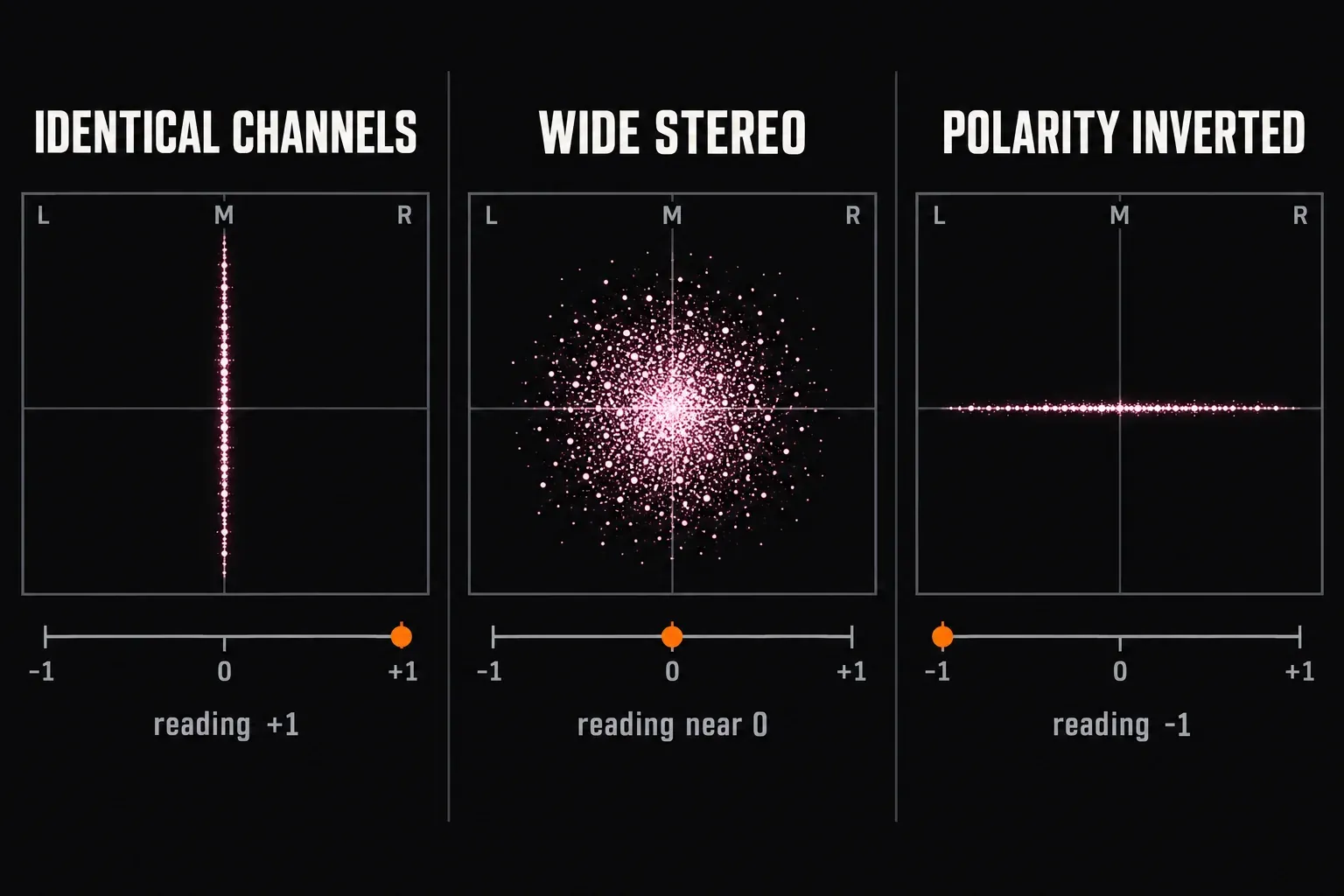
Near +1, the channels move together. That is ordinary for a centered voice or identical left and right channels; it does not mean a mix has the right amount of width. Around 0, the channels share less of the same movement. Wide ambience can sit there without losing anything important. A negative reading means opposing information is present in that window. If it lasts through a crucial sound, switch to mono and listen for a loss of body, attack or clarity. A brief dip on its own is a reason to check, not a verdict. Typical causes of a sustained negative reading include a stereo width or spread setting pushed beyond 100%, which Apple's guide to the Logic Pro Correlation Meter lists as a source of negative values, and one channel with inverted polarity. At −1 the channels are proportional with opposite polarity. They cancel completely in mono only when their amplitudes also match.
The number is also broadband: every frequency contributes to one value. A loud, centered bass line can hold the reading positive while a quieter pad or double-tracked part cancels underneath it, so the mono preview still has the final say. Check the low end with particular care, because cancellation there removes weight rather than just width. When you need to locate the problem by frequency, a multiband correlation meter such as Voxengo Correlometer, covered in our free metering plug-ins roundup, splits the reading into bands.
Use the shape to find the moment
The vectorscope plots the left/right relationship for the same short window. A narrow, upright trace suggests a strong center relationship; a wider cloud suggests more side information. A trace that flattens toward a horizontal line points to out-of-phase content; Apple's goniometer guide for Logic Pro reads the shapes the same way. If the trace leans to one side, check whether your channels are balanced and routed as expected. The left/right speaker test helps you rule out a monitoring mix-up before changing the file.
Choose Mono fold-down while the file plays to hear the channels combined as (L + R) / 2, with the preview output at 80%. The position stays put when you switch modes. Listen for an element changing or disappearing, not just a difference in loudness. Headphones can reveal a cancellation change, but they cannot tell you exactly how it will sound through a particular room and speaker system.
What this check can and cannot do
The file is decoded and analyzed in your browser; this tool does not upload the audio. It accepts one browser-decodable file at a time. Format support and available memory depend on your browser and device, so a file that opens in an editor may still fail here. Mono input is playable, but there is no left/right correlation to calculate. Silence also has no stable correlation reading, and multichannel files need a different analysis than a single left/right pair.
If mono reveals a real loss, the Sound Forge mono-compatibility guide shows how to confirm it with the editor's Mono-Compatibility Meter and Phase Scope, then find the cause and repair the source. Once you have changed it, run the audio export QA checklist on the actual delivered file. Correlation cannot certify a mix for every playback system; the important question is whether the parts your listener needs survive the fold-down.