
Mono compatibility is the ability of a stereo file to keep its important content when the left and right channels are combined. If a mix loses its vocal, bass weight, center image or attack in mono, the problem is usually not “mono sounding bad.” It is two channel signals partially cancelling each other.
Sound Forge gives you two useful warnings: the Mono-Compatibility Meter shows whether the channels are moving toward a risky relationship, and the Phase Scope shows the shape of that relationship. Neither meter replaces the final check. The reliable decision comes from folding the file to mono and listening to what survives.
What the correlation reading actually tells you
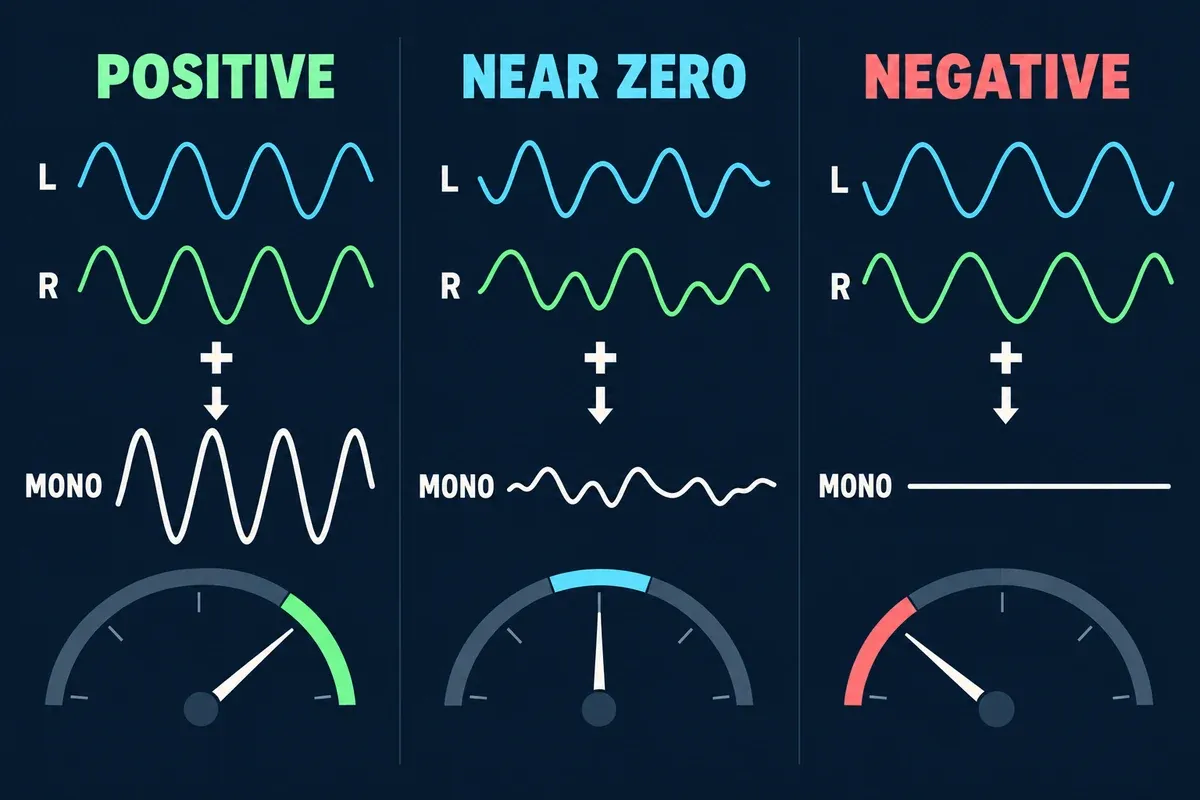
Phase correlation describes how similarly the two channels move over time. Treat it as a range of clues rather than a score you must maximize.
| General reading | What it suggests | What to check in mono |
|---|---|---|
| Positive, toward +1 | The channels share a lot of similar information | Usually stable, but confirm that the mix has not become unnecessarily narrow |
| Near zero | The channels are less related or strongly decorrelated | Often normal for ambience and wide effects; check important center elements |
| Negative | Some energy in one channel opposes the other | Listen for missing bass, a hollow vocal, softened transients or a collapsing stereo effect |
A reading near +1 is not a universal target. A mono voice, centered kick or identical left/right signal naturally sits high. Wide ambience, modulation and reverb may spend time closer to zero and still fold down acceptably. The warning becomes meaningful when an important sound changes or disappears.
Turn on the Sound Forge phase tools
Current Sound Forge Pro 2026 documentation places the Mono-Compatibility Meter and Phase Scope in the Channel Meters window, Hardware Meters window and Record dialog. Right-click the meters and enable Show Mono-Compatibility Meter, then enable Show Phase Scope.
The documented compatibility meter lights its right or top half when the channels are similar. Movement into the left or bottom half warns that channel differences can cancel during a mono downmix. Watch the meter through the actual problem section, not only during a loud chorus or a convenient ten-second loop.
Read the Phase Scope without chasing a perfect shape
The Phase Scope documentation lists four views: Lissajous – XY Plot, Lissajous – Rotated, Polar – Linear Plot and Polar – Circular Plot. Real music and dialogue produce diffuse traces, so look for direction and change rather than a clean textbook line.
- Lissajous – XY: a forward-slash tendency is the safer orientation in the documented examples; a backslash tendency points toward cancellation.
- Lissajous – Rotated: a mainly vertical trace is safer; a strong horizontal trace warns of opposing channel movement.
- Polar views: a centered trace is generally safer than left/right traces pulling apart.
The scope is most useful when you compare moments. If the vocal sounds solid until a widening effect enters and the trace immediately spreads or rotates, you have a much better repair lead than a single average correlation number.
Make a real mono fold-down
Use a copy of the file for diagnosis. In Sound Forge, open Process > Channel Converter, choose one output channel, and mix the left and right sources into that mono output. The official Channel Converter guide documents independent contribution controls for both source channels. The separate Sound Forge Channel Converter walkthrough explains the broader conversion workflow.
Do not judge only by whether mono is quieter. Summing conventions and channel content can change level. Listen for a change in balance or tone:
- Does the vocal move backward or become hollow?
- Does the kick or bass lose its center weight?
- Do snare hits, picked notes or consonants lose their leading edge?
- Does a wide pad become thin, swirly or nearly disappear?
- Does one side sound healthy alone while the combined version fails?
Use the loudness meter guide if level changes are distracting you from the tonal comparison. Match playback sensibly; do not mistake “louder” for “better correlated.”
Trace the cause before changing the file
Phase trouble usually comes from one source or process. Isolate the left and right channels, then bypass or inspect likely contributors one at a time.
| Likely cause | Typical clue | First repair to try |
|---|---|---|
| Polarity inversion | Strong cancellation across much of a duplicated signal | Correct the polarity on the affected channel or source |
| Haas delay or micro-delay widening | A sound is wide in stereo but hollow or comb-filtered in mono | Shorten the delay, lower the delayed side or use a mono-safe widening method |
| Duplicated tracks | Two near-identical layers fight after a small timing shift | Align the layers or keep one centered and make the other genuinely different |
| Multimic timing | Low end or attack changes when microphone channels combine | Adjust timing or polarity at the source-track level |
| Chorus, modulation or reverb | The effect return is unstable while the dry source remains solid | Narrow, filter or reduce the return rather than flattening the dry sound |
| Different low-frequency content in L and R | Bass loses focus even though upper frequencies remain wide | Keep critical low frequencies more centered and check the crossover region |
The left/right speaker test helps confirm channel routing before you blame the file. A swapped or missing channel in the monitor path can imitate an editing problem.
Fix the source, not the whole stereo image
Start with the smallest change that restores the missing information. Correct an inverted channel. Realign one duplicate. Reduce a short side delay. Narrow only the effect return. Keep the bass component centered while leaving higher ambience wide.
Converting the complete mix to mono can hide the symptom, but it also removes the stereo design. Pushing every correlation reading toward +1 has a similar cost. The goal is stable priorities: the center, low end, vocal and defining transients should survive, while decorative width can remain wide.
When the problem exists only for a few moments, repair those moments. A single automated width reduction or local effect change is usually less audible than narrowing the entire file.
Use this repeatable check
- Select the section where the mix changes most noticeably.
- Enable the Mono-Compatibility Meter and Phase Scope.
- Note what happens when the suspect element enters.
- Create or monitor a true mono fold-down.
- Check the center, low end, vocal and transients.
- Listen to the left and right channels separately.
- Repair the source of the disagreement.
- Repeat the mono check at a modest playback level.
Then return to stereo and make sure the repair did not remove useful width. A good fix should make mono more dependable without making stereo feel smaller than it needs to be.
Run the final export check
Check the beginning, loudest section, widest section and ending in both stereo and mono. Use the headphone test to catch routing and balance problems, then follow the audio export QA checklist before delivery.
Mono compatibility matters because real playback is unpredictable: small speakers, grouped devices, club systems, accessibility feeds and social platforms can narrow or sum a signal. You do not need to make every mix mono. You need to know that its essential information remains intelligible when stereo separation is reduced.
Sources and scope
This guide uses Boris FX Sound Forge Pro 2026 documentation for the Mono-Compatibility Meter, Phase Scope and Channel Converter. The diagnostic advice is based on established signal-summing behavior. It is not a claim that we installed Sound Forge, processed a reference file or measured a specific mix for this article.