
Tonal Balance Control 3 is iZotope's referencing tool. It compares your mix or master with a genre target or a custom target and shows the difference three ways: as a spectrum (Fine, Leveled and Broad views), on a Low End Crest Factor meter, and on three Extra Meters for Vocal Balance, Dynamics and Stereo Width. Version 3 adds a built-in Hybrid EQ to the plugin and a standalone, analysis-only app that captures targets from Spotify, YouTube or anything else playing on your computer.
My take is simple. Buy it if you mix or master against references and don't already own a referencing tool you trust. Upgrade from TBC2 if it sits on your master bus every session, because capture, Leveled view, the new meters and the EQ change how you work. Skip it if you already have a monitoring tool you prefer, or if you master only inside Ozone 12 and its Master Assistant's tonal balance view is enough for you.
The iZotope US store lists Tonal Balance Control 3 at $129 for a new license, $99 to update from any earlier version and $64.50 for an education license. It is also part of iZotope Pro. The current version is 3.4.0, released October 20, 2026.
What Tonal Balance Control 3 does
TBC3 sits in the metering corner of iZotope's plugin lineup. It does one job: it tells you how far your tonal balance sits from a reference, and where. It ships in two forms, and they have different jobs.
- The plugin goes on your mix or master bus. It meters your session, captures DAW playback as a target, and corrects the balance with its own EQ or with the EQ in a linked Ozone, Neutron or Nectar instance.
- The standalone app is for analysis only. The getting-started section of the TBC3 manual says it has no EQ. Band Solo, EQ bypass, the EQ selector and Gain are missing too. Its job is to listen to whatever your computer plays and turn it into a target. iZotope's own summary is short: capture in the app, then shape the sound with the plugin in your DAW.
Both share the same metering and the same Target Library. The window has five areas: Header, Target Library, Main Meter and EQ, Footer, and Extra Meters.
- The Header holds the view selector and the Capture button.
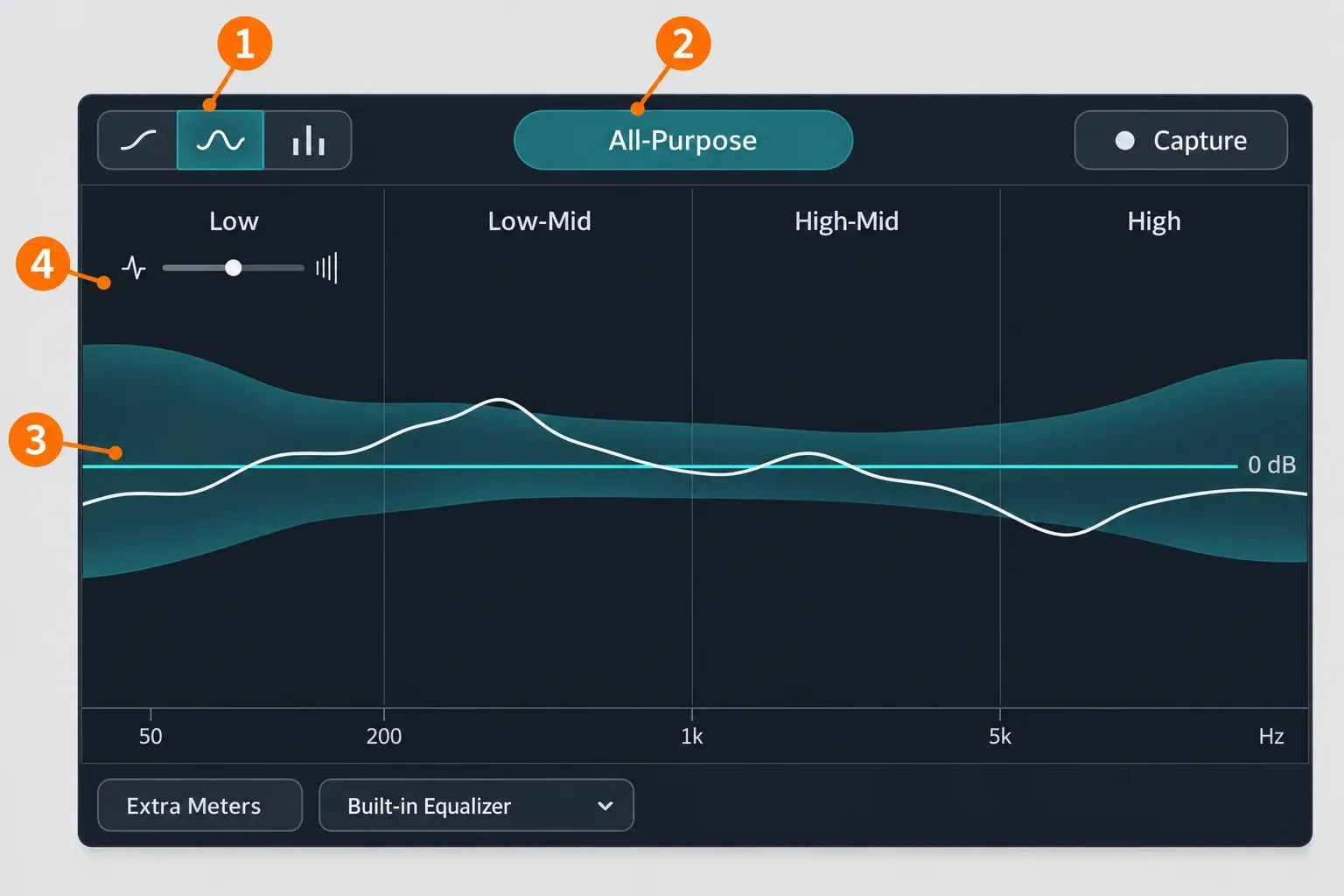
- The Main Meter draws your spectrum against the target's tolerance band.
- The Footer holds the EQ selector and the EQ bypass.
According to the Target Library chapter of the manual, the factory targets come from analysis of hundreds of professional tracks across dozens of genres and subgenres. The product page promises 30+ genre targets. WeRaveYou's launch review lists 34 named genres plus a generic All-Purpose curve. The list runs alphabetically from Alt Rock and Ambient to Techno, Trap and Vocal Jazz.
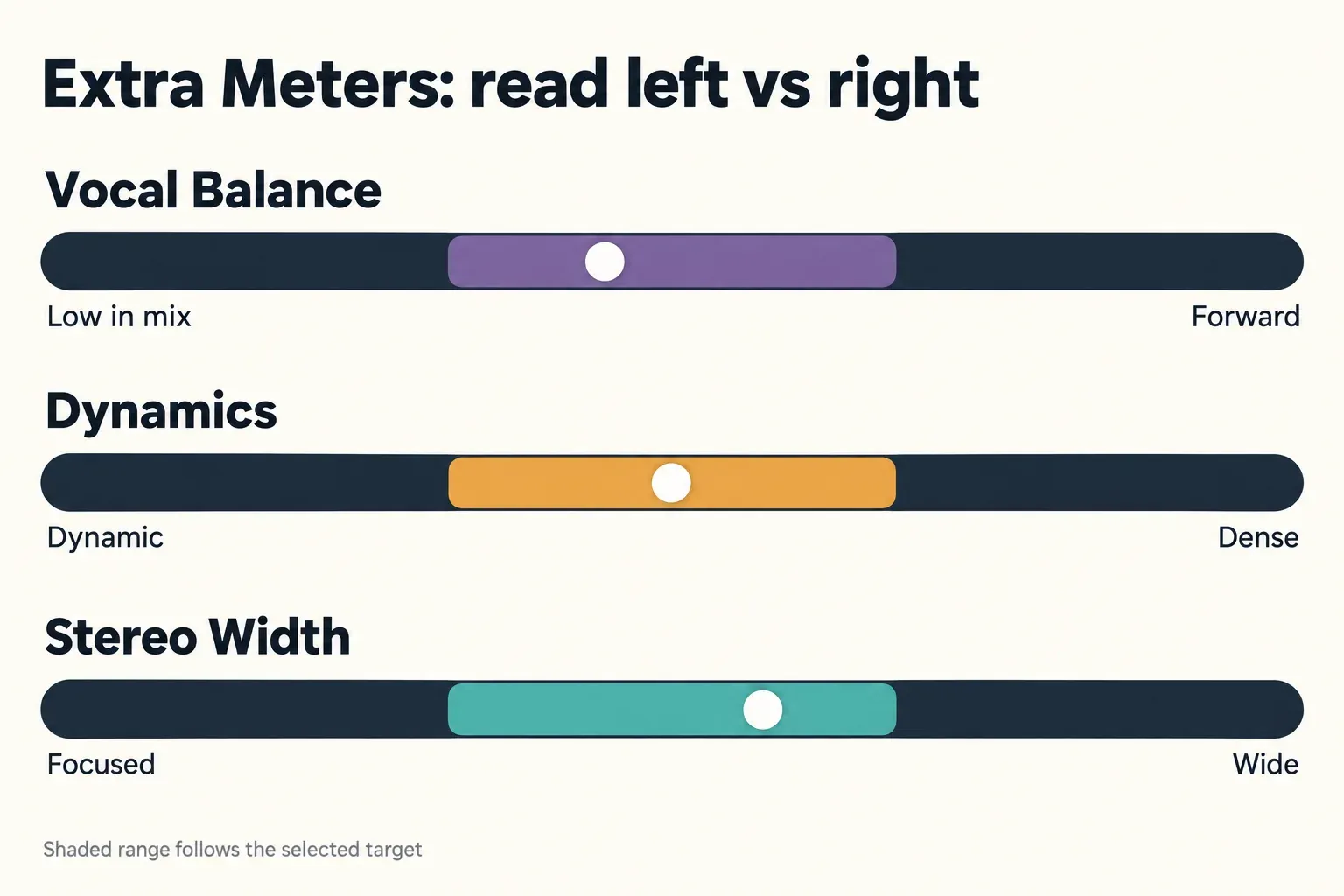
Picking a target does more than draw a curve. It sets the tolerance band on the main meter and the suggested ranges on all three Extra Meters, so the meters change their idea of "normal" when you change genre.
Tonal Balance Control 2 vs 3
On iZotope's product page, version 3 introduces six things:
- the standalone app
- Target Blender
- Leveled view
- a built-in Hybrid EQ
- new Vocal Balance, Dynamics and Stereo Width meters
- capture of DAW playback in the plugin
Here is how that lines up against the last TBC2 build.
| Feature | Tonal Balance Control 2 | Tonal Balance Control 3 |
|---|---|---|
| Capture from Spotify, YouTube or system audio | No | Yes, in the standalone app |
| Capture DAW playback as a target | No | Yes, in the plugin |
| Leveled view (target drawn as a flat 0 dB line) | No | Yes, alongside Fine and Broad |
| Target Blender | No | Yes, blend two targets from 0% to 100% |
| Vocal Balance, Dynamics and Stereo Width meters | No | Yes |
| Built-in EQ | No | Hybrid EQ with static and dynamic nodes |
| Older targets | Stored in its Target Curves folder | Imports TBC 1 and 2 targets from a folder |
| Latest version | 2.10.0 (March 20, 2025) | 3.4.0 (October 20, 2026) |
One thing goes away: VST2. TBC3 comes as AAX, AU and VST3, 64-bit only. The Tonal Balance Control release notes date 3.0.0 to March 17, 2026. They also show 2.10.0 as the last TBC2 release.
Your old targets come with you. In the Target Library, "Import legacy targets from folder" reads TBC 1 and 2 targets. On a Mac, TBC2 keeps them in ~/Documents/iZotope/Tonal Balance Control 2/Target Curves/. On Windows, the matching folder is Documents\iZotope\Tonal Balance Control 2\Target Curves\ under your user profile.
The reviews split along the same line I would draw. WeRaveYou highly recommends the upgrade to TBC2 users and calls the new meters the most impactful change. The same review warns that not much sets TBC3 apart if you already have a monitoring tool you prefer. MusicNation found it reasonably priced for a new buyer but noted complaints about upgrade costs.
My rule: if TBC2 is on your master bus every session, the $99 buys capture and three new meters, and both change what you can check. If you open TBC2 once a month, keep it.
How to use Tonal Balance Control 3 in a mix or master
The Header chapter and the Main Meter and EQ chapter of the manual cover every control. This is the order I recommend in a session.
- Insert the plugin last on the mix or master bus. That way it measures what you will actually bounce, after your limiter.
- Pick a target. Choose a factory genre target, a target you captured, or a blend. Target Blender mixes a primary and a secondary target, and the Blend Amount runs from 0% to 100%. That makes it handy when a song sits between two genres.
- Switch to Leveled view. Fine view is the default: it draws your full spectrum over the target's shaped curve. Leveled view subtracts the target from your spectrum, so the target becomes a flat line at 0 dB. Anything above the line is more energy than the target, and anything below is less. Broad view reduces the picture to four bars: Low, Low-Mid, High-Mid and High. If those names are fuzzy, the audio frequency chart puts rough numbers and instruments on them.
- Read the band, not the wiggles. The shaded band is the target's tolerance range. A spectrum that stays inside it is close to the target. Aim to keep it inside the band, not to trace the 0 dB line.
- Listen to the problem area. Band Solo plays one band in isolation. Alt-Solo (alt or option-click) solos the frequencies under the mouse, and you set its Q in Options. Neither exists in the standalone app.
- Correct it. Use the built-in Hybrid EQ, or point the EQ selector at a linked Ozone, Neutron or Nectar EQ and adjust that instead.
- Bypass and compare. EQ bypass keeps the spectrum running, so you can see and hear the mix with and without the correction.
- Recheck the Extra Meters. An EQ move that fixes the curve can push the vocal back or change the density, so look again before you move on.
Two settings in the Options chapter are worth a minute.
- The frequency scale switches between FLAT LOG, EXTENDED LOG and PIANO ROLL. PIANO ROLL helps if you think in notes.
- Average Time sets how much the spectrum is smoothed over time.
Capture a target from Spotify, YouTube or your DAW
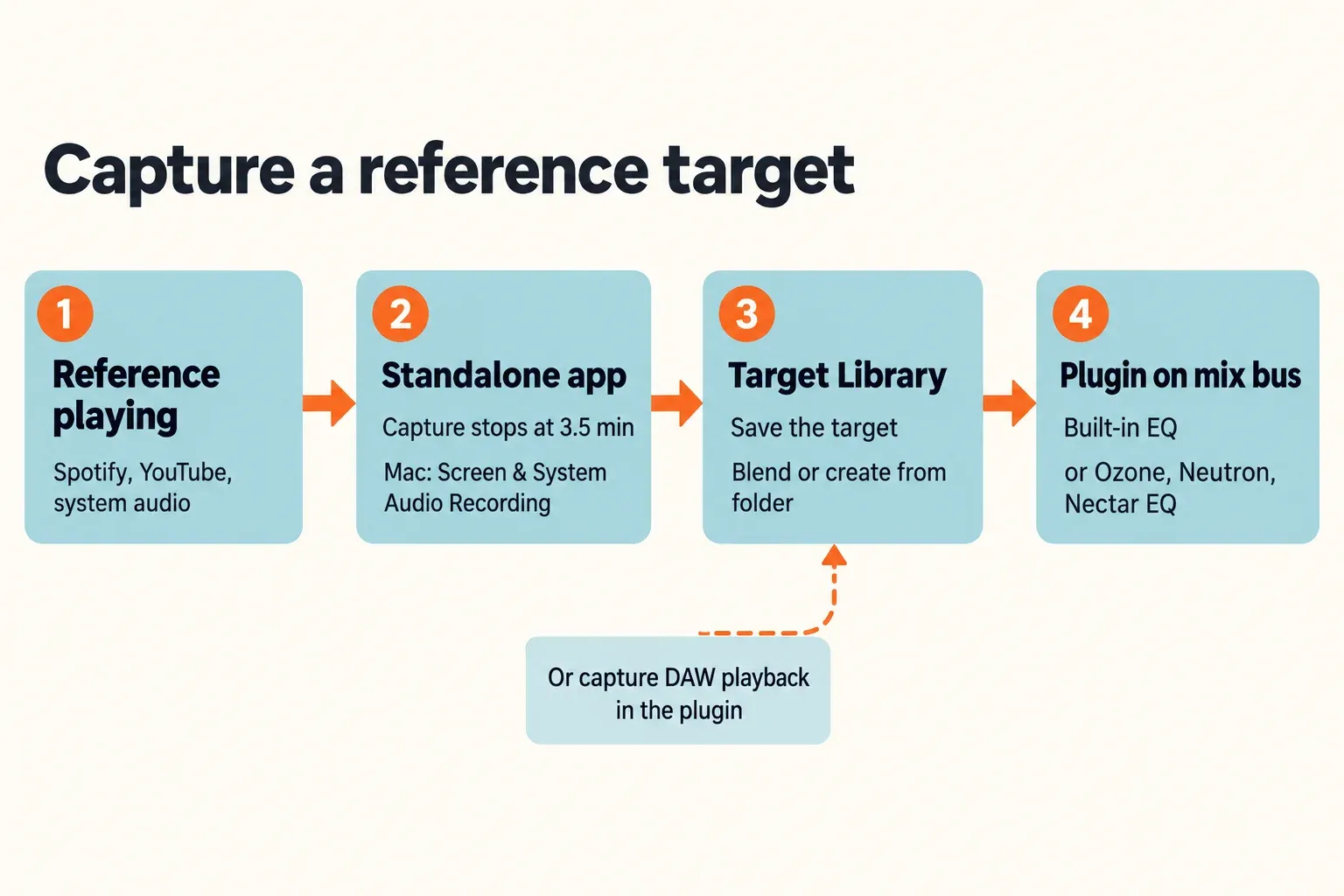
Capture works differently in the two forms. In the plugin, Capture records live audio from your DAW session. In the standalone app, it captures your computer's system output, so Spotify, Apple Music, YouTube or any other player can become a target. The app needs permission first.
- macOS: open System Settings > Privacy & Security > Screen & System Audio Recording and enable Tonal Balance Control 3. Restart the app if it was already open.
- Windows: TBC3 captures whichever device is selected as the Output in Sound settings on Windows 11, or in Sounds on Windows 10.
Two details decide whether a captured target is useful:
- The manual warns that both the playing app's volume and the system output volume affect the target. Set them once and keep them fixed for every capture.
- Capture stops by itself after 3.5 minutes.
I would capture the section you are actually matching, usually the densest chorus, rather than a whole song with a quiet intro.
You can also build a target from audio files. Point TBC3 at a single file or at a folder, and it averages the folder into one curve. That suits a set of tracks from one album or one client brief. Blend that custom target with a factory genre target if you want it to lean one way. iZotope says custom targets also load into the Ozone, Neutron and Nectar assistants, so one capture can guide several tools.
How to read the meters
The spectrum tells you where the energy sits. The four smaller meters answer questions the spectrum can't. The Extra Meters chapter and the Main Meter chapter of the manual define them this way.
| Meter | What it measures | Left side means | Right side means | Range follows the target? |
|---|---|---|---|---|
| Low End Crest Factor | Peak-to-RMS ratio of the bass | Punchy, transient-heavy low end | Dense, compressed low end | No, it stays fixed |
| Vocal Balance | Vocal level against the mix, using real-time source separation | The vocal sits low | The vocal is forward | Yes |
| Dynamics | Peak-to-short-term loudness ratio (PSR) | More dynamic | Denser and more compressed | Yes |
| Stereo Width | Broadband phase correlation | Focused and mono-compatible | Wider | Yes |
Read Low End Crest by side, not by number. Left is punchy, right is dense. Its suggested range stays the same whatever target you pick.
Dynamics reads PSR, which is not integrated loudness. Check delivery levels separately with a LUFS meter.
Stereo Width is a correlation reading. The phase correlation meter guide explains what the underlying number means for mono playback. If the meter says your mix is narrower than the target and you decide to widen it, do that with a dedicated tool such as Ozone Imager, and check mono afterwards.
Vocal Balance is the meter you can't get from a plain spectrum, and it does the heaviest work. The 3.1.0 release (May 26, 2026) added an option to turn off vocal level metering to improve performance. If a large session struggles, turn it off and back on only when you need the reading.
The built-in Hybrid EQ and iZotope plugin control
The Hybrid EQ is plugin-only, and it is the reason TBC3 can fix what it finds. To add a node, click the EQ curve or double-click the display. A HUD opens with Frequency, Gain and Q.
The filter shapes include:
- Bell
- Proportional Q
- Band Shelf
- Baxandall Bass and Treble
- Analog Shelf
- Resonant Shelf
- Flat Pass
Any node can switch to Dynamic mode, as Upward Expansion or Downward Compression with a threshold in dBFS.
Use a dynamic node when a problem shows up only on loud passages, such as low-mid build-up in a chorus. A static cut would thin the verses as well.
If you already own iZotope's mixing tools, the EQ selector can drive their EQ instead. The Footer chapter sets these minimums:
- Ozone 9.0.0 or later: its Equalizer 1 or 2 modules, or the Equalizer component plugin.
- Neutron 3.1.0+ and Nectar 3.1.0+: spectrum, gain and EQ controls, provided an EQ module is in the chain.
- Neoverb, plus Relay 1.0.3+: output spectrum and gain only.
- VocalSynth: not supported.
If you are still choosing an Ozone edition, the Ozone 12 edition comparison shows which modules each tier includes. Remember that the standalone app can't EQ at all. All of this lives in the plugin.
Test results: what published reviews report
This composite result draws on six published reviews and guides from March to May 2026: FutureMusic, WaveInformer, WeRaveYou, MusicNation, Sound On Sound and MixingGPT. None of the six publishes CPU load, latency or metering-accuracy figures. So the composite counts verdicts and recurring findings, not performance numbers.
| Finding | Reviews |
|---|---|
| Positive overall verdict | 6 of 6 |
| Target capture (standalone app or DAW) is a key addition | 5 of 6 |
| The built-in Hybrid EQ is a real improvement | 5 of 6 |
| The new meters add value beyond the spectrum | 4 of 6 |
| Treat it as a second opinion, not the final word | 3 of 6 |
| Readings can sit outside the target on records that sound right | 2 of 6 |
| Upgrade value depends on the tool you already use | 2 of 6 |
What each review says:
- FutureMusic gave TBC3 a Power Award and a "Highly Recommended" tag. Its badge shows a rating of 94.
- WaveInformer called it "a brilliant update" in a review published March 14, three days before release.
- WeRaveYou recommends the upgrade to TBC2 owners and names the meters as the biggest change. It also warns against fixing a track with EQ alone, or mixing with your eyes over your ears.
- The free opening of the Sound On Sound review comes from a long-time TBC user. It says version 3 expands the concept "in genuinely useful ways" and points to DAW capture and the standalone app. Its full verdict is paywalled, so only that opening counts here.
- MusicNation says TBC3 "quietly earns its place" without being essential in the strictest sense. Its reviewer got better results by leaving the All-Purpose target and trusting their ears.
- MixingGPT, which sells its own AI mixing assistant, calls version 3 "a meaningful upgrade, not a cosmetic refresh". It says Vocal Balance alone justifies it, and it notes that trap hits often read past the Low End Crest range and still sound right.
My reading of the composite: the praise concentrates where TBC3 is new: capture, the EQ and the meters. The caution is consistent where it always was. A target is an average of other people's records, not a verdict on yours. Buy it as a fast, honest second opinion and you will get your money's worth.
Price, upgrade and subscription (US, October 20, 2026)
List prices come from iZotope's US store. Street prices come from the plugindeals.net price history for TBC3, checked the same day. Thomann and Gear4Music figures exclude VAT.
| Option | Price | Where and conditions |
|---|---|---|
| New perpetual license | $129 | iZotope US store |
| Update from any earlier version | $99 | iZotope US store; Plugin Boutique also sells the upgrade |
| Education license | $64.50 | iZotope US store; check eligibility there |
| Native Instruments store | $129 | As listed |
| Lowest current street price | $111 ex-VAT | Thomann |
| Other stores | $121.99 to $136.25 | Best Service $121.99; Plugin Boutique, AudioDeluxe and PluginFox $129; Gear4Music $136.25 ex-VAT |
| Lowest recorded price | $96.75 | PluginFox, June 2026, the only tracked sale in 12 months |
| Upgrade, street price | $83 ex-VAT | Thomann, since October 14, per the tracker's iZotope price list |
| iZotope Pro subscription | $25/mo or $250/yr | Includes TBC3; starts with a 7-day free trial |
If you have seen €139 quoted, that is the euro list price on iZotope's default storefront. At launch, MusicRadar reported $129, €139 and £119. The US list price hasn't moved since then.
The tracker has logged one sale since launch, so I wouldn't wait for a discount if you need the tool now. The deals hub tracks iZotope pricing if you can wait.
Here is what iZotope's subscriptions page says about the Pro route:
- It starts with a 7-day free trial and renews monthly.
- It installs through Native Access and has to connect once a month to verify.
- If the subscription lapses, the included tools go read-only.
- Perpetual licenses remain on sale alongside it.
One detail matters for perpetual buyers. The release notes mark the assistant as subscription-only, and that is where the recent features went: switching or blending targets on request and mix feedback tailored to TBC in 3.3.0, then full control of Ozone modules and drum and bass stem level checks in 3.4.0. Perpetual owners still get the maintenance fixes.
Bundles are the other route. Music Production Suite 9 and Mix & Master Bundle Advanced both include TBC3. If you are weighing a bundle against the single plugin, the iZotope price and upgrade guide compares them.
There is no free edition. The official download page describes a 10-day trial that runs without restriction. After that, TBC3 switches to Demo mode and inserts silence at regular intervals. Downloading the installer requires an iZotope account login. Buying through Native Instruments creates that account for you and adds the serial. iZotope's genuinely free tools are collected in the free iZotope plugins roundup.
System requirements and supported hosts
The product page lists:
- macOS: Sonoma 14.7, Sequoia 15.4 or Tahoe 26.4 or later, on Intel or Apple silicon, natively or under Rosetta 2. The 3.0.0 release notes give Tahoe 26.1 instead, so install the latest point release of whichever version you run.
- Windows: Windows 10 (22H2) or Windows 11 (24H2).
- Formats: AAX, AU and VST3, 64-bit only. VST2 is no longer supported.
- Supported hosts: Logic 11–12, Pro Tools 2025, Ableton Live 12, Studio One 7, Fender Studio Pro 8, FL Studio 25, Cubase 15, Nuendo 14, REAPER 7, Audition CC 2026 and Premiere CC 2026.
If you run Tahoe or Logic, stay current. The 3.2.0 update (August 24, 2026) fixed obscured inline text on macOS Tahoe and GUI rendering when you reopen resized windows in Logic Pro.
Sound Forge users: Sound Forge hosts VST2 and VST3 plugins, so it can open a VST3 like TBC3. Sound Forge is not on iZotope's supported-host list, though, so compatibility isn't vendor-confirmed. For delivery loudness inside the editor, the Sound Forge loudness meters cover what TBC3 doesn't measure.
Limits: when to ignore the target
- A target is an average, not a verdict. MusicNation's reviewer got better results by leaving All-Purpose and listening. MusicNation calls the tool a second opinion rather than the final authority.
- Some genres live outside the range. MixingGPT notes that trap records often read past the suggested Low End Crest range and still sound right. If your genre's references do the same, follow the references.
- Eyes can override ears. WeRaveYou warns against fixing a track with EQ alone or mixing to the screen. Make the move, close your eyes, and bypass.
- Captured targets depend on playback level. Change the player or system volume between captures and the targets stop being comparable.
- The standalone app can't fix anything. It is for analysis only, so corrections happen in the plugin.
- The newest assistant tricks need a subscription. A perpetual license doesn't include the 3.2/3.3 assistant features.
TBC3 vs Ozone 12 Master Assistant and free alternatives
If you already master in Ozone, you already have part of what TBC3 does. According to the Ozone 12 Master Assistant documentation, the Master Assistant has a Tonal Balance section with metering that iZotope describes as familiar to TBC users. It ships ten genre targets. It can use custom reference targets, but it doesn't build vocal balance targets from them. The Ozone 12 review covers the rest of that suite.
TBC3 adds three things:
- 30+ targets
- capture from any source
- the Vocal Balance, Dynamics and Stereo Width meters
It also works outside a mastering chain, on a mix bus while you are still balancing. Its custom targets load back into the Ozone, Neutron and Nectar assistants, so the two products complement each other rather than compete. If you only master, Ozone 12's view may be all you need. If you mix against references, TBC3 is the better tool.
On a zero budget, a free spectrum analyzer and correlation meter get you part of the way. The free metering plugins list covers them, and the audio spectrum analyzer guide explains how to read a plain FFT without a target band. MusicNation got similar kinds of results with REAPER's stock JS plugins but called that route clunky. That matches the trade: free tools give you the readings, and TBC3 gives you the target, the band and the fix in one window.
Verdict
- Buy it ($129) if you mix or master against references and want one window that shows the gap, plays the problem band and fixes it.
- Upgrade ($99) if TBC2 is a fixture on your master bus. Capture and Vocal Balance alone change what you can check.
- Subscribe to iZotope Pro if you would rather rent iZotope's wider toolset and want the subscription-only assistant features.
- Skip it if you already have a referencing tool you trust, or if Ozone 12's Master Assistant covers your mastering and you rarely reference during the mix.
FAQ
Does Tonal Balance Control 3 run as VST2?
No. It is AAX, AU and VST3, 64-bit only. Hosts that load only VST2 can't run it.
Can I use my Tonal Balance Control 2 targets?
Yes. Use "Import legacy targets from folder" in the Target Library and point it at TBC2's Target Curves folder.
Is there a free version?
No. Your free options are the 10-day full trial and iZotope Pro's 7-day trial.
Is Tonal Balance Control accurate?
The factory targets come from analysis of hundreds of professional tracks, and they show where your mix departs from that average. Three of the six published reviews treat it as a second opinion rather than the final word, and two note readings outside the target on records that sound right.