
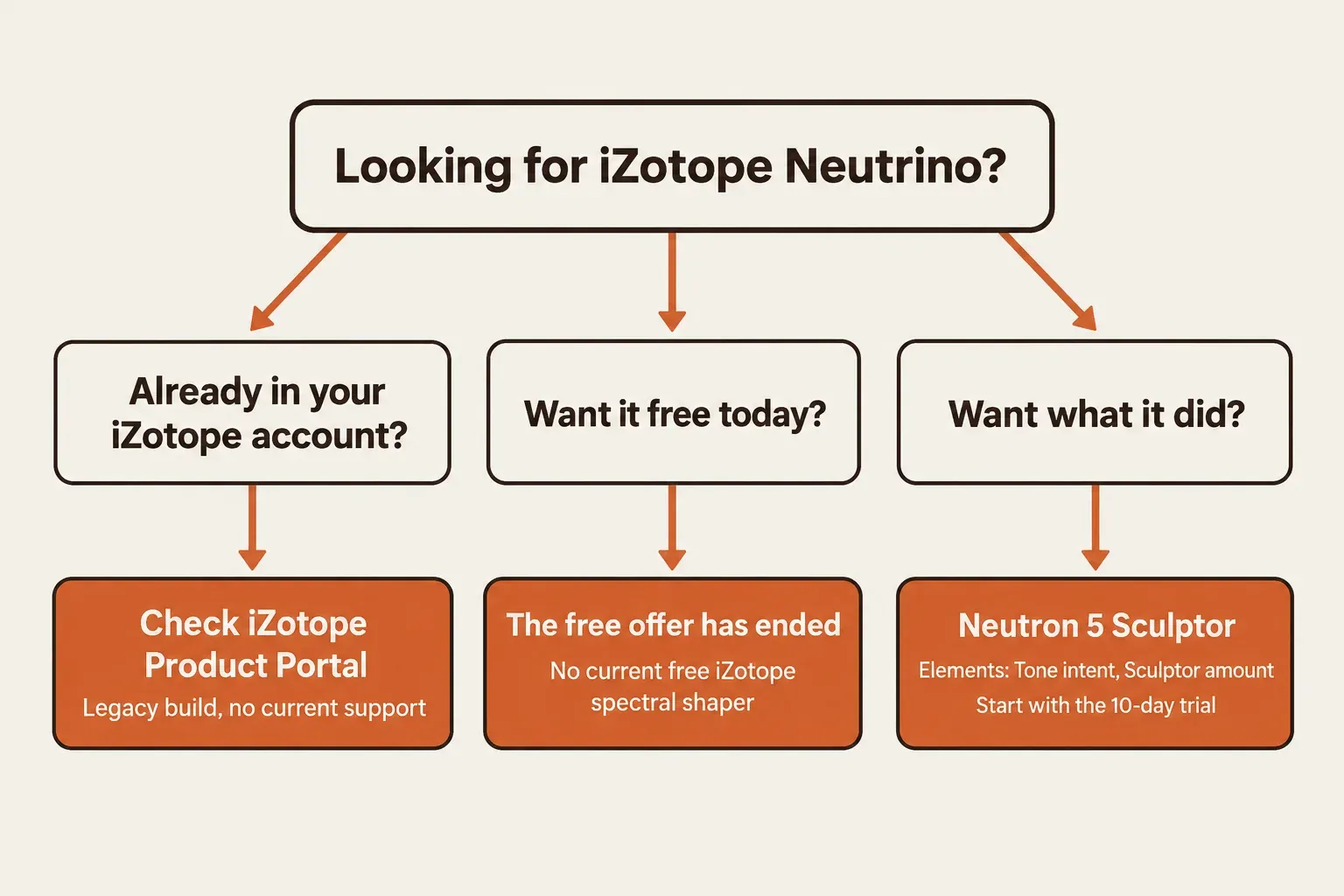
iZotope Neutrino was a free spectral-shaping plug-in from September 2016, and iZotope no longer offers it. It's gone from the free plugins page, the store and the Legacy Products page, and its old product page now redirects to Neutron 5. Its job lives on in Neutron 5's Sculptor module, which compresses up to 32 bands toward an instrument target, and none of iZotope's current free plug-ins does that.
I wouldn't spend an evening hunting for an old installer. Neutrino's last official requirements stopped at Mac OS X 10.13 High Sierra and Windows 10, and no current iZotope compatibility statement mentions it. If you want what it did, I'd run the 10-day Neutron 5 trial first, then choose between Elements, where Sculptor survives as one amount inside the Tone intent, and full Neutron 5, where Sculptor has its own controls. The rest of the product line, from RX to Ozone, is mapped on the iZotope hub.
What iZotope Neutrino was
Neutrino was a mix sweetener, not a repair tool. iZotope released it free in September 2016 as a preview of the mixing technology behind Neutron, and MusicRadar's launch report called it a showcase for that technology. Despite the near-identical name, it was never a version of Neutron. It was a separate free plug-in with one job.
That job is what iZotope calls spectral shaping. iZotope's explainer on spectral shaping describes subtle, low-ratio compression applied separately across dozens of frequency bands, with thresholds that adjust themselves. Neutrino analyzed audio in 32 Mel-spaced bands and processed each one without crossovers, and iZotope likened the result to a 32-band dynamic equalizer. Compared with an ordinary multiband compressor, the differences are the band count, the missing crossovers and the automatic thresholds. The algorithm grew out of iZotope's research for the IRC IV maximizer in Ozone 7 and was then tuned to run on many tracks at once.
The controls were deliberately few: four modes and two knobs. SoundGym's Neutrino write-up, which follows iZotope's own product copy, gives each mode its purpose.
| Neutrino mode | What it aimed at |
|---|---|
| Voice | Clarity and detail, so vocals sit on top of the mix |
| Instrument | Smoother resonances while the instrument keeps its character |
| Bass | More punch and weight |
| Drums | Clearer transient detail |
Amount set how much of the dynamic processing was applied. Detail set how finely that processing was spread across the spectrum, and a Detail change took a moment to settle. iZotope's 2016 getting-started post gave a starting point: choose the mode, set both knobs to 25%, put Neutrino at the end of the chain the way you would an analog summing emulation, use it on tracks, submixes or stems rather than the master, and judge it in the full mix rather than in solo. That post is gone from iZotope's site and survives only in Internet Archive captures, but its advice carries over to Sculptor, as the replacement section shows.
Can you still download iZotope Neutrino?
No, not as a new user. iZotope never announced an end date; the offer simply disappeared. Neutrino isn't on iZotope's free plugins page, which lists Vocal Doubler, Vinyl, Ozone Imager, Trash Lite and Ozone EQ, and the store catalog has no Neutrino product at any price. It's also missing from iZotope's Legacy Products page, the page that keeps installers for past buyers of products iZotope no longer sells and still carries older Neutron versions.
The old addresses tell the same story. The short Neutrino address on izotope.com now lands on the store catalog, and the old product page redirects to Neutron 5. Internet Archive captures show the free-download page live until at least May 2019, and by January 25, 2020 the same address pointed to Neutron's Sculptor feature page. The exact withdrawal date was never published, so the window between those two captures is as precise as the record gets.
If Neutrino is already in your iZotope account
Owners should start with their iZotope account. The 2016 offer was tied to an iZotope account, and in 2019 a MAGIX forum thread about Neutrino 1.0 pointed users back to that account for the license code. Today the official app for installing products already in an account is iZotope Product Portal. The Product Portal FAQ excludes a short list of old products, Ozone 5 and below, RX 3 and below, Nectar 1, Iris 1 and Trash 1 among them, and Neutrino isn't on that list. That doesn't prove Neutrino appears or installs today, and no iZotope page confirms either. If it is listed under My Products, treat it as a legacy build with no current support.
Product Portal itself runs on Windows 10 and 11 and on macOS Ventura 13.7 through Tahoe 26.1, on Intel Macs and under Rosetta on Apple silicon, according to iZotope's Product Portal overview. The macOS 27 note for Product Portal users adds that Apple has announced macOS 27 as the last macOS with Rosetta 2, which Product Portal needs on Apple silicon, and that installers can also be downloaded from the iZotope account under My Products > Install & Activate. When Product Portal refuses to install or authorize an older product, the Product Portal install and authorization fixes cover the usual errors.
A Neutrino installer from anywhere other than iZotope is unofficial, and nothing guarantees what's inside it. I wouldn't run one on a computer that holds your sessions and paid licenses.
Will an old copy of Neutrino run today?
Nothing official says it will. Neutrino's last published requirements were Windows 7, 8 and 10 and Mac OS X 10.9 to 10.13 High Sierra; no later macOS and no Windows 11 ever appeared. It shipped as VST2, VST3 and Audio Unit in 32- and 64-bit builds, AAX in 64-bit, plus RTAS and AudioSuite, and no native Apple silicon build was ever documented.
Current statements leave it out. Neutrino isn't in iZotope's Apple silicon compatibility table, which says all shipping products and certain older ones run under Rosetta 2, and it isn't in the macOS 26 Tahoe compatibility statement either. iZotope's macOS compatibility article says legacy products, including previous versions of supported products, haven't been updated for macOS Big Sur, and iZotope's own support pages file Neutrino under legacy products. Apple silicon Macs arrived in November 2020 with macOS Big Sur, so no M-series Mac falls inside the range Neutrino was built for.
Format is the second trap. Since Neutron 4, RX 10 and Ozone 10, iZotope ships VST3 rather than VST2, because Steinberg no longer supports VST2, as iZotope's VST2 migration note explains. A session built on Neutrino's VST2 version has no current iZotope VST2 to fall back on, and the VST plug-in primer covers what changes between the two formats. For contrast, Neutron 5 lists macOS Sonoma 14.7, Sequoia 15.7 and Tahoe 26.2 on Intel and Apple silicon, plus Windows 10 and 11, as 64-bit AU, VST3 and AAX.
I wouldn't build a new session around Neutrino even if an old copy loads. A plug-in with no update path can stop loading after the next system update, and every mix that depends on it stops opening the way you left it.
Test results: what reviews and users reported
Across seven published sources, the verdict is consistent: Neutrino was simple, subtle and free, and none of them published a measurement of it. With no CPU, latency or loudness figures to compare, this composite result is a count of what reviewers and users reported, not a median.
| Finding | Sources (of 7) |
|---|---|
| Simple design: four modes, two knobs | 4 |
| Subtle effect, a sweetener rather than a fix | 3 |
| Meant for many tracks at once; no CPU or latency figure published | 3 |
| Seen as a preview of Neutron or its technology | 3 |
| The free offer has ended | 2 |
| Practical friction in 2017–2019 | 2 |
| A concrete audible gain described | 1 |
The design is the most common finding. Four of the seven, including SoundGym and Sweetwater's SoundCheck episode on Neutrino, recorded with a guest from iZotope, describe the same four modes and two knobs, and three call the effect subtle. MusicRadar's launch report put it plainly: "Don't expect radical changes," comparing the idea to analog summing or console emulation.
Only one source names a concrete gain. SoundGym credits Neutrino with added clarity, particularly on rhythmic parts; the other six stay general. Three of seven repeat that it was built to sit on every track, yet none publishes a CPU or latency number, so low CPU use remains iZotope's own claim rather than a measured result.
Three of seven read it as a preview of Neutron or its technology, MusicRadar and a Steinberg Forums thread from October 2016 among them. Two say the offer is over, which iZotope's pages confirm by absence. Two record practical friction: install and licensing confusion in the MAGIX thread, and on Steinberg's forums a WaveLab 9.0 crash when loading saved effects, solved by the 9.1 release, plus a Cubase user's report of added delay from a deactivated instance, with no figure given.
The takeaway for anyone searching now: losing Neutrino costs you a light finishing touch, not a tool that fixed problems. Judge its replacement on the same terms, at a low amount across several tracks and in the full mix, rather than expecting it to rescue one bad recording.
What replaced Neutrino: Sculptor in Neutron 5
Sculptor is the closest match, and iZotope drew that line itself when the old Neutrino page began redirecting to Neutron's Sculptor feature page. The Neutron 5 Sculptor manual describes a spectral-shaping tool that compresses the signal in up to 32 frequency bands toward a selected target curve and is designed not to add distortion. Its thresholds can aim at that target or stay adaptive, compressing the signal toward its own time-averaged spectral shape.
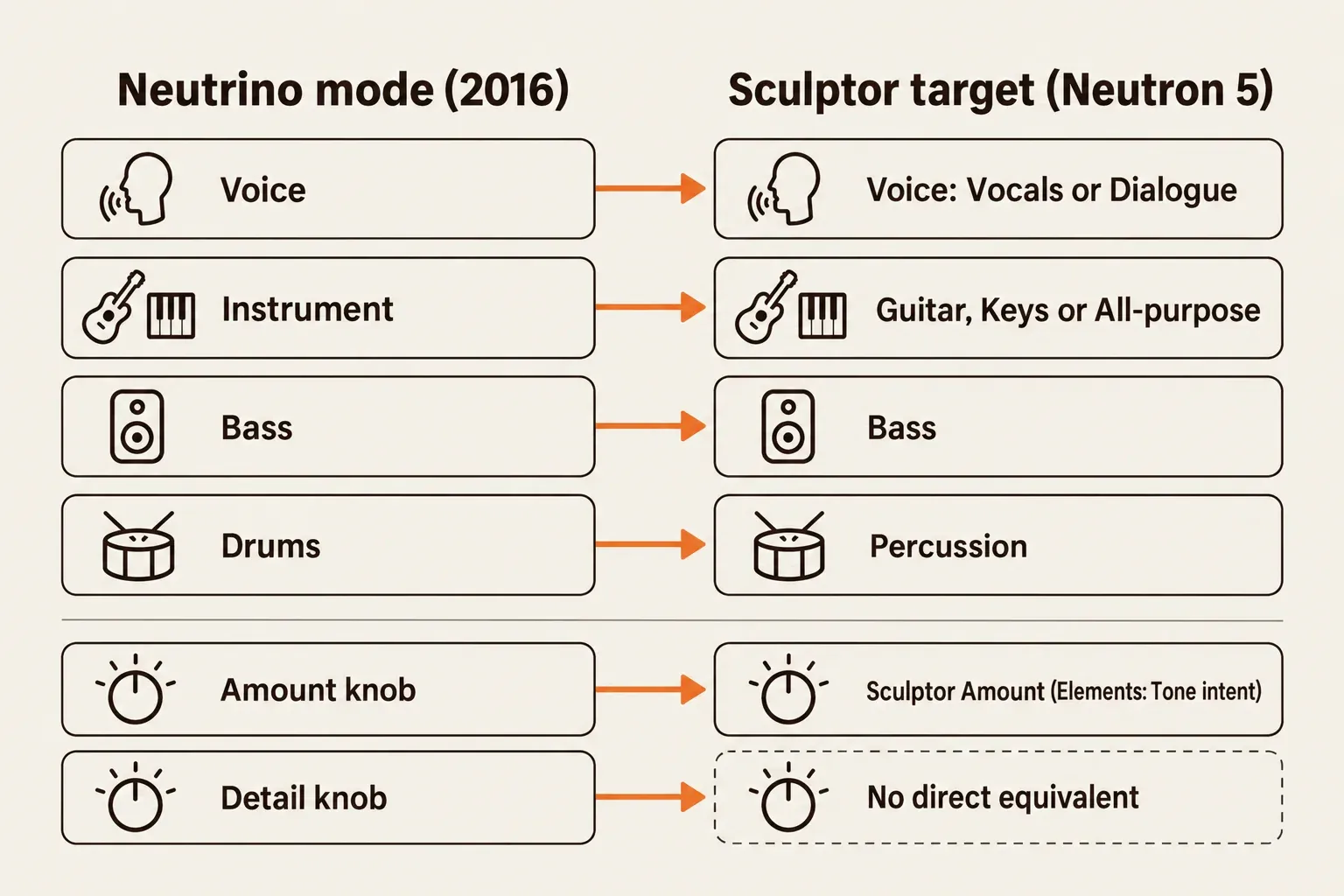
Neutrino's mode switch becomes Sculptor's target menu. When Sculptor opens, or after Reset, it asks for a target: All-purpose, Bass, Guitar, Keys, Orchestral, Percussion or Voice, with Voice split into Vocals and Dialogue. iZotope doesn't publish a mode-to-target table, so this mapping is mine, not iZotope's.
| Neutrino (2016) | Sculptor in Neutron 5 | How close |
|---|---|---|
| Voice mode | Voice target: Vocals or Dialogue | Close; pick the one that matches the source |
| Instrument mode | Guitar, Keys or All-purpose target | Sculptor splits what Neutrino lumped together |
| Bass mode | Bass target | Same name, same source |
| Drums mode | Percussion target | Same source family |
| Amount knob | Sculptor Amount (in Elements, the Sculptor amount inside the Tone intent) | Same role |
| Detail knob | No direct equivalent | Nothing in the manual maps to it |
The controls go well past two knobs. According to the manual, Sculptor's HUD holds Amount, which sets how much processing is applied to meet the target, plus the target menu, Tone for timbral character, Speed for the ballistics of the compression, and Solo to hear the processing on the selected range only. Range Selector handles limit where Sculptor works: narrow for surgical shaping, wide for an EQ-like overall balance. In the header, Delta lets you hear only the difference, Channel Modes switch between Stereo, Mid/Side and Transient/Sustain, and the Difference Meter shows how much gain is added or removed.
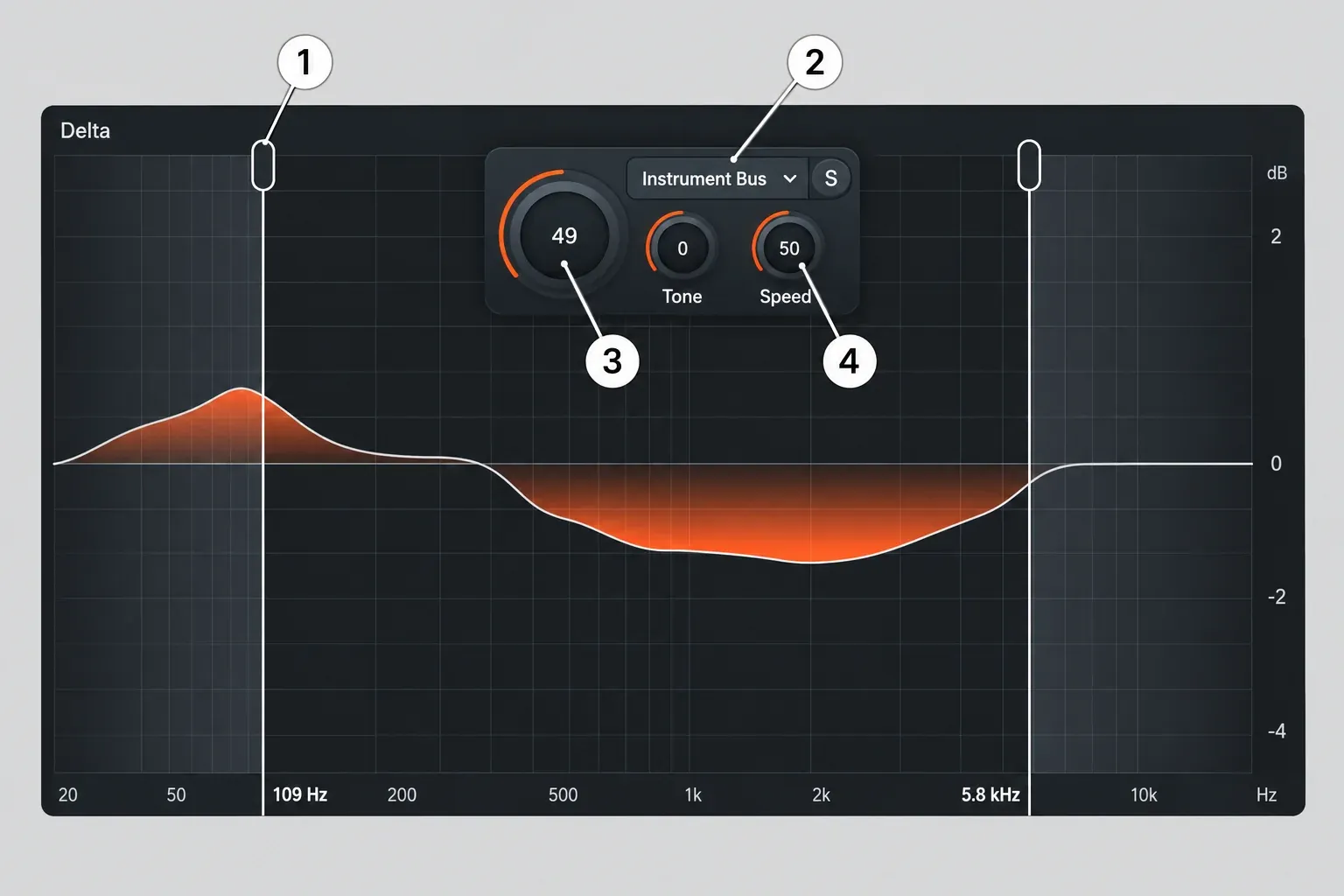
iZotope's 2016 Neutrino advice still makes a sound Sculptor starting point. I'd pick the target, keep Amount low, put Sculptor late in the chain and judge it with the whole mix playing, not in solo. That keeps it doing what Neutrino did, a light balancing move, instead of turning it into heavy corrective EQ.
For two tracks fighting each other, rather than one track's tone, Unmask is the adjacent tool. The Unmask manual page describes a dynamic sidechain processor that splits the spectrum into 32 bands and clears space between two tracks only while masking occurs, and it needs a sidechain input. That's a different job from Neutrino's, so it helps to know which problem you have before you buy.
Free iZotope plug-ins you can get today
None of them is a spectral shaper. iZotope's free lineup is Ozone EQ, Ozone Imager, Vinyl, Vocal Doubler and Trash Lite, and the free plugins page describes them as an equalizer, a stereo-width tool, a lo-fi saturator, a vocal doubler and a distortion. Ozone EQ, the Ozone 12 equalizer, comes through Native Access with a free Komplete Start sign-up; the other four check out at $0 in iZotope's store.
Ozone EQ is the nearest of the five for tone, and the free Ozone EQ guide covers what it does. It's still an equalizer, and none of iZotope's descriptions calls it a spectral shaper, so it won't do Neutrino's job on its own. On macOS 26 Tahoe, iZotope's statement lists Ozone Imager 2, Vinyl, Vocal Doubler and the Ozone 12 Equalizer as compatible. What each free tool is good for is covered in the free iZotope plugins guide, and free tools from other developers are collected on the free plugins and trials hub.
Neutron 5 Elements or full Neutron 5?
Elements is the cheapest legal way back to Neutrino's idea; full Neutron 5 is the way to real control over it. Neutron 5 lists at $299 and Neutron 5 Elements at $55 on iZotope's US store (October 23, 2026). Upgrading from Elements to full costs $245, and updating from an earlier Neutron or crossgrading from a paid iZotope product costs $199. Every upgrade and crossgrade route is laid out in the iZotope price and upgrade guide.
The catch with Elements is control. The Neutron 5 Elements manual says Elements contains the Assistant only. Its Tone intent includes a Sculptor amount aimed at the selected target curve, and the deeper Detailed View controls are reserved for full Neutron 5. So Elements gives you something close to Neutrino's single Amount knob, while Sculptor's Range Selectors, Tone and Speed controls and the standalone Sculptor plug-in stay in the full version. Full Neutron 5 is a suite of 11 plug-ins, a main plug-in plus 10 component modules, and Sculptor is one of those components, so it can sit on a track by itself.
The arithmetic makes the choice low-risk. Elements plus the upgrade comes to $300, a dollar more than buying full Neutron 5 outright, so starting small costs almost nothing. My pick for anyone who simply misses Neutrino is Elements, because one amount per source is what Neutrino offered. Buy full Neutron 5 if you want to set range, speed and target on each track.
Try before either. The Neutron download page says the trial runs without restriction for 10 days, then switches to Demo mode, which inserts silence at regular intervals, and the download needs an iZotope login. I'd spend those ten days with Sculptor on your own sessions before paying, because neither edition brings back Neutrino's two-knob simplicity exactly. For the rest of the suite, from the Mix Assistant to the other modules, the Neutron 5 review has the full verdict.
Using Sculptor in Sound Forge Pro
Sound Forge Pro isn't on iZotope's tested host list for Neutron 5, and it wasn't on Neutrino's 2017 list either. That means iZotope makes no promise for it, not that it fails. The Neutron 5 product page names hosts such as Logic Pro 12, Pro Tools 2025, Ableton Live 12, Cubase 15, Reaper 7, FL Studio 2025, Audition 2025 and DaVinci Resolve 19.
On the host side, the Sound Forge pricing page lists VST2, VST3 and ARA support in both editions, and Sound Forge's help on Melodyne and SpectraLayers ARA editing has you add the VST3 folder as an Alternate VST search folder under Preferences, VST Effects tab. Of Neutron 5's formats, AU, VST3 and AAX, VST3 is the one Sound Forge Pro lists, so that's the format to point it at.
The 10-day trial doubles as the compatibility check: install it, rescan, and run Sculptor on a copy of a real file before buying. How third-party plug-ins load is covered in the Sound Forge plug-ins guide. When Sculptor doesn't appear after the install, start with the fixes for VST plug-ins not showing in Sound Forge Pro, and to run it after an EQ, the Plug-in Chainer guide shows how to build the chain.
The verdict on iZotope Neutrino
My verdict: let Neutrino go. It was a pleasant, subtle free teaser, the reviews that described its sound call it a light touch, and an unsupported 2016 build is a poor base for anything you plan to reopen. If you miss what it did, Neutron 5 Elements brings back the one-amount version through its Tone intent, and full Neutron 5 is the pick when you want Sculptor's range, speed and target on every track. Run the 10-day trial in your own host first, Sound Forge Pro included, since it isn't on iZotope's tested list. For a no-cost start, Ozone EQ is the free iZotope plug-in worth installing today, even though it won't shape a mix the way Neutrino did.