

Drop a finished WAV or another browser-decodable audio file into the meter below. The meter analyzes decoded audio on this device without uploading your file or sending its name or readings to analytics. Reset clears the selected file and results. Site analytics may still record ordinary page visits.
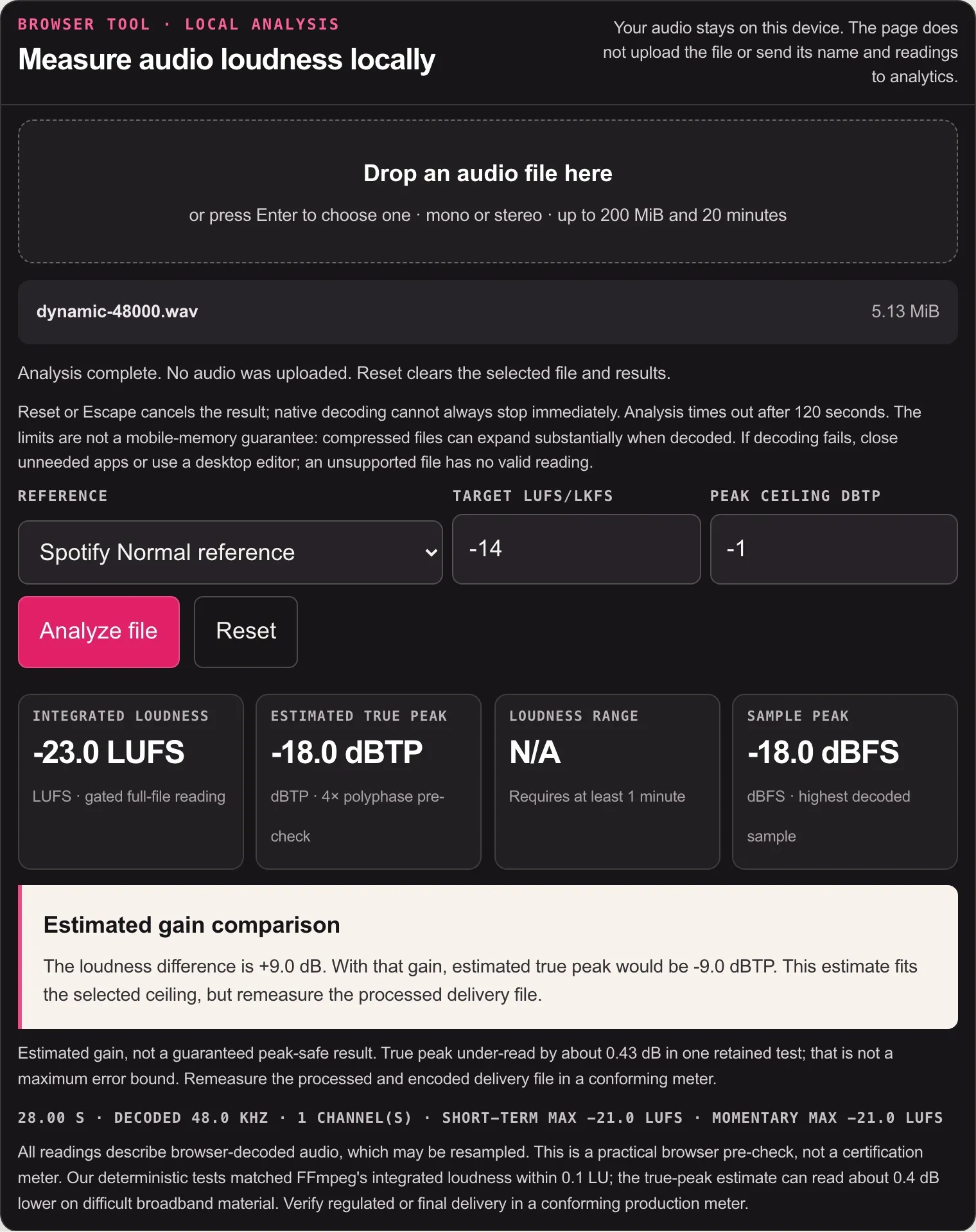
The four useful numbers are integrated loudness, loudness range, estimated true peak and sample peak. Read them together: a single LUFS value can’t tell you whether the file will cross a peak ceiling, and a peak reading says nothing about how loud the whole program feels.
Browser tool · local analysis
Measure audio loudness locally
Your audio stays on this device. The page does not upload the file or send its name and readings to analytics.
Formats depend on your browser's decoder. WAV is the safest choice for a final check.
Reset clears the selected file and results. Escape cancels an active analysis; native decoding cannot always stop immediately. Analysis times out after 120 seconds. The limits are not a mobile-memory guarantee: compressed files can expand substantially when decoded. If decoding fails, close unneeded apps or use a desktop editor; an unsupported file has no valid reading.
Estimated gain, not a guaranteed peak-safe result. True peak under-read by about 0.43 dB in one retained test; that is not a maximum error bound. Remeasure the processed and encoded delivery file in a conforming meter.
All readings describe browser-decoded audio, which may be resampled. This is a practical browser pre-check, not a certification meter. The tool's deterministic tests matched FFmpeg's integrated loudness within 0.1 LU; the true-peak estimate can read about 0.4 dB lower on difficult broadband material. Verify regulated or final delivery in a conforming production meter.
How to measure LUFS without uploading the file
- Choose a mono or stereo file. PCM WAV is the safest final-check format; compressed formats work only when your browser can decode them.
- Select a reference. Use a numeric reference or the recipient’s specified values. The ATSC preset does not add dialogue gating or certify A/85 compliance; the measurement remains gated full-program loudness.
- Press Analyze file. The browser decodes the full program and runs the loudness calculation in a local worker.
- Read the gain plan. If the LUFS target needs more gain than the peak ceiling allows, the meter says so instead of pretending that normalization is a one-number fix.
Read the four numbers in this order
| Reading | What it answers | What it does not answer |
|---|---|---|
| Integrated LUFS | How loud the complete gated program measures | Whether inter-sample peaks cross a delivery ceiling |
| Estimated true peak, dBTP | How high the reconstructed waveform may rise between stored samples | Whether the track is dynamically healthy or musically balanced |
| Loudness range, LU | How widely short-term loudness varies across the program | Whether a particular genre “should” be more or less dynamic. EBU R128 does not recommend LRA for programs shorter than one minute because there are too few short-term data points. |
| Sample peak, dBFS | The highest amplitude in the browser-decoded samples | The original stored-sample peak when decoding has resampled the file, or the peak of a later encoded delivery |
Momentary vs Short-Term vs Integrated vs LRA
These readings answer different questions, so do not judge the file from one number alone.
| Reading | Time span | What it tells you |
|---|---|---|
| Momentary maximum | Loudest rolling 400 ms window | The strongest brief burst in the file. It is not the loudness target for the whole program. |
| Short-Term maximum | Loudest rolling 3-second window | The loudest sustained passage, useful for finding a section that stands above the rest. |
| Integrated LUFS | From measurement start to stop | Overall gated program loudness. On this page, that means the complete selected file. |
| LRA | Gated Short-Term values across the measurement | How widely program loudness varies. It is measured in LU, not LUFS. |
Do not compare unlike numbers. This meter reports the maximum Momentary and Short-Term values found in the file, not live moving readings. An LRA of 7 LU and a target of −14 LUFS answer different questions.
The measurement follows the gated program-loudness method described in ITU-R BS.1770-5: K-weighted energy is measured in overlapping blocks, then very quiet material is excluded by absolute and relative gates. That is why long silence at the head or tail does not simply drag the integrated result down like an ordinary average.
Compare the same decode and channel mode. The browser’s decodeAudioData method resamples audio to the AudioContext rate. The footer reports that decoded rate, not necessarily the original file rate. Sample peak therefore means decoded-sample peak here, and all readings can differ from a native-rate desktop scan. Mono is measured as one channel, without dual-mono compensation. Duplicating identical audio into two channels raises its loudness reading by about 3.01 LU; opposite polarity does not cancel energy in this meter. Match the channel and peak settings of your reference meter before comparing.
Integrated loudness requires a complete 400 ms block. Momentary and short-term maxima use 400 ms and 3-second windows sampled every 100 ms. The final incomplete block is omitted. LRA uses gated short-term values with a 1.5-second zero tail for file analysis, as described in EBU Tech 3342. This interface hides LRA below one minute. Silence or an empty loudness gate has no finite integrated value; N/A is not a loudness target.
A target is a reference, not a grade
I'd choose the recipient’s reference rather than treating a preset as an approval badge. These presets change only two numbers; they do not select a different measurement algorithm. For spoken-word delivery, use the publisher's or host's stated target instead of borrowing a music or broadcast preset; the podcast loudness standard guide covers common stereo and mono targets, true-peak checks, and export verification.
- Spotify Normal is a playback-normalization reference of −14 LUFS. Spotify also advises keeping true peak below −1 dBTP for masters at or below that level and below −2 dBTP for louder masters, because lossy encoding can add peak energy. Those details are in Spotify’s loudness-normalization guidance.
- EBU R128 uses −23 LUFS and a −1 dBTP maximum permitted true peak for linear audio during production. Distribution or codec specifications may require a lower ceiling, as explained in the current EBU recommendation.
- ATSC A/85 uses −24 LKFS absent metadata and a −2 dBTP ceiling in its television delivery context. ATSC lists A/85:2026-07, approved July 8, 2026, on the ATSC A/85 technical page. LUFS and LKFS name the same unit, but the measurement method still matters. A/85 differentiates long-form dialogue measurement from short-form full-program measurement. This tool does not detect dialogue or classify content; its ATSC preset changes only the reference numbers and is not an A/85 compliance result.
None of those numbers can decide how much compression, limiting or musical density a master needs. Spotify also recommends −14 integrated LUFS in its mastering tips, but that is not a universal requirement for every service or release. Its web player and some third-party devices do not apply normalization; listener settings and album playback can also change the outcome.
When gain alone cannot satisfy both references
Suppose a file measures −18 LUFS with an estimated true peak of −2 dBTP, and the selected reference is −14 LUFS with a −1 dBTP ceiling. Loudness asks for 4 dB of gain, while the estimated peak allows only 1 dB. These readings cannot be satisfied together by gain alone. Because the peak is an estimate, even the suggested 1 dB is not a guaranteed safe ceiling; verify the actual processed output.
The remaining 3 dB needs a processing decision. The gain calculation assumes the same blocks survive the absolute loudness gate; a large level change can alter that set, so remeasure after processing. It would require a limiter, compression, clipping or a different mix decision. The meter reports that conflict but doesn’t process the file, because choosing how peaks are controlled is an audible mastering decision.
Numerical checks and measurement limits
On September 14, 2026, this meter's deterministic 44.1 and 48 kHz fixtures were rerun through its worker and FFmpeg 8.1.2’s ebur128 filter: steady tones, low-frequency weighting, broadband noise, gated dynamics, correlated and anti-phase stereo, inter-sample peaks and 65-second level changes. Separate silence and endpoint-impulse checks cover missing results and boundary samples. These are numerical tests, not listening tests or a complete ITU/EBU conformance suite.
| Metric | Largest observed difference in the fixture set | How to use it |
|---|---|---|
| Integrated LUFS | Within 0.1 LU | Suitable for a practical local loudness check |
| Loudness range | Within 0.1 LU on the two 65-second level-change fixtures | Short clips are excluded from this comparison; the interface hides their LRA |
| Estimated true peak | About 0.4 dB lower on the hardest broadband-noise case | Use as a pre-check; verify regulated or final delivery in a conforming production meter |
The limits are mono or stereo, up to 200 MiB (209,715,200 bytes) and 20 minutes. Duration and channel count can be checked only after decoding. A 20-minute stereo decode at 48 kHz needs 460,800,000 bytes, about 439 MiB, for one 32-bit sample buffer alone; decoder, copies and worker overhead require more. A small compressed input may therefore exceed a phone’s available memory. It relies on the browser’s audio decoder, so extension support isn’t universal. It won’t certify a broadcast master, inspect encoded-platform output or replace listening after gain and dynamics changes.
Check the same file in Sound Forge
If Sound Forge is already in your workflow, use this browser meter as a quick independent read, then repeat the measurement in the editor before export. The Sound Forge LUFS, R128 and true-peak guide shows the current Channel Meters, separate Loudness Meters window, EBU/ATSC presets and loudness-log route.
Use this page for a local file reading. Use the Sound Forge guide when you need the editor’s monitoring, presets or loudness-log workflow.
For another local measurement task, use the audio tools directory. For gain and dynamics decisions after measuring, continue with the mastering guides.
Frequently asked questions
Is my audio uploaded to SoundForgePro?
No. The browser reads and decodes the selected file locally. The tool does not send the audio, filename or measured values to this site's server or analytics.
Which file formats does the LUFS meter support?
It supports audio formats your browser can decode. PCM WAV is the most dependable choice; MP3, AAC/M4A, OGG, FLAC and AIFF availability can differ by browser and operating system.
What is the difference between LUFS and dBTP?
Integrated LUFS describes gated program loudness over time. dBTP describes the estimated highest reconstructed peak between samples. One is a loudness measure; the other is a peak-safety measure.
Should every song be mastered to −14 LUFS?
No. −14 LUFS is Spotify’s Normal playback reference, not a universal mastering instruction. Musical density, dynamics, genre, release context and true-peak headroom still require judgment.
Why can true peak be higher than sample peak?
A digital-to-analog or lossy-codec reconstruction can form a waveform crest between stored samples. Oversampled true-peak estimation looks between those sample points; an ordinary sample-peak meter does not.
Can this tool normalize or download a corrected file?
No. It measures and calculates a peak-aware gain plan but does not alter the audio. Limiting or compression is an audible decision that should be made in an editor or mastering chain and checked again afterward.