

Buy CrumplePop if you clean dialogue inside a video editor and want one Strength control that works in real time on the timeline. Buy iZotope RX 12 Standard if your recordings carry hum, mouth clicks, sibilance or breaths, because RX has a dedicated module for each of those and CrumplePop does not. Boris FX listed CrumplePop at $345 perpetual or $25 a month on May 7, 2026; RX 12 Standard cost $399 on the US iZotope store on October 20, 2026, or comes inside iZotope Pro at $25 a month.
My rule is simple. If the problem lives across the whole clip, such as wind, traffic, room noise or echo, and you want it gone without leaving Final Cut Pro, Premiere Pro or DaVinci Resolve, CrumplePop is the faster tool, and Final Cut Pro is one of its supported hosts. If the problem has a shape you could point at, such as a hum line, a lip smack, a hard S or a siren under one word, I would buy RX 12 Standard, because spectral repair is what RX is built for. Both brands now belong to Boris FX, so this is a choice of workflow, not of vendor.
Quick verdict: CrumplePop or RX
CrumplePop is a set of one-job plugins you drop on a clip. RX is a repair editor with plugins around it. The table compares CrumplePop 2026.5 with RX 12 Standard, the first RX edition with the editor.
| CrumplePop 2026.5 | iZotope RX 12 Standard | |
|---|---|---|
| Best for | Dialogue cleanup on the timeline: wind, traffic, room noise, echo, rustle | Targeted repair: hum, clicks, sibilance, breaths, music, sounds you can see in a spectrogram |
| How you work | Real-time plugin with a Strength control; SoundApp for full clips | Standalone spectral editor, real-time plugins and RX Connect |
| Entry price | $345 perpetual or $25/month (Boris FX list, May 7, 2026) | $399 (US iZotope store, October 20, 2026) or iZotope Pro at $25/month |
| Final Cut Pro | Supported host | External editor round trip; iZotope does not support most of its plugins in Final Cut Pro |
| ARA | SoundApp ARA in Pro Tools, Cubase, Reaper, Sequoia, Samplitude | Spectral Editor ARA in Logic Pro and Studio One 7 / Fender Studio Pro 8 only |
| Main gap | No dedicated hum, de-ess, de-click or breath tool | Spectral Repair works only in the standalone editor |
The closer match in format is RX 12 Elements: six plugins, no editor, $99 on the same US store. MusicTech's RX 12 review says Elements handles common problems like clicks and hum but leaves out the standalone editor, so it competes with CrumplePop on price and format, not on repair depth.
Ownership no longer separates them. CrumplePop was already part of Boris FX when the company announced its acquisition of iZotope on July 2, 2026, and Boris FX said every iZotope product, license and subscription stays active. For more on both brands, see the Boris FX audio hub. If RX is the direction you lean, start at the iZotope RX hub.
Price and licensing in October 2026
For a perpetual license, CrumplePop costs $54 less than RX 12 Standard. On subscription, both cost $25 a month, but a year of CrumplePop is $75 less than a year of iZotope Pro, which adds Ozone 12 Advanced and Nectar 4 Advanced to RX 12 Standard.
| Plan | Price | What it includes |
|---|---|---|
| CrumplePop monthly | $25/month | Every CrumplePop plugin (ARA, VST, AU, AAX) plus SoundApp |
| CrumplePop annual | $175/year | The same toolkit |
| CrumplePop perpetual | $345 | The same toolkit, owned |
| CrumplePop Upgrade & Support | From $195 | Plan holders received 2026.5 as a free update |
| RX 12 Elements | $99 | Six plugins including Repair Assistant, no editor |
| RX 12 Standard | $399 new; $299 from Elements; $349 crossgrade from any paid iZotope product; $129 from RX 11 Standard | Standalone editor, Dialogue Isolate and the Standard repair modules |
| RX 12 Advanced | $1,399 | Standard plus film and TV post modules |
| iZotope Plus | $15/month or $150/year | RX 12 Elements, Ozone 12 Standard, Nectar 4 Standard |
| iZotope Pro | $25/month or $250/year | RX 12 Standard, Ozone 12 Advanced, Nectar 4 Advanced |
The CrumplePop prices are the ones Boris FX published in its CrumplePop 2026.5 announcement on May 7, 2026, where it also says one license covers the ARA, VST, AU and AAX plugins and the standalone SoundApp. The CrumplePop product page adds that Boris FX now sells a single Multi-Host plan with lower pricing for new plans, and that existing users keep their current access. Confirm the figure at checkout before you buy.
The RX prices are logged-out list prices on the US iZotope store on October 20, 2026, with no sale running: RX 12 Elements at $99, RX 12 Standard at $399 and RX 12 Advanced at $1,399, the same new-license prices MusicTech reported at launch. The subscription tiers and what each includes come from the iZotope subscriptions page and iZotope's list of products in Plus and Pro. One difference matters before you subscribe: if you cancel iZotope Plus or Pro, the tools turn read-only once the subscription expires.
For more on RX pricing, read our RX price, trial and license guide; owners of other iZotope products should also see our iZotope price and upgrade guide. If you can wait for a sale, look at our deals hub before paying list price.
Hosts, plugin formats and system requirements
CrumplePop covers every major video editor, Final Cut Pro and VEGAS Pro included. RX 12 covers the main DAWs plus Premiere Pro, Audition and Resolve, and leaves Final Cut Pro to an external-editor round trip.
| Host | CrumplePop | iZotope RX 12 |
|---|---|---|
| Final Cut Pro | Plugin | Not on the RX 12 host list; RX works as an external editor |
| Premiere Pro | Plugin, after a scan in the Audio Plugin Manager | Plugin; RX standalone as an external editor |
| Audition | Plugin | Plugin; RX Connect |
| DaVinci Resolve | Plugin | Plugin |
| Media Composer | AudioSuite plugin | RX Connect |
| Pro Tools | AAX, most tools under AudioSuite > Noise Reduction; SoundApp ARA | AAX and AAX AudioSuite plugins; RX Connect |
| Logic Pro | AU plugin | Plugin; external editor; Spectral Editor ARA (Logic 10.7+, under Rosetta on Apple silicon) |
| GarageBand | AU plugin | Not on the RX 12 host list |
| Cubase and Nuendo | VST3 plugin; SoundApp ARA in Cubase | Plugin; RX Connect |
| Reaper | VST3 plugin; SoundApp ARA | Plugin; external editor |
| VEGAS Pro | Plugin; included with VEGAS Pro Plus and Ultimate | Not on the RX 12 host list |
The CrumplePop column follows the host list on the CrumplePop product page and the 2026.5 announcement, which adds Audition, Pro Tools, GarageBand and Logic. The RX column follows the host list on iZotope's RX 12 product pages, iZotope's note that most iZotope products are not supported in Final Cut Pro, even though they can be scanned in as Audio Units, and the RX Connect FAQ. RX 12 plugins come in AU, AAX, AAX AudioSuite, VST3, AU ARA and VST3 ARA formats, all 64-bit only.
System requirements split the two more than the host lists do. CrumplePop's plugins on a Mac need macOS 12 Monterey or later, a 2.7 GHz Intel Core i5 or better, 8 GB of RAM and 450 MB of disk; on Windows they need 64-bit Windows 10 or 11. SoundApp is stricter: macOS 14 or later on an Apple silicon Mac (M1 or newer), 16 GB of RAM and at least 10 GB free. RX 12 lists macOS Sonoma 14.7, Sequoia 15.7 and Tahoe 26.2 on Intel or Apple silicon, and Windows 10 22H2 or Windows 11 24H2. An Intel Mac still on macOS 12 or 13 meets the CrumplePop plugin requirements but falls outside the ones for SoundApp and RX 12.
Finding the plugins is the usual first hurdle. In Adobe apps, Audacity and Resolve, CrumplePop sits under Audio Effects > VST3 > Restoration > CrumplePop Complete, or Audio Effects > AU > CrumplePop Complete for the AU versions on a Mac. Premiere Pro and Audition show it only after a scan in Preferences > Audio > Audio Plugin Manager. If a CrumplePop plugin turns up disabled in Final Cut Pro, Boris FX's fix is Preferences > General, the Audio Units "Validate on Next Launch" button and a restart; it also suggests running fewer instances, or putting many segments in a compound clip so one instance covers them. When RX plugins are the ones missing, start with our fix for iZotope plugins not showing up.
How each one processes audio
CrumplePop asks you to choose the plugin that matches the noise and set one Strength value. RX asks you to look at the problem and choose a module, often in a separate editor. That difference decides how each fits into an edit.
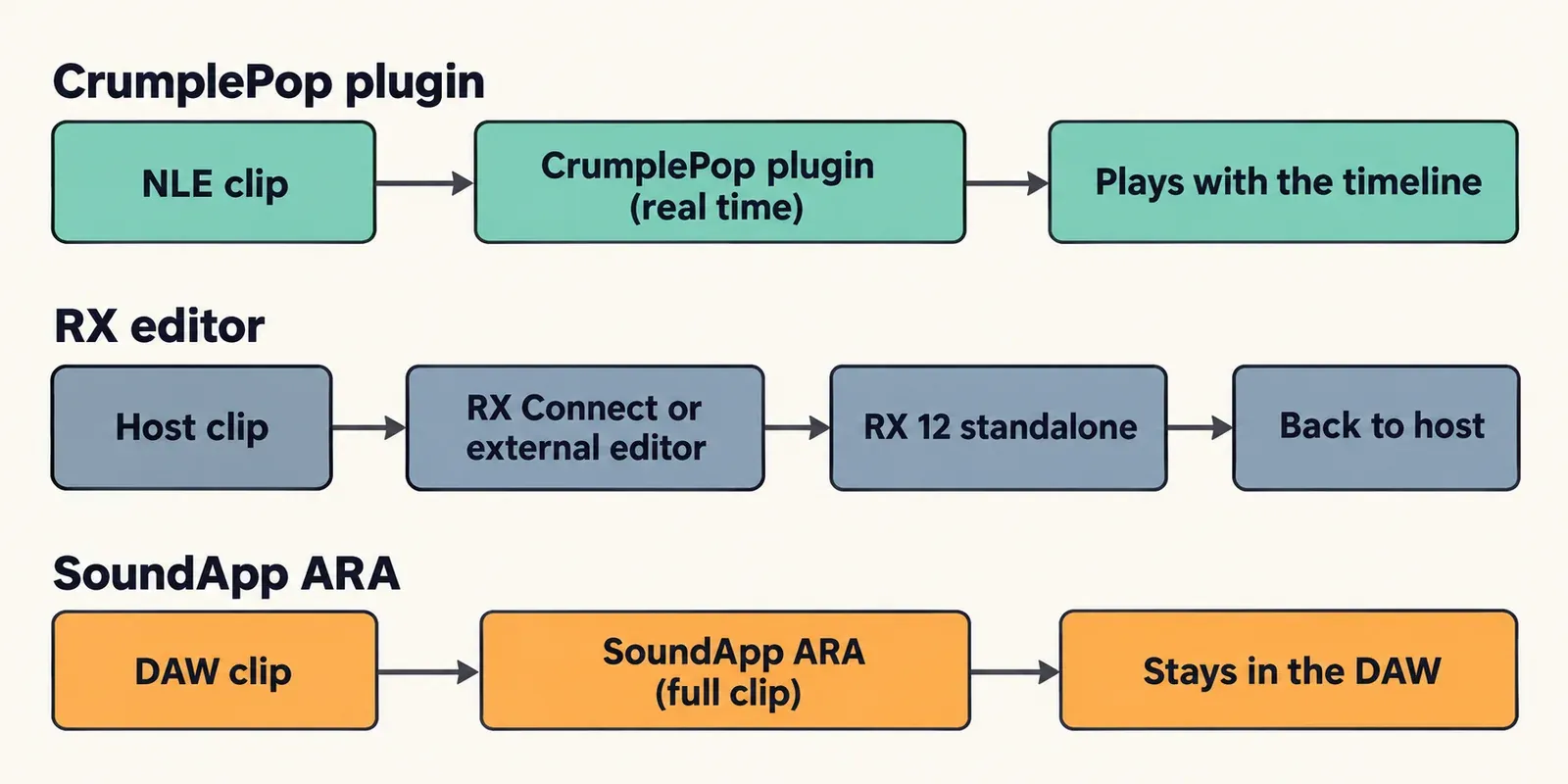
CrumplePop: one plugin per noise, one main control
There is no noise print to capture and nothing to render: in his review of the CrumplePop bundle, Oliver Peters found the plugins work in real time on the timeline. Boris FX told him the filters use AI models to generate a clean version of the audio, which is why wind, traffic and similar noises each get their own plugin, and a messy clip may need several stacked. Pro Video Coalition's 2025 CrumplePop review shows that pattern: WindRemover on its defaults first, then Voice Enhance on top. Larry Jordan's CrumplePop review notes that the default Strength is 80% and that at 100% the speaker can sound "a bit weird," so the right move is to back Strength off, not push it.
SoundApp is the full-clip side of the same license. As an ARA plugin in Pro Tools, Cubase, Reaper, Sequoia and Samplitude, it processes the whole clip inside the DAW, without the real-time limits of a standard plugin. As a standalone app it opens WAV, AIFF, MP3, FLAC, AAC, MP4, MOV, MKV, MPG/MPEG and MXF files, separates vocals, drums and bass, and removes noise, echo and wind. Boris FX says processing runs locally on your GPU, with no cloud upload and no credits, and version 2026.5 added a Processed Audio Cache and faster model loading.
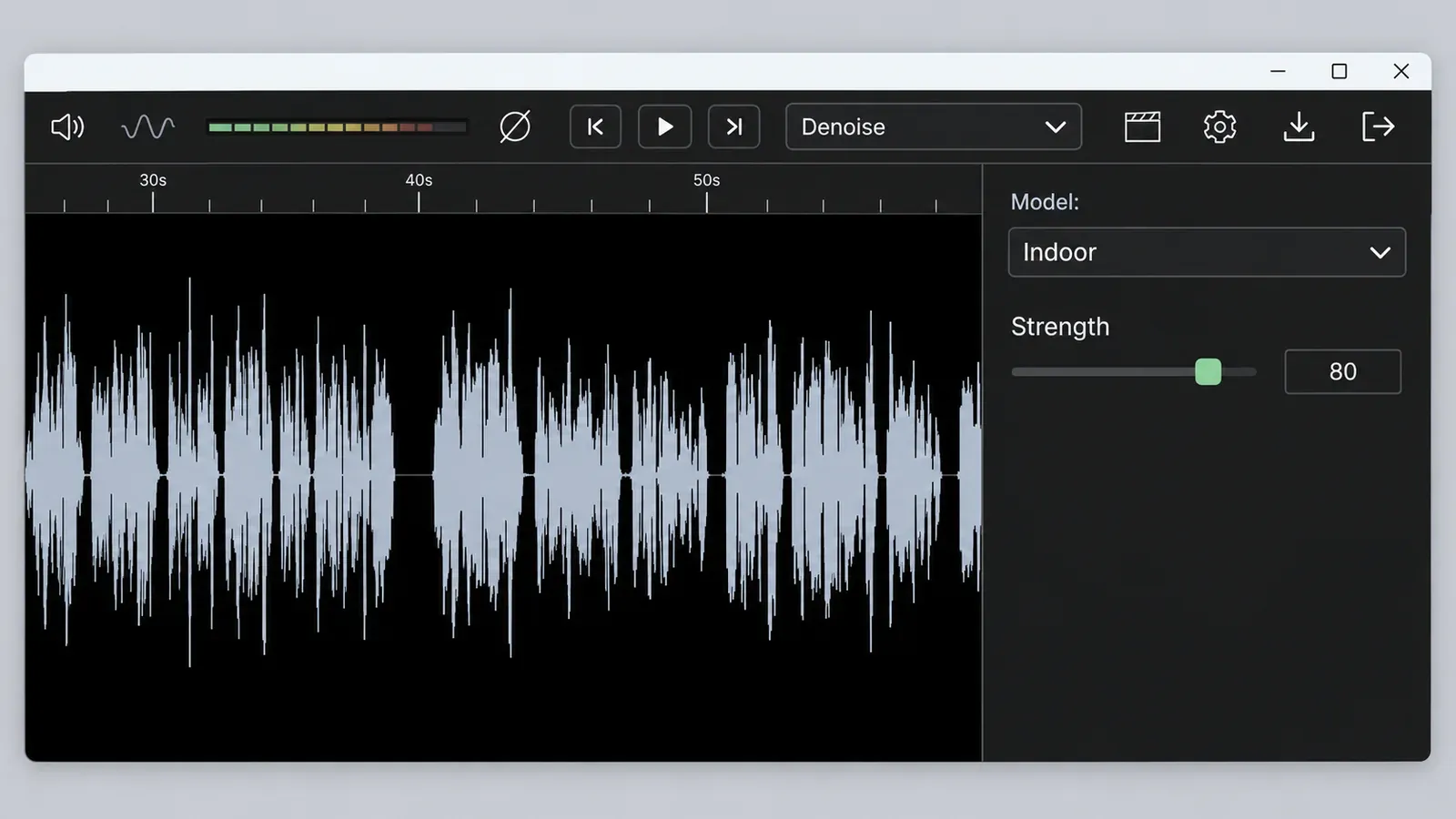
RX: see the problem, then repair it
iZotope's pitch for RX is that you can visually target and replace sounds such as dog barks, string squeaks and sirens in the spectrogram. That job, Spectral Repair, runs only in the RX standalone application according to iZotope's guide to where each RX module runs; there is no real-time or AudioSuite version. Hosts reach the editor in two ways: Pro Tools, Media Composer, Audition, Cubase and Nuendo send audio through the RX Connect plug-in, while Live, Premiere Pro, Final Cut Pro, Logic and Reaper use RX as an external editor.
Final Cut Pro is the awkward case. iZotope's route for RX with Final Cut Pro is Reveal in Finder (Shift-Command-R), open the file in RX, repair it and save. Saving in place is destructive, so work on a copy. RX cannot overwrite video files, so audio inside a video file has to be exported, repaired and reimported.
RX 12 moved more of the work onto the timeline. The RX 12 release notes list improved Music Rebalance and Dialogue Isolate and a rebuilt De-bleed with a real-time plugin, all in Standard and Advanced, and MusicTech confirms that Music Rebalance and Dialogue Isolate joined the real-time RX plugins. For the dialogue side, see our RX Dialogue Isolate guide and our full RX 12 review.
What each one can fix, problem by problem
CrumplePop has a dedicated plugin for wind, traffic, room noise, echo, plosives, rustle and clipping. RX 12 Standard has a module for most of those plus the jobs CrumplePop leaves open: hum, clicks, sibilance, breaths, bleed and sounds that hit a single word.
| Problem | CrumplePop tool | RX 12 Standard module | My pick |
|---|---|---|---|
| Steady room noise and hiss | AudioDenoise | Voice De-noise, Spectral De-noise | CrumplePop on the timeline, RX in a DAW |
| 50/60 Hz hum | AudioDenoise is described as removing hum, but Larry Jordan found no CrumplePop tool that removes AC hum | De-hum | RX |
| Wind | WindRemover | Dialogue Isolate | CrumplePop, which has a plugin named for the job |
| Traffic and street noise | TrafficRemover | Dialogue Isolate, Voice De-noise | CrumplePop |
| Room echo | EchoRemover | De-reverb | Either |
| Plosives | PopRemover (free) | De-plosive | CrumplePop, since PopRemover costs nothing |
| Clothing rustle on a lav | RustleRemover (free) | Not in Standard; de-rustling is an RX 12 Advanced tool | CrumplePop |
| Clipping | ClipRemover | De-clip | Either |
| Mouth clicks and crackle | No dedicated tool | Mouth De-click, De-click, De-crackle | RX |
| Sibilance | No de-ess tool | De-ess | RX |
| Breaths | No de-breath tool | Breath Control | RX |
| A siren or dog bark under one word | Larry Jordan found sirens and loud exterior noise stayed | Spectral Repair in the standalone editor | RX |
| Music under dialogue, stems | SoundApp separates vocals, drums and bass | Music Rebalance, Dialogue Isolate, Stems View | RX for control, SoundApp if you already own it |
| Microphone bleed | No dedicated plugin | De-bleed, now with a real-time plugin | RX |
| Matching room tone between takes | No dedicated plugin | Not in Standard; Ambience Match is RX 12 Advanced only | RX Advanced |
The CrumplePop column uses the plugin list on the CrumplePop product page. Boris FX describes AudioDenoise as removing hiss, background noise and hum, but Larry Jordan found no CrumplePop tool that removes 50 or 60 Hz AC hum, and he found the noise remover left sirens and other loud exterior noise in place. Oliver Peters noted in 2023 that CrumplePop had no de-ess, de-breath, de-click or de-hum filters and nothing music-specific, and the 2026.5 plugin list still has none of the first four. Levelmatic and Voice Enhance are finishing tools rather than repairs: Larry Jordan describes Levelmatic as automatically adjusting levels so nothing is too loud or too soft.
The RX column uses the repair list on the official RX 12 Standard page and the Advanced-only modules named on the RX 12 Advanced page. If your files have already left the video editor and you work in Sound Forge, the same jobs have Sound Forge routes: removing hiss and hum in Sound Forge, reducing wind noise in a voice recording, reducing sibilance without dulling the voice and removing mouth clicks without damaging speech. For the RX side of steady noise, the guide to removing background noise with iZotope RX is the next step.
Which RX edition is the fair comparison
Compare CrumplePop with RX 12 Standard on capability and with RX 12 Elements on format. Advanced only enters the picture for film and TV post work.
- RX 12 Elements, $99: six plugins including Repair Assistant, with no standalone editor. MusicTech says it handles common problems like clicks and hum; Sound On Sound's RX12 review calls it a very small subset of six relatively basic noise-removal tools. Next to CrumplePop, it is the cheapest way to add click and hum repair.
- RX 12 Standard, $399: the standalone editor, Dialogue Isolate, the full repair list from the table above and the new Stems View. MusicTech calls Standard solid value, and Sound On Sound notes that it lacks the newest additions and most film and TV modules but keeps Dialogue Isolate. This is the real CrumplePop rival.
- RX 12 Advanced, $1,399: adds Scene Rebalance, Trim Silence, Ambience Match, Dialogue Contour, EQ matching and de-rustling. MusicTech lists the large premium over Standard as a con; on the US store on October 20, 2026, that premium was $1,000.
Before you pick an edition, see the RX Elements vs Standard vs Advanced comparison. For this matchup, Elements is the like-for-like plugin bundle and Standard is the first edition with the editor.
Test results: what published reviews and shootouts show
Across eight published sources, the pattern is consistent. All five CrumplePop reviews found it gets usable results from its defaults or one Strength control, three of the five reported side effects such as artifacts or level loss, and two named the jobs it cannot do. On the RX side, two of three sources say Standard keeps most of the toolkit for far less than Advanced and that Elements is a small, basic subset, and Production Expert's 2025 listening shootout placed RX Dialogue Isolate, tested before RX 12, at a median third among eight dialogue noise-reduction plugins, with a range of second to fourth across four noisy recordings. No published review has run CrumplePop and RX on the same recordings, so the table counts verdicts rather than scoring one product against the other.
| Finding | Count | Who reported it |
|---|---|---|
| CrumplePop gets usable results from defaults or one Strength control, with no noise print | 5 of 5 CrumplePop reviews | Pro Video Coalition (2025), Larry Jordan (2023), Oliver Peters (2023), Music Radio Creative's CrumplePop review (an affiliate review), Larry Jordan's 2020 review of the earlier plugins |
| Artifacts or level loss when pushed | 3 of 5 | Jordan 2023 (the voice can sound "weird" at 100%), Peters 2023 ("lounge" became "loun" at the end of a sentence), Jordan 2020 (AudioDenoise 2 defaults too strong on the older generation) |
| Missing tools for common fixes | 2 of 5 | Jordan 2023 (no 50/60 Hz hum tool; sirens stay), Peters 2023 (no de-ess, de-breath, de-click or de-hum) |
| Held its own against a named rival | 2 of 5 | Peters 2023 (EchoRemover sounded better than Resolve's Voice Isolation on one reverberant track), Jordan 2020 (competitive with iZotope and Accusonus tools of the time) |
| RX 12 Standard keeps most of the toolkit for far less than Advanced | 2 of 3 RX sources | MusicTech (April 2026: "solid value", with a large Advanced premium), Sound On Sound (July 2026) |
| RX 12 Elements is a small, basic subset without the editor | 2 of 3 | MusicTech, Sound On Sound |
| RX Dialogue Isolate no longer dominates dialogue noise reduction | 1 of 3 | Production Expert (2025): placements 2, 3, 3 and 4 |
The hard numbers are few. Production Expert's 2025 dialogue noise-reduction shootout put eight plugins on four dialogue recordings (AC noise with reverb, a reversing vehicle with broadband noise, cicadas, and traffic with reverb), judged them by listening and rendered in best/offline mode. RX Dialogue Isolate, then part of RX Advanced, placed second once, third twice and fourth once, a median of third. Neither iZotope nor CEDAR led: the winners were Hush Pro, Accentize dxRevive Pro and Supertone Clear, and no plugin won all four. That shootout ran before RX 12 and did not include CrumplePop, so read it as RX's standing against specialist dialogue tools.
On speed, MusicTech timed RX 12's stem split of a 4'30" test mix at about 1'45", against about 2'30" in RX 11, roughly 30% less time on the reviewer's machine, and rated RX 12 a 7 overall. On the CrumplePop side, Pro Video Coalition's reviewer stacked WindRemover and Voice Enhance on their default settings over poor location audio and said it sounded "worlds better," and he frames any repair as getting broken audio back to 80 to 90%, never 100%. Music Radio Creative calls the tools easy to use even for beginners.
My verdict: CrumplePop is the quickest fix on a timeline, and the reviews agree on where it stops: hum, clicks, sibilance, breaths and noises that land on one word. RX 12 Standard is the deeper repair tool, but Production Expert's shootout shows its Dialogue Isolate is no longer the automatic pick for pure dialogue denoising, so I would not pay the $1,000 Advanced premium for dialogue cleanup alone. If dialogue noise is your only job, read our guide to the best iZotope RX alternatives before you buy either.
Free options, trials and bundles
Both can be tried for free, and two CrumplePop plugins stay free for good.
- CrumplePop trial: the CrumplePop free trial is fully functional but adds an audio watermark, and it includes two free plugins. A beeping sound during playback means you are still in trial mode; entering the Activation Key from your receipt email in Boris FX Hub removes it.
- Free for good: PopRemover and RustleRemover keep working for free after you install the complete bundle, as Production Expert's guide to RX alternatives explains.
- SoundApp trial: Boris FX offers a 15-day SoundApp trial with the full feature set and no credit card.
- iZotope trial: iZotope Plus and Pro start with a free 7-day trial. Once installed, iZotope products work offline, but Native Access must connect once a month to verify the subscription.
- VEGAS Pro bundles: the VEGAS Pro plan comparison shows the CrumplePop VST plugins in VEGAS Pro Plus and Ultimate, but not in base VEGAS Pro, and SoundApp Standalone only in Ultimate.
- Existing subscribers: active CrumplePop, Boris FX Suite and VEGAS Pro Ultimate subscriptions, and CrumplePop Upgrade & Support plans, received 2026.5 as a free update.
If you already pay for VEGAS Pro, check your plan before buying anything, and see our VEGAS Pro plugins guide. For other no-cost tools, browse our free plugins hub and the guide to free iZotope plugins.
Who should buy which
Match the tool to where you edit and what goes wrong most often.
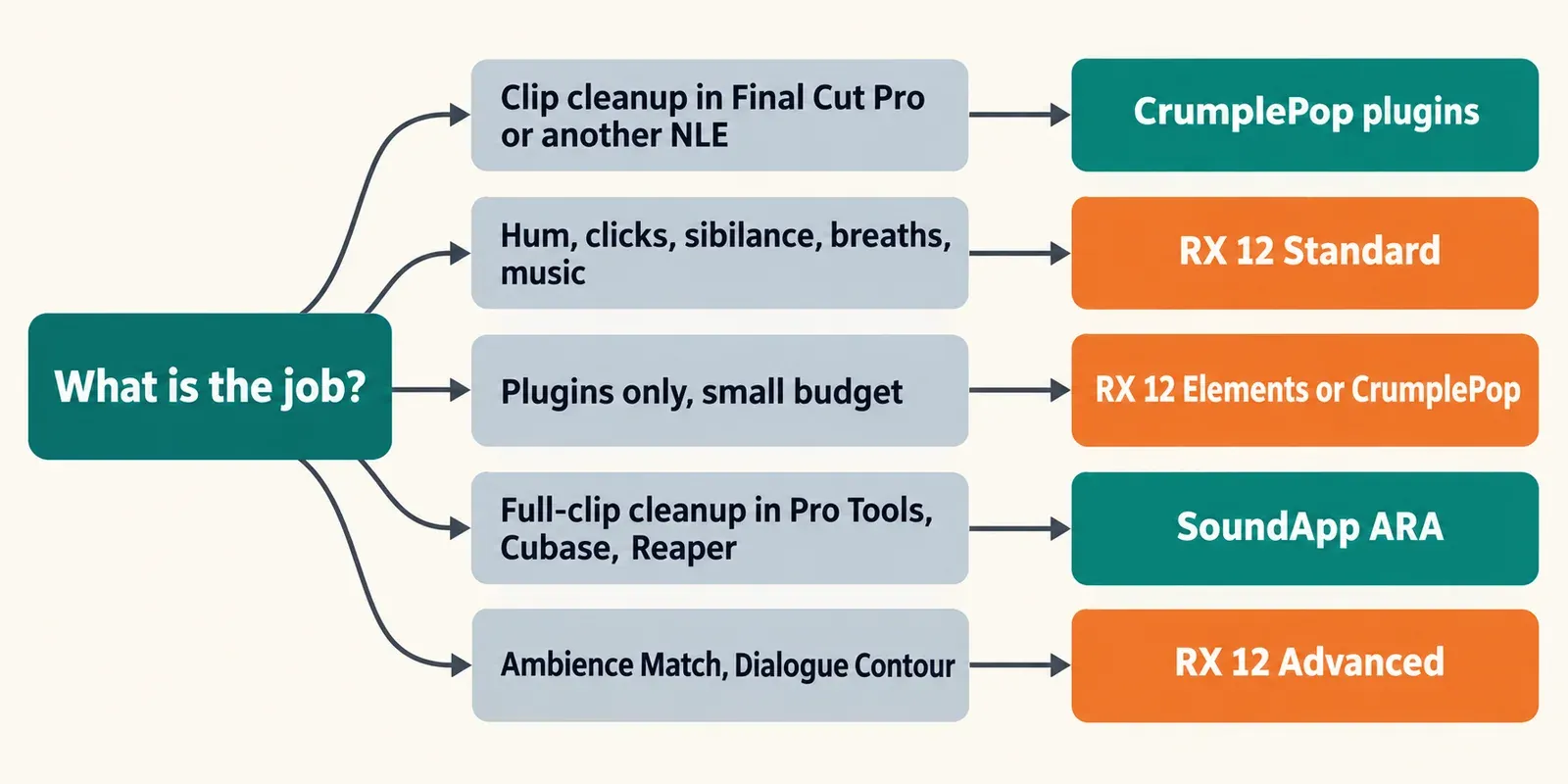
- Final Cut Pro editor: CrumplePop. Final Cut Pro is a supported host, while RX means a Reveal in Finder round trip and exporting audio out of video files.
- Premiere Pro or Resolve editor: CrumplePop for daily cleanup. Add RX 12 Standard, which also runs as a plugin in both, the first time hum or clicks will not go.
- Podcaster: CrumplePop if most episodes come from untreated rooms and speed matters most. RX 12 Standard if you edit breaths, mouth clicks and sibilance, because those are RX modules. If you edit episodes in Sound Forge, see our Sound Forge podcast workflow.
- Pro Tools or Cubase dialogue editor: RX 12 Standard first, because RX Connect and Spectral Repair are built for clip-level repair. SoundApp ARA is a fast full-clip first pass if you already own CrumplePop.
- Music and archive restoration: RX 12 Standard, for Music Rebalance, De-crackle, De-click and Spectral Repair. Boris FX's own RX vs CrumplePop guide points CrumplePop at video, podcast and dialogue repair, not music.
- VEGAS Pro user: check your plan first, because Plus and Ultimate already include the CrumplePop plugins, and VEGAS Pro is not on the RX 12 host list. If you finish audio outside VEGAS, see our Sound Forge and VEGAS Pro workflow for video editors.
- Existing iZotope owner: a crossgrade to RX 12 Standard costs $349, and iZotope Pro at $250 a year makes more sense if you also want Ozone and Nectar.
- Sound Forge owner: if you want a destructive editor more than a restoration suite, read iZotope RX 12 vs Sound Forge, and for more options see our pick of the best audio noise reduction software.
FAQ
Does CrumplePop work offline?
Processing does. Boris FX says CrumplePop processes locally on your GPU, with no cloud upload and no credits. iZotope products also work offline once installed, although a Plus or Pro subscription needs Native Access to connect once a month.
Is CrumplePop made by iZotope?
No. CrumplePop is a Boris FX product, and Boris FX announced its acquisition of iZotope on July 2, 2026. The two brands now share a parent company, and Boris FX said existing iZotope licenses and subscriptions remain active.
Can I buy a single CrumplePop plugin?
Not as a paid product. Boris FX sells one Multi-Host plan that includes every plugin, and its own comparison guide lists the lack of a single-plugin purchase as a con, alongside high CPU use and limited manual tweaking. The exceptions are PopRemover and RustleRemover, which stay free after you install the bundle.
Are EchoRemover 2 and PopRemover AI still current?
Those names belong to the earlier CrumplePop generation that Larry Jordan reviewed in 2020. The 2026.5 plugin list names EchoRemover and PopRemover, and a single license now covers them along with the rest of the toolkit.