
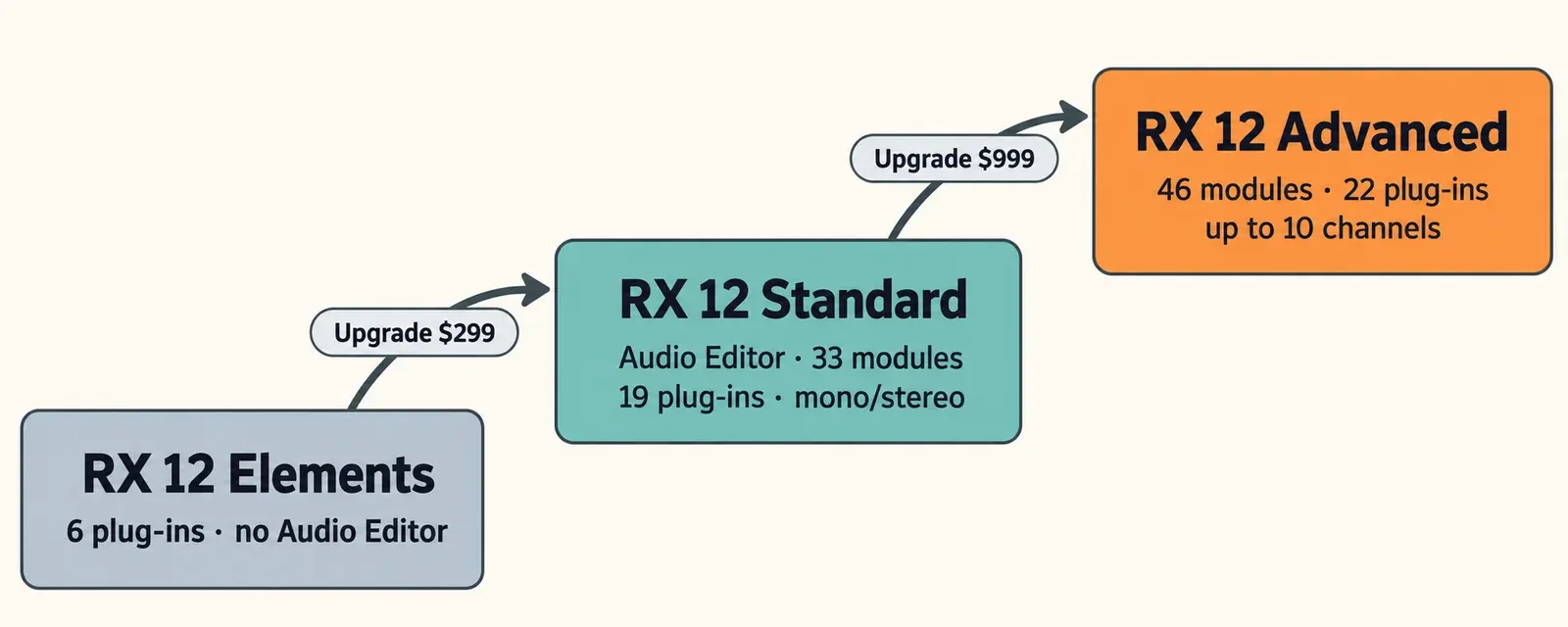
Buy RX 12 Standard ($399 on the US iZotope store on October 20, 2026) unless one of two cases fits you. If you only need quick voice fixes inside a DAW or video editor, RX 12 Elements ($99) is enough. If you cut film or TV dialogue, location sound or files with more than two channels, RX 12 Advanced ($1,399) is the right tool. The physical difference is simple. Elements is six plug-ins and has no RX Audio Editor. Standard adds the Audio Editor, with 33 modules and 19 plug-ins. Advanced adds 13 more modules, 22 plug-ins in all and editing of files with up to 10 channels.
I settle the choice with two questions. First, do you need to see a problem in the spectrogram and paint it out, such as a cough under a line, a phone buzz or a chair squeak? Spectral editing starts at Standard, in the Audio Editor and the Spectral Editor plug-in, so that answer alone moves you from Elements to Standard. Second, is your work dialogue for picture, where you match room tone between takes, tame lav rustle and deliver multichannel files? That is the only kind of work where I think the extra $1,000 for Advanced pays for itself. For everything else, I would buy Standard and stop there. If you are new to RX, the iZotope RX hub sorts the tools by job before you pick an edition.
RX 12 Elements vs Standard vs Advanced at a glance
The three editions are steps on one ladder, and every step keeps everything below it. The counts in this table come from iZotope's RX 12 edition comparison. The prices are the US store prices read on October 20, 2026.
| What you get | RX 12 Elements | RX 12 Standard | RX 12 Advanced |
|---|---|---|---|
| US store price, Oct 20, 2026 | $99 | $399 | $1,399 |
| RX Audio Editor (standalone app) | No | Yes | Yes |
| Plug-ins | 6 | 19 | 22 |
| Editor modules | None, plug-ins only | 33 | 46 |
| Editor features | None | 22 | 23 (adds Multichannel Processing) |
| Files the editor opens | Works on your host's tracks | Mono and stereo | Up to 10 channels per file tab |
| Best for | Quick voice fixes in a DAW or video editor | Music, podcasts, voice-over and most video | Film and TV dialogue, location sound, multichannel delivery |
All of this applies to RX 12.1.0, which iZotope's RX release notes date to October 15, 2026. RX 12.0.0 shipped on April 28, 2026. Many comparison tables still in search results describe RX 8 to RX 11, and several of their edition splits no longer hold.
RX Elements vs Standard: is the Audio Editor worth $300?
Yes, if you ever need to see a problem in the audio to fix it, or if you clean speech recorded in noisy places. No, if your fixes are clicks, clipping, hum, room reverb and steady background noise on tracks you already edit in a DAW or video editor. That is the whole job Elements is built for.
RX 12 Elements contains exactly six plug-ins: De-click, De-clip, De-hum, De-reverb, Repair Assistant and Voice De-noise. Some forum answers still describe Elements as roughly five plug-ins, which is out of date. iZotope's documentation tags the repair processors as "Plug-in only" in Elements, so there is no standalone app, no spectrogram view and no selection-based repair. Repair Assistant learns a clip and proposes settings for its repair sections, and the RX 12 plug-in table marks it as improved.
Standard adds the RX Audio Editor and 13 more plug-ins. These are the ones I would miss first:
- Spectral Repair and the spectral editing tools. These let you select a cough, a siren or a squeak in the spectrogram and remove only that. Elements has no equivalent.
- Dialogue Isolate and Spectral De-noise. Dialogue Isolate pulls speech away from crowds, traffic and changing noise. Spectral De-noise learns a noise profile. In Elements, Voice De-noise is the only noise tool. The guide to removing background noise in RX shows when each one fits.
- Voice detail tools. Mouth De-click, Breath Control, De-plosive and De-ess are the daily tools of podcast and voice-over editing.
- Music tools. Music Rebalance (Voice, Bass, Drums, Other), De-bleed, Guitar De-noise and De-crackle.
- Workflow. Connect sends clips from your DAW to the editor, and Monitor plays the editor through your host. The editor also adds Batch Processor, Module Chain, Loudness Optimize, Streaming Preview, Text Navigation and the new Stems view.
What Standard does not buy you is better processing from the tools Elements already has. In Frank Verderosa's guide to choosing an RX version, iZotope is quoted as saying the core processing quality of RX modules does not change between Elements, Standard and Advanced. So De-click in Elements is the same De-click as in Standard. The two exceptions sit in Advanced and are covered in the next section.
If you already edit in Sound Forge Pro, you have a waveform editor with its own repair tools. In that case, Elements' plug-ins may be all the RX you need, and Sound Forge Pro vs iZotope RX explains where each editor is stronger. One caution: Sound Forge is not on iZotope's RX 12 host list, so use the free trial to confirm the plug-ins load in your copy before you pay.
RX Standard vs Advanced: what the extra $1,000 buys
Advanced adds four things to Standard:
- 13 modules aimed at dialogue for picture, location problems, matching and tape transfers.
- Editing of files with up to 10 channels.
- Two extra Dialogue Isolate controls.
- Repair Assistant's Open Module Chain.
Spectral Repair, Dialogue Isolate itself, Music Rebalance, Text Navigation, Loudness Optimize and Streaming Preview are already in Standard. If none of the 13 modules below matches a problem you meet every week, Advanced is not for you.
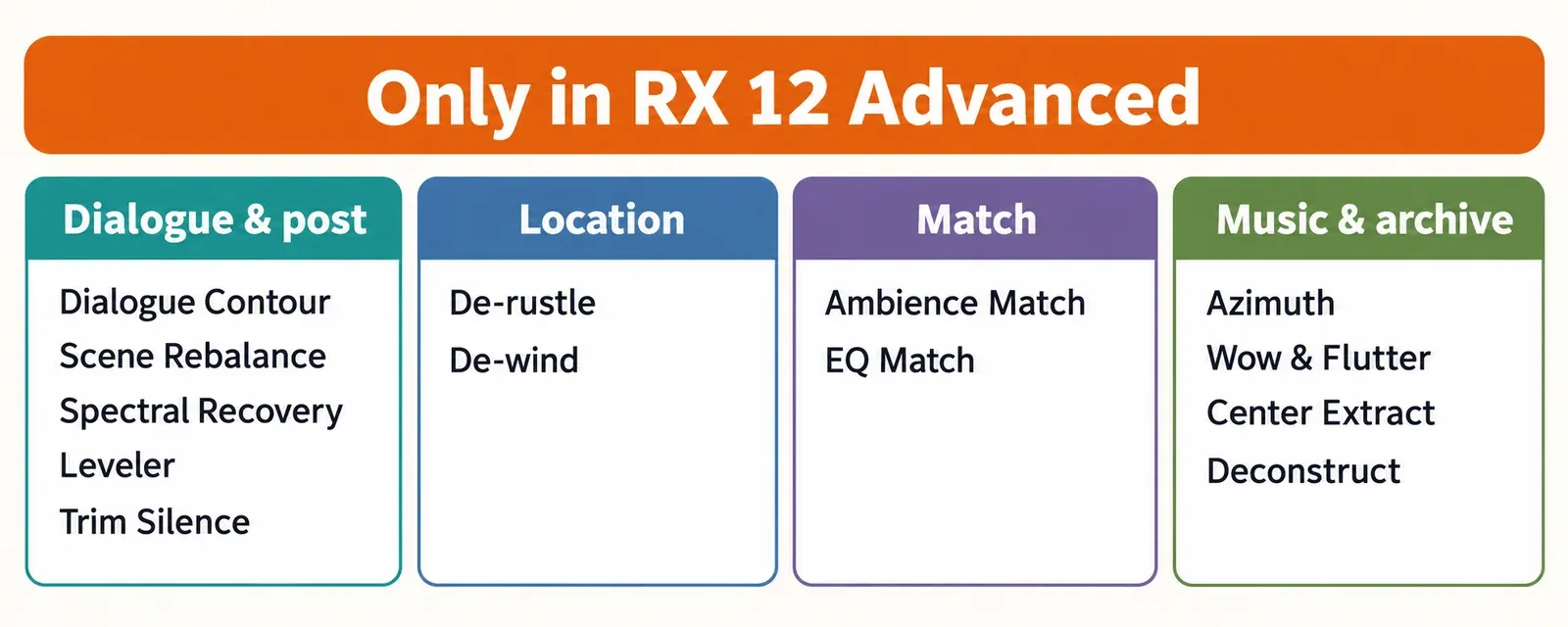
The RX 12 module list marks each of these with an ADV label. Here is what each one does:
- Dialogue and post. Dialogue Contour reshapes the pitch of a spoken line. Scene Rebalance, new in RX 12, separates a finished soundtrack into Voice, Music and Effects. Spectral Recovery restores bandwidth-limited speech such as a VoIP call. Leveler rides gain toward a target level. Trim Silence, also new, removes silent sections. Its documentation notes that it ignores your selection and always processes the entire file.
- Location problems. De-rustle reduces lavalier clothing rustle, and De-wind removes light to moderate wind rumble. Without Advanced, reducing lav clothing rustle in Sound Forge is the slower manual route.
- Matching. Ambience Match carries a noise floor across edits so cuts between takes stop jumping. EQ Match copies the tonal profile of one recording onto another.
- Music and archive. Azimuth corrects gain and timing offsets between left and right channels. Wow & Flutter targets the speed wobble it is named for. Center Extract keeps or removes the center of a stereo mix. Deconstruct splits a sound into tonal, noisy and transient parts.
The channel limit is the quieter difference, and for post work it can decide the purchase on its own. According to iZotope's guide to working with files, the Standard editor opens mono and stereo files. The Advanced editor opens files with up to 10 channels per file tab. A 5.1 mix has six channels, so anyone repairing surround stems or multitrack location files needs Advanced. Multichannel Processing is the only editor feature in the official table that Standard lacks.
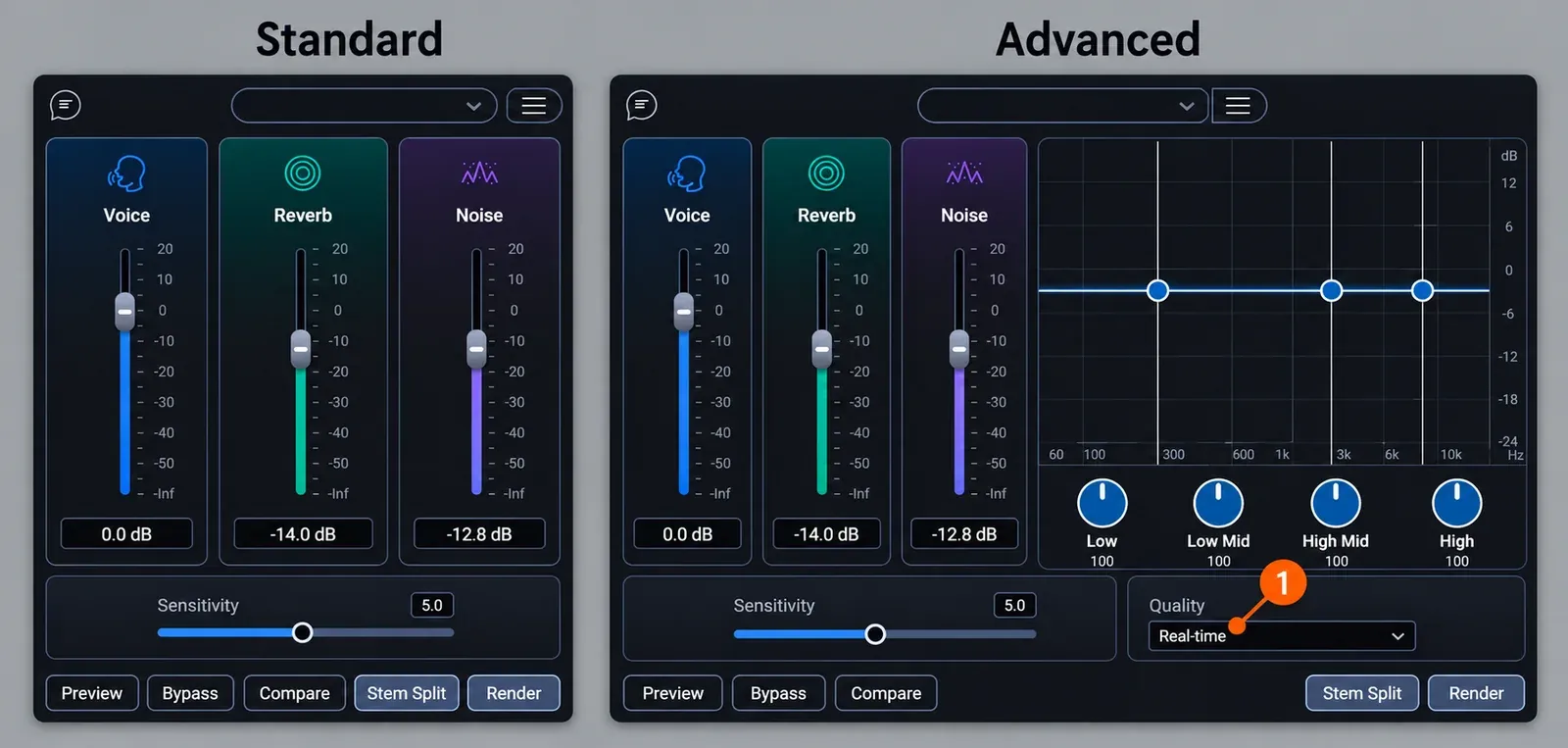
Dialogue Isolate is in both editions, but Advanced gives it more controls. Both share the Voice, Reverb and Noise faders and the Sensitivity control. The Dialogue Isolate documentation lists two Advanced-only additions:
- A Quality menu with Good / Real-time and Best / Offline modes. Best / Offline is the highest-quality mode, with fewer artifacts in exchange for longer processing, and it is meant for the editor and offline renders.
- A four-band interface (Low, Low Mid, High Mid, High), so you can isolate harder in one frequency range than another.
Settings for both modes are in the Dialogue Isolate guide.
The second exception to processing parity is Repair Assistant. In Advanced only, its Open Module Chain button lets you open the suggested fixes as a Module Chain, then edit them or save them as a preset before rendering. In Elements and Standard you accept or adjust the suggestion inside Repair Assistant itself.
Some older comparisons list features as Advanced extras that RX 12 includes in Standard. Text Navigation is in both editor editions, and it can detect up to 8 speakers in a transcript (American English only). Loudness Optimize and Streaming Preview are in both as well. Creative Field Recording makes the same point from the field-recording side. In its RX 12 guide for sound effects, it names Ambience Match as the one field-recording tool locked to Advanced, along with multichannel editing.
What RX 12 added to each edition
The new tools in RX 12 favor Standard more than you might expect. iZotope's RX 12 launch post tags each change by edition:
- Advanced only: Scene Rebalance (Voice, Music and Effects separation) and Trim Silence.
- Standard and Advanced: Stems view (the documentation's feature table also lists a new Stem Split pane), a rebuilt De-bleed, a rebuilt Breath Control, and improved Music Rebalance and Dialogue Isolate.
- Elements: the plug-in table marks Repair Assistant as improved.
If you already own RX 11, the update prices on October 20, 2026 were $129 for Standard and $269 for Advanced. The RX 12 vs RX 11 comparison decides whether those changes are worth it for your work.
Which RX 12 edition fits your work
Pick by the problem you meet most often, not by the longest feature list. Each row names the tools that decide it.
| Your work | Edition I would buy | The tools that decide it |
|---|---|---|
| Podcast and voice-over | Standard | Mouth De-click, Breath Control, De-plosive, De-ess, Dialogue Isolate, Spectral Repair |
| YouTube and video creators | Elements to start, Standard for noisy locations | Voice De-noise and De-reverb inside Premiere Pro or Resolve; Dialogue Isolate once crowds and traffic appear |
| Music mixing and production | Standard | Music Rebalance, Stems view, De-bleed, Guitar De-noise, Spectral Repair |
| Archive, tape and vinyl transfers | Standard; Advanced for tape problems | De-click, De-crackle and De-hum in Standard; Azimuth, Wow & Flutter and Spectral Recovery in Advanced |
| Film and TV dialogue | Advanced | Ambience Match, Dialogue Contour, De-rustle, De-wind, EQ Match, Scene Rebalance, up to 10 channels |
| Field recording and sound effects | Standard; Advanced if you need Ambience Match or multichannel | Spectral Repair and De-noise tools in Standard; Ambience Match and multichannel files in Advanced |
For podcasts and voice-over, Elements can cover clicks, hum, room reverb and steady noise. A weekly show, though, soon runs into breaths, plosives and mouth noise, and Standard is where those tools live. Video creators working inside Premiere Pro or DaVinci Resolve, both on iZotope's host list, can start with Elements and move up when location noise outgrows Voice De-noise.
For music, Standard is the line. Music Rebalance and the new Stems view are the reasons most music users stop there. Advanced's extras for music are narrow: Deconstruct, Center Extract and EQ Match.
For dialogue editors, Advanced is the working tool rather than a luxury. MixingGPT's RX 12 review puts it bluntly: for film and TV post-production, Advanced "is not optional — it is required."
Plug-in formats and host traps by edition
All RX 12 plug-ins are 64-bit only. They install as AU, AAX, AAX AudioSuite and VST3, and the Spectral Editor also comes as AU ARA and VST3 ARA. Three format details catch buyers out:
- Three Advanced plug-ins are AudioSuite only. Ambience Match, De-rustle and Scene Rebalance run as plug-ins only as AAX AudioSuite, which in practice means Pro Tools. In any other host you use them as modules in the Advanced Audio Editor.
- Repair Assistant has no real-time AAX version. It comes as AAX AudioSuite, AU and VST3.
- Spectral Editor ARA in Logic runs under Rosetta only. The AU ARA version needs Logic Pro 10.7 or later running under Rosetta, on Intel or Apple silicon Macs. The VST3 ARA version runs in Studio One 7 and Studio Pro 8.
The RX 12 release notes list support for macOS Sonoma 14.7, Sequoia 15.7 and Tahoe, and for Windows 10 22H2 and Windows 11 24H2. The supported hosts are:
- Logic Pro 12
- Pro Tools 2025
- Ableton Live 12
- Cubase 15 and Nuendo 15
- Fender Studio Pro 8 (Studio One 7)
- Reaper 7
- FL Studio 25
- Adobe Audition 2026 and Premiere Pro 2026
- DaVinci Resolve 19
- Reason 13
If a plug-in from your edition is missing in your DAW, check its format first, then work through why RX plug-ins don't show up.
RX 12 prices, upgrades and the cheapest path
At US list prices, starting low costs you almost nothing extra, because the upgrade steps add up to the full price or less. These prices come from iZotope's store pages for RX 12 Elements, RX 12 Standard and RX 12 Advanced, read on October 20, 2026, when no RX 12 item showed a sale price.
| Edition | New license | Student (EDU) | Upgrade or crossgrade into it |
|---|---|---|---|
| RX 12 Elements | $99 | $49.50 | None |
| RX 12 Standard | $399 | $199.50 | $299 from Elements or Elements Suite; $349 crossgrade from any paid iZotope product; $129 update from RX 11 Standard |
| RX 12 Advanced | $1,399 | $699.50 | $999 from RX 12 Standard; $1,199 from Elements or Elements Suite; $799 from RX 11 Standard; $269 update from RX 11 Advanced |
Here is how the listed prices add up if you start low and climb later:
- Elements, then the Standard upgrade: $99 + $299 = $398, against $399 for Standard new.
- Standard, then the Advanced upgrade: $399 + $999 = $1,398, against $1,399 for Advanced new.
- Elements, then the Advanced upgrade: $99 + $1,199 = $1,298, against $1,399 new.
These totals depend on your account being eligible for each upgrade and on prices staying where they were on October 20. Check the upgrade price shown in your own iZotope account before you count on them. The practical point holds anyway: you do not need to buy Advanced "just in case."
Subscriptions follow the same split. On iZotope's subscription page, iZotope Plus ($15 a month or $150 a year) includes RX 12 Elements, and iZotope Pro ($25 a month or $250 a year) includes RX 12 Standard. No plan includes Advanced.
Activation limits, license transfers and the full list of purchase routes are covered in RX price, trial and license rules. Owners of RX 10 and older will find their own prices in the iZotope upgrade pricing guide. Store prices change during promotions, and current offers are tracked on the audio plugin deals page.
Try the right edition before you pay
Each edition has its own trial, and the terms are the same for all three. On iZotope's RX 12 Standard download page, the trial runs for 10 days with export disabled. After that, the product switches to Demo mode and inserts silence at regular intervals. Ten days is short, so I would plan the trial before installing it:
- Collect three of your worst real files before you start: the noisiest interview, the clip with the cough, the take with the hum.
- Start with the Standard trial, not Advanced. Run Repair Assistant on each file first. If its suggestions solve the problem, Elements may be all you need.
- Open the same files in the Standard editor and try Spectral Repair and Dialogue Isolate. Judge by listening in the editor, since export is off.
- Trial Advanced only if one of its 13 modules, the 10-channel limit or Dialogue Isolate's Best / Offline mode is a real question for your work.
- Load the plug-ins in every host you use, especially one that is not on iZotope's list, such as Sound Forge.
Test results: what published reviews and prices show
The published sources line up behind one split: Standard is the value pick, and Advanced has to be earned by dialogue and post work. No published source measures processing differences between editions. That fits iZotope's statement that shared modules process identically. So the useful data is price over time and how reviewers judge each edition.
Price stability. I gathered four dated observations of the RX 12 Standard price, from April 29 to October 20, 2026:
- MusicTech's RX 12 review, April 29
- Creative Field Recording, May 6
- MixingGPT, June 19
- the iZotope US store, October 20
The Standard price was $399 in all four: median $399, range $399 to $399, four sources. Advanced was $1,399 in all four, so the $1,000 gap has not moved since launch. Elements was $99 in all three sources that list it.
Reviewer verdicts. I compared six edition verdicts: four RX 12 reviews (MusicTech, Sound On Sound, Creative Field Recording and MixingGPT), Frank Verderosa's edition guide, and one RX 11-era comparison.
| Finding | Sources that agree | Example |
|---|---|---|
| Advanced is justified mainly by film, TV and location-dialogue work | 5 of 6 | MixingGPT: "not optional" for post |
| Standard is the value pick for most users | 4 of 6 | MusicTech: Standard is "solid value" |
| Elements suits basic clean-up and first-time creators | 4 of 6 | Sound On Sound: "relatively basic — but still capable" |
| The Advanced premium is a drawback | 4 of 6 | Creative Field Recording calls the price "eye-watering" |
| Dialogue Isolate in Standard stands out | 3 of 6 | MusicTech, Sound On Sound, MixingGPT |
| Starting low and upgrading later works | 2 of 6 | Sound On Sound, MixingGPT |
MusicTech gave RX 12 a rating of 7. It listed "Large premium for Advanced edition compared to Standard edition" as a con and asked whether the Advanced modules are "really worth an additional $1000 over the cost of Standard."
The Sound On Sound review of RX12 Advanced counts its tools differently: Advanced has "90-plus tools" and Standard "over 70 tools and plug-ins." Adding modules, editor features and plug-ins from iZotope's tables gives 91 for Advanced and 74 for Standard, which fits those figures.
Creative Field Recording says field recordists really need Standard or Advanced, and that most of the tools they need are in Standard.
My reading of the record: reviewers who work in post buy Advanced without complaint, and everyone else calls Standard the sensible stop. The price data supports that. With a fixed $1,000 gap and upgrades that add up to the full price, nothing pushes you to buy higher than you need today.
My pick
I would buy RX 12 Standard. For $399 it gives you the Audio Editor, Spectral Repair, Dialogue Isolate, Music Rebalance and the voice tools that podcast, music and video work use every day. It sits $1,000 below Advanced without losing any processing quality on the tools they share.
I would buy Elements only as a DAW-side kit for quick voice fixes, or as a cheap first step, since the Standard upgrade costs $299 later. I would buy Advanced when Ambience Match, De-rustle, Dialogue Contour, multichannel files or Dialogue Isolate's Best / Offline mode is part of my weekly work, which mostly means film, TV and location dialogue.
For the whole-product verdict, read the RX 12 review. If $399 is still too much, the RX alternatives cover cheaper restoration tools.
FAQ
Does RX Advanced sound better than RX Standard?
Not on the tools they share. iZotope is quoted as saying core processing does not change between editions. The documented exception is Dialogue Isolate, where only Advanced has the Best / Offline mode and four-band control.
Do I need RX Advanced for a podcast?
No. Every voice tool a podcast needs is in Standard: Dialogue Isolate, Mouth De-click, Breath Control, De-plosive, De-ess and Spectral Repair. Advanced adds tools for dialogue cut to picture and for multichannel files.
Can I use RX Elements plug-ins in Sound Forge Pro?
RX 12 plug-ins install as VST3 and AU, but Sound Forge is not on iZotope's list of supported RX 12 hosts. Install the 10-day trial and check that the plug-ins load and process in your version first. If they do not appear, see fixing VST plug-ins that don't show in Sound Forge Pro.