

A gust can sound like a low thump, a rolling roar, or a burst that swallows a syllable. Those are not the same edit. If the gust sits between words, you can usually deal with that small interval. If it runs under the voice, you have to preserve the words while reducing what you can. And if the microphone overloaded, a quieter version of the damage is still damage.
My rule is to locate the gust first, then decide how much of it the listener actually hears in the sentence. Do not process a whole outdoor recording to fix three rough seconds.
Find out where the wind is
Save a working copy and listen to the passage at an ordinary level. Mark each gust and note whether it lands in a pause, partly under a word, or across an entire phrase. Listen for crackly distortion as well as bass-heavy rumble. A waveform can help you find a large burst, but it cannot tell you whether a consonant remains intelligible.
Gust in a pause. Reduce or replace that interval while keeping the pause and room tone continuous. Listen for an abrupt join.
Rumble under clear speech. Try a restrained low cut or local level shaping, then compare the same phrase with the original. Too much filtering can thin the voice.
A word is obscured or distorted. Look for another take or record the phrase again if possible. A filter cannot restore missing speech detail.

Do not mistake this for ordinary steady hiss. The noise-reduction software guide discusses more general cleanup choices; intermittent wind buffeting needs closer decisions at each event.
When the gust is between phrases
Zoom in around the pause and select the gust without catching the tail of the previous word or the attack of the next. In Sound Forge Pro 2026, Process → Volume lets you lower a selected region with negative Gain. Start gently, preview, then listen from the previous sentence into the next. Without a selection, the command can affect the whole file, so check what is highlighted before applying it.
If a sudden level step makes the background jump, use a gradual transition. The documented Process → Fade → Graphic offers an envelope for the selected audio. Bring the level down after the first word has finished and back up before the next begins. The aim is not a ruler-flat gap; it is a pause that still belongs to this recording.
For a gust that fills most of the pause, matching ambience from a clean section of the same recording may sound less conspicuous than digital silence. Check the source for a hidden breath or speech tail, preserve the original timing, and listen across both joins. The restoration hub has related repairs when the interval also contains clicks or handling noise.
When gusts fall only in the gaps and remain below a threshold that preserves quiet speech, a gate can reduce them in one pass. Sound Forge's Effects → Noise Gate is documented for removing noise from silent breaks, and the noise gate guide explains how to set its threshold against the pause and the quietest word. It will not help once wind runs under a word: the voice opens the gate and the gust comes through with it, and the silence around that moment can make the remaining wind more obvious. Set it gently, then listen where the gate opens and closes.
When wind sits under the voice
Keep the words as your reference. Wind often brings a strong low-frequency component: Shure's wind guidance explains why reducing the very low end can help. Try a conservative low cut on a working copy, and compare the same phrase at matched listening loudness. Move only as far as the voice allows. If the result loses its weight while the gust is still obvious, more filtering is a poor trade.
There is no frequency setting I can give you without hearing this voice and microphone. A deep voice, a close recording and a lavalier buffeted by clothing will not tolerate the same move. The Sound Forge equalizer guide explains the EQ controls; use it for the mechanics, then make the judgment in context. A broad level reduction over the whole word is rarely a substitute: it turns down the speech with the wind.
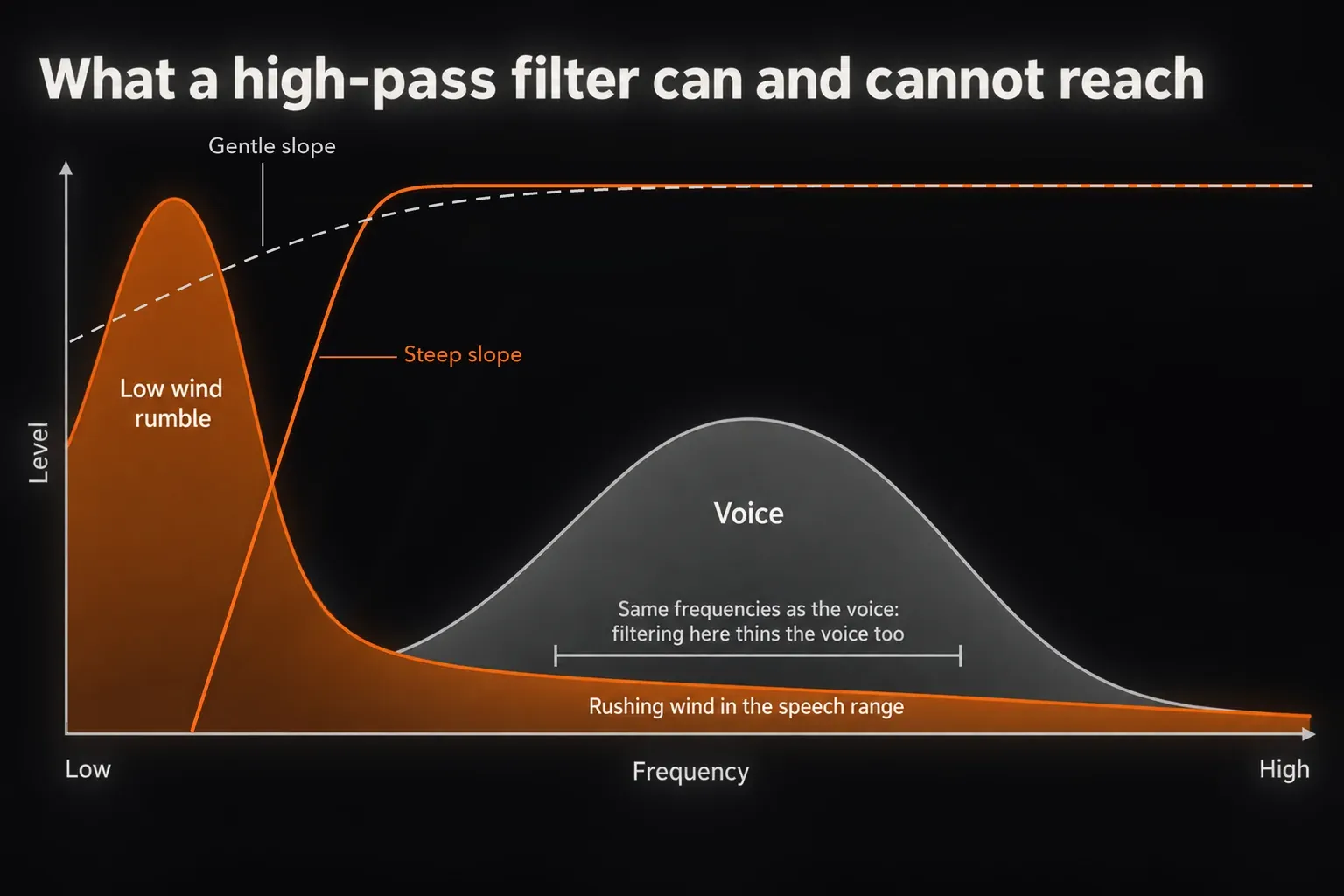
Slope is a separate choice from where the filter starts. Shure's wind guidance uses a microphone with both a steep and a gentle low-frequency roll-off switch as its example, and regulars in an Audacity forum thread on wind noise reached for a steep high-pass. Their starting points, around 100–120 Hz, are places to begin listening rather than a setting to copy. In the Modern Equalizer, a High Pass band's slope is changed from the three-dot control on its filter icon, from 6 up to 36 dB per octave. One of those regulars also drew the limit plainly: if the wind is whistling or rushing rather than a low thump, it stays in the recording. That sound shares frequencies with the voice, so a filter cannot take it out without taking some of the voice too.
A dedicated wind tool can sometimes be worth trying on an important take. For example, iZotope lists De-wind in RX Advanced for intermittent low-frequency wind at the microphone diaphragm. That is a separate product and edition, not a Sound Forge command. Even with a specialist tool, listen for altered consonants and false confidence about words you can no longer hear clearly.
Speech-isolation tools are the other route people try. In an r/Logic_Studio thread about wind, the original poster found that Final Cut Pro's voice isolation did a surprisingly good job on wind, at the cost of a slightly thinner voice tone, and later reported that Logic's built-in Voice Isolation plug-in also worked well. In a DVXuser thread, members pointed a video editor to DaVinci Resolve's dialogue isolation and to an online AI service. Treat any of these as a separate pass on a copy, and compare consonants and breaths against the original before you bring the result back into Sound Forge. Before uploading a private recording to a web service, check its retention and model-training terms, as the AI audio restoration guide explains. In that same thread, exporting an audio-only WAV instead of sending the large video file is what finally got the job through.
When the gust has ruined a word
First compare another take, a second microphone or the unprocessed original. If a word is buried by a heavy burst or the input clipped, reducing the low end cannot recover information that was never captured cleanly. Sometimes a less polished but intelligible alternate is the better edit. For a new voice-over, a short pickup of the phrase is preferable to a plausible-sounding guess at the syllable.
If there is no replacement, decide whether the listener can still understand the sentence. Keep enough of the original texture to avoid an obvious hole, and do not present an aggressive cleanup as restored speech. For a quoted or consequential statement, mark the uncertain word for editorial review instead of silently changing its meaning.
Prevent the next gust before you hit record
Editing works best when wind never reaches the diaphragm. Use a windshield suited to the microphone and conditions, watch where the mic points, and make a brief outdoor test before the real take. RØDE's outdoor recording guidance covers placement and wind protection; Shure also recommends physical shielding and attention to mic position. A foam cover that helps indoors may not be enough for a strong outdoor gust. For that, both RØDE and Shure describe an artificial-fur cover, the one crews call a dead cat; Shure notes it is typically fitted over a zeppelin-style blimp. Also set the input level lower than you would indoors, so a gust has room before it clips. A reply in the r/Logic_Studio wind thread makes the same point, and a clipped gust is the kind of damage no later edit can undo.
Replay the repaired section after any later compression, limiting or overall EQ, because that processing may make a remaining gust more noticeable. Compare with the original at similar loudness and listen to the whole sentence, not only the repaired half-second. If your broader task is spoken-word capture and delivery, the voice-over recording workflow provides the surrounding steps.