
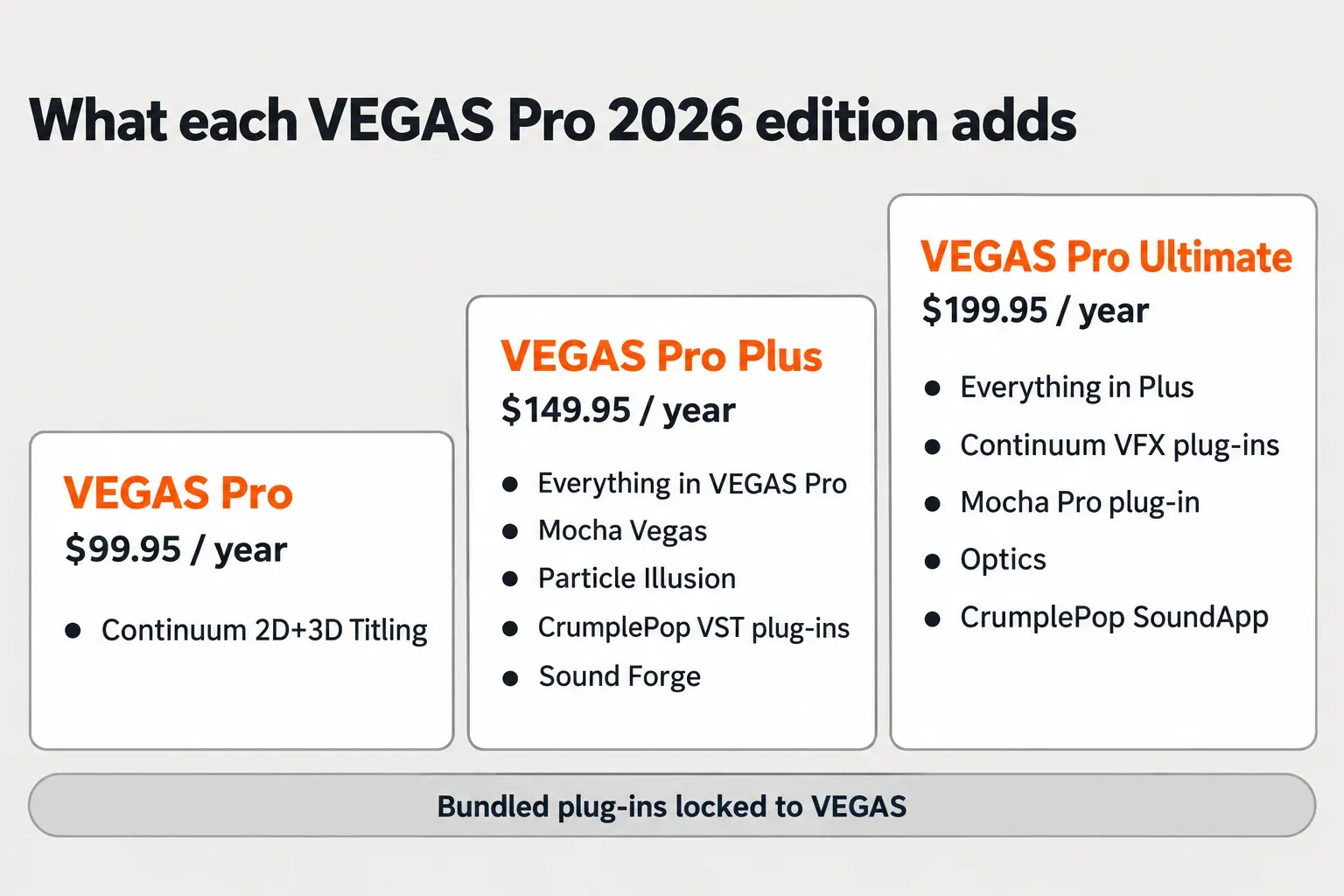
VEGAS Pro 2026 loads third-party video effects as OpenFX (OFX) plug-ins and audio effects as VST2, VST3 or DirectX plug-ins. Every edition includes the Continuum Title Pack. VEGAS Pro Plus adds Mocha Vegas, Particle Illusion, the CrumplePop VST plug-ins and Sound Forge, and VEGAS Pro Ultimate adds the Continuum VFX plug-ins, the Mocha Pro plug-in, Optics and CrumplePop SoundApp. Plan on those bundled copies working only inside VEGAS.
My rule is short. If you want Continuum and Mocha Pro only for VEGAS, Ultimate at $199.95 a year costs less than either OFX plug-in bought on its own at $325 a year. If you also cut in another OFX host, buy the standalone licenses, because the bundled versions stay in VEGAS. Free plug-ins cover presets and clip effects, not serious effects work. And before you pay for anything, run the free 15-day trial with your heaviest plug-in on your own graphics card: Continuum's machine-learning filters need an NVIDIA or AMD GPU.
Plug-ins that come with VEGAS Pro 2026
Boris FX announced on March 30, 2026 that it had acquired VEGAS Pro, Sound Forge and ACID Pro from MAGIX. For plug-in buyers, that changes the whole picture: VEGAS now sits in the Boris FX family alongside Continuum, Sapphire and Mocha, and the three 2026 editions are built around those tools. The official plans and pricing table breaks down like this.
| Bundled plug-in or tool | VEGAS Pro | VEGAS Pro Plus | VEGAS Pro Ultimate |
|---|---|---|---|
| Continuum 2D+3D Titling (Title Pack) | Yes | Yes | Yes |
| Mocha Vegas | No | Yes | Yes |
| Particle Illusion | No | Yes | Yes |
| CrumplePop VST plug-ins | No | Yes | Yes |
| Sound Forge | No | Yes | Yes |
| Continuum VFX plug-ins for VEGAS Pro | No | No | Yes |
| Mocha Pro plug-in for VEGAS Pro | No | No | Yes |
| Optics | No | No | Yes |
| CrumplePop SoundApp (standalone) | No | No | Yes |
| Storyblocks Media Library | Subscription only | Subscription only | Subscription only |
The Title Pack is the floor. Boris FX's launch release counts 70 drag-and-drop presets, and the VEGAS Pro 2026 What's New page says every Title Pack tool works as a standard video effect, so you apply it like any other filter. The Continuum 2026.5.3 release notes add that the Title Studio standalone application now launches in the VEGAS Pro and Pro Plus bundles.
Ultimate is where the bundle gets large. Boris FX describes its Continuum set as over 300 effects and thousands of presets. Treat that as the vendor's count; the editions table above is the part that matters for budgeting.
Plus also brings Sound Forge, which is why this site cares about VEGAS at all. If you send dialogue out of the timeline for repair, the Sound Forge and VEGAS Pro workflow for video editors covers the round trip, and the guide to Sound Forge plug-ins covers the audio tools once the file is open there.
Two items depend on how you pay, not on the edition. Storyblocks and the fully offline Speech-to-Text and Text-to-Speech features are subscription-only. Perpetual licenses do without them.
One catch before you count the bundle as free plug-ins: the bundled copies are tied to VEGAS. A forum moderator says the Continuum version bundled with VEGAS works only in VEGAS, and users report that the bundled CrumplePop plug-ins run as beeping trials in other audio software.
Ultimate bundle or standalone plug-ins?
This is the money question, and the arithmetic is lopsided. These are US list prices on October 20, 2026, before tax and without promotions.
| Product | Monthly | Annual | Perpetual | What to know |
|---|---|---|---|---|
| VEGAS Pro | $17.95 | $99.95 | $219.95 | Title Pack included; perpetual includes one year of upgrades and support |
| VEGAS Pro Plus | $24.95 | $149.95 | $299.95 | Adds Mocha Vegas, Particle Illusion, CrumplePop and Sound Forge |
| VEGAS Pro Ultimate | $39.95 | $199.95 | Check the store | Adds Continuum VFX, the Mocha Pro plug-in and Optics, all for VEGAS only |
| Continuum for OFX | $48 | $325 | $1,095 | Works in VEGAS and other OFX hosts |
| Mocha Pro plug-in for OFX | $48 | $325 | $765 | Works in VEGAS and other OFX hosts |
| Sapphire for Adobe/OFX | $80 | $545 | $1,865 | Not part of any VEGAS Pro 2026 edition |
| NewBlue TotalFX | $39.99 | $299 | $699 | NewBlue's own price; 177 plug-ins and 1,500 presets by its count |
Buy base VEGAS Pro plus Continuum and the Mocha Pro plug-in separately and you pay $749.95 a year. Ultimate includes both for $199.95 a year. Even if you already own VEGAS, the two OFX plug-ins alone cost $650 a year, more than three times the price of Ultimate.
The catch is scope. That same forum moderator says other OFX hosts need a separate Continuum OFX license, and a user who opened the Ultimate-bundled Mocha Pro in a non-VEGAS OFX host saw it come up unlicensed. The moderator answer in the Continuum thread adds two limits: the Continuum plug-ins licensed through Ultimate are not licensed in VEGAS Pro 23, and only one full Continuum OFX version can be installed at a time. If you work in two hosts, the standalone license is the only clean answer.
Boris FX launched Ultimate as a subscription plan. If you want to own it outright, check the store for a current perpetual option before you budget around one. The VEGAS Pro FAQ says a license can be used on up to two computers, which covers a desktop and a laptop.
If you are torn between the two big Boris FX packs before paying for either, read the Continuum vs Sapphire comparison next. For every Mocha license and upgrade path, see Mocha Pro pricing explained. If you are deciding between Mocha Vegas in Plus and the Mocha Pro plug-in in Ultimate, Mocha VEGAS vs Mocha Pro sorts common tracking jobs by edition.
The best VEGAS Pro plug-ins by job
Pick plug-ins by the job, not by effect count. This is where I would start for each job in VEGAS Pro 2026, and what to check before paying.
| Job | First choice | Check before buying |
|---|---|---|
| Titles and lower thirds | The Continuum Title Pack in every edition; NewBlue Titler Pro 7 at $299 if you want a dedicated titler | NewBlue's VEGAS page names no supported VEGAS versions, so confirm 2026 on the trial |
| Looks, glows, light and transitions | Sapphire or Continuum; how Sapphire behaves inside VEGAS has its own guide | Continuum effects that need a second layer, such as BCC Light Wrap, run per track as a Custom Composite in VEGAS |
| Tracking and masking | Mocha Vegas in Plus, or the Mocha Pro plug-in in Ultimate or as a standalone OFX license | The bundled Mocha stays in VEGAS |
| Video noise reduction | Neat Video 6.1.2, or Continuum's BCC+ DeNoise ML | DeNoise ML needs an NVIDIA or AMD card; see the GPU section |
| Retiming, motion blur and deflicker | RE:Vision Twixtor, ReelSmart Motion Blur and DEFlicker | RE:Vision's VEGAS page lists what runs in VEGAS, which is not the same as what the license covers |
| Keying | Primatte Studio in Continuum | Primatte Studio's HUD features are not available in VEGAS |
| Dialogue cleanup | The CrumplePop VST plug-ins in Plus and Ultimate; the CrumplePop vs iZotope RX comparison covers heavier repair | Bundled CrumplePop came up in 5 of the 25 help threads in the test results below, mostly licensing and startup problems |
| Rendering and export | Voukoder Pro 2026, DebugMode Frameserver or MagicYUV | Users report these carried over from VEGAS Pro 23; Voukoder classic did not |
Neat Video 6.1.2, released April 9, 2026, added VEGAS Pro 2026 support and is free for licensed version 6 users. RE:Vision's VEGAS list currently names DEFlicker, DE:Noise, ReelSmart Motion Blur, RE:Match, Twixtor and REZup. On that same page, RE:Vision says not every product runs in every host, so check the list before buying a bundle for one tool.
Waves and other audio brands are not a separate category here. They are VST plug-ins, so they follow the audio route in the install and troubleshooting sections below.
Free VEGAS Pro plug-ins and effects
Free is thinner than the search results suggest. Three things are free in practice:
- The Continuum Title Pack. It ships in every edition, so base VEGAS Pro already has 3D titling presets.
- Vegasaur's free downloads. The Vegasaur free tools page offers clip-based effects and transitions, light leaks, particle and dust effects, 35mm film grain and preset packs. They are media files and presets, not OFX plug-ins, and the page still uses the old "Sony Vegas" name.
- The 15-day trial. The official FAQ promises full access to all features, which makes the trial the free way to judge the Ultimate bundle on your own footage.
Searches for free plug-ins for VEGAS Pro 18, 21, 22 or 23 get the same answer. Clip-based effects are ordinary media files on the timeline, and whether a free OFX or VST plug-in runs in your version depends on that plug-in's own host and version list, not on a separate list per VEGAS release. For free audio effects you can use in VEGAS and Sound Forge, start with the free plug-ins hub.
OFX vs VST: what VEGAS actually loads
VEGAS has two plug-in doors. Video effects come in as OpenFX. Audio effects come in as DirectX or VST plug-ins, the standard audio effect format. The VEGAS product page promises full support for third-party plugins and hardware, and the two formats are handled differently from install to timeline.
| Question | OFX (video) | VST2 / VST3 (audio) |
|---|---|---|
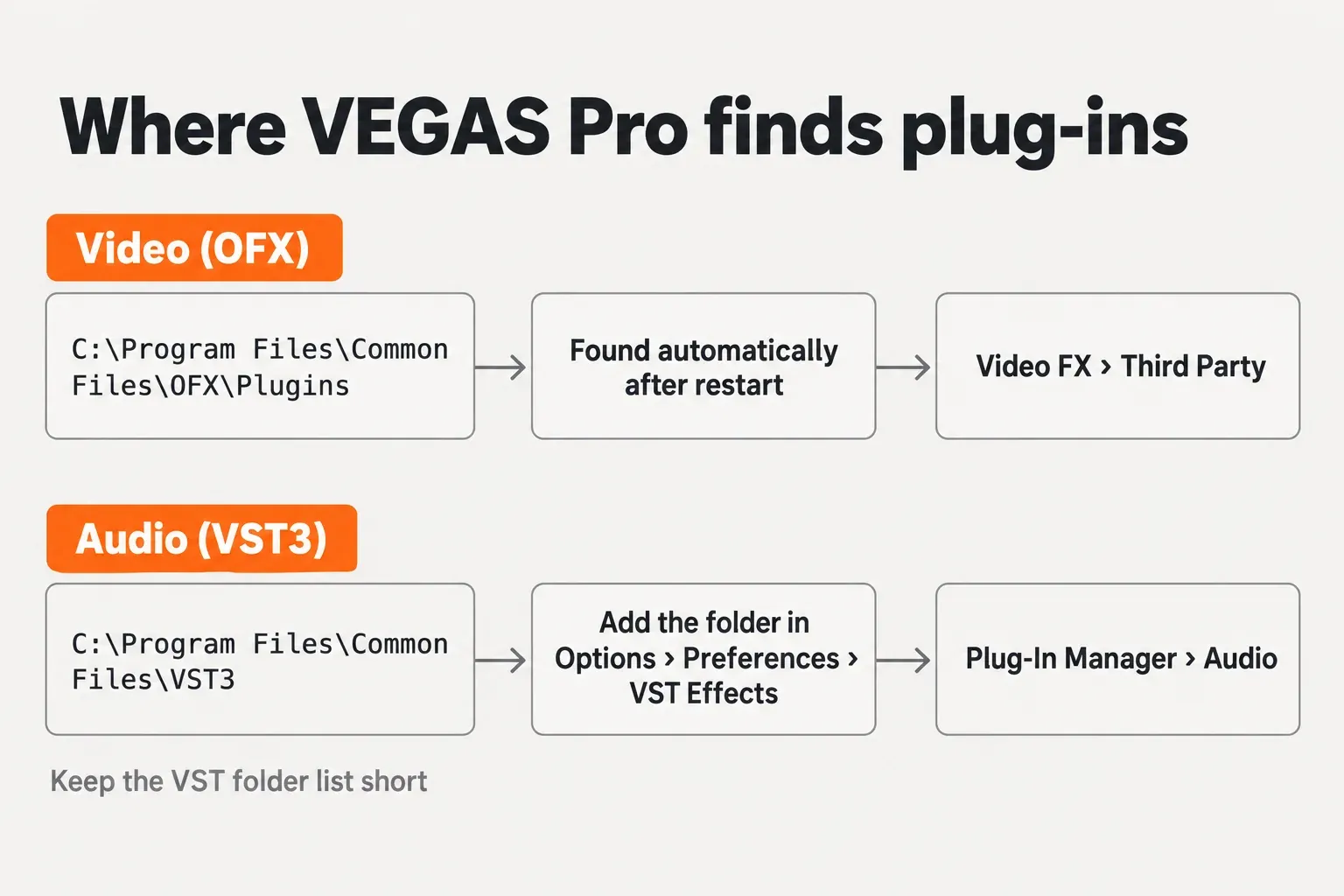
| Default Windows folder | C:\Program Files\Common Files\OFX\Plugins | C:\Program Files\Common Files\VST3 for 64-bit VST3 |
| How VEGAS finds it | Automatically from the OFX folder | From the search folders set in Options > Preferences > VST Effects |
| Where it appears | Video FX window, Third party category | Plug-In Manager, under Audio |
| Where you apply it | Events, tracks, source media or the whole project | Events, tracks, busses or assignable effects |
| Version notes | Event- and track-level OFX keyframes in the timeline (from an earlier release) | VST3 and a 32-bit bridge (beta) since VEGAS Pro 20 |
If a guide tells you VEGAS cannot load VST3, it is out of date. The VEGAS Pro version history shows VST3 support arriving in VEGAS Pro 20, as a beta at release and listed as VST3 support in Update 2 (build 326), together with a 32-bit VST bridge (beta) for legacy plug-ins. The 2026 help on applying effects covers DirectX and VST effects on tracks, busses, assignable effects and individual events.
On the video side, VEGAS Pro, since an earlier release, lets you add and adjust OFX keyframes directly in the timeline for event- and track-level filters, which saves a trip into the effect window for simple ramps.
What VEGAS still lacks is ARA, and users report no working switch to skip the VST scan at startup. A VEGAS team member said on the forum that they would like to let users bypass the audio plug-in scan and add ARA support, without giving a date.
How to install plug-ins in VEGAS Pro
Installing is mostly about folders. Get the folder right and VEGAS does the rest.
- Run the vendor installer and keep its default folder. OFX plug-ins belong in C:\Program Files\Common Files\OFX\Plugins, the default in the OpenFX packaging reference. 64-bit VST3 plug-ins belong in C:\Program Files\Common Files\VST3, the Steinberg default for VST3 on Windows. Bundled Boris FX tools and VEGAS updates come through the Boris FX Hub app, as the Movie Studio Zen update history shows.
- For audio plug-ins, add the folder. Open Options > Preferences > VST Effects, add the plug-in folder as a search path and tick the effects you want available, as the VST Effects preferences help describes. A forum moderator's accepted answer for missing VST3 plug-ins is exactly this: list Common Files\VST3 as a search folder.
- Restart VEGAS. OFX plug-ins in the default folder should appear automatically, a forum moderator says. Once a VST has been used in a session, VEGAS locks it until you close and reopen the program.
Then find the plug-in and put it to work.
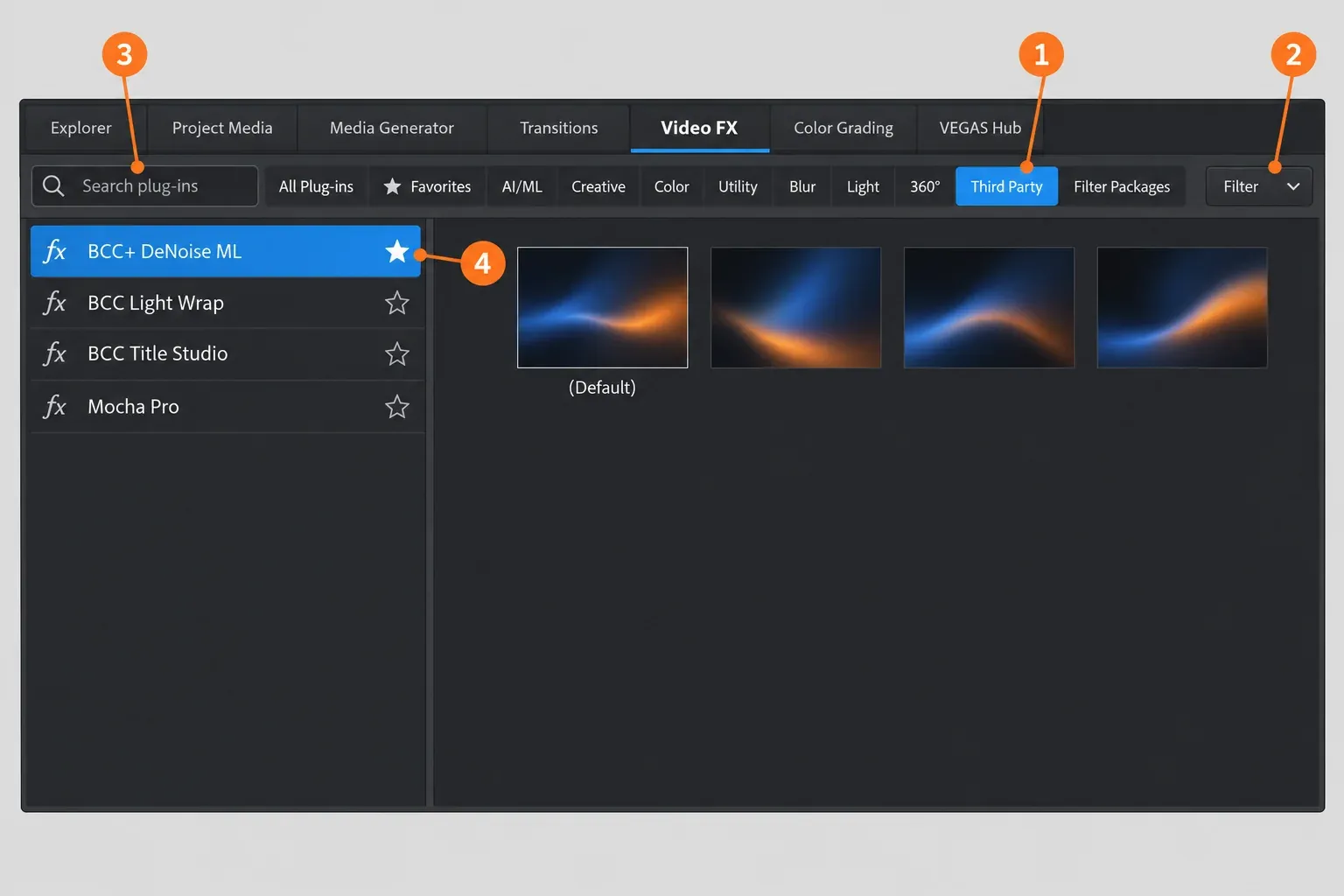
- Find it in Video FX. Open the Video FX window and click Third party. The 2026 Video FX help says a Filter drop-down then lets you narrow the list by provider, and the search box finds a plug-in by name. Click the small star beside a plug-in's name to add it to Favorites.
- Apply it. Drag a preset onto an event, a track or the Video Preview window. Video plug-ins can also go on a source media file through Project Media or on the whole project. Audio plug-ins sit in the Plug-In Manager, opened from View | Window | Plug-In Manager, and drag from there to events, tracks and buses.
Test results: what 2026 forum reports show
Speed figures for VEGAS plug-ins come mostly from vendors, so the most useful evidence is what owners report when something breaks. This composite result codes 25 Boris FX community-forum threads about plug-ins in VEGAS, posted April 1 to October 11, 2026 and read on October 20. One thread can carry more than one problem. These are people asking for help, so the counts show which problems recur and which fixes get confirmed, not how often plug-ins fail.
Nine of the 25 threads have an accepted answer. Two had no posted fix by October 20: the VST3 thread and the Sapphire script error. Twelve of the 25 threads are about audio plug-ins, every one of them the startup scan, bundled CrumplePop or a VST that will not list.
The pattern: plug-in trouble in VEGAS Pro 2026 clusters in two places, the audio plug-in scan at startup and the split between bundled and separately installed Boris FX tools. Neither is a reason to avoid VEGAS. Keep your VST search folders short, install one Continuum, remove bundled plug-ins you do not use, and update to the latest build before you troubleshoot anything else.
Plug-in not showing or VEGAS slow to start: fixes
Start with an update. Boris FX's notes for build 2026.0.3.189 include "Improved startup stability while scanning OFX plug-ins." Update 1 (build 105) unified OFX blacklisting, fixed a Continuum (BCC) crash and improved handling of blocked or uninstalled OFX DLLs, according to Movie Studio Zen's third-party changelog. If the problem survives the update, work down this table.
| Symptom | Try first | Then |
|---|---|---|
| OFX plug-in missing from Video FX | Confirm it sits in C:\Program Files\Common Files\OFX\Plugins, check the vendor's host list and restart VEGAS | For missing Continuum filters, a Boris FX support reply relayed by a user says to look for "Prefer bundled OFX plugins over the globally installed versions" at the bottom of Options > Preferences, toggle it and restart; keep only one full Continuum installed |
| VST or VST3 missing | Add its folder in Options > Preferences > VST Effects and tick the plug-in | For old 32-bit plug-ins, rely on the 32-bit bridge or install the vendor's 64-bit VST3; a similar fix path for VST plug-ins not showing in Sound Forge covers the audio side |
| Slow start or a rescan at every launch | Remove unused paths from the VST search folders; users say the /NOVSTGROVEL switch and Flags = 0 no longer stop the scan | Users with large VST libraries point VEGAS at a VEGAS-only VST3 folder that holds only the plug-ins they use there; uninstall bundled CrumplePop if you do not use it, since a moderator calls the slow start it causes "a known issue for some Vegas users" |
| Crash at startup after adding a plug-in | Hold Ctrl+Shift while double-clicking the VEGAS shortcut and confirm the dialog, a moderator-accepted fix | This is a full factory reset: it clears plug-in caches and your preferences too, and in that thread it helped only temporarily, so treat it as a diagnostic and remove the plug-in that triggered the crash |
| Freeze at "initializing UI" | Run the Ctrl+Shift reset with "Delete all cached application data" | Users also suggest reinstalling the Visual C++ 2015-2022 runtimes, or renaming C:\Program Files\Common Files\OFX to OFX.old to test whether an OFX plug-in is the cause; rename it back afterwards |
| Bundled CrumplePop stuck in trial mode | Close VEGAS and rename rehost_vegasproultimate.lic in C:\ProgramData\GenArts\rlm to .old, keeping the original as a backup | One user fixed it instead by deactivating VEGAS Pro in Boris FX Hub, restarting the Hub and activating again |
| A VST cannot be removed from the list | VEGAS locks a VST once it has been used in a session | Close and restart VEGAS, then remove it |
| Every Waves plug-in stopped loading | One user traced it to Waves V17 | Going back to V16 fixed it for that user; it is a single report |
| The timeline effects drop-down is gone | In VEGAS Pro 2026 it moved left into the colored track header area, per the accepted answer | Look there before reinstalling anything |
One more habit saves hours: change one thing at a time. Remove one plug-in or one search folder, restart, and check again, so you know exactly which change fixed it.
GPU and system requirements for heavy plug-ins
VEGAS Pro 2026 is Windows 11 only, so there are no VEGAS Pro plug-ins for Mac. The official system requirements list three tiers.
| Component | Minimum | Recommended for 4K | Recommended for AI |
|---|---|---|---|
| Operating system | Windows 11 | Windows 11 | Windows 11 |
| Processor | Intel Core i5 8th gen or AMD Ryzen 5 1000 series | Intel Core i7 12th gen or AMD Ryzen 7 5000 series | Intel Core i9 14th gen or AMD Ryzen 9 7000 series |
| Graphics card | GeForce GTX 20 series, Radeon with 8 GB or Intel HD Graphics 630 | GeForce RTX 30 series (12 GB recommended for 8K), Radeon RX 5000 series or Intel HD Graphics 770 | GeForce RTX 40 series or Radeon RX 6000 series |
| VRAM | 8 GB | 8 GB (12 GB or more for 8K) | 16 GB or more |
| RAM | 16 GB | 32 GB | 32 GB |
For plug-ins, the AI column matters more than the minimum. On Windows, Continuum's machine-learning filters need a DirectX 12 device and an NVIDIA or AMD card, and BCC+ filters need NVIDIA or AMD for full GPU support, according to the Continuum 2026.5.3 release notes. The same notes list two known issues: BCC+ DeNoise ML renders black or crashes on Intel GPUs, and several BCC+ filters show black boundaries on AMD GPUs, with CPU mode as the temporary workaround. A user with an Intel Arc B580 said Boris FX told them that card is not supported for DeNoise ML.
In a July thread about BCC crashes on an RTX 5070, forum users suggested preferring the BCC+ versions of Continuum effects because they are GPU-accelerated and still being developed. I agree with that advice: when a BCC and a BCC+ version of the same effect both exist, start with BCC+.
Upgrading from VEGAS 21, 22 or 23: will your plug-ins carry over?
Mostly yes for current OFX packs. These are the cases to check before you move.
- Continuum. Continuum 2026.5.3 for OFX, released June 17, 2026, supports VEGAS Pro 22, 23 and 2026, and Boris FX officially supports Continuum OFX only in VEGAS Pro, DaVinci Resolve and Nuke. The Ultimate-licensed Continuum does not cover VEGAS Pro 23, and one user who installed and then removed a VEGAS 2026 trial found the BCC transitions licensed with VEGAS 23 broken until reinstalled.
- Red Giant. Maxon put Red Giant tools in VEGAS into limited maintenance mode from April 1, 2025: existing users can keep using them, but no new enhancements come, and support and critical fixes covered Red Giant 2025.3.0 and Universe 2025.2.0 for one year. In an April 2026 thread, most users said Ignite and older Sapphire and BCC plug-ins kept working in 2026, one saw Ignite Pro OFX previews go black, and Red Giant did not work.
- Old bundles. In the NewBlue migration thread, a forum regular who answers NewBlue questions says recent bundles have been full retail products that keep working, while some older bundles were tied to a specific VEGAS version. Users there report full NewBlue TotalFX licenses working in 2026 without a watermark; the effects that did watermark came from a VideoStudio bundle.
- Old Sapphire units. Users report that updating Sapphire through Boris FX Hub replaced older bundled units with the current Sapphire, which watermarks until purchased. I'd skip that update unless you plan to buy Sapphire.
- Render plug-ins and Neat Video. Users moved Voukoder Pro 2026, DebugMode Frameserver and MagicYUV from VEGAS Pro 23 to 2026 and kept them working, while Voukoder classic stayed broken. Neat Video needs 6.1.2 or later for 2026 support.
If your serial dates from the MAGIX era, the Boris FX store lists upgrades to VEGAS Pro at $143.95 and to VEGAS Pro Plus at $199.95 (US list prices on October 20, 2026). Boris FX's single-price upgrade offer for MAGIX customers who own any previous VEGAS Pro or Sound Forge runs until December 5, 2026. If that serial is for VEGAS Pro 23, the VEGAS Pro 23 review weighs the 2026 render-speed gain against the upgrade price.
My verdict, by buyer
- Titles and everyday editing: base VEGAS Pro. The Title Pack handles titles; add one paid OFX pack only when a specific job demands it.
- Dialogue-heavy video: VEGAS Pro Plus, for CrumplePop, Mocha Vegas and Sound Forge. Uninstall the CrumplePop plug-ins you do not use to keep startup quick.
- Effects work that stays in VEGAS: VEGAS Pro Ultimate. It is the cheapest annual route to Continuum and Mocha Pro if VEGAS is your only OFX host.
- Several OFX hosts: standalone Continuum, Mocha Pro or Sapphire licenses, because bundled copies stay in VEGAS.
My next step for anyone still deciding: install the 15-day trial and drop your heaviest plug-in on your own footage, on your own GPU, before paying for anything. If you can wait for a sale, check the Boris FX Black Friday guide and the current deals first.