
Melodyne essential is enough for quick note-by-note pitch and timing fixes on a single vocal or instrument. Assistant is the edition to buy when you need vocal edits that sound natural, because it adds the vibrato, pitch-drift, transition, formant, amplitude, fade and sibilant tools that essential lacks; it cost US$249 outright, or US$149 as an upgrade from essential, in Celemony's US web shop on October 20, 2026. If you need to change single notes inside chords on piano or guitar, skip both and look at editor or studio.
My rule is simple. If essential came with your software, start there and upgrade only when you catch yourself fighting vibrato, a note that sags at its tail or a harsh "s" with a tool that cannot reach them. Waiting costs nothing extra: essential at US$99 plus the US$149 upgrade comes to US$248, a dollar under assistant bought outright, and Celemony's Melodyne 5 editions page states that an upgrade costs only the difference in list price. The rest of the audio tools that come with or around Sound Forge are mapped on the Boris FX audio hub.
Melodyne essential or assistant: which should you get?
Get essential for corrections, assistant for vocal production, editor for chords and studio for editing several tracks together. Prices are Celemony's US web-shop prices on October 20, 2026, with the suggested retail price in brackets where the shop shows one.
| Edition | Web-shop price | Upgrade from essential | Who it fits | What it cannot do |
|---|---|---|---|---|
| essential | US$99 | – | Quick pitch, timing and level fixes on a monophonic vocal or instrument; time-stretch and transpose on drums or whole mixes | Vibrato, drift, transition, formant, fade or sibilant editing as separate tools; Inspectors; Audio-to-MIDI; notes inside chords |
| assistant | US$249 (US$299) | US$149 | Detailed vocal editing and any monophonic source | Notes inside chords (no DNA); Multitrack Note Editing |
| editor | US$399 (US$499) | US$319 | Piano, guitar and other polyphonic parts through DNA Direct Note Access | Multitrack Note Editing, Quantize to a reference track, Sound Editor |
| studio | US$699 (US$849) | US$599 | Editing notes across several tracks at once and quantizing to a reference track | Nothing further in the Melodyne 5 line; it is the full set |
Melodyne is a pitch and timing editor first. If you record narration rather than singing, start with the cleanup chain in Sound Forge Pro for voice-over recording before you spend anything here.
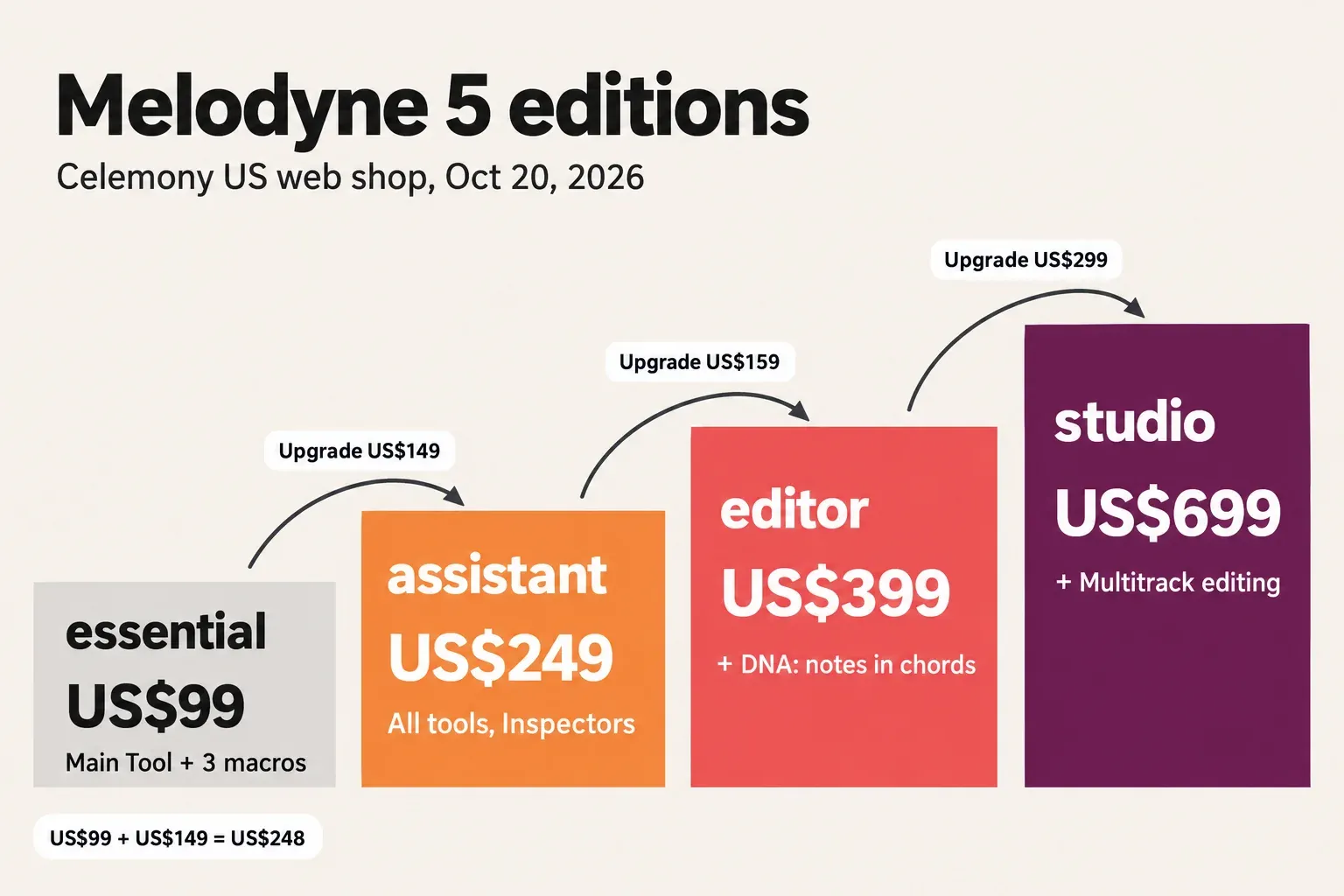
The four Melodyne 5 editions
Melodyne 5 comes in four editions: essential, assistant, editor and studio. There is no "pro" edition, so a search for "essential vs pro" really means essential against studio, the top of the line. According to Celemony's editions chart, all four use the same algorithms and sound engine and differ only in the range of functions; a note moved in essential goes through the same technology as a note moved in studio.
Every edition shares the same core:
- the Main Tool for the pitch, position and duration of notes;
- the pitch, timing and leveling macros;
- the Chord Track with chord recognition;
- stand-alone use, or use inside a DAW through ARA, AU, VST3 or AAX;
- opening Melodyne 4 projects.
Projects also travel between editions. Celemony says a studio project opens and plays back in essential with its edits intact; further editing there is limited to essential's functions. If a collaborator works in a larger edition, you can still open and hear their session.
What Melodyne essential can and cannot do
Essential gives you one editing tool, the Main Tool, plus three macros. In Celemony's essential quick start, the Main Tool changes a note's pitch, position and duration and splits notes; the tools for vibrato, amplitude, formants and timing inside notes belong to the larger editions.
The Main Tool
- Drag a blob up or down to move it in semitone steps.
- Hold Alt while dragging for steps in cents, or to move a note freely in time.
- Double-click an off-key note to snap it to the pitch it was aiming for.
- Double-click just above a blob to split it into two notes.
The three macros
Correct Pitch, Quantize Time and Note Leveling act on the notes you select, or on every note in the file when nothing is selected. Quantize Time moves notes to or towards the intended beat or the nearest grid line. Note Leveling makes loud notes quieter, quiet notes louder, or both. Correct Pitch has a second slider for drift: Celemony's Correct Pitch macro page says it progressively reduces slow pitch drift, while faster movement such as vibrato or pitch modulation stays as it was.
Boris FX's Sound Forge plan page describes the bundled edition with the phrase "pitch drift and modulation control". Read that through Celemony's documentation: essential tames slow drift with the macro, and the dedicated vibrato and pitch-modulation tool starts at assistant.
Algorithms and sibilants
Essential picks the Melodic or Percussive algorithm when it analyzes a file. You can switch it in the Algorithm menu, but switching discards the Melodyne edits already made on that track, so confirm the choice before you start. For vocals, the Melodic algorithm includes Sibilant Detection: Celemony's free essential update page explains that it separates unpitched sibilants and breaths from the pitched parts, so pitch and timing edits treat them naturally.
Detection is not editing. Essential has no Sibilant Balance tool and no Fade tool; both start at assistant. If harsh esses are the problem, treat them after Melodyne with de-essing in Sound Forge, and loud breaths with breath editing in Sound Forge.
What stays out of reach
- Notes inside chords. Essential includes every algorithm except DNA, so it edits monophonic vocals and instruments, drums and even whole mixes (time-stretch and transpose), but not single notes in a piano or guitar part.
- Inspectors and Audio-to-MIDI. Numeric access to note parameters and MIDI export both start at assistant.
- The detail tools. Vibrato, pitch transitions, formants, amplitude, fades and sibilant level are not available as separate tools.
Two shortcuts save money. If you only need to move a whole file up a semitone or change its length, Sound Forge's own pitch shift and time stretch does that without Melodyne. To check which note a take is aiming for before you correct it, the online pitch detector reads the note, frequency and cents.
What assistant adds for vocals
Assistant adds the entire Melodyne toolkit for monophonic material. On its essential-to-assistant upgrade page, Celemony groups the tools in four sets, each tool with its own Undo history:
| Group | Tools | Count |
|---|---|---|
| Intonation | pitch center, vibrato, pitch drift, pitch transitions | 4 |
| Timing and phrasing | position, duration, attack speed, warping | 4 |
| Dynamics | amplitude, amplitude transitions, fades, sibilant and breath volume | 4 |
| Tone color | formant, formant transitions | 2 |
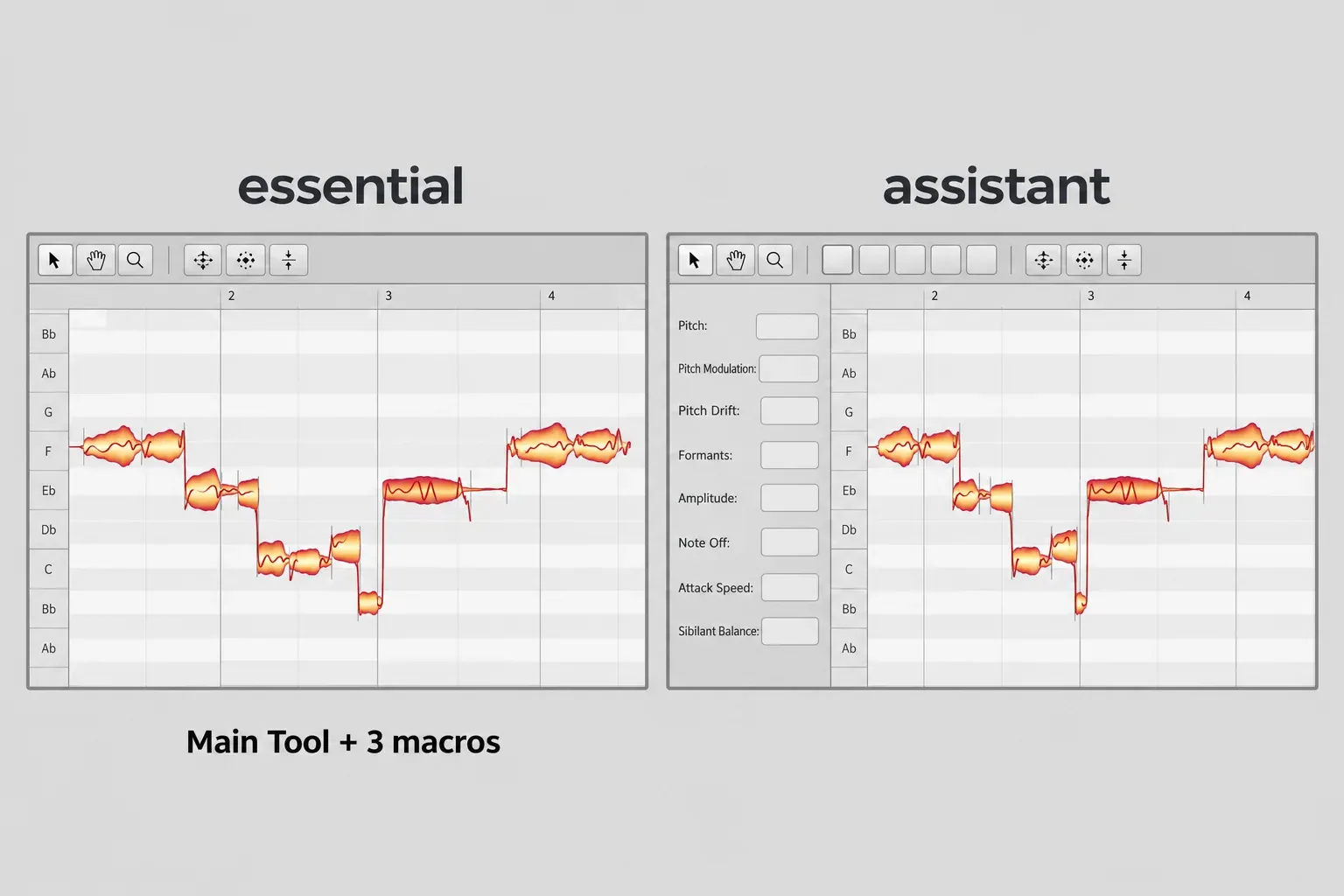
Assistant also adds Inspectors, which give numeric access to all note parameters, and Audio-to-MIDI export. Celemony goes further on the dynamics set, calling its control of sibilant and breath volume "better and more precisely targeted than any de-esser". That is the vendor's wording; the practical point is that sibilant level becomes something you edit inside Melodyne rather than after it.
Celemony positions assistant for professional vocal editing and any monophonic source, and says it is the wrong choice if you want polyphonic editing or a more user-friendly multitrack workflow; for those it recommends editor or studio.
The intonation group is the reason I would pay. Essential can snap a note and reduce slow drift, but vibrato and the glide from one note to the next stay out of reach, and a semitone snap cannot fix either. If your edits stop at "this note is flat", essential is enough. Once you want to shape how a note moves, buy assistant.
Melodyne 5 prices and upgrade paths
On October 20, 2026, Celemony's US web shop sold the Melodyne 5 editions at the prices below and listed no later major version. The assistant upgrade appears as "upgrade from Melodyne essential (any version)".
| Purchase | Web-shop price | Suggested retail |
|---|---|---|
| Melodyne 5 essential | US$99 | – |
| Melodyne 5 assistant | US$249 | US$299 |
| Melodyne 5 editor | US$399 | US$499 |
| Melodyne 5 studio | US$699 | US$849 |
| essential to assistant | US$149 | – |
| essential to editor | US$319 | US$399 |
| essential to studio | US$599 | US$749 |
| assistant to editor | US$159 | US$199 |
| assistant to studio | US$449 | US$549 |
| editor to studio | US$299 | US$349 |
| older assistant to Melodyne 5 assistant | US$19 | US$49 |
| older essential to Melodyne 5 essential | free | – |
The arithmetic backs Celemony's upgrade rule. Essential plus the assistant upgrade is US$99 + US$149 = US$248, a dollar below assistant bought outright, so starting small carries no penalty. There is no free route from essential to assistant: the only free Melodyne item on the shop's updates and upgrades list is the update from an older essential to Melodyne 5 essential. One limit applies to the smallest edition only: Celemony combines several licenses of the same edition into one license with more activations for every edition except essential.
If your essential came in a bundle, the upgrade listing says "any version" and the shop states no exclusion for bundled licenses, but confirm that your essential license appears in your Melodyne user account before you buy.
Dealer prices and sale history
Dealers price Melodyne differently from Celemony, and the two trackers worth checking disagree about the upgrade.
- Assistant upgrade from essential. plugindeals.net's upgrade price history showed a best price of $140.90 at Best Service on October 20, 2026 (typical $146.37), no discount of 10% or more in the past 12 months at the three stores it has followed since July 2022, and a record low of $42.87 at Best Service in November 2024. Its Black Friday lows were $59.14 (2022), $45.29 (2023), $42.87 (2024) and $146.37 (2025), all at Best Service.
- The same upgrade, other stores. musicsoftwaredeals.com's upgrade history follows a different set of stores: not on sale on October 20, 2026 at $149.00, with recorded sale prices of $49.00 at The FX Chain on June 13, 2025 and at JRR Shop on September 26, 2026; Audiodeluxe also shows $49.00 as its last sale price. The FX Chain record points to a product page with an assistant 4 slug, so it may belong to an older version of the upgrade.
- Full assistant. plugindeals.net's assistant history showed $177.00 at Thomann (typical $211.00), three sales in the past 12 months at usually 66% off for about 34 days, a record low of $48.80 at Gear4Music in January 2023 and a Black Friday 2025 low of $71.92 at Best Service.
- Essential. plugindeals.net's essential history showed $77.00 at Thomann (typical $81.00), three sales in the past 12 months at usually 72% off for about 30 days, a record low of $22.48 at Best Service in June 2025 and a Black Friday 2025 low of $22.90 at Gear4Music.
Thomann and Gear4Music prices on plugindeals.net exclude VAT, so UK and EU buyers pay VAT on top at checkout. One comparison stands out: at the Black Friday 2025 low of $71.92, full assistant cost less than the US$248 web-shop ladder, from a different store and before any tax. Past sales are history, not a forecast.
My buying advice follows from that. If you already own essential, the upgrade is the path, and the Celemony price is fair unless a dealer has it clearly lower that week. If you own nothing yet and can wait, full assistant on sale has beaten the ladder before. Current Sound Forge offers are on the deals page, and how the Boris FX sale pattern applies to Sound Forge is covered in Boris FX Black Friday deals.
Free ways to get or step up from essential
There is no free upgrade from essential to assistant. These are the free routes that do exist, with their conditions:
- Free update. Owners of any older essential update to Melodyne 5 essential at no charge.
- 30-day trial. Celemony's Melodyne trial is Melodyne 5 studio for 30 days with all functions and saving. Switch to a smaller edition via Help > License to compare; the trial starts again as studio at each launch, needs an internet connection to register and at every launch, and runs once per computer (an earlier Melodyne trial on the same computer does not block it).
- Edition switching from your account. Celemony's assistant upgrade page says you can switch between all editions from your user account for 30 days, free of charge; it does not say how that applies to a bundled essential.
- Tonalic essential. The essential-to-assistant upgrade includes a Tonalic essential license. Celemony's Tonalic page gives it free to Melodyne 5 studio, editor and assistant users and to essential users who bought from a dealer or Celemony's web shop; bundled essential licenses are not named, so check your Melodyne user account. Tonalic essential is a small edition with a selection of guitar material and no time limit, and it is not sold separately.
- A second essential as a coupon. If you already own Melodyne and receive another essential in a bundle, Celemony's coupon instructions let you enter that serial once as a €/US$20 coupon in the web shop toward updates, upgrades or an extra workstation. It voids that essential license, even if activated, and must be redeemed within one year of receiving the serial and in any case within three months of the release of Melodyne 6; one coupon per transaction.
Bundle terms vary by partner. Celemony's Pro Tools page, for example, ties the essential included with Pro Tools 2020.11 and later to an active subscription or an Update + Support Plan, and substitutes a coupon if Melodyne is already installed. Celemony also states a satisfaction guarantee on assistant ("If you aren't satisfied, you'll get your money back") without giving the terms on that page.
Sound Forge has its own fully functional 15-day trial, a separate offer explained in what the Sound Forge Pro free trial includes. For plug-ins that cost nothing at all, see free plugins and trials.
Test results: what published reviews and comparisons conclude
Reviewers publish verdicts rather than measurements for this choice, so the composite result is a count of agreeing sources. Six independent reviews and comparisons went in: three editorial reviews of Melodyne 5.0 and 5.1 from 2020 and 2021, one 2020 video breakdown and two dealer comparison pages. Every point below still matches Celemony's current editions chart; the newest Melodyne 5 version is 5.4.2.
| Finding | Sources that agree | Count |
|---|---|---|
| Notes inside chords need editor or studio | Sound On Sound, MusicTech, MusicRadar, Roy Thompson, The FX Chain, Pluginfox | 6 of 6 |
| Assistant is the edition for detailed vocal or monophonic work | MusicTech, MusicRadar, The FX Chain, Roy Thompson | 4 of 6 |
| Essential is one main tool plus macros | Roy Thompson, The FX Chain, Pluginfox | 3 of 6 |
| Essential lacks fade and sibilant editing | Sound On Sound, MusicTech, Pluginfox | 3 of 6 |
| Essential's Melodic algorithm still detects sibilants | MusicTech, Pluginfox | 2 of 6 |
| Chord Track and chord detection reach essential | Sound On Sound, The FX Chain | 2 of 6 |
The agreement is strongest at the top. Sound On Sound's Melodyne 5 review (Sam Inglis, 2020) keeps polyphonic editing to Editor and Studio, puts the Fade tool in every edition except Essential, enables chord detection in Essential and Assistant, and sums up: "Most new features are available in all editions apart from the basic Essential version." MusicTech's Melodyne 5 review (Will Betts, 2020) notes that Essential shows sibilance in Melodic mode but has no tools to edit it, and calls Assistant "a solid choice" if you will not edit polyphonic sources. MusicRadar's Melodyne 5.1 review (Bruce Aisher, 2021, rated 4.9 out of 5) says monophonic users still get many of the new features in Assistant.
The comparison pages say the same in plainer terms. The FX Chain's Melodyne 5 comparison calls essential best for beginners and quick vocal fixes and assistant "the sweet spot for detailed vocal editing". Pluginfox's edition table lists the Main Tool in every edition and the Pitch, Vibrato, Pitch Drift, Formant, Amplitude, Timing, Attack Speed, Fade and Sibilant tools from assistant up. Roy Thompson's 2020 edition breakdown labels essential "LIMITED...only 1 main editing tool" and assistant "GOOD...all the editing tools, only monophonic".
My verdict: assistant is the Melodyne edition for anyone who edits vocals seriously, and the composite backs it: four of six sources name it for that job, and all six send polyphonic work to editor or studio. Essential earns its place as a free or cheap entry for snapping notes and tightening timing, especially when it arrives with Sound Forge Plus; it is not the edition for shaping vibrato, transitions or sibilants. The quickest way to settle it for your own voice is Celemony's trial: switch between essential and assistant on the same vocal and notice which tools you reach for.
Using Melodyne essential in Sound Forge
Melodyne 5 essential comes with Sound Forge Plus, not with base Sound Forge. Boris FX's Sound Forge plan comparison lists "Celemony Melodyne 5 Essentials" (Boris FX's spelling) in Sound Forge Plus alongside Vandal, VariVerb II and 3D Reverb, shows no Melodyne in the Sound Forge column, and lists VST2, VST3 and ARA plug-in support. The full split between the plans is in Sound Forge vs Sound Forge Plus, the other Plus extras are covered in Sound Forge's bundled plug-ins, and current plan prices are in the Sound Forge Pro pricing guide.
Boris FX's Sound Forge help on ARA documents the supported route; Sound Forge Pro has worked with Melodyne through ARA2 since Sound Forge Pro 13:
- Install Melodyne's VST3 version.
- In Preferences, on the VST Effects tab, set the VST3 folder (usually
C:\Program Files\Common Files\VST3\) as the Alternate VST search folder. - Open the file, select all of it or the part you want, and choose Tools > Edit in Melodyne (ARA).
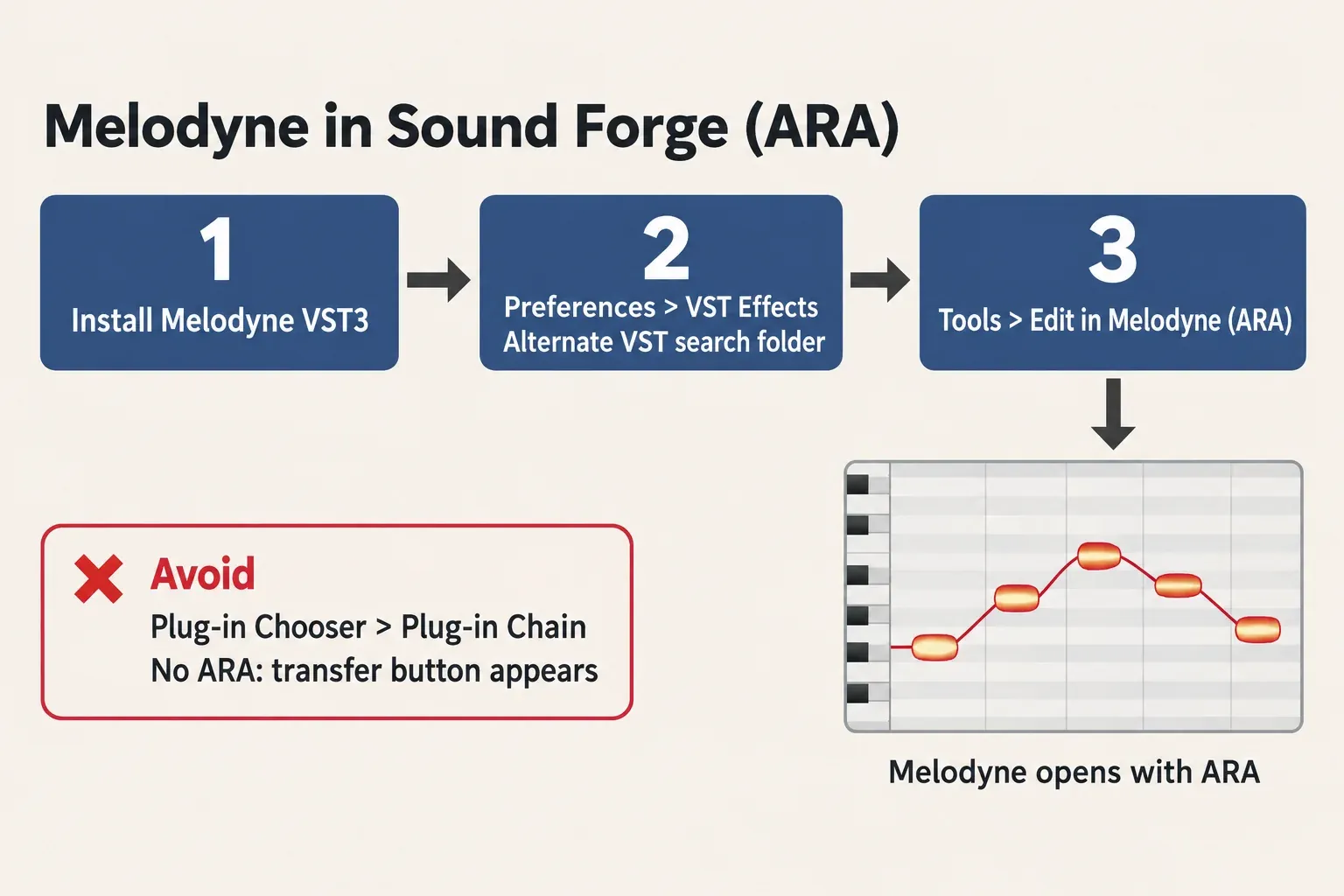
Do not load Melodyne through the Plug-in Chooser into the Plug-in Chain. Boris FX warns that it loads there without ARA integration, which you can recognize by a transfer button in Melodyne's window. The Plug-in Chain is fine for ordinary effects (how to use the Plug-In Chainer); for Melodyne, use the Tools menu. If you close Melodyne's window, reopen it with the Show Plug-In Window button in the Plug-in Chain window. The range of edits depends on your Melodyne edition, so essential inside Sound Forge has exactly the limits described above.
If Melodyne is still missing after you set the VST3 folder, work through VST plug-ins not showing in Sound Forge Pro. Keep one condition in mind: Sound Forge does not appear on Celemony's list of DAWs checked with the latest Melodyne 5, which names hosts such as Pro Tools 2026.4, Logic Pro 11.2.2, Cubase 15.0.30 and Reaper 7.52, and Celemony notes that the range of ARA functions varies by host. For this host, Boris FX's help is the reference.
Boris FX's third-party activation article covers its Samplitude Suite and Sequoia bundles: the Melodyne serial is entered at Celemony, the installer comes from the Celemony user area, and the plug-in is activated with your Melodyne account on first use. How Sound Forge fits into that suite is covered in Sound Forge in Samplitude Suite.
When editor or studio is the right answer
Go past assistant only when the material demands it. Editor adds DNA Direct Note Access, which edits individual notes inside chords on piano, guitar and samples, plus extended scale and tempo functions. Studio adds Multitrack Note Editing, Quantize to a reference track and the Sound Editor.
From essential, the web-shop upgrade costs US$319 to editor and US$599 to studio; from assistant, US$159 to editor and US$449 to studio; editor to studio is US$299. One quirk of the October 20 price list: stepping from essential to assistant (US$149) and later to editor (US$159) totals US$308, US$11 less than the direct US$319 essential-to-editor upgrade.
If piano or guitar parts are already on your list, I'd plan for editor from the start and compare the direct and two-step upgrade prices on the day you buy. Studio is worth it when you edit related tracks together, such as backing vocals or a choir, and want one track's timing to serve as the reference for the others.
System requirements and activation
Celemony's essential update page lists the Melodyne 5 requirements: macOS 10.12 (64-bit) or later with an Intel Dual Core processor and 4 GB of RAM (8 GB recommended), native on Apple Silicon from version 5.2; or Windows 10 (64-bit) or Windows 11 with an Intel or AMD Dual Core processor, 4 GB of RAM and ASIO-compatible audio hardware.
Activation is the one practical difference for essential. Melodyne can be activated per computer or with an iLok (2nd or 3rd generation), but essential is computer-based only, and the first activation needs internet access. The newest entry in Celemony's essential version history is 5.4.2, a free update with macOS Sequoia adaptations. If VST3, ARA and plug-in formats are new terms, what a VST plugin is explains how they fit together.