
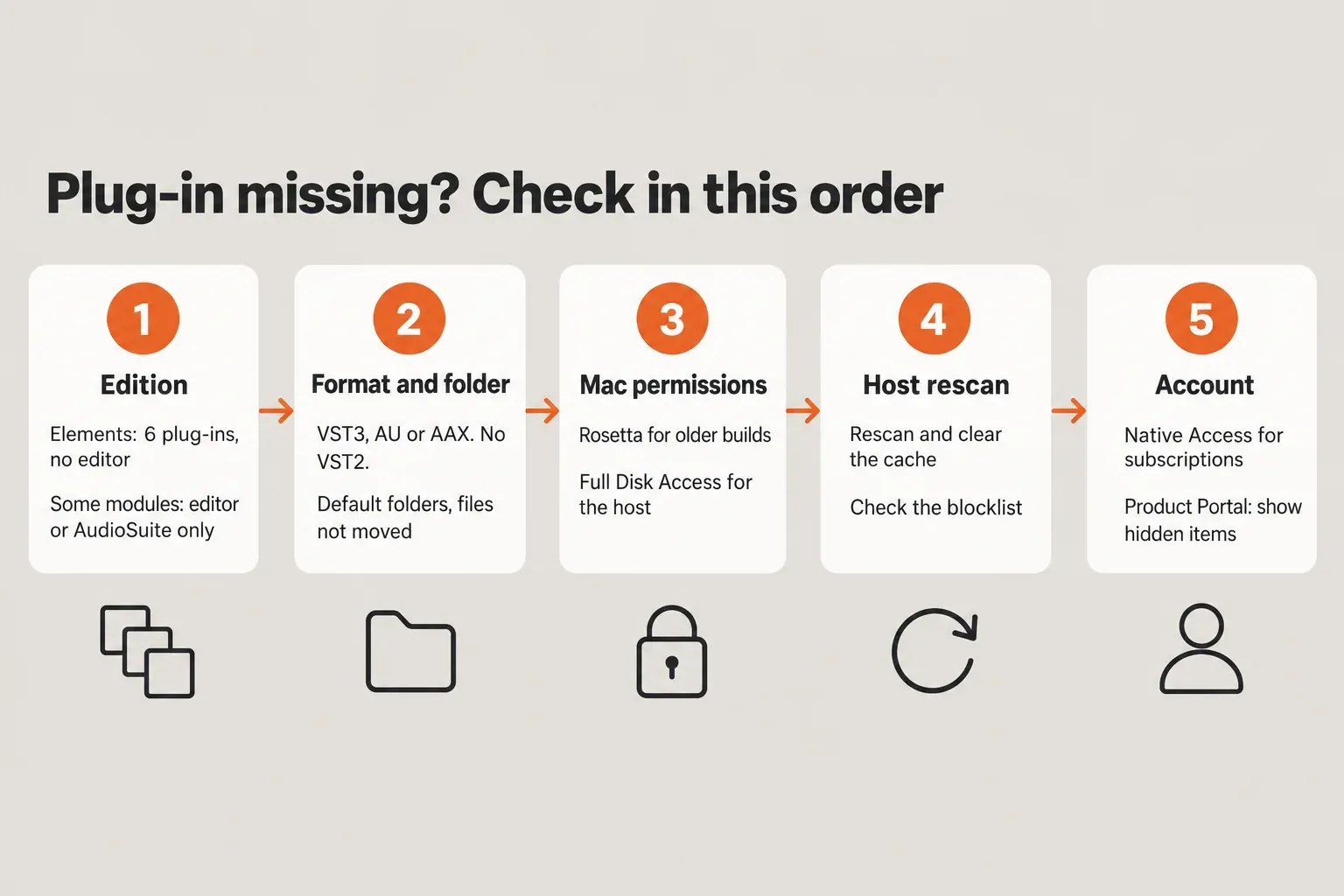
When iZotope RX plug-ins are not showing up, work through five checks before reinstalling anything: confirm the module is a plug-in in your edition, confirm you installed a format your host scans (VST3, AU or AAX; current RX has no VST2) into the default folders, rule out Rosetta and Full Disk Access on a Mac, rescan the host and clear its cache or blocklist, and only then look at the account side in Native Access or Product Portal. Across 13 published support threads, pointing the host at the right format and folder was the fix reported most often, in 5 of the 13.
I would check the edition table before touching an installer, because many "missing" RX modules were never plug-ins in the first place. Spectral Repair and Dialogue Contour run only inside the RX Audio Editor, and RX 12 Elements has no editor at all. A reinstall cannot add what the edition leaves out, and it can quietly undo format choices that were already right. The order below goes from causes you can confirm in a minute to causes that need an account login.
Check what should appear in your host
Start with what your edition actually installs. iZotope's RX 12 release notes date version 12.0.0 to April 28, 2026, and the plug-in table in the RX 12 manual overview splits the three editions like this:
- Elements installs six plug-ins: De-click, De-clip, De-hum, De-reverb, Repair Assistant and Voice De-noise. There is no RX Audio Editor, and the RX Elements release notes say the same was true of RX 11 Elements.
- Standard adds 13 more: Breath Control, Connect, De-bleed, De-crackle, De-ess, De-plosive, Dialogue Isolate, Guitar De-noise, Monitor, Mouth De-click, Music Rebalance, Spectral De-noise and Spectral Editor.
- Advanced adds Ambience Match, De-rustle and Scene Rebalance, and the RX Advanced release notes mark all three as AAX AudioSuite only. Only an AAX AudioSuite host such as Pro Tools lists them as plug-ins; inside the Advanced editor they are ordinary modules.
Two more rules catch people. Repair Assistant ships as AAX AudioSuite, AU and VST3, with no real-time AAX insert, so in Pro Tools it lives under the AudioSuite menu. And a long list of editor modules, including Spectral Repair, Dialogue Contour, Deconstruct, Center Extract, Wow & Flutter, Spectral Recovery and Loudness Control, is absent from the RX 12 plug-in table entirely. Those run only in the RX Audio Editor.
| You are looking for | Where it lives | Next step |
|---|---|---|
| An Elements module (De-click, De-clip, De-hum, De-reverb, Voice De-noise) | Your host's insert or effects list | Go on to formats and folders |
| Repair Assistant in Pro Tools | AudioSuite menu, not the insert list | Open it from AudioSuite |
| Spectral Repair, Dialogue Contour, Deconstruct, Wow & Flutter | RX Audio Editor only | Open the editor, or send audio to it with RX Connect |
| Ambience Match, De-rustle, Scene Rebalance | Pro Tools AudioSuite, or the Advanced editor | Hosts without AAX AudioSuite never list them |
| RX Spectral Editor | An ARA slot or the first insert, depending on the host | See the Spectral Editor section below |
| An "RX Elements" app | Not installed | Use the plug-ins inside a host |
The last row matters more than it looks. iZotope's note on products that do not appear after installation explains that most of its products install no standalone app; RX Standard and Advanced are among the few exceptions. If the module you need is not in your edition's list, the RX Elements vs Standard vs Advanced comparison shows what each step up adds, and the iZotope RX hub maps the whole lineup.
VST3, AU and AAX: formats and default folders
Current RX speaks three plug-in formats and nothing older. The same RX 12 release notes list AU, AAX, AAX AudioSuite, VST3, AU ARA and VST3 ARA, all 64-bit only, and state that RX 11 plug-ins are not available in VST2. iZotope's article on plug-ins missing in RX 10 confirms that RX 10 was already VST3, AAX and AU only. A host that scans only a VST2 path will never see RX 10, 11 or 12, however many times you rescan.
The installer is the second trap. The RX 12 installer asks which formats to install: AU (Mac only), AAX, AAX AudioSuite, VST3, AU ARA (Mac only) and VST3 ARA. Untick AU and Logic sees nothing; untick AAX AudioSuite and the Advanced-only modules never reach Pro Tools. If you are unsure what you chose, run the installer again and tick the formats your host needs. The guide to VST plug-ins explains how the formats differ if the acronyms blur together.
| Format | macOS default folder | Windows default folder |
|---|---|---|
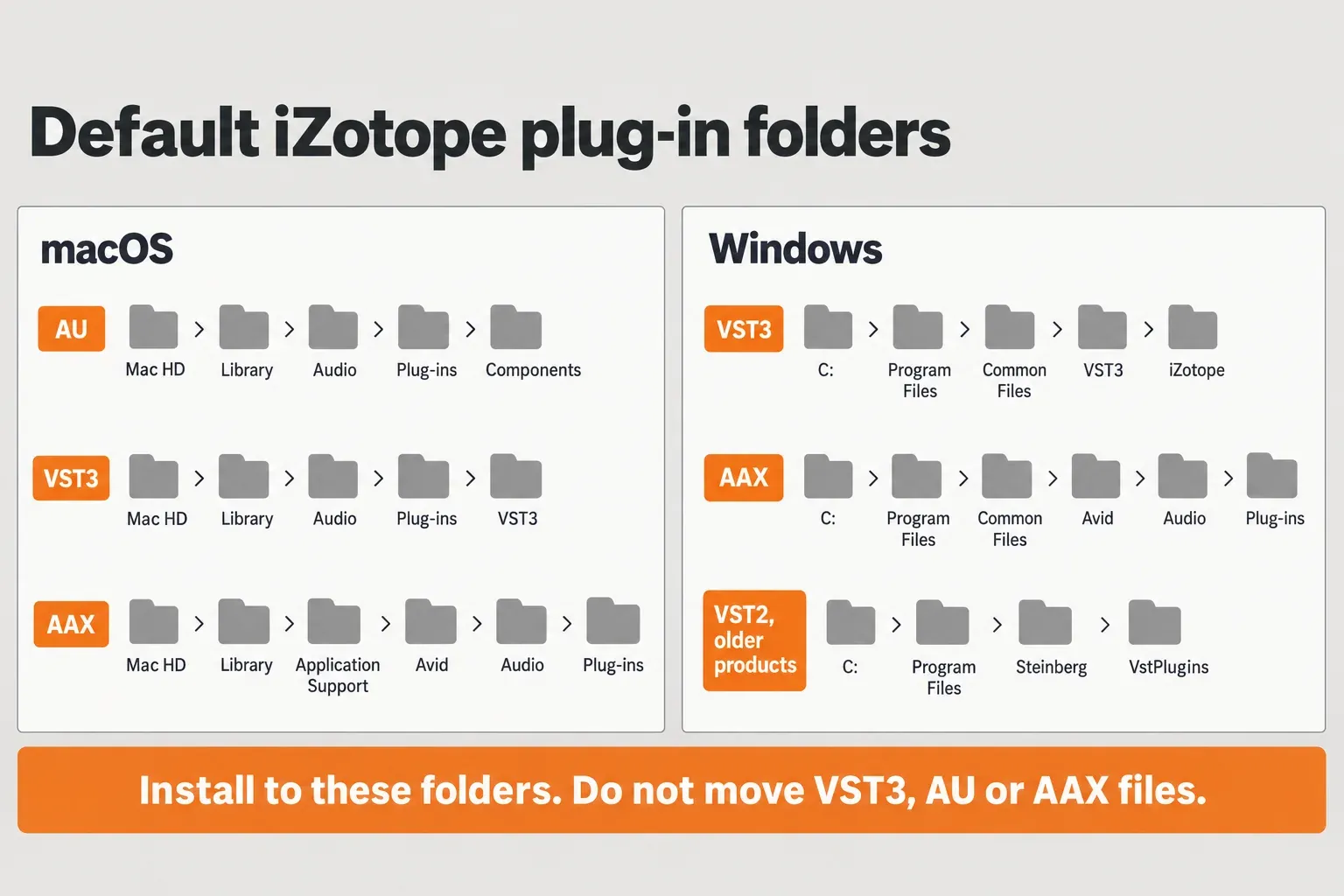
| AU | Mac HD > Library > Audio > Plug-ins > Components | Not used on Windows |
| VST3 | Mac HD > Library > Audio > Plug-ins > VST3 | C:\Program Files\Common Files\VST3\iZotope |
| AAX | Mac HD > Library > Application Support > Avid > Audio > Plug-ins | C:\Program Files\Common Files\Avid\Audio\Plug-ins |
| VST2 (older products only) | Mac HD > Library > Audio > Plug-ins > VST | C:\Program Files\Steinberg\VstPlugins |
Those defaults come from iZotope's host articles for Reaper, Cubase and Nuendo and Pro Tools. On a Mac they sit in the Library at the top of the startup disk, not in the Library inside your user folder.
Leave the files where the installer put them. iZotope's Ableton Live article warns that plug-ins can stop working after they are moved, and its note on installing to a custom location says VST3, AAX and AU should never be installed or moved to custom folders; only an older product's VST2 folder can be changed, on Windows and only through Custom Install. If a host needs a different folder, add the default folder to the host's scan paths instead of dragging files across.
Mac: Apple silicon, Rosetta and Full Disk Access
On an Apple silicon Mac, a plug-in and its host have to run the same architecture. iZotope's Apple silicon compatibility table sets the cut-off points for RX, and the RX 12 system requirements cover the current version:
| RX version | Native on Apple silicon | What to do |
|---|---|---|
| RX 8 Standard / Advanced | No | Run the host in Rosetta |
| RX 9 Standard / Advanced | App, AU and VST3 from 9.3.0; AAX from 9.4.0 | Update to at least those builds, or use Rosetta |
| RX 10 | App, AU and VST3 from 10.0.0; AAX from 10.4.0 | Pro Tools users need 10.4.0 or later to run natively |
| RX 12 | Yes; Rosetta is also supported | Run natively unless another plug-in forces Rosetta |
VST2 builds are the exception that never goes away: iZotope says its VST2 plug-ins run on Apple silicon only in Rosetta, and native VST2 support will not be added. Product Portal also needs Rosetta 2 installed. To start a host in Rosetta, follow iZotope's Rosetta steps: in Finder, open Applications, right-click the host, choose Get Info, tick Open using Rosetta, then restart the host. iZotope has seen the checkbox fail to appear in some older hosts, so update the host first if it is missing.
One RX feature still depends on Rosetta in RX 12. The RX Spectral Editor's ARA mode in Logic Pro 10.7 and later works on Apple silicon only while Logic runs in Rosetta, according to the RX 12 Spectral Editor manual page. On an Intel Mac that restriction does not apply.
Full Disk Access is the permissions check. iZotope's Full Disk Access article lists "iZotope plug-ins are blacklisted by the DAW" and "Plug-In Validation fails in Logic Pro" among the problems it prevents, and asks you to grant access both to iZotope apps and to your audio software. Its steps still show the older System Preferences layout. On current macOS the setting is under Apple menu > System Settings > Privacy & Security > Full Disk Access, where the + button adds an app, as Apple's Privacy & Security guide describes. Add the DAW itself, not only the iZotope apps, and restart the DAW before rescanning.
On macOS 26 Tahoe, check versions before anything else. iZotope's macOS compatibility list gives Tahoe minimums that include RX 11 11.3.0, RX 12 12.0.0, Ozone Imager 2 2.3.0, Vinyl 1.13.0, Trash 2024 1.1.0 and Product Portal 1.4.9. RX 10 and Trash 2 are not on that list. iZotope does not call them incompatible, but I would treat them as unconfirmed on Tahoe and plan around RX 11, RX 12 or Trash 2024.
Rescan in your host
Once the files are in the right place, the host has to look again. The RX 12 host list names Logic Pro 12, Pro Tools 2025, Ableton Live 12, Cubase 15, Nuendo 15, Fender Studio Pro 8 (Studio One 7), Reaper 7, FL Studio 25, Adobe Audition 2026, Adobe Premiere Pro 2026, DaVinci Resolve 19 and Reason 13. These are the rescan routes iZotope and Apple document:
| Host | Rescan or add the folder | Watch for |
|---|---|---|
| Logic Pro | Logic Pro > Settings > Plug-in Manager: select a plug-in marked "failed validation" and click Reset & Rescan Selection, or click Full Audio Unit Reset, as Apple's missing plug-in article explains. iZotope's deeper Logic cache reset moves the files in ~/Library/Caches/AudioUnitCache to the Desktop. | Plug-in slots group plug-ins in manufacturer sub-menus, so look under iZotope. A plug-in set to Hide or Ignore in the Logic Plug-in Manager never reaches the Insert menu; "not authorized" needs the maker's authorization first. |
| Pro Tools | With Pro Tools closed, delete InstalledAAXPlugins from ~/Library/Preferences/Avid/Pro Tools (Mac) or AppData\Avid\Pro Tools (Windows), then reopen, per iZotope's Pro Tools steps. | AudioSuite-only modules sit in the AudioSuite menu, not on inserts. |
| Ableton Live 10.1+ | Preferences > Plug-ins > Rescan. On Windows switch on the VST3 System folder; on a Mac switch on Use Audio Units or the VST3 system folder, per iZotope's Live steps. | Live 10 and later is 64-bit only. |
| Cubase / Nuendo | Studio > Plug-in Manager > gear icon > + to add the VST3 folder > Re-scan All, per iZotope's Cubase steps. | Cubase 10 and later blacklists VST2 and 32-bit versions. |
| Reaper | Options > Preferences > Plug-in > VST > Rescan, per iZotope's Reaper steps. | Use the default VST3 folder, not a copy. |
| Studio One / Fender Studio Pro | Options (Windows) or Preferences (Mac) > Locations > VST Plug-ins > Add the folder > Apply, per iZotope's Studio One steps. | The Spectral Editor's ARA mode needs the VST3 version. |
| FL Studio | Options > Manage Plugins > Add path, then Start scan, per iZotope's FL Studio steps. | Add the VST3 folder, not only the VST2 one. |
| Reason | Preferences > Advanced > VST Plugin Folders. To force a full rescan on a Mac, move the .dat file from Application Support/Propellerhead Software/Reason/Caches to the Desktop, per iZotope's Reason steps. | Quit and relaunch Reason; iZotope warns the full rescan can take longer. |
| Adobe Audition | Audio Plug-in Manager > Scan for Plug-ins, then enable the plug-in, per iZotope's Audition article. | RX Connect works only as a VST3 plug-in there. |
| Final Cut Pro | Move com.apple.audio.InfoHelper.plist out of ~/Library/Preferences and restart the Mac to force an Audio Units rescan, per iZotope's Final Cut Pro article. | iZotope says most of its products are not supported in Final Cut Pro. |
| GarageBand | No rescan fixes this. | iZotope plug-ins are not compatible with GarageBand, and subscription products cannot be activated there. |
Avid Media Composer is not on the RX 12 host list. iZotope's RX Connect FAQ still names it, and its Media Composer article opens RX Connect from Tools > AudioSuite Window, so confirm your RX and Media Composer versions with iZotope before planning around that route. Sound Forge Pro scans its own plug-in folders; if RX is missing there, the Sound Forge Pro VST scanning guide covers that host.
Blocklists, failed validation and "not authorized"
A blocklist hides a plug-in that is installed correctly. In the support threads behind this guide, every blocklist case came from Cubase. iZotope's Cubase and Nuendo article says Cubase 10 and later blacklists VST2 and 32-bit versions, so the 64-bit VST3 is the one to use. When Cubase finds both a VST2 and a VST3 version of the same plug-in, it shows only the VST3, as a Steinberg staff member explains in a thread about free iZotope plug-ins on the blocklist. In the same thread a forum responder points out that iZotope keeps .dll files beside its VSTs and Cubase can blocklist the dll; if the plug-in still inserts normally, the warning is about that file, not the plug-in you use.
Windows N editions are a separate case. iZotope's Cubase "Fatal Error" article describes Cubase 12 and 13 blocklisting Neutron 4, Nectar 4 and Ozone 11 with "Fatal Error - One of the files this plug-in needs cannot be found", and the fix is installing the Media Feature Pack for Windows 10 or 11 N, then restarting. The article names those three products rather than RX, but on an N edition it is a quick check before you start reinstalling.
Logic labels its rejects in the Plug-in Manager's Compatibility column. Apple's guidance is precise: "failed validation" means select the plug-in and click Reset & Rescan Selection; "not authorized" means authorize it as the maker documents, then rescan; 32-bit plug-ins are not compatible with Logic at all. If an iZotope plug-in fails validation again after a reset, go back to Full Disk Access, because iZotope links that exact failure to missing permissions.
If the host blocklisted RX because the scan crashed, fix the crash first: the RX crash and won't-open guide covers that side, and a clean scan usually follows.
Spectral Editor and RX Connect live in different menus
Two RX plug-ins in Standard and Advanced do not sit where ordinary effects sit, so people report them as missing when they are simply elsewhere. The RX 12 plug-in table lists ARA support for the Spectral Editor in Logic Pro 10.7+ (AU), on Intel or on Apple silicon in Rosetta only, and in Studio One 7 and Studio Pro 8 (VST3).
- Logic Pro: RX Spectral Editor is an ARA 2 plug-in that must be the first insert on an audio track. If it still does not appear, the Spectral Editor manual page points to Plug-in Manager > Full Audio Unit Reset.
- Pro Tools 2024.6 and later: open it from the Clip menu > RX Spectral Editor > Edit, or from the Elastic Audio/ARA selector, not from the insert list.
- Studio One 7 and Fender Studio Pro 8: use the VST3 ARA version as Event FX. The RX 12 Spectral Editor manual page notes that the AU version also appears in Studio One on macOS but is not supported.
RX Connect needs the RX Audio Editor, so it exists only in Standard and Advanced. The RX 12 Connect manual page gives the menu for each host:
- Pro Tools: AudioSuite > Noise Reduction > RX 12 Connect.
- Cubase and Nuendo: Audio > Direct Offline Processing, untick Auto-Apply, then + Plug-in > RX 12 Connect.
- Audition: Effects > VST3 > Restoration > iZotope; if RX 12 Connect is missing, run Scan for Plug-ins in the Audio Plug-in Manager and make sure it is enabled.
- Media Composer: Tools > AudioSuite Window, with the version caution above.
Some hosts never get RX Connect. iZotope's RX Connect FAQ lists Ableton Live, Premiere Pro, Final Cut Pro, Logic Pro and Reaper as hosts that use RX as an external editor instead. In Logic, iZotope's external editor article and the RX 12 manual describe the setup: enable Audio in Logic's Advanced settings, set Audio > Audio File Editor > External Sample Editor to the RX 12 Audio Editor, then use Edit > Open in iZotope RX 12 Audio Editor (Shift-W). That is also why an Elements owner cannot set RX as Logic's external editor: Elements has no editor to point at. Once audio arrives in the editor, the RX 12 beginner tutorial picks up the workflow.
Missing from Native Access or Product Portal
If the plug-in is missing from the installer app rather than the DAW, the cause is usually which app you opened. Since April 30, 2025, iZotope subscription products are managed in Native Access, not Product Portal. Native Instruments products bought from the iZotope store also install only through Native Access. A lapsed subscription looks the same from the DAW side: in one Native Instruments community thread, the plug-ins came back only after the poster resubscribed.
For perpetual licenses that still live in Product Portal, a missing product may just be hidden. iZotope's "Not finding your product?" article says the eye icon in the upper right turns hidden products on and off; if a product then looks greyed out, hover over it and click the small eye icon underneath to unhide it. On Apple silicon, Product Portal needs Rosetta 2, and on Tahoe it needs version 1.4.9 or later.
Activation, authorization and installer errors are a different problem with their own fixes, covered in the Product Portal authorization and install guide.
The plug-in shows, but its presets are missing
Presets live in their own folders, so a plug-in can load cleanly with an empty preset menu. iZotope's missing presets article says the preset folders for RX 10 and Ozone 10 moved to Mac HD > Library > Application Support > iZotope on a Mac and C:\Users\[USER]\Documents\iZotope on Windows. Products that use the iZotope Preset Manager store presets as .XML files in Documents/iZotope/[product name], according to iZotope's preset file location article.
When the files are there but the menu stays empty, check two things:
- Permissions. iZotope asks for Read & Write access on the preset folder and the folders that contain it.
- Cloud-synced Documents. iCloud Drive's Desktop & Documents Folders option on a Mac, or OneDrive on Windows, can stop the installer from writing presets into Documents, as iZotope's Documents folder article describes.
Third-party plug-ins missing inside the RX Audio Editor
The editor is a host too, with its own scan list and its own rules. The RX 12 plug-in hosting page says RX hosts VST3 and VST2 on Windows; AU, VST3 and VST2 on Intel Macs and on Apple silicon Macs running RX in Rosetta; and only AU and VST3 when RX runs natively on Apple silicon. A VST2-only plug-in on an M-series Mac will therefore never appear in native RX. iZotope also asks you to update third-party plug-ins to their latest version so RX can scan them.
The scan results are in Preferences > Plug-ins. According to the RX 12 Preferences page, a plug-in that failed scanning is prefixed with [Crashed] or [Failed], RX blacklists plug-ins it detects as unstable, Rescan clears that blacklist, and Clear empties the list. The VST2 option appears only on Windows and on Intel or Rosetta Macs.
![RX 12 Preferences window on the Plug-ins tab: format list with Audio Units and VST3 marked 1, a plug-in list with one entry tagged [Failed] marked 2, and the Clear and Rescan buttons marked 3 and 4](https://storage.ghost.io/c/af/4b/af4b05d4-2e0b-4edc-8378-1e2a62fecc70/content/images/2026/10/rx12-preferences-plugins-tab.webp)
Three more limits explain the stubborn cases:
- Custom VST2 folders: RX scans only the first level of sub-folders, so a plug-in buried two folders deep needs to move up one level.
- Waves: iZotope says Waves plug-ins are not currently supported inside the RX standalone editor.
- Everything else third-party: iZotope does not officially test third-party plug-ins inside the Ozone or RX applications, so a plug-in that fails here can still be fine in your DAW.
The plug-in loads, but the window is cut off or blank
Sometimes the plug-in is found and the problem is only what it draws. The RX release notes record that RX 11.2.0 added Windows HiDPI support, and that on 4K monitors in Ableton Live for Windows you should untick Auto-Scale Plug-In Window for each RX plug-in, save and reopen the session. A blank plug-in window on Windows is a different symptom: iZotope's blank window article links it to apps that hook into the display, such as Bandicam or Duet Display, and to outdated graphics drivers.
Adobe Audition users have also reported a cropped RX 11 Elements window. In that Adobe community report, one user made the window usable by switching temporarily to a 1920x1080 display resolution; no staff fix was posted, so treat it as a workaround, not a cure.
Older and free iZotope plug-ins: Vinyl, Ozone Imager and Trash 2
Free and legacy plug-ins go missing for the same reasons, with older cut-off points. On Apple silicon, iZotope's compatibility table lists Vinyl as native AU/VST3 from 1.11.0, Ozone Imager 2 as native AU/VST3 from 2.1.0 and AAX from 2.2.0, and Trash 2 with no native support. On Tahoe the minimums are Vinyl 1.13.0 and Ozone Imager 2 2.3.0.
Trash 2 is the hard case. Support for Iris 2, BreakTweaker and Trash 2 ended on October 27, 2023; they remain downloadable, but Trash 2's final official spec stops at macOS Catalina 10.15.7 to Monterey 12.6, with Apple silicon only when the host runs in Rosetta, and Windows 10 to 11. If Trash 2 or its presets are missing on an Apple silicon Mac, start the host in Rosetta first, because that is the only way its final spec supports Apple silicon. Trash 2 is also absent from the Tahoe list.
Format is the other trap. iZotope's available VST versions list still shows a current VST2 build for Ozone Imager 2, Vocal Doubler, Relay, Insight 2, Nectar 3, Neoverb, TBC 2 and VocalSynth 2, while Nectar 4, Ozone 10, Neutron 4 and RX 10 are VST3 only. On Apple silicon those VST2 builds need Rosetta, so install the VST3 or AU instead. Download sources and setup for the free ones are on the free iZotope plug-ins page and the Ozone Imager guide; the wider product family sits on the iZotope hub.
Test results: what fixed it in 13 support threads
No lab benchmark measures "plug-in not showing", so the composite result here counts reported causes and fixes. The sample is 13 readable threads from the Native Instruments, Steinberg, MAGIX and Adobe communities, dated 2018 to 2025, each with a stated cause or outcome. One thread can count toward more than one row.
| Reported cause or fix | Threads (of 13) | Representative thread |
|---|---|---|
| Host not scanning that format or folder | 5 | Ozone 11 missing in Ableton Live (2023) |
| Host blocklist | 4 | iZotope plug-ins on the Cubase blocklist (2024) |
| Account or installer side | 3 | Lapsed iZotope subscription (2025) |
| Fix outside the host (Windows component, user profile) | 2 | Ozone 11 working under a new Windows user (2025) |
| Host restarted in Rosetta | 1 | Cubase 13 on Sonoma (2023) |
| Window cropped, workaround only | 1 | RX 11 Elements in Audition (2024) |
| No complete fix confirmed by the poster | 4 | Native Access asking to locate iZotope plug-ins (2024) |
Format and folder problems led the count at 5 of 13. The pattern repeats: an RX Elements install that MAGIX Movie Edit Pro could not see came back once the correct VST folder was set and rescanned, and in the Ableton thread Native Instruments staff explained that Ozone 11 is VST3 only and the VST3 system folder simply had to be switched on. Blocklists followed at 4 of 13, all in Cubase; one of those turned out to be a Windows Media Feature Pack missing after an offline install, and the Sonoma case cleared once Cubase 13 started in Rosetta, as Cubase 12 had. The account side accounted for 3 of 13, including an Ozone 11 install missing from Native Access that came back after the poster deleted everything, restarted and logged in to Native Access again.
Two threads carried a warning against moving plug-in files by hand, which matches iZotope's own advice; the one Cubase thread where copying files into a scanned folder helped also drew a reply disputing that explanation. In 4 of 13 the original poster never confirmed a complete fix, so the counts describe what these threads reported, not how often each cause occurs. The sample also leans toward Ozone and Neutron on Native Instruments and Steinberg hosts; only the MAGIX, Adobe and Cubase free-plug-in threads involve RX or its free siblings directly. Even so, the ranking supports the order in this guide: format and folder first, host blocklist second, account third.
Verdict: the order I would check
Most "RX not showing" problems are a mismatch, not a broken install. My order is fixed:
- Edition. Confirm the module is a plug-in in your edition, and that it is not editor-only or AudioSuite-only.
- Format and folder. VST3, AU or AAX in the default folders; no VST2 for RX 10 and later; nothing moved by hand.
- Mac architecture and permissions. Rosetta for older builds, VST2 and Logic's Spectral Editor; Full Disk Access for the DAW and iZotope apps.
- Host rescan and blocklist. Use the host's own reset, then clear blocklists or failed-validation flags.
- Account. Native Access for subscriptions, the eye icon for hidden Product Portal items.
- Reinstall last, into the default folders, with the formats your host needs ticked.
If all six pass and the plug-in is still absent, the likeliest remaining cause is version support, and the host and system lists in the release notes are the place to settle it. For everything else in the RX family, start from the iZotope RX hub.