
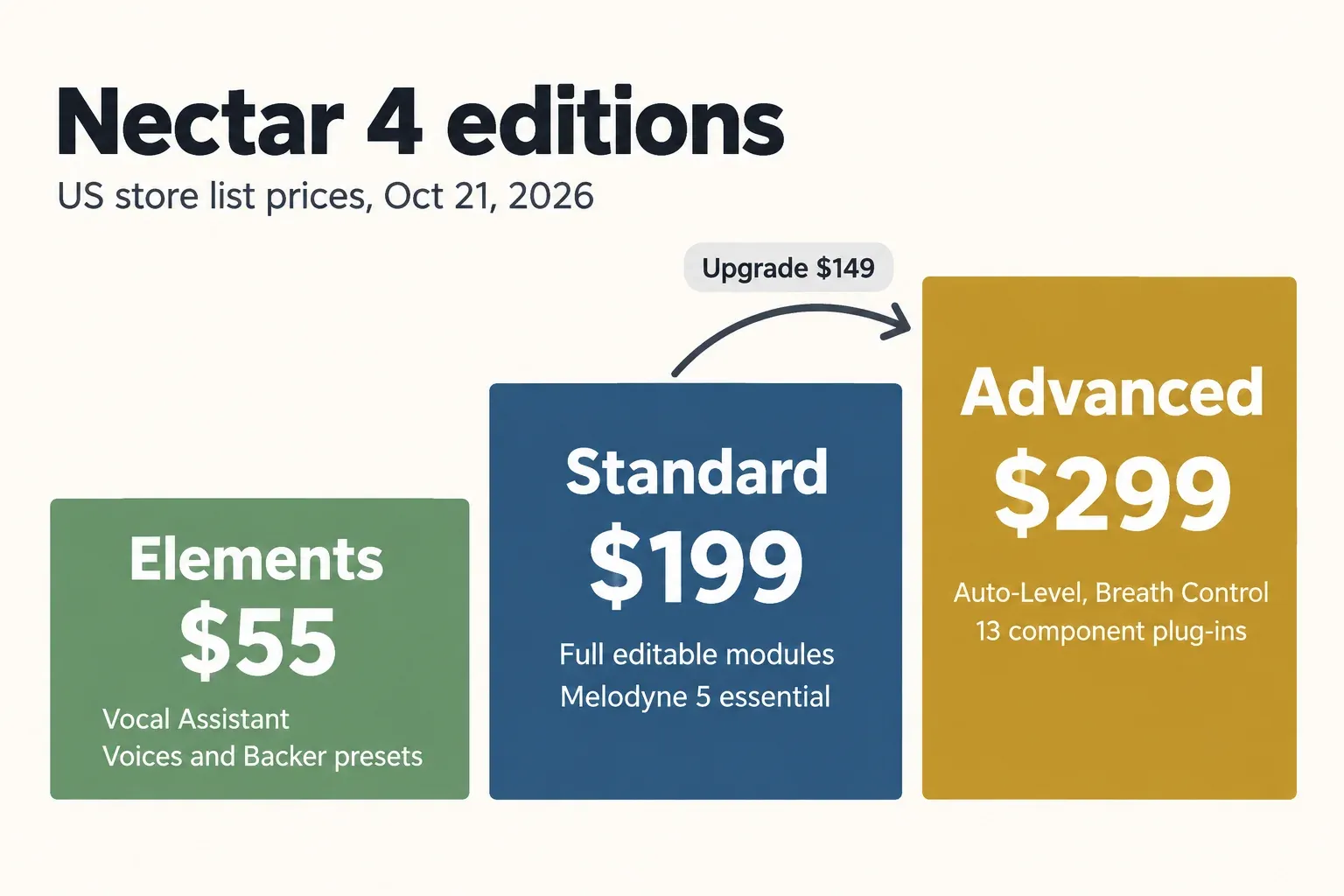
Buy Nectar 4 Standard if you mix your own vocals or dialogue. At $199 (US store price on October 21, 2026) it is the cheapest edition with editable modules, automatic pitch correction, Vocal Unmask and Melodyne 5 essential in the box. Elements ($55) is Vocal Assistant with macro controls and preset-level Voices and Backer. Advanced ($299) adds three things: Auto-Level, Breath Control and all 13 modules as separate component plug-ins. Pay for it only when one of those handles a job you do every week.
I would buy Standard first, because the $100 step to Advanced buys workflow, not a different sound: the EQs, compressors, de-esser, saturation and effects are the same modules in both editions. The catch is timing. Buying Standard now and taking iZotope's $149 upgrade later comes to $348 by plain arithmetic, $49 more than Advanced up front. So if riding levels by hand on long vocal or voice-over takes is a weekly chore you want to hand off, buy Advanced on day one. If you are still working out which iZotope tools you need at all, the iZotope plugins buying guide maps the whole range by job, and the guide to the best iZotope plugins for vocals narrows it to the vocal tools.
Nectar 4 Elements vs Standard vs Advanced at a glance
Elements stops at the Assistant, Standard opens the full vocal chain, and Advanced adds leveling, breath removal and per-module plug-ins. The rows below follow iZotope's Nectar 4 edition comparison chart as it stood on October 21, 2026.
| Feature | Elements | Standard | Advanced |
|---|---|---|---|
| US list price (Oct 21, 2026) | $55 | $199 | $299 |
| Vocal Assistant, Intent Controls, Audiolens referencing, Target Library, key and range detection | Yes | Yes | Yes |
| Output Width and Wet/Dry | Yes | Yes | Yes |
| Voices (harmonies) | 11 auto-harmony styles | Full module: custom styles, MIDI mode, up to 8 voices | Full module |
| Backer (alternate singer personas) | 8 personas with a blend control | Full module: custom voice upload, pitch, formant and tone | Full module |
| Two EQs, two compressors, De-esser, Gate, Saturation, Reverb, Delay, Dimension | No | Yes | Yes |
| Module reordering and output limiter | No | Yes | Yes |
| Automatic pitch correction | Key detection only | Yes | Yes |
| Vocal Unmask | No | Yes | Yes |
| Relay plug-in and Neutron Visual Mixer control | No | Yes | Yes |
| Melodyne 5 essential | No | Yes | Yes |
| Auto-Level | No | No | Yes |
| Breath Control plug-in | No | No | Yes |
| 13 component plug-ins | No | No | Yes |
One row needs a footnote. iZotope's comparison chart lists Vocal Unmask under Standard and Advanced, though one summary row marks it Advanced-only; iZotope's Nectar 4 launch notes place it in Standard, and the Nectar 4 Standard product page promises "intelligent processing and vocal unmasking". I treat Unmask as a Standard feature and would not buy Advanced for it.
What Nectar 4 Elements does for $55
Elements is a one-screen vocal polisher: you play a section, Vocal Assistant builds a chain, and you steer it with a handful of macro controls. All three editions share that Assistant, along with custom referencing through the bundled Audiolens app, the Target Library and vocal range and key detection, as the Nectar 4 Elements product page and the comparison chart confirm.
The macro view is where Elements lives. MusicTech's Nectar 4 review spells out what each control touches: Shape steers the EQ, Intensity sets the compressor threshold, and an X/Y pad adds reverb, delay and Dimension. Width and the Voices or Backer level sit alongside. Relearn re-runs the Assistant's analysis, and Bypass switches the processing off, according to iZotope's Nectar 4 help documentation.
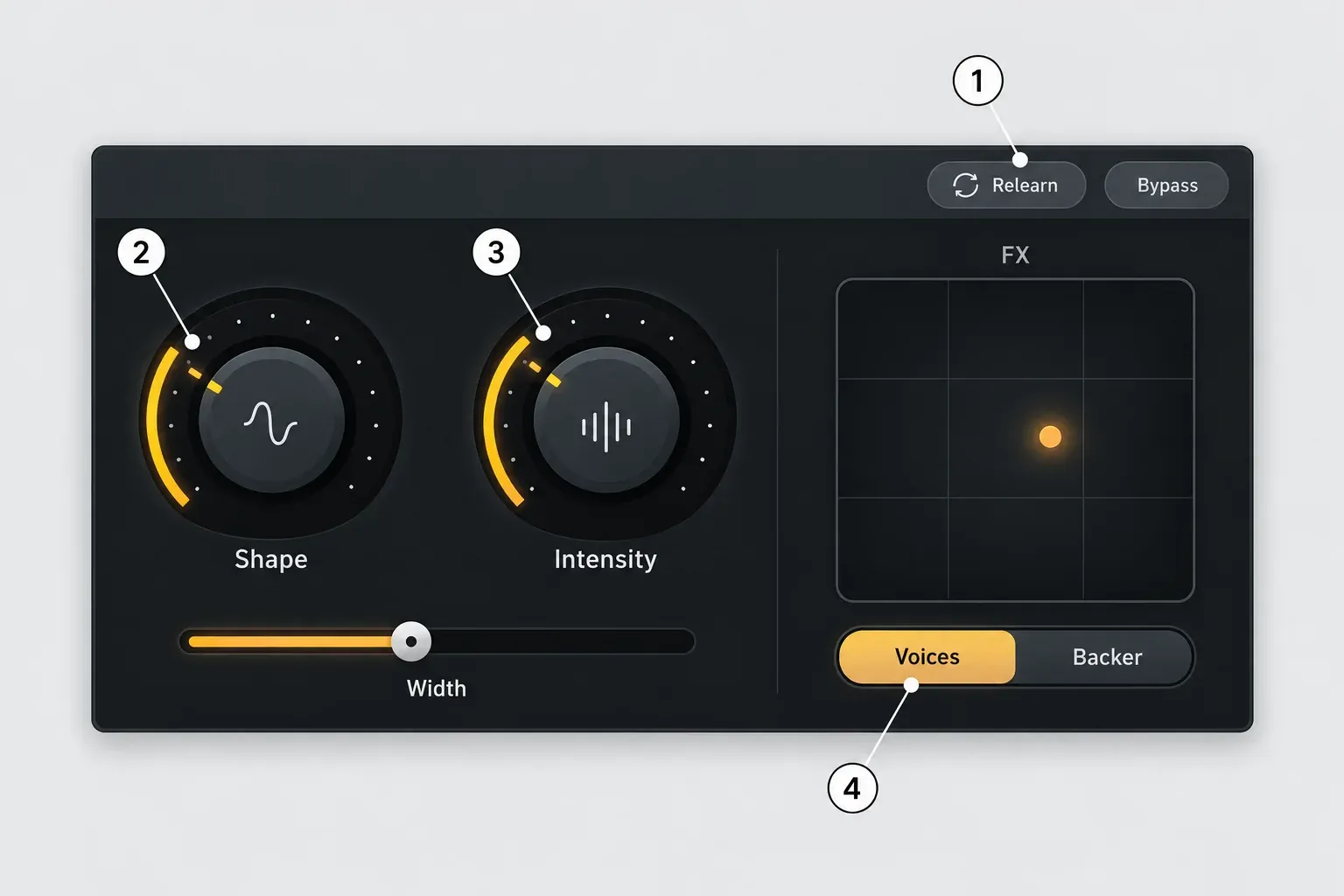
What you give up is everything behind that screen. In Elements you cannot open the EQ, compressor or de-esser modules, pitch handling stops at key detection, and Melodyne is not included. Voices and Backer run at preset level: 11 auto-harmony styles, and Backer's 8 personas with a blend control. Elements does have both features; it just does not let you edit them.
That makes Elements a sensible buy for podcast hosts and video voice tracks that need a cleaner, more present voice without learning a channel strip, and for songwriters polishing demos. Sound On Sound's Nectar 4 review found Vocal Assistant "a very easy and effective point of entry" and expected the cheaper edition to appeal to people new to Nectar. If your voice work happens in Sound Forge, the guide to Sound Forge Pro for podcasters covers the editing that comes before any vocal chain.
What Nectar 4 Standard adds for $199
Standard turns the Assistant's result into a chain you can edit module by module, and adds the tools that fix pitch and masking. According to the comparison chart, Standard and Advanced share all of this:
- Two EQs with up to 48 bands, plus Dynamic, Follow EQ and Solo Band modes.
- Two compressors with four modes, a De-esser and a Gate.
- Saturation with eight modes, Reverb, Delay and Dimension with three modes.
- Module reordering and an output limiter.
- Automatic pitch correction, Vocal Unmask with Dynamic and Sidechain modes, the Relay plug-in and Neutron Visual Mixer control.
- The full Voices module (custom styles, MIDI mode, up to eight voices, pitch and time variation, Piano Inspector, Quick Harmonies) and the full Backer module (custom voice upload, pitch and formant shift, tone).
- Melodyne 5 essential.
The editable modules are the real jump. Once you can see the de-esser and the compressor, you can correct what the Assistant got wrong, such as harsh esses on a bright voice or a compressor working too hard on a quiet narrator. The principles carry over from the guides to reducing sibilance in Sound Forge and to compressors versus limiters.
Two features need context. The Pitch module is automatic correction; note-by-note editing is Melodyne's job, which is why Standard bundles Melodyne 5 essential. The Melodyne Essential vs Assistant comparison shows where that bundled edition runs out. Vocal Unmask works only when Relay, Nectar or Neutron sits on the track that masks the vocal, per the Nectar documentation, so it pays off in a full DAW mix rather than on a solo voice-over file.
The full Backer module accepts your own voice upload and shifts pitch and formant. The Nectar 4 product page notes that Backer was trained only on English-speaking voices, so if you sing in another language, try it on your own material during the trial before you count on it.
What Nectar 4 Advanced adds for $299
Advanced adds Auto-Level, Breath Control and the component plug-ins. Every other feature matches Standard.
Auto-Level: a vocal rider before the compressor
iZotope's documentation describes Auto-Level as "an intelligent and transparent alternative to compressors" that sits at the start of the signal chain and manages vocal level before anything downstream reacts to it. MusicTech called it "essentially a vocal rider" that helps "reduce the need for excessive compression down the line". Nectar 3 already had Auto-Level, but only as an on/off switch on the input; version 4 turned it into a full module with its own controls. In Advanced, Vocal Assistant switches Auto-Level on as part of its analysis. Standard has no Auto-Level at all.
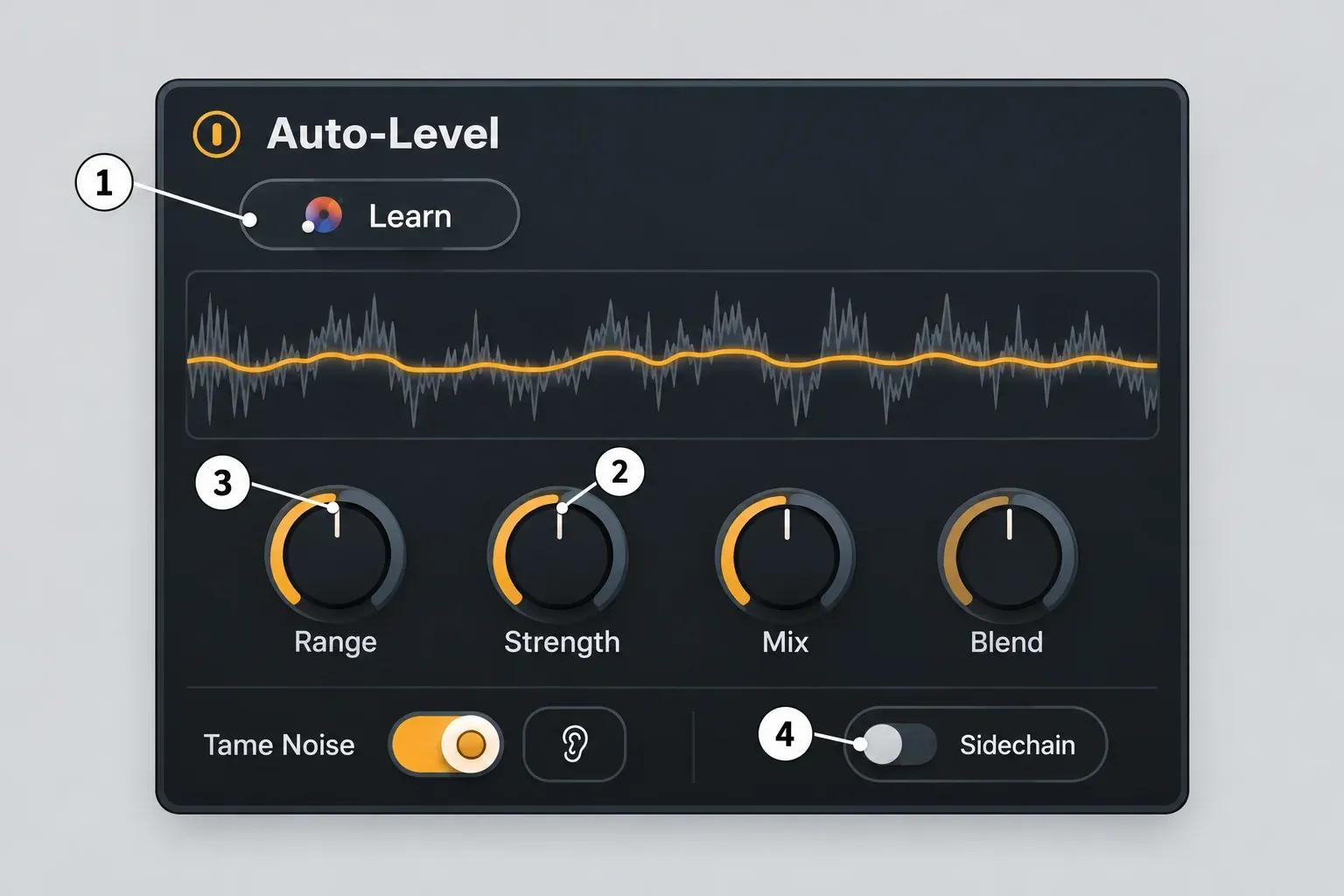
- Learn runs a short analysis pass and sets an RMS target level.
- Strength sets how quickly and how sensitively the leveling reacts.
- Range caps the correction: a 6 dB setting limits it to 6 dB of boost or cut.
- Sidechain lets the vocal follow the level of an external source, and Blend mixes that source's level with the fixed target. You set up the side-chain routing in your DAW.
Mix blends the unprocessed signal back in. Tame Noise keeps breaths, esses and mouth sounds out of the leveling, so they are not pushed up along with the words. Sound On Sound suggests feeding the side-chain from an instrumental group bus, so the vocal rises and falls with the arrangement instead of sitting at one level.
Breath Control
Breath Control is an Advanced-only component plug-in that, in iZotope's words, "reduces unwanted breaths without compromising audio quality". Because it is a separate insert, you can put it first on a long podcast or audiobook voice and leave the rest of the chain alone. You can do the same job by hand with the methods in the guide to editing breaths in Sound Forge; Breath Control is worth paying for when the number of takes makes manual breath editing the bottleneck.
Component plug-ins
With Advanced, all 13 modules also load as separate plug-ins: EQ, Auto-Level, Breath Control, Backer, Pitch, Compressor, Voices, De-Esser, Saturation, Reverb, Gate, Delay and Dimension. You can put Auto-Level first, follow it with a third-party compressor you already trust, then add Nectar's de-esser. Sound On Sound called this "a most welcome development", because the modules can now be used instead of, or alongside, stock and third-party plug-ins. Two limits apply: the component plug-ins come in VST3, AUv2 and AAX only, and the Assistant's Intent Controls are not available in them, per the Nectar 4 documentation.
Nectar 4 prices, upgrades and sale history
The list prices are $55, $199 and $299. Upgrading from Elements later costs about a dollar extra, but going from Standard to Advanced later costs $49 more than buying Advanced outright. These figures come from the iZotope US store on October 21, 2026, with no sale running; the Nectar 4 Advanced store page lists every upgrade path.
| Purchase path | Advanced | Standard |
|---|---|---|
| New license | $299 | $199 |
| Education license | $149.50 | $99.50 |
| Update from any earlier Nectar (not Elements) | $149 | $99 |
| Crossgrade from any paid iZotope product | $249 | $149 |
| Upgrade from Nectar Elements or Elements Suite | $245 | $145 |
| Upgrade from Nectar 4 Standard | $149 | — |
| Inside Music Production Suite 9 ($799) | Included | — |
Elements costs $55 new, or $27.50 as an education license. The arithmetic between tiers is simple. Elements now plus the $145 upgrade to Standard comes to $200, one dollar more than Standard outright; Elements plus the $245 upgrade to Advanced comes to $300 against $299. Standard plus the $149 step to Advanced is $348, so waiting costs $49. These are US prices; check the iZotope store for your own region rather than converting them.
Sales are where the real savings sit. PluginDeals' Nectar 4 Advanced price history, which follows several stores, shows two sales in the past 12 months, usually 34% off and 43% at the deepest, a Black Friday 2025 low of $165.75 and a lowest recorded price of $129.00 at Plugin Boutique in August 2025. The Nectar 4 Standard price history shows one sale in the past year, $116.80 (25% off) in November 2025, and a lowest recorded price of $66.39 in March 2024. Elements went on sale three times in 12 months, usually at 47% off, and bottomed out at $18.49 in January 2024.
If you can wait until late November, compare any offer with the iZotope Black Friday buy-below targets and the current offers on the audio plugin deals page. Every iZotope upgrade and crossgrade path, Nectar included, sits in one table in the iZotope upgrade price guide.
Should you rent Nectar through iZotope Plus or Pro?
I'd rent only if you also want Ozone and RX, or need Nectar for about a year. iZotope's subscription page lists two tiers that include Nectar 4:
| Plan | Price | Nectar edition | Also included |
|---|---|---|---|
| iZotope Plus | $15/month or $150/year | Standard | Neutron 5, Ozone 12 Standard, RX 12 Elements, Melodyne 5 Essential |
| iZotope Pro | $25/month or $250/year | Advanced | Ozone 12 Advanced, RX 12 Standard, Neutron 5, Melodyne 5 Essential and more |
Both plans start with a 7-day free trial, and the tools revert to read-only mode if you cancel. By the same plain arithmetic, one year of either plan on annual billing costs less than buying the matching edition ($150 against $199, $250 against $299), but the first renewal takes you past it ($300 and $500). On monthly billing, Plus passes Standard's price in month 14 and Pro passes Advanced's in month 12.
Splice offers a third route: rent-to-own Nectar 4 Advanced on Splice at $14.99 a month for 20 months, $299.80 in total, with a 3-day trial and use on up to two computers. That is 80 cents more than buying outright, in exchange for spreading the payment.
Test results: what four published reviews conclude
Across four independent sources, Vocal Assistant, Auto-Level and the component plug-ins each win praise from three, and two say a cheaper edition will serve many buyers. The reviewers published verdicts rather than measurements, so this composite counts verdicts. The sources are Sound On Sound's Nectar 4 Advanced review by John Walden (March 2024), which listed no cons, MusicTech's review by Alex Holmes (October 2023, scored 9/10), a June 2026 review on MixingGPT whose edition advice I count but whose price figures and several edition details are out of date, and one Gearspace user comparing Nectar with a Manley Voice Box. Both full reviews cover version 4.0; the edition split they describe still matches iZotope's chart for version 4.2.0.
| Finding | Sources agreeing | What they said |
|---|---|---|
| Vocal Assistant is a fast, usable starting point | 3 of 4 | Sound On Sound: "a very easy and effective point of entry"; MusicTech: "more usable starting points" |
| Auto-Level is the Advanced feature that matters | 3 of 4 | MusicTech: "Dramatically improved Auto-Level Module is highly effective at levelling dynamics" |
| Component plug-ins are worth having | 3 of 4 | Sound On Sound: "a most welcome development" |
| Strong value for first-time buyers | 2 of 4 | Sound On Sound: "great bang for that buck"; MusicTech: "a lot of bang for your buck" |
| A cheaper edition is enough for many buyers | 2 of 4 | MixingGPT: Standard is "the tier most people should buy"; Sound On Sound sees Elements as the entry for newcomers |
| Little gain if you already have a vocal chain | 2 of 4 | Gearspace user: "a generic channel strip plugin"; MixingGPT: Advanced only for component plug-ins or Auto-Level |
| Backer quality | Split, 1 vs 1 | Sound On Sound: "It works remarkably well"; MusicTech: "robotic-sounding, with artefacts and glitches" |
| Weak points | 1 of 4 each | MusicTech: upgrade price "a little steep", "CPU hungry with multiple modules running", uninspiring reverb sounds, no ducking on reverb and delay |
My reading of the composite: the reviewers agree on what Advanced is for, and it is Auto-Level and the component plug-ins, not better-sounding modules. The CPU remark comes without a figure, so load the modules you would actually use on your own machine during the trial. Treat Backer as an experiment, because the two full reviews heard opposite results from it. The verdict for most buyers stays Standard.
Is Nectar 4 Advanced worth the extra $100?
Yes, if one of these four jobs is routine for you; otherwise Standard runs the same processing for less.
- Long takes with level swings. Narration, audiobooks and vocal takes where the singer moves on and off the mic: Auto-Level does the riding before the compressor sees the signal.
- Breath-heavy dialogue. Breath Control handles it as a plug-in instead of manual edits on every take.
- Mixed-brand chains. If you want Nectar's Auto-Level or EQ in a chain with third-party compressors, only Advanced gives you the modules as separate plug-ins.
- Vocals that must follow a music bed. Auto-Level's side-chain mode lets the vocal track the level of a guide signal such as an instrumental bus.
Stay on Standard if you work inside the main Nectar window, already ride levels with clip gain or automation and are happy to keep doing so, and clean breaths in your editor. For spoken word, the recording and editing steps matter as much as the plug-in: the Sound Forge Pro voice-over recording guide covers what comes before the chain.
System requirements, hosts and the trial
Nectar 4.2.0 runs on macOS Sonoma 14.7 or newer and on Windows 10 or 11, as a 64-bit AU, AAX or VST3 plug-in; there is no VST2 version. iZotope's Nectar release notes date version 4.2.0 to August 18, 2026, the release that raised the minimum macOS to Sonoma 14.7. The system requirements on the Advanced product page list macOS Sonoma 14.7, Sequoia 15.7 and Tahoe 26.6 on Intel and Apple silicon, native or under Rosetta, plus Windows 10 22H2 and Windows 11 24H2.
iZotope's supported hosts are Logic Pro 12, Pro Tools 2026, Ableton Live 12, Cubase 15, Nuendo 15, Studio One 7, Fender Studio Pro 8, Reaper 7, FL Studio 2026, Audition 2026, Premiere Pro 2026, DaVinci Resolve 21 and Reason 14. Sound Forge Pro is not on iZotope's supported-host list; if you want Nectar on a voice-over chain in Sound Forge, run the 10-day trial there before buying. The explainer on what a VST plugin is covers the formats and how hosts load them.
The Nectar 4 trial runs without restriction for 10 days, then switches to Demo mode, which inserts silence at regular intervals. If the installer or authorization stalls, the iZotope Product Portal fixes cover sign-in, install and authorization problems.
Nectar 4 edition questions
Is there a Nectar 5?
No. The current version is Nectar 4.2.0, released on August 18, 2026; the release notes linked above list every update.
Does Nectar 4 Elements include Melodyne?
No. Melodyne 5 essential comes with Standard and Advanced only. Both iZotope Plus and iZotope Pro subscriptions also include it.
My verdict
Standard at $199 is the edition I would buy for most vocal and dialogue work: it is the first tier that lets you edit what the Assistant decided, and it brings Melodyne 5 essential and Vocal Unmask with it. Advanced at $299 earns its extra $100 when Auto-Level, Breath Control or the component plug-ins handle a job you repeat every week, and in that case buy it outright rather than paying $49 more through the upgrade later. Elements at $55 suits people who want the Assistant's result and nothing to tweak. Whichever you choose, check the November sale prices before paying list. For the mastering side of the same three-tier decision, see the Ozone 12 edition comparison.