
Sound Forge Pro and iZotope RX 12 solve different parts of the same job. Sound Forge is the Windows editor: record, cut, fade, process, batch-convert and deliver a finished file. RX is the specialist repair toolkit: remove difficult noise, isolate dialogue and repair damage in a spectrogram. If routine cleanup is all you need, Sound Forge may be enough. Test RX Standard when you need to select damage by both time and frequency, or when a specialist module such as Dialogue Isolate solves a problem your current tools do not.
Choosing a different kind of editor? The Sound Forge comparisons hub separates restoration, mastering and multitrack alternatives.
iZotope RX 12 vs Sound Forge 2026 at a Glance
This table compares the current Sound Forge 2026 base edition with RX 12 Elements and RX 12 Standard. RX 12.0.0 was released on April 28, 2026 and remains the current major release on the official product and release-notes pages checked September 12, 2026. Older Sound Forge licenses may carry separate RX entitlements, but the current purchase decision should be based on the products listed now rather than on a 2024 bundle.
| Decision point | Sound Forge 2026 | RX 12 Elements | RX 12 Standard |
|---|---|---|---|
| Primary role | Single-file waveform editor | Six repair plug-ins | Repair suite with standalone Audio Editor |
| Routine noise cleanup | Documented broadband noise reduction | Voice De-noise and De-hum | Spectral De-noise, Voice De-noise, De-hum and more |
| Clicks / crackle | Documented click/crackle removal | De-click | De-click, De-crackle and Mouth De-click |
| Clipping repair | Documented clipping repair | De-clip | De-clip |
| Time-frequency repair canvas | No | No | Yes: Spectral Repair in RX Audio Editor |
| Dialogue Isolate | No | No | Yes |
| Music Rebalance | No | No | Yes |
| Repair Assistant | No | Yes | Yes |
| Standalone editor | Yes: Sound Forge itself | No | Yes: RX Audio Editor |
| Platform | Windows 11 | Windows 10 22H2 / 11 24H2; macOS Sonoma, Sequoia or Tahoe—check the exact supported point release | Windows 10 22H2 / 11 24H2; macOS Sonoma, Sequoia or Tahoe—check the exact supported point release |
| USD reference price: Sound Forge March launch; RX checked Sep. 12 | $299.95 perpetual; $149.95/year; $24.95/month | $99 | $399 |
| Free evaluation | 15 days | 10-day evaluation; RX Standard trial export is disabled | |
Check the exact OS build before installing RX. The RX 12 release notes list macOS 14.7, 15.7 and 26.4, while the product page currently lists Tahoe 26.2. That discrepancy is not a promise that every intervening or newer release is supported.
Where Sound Forge Fits: Editing and Delivery
Sound Forge Pro is a full audio editor. The full feature list centres on editing and delivery: it records, edits at sample level, normalizes, runs effect chains, handles batch processing and exports finished files. RX Standard also has recording and monitoring, but its standalone Audio Editor is built around restoration rather than Sound Forge's conventional waveform-editing workflow. For everyday cuts, fades, conversion and final delivery, Sound Forge is the practical home base.
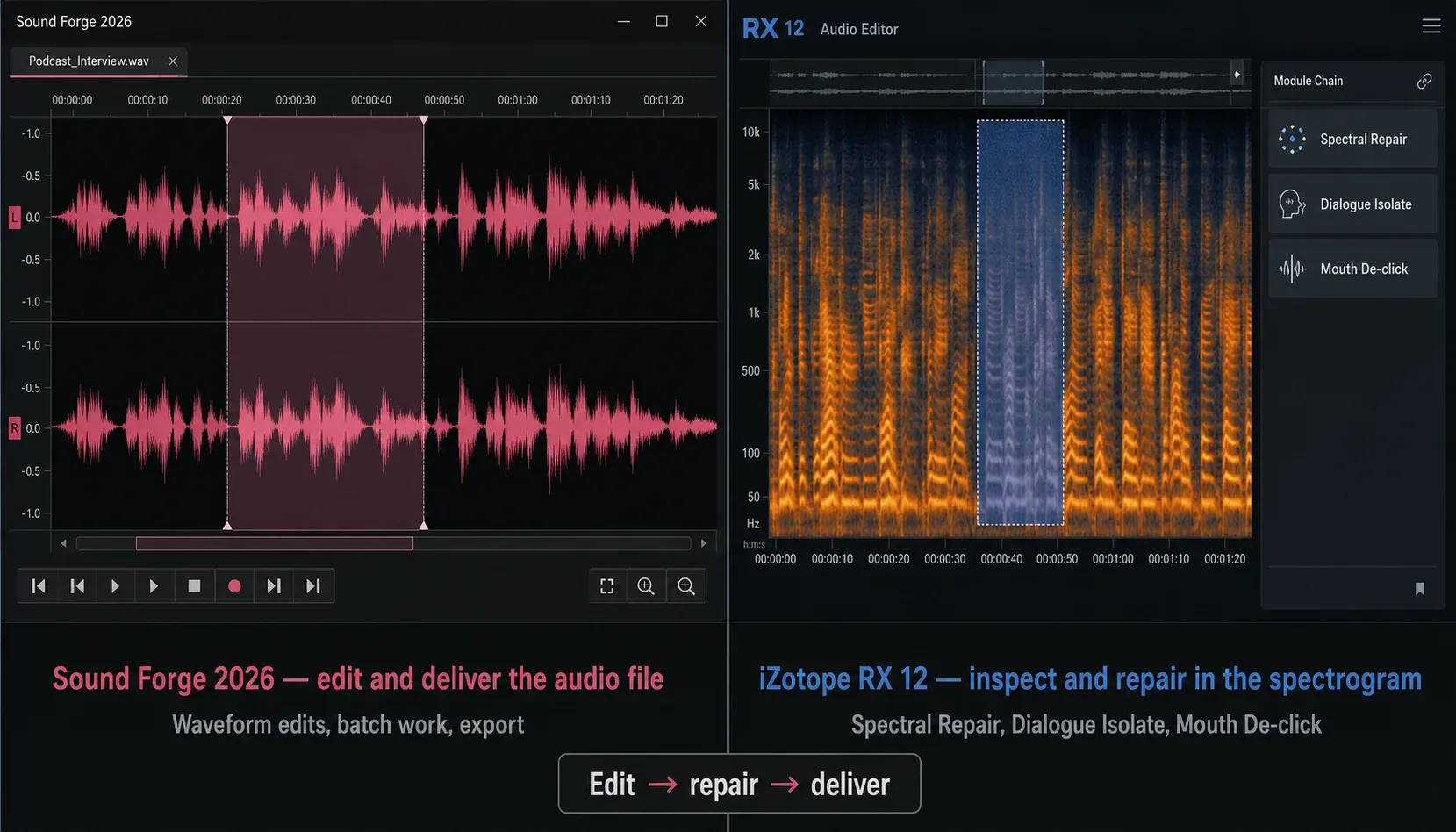
The current Sound Forge feature page documents broadband noise reduction, click/crackle removal and clipping repair, and the 2026 effects manual also names DeClicker/DeCrackler, DeClipper and DeHisser. These are not reasons by themselves to buy RX. Start by trying the repair tools already available in your installation. Use the background-noise workflow, click-removal workflow and clipping-repair workflow to test each problem conservatively. Work on a copy or save a new version before destructive processing; no repair tool can reconstruct detail that was never captured.
What RX Does That Sound Forge Pro Doesn't
The decisive gap is spectral repair. Base Sound Forge does not provide RX's time-frequency canvas, where you can select only the damaged band at the exact moment it occurs. RX Standard includes Spectral Repair and a standalone Audio Editor: mark a short squeak, ring, click cluster or other isolated event in the spectrogram, then attenuate or replace that region while leaving more of the surrounding signal untouched. That is a different class of control from applying a broadband process to the whole selection.
RX 12 Standard also includes the Spectral Editor ARA plug-in, but the host details matter. The current RX 12 release notes list AU ARA for Logic Pro 10.7+ on Mac in Rosetta and VST3 ARA for Studio One 7 and Studio Pro 8. Pro Tools has a separate distribution path: Avid documents RX Spectral Editor 11.1 and later for Pro Tools 2024.6 and later, included with paid Pro Tools versions. That Avid-provided ARA integration should not be confused with the AU/VST3 ARA host list in the RX retail release notes. Sound Forge supports ARA generally, but iZotope does not list it as a confirmed Spectral Editor ARA host. Trial the exact workflow before buying.
For that Pro Tools workflow, check Avid’s RX Spectral Editor compatibility table and your Avid downloads. It does not establish compatibility between the retail RX Spectral Editor and Sound Forge.
Dialogue Isolate starts with RX 12 Standard. It is designed for speech mixed with changing background sound or room ambience, where a stationary noise profile is the wrong model. Sound Forge's broadband noise reduction is better suited to repeatable noise for which you can capture a representative sample. Neither process is automatic magic: strong settings can damage consonants and room tone, so preview short passages and compare level-matched results.
Mouth De-click also starts with RX 12 Standard. Its controls are tuned for lip smacks and saliva clicks in dialogue, while a general De-click tool must cover a wider range of transients. That narrower job can save setup time on voice-over and audiobook sessions, but it still needs auditioning: an aggressive pass can mistake useful articulation for noise.
RX Elements, Standard, or Advanced?
Don’t treat RX as part of every Sound Forge licence. A Japanese Sound Forge Pro 18 release notice explicitly documented RX 10 Elements and Ozone 11 Elements in that 2024 package. The current Sound Forge 2026 pricing page lists the native restoration tools and Plus extras, but not RX. If you upgraded from a MAGIX-era licence, check your account for an existing RX serial; if you are buying now, budget for RX separately unless the checkout page explicitly includes it.
RX 12 Elements is a six-plugin pack: De-click, De-clip, De-hum, De-reverb, Voice De-noise and Repair Assistant. It does not include the standalone RX Audio Editor, Spectral Repair, Dialogue Isolate, Mouth De-click or Music Rebalance. Standard is the edition to test if the standalone editor or those specific repair tools are what you need. The current RX 12 module comparison reserves Scene Rebalance, Trim Silence, Ambience Match, Dialogue Contour, EQ Match and De-rustle for Advanced, so that edition needs a post-production business case rather than a generic 'more tools' argument.
The upgrade trigger is the material, not the feature count. Elements supplies modules for routine clicks, clipping, hum, reverb and voice noise, but confirm that the exact modules scan and render correctly in your Sound Forge build before buying. Choose Standard when you need to draw on a spectrogram, isolate dialogue, repair mouth noise efficiently or rebalance a finished mix. Choose Advanced only if an exclusive module solves a recurring problem; paid work alone is not a reason to upgrade. For a module-by-module split, see the RX 12 Elements vs Standard vs Advanced breakdown.
Price and the Upgrade Decision
Boris FX's March 2026 pricing announcement lists Sound Forge at $299.95 perpetual, $24.95 monthly or $149.95 annually. Sound Forge Plus is $399.95 perpetual. Those prices do not establish an RX entitlement; the current Sound Forge feature table does not list RX among either edition's included extras.
At the list prices checked September 12, 2026, the current RX edition chart and prices show Elements at $99, Standard at $399 and Advanced at $1,399. Elements is plug-ins only; Standard adds the standalone editor and the core spectral/dialogue tools; Advanced adds the deepest post-production set. iZotope's current RX Standard download page describes a ten-day trial with export disabled; after that, Demo mode inserts periodic silence. Use previews to evaluate the standalone workflow rather than expecting a trial export. Sale and upgrade prices change, so compare the live checkout price with the exact module you need.
A practical test is cheaper than guessing. Put the worst 30–60 seconds of a real project through the ten-day RX trial and compare previews at matched loudness; the standalone trial has export disabled. If Spectral Repair or Dialogue Isolate produces a clearly cleaner result than Sound Forge's documented repair features, Standard has a defensible job. If the improvement disappears in a level-matched comparison, keep the money.
The sensible order is Sound Forge's documented base repair features first, RX Elements only if its six quick-repair plug-ins fill a real gap, and RX Standard when the standalone spectral workflow becomes necessary. For clean music editing and light vinyl cleanup, Standard may be overkill. For recurring location dialogue, podcast rescue or audiobook mouth-noise work, Standard is usually the edition worth testing. Advanced needs a module-by-module business case.
Using RX as a Plugin Inside Sound Forge Pro
Sound Forge's current VST3 support and RX 12's VST3 plug-ins make an in-editor workflow technically possible on Windows. However, RX 12's confirmed host list does not name Sound Forge, so this is a test-required path rather than an official compatibility guarantee. Use the RX trial, confirm that the required modules scan and preview, process a disposable copy and verify undo before relying on the combination for deadline work.
Keep the simple jobs in Sound Forge. Load De-click, Voice De-noise or Mouth De-click as plug-ins for selection-based passes, then save to a new version. When a repair needs drawing, comparing alternate selections or building a longer module chain, open a copy in the RX standalone editor and return the repaired file to Sound Forge for the final edit and export.
Compatibility deserves a test, especially with old RX licences. A March 2026 magix.info troubleshooting thread reports RX 10 plug-ins failing in Sound Forge 16 while the same plug-ins worked in the Sound Forge 18 trial. The author’s final update says the plug-ins also began working again in Sound Forge 16, without an established cause. This is a troubleshooting report, not evidence that SF16 is incompatible or that upgrading fixes the problem. Test your exact versions; do not copy executables between installations based on that thread.
Use RX standalone for the work that depends on its editor: spectral selections, repeated comparison, module chains and detailed navigation. Use plug-ins for targeted passes that fit inside the Sound Forge edit. This split also gives you a clean rollback point: keep the original, the RX-repaired intermediate and the final Sound Forge master as separate files.
If mastering and album delivery matter more than repairing damaged recordings, the Sound Forge versus WaveLab comparison is the next useful choice. For an RX plug-in workflow inside Sound Forge, follow the Plug-In Chainer setup after checking compatibility.
Frequently Asked Questions
Does Sound Forge Pro include iZotope RX?
Do not assume so. Some MAGIX-era Sound Forge Pro 18 packages included RX 10 Elements; a 2024 Japanese release notice documents that bundle. The current Sound Forge 2026 feature table does not list RX for Sound Forge or Sound Forge Plus. Check the exact checkout offer and your existing account. RX 12 Elements, when bought separately, includes six plugins but not the standalone RX Audio Editor.
Is iZotope RX better than Sound Forge Pro for noise reduction?
Sound Forge's broadband noise reduction is a good first tool for steady noise with a representative sample. RX 12 Standard is the stronger fit for changing ambience, difficult dialogue and repairs that need a time-frequency selection or modules such as Dialogue Isolate and Spectral Repair. Preview both on the same passage; aggressive noise reduction in either product can damage speech and room tone.
Can I use iZotope RX inside Sound Forge Pro?
Sound Forge 2026 and RX 12 both support VST3 on Windows, so individual RX VST3 plug-ins can work in Sound Forge. However, iZotope's current confirmed-host list does not name Sound Forge. Trial the exact versions before buying, verify that the required plug-ins scan, preview, render and undo correctly, and use RX standalone for spectral selections and longer repair chains.
What does iZotope RX Standard have that Sound Forge Pro doesn't?
RX 12 Standard adds the standalone Audio Editor, Spectral Repair, Dialogue Isolate, Mouth De-click, Music Rebalance, Spectral De-noise and a broader module set. Repair Assistant is not a Standard-only advantage because RX 12 Elements includes it too. The biggest gap is RX's time-frequency repair workflow, not ordinary cutting, fading or export.
Should I buy iZotope RX if I already have Sound Forge Pro?
Start with Sound Forge's documented base repair features. Test RX 12 Standard when real projects require Dialogue Isolate, Mouth De-click, Music Rebalance or manual spectral repair. RX Elements is cheaper but has no standalone editor. Ignore old sale-price promises and compare the live price with the module you actually need. Choose Advanced only when a specific exclusive module solves a recurring problem that Standard cannot.
Is Sound Forge Pro Windows only compared to iZotope RX?
Yes. Sound Forge 2026 is Windows-only. RX 12 supports current Windows and macOS versions listed by iZotope. On a Mac, pair RX with a compatible editor or DAW rather than planning a Sound Forge workflow. Always check the current operating-system and plug-in-host requirements before buying.