

iZotope RX 12 is worth buying, and the reason is one workflow: split a mix or a scene into stems, then repair each stem with the full toolkit. Standard is the edition most people should buy ($399, US store price on October 20, 2026). Advanced ($1,399) pays off only when dialogue and post-production work is regular. Elements ($99) is six plug-ins without the RX Audio Editor, so it fixes problems inside a DAW rather than giving you RX itself.
I would buy Standard unless you cut dialogue for picture most weeks. Standard already has the editor, Stems View, Music Rebalance, Dialogue Isolate, De-bleed and Breath Control, which is where the RX 12 changes landed for music and spoken word. Advanced costs $1,000 more and earns it through Scene Rebalance, the higher-quality and four-band Dialogue Isolate controls, Ambience Match, Dialogue Contour, Trim Silence and multichannel processing. If none of those names shows up in your weekly work, keep the difference. RX 11 owners can wait unless separation, bleed or breath repairs come up often. If you are still mapping the whole toolkit, the iZotope RX hub groups the module guides by job.
RX 12 verdict at a glance
Pick by the work you repeat, not by the module count. Prices are US store prices on October 20, 2026.
| Reader | Edition | Price | Why |
|---|---|---|---|
| Podcaster or YouTuber fixing noise, clicks and hum in a DAW | Elements; Standard once you need the editor | $99 / $399 | Voice De-noise, De-click, De-clip, De-hum, De-reverb and Repair Assistant as plug-ins. No editor, Dialogue Isolate or Breath Control. |
| Music producer or mix engineer | Standard | $399 | Stems View, Music Rebalance, De-bleed and Breath Control cover vocal and remix repairs. |
| Archivist, vinyl or field recordist | Standard; Advanced for the tape, wind and room-tone tools | $399 / $1,399 | Azimuth, Wow & Flutter, Spectral Recovery, De-wind and Ambience Match are Advanced-only. |
| Video editor or film and TV post | Advanced | $1,399 | Scene Rebalance, Dialogue Isolate Best / Offline with four bands, Dialogue Contour, Trim Silence, multichannel. |
| Prefers a subscription | iZotope Pro | $25 a month or $250 a year | Includes RX 12 Standard, not Advanced. |
| RX 11 Standard owner who wants Advanced | Upgrade to RX 12 Advanced | $799 | Going from RX 12 Standard to Advanced later costs $999. |
What changed in RX 12
RX 12 arrived as version 12.0.0 on April 28, 2026. The RX 12 release notes list 12.1.0 from October 15, 2026 as the current build: a maintenance update with bug fixes, support for the Boris FX license activation method and new branding in the product and installer. The last RX 11 update was 11.4.0 on February 13, 2026. Sound On Sound's RX 12 Advanced review notes that a major version arrives roughly every two years: RX 10 came in late 2022 and RX 11 in mid-2024.
The changes that matter, as listed in iZotope's RX 12 announcement:
- New: Stems View (Standard and Advanced), a track-based view where the whole RX toolkit works on individual separated stems; Scene Rebalance (Advanced), which separates dialogue, music and effects from one stereo render; Trim Silence (Advanced), which detects and standardizes regions of silence in long files.
- Rebuilt: De-bleed, now with a real-time plug-in that needs no reference track, and Breath Control, which iZotope says detects and removes breaths more accurately. Both are in Standard and Advanced.
- Improved: upgraded neural networks for Music Rebalance and Dialogue Isolate.
- Interface: a larger spectrogram, a module search and a resizable history panel.
The workflow change is bigger than the list suggests. According to iZotope's Stem Split pane documentation, you click Stem Split in the top right of the editor, pick a minimodule (Music Rebalance, Scene Rebalance or Dialogue Isolate), set the Sensitivity controls (and Quality where the minimodule offers it), and press Process. The stems open in a new tab named after the file with "(Stems)" added. Choose All Stems and each stem gets its own lane; playback, selections and edits then touch only the stems you activate, so you can run a repair module on the drums or the voice alone. File > Export… writes every stem to its own file, and Export as Single File… writes the sum.
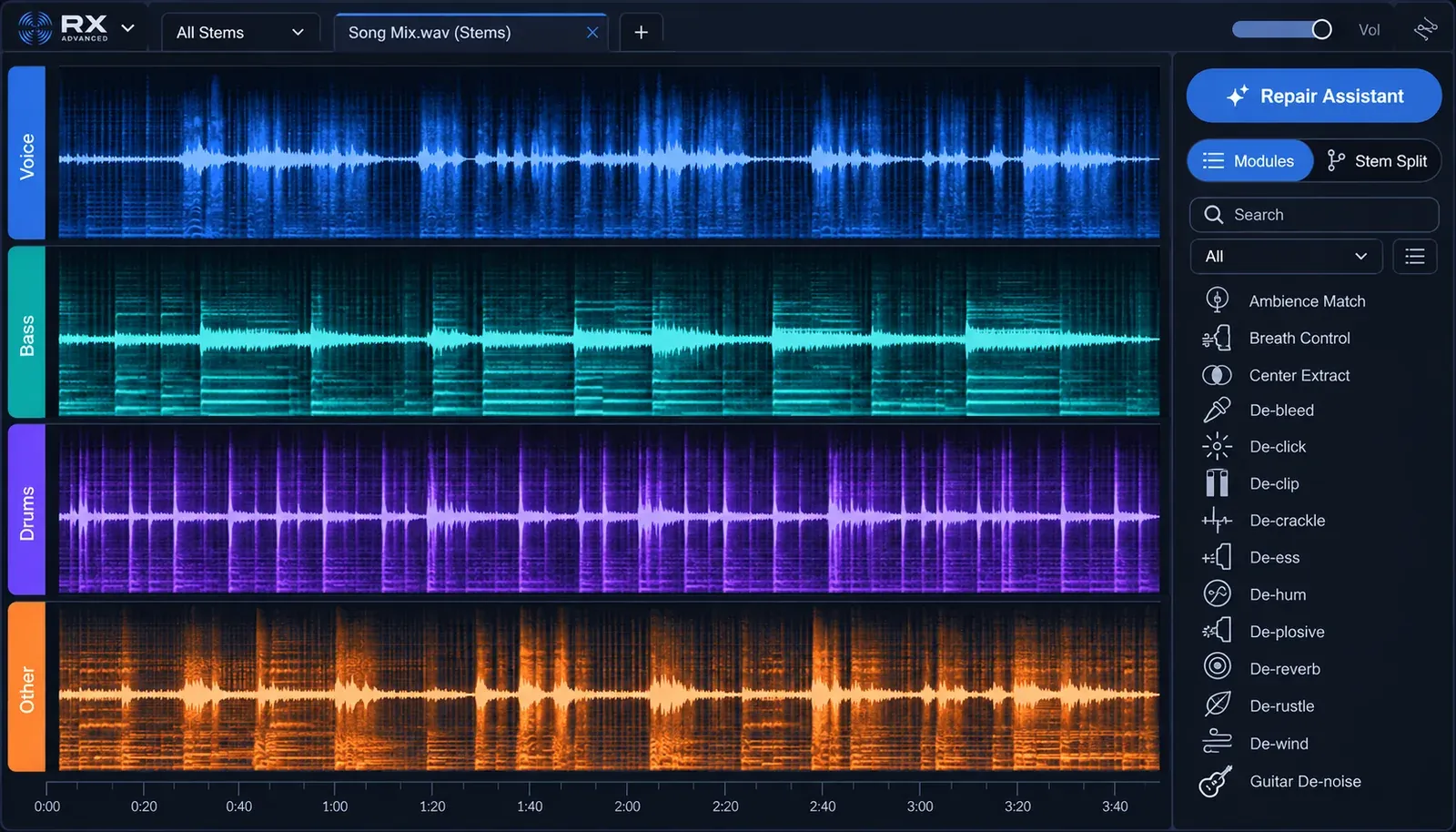
Every change between versions, including the smaller fixes, is in RX 12 vs RX 11. This review keeps only what changes the buying decision.
Elements vs Standard vs Advanced: what you actually get
The editions differ in kind, not only in module count. iZotope's RX 12 edition tables show Elements as six DAW plug-ins (De-click, De-clip, De-hum, De-reverb, Repair Assistant and Voice De-noise) with no standalone RX Audio Editor. Standard and Advanced add the editor itself, with Batch Processor, Module Chain, Composite View, plug-in hosting and the spectral editing tools. Repair Assistant, marked improved in RX 12, is in all three.
| Feature | Elements | Standard | Advanced |
|---|---|---|---|
| RX Audio Editor | No | Yes | Yes |
| Editor modules in the docs table | None | 33 of 46 | All 46 |
| Plug-ins in the docs table | 6 | 19 | 22 |
| Stems View | No (needs the editor) | Yes | Yes |
| Dialogue Isolate | No | Voice, Reverb, Noise, Sensitivity | Adds the Quality menu and four bands |
| Multichannel processing | No | No | Yes |
| US store price on October 20, 2026 | $99 | $399 | $1,399 |
The 13 modules only Advanced has, per the RX 12 module list, are Ambience Match, Azimuth, Center Extract, De-rustle, De-wind, Deconstruct, Dialogue Contour, EQ Match, Leveler, Scene Rebalance, Spectral Recovery, Trim Silence and Wow & Flutter. Read that list as a job description. Ambience Match, De-rustle, Dialogue Contour, Scene Rebalance and Trim Silence serve dialogue and post work; Azimuth and Wow & Flutter serve tape and disc transfers; De-wind serves location audio. A music producer rarely reaches for any of them.
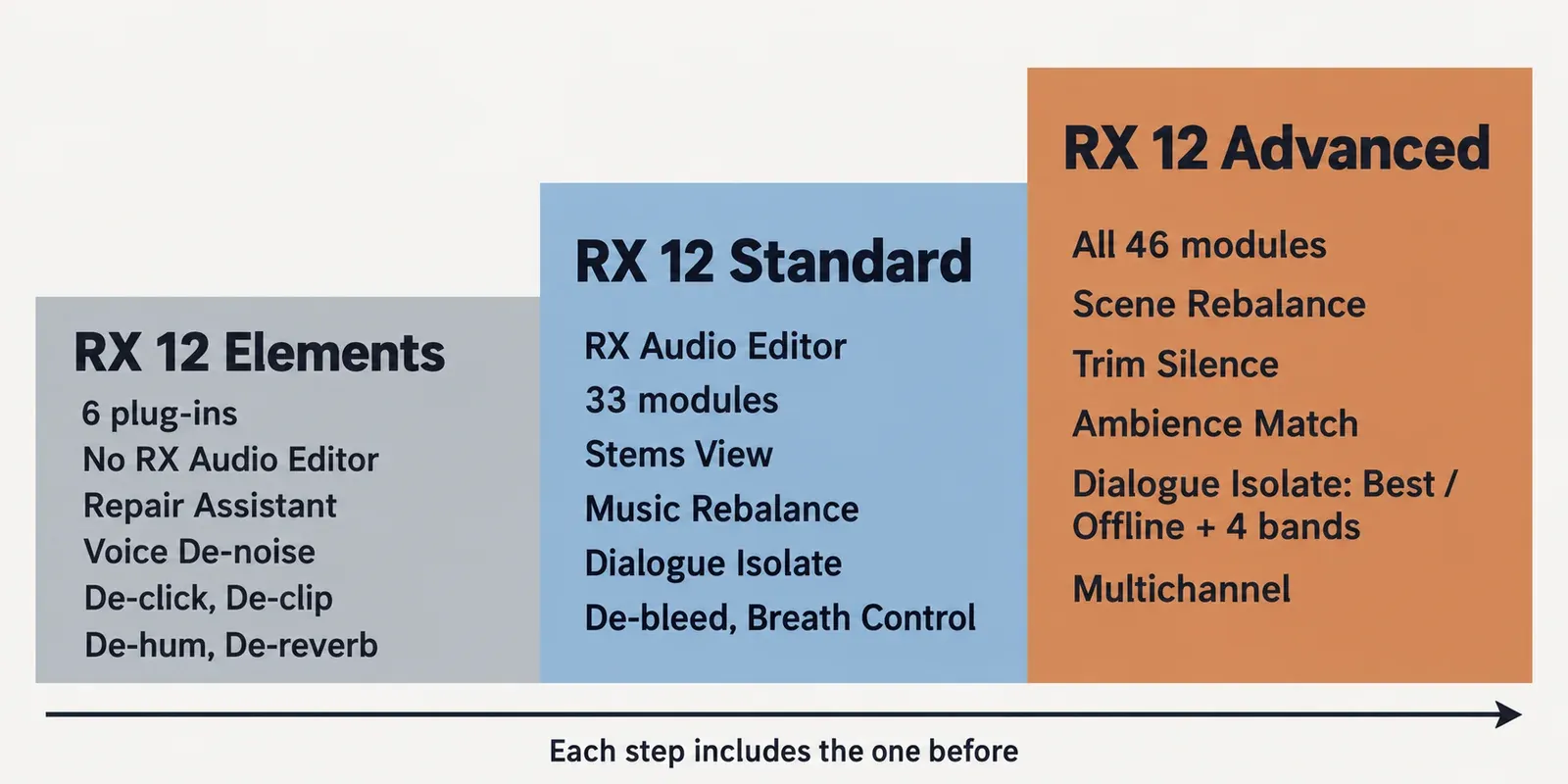
Tool counts vary by source because each counts something different. iZotope markets RX 12 Advanced as its "complete 50+ tool" suite, Sound On Sound counts "90-plus tools, plug-ins and standalone processing facilities" in Advanced and "over 70" in Standard, and Gearnews says over 50 modules. I use the docs count of 46 editor modules because it is the only one that splits cleanly by edition. For the full module-by-module matrix, see RX Elements vs Standard vs Advanced.
Test results: what published measurements show
The composite result counts eight independent write-ups from April to June 2026: MusicTech's RX 12 review, the free portion of Sound On Sound's RX 12 Advanced review, Gearnews' RX 12 studio review, ProVideo Coalition's RX 12 shootout, Arefyev Studio's RX 12 review, MixingGPT's RX 12 buyer review, a quick look from Creative Field Recording whose author had not yet used RX 12, and one owner's report on thegearforum. Few of them publish numbers, so the table counts verdicts; the single-source numbers follow it with their conditions.
| Finding | Sources (of 8) | Who says it |
|---|---|---|
| Stems View and the separate-then-repair workflow are the clearest gain | 6 | MusicTech, Sound On Sound, Gearnews, ProVideo Coalition, MixingGPT, Arefyev Studio |
| Standard covers most music, editing and field-recording work | 5 | Gearnews, Arefyev Studio, MixingGPT, Creative Field Recording, thegearforum |
| Advanced's premium pays off mainly for regular post or dialogue work | 5 | ProVideo Coalition, Gearnews, Arefyev Studio, MixingGPT, thegearforum |
| Separation or dialogue cleanup sounds audibly better than RX 11 | 4 | MusicTech, ProVideo Coalition, Sound On Sound, thegearforum |
| Separation still falls short of real multitracks: artifacts, bleed, phase or stray sounds | 4 | Gearnews, Arefyev Studio, ProVideo Coalition, MixingGPT |
| The upgrade from RX 11 is incremental or a judgement call | 3 | ProVideo Coalition, Arefyev Studio, Creative Field Recording |
| ARA works only in Logic Pro and Studio One / Studio Pro | 2 | MusicTech, MixingGPT |
| RX 12 does not meaningfully improve separation quality | 1 | Arefyev Studio |
Speed. MusicTech timed one stem split: a 4:30 test mix took about 2:30 in RX 11 and about 1:45 in RX 12, roughly 30% less time on that run, and the reviewer found the RX 12 result "significantly better" as well. The reviewer says the gain holds even at the highest quality level, but host and hardware were not stated, so treat it as one reviewer's stopwatch rather than a benchmark.
Dialogue, head to head. ProVideo Coalition's four listening tests split 2–2. RX 12 won on steady background noise and in a Scene Rebalance versus UVR (Bandit model) scene split; Adobe Enhance Speech online won on a phone recording with room reverb and on heavy traffic. Against RX 11 at the same settings, Dialogue Isolate improved noticeably but "not massive" on steady noise, little if at all on the reverberant phone clip, and with "significantly less artifacting" on traffic. Two details matter more than the score: the reviewer found that Enhance Speech "changed the voice a bit" while RX stayed "truer to the original", and RX 12's dialogue stem kept some effects when nobody was speaking, which UVR avoided.
Latency. One Native Instruments community user reported that the real-time Dialogue Isolate plug-in's latency in the Live Professor 2 host rose from 42.3 ms in RX 11 to 85.3 ms in RX 12, and a reply said the plug-in is not recommended for live work that needs minimal latency. It is one report from one host with unstated settings. If you plan to run Dialogue Isolate live, check its latency in your own host first.
The dissent. Arefyev Studio credits RX 12 with better workflow and speed but says it "does not meaningfully improve separation quality", and reports phase issues and residual bleed in separated stems. Its buying advice still matches the majority: Standard for most producers and editors, Advanced only for consistent post-production work.
The positive end of the range is clear. MusicTech hears "markedly higher quality" from Music Rebalance and Dialogue Isolate and calls RX "very much back to the top of its game"; Sound On Sound calls Stems View "a very big workflow improvement" and says the rebuilt tools work "faster and more precisely".
What the composite shows: RX 12 is a clear step forward for anyone whose repairs start with separation, and a modest one for everyone else. The workflow gain is close to unanimous. The sound-quality gain is real for most reviewers but depends on the material, and dense mixes and reverberant phone recordings are where it still struggles. If dialogue rescue from rough phone recordings is your only job, compare the best RX alternatives before you pay for RX.
RX 12 for vocals and dialogue
For a singer or a podcast voice, Standard has every tool RX 12 changed. Four of them do the work: Dialogue Isolate, Music Rebalance, De-bleed and Breath Control.
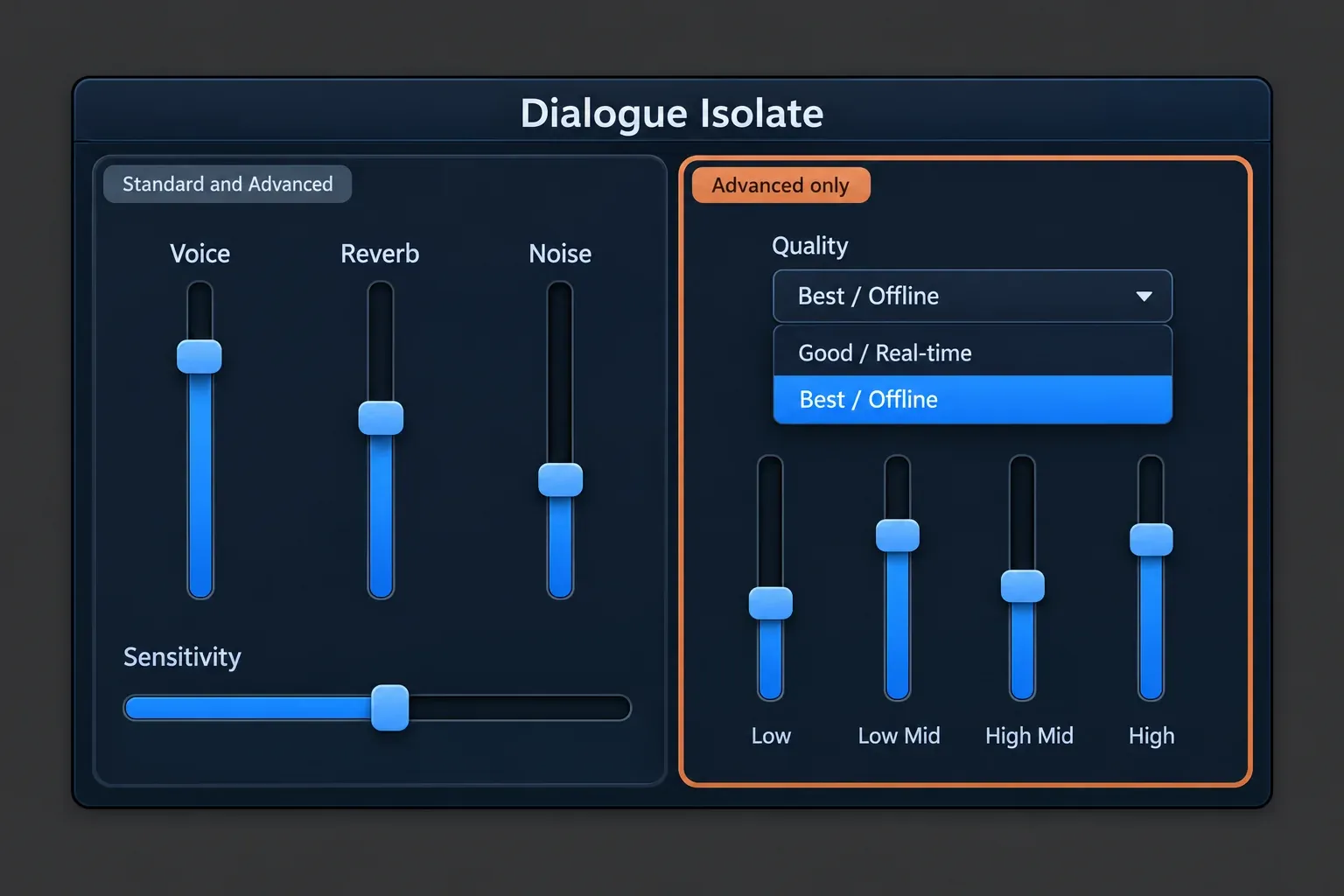
Dialogue Isolate. In both editions, the Dialogue Isolate documentation lists Voice, Reverb and Noise gain controls plus Sensitivity, which sets how much of the signal counts as noise and reverb. Advanced adds two things in the module and plug-in: a Quality menu with Good / Real-time (low latency, for plug-in use) and Best / Offline (fewer artifacts and higher latency, for the editor and offline renders), and a four-band interface with Low, Low Mid, High Mid and High bands, each set from 0 to 100% of the processing. The bands let you process the low end harder than the presence range, for example. The settings order for noisy interviews is in the Dialogue Isolate guide.
Music Rebalance. It separates Voice, Bass, Drums and Other, according to the Music Rebalance documentation, with three quality modes: Good / Real-time, Better / Offline and Best / Offline. Best adds anti-phasing processing and is the slowest, and only Good is meant for real-time use. In the Stem Split pane, raising Voice sensitivity keeps more breath sounds in the voice stem but can let other elements leak in. To pull a vocal down or out of a stereo mix step by step, follow the Music Rebalance walkthrough.
De-bleed and Breath Control. De-bleed was rebuilt with a real-time plug-in that removes headphone or instrument bleed without a reference track, and Breath Control was rebuilt to find and remove breaths more accurately, by iZotope's account. Both are in Standard. Cutting bleed at the source still beats repairing it later; see how to reduce headphone bleed in a vocal recording. If you prefer to treat breaths by hand, editing breaths in Sound Forge without chopping the speech shows the manual route.
My pick for a vocal chain is Standard: Breath Control and De-bleed on the recording, and Music Rebalance only when all you have is a stereo bounce.
Limits and complaints worth knowing
The complaints cluster around separation quality, Pro Tools-only plug-ins and what Elements leaves out.
- Separation is not a multitrack. Gearnews warns that separated stems can carry artifacts, especially on dense or heavily processed material; Arefyev Studio reports phase issues and residual bleed; ProVideo Coalition found stray effects on a dialogue stem. Four of the eight sources make the point.
- Four stems is the ceiling for music. MusicTech criticizes Music Rebalance for still recognizing only vocals, drums, bass and "other", so guitars, keys and strings stay together in one stem.
- Some plug-ins are Pro Tools AudioSuite only. The Ambience Match, De-rustle and Scene Rebalance plug-ins run only as AAX AudioSuite, per the release notes. In other hosts you use those modules in the RX Audio Editor.
- No preview in two AudioSuite plug-ins. The Music Rebalance and Scene Rebalance AudioSuite plug-ins cannot preview processing before rendering.
- Stem Split ignores your gain settings. The Stem Split button in the Scene Rebalance module ignores the gain slider positions for each stem and always assumes 0 dB, so a slider balance you set before splitting does not carry into the stems.
- ARA is narrow. Only the Spectral Editor plug-in supports ARA: AU ARA in Logic Pro 10.7 and later (marked Rosetta only in the release notes) and VST3 ARA in Studio One 7 and Studio Pro 8. MusicTech and MixingGPT both flag it.
- Real-time latency. The one published latency report, covered above, saw the real-time Dialogue Isolate plug-in double its latency from RX 11 to RX 12.
- Elements is not the editor. Elements is six plug-ins without the RX Audio Editor, so Stems View, Music Rebalance, Dialogue Isolate and Breath Control are out of reach. Read Elements reviews with that in mind.
- Subscriptions check in monthly. iZotope Plus and Pro activate in Native Access and must connect once a month to verify the subscription; otherwise they work offline.
Price on October 20, 2026: buy, upgrade, crossgrade or subscribe
Standard at $399 is the price most readers should plan around. All figures below are US store prices on October 20, 2026, from the RX 12 Elements, RX 12 Standard and RX 12 Advanced store pages and iZotope's subscription plans.
| Route | You get | US store price on October 20, 2026 |
|---|---|---|
| New license | Elements / Standard / Advanced | $99 / $399 / $1,399 |
| EDU license | Elements / Standard / Advanced | $49.50 / $199.50 / $699.50 |
| Update from RX 11, same edition | Standard / Advanced | $129 / $269 |
| Update from RX 10, same edition | Standard / Advanced | $199 / $399 |
| Update from RX 1–9, same edition | Standard / Advanced | $299 / $599 |
| Upgrade from Elements or Elements Suite | Standard / Advanced | $299 / $1,199 |
| Upgrade from RX 11 Standard | Advanced | $799 |
| Upgrade from RX 10 Standard | Advanced | $899 |
| Upgrade from RX 1–9 Standard | Advanced | $999 |
| Upgrade from RX 12 Standard | Advanced | $999 |
| Crossgrade from any paid iZotope product | Standard | $349 |
| iZotope Plus subscription | Elements, plus other iZotope products | $15 a month or $150 a year |
| iZotope Pro subscription | Standard, plus other iZotope products | $25 a month or $250 a year |
Elements is sold only as a full or EDU license, with no Elements update, so Elements owners move up through the $299 and $1,199 upgrade routes. These store prices match the launch prices MusicTech printed in April. iZotope's RX 12 announcement says owners of an earlier RX version see loyalty pricing after logging in, so check your account before buying a full license. Both subscriptions start with a 7-day free trial and then renew monthly, and iZotope says perpetual licenses remain on sale alongside them.
If RX is the only product you want, the math favors the perpetual license: $399 for Standard equals about 16 months of iZotope Pro at the monthly rate, or about 19 months at the yearly rate. I would subscribe only if you also want Pro's other tools, which include Ozone 12 Advanced, Neutron 5 and Nectar 4 Advanced. Discounts are seasonal; current offers sit on the deals page. If you own other iZotope products, check the iZotope upgrade and crossgrade guide before paying full price.
Should RX 11 owners upgrade?
Upgrade if separation is part of your regular work; otherwise RX 11 still does the job. Three of the eight sources call the step incremental or a judgment call, and the decision splits by role.
- Advanced owners in post: yes, for $269. Scene Rebalance and Trim Silence are new, and ProVideo Coalition sees "a fairly compelling case" for Advanced post users.
- Standard owners in music: the $129 update is worth it if stem separation, headphone bleed or breath editing comes up every week. ProVideo Coalition calls it "a judgement call" for editors on Standard.
- Sound-effects and field recordists: Creative Field Recording sees little in RX 12 worth the upgrade price for effects work, though from a first look rather than from use.
- RX 11 Standard owners who want Advanced: take the $799 route to RX 12 Advanced now if you are sure. Going from RX 12 Standard to Advanced later costs $999.
The full RX 12 vs RX 11 comparison maps each change module by module.
Compatibility before you pay
RX 12 runs on macOS Sonoma 14.7, Sequoia 15.7 and Tahoe (26.4 in the RX 12 system requirements), on Intel and Apple silicon Macs, natively or under Rosetta, and on Windows 10 (22H2) and Windows 11 (24H2). Plug-in formats are AU, AAX, AAX AudioSuite, VST3, AU ARA and VST3 ARA, all 64-bit only. iZotope lists Logic Pro 12, Pro Tools 2025, Ableton Live 12, Cubase 15, Nuendo 15, Fender Studio Pro 8 (Studio One 7), Reaper 7, FL Studio 25, Adobe Audition 2026, Adobe Premiere Pro 2026, DaVinci Resolve 19 and Reason 13 as supported hosts; other hosts may work but are not on the list.
If the plug-ins do not appear in your DAW after installation, start with RX plug-ins not showing up. Activation and authorization errors are covered in iZotope Product Portal and authorization fixes.
Who owns iZotope now, and does it change your license?
Boris FX owns iZotope. It announced the acquisition on July 2, 2026, and the Boris FX announcement says all iZotope products, licenses and subscriptions remain fully active, with iZotope operating as a business unit within Boris FX. On that statement, an existing RX license keeps working as before. The current subscriptions page still describes activation through Native Access. The reviews in the composite above were published before the deal, and 12.1.0 brings fixes rather than new modules, so they describe the same tools you would buy today. The iZotope hub tracks how the brand fits into Boris FX.
My verdict
RX 12 is a strong release for repairs that start with separation, and Standard is where most of that value sits.
- Music producers and mix engineers: Standard. Stems View, Music Rebalance, De-bleed and Breath Control are the RX 12 changes you will use most.
- Podcasters and YouTubers: Elements if your problems are noise, clicks and hum inside a DAW; Standard once you need the editor or Dialogue Isolate. For the editing side of a show, see Sound Forge Pro for podcast editing.
- Video editors and post engineers: Advanced. Scene Rebalance, the Best / Offline and four-band Dialogue Isolate controls, Dialogue Contour, Trim Silence and multichannel processing are the reasons to pay $1,399.
- Archivists and field recordists: Standard, unless Azimuth, Wow & Flutter, Spectral Recovery, De-wind or Ambience Match is on your daily list.
- RX 11 owners: update only if separation, bleed or breath work is routine.
The cheapest way to hear RX 12 Standard on your own files is the 7-day free trial of iZotope Pro, which includes it; trial, activation and license transfers are covered in RX price, trial and license. Then work through the RX 12 beginner tutorial and the guide to removing background noise in RX. If you already edit in Sound Forge Pro, Sound Forge Pro vs iZotope RX explains which editor does which job better.
FAQ
Does RX 12 run natively on Apple silicon?
Yes. RX 12 runs natively on Apple silicon Macs and also under Rosetta. The exception is ARA in Logic Pro: the AU ARA Spectral Editor is marked Rosetta only in the release notes.
Is iZotope Pro the same as RX Advanced?
No. iZotope Pro ($25 a month or $250 a year, US store price on October 20, 2026) includes RX 12 Standard, not Advanced. For Advanced you buy the perpetual license or an upgrade.
Does the Boris FX acquisition affect my RX license?
Boris FX says all iZotope products, licenses and subscriptions remain fully active, so an existing RX 11 or RX 12 license keeps working.