
iZotope Relay is a utility channel strip and a bridge between ordinary tracks and iZotope's mixing and metering tools. It provides gain, stereo balance, width, mono, polarity, delay and a high-pass filter. Relay is free: the current Neutron 5 download offer includes it even with a trial, and several paid products include a license. The current release is 1.8.0, from November 5, 2026.
Here's how I'd decide. I'd use Relay on tracks that need to appear in Visual Mixer or the Mix Assistant but don't already have a compatible Neutron or component plug-in. Select one source per track or bus, rather than counting both a track and the bus it feeds. If all you want is a gain, width and high-pass strip, I wouldn't buy an iZotope product to get it. Once Relay is on your tracks, choose its insert slot by the job in the table below.
What Relay does
The Relay manual defines it as a utility plug-in that sends audio information to Inter Plug-in Communication (IPC) compatible iZotope plug-ins. The Relay product page adds the channel-strip side: a lightweight utility that lets tracks and instances of Ozone, Neutron and other iZotope plug-ins interact, with high-pass filtering, phase and mono controls, pan and width sliders, and delay time.
In practice, one Relay instance turns an ordinary track into something the rest of the iZotope line can work with:
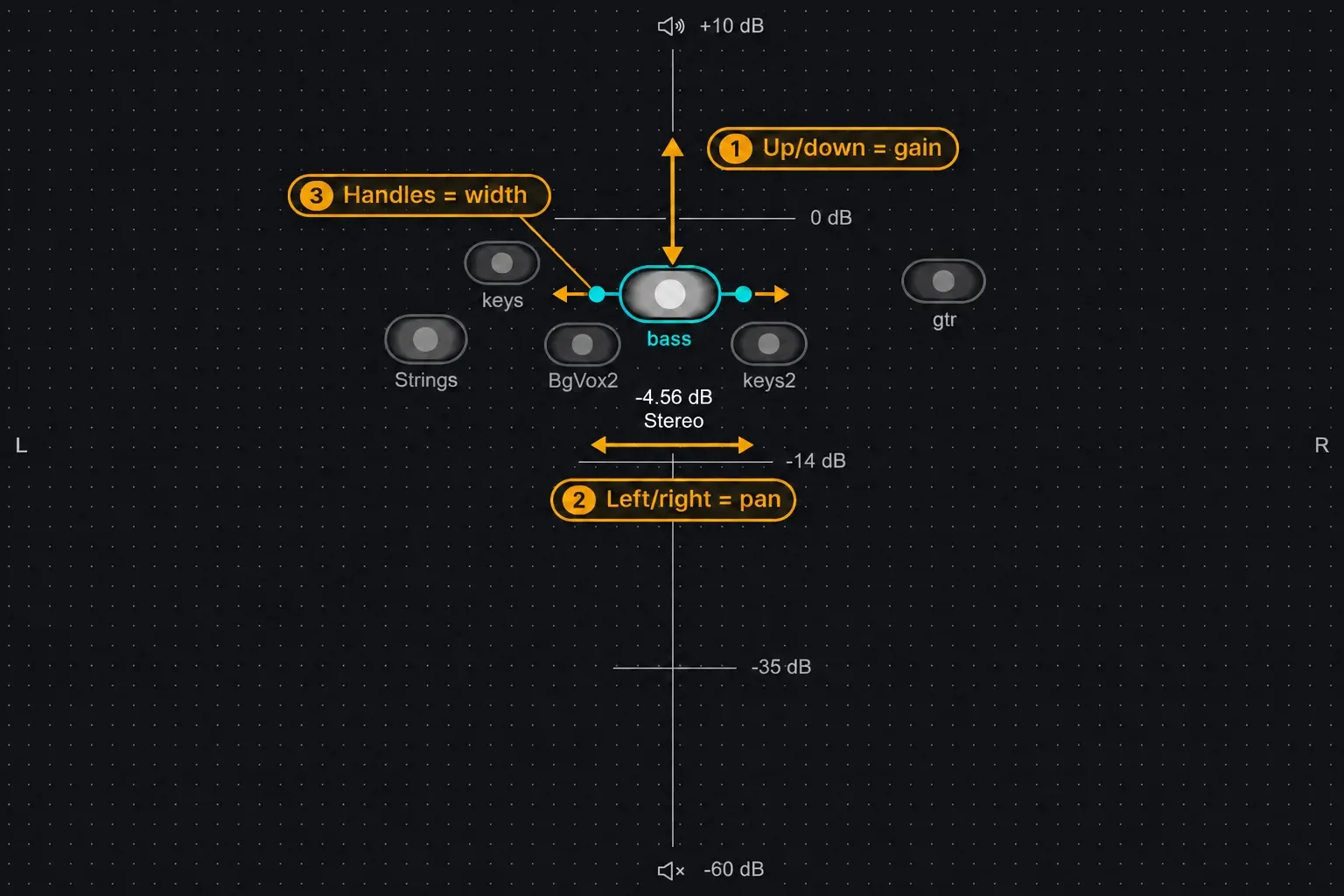
- a draggable node in Neutron's Visual Mixer, and a track the Visual Mixer Assistant can level;
- a source in Insight 2's Spectrogram and Intelligibility meter, in Tonal Balance Control and in Neutron's Masking Meter;
- a target Nectar's Unmask can apply an EQ curve to when that track masks your vocal.
Making A Scene's Neutron 5 review puts it plainly: Relay is "a tiny utility plug-in that you place on your tracks so Neutron and the Visual Mixer can 'see' them," and every track with Relay shows up as a node you can drag around. Relay makes no mix decisions itself. The plug-in that reads it does the analysis.
Relay's controls, one by one
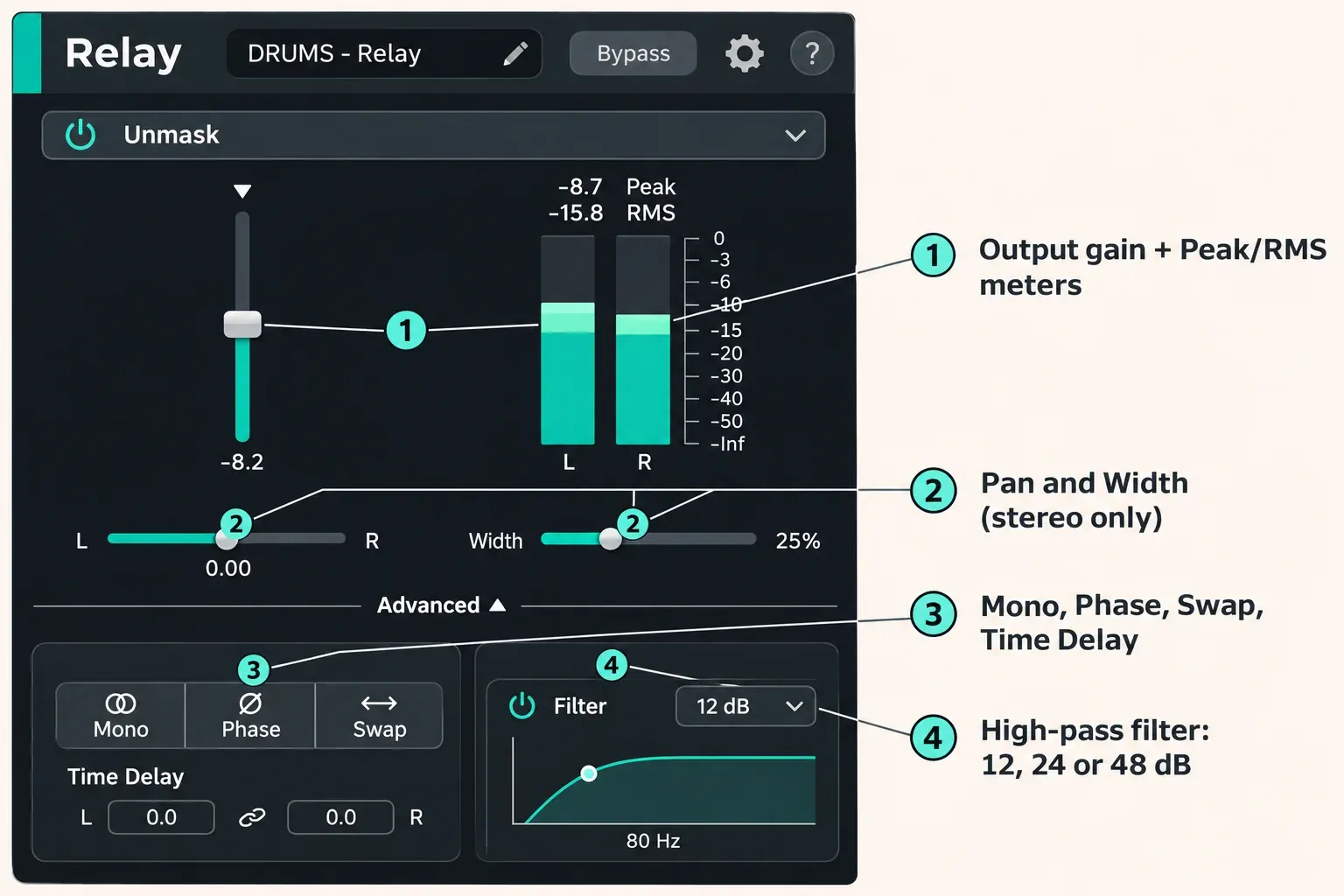
Relay inserts on mono, stereo or surround tracks, and its meters work on all of them. Most of the other controls need a stereo instance, which is the first thing to check when a slider seems dead.
| Control | What it does | Limits |
|---|---|---|
| Output gain | Raises or lowers the track level, equally on every channel | Any channel layout |
| Peak and RMS meters | Per-channel level, peak on the top readout and RMS below; click a clip indicator to clear it | Up to 7.1.2 Dolby Atmos |
| Pan | A stereo balance control that changes the left and right channel levels | Stereo only |
| Width | Negative values narrow the image, with -100% equal to mono; positive values widen it | Stereo only |
| Mono | Sums left and right to mono for a quick mono-compatibility check | Stereo only |
| Phase | Inverts the polarity of the input signal | Stereo only |
| Swap | Exchanges the left and right channels | Stereo only |
| Time Delay | Separate delay for left and right; with Link on, both values move relative to each other; double-click a readout to type a value | Stereo only |
| High-pass filter | On/off button, slopes labeled 12 dB, 24 dB and 48 dB, cutoff set by dragging the node or typing a value | High-pass only |
| Name display | Shows the name other iZotope plug-ins list as a source; you can edit it | Auto-fills the track name only in some hosts |
| Unmask power | Shows which track Nectar is unmasking; the power button disables the EQ curve | Active only with Nectar connected |
The current manual has no low-pass filter and no mute button, whatever a few summary pages say. The Phase button reverses the stereo instance's polarity relative to other tracks; it doesn't correct a timing offset or selectively repair one reversed channel. For a small timing offset between left and right, use the Time Delay readouts.
Which iZotope plug-ins read Relay
Relay is only as useful as the plug-in on the other end. This is the current list of IPC hosts and what each one takes from a Relay instance, according to the Relay, Neutron 5 and Nectar 4 manuals:
| Host plug-in | What it does with Relay | Notes |
|---|---|---|
| Neutron 5 Visual Mixer | Shows each Relay as a node: up or down changes gain, left or right changes pan, the handles change width | Sits on the master bus and doesn't process audio |
| Visual Mixer Assistant | Sets static levels on tracks with Relay, Neutron 5 or its components | Start DAW faders at unity gain |
| Neutron EQ module and Equalizer component | Can use a Relay track as the Masking Meter source | Compares the two tracks' spectra |
| Insight 2 | Shows up to eight Relay instances in the Spectrogram; a Relay can feed the Intelligibility meter | Insight 2 goes on the master bus |
| Tonal Balance Control 3 | Reads the output spectrum and Output Gain control only | Needs Relay 1.0.3 or later |
| Nectar 4 Standard or Advanced | Vocal Unmask applies an EQ curve to the Relay track that masks the vocal | Relay shows which track it's unmasking |
The Neutron 5 Assistant documentation covers the Visual Mixer side: add Visual Mixer to the master bus, keep in mind that it doesn't process audio, and let the Assistant set static levels on every Neutron 5, component or Relay track. iZotope's Mix Assistant FAQ, written for Neutron 3, rates the Assistant for up to 100 tracks with Relay. The Assistant's stages and the bus-versus-track choice are covered in our Neutron 5 review, so I won't repeat them here.
On the analysis side, Tonal Balance Control 3 takes only Relay's output spectrum and Output Gain. What TBC3 does with that spectrum is in our guide to using Tonal Balance Control 3. For Unmask, the Nectar 4 Unmask documentation accepts Relay, Nectar or Neutron as the plug-in on the masking track, and the Nectar 4 comparison lists "Vocal Unmask with Relay & Neutron" for Standard and Advanced. How Unmask and Neutron's masking tools split the work is laid out in Nectar vs Neutron.
How to get Relay: free, but tied to a license
The product page labels Relay a free utility plug-in and shows no separate price. The iZotope free plug-ins page lists Vocal Doubler, Vinyl, Ozone Imager, Trash Lite and Ozone EQ, which our free iZotope plug-ins guide covers. Relay has its own account-based download and authorization route. Its omission from that list does not mean you need a paid purchase: the current Neutron trial offer includes Relay free.
| Route | Includes Relay? | Notes |
|---|---|---|
| Neutron 5 (full) | Yes | The Neutron comparison gives Visual Mixer and Relay to full Neutron 5 only, not Neutron 5 Elements |
| Nectar 4 Standard or Advanced | Yes | Nectar 4 Elements doesn't include it |
| Ozone 12 Advanced | Yes, as a bonus plug-in | The Ozone 12 comparison leaves it out of Standard and Elements |
| Insight 2 | Yes | A separate download since Insight 2.4.0 (August 23, 2023), still authorized by the Insight 2 license |
| Music Production Suite 9, RX Post Production Suite 9 | Yes | MPS 9 includes qualifying Neutron and Nectar licenses; RX Post Production Suite 9 explicitly lists Relay |
| iZotope Plus or Pro | Yes | Subscriptions are serviced through Native Access |
| Neutron 5 trial | Yes | Relay is included free; the Neutron 5 trial itself is unrestricted for 10 days |
The Neutron 5 downloads page says "Neutron 5 includes Relay for FREE, even if you only trial." Its ten-day restriction describes Neutron 5, not a stated expiry date for the free Relay license. Sign in to claim the offer and use the Relay entitlement or serial shown in your account. For existing Insight owners, the Insight release notes explicitly confirm that the Insight 2 license authorizes the separate Relay download. Music Production Suite 9 includes full Neutron 5 and Nectar 4, while RX Post Production Suite 9 lists Relay itself. Our iZotope bundles comparison explains the wider suites, and the Plus and Pro inclusion table confirms both subscriptions include Relay.
The install itself is short:
- Sign in to your iZotope account. The official Relay download page asks you to log in and says the installer will prompt you to authorize with a serial number.
- Get the installer from that page, or go to your account, then My Products, then Install & Activate, then Download the installer. Product Portal installs and authorizes iZotope products too, and subscription installs run through Native Access.
- Load Relay in your host and authorize its account entitlement or Relay serial. Insight 2 is one explicitly documented case where the parent product license also authorizes Relay; subscription activations use Native Access.
The 2019 Neutron 3 offer provided separate free serials for Visual Mixer and Relay. That tutorial is marked as an older-version guide, so follow the current account instructions rather than expecting its screens to match Neutron 5.
On iZotope's US store on November 6, 2026, Insight 2 and Nectar 4 Standard were listed at $199.00 each, full Neutron 5 at $299.00 and Ozone 12 Advanced at $499.00. Upgrade and crossgrade paths are in the iZotope upgrade price guide. I'd never buy any of them for Relay alone: pick the product whose main job you need, and Relay comes with it.
Where to put Relay in the insert chain
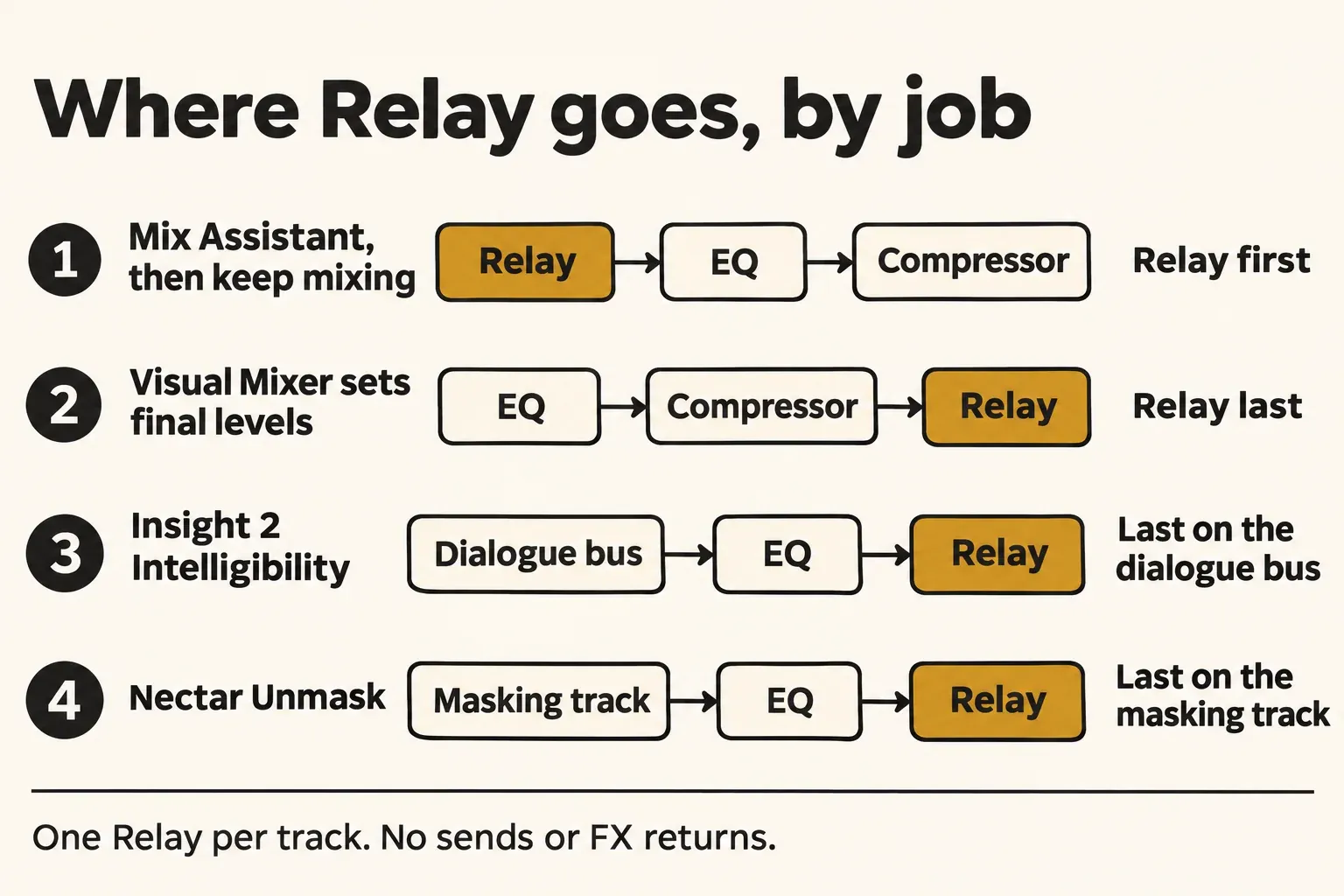
The right slot depends on what reads Relay. The Neutron 3-era Mix Assistant FAQ, the Insight 2 manual and the Nectar 4 manual each give a rule. The current Neutron 5 manual also recommends the last insert when Visual Mixer exclusively sets the final balance:
| Job | Relay slot | Why |
|---|---|---|
| Mix Assistant, then more processing or DAW faders | First insert | The Assistant balances the dry tracks; your later plug-ins and faders work on top |
| Visual Mixer sets the final levels | Last insert | Relay's gain lands after all other processing |
| Insight 2 Intelligibility | Last insert on the dialogue bus | Insight 2 sits on the master bus, in the same channel configuration as Relay |
| Nectar Unmask | After all other inserts on the masking track | The Unmask curve applies to what that track finally sends to the mix |
Four more rules from the same FAQ save most of the confusion:
- Choose individual tracks or buses, not both, and select only one Relay, Neutron or Neutron component per source. Keep the Assistant off sends and FX returns.
- The Mix Assistant moves Relay, Neutron and component levels, never your DAW faders.
- Automatic track naming works only in DAWs that support it.
- The FAQ gives version-specific batch-insert examples for older hosts, including Pro Tools 2019 and Live 9–10. Use the equivalent command in your current host rather than assuming those shortcuts are universal.
An old review clears up the most common worry. Asked about Relay's slot, iZotope told Sound On Sound that a clean slate is best, but if you've already deployed plug-ins of your own, it's OK to put Relay after them. The same review suggests Relay on buses rather than individual tracks for dense mixes. On music tracks I'd default to the first slot, because most mixes keep changing after the Assistant's pass, and only move Relay to the end when Visual Mixer or Unmask has the final word. For a dialogue mix, the full bus routing is in our Insight 2 guide.
Test results: what reviews and users report about Relay
This synthesis groups twelve selected pages from 2018 to 2026: two editorial reviews and ten forum threads across KVR, HomeRecording, the Fractal Audio forum and the Native Instruments community. A page can discuss several themes, so the counts overlap. They describe this source set, not the proportion of Relay users who encounter a problem. None of these pages supplies a measured CPU or latency result for Relay.
| Finding | Pages | Where it shows up |
|---|---|---|
| IPC or cross-track workflow discussed | 6 of 12 | Sound On Sound 2019, Making A Scene 2025, a KVR Visual Mixer thread describing each Relay as a node |
| Install, authorization or scan friction | 5 of 12 | A Native Instruments community thread where Relay was missing after a Neutron 5 install, and a KVR report of Relay stuck in demo mode for an Insight 2 owner |
| Where to put Relay in the chain comes up | 3 of 12 | Sound On Sound putting the question to iZotope, Making A Scene's start-of-channel advice, and a HomeRecording thread torn between "first insert" and existing compressors |
| Positive comments about initial balance, templates or unmasking | 3 of 12 | Initial balance (Making A Scene), unmasking vocals and guitars on the Fractal Audio forum, template workflow (Sound On Sound) |
| CPU-related impressions or motivation | 2 of 12 | One Native Instruments user calls Relay lightweight; the missing-installer report describes excessive CPU when using Neutron instead. Neither gives a controlled comparison |
| DAW-specific display or behavior problems | 2 of 12 | A 2022 KVR report of Relay not displaying properly in Studio One and Bitwig, and the HomeRecording user whose Relay faders seemed to do nothing with Neutron 3 in Cubase 14 |
| Static-balance workflow limitation | 1 of 12 | The KVR Visual Mixer thread includes a user who likes the feature but finds its lack of automation limiting |
| Published CPU or latency measurement | 0 of 12 | None found |
My reading is that Relay is useful when it connects a track to a specific IPC job, but these reports do not establish a general success rate. Five pages discuss installation, authorization or scanning, two describe host behavior problems, and the KVR discussion includes dissatisfaction with automation. The HomeRecording author revisited the setup and still reported that Neutron 3 did not change the audio in Cubase 14; reducing that to placement confusion would lose the unresolved result. The Fractal thread also contains people who do not use Relay much alongside a positive unmasking report. For moving levels over time, the Neutron 5 Assistant produces a static starting balance; continue with your DAW automation afterward.
The numerical specifications serve different purposes: iZotope's Neutron 3 FAQ rates the Mix Assistant for up to 100 tracks with Relay, with results dependent on CPU limits; Insight 2's Spectrogram displays up to eight Relay instances at once; the Neutron 5 trial runs unrestricted for ten days. These are separate vendor limits, not measurements to average together.
Formats, systems and hosts for Relay 1.8.0
The Relay release notes list five changes in 1.8.0: support for the Boris FX licensing method, new branding in the plug-in and installer, support for macOS 27 (which iZotope lists as Golden Gate) with macOS Sonoma removed, updated supported DAW versions, and a fix for overlapping text in edit fields on macOS Tahoe. The notes don't explain what the new licensing method means for existing serials, and the Relay download page still says the installer asks for your serial number.
- Systems: macOS Sequoia (15.8), macOS Tahoe (26.7) and macOS 27.2 on Intel and Apple silicon Macs, native and under Rosetta; Windows 10 (22H2) and Windows 11 (24H2).
- Formats: AAX, AU and VST3, all 64-bit only. The product page says the VST2 format is no longer supported, although an older iZotope support table still lists VST2 for Relay. I'd plan on VST3, AU or AAX and treat VST2 as gone.
- Apple silicon: the Apple silicon compatibility article lists native AU and VST3 since 1.3.0 and native AAX since 1.4.0; VST2 instances only ever ran in hosts opened under Rosetta.
- Tested hosts: Logic Pro 12, Pro Tools 2025 to 2026, Ableton Live 12, Cubase 15, Nuendo 15, Studio One 7, Studio Pro 8, Reaper 7, FL Studio 2026, Adobe Audition 2026, Adobe Premiere Pro 2026, DaVinci Resolve 21 and Reason 13.
On an older Mac, the first Relay version for each macOS release tells you how far back you can go:
| macOS | First Relay version |
|---|---|
| Ventura | 1.3.0 |
| Sonoma | 1.4.0 (dropped from the list in 1.8.0) |
| Sequoia | 1.6.0 |
| Tahoe | 1.7.0 |
| macOS 27 | 1.8.0 |
The first four rows come from iZotope's macOS compatibility table, which predates 1.8.0; the macOS 27 row comes from the 1.8.0 release notes. Relay 1.7.0 also raised the minimum to macOS Ventura and added Windows HiDPI support.
Relay troubleshooting: missing, silent or stuck
Relay isn't in the plug-in list after installing Neutron 5 or Insight 2
Relay is a separate install. Since Insight 2.4.0 it is no longer inside the Insight installer, and the Neutron 5 forum author resolved the missing-plugin case by reinstalling Product Portal and installing Relay separately. Install it from your account, authorize it and rescan. Insight explicitly confirms continued authorization by its license; for other routes, use the Relay entitlement shown in your account.
The track drops to silence every few seconds
Check Relay's authorization state first. iZotope's demo-mode guide describes periodic silence in an unauthorized plug-in after its trial, and the older Relay manual documents the same behavior. Activate Relay with its account entitlement or applicable serial; reinstalling alone does not grant a license. If Relay already shows as authorized, investigate the host and other processing rather than assuming every dropout is Demo mode.
The scan hangs on Relay, Native Access says Cancelled, or the install asks for Full Disk Access
These cases have different outcomes. In the Maschine scan thread, a hidden authorization dialog was a suggestion; removing iZotope plug-ins let the application open, but putting them back reproduced the hang. The 2024 Cancelled-label thread clarified that the listed products used the iZotope installer, rather than proving the licenses were gone. The 2026 macOS report remained unresolved even after Full Disk Access was granted. Match the route to your entitlement: account installer or Product Portal for the relevant perpetual license, Native Access for Plus/Pro subscriptions. Our Product Portal fixes and plug-in installation and rescan guide cover the next checks.
Product Portal shows a Rosetta warning on macOS 27
On Apple silicon Macs, Product Portal needs Rosetta 2, and macOS 27 is the last macOS that supports Rosetta, so you may see a compatibility warning. iZotope's macOS 27 Product Portal note says the app still runs normally and still installs and authorizes products. If you'd rather avoid Rosetta, use your account, then My Products, then Install & Activate, then Download the installer.
The Mix Assistant ran, but the DAW faders didn't move
That's by design. The Assistant changes Relay, Neutron and component levels and leaves your DAW faders alone, which is why it wants them at unity gain before it starts.
Track names don't appear in Visual Mixer or Insight
If your host does not pass track names to plug-ins, click Relay's name display and type a recognizable name; other iZotope tools use that name in their source lists. If a source is missing entirely, check that the receiving plug-in supports it and that the correct instance is selected.
Do you need Relay in Sound Forge Pro?
Sound Forge Pro isn't on iZotope's tested host list for Relay. More to the point, Relay's job needs other tracks and an IPC host such as Visual Mixer or Insight 2 in the same session, which is mixing work. In Sound Forge Pro I'd skip it and keep Relay for the DAW where you balance stems. For a mono check on a single file, our guide to mono compatibility and phase correlation in Sound Forge does the job with the editor's own tools. How Sound Forge Pro 18 loads VST3 plug-ins is in the Sound Forge plug-ins guide, and if an iZotope plug-in doesn't appear there, work through the fixes for VST plug-ins not showing in Sound Forge.
Is iZotope Relay worth installing?
My verdict: Relay earns its place when an ordinary track needs to feed Visual Mixer, Insight, Tonal Balance Control or Nectar Unmask. A compatible Neutron or component instance may already cover that track, so do not duplicate the source just to add Relay. Use an existing entitlement or the free-with-Neutron-trial offer before considering a purchase. Choose the insert slot by the receiving tool, keep the Assistant's static balance separate from automation, and check the result by listening. The rest of the line is mapped on the iZotope hub.
Quick answers
Is iZotope Relay free?
Yes. The official product page calls it free, and the current Neutron 5 download offer includes Relay even if you only trial Neutron. It also comes with qualifying perpetual products and Plus/Pro subscriptions. You need to sign in, obtain the installer and authorize the Relay entitlement; the ten-day Neutron trial is a separate condition.
Does Relay work without Neutron?
Yes. Insight 2, Tonal Balance Control 3 and Nectar 4 Standard or Advanced all read Relay, and any of the products in the table above can authorize it. With no IPC host in the session, Relay is just a small channel strip.
Is Relay available as VST2?
Not anymore, according to the product page: Relay 1.8.0 ships as AAX, AU and VST3, all 64-bit only.
Does Relay have a low-pass filter or a mute?
No. The only filter is the high-pass with 12, 24 and 48 dB slopes, and there's no mute button. Use your host's mute.