
iZotope Stutter Edit 2 is a MIDI-triggered stutter and glitch effect built with BT: each key you play fires a Gesture that repeats slices of the incoming audio in tempo through up to 11 effects, and Auto mode fires the selected Gesture when playback starts, with no MIDI needed. It's still sold on its own at a $199 list price ($99.50 EDU). The only iZotope bundle that includes it is the $2,999 Everything Bundle; Music Production Suite 9 and the Plus and Pro subscriptions don't.
I wouldn't pay full price for it. It went on sale four times in the past 12 months, usually at 84% off, and in MIDI mode the plugin does nothing until audio and a note meet inside it, so the routing in your DAW decides whether you'll use it at all. Bought in a sale, it's a strong pick from iZotope's lineup for producers who want stutters, transitions and gated glitches they can play from a keyboard.
- Buy it in a sale if you want playable stutters and transitions in Live, Logic, FL Studio or another host on iZotope's tested list.
- Take the Everything Bundle only if you want the whole bundle anyway; this one plugin doesn't justify it.
- Use Auto mode if you have no controller or your host can't send notes to an effect.
- Skip it if you edit only in Sound Forge or need Gestures longer than two bars.
The current version is 2.1.0. It runs natively on Apple silicon and ships as AAX, AU and VST3; the last VST2 build was 2.0.0.
Price, sales and bundles
US store price on November 7, 2026: $199 on iZotope's Stutter Edit 2 page, with no sale running. On the same day, Best Service was the cheapest of the 10 stores tracked by plugindeals, at $187.70.
| Store | Price | Notes |
|---|---|---|
| iZotope US | $199, no sale running | EDU $99.50 |
| iZotope UK | £189 | EDU £94.50 |
| iZotope EU | €219 | EDU €109.50 |
| Native Instruments | $199 | Same product; NI's specs list is out of date |
| Best Service | $187.70 | Lowest of the 10 tracked stores |
| Plugin Boutique | $199 | Also sells an upgrade from Stutter Edit 1 or Creative Suite |
| AudioDeluxe, ADSR, PluginFox, JRR Shop | $199 | No discount |
The sale history is the reason to wait. The price history tracked across 10 stores reports four sales in the last 12 months, starting in December, March, April and June, usually 84% off and up to 90% off, with a typical sale lasting about 42 days, so the plugin was discounted for 47% of the year. Its lowest recorded price is $10.00 at Plugin Boutique in May 2025. Black Friday lows were $49 in 2022, $27.59 in 2023 and $25.79 in 2024, then only $191 in 2025, and none had been recorded for 2026 when the price above was taken. That 2025 result is why I'd check the price on the day rather than count on a November cut; iZotope's Black Friday pattern covers the rest of the catalog.
| Bundle or plan | Price | Includes Stutter Edit 2? |
|---|---|---|
| Everything Bundle | $2,999 | Yes |
| Music Production Suite 9 | $799 (EDU $399.50) | No |
| iZotope Plus subscription | $15/month or $150/year | Not listed |
| iZotope Pro subscription | $25/month or $250/year | Not listed |
The Everything Bundle is the only bundle that includes it, and my iZotope bundle comparison shows when that bundle pays off. Stutter Edit 1 and Creative Suite owners can buy the upgrade at Plugin Boutique, while iZotope's own store offers only the full and EDU versions; how iZotope's upgrade and education pricing works explains who qualifies for EDU.
What iZotope Stutter Edit 2 does
It turns a sustained part, a drum loop or a full mix into rhythmic repeats, gates, tape stops and filter sweeps that follow the host tempo, including tempo changes. BT created it with iZotope, and the original Stutter Edit came out in 2011. Each Gesture bundles processing settings with a rhythm and sits on a MIDI note, so the key you press picks the effect. According to the Stutter Edit 2 manual, the factory presets were crafted by BT and iZotope's preset programmers.
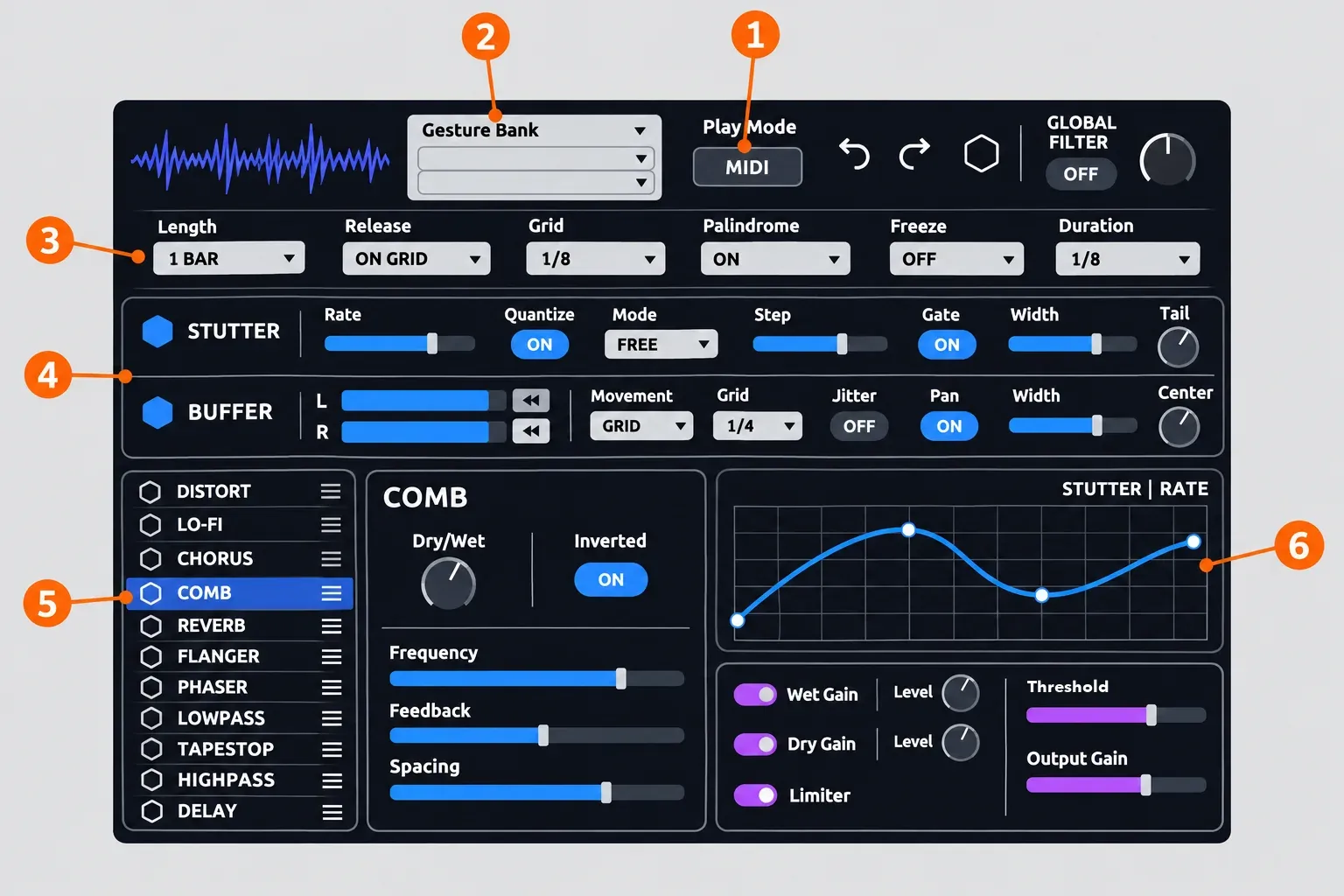
Two modules sit at the core of every Gesture. The Stutter module's Rate sets the note values used across the Gesture, Quantize locks them to rhythmic values, and a Gate with Width and Tail controls sits beside them. The Buffer module's L and R position nodes set where buffer playback begins and ends, with Link and Reverse buttons, Movement modes called Slider, Grid and Random, a Jitter that varies pitch by up to ±24 semitones or varies rhythm, and Pan, Width and Center.
- Effects: 11 of them, listed on iZotope's product page as Distort, Lo-Fi, Chorus, Comb, Reverb, Flanger, Phaser, Lowpass, Tapestop, Highpass and Delay. Reverb, Comb and Chorus are new in version 2, and Distort offers 19 characters on one band or split across two.
- Chain order: you drag effects to reorder them, though MusicTech's review reports the Delay stays at the end.
- Movement: Time-Variant Modifiers animate the parameters. The manual says a TVM "acts somewhat like a retriggerable envelope with multiple nodes and curves that can sync to tempo", with Locked, Split and Custom modes.
- Curves: clicking a slider opens its curve in the Curve editor, where Speed runs from 0.25x to 4x tempo and a Curve Presets column offers common shapes. The expanded editor adds Save, Load, Reset and Reverse.
- Length: a Gesture lasts from a 16th-note triplet to 2 measures (8 beats). At 120 BPM, 8 beats last 4 seconds; the BPM to milliseconds calculator gives the figure for other tempos.
- Output: Wet and Dry levels, a Limiter with a Threshold you can modulate, and Output Gain.
Stutter Edit 2 review: test results from critics and buyers
The test results fall into three groups that shouldn't be blended: two editorial reviews, store ratings from buyers, and counted findings from reviews and forum threads. Both editorial reviews date from 2020, before version 2.1.0, and only one of them publishes a score. The composite result is still clear: the sound and effect range draw the praise, and setup and learning time draw the complaints.
Editorial reviews
| Review | Date | Score | Verdict | Main criticism |
|---|---|---|---|---|
| MusicRadar (Si Truss) | November 17, 2020 | 4.1/5 | "remains a winning source of complex, glitchy multi-effects" | Creating your own Gestures can be time-consuming |
| MusicTech (Alex Holmes) | August 7, 2020 | No score | "a sensational and flexible option for both glitches and simpler sidechains and gate patterns" | Dark interface with faint grey text, the two-bar Gesture limit, the lost generator section |
MusicTech also called it "fairly expensive at full price but is better value if you can pick it up as part of a bundle", which matches the price history above.
Buyer ratings
| Buyer source | Rating | Sample |
|---|---|---|
| Plugin Boutique store average | 4.5 of 5 | 6,375 ratings |
| Best Service store average (eKomi) | 4.5 of 5 | 2 ratings |
| Plugin Boutique written reviews, July 1 to November 6, 2026 | Median 4, range 2–5 | 19 reviews |
I'd give the 19 recent written reviews more weight than the 6,375-rating average, because they were written while 2.1.0 was current and their spread is visible: one 2-star, three 3-star, seven 4-star and eight 5-star reviews. Damian's August 2026 review sums up the low end: "Setting up the MIDI routing is confusing depending on your DAW, and building custom gestures takes a lot of time." Another buyer, R7, put the price advice in one line: "Definitely buying if you get it on sale."
What reviewers and buyers keep mentioning
- Sound and effect range: praised in 2 of 2 editorial reviews.
- Time to build your own Gestures: flagged in 2 of 2 editorial reviews, and 7 of 19 buyers mention difficulty, the learning curve, routing or workflow. One buyer, Vaktükör, wrote "Very steep learning curve. Not too intuitive."
- Auto mode: welcomed in 2 of 2 editorial reviews.
- Live-performance fun: praised by 2 of 19 buyers.
- Setup friction on the forum: 4 of 6 Native Instruments community threads are about MIDI routing or setup, one is about Native Access and one is about the dry signal.
- CPU, latency and stability: 0 of the 27 reviews and threads in this summary report a problem, and none of the sources read publishes a CPU or latency measurement.
I take one practical point from this. MusicRadar's 4.1 and a buyer median of 4 agree on the sound, and the complaints cluster around the routing step and building Gestures from scratch. The next three sections deal with exactly that.
Requirements, formats and install
Version 2.1.0, released November 22, 2022 according to iZotope's release notes, added native Apple silicon support plus macOS Monterey, Ventura and Windows 11, and dropped macOS 10.13 and 10.14 and Windows 8. It also dropped VST2: iZotope's VST version table lists 2.0.0 as the last VST2 build, so a host that only loads VST2 can't run the current version. The guide to the VST3 format and plugin compatibility covers how that differs from VST2.
| Item | Current listing |
|---|---|
| Formats | AAX, AU, VST3, 64-bit only |
| macOS | Sonoma 14.7.x, Sequoia 15.7.x, Tahoe 26.1.x, Intel and Apple silicon |
| Windows | Windows 10 and 11 |
| Tested hosts | Logic Pro, Live 10.1–11, Cubase 12, Pro Tools 2022, FL Studio 20, Studio One 5–6, REAPER 6, Bitwig Studio 4, Digital Performer 11 |
Newer host releases, such as Live 12, aren't on that tested list, and neither is Sound Forge. Native Instruments' page still lists VST2 and older hosts, so go by iZotope's page. Installation and authorization run through iZotope, not Native Access: an NI staff member on the Native Instruments community forum said the plugin was "never distributed through Native Access". If the iZotope Product Portal won't accept your serial or the plugin won't authorize, see my Product Portal authorization fixes.
Factory banks install to Library > Application Support > iZotope > Stutter Edit 2 on a Mac and to Program Files (x86) > iZotope > Stutter Edit 2 on Windows. User presets go to Documents > iZotope > Stutter Edit 2 in your user folder on both, per iZotope's presets article.
How to use Stutter Edit 2
Start in Auto mode, shape a Gesture, then switch to MIDI mode to perform it. iZotope recommends that split, editing in Auto and performing in MIDI, because the interface updates frequently in MIDI mode.
- Insert Stutter Edit 2 on an audio track or bus that carries the sound you want to cut up. Audio has to pass through the plugin.
- Set Play Mode to Auto. The selected Gesture then fires when host playback starts, with no controller or MIDI routing needed.
- Open the Gesture Bank menu to choose a bank, then click keys on the keyboard graphic to audition its Gestures.
- Set Length, Release and Grid in the header row. Grid has nine values: at 1/8 a triggered Gesture starts on the next eighth note, which lets you trigger slightly early. Palindrome On reverses the Gesture at the end of its length instead of restarting it, and Freeze repeats a captured buffer whose length you pick from nine Duration values.
- Switch Play Mode to MIDI, route notes to the plugin as shown in the next section, start playback and play or paint notes.
- Record your playing to a MIDI clip so you can edit the performance later, as iZotope's Learn Stutter Edit in 10 minutes walkthrough shows.
Release decides what happens when you let go of the key, which matters most when you perform in MIDI mode.
| Release mode | What happens when the note ends |
|---|---|
| On Grid | The Gesture keeps going until the next Grid point after the note ends |
| Full Gesture | The whole Gesture plays through, even if you only tap the key |
| Latch | The Gesture holds until you trigger it again or trigger another Gesture |
| Instant | The Gesture stops as soon as the note ends |
| Stick | Like Latch, but it sticks at the end of the timeline |
Use the plugin's own undo and redo buttons rather than Ctrl+Z. The history holds 30,000 actions but is cleared when you close the DAW, so save a Gesture you like before quitting.
MIDI routing in each DAW
In MIDI mode nothing happens until audio passes through the plugin and a MIDI note reaches it. The plugin's Mode button shows setup steps for the DAW it detects, and iZotope's DAW setup article gives the generic method for any host: insert Stutter Edit 2 on an audio track or bus, then route a MIDI or Instrument track, or a controller, to it.
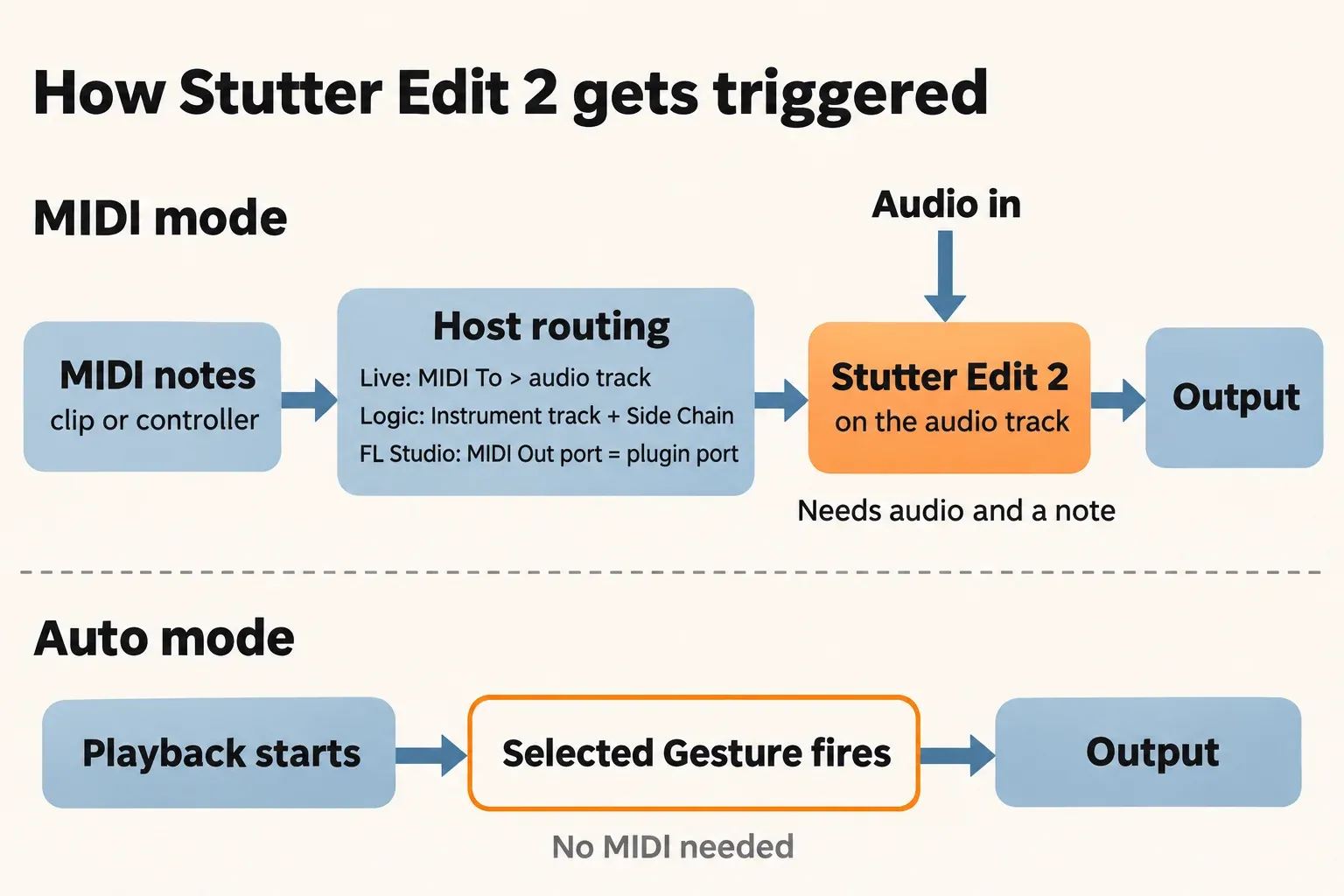
The steps below are iZotope's documented ones from the DAW Setup chapter of the manual; the last column shows which host versions iZotope lists as tested.
| Host | iZotope's documented steps | Tested version |
|---|---|---|
| Ableton Live | Insert Stutter Edit 2 on an audio track. On a MIDI track, set Monitoring to In, set MIDI To to the audio track and choose Stutter Edit 2 in the chooser below it. | Live 10.1–11 |
| Logic Pro | In Logic Pro X > Preferences > Advanced Tools, turn on Show Advanced Tools and Enable All. Create an audio track and mute it, load Stutter Edit 2 on a Software Instrument track from the Instrument menu, then select the audio track in the plugin's Side Chain menu. | Logic Pro |
| Pro Tools | Create an audio track and a MIDI track and insert Stutter Edit 2 on the audio track. In the MIDI track's Output menu, select a MIDI channel for Stutter Edit 2. | Pro Tools 2022 |
| REAPER | Insert Stutter Edit 2 on an audio track, click Input 1 and choose your MIDI device, click the speaker icon to turn on Record Monitoring, and record-enable the track. | REAPER 6 |
| FL Studio | Add Stutter Edit 2 as an insert effect on the track. In Options > MIDI Settings, select your device under Input, set a Port and click Enable, then set the plugin's MIDI Input Port (gear icon) to the same port. | FL Studio 20 |
| Studio One | Insert Stutter Edit 2 on an audio track, then select Stutter Edit 2 in an Instrument track's Instrument Output. For live playing, set that Instrument track's input to your controller. | Studio One 5–6 |
| Cubase | Create an audio track and a MIDI track, insert Stutter Edit 2 on the audio track and select that insert in the MIDI track's output menu. Set up a live controller in Studio Setup > MIDI Port Setup. | Cubase 12 |
| Reason | Insert Stutter Edit 2 on an audio track. In Preferences > Sync, set External Control Bus A to your MIDI device, open the Adv. MIDI panel from the Hardware Interface, click the channel dropdown and choose the audio track, then Stutter Edit 2. | Not on the current list |
| Bitwig Studio, Digital Performer | No host-specific steps; use iZotope's generic method above. | Bitwig Studio 4, Digital Performer 11 |
Two host manuals confirm the key settings. Ableton's Live 12 routing chapter describes the same output chooser: "The lower chooser pair ('Audio/MIDI To') selects the track's output." For playing Gestures from FL Studio's piano roll instead of a controller, Image-Line's MIDI Out page says to "Set the Input Port number on the VST plugin's wrapper to the same Port number as MIDI Out".
Logic has two known snags. iZotope's Logic scanner article covers a failure to validate the MIDI-controlled effect: install the current version from the Product Portal, hold Option in the Finder and choose Go > Library, open Caches > AudioUnitCache, move its files to the Desktop, restart, and reopen Logic so it rescans. Separately, one user on the NI community forum couldn't get MIDI mode working with the plugin on Logic's master track in January 2026 and solved it by routing everything to an Aux track. That's a single report, but it's a cheap thing to try.
What Stutter Edit 2 doesn't do
- Mute between Gestures. The dry signal passes whenever no Gesture is triggered. An NI staff member on the dry-signal thread suggested automating the track mute.
- Run longer than two bars. The 8-beat Gesture ceiling was one of MusicTech's complaints and it still applies.
- Load Stutter Edit 1 presets. iZotope's Stutter Edit 2 FAQ says they don't work, and MusicTech noted that the first version's generator section is gone.
- Remember custom MIDI assignments. The Global filter is a resonant high/low-pass on Pitch Bend by default, and custom assignments aren't stored with the project.
- Install from Native Access. It uses iZotope's own installer and authorization.
- Load on Maschine+. A 2022 forum thread reports it doesn't run on the standalone hardware, while one trial user said in a June 2026 thread that it works in the Maschine 3 desktop software. Both are user reports, not official support statements.
Can you use Stutter Edit 2 in Sound Forge?
Only in Auto mode. Sound Forge isn't on iZotope's host list, it has no MIDI tracks, and none of its documented MIDI features sends notes to a plugin: the MIDI keyboard sends note on and note off messages to your sound card or sampler, MIDI triggers control Sound Forge's own functions, and MIDI timecode handles sync. MIDI mode therefore can't be driven there, and Auto mode is the documented way to use the plugin without MIDI.
Sound Forge's Plug-In Chainer is where VST effects go on Windows, and if Stutter Edit 2 doesn't appear in the plug-in list, start with the VST plug-ins not showing fixes. My advice for anyone who wants to play Gestures is simpler: perform them in a DAW on iZotope's tested list, print the result to audio, and edit that file in Sound Forge, which is the editor's job in a music production workflow anyway.
Who should buy Stutter Edit 2
It suits electronic producers, remixers and DJs who perform transitions from a controller in a listed DAW, and sound designers who want quick glitch textures from Auto mode. It's a poor fit for Sound Forge-only editors and for anyone who needs a Gesture longer than two bars. For heavy multiband distortion rather than stutter, iZotope Trash is the deeper tool.
My verdict: buy Stutter Edit 2 in a sale or inside an Everything Bundle you already wanted, not at full price. MusicRadar's 4.1 and a recent buyer median of 4 back the sound, and the plugin was discounted for 47% of the past year. Check the current price on iZotope's page before you pay.