
Mono is one audio channel, so every speaker or earbud plays the same signal; stereo is two channels, left and right, so sounds can sit anywhere between the speakers. Neither is better in general: stereo is the format for music, film, TV and games, and mono is the format for one voice, for calls and for sound that has to be the same everywhere in a room. Mono still matters for speech, listening with one ear and hands-free calls. Bluetooth Classic headsets use mono while their microphone is active on Windows; compatible LE Audio systems can keep stereo playback.
My rule is simple. For a spoken-word podcast, interview or voice-over I'd record mono and check the destination's rules before delivery: one voice has nothing to place left or right, and the settings below show how a lower delivery bitrate saves space when the destination allows it. They do not establish equal quality at different bitrates. I'd move to stereo only when music, a room or effects use both sides. On the listening end I'd turn Mono Audio on if you hear with one ear or one earbud and leave it off otherwise, because it throws away the placement the mix was built with.
Mono vs stereo: what each one means
The difference is a channel count, not a speaker count. A WAV file stores it as a plain number in its header, and Microsoft's WAVEFORMATEX format definition sets that number to 1 for mono and 2 for stereo. Everything else follows from it.
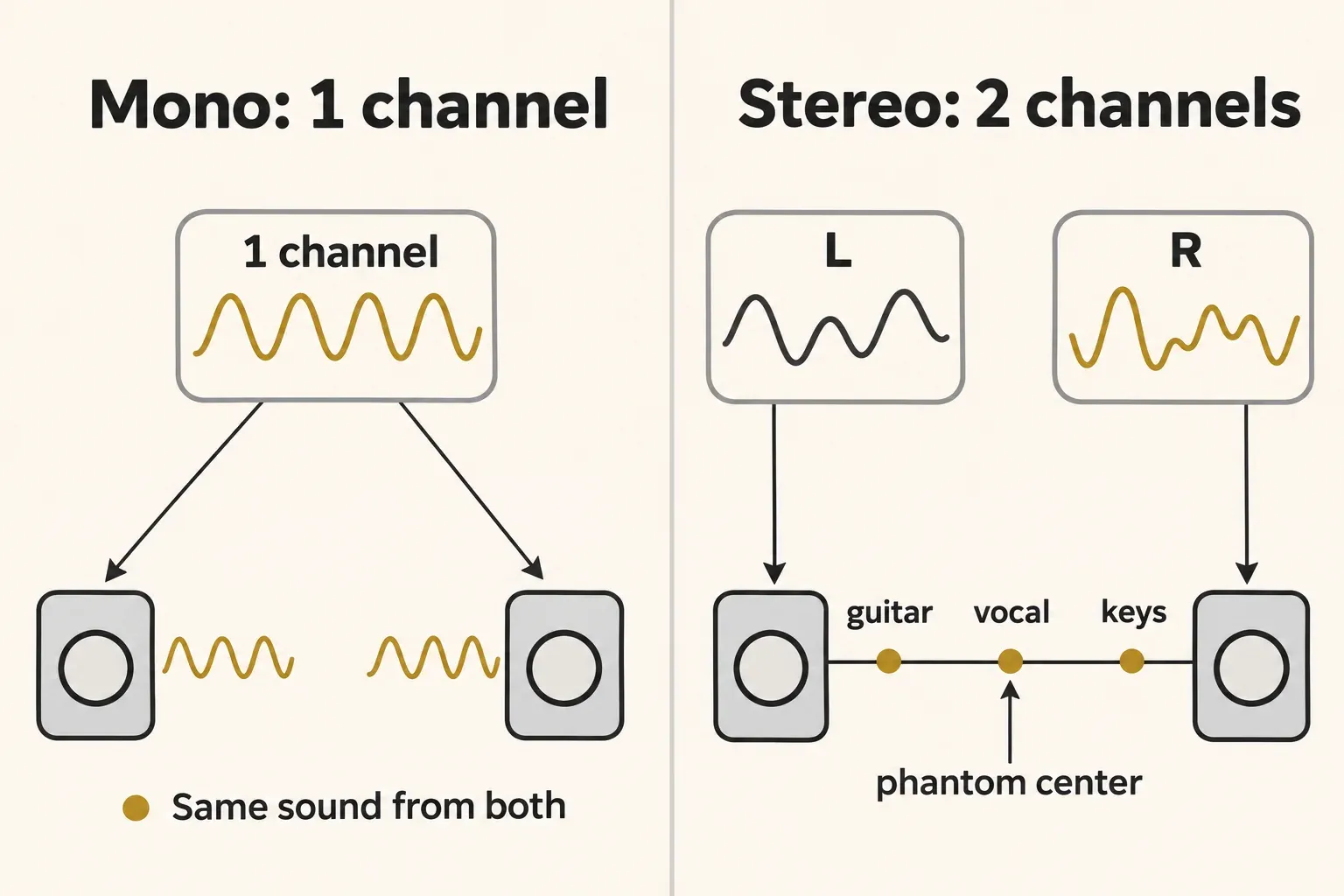
Mono means one signal, copied to every output. Buzzsprout's audio optimization help describes it the same way: a mono encoding tells the device to play the same channel out of all available speakers. Two speakers, a ceiling full of them or a pair of earbuds all carry identical sound, and on a stereo system the result is called dual mono. The voice seems to come from a point midway between the speakers, and nothing moves left or right.
Stereo carries two channels that can contain different signals. Your ears place a sound by the level and arrival-time difference between the two sides, as Audio University's mono vs stereo explainer lays out, and when both speakers carry the same signal at the same level you hear a phantom center between them. Pan a guitar left and it lives mostly in the left channel; keep the vocal equal in both and it hangs in the middle. The stereo image is most stable when you sit between the speakers or wear headphones. Use the speaker placement calculator to position a pair symmetrically around your listening seat. More than two channels is surround, a separate format with its own surround sound test.
| Aspect | Mono | Stereo |
|---|---|---|
| Channels | 1 | 2 (left and right) |
| What you hear | The same sound from every speaker, with no left-right placement | Parts placed left, right or in the phantom center |
| On the other kind of system | Two speakers or headphones play it as dual mono, centered | A single-driver speaker folds both channels into one |
| Typical content | One voice, interviews, calls, background sound over many speakers | Music, film, TV, games, music-heavy podcasts |
Which is better, mono or stereo?
Stereo is better for anything built on space: music, film, TV and games, where the mix spreads instruments, effects and ambience across two sides. Mono is better for a single voice or source, because one voice has nothing to place, and for sound that has to reach everyone the same way. Bose's mono vs stereo explainer draws the same line: voice recordings and interviews in mono, music, film, TV and games in stereo.
Background music over many speakers leans mono. Every ceiling speaker in a shop or along a hallway then carries the whole mix, so nobody standing under a left-channel speaker loses the right half. Live engineers don't all agree for a PA: Attaway Audio's take on mono vs stereo PA still favors stereo in most rooms and keeps mono for oddly shaped rooms with many zones.
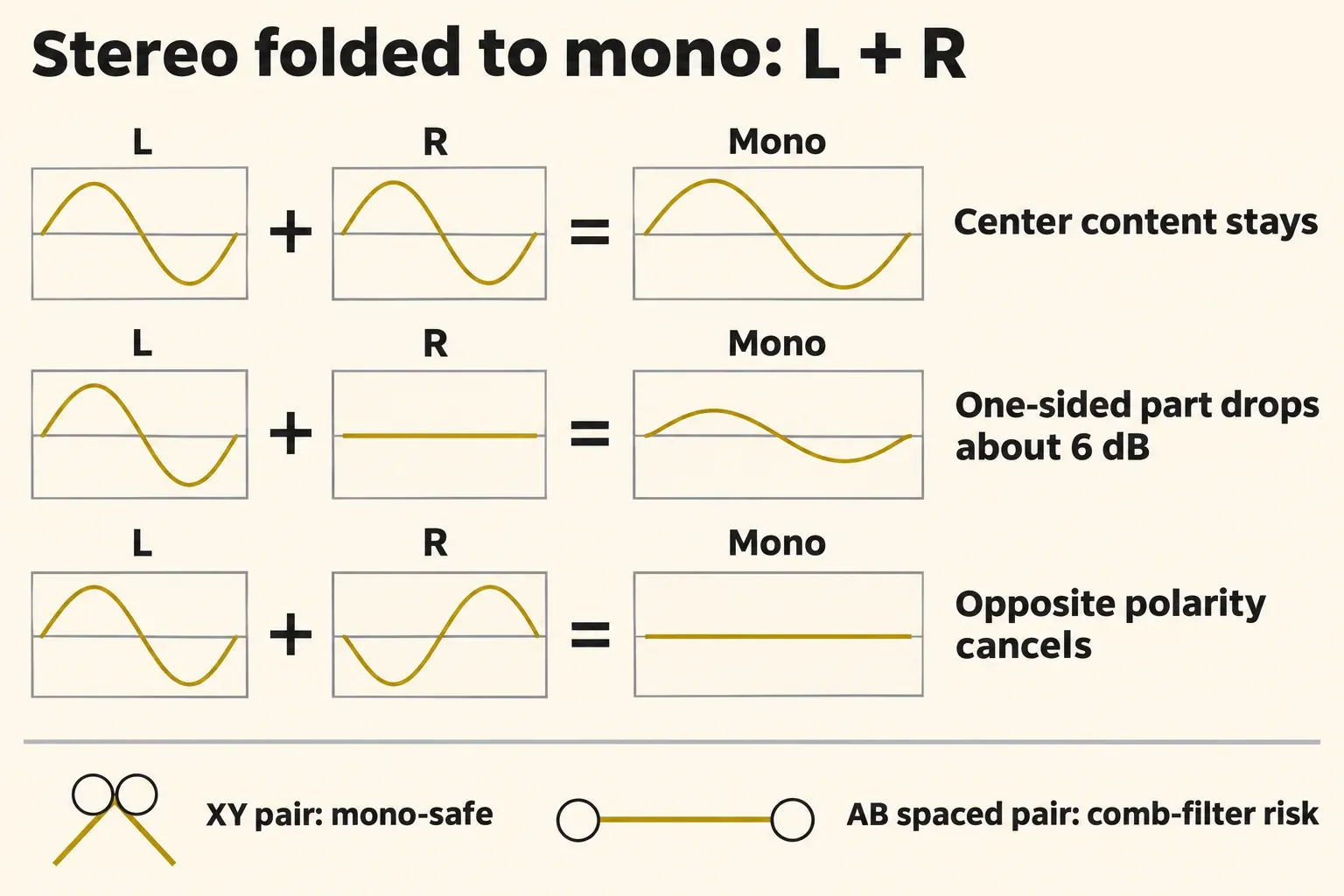
Stereo has one weak spot. It doesn't always survive being folded into a single channel, and that fold happens on single-channel playback systems, on a phone call and whenever a listener turns Mono Audio on. A fold-down adds left and right together. In a 50/50 fold, content that's identical in both channels, such as a centered vocal, keeps its level. A part that exists in only one channel comes out at half amplitude, about −6 dB. Content in opposite polarity, or offset in time between the channels, cancels or comb-filters, and Wikipedia's monaural sound entry notes that the result can sound muffled.
That's why a stereo mix gets a mono check before release. If the vocal, bass or reverb drops away when folded, the mono compatibility check in Sound Forge shows where the cancellation sits. A phase correlation meter reading near +1 means the two channels move together, which is normal for a centered voice, though it says nothing about whether the width is right.
Is mono sound obsolete?
No. Stereo dominates entertainment playback, but mono remains useful for speech, single-channel devices and listening with one ear:
- Headset calls. Microsoft's Bluetooth audio driver documentation describes Bluetooth Classic headsets playing stereo over A2DP and switching to mono playback and capture over HFP when the microphone is in use, at 8 kHz narrowband or 16 kHz wideband on Windows. Stereo playback with the microphone active is available on supported Windows 11 24H2 or newer systems with compatible LE Audio devices and manufacturer drivers. That exception doesn't change how Bluetooth Classic HFP works.
- Single-driver smart speakers. Apple's HomePod mini specs list one full-range driver with two passive radiators, and a stereo pair needs two units of the same model and generation. Google's Nest Mini specs list a single 40 mm driver, and Google's speaker pairing help asks for two of the same model in the same room, around 4–8 feet apart. One enclosure doesn't always mean mono: Sonos describes speakers with separate left and right drivers inside one unit.
- Phone networks, hearing aids and AM radio. The Wikipedia entry lists mono as the standard for telephone networks, radiotelephone and hearing-aid induction loops, and notes that most AM stations broadcast in mono.
- Accessibility switches. Apple, Google and Microsoft all ship a Mono Audio setting, covered in the next section.
- Podcasts. Mono remains an option in delivery guidance; the bitrate table below keeps each platform's conditions beside its figures.
One correction to a common claim: phone speakers aren't mono by default. Apple's iPhone 17 tech specs list a built-in stereo speaker and stereo recording. Mono reaches phone users through calls, a single earbud, the Mono Audio switch and hands-free Bluetooth, and that's reason enough to make sure a voice track holds up in one channel.
What the Mono Audio setting on your phone or computer does
Mono Audio adds the left and right channels together and plays the sum on both sides. A part panned hard left then reaches your right ear too, so nothing goes missing if you hear with one ear or wear one earbud. Google's Pixel Watch mono audio help presents it as help for hearing loss in one ear, and Microsoft's Windows hearing settings page as a way to hear everything even with just one headphone.
| Device | Where to find it | Note |
|---|---|---|
| iPhone | Settings > Accessibility > Audio & Visual > Mono Audio | The Balance slider sits on the same screen |
| Mac | Apple menu > System Settings > Accessibility > Audio > Play stereo audio as mono | Same path in macOS 27, Tahoe 26, Sequoia 15 and Sonoma 14 |
| Android phone | Usually Settings > Accessibility > Audio adjustment | Menu names vary by phone maker and Android version |
| Pixel Watch | Settings > Accessibility > Audio Adjustment > Mono Audio | Plays the combined channel in both Bluetooth headphones or speakers |
| Windows 11 | Settings > Accessibility > Audio > Mono audio | One toggle |
| Windows 10 | Settings > Ease of Access > Audio > Turn on mono audio | One toggle |
The iPhone path comes from Apple's iPhone audio accessibility guide, the Mac path from Apple's Mac audio accessibility settings, and the Android route from Google's Android accessibility help, which groups mono audio and balance under the Audio adjustment features.
I'd turn it on if you hear better in one ear, listen with a single earbud or share a pair of earbuds with someone. I'd leave it off otherwise. The sum throws away the placement the mix was built with, and any part that sits in opposite polarity across the two channels can thin out or vanish. Switch it off before you judge a stereo mix, too, or you'll be judging the mono version. To see whether a device is folding everything to mono, play the left and right speaker test: a left-only tone that comes from both sides means the system is summing the channels.
When to record in mono and when in stereo
Record in mono when you have one source on one microphone, and in stereo when the room or the spread of the players is the point. A voice, a guitar amp or a bass cabinet on one mic is mono by nature, and a second channel would only hold a copy. A piano in a good room, drum overheads, a choir or a field recording carries information in the difference between two microphones, and that difference is exactly what stereo stores.
| Source | Record | Why |
|---|---|---|
| Podcast host, guest or voice-over | Mono, one mic per person | One voice has nothing to place, and each person stays on a track you can edit alone |
| One instrument or amp on one mic | Mono, panned in the mix | Placement comes from the pan control later |
| Acoustic instrument in a room | Stereo pair, XY or MS | The pair captures width and room, and both fold to mono cleanly |
| Drum overheads, choir, ensemble | Stereo pair | The spread across the group is the point |
| Ambience and field recordings | Stereo | The space itself is the subject |
Voice-over follows the same rule. The Sound Forge Pro voice-over recording guide gives the rule as one microphone, one mono file, unless the client explicitly requires stereo.
Once a mono track sits in a stereo mix, the pan control places it and the DAW's pan law decides how loud it is at center. Logic Pro's pan law settings offer 0 dB plus −3, −4.5 and −6 dB, each also in a Compensated version, and at 0 dB a center-panned track may sound louder than the same track panned hard to one side. Other hosts use their own defaults.
Which stereo mic pair stays safe in mono
The pair you choose decides how the recording folds down later. DPA's stereo recording techniques guide sorts the common setups this way:
- XY. Two coincident capsules, commonly cardioids at 90°. Summed to mono, they don't comb-filter.
- MS. A mid and a side signal, decoded as L = M + S and R = M − S. In a mono sum the side cancels and the mid remains, so the mono version is the mid signal on its own.
- Spaced AB. Two omnis set apart. DPA calls the pair generally not suitable for mono, because the sum can comb-filter; for a mono version, use one of its channels.
My pick when mono playback matters is XY or MS, since a phone call, a single-driver smart speaker or a listener with Mono Audio on will fold the pair anyway. The guide to microphone polar patterns covers the pickup patterns these pairs are built from.
A mono recording can't become real stereo later. Converting it to stereo copies the same signal into both channels, which Sonos's mono vs stereo article calls dual mono: no width and no placement. Width added afterward is processing. The Ozone Imager 2 guide shows how to add it with mono-safe settings, and the iZotope and Boris FX free plugins hub lists the other no-cost tools.
Mono or stereo for podcasts, audiobooks and music
Deliver a talk podcast or a single-narrator audiobook in mono and music in stereo, then check the platform's channel rule, because two of the big ones attach conditions to mono.
| Destination | Channel rule | What I'd send |
|---|---|---|
| Apple Podcasts | For subscriber audio uploaded through Apple Podcasts Connect, MP3 may be mono or stereo; WAV and FLAC must have two channels, so a mono source goes as two identical channels. RSS-feed guidance is separate | Mono MP3 for talk if accepted; two-channel WAV or FLAC for subscriber lossless uploads |
| ACX audiobooks | Every file in the same channel format, all mono or all stereo; MP3 at 192 kbps or higher CBR, 44.1 kHz | Mono for a single narrator, in every chapter file |
| Podcast hosts | Mono recommended for spoken word, stereo for music-heavy shows | 96 kbps mono MP3 for talk |
| Music releases | Stereo | Stereo, checked in mono first |
The Apple rules are in Apple Podcasts' audio requirements, and the audiobook rules in ACX's audio submission requirements, which warn that mixed channel formats cause errors.
Loudness is the one place dual mono complicates delivery: most players skip the 3 dB cut a mono file needs on two speakers, hence the −19 LUFS mono convention against −16 LUFS for stereo, and Auphonic's note on mono loudness adds that no single choice is right for every device. The podcast loudness standard guide has the full targets, including Apple's −16 LKFS.
How much space mono saves
Uncompressed audio is plain arithmetic: sample rate × bit depth × channels. Mono PCM needs exactly half the data of stereo at the same settings.
| Format | Mono | Stereo |
|---|---|---|
| 44.1 kHz / 16-bit PCM | 705.6 kbps; 5.292 MB per minute; 317.52 MB per hour | 1,411.2 kbps; 10.584 MB per minute; 635.04 MB per hour |
| 48 kHz / 24-bit PCM | 1,152 kbps; 8.64 MB per minute; 518.4 MB per hour | 2,304 kbps; 17.28 MB per minute; 1,036.8 MB per hour |
The table counts the audio payload only, with MB as 1,000,000 bytes. MP3 works differently: size follows the bitrate you choose, not the channel count. A constant-bitrate hour weighs 28.8 MB at 64 kbps, 43.2 MB at 96 kbps, 57.6 MB at 128 kbps and 86.4 MB at 192 kbps, before tags and artwork. As the guide to exporting MP3 from Sound Forge Pro points out, a mono file at the same bitrate as a stereo one isn't any smaller; the saving comes from picking a mono bitrate such as 96 kbps instead of 192 kbps stereo. The audio file size calculator handles any other format and length.
Published bitrate recommendations and file-size calculations
The five selected mono figures below have a median of 96 kbps and a range of 64–96 kbps. The selection uses the lower bound of Apple's RSS range, Blubrry's spoken-word recommendation, Buzzsprout's spoken-word encode, Captivate's talk-show recommendation and the main option in The Podcast Host's guide. The last guide also offers 64 kbps for voice-only shows; 96 kbps is its main option, not its minimum.
The four selected stereo figures have a median of 128 kbps and a range of 128–192 kbps. Within each of those four sources, the selected stereo figure is 1.33–2 times its mono figure, with a median ratio of 2.0. Apple's ranges are channel-format guidance; the other paired figures concern spoken word versus music or effects. The table preserves those differences.
These figures compare selected delivery settings, not measured sound quality. They do not mean a stereo MP3 always assigns half its bits to each channel. Joint stereo can encode a shared mid signal and a difference signal, allocating bits according to the material. At the same constant bitrate and duration, mono and stereo MP3 audio payloads have the same size; choosing 96 kbps instead of 192 kbps is what halves the data. Apple suggests mono when the delivery bitrate has to come down.
| Source | Selected mono figure | Selected stereo figure | Condition |
|---|---|---|---|
| Apple Podcasts (RSS feed table) | 64 kbps | 128 kbps | Lower bounds of the 64–128 and 128–256 kbps ranges, 44.1 or 48 kHz |
| Blubrry | 64 kbps | 128 kbps | Spoken word; music and dynamic sound |
| Buzzsprout | 96 kbps | 192 kbps | Its own spoken-word encode; Mostly Music option |
| Captivate | 96 kbps | 128 kbps | Talk shows; stereo music or many sound effects |
| The Podcast Host | 96 kbps | Not counted | Main option is 96 kbps; voice-only alternative is 64 kbps; music option states no channel count |
| Composite | Median 96 kbps, range 64–96, n = 5 | Median 128 kbps, range 128–192, n = 4 | Stereo-to-mono ratio median 2.0, range 1.33–2.0, n = 4 |
For a talk show I'd encode 96 kbps mono when the destination allows it. It is the median of the five selected figures and uses half the audio data of 192 kbps for the same duration. A stereo copy adds no spatial information to one centered voice, but joint stereo does not have to waste half the bits on an independent duplicate.
How to switch a file between mono and stereo in Sound Forge Pro
In Sound Forge Pro, Process > Channel Converter turns a stereo file into mono or a mono file into stereo. Sound Forge Pro's Channel Converter help describes the dialog, and the stereo-to-mono route takes five steps:
- Keep the original stereo file untouched and save a working copy under a different filename. Work on that copy: after you save a mono fold-down over the only original, its independent left and right information cannot be recovered from the mono file.
- Open the working copy and choose Process > Channel Converter.
- Choose 1 from the Output channels drop-down list to create a mono file.
- Set Source 1 (the original left channel) and Source 2 (the original right) to 50% each, and leave Invert Mix unchecked.
- Click OK, then play the result and listen for anything that thinned out or disappeared. That's the fold-down at work.
For a quick switch without the dialog, use the Audio channels box in the File Properties window, or right-click the Channels box in the status bar and pick a setting. Going the other way copies the one channel into both sides: the same sound, with twice the uncompressed PCM audio data at the same sample rate and bit depth. A fixed-bitrate MP3 export does not double in size just because it has two channels. You need that step before you can apply a panning envelope to a mono file. The Sound Forge Channel Converter guide covers custom matrices, one-sided recordings, channel swaps and how to verify the result.
Verdict
My verdict: record one voice in mono, and keep stereo for a room or performance whose spread matters. For a talk podcast that accepts it, I'd send a 96 kbps mono MP3: it uses half the data of 192 kbps for the same duration, and a stereo copy of one centered voice adds no placement. A voice-over client may require WAV instead; ACX requires at least 192 kbps CBR at 44.1 kHz even for mono narration. Follow the destination's codec, channel and bitrate rules before choosing an export. At one fixed MP3 bitrate, changing only the channel count does not halve the file size. For a room or ensemble that must survive mono playback, I'd choose XY or MS and check the fold-down. On the listening side I'd leave Mono Audio off unless you hear with one ear or one earbud; then it keeps both sides of the mix in reach.
FAQ
Is mono louder than stereo?
Not by itself. Folding stereo to mono at 50/50 keeps centered parts at their level and drops one-sided parts by about 6 dB. A mono file played on two speakers can also come out about 3 dB louder than on one if the player doesn't compensate.
Why does my Bluetooth headset sound mono during calls?
With Bluetooth Classic on Windows, opening the headset microphone switches audio from stereo A2DP to the mono hands-free profile. A2DP returns when the microphone closes. LE Audio is different: compatible Windows 11 systems can retain stereo playback during microphone use. Check the device's Format when microphone is active option under Settings > System > Sound; if it isn't available after OS and manufacturer-driver updates, the system doesn't support that stereo mode.
Are earbuds stereo, and what happens with one earbud?
Yes, a pair of earbuds is stereo: one plays the left channel and the other the right. A single earbud can miss a part panned to the other channel unless the device combines both sides. Turn on Mono Audio to combine the channels in the earbud you're wearing.