
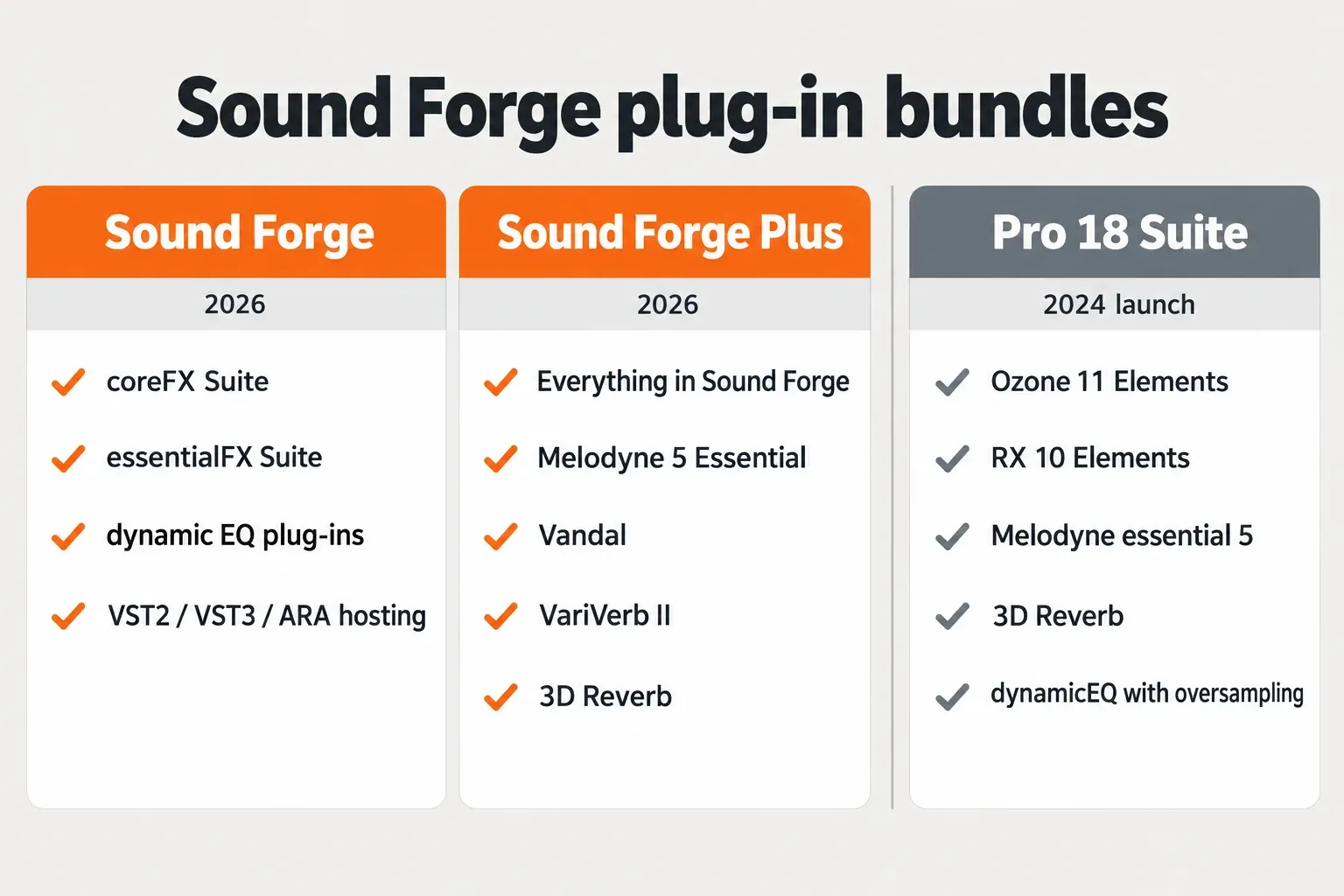
Sound Forge Pro 18 was the 2024 MAGIX release; Boris FX now sells Sound Forge 2026 in two editions. Both include the coreFX Suite, the essentialFX Suite and the dynamic EQ plug-ins, and both host VST2, VST3 and ARA plug-ins. Sound Forge Plus adds Melodyne 5 Essential, Vandal, VariVerb II and 3D Reverb. The Pro 18 Suite was a different bundle: MAGIX launched it with iZotope Ozone 11 Elements, RX 10 Elements and Melodyne essential 5, and neither current edition lists Ozone or RX.
I answer this question from the licence you hold. If you own Pro 18, your plug-ins are the ones registered in your MAGIX account, and the 2024 bundle is the reference. If you are buying now, you get only what the current Boris FX comparison lists, so the Ozone and RX names in older reviews do not apply to you. Loading third-party plug-ins works the same either way: add the folder, click Refresh, tick the plug-in, and open ARA editors such as Melodyne from the Tools menu. The sections below take each bundled extra and each loading step in turn.
What Sound Forge and Sound Forge Plus include in 2026
The two current editions share one plug-in core and differ by four extras. The rows below follow the Sound Forge pricing and edition comparison; prices are the US list prices shown on October 20, 2026.
| Plug-in or feature | Sound Forge | Sound Forge Plus |
|---|---|---|
| coreFX Suite | Included | Included |
| essentialFX Suite | Included | Included |
| Dynamic EQ plug-ins | Included | Included |
| Third-party VST2, VST3 and ARA hosting | Included | Included |
| Melodyne 5 Essential | Not included | Included |
| Vandal | Not included | Included |
| VariVerb II | Not included | Included |
| 3D Reverb | Not included | Included |
| Perpetual licence (October 20, 2026) | $299.95 | $399.95 |
| Monthly / annual subscription (October 20, 2026) | $24.95 / $149.95 | $33.95 / $199.95 |
| Installation size | 1,100 MB | 1,400 MB |
Perpetual licences include one year of upgrades and support, and store prices move, so read the price rows as a dated snapshot and check the current Sound Forge price breakdown before you buy. Both editions need Windows 11; the official Sound Forge system requirements ask for 2 GB of RAM and recommend 8 GB, and the Sound Forge 2026 PC specs guide covers the hardware side in more detail. On the same date the Sound Forge Plus download page listed version 2026.0.0.71 as a standalone Windows 64-bit installer.
Two naming details save confusion. There is no Suite edition in 2026: Plus is the upper edition, and its extras are not the old Suite's extras. And on October 20, 2026, the comparison table's column headers read "Vegas Pro" and "Vegas Pro Plus", a template slip from the sister product; the row names and the Sound Forge page around the table show which product the rows describe.
What the Sound Forge Pro 18 Suite bundled
MAGIX released Sound Forge Pro 18 in March 2024 in two editions, Pro 18 and Pro 18 Suite. Two years later the product changed hands: on March 30, 2026, Boris FX announced its acquisition of Sound Forge, together with Vegas Pro and Acid Pro, from MAGIX Software GmbH. Pro 18 plug-in lists therefore describe the MAGIX catalogue, not the one on sale today.
The Suite's headline plug-ins are well documented. Pro Video Coalition's Pro 18 launch report carried MAGIX's description of the Suite as featuring iZotope Ozone 11 Elements, RX 10 Elements and Celemony Melodyne Essential 5, and gearnews' Sound Forge Pro 18 announcement named the same three. Which items were Suite-only is less clear-cut. The proaudio.tech reprint of MAGIX's launch highlights tagged 3D Reverb, dynamicEQ with oversampling and Melodyne essential 5 as exclusive to the Suite. The Ozone and RX line carried no such tag, so the launch list did not mark them Suite-only. If you own the base Pro 18, check your MAGIX account and serials instead of assuming either way.
| Item | Pro 18 launch materials, March 2024 | Sound Forge 2026 editions |
|---|---|---|
| iZotope Ozone 11 Elements | Named for the Suite; not tagged Suite-only in the highlights list | Not listed in either edition |
| iZotope RX 10 Elements | Named for the Suite; not tagged Suite-only in the highlights list | Not listed in either edition |
| Melodyne essential 5 | Tagged Suite-only in two of three launch reports | Melodyne 5 Essential in Plus only |
| 3D Reverb | New in Pro 18; tagged Suite-only in the proaudio.tech reprint | Plus only |
| Dynamic EQ | dynamicEQ with oversampling tagged Suite-only in two of three launch reports | Dynamic EQ plug-ins in both editions |
| Perpetual price | Pro 18 $399, Suite $599 at launch | $299.95 and $399.95 on October 20, 2026 |
The launch upgrade prices, $199 for Pro 18 and $299 for the Suite, are history too. On October 20, 2026, MAGIX's former Sound Forge product URLs redirected to the MAGIX homepage, and the Boris FX store listed an "Upgrade from Magix Serial" at $189.95 for Sound Forge and $249.95 for Sound Forge Plus. Boris FX sets the eligibility rules, so confirm them on the pricing page before you count on that price. What a Pro 18 licence carries into 2026, and how accounts and serials moved, is the subject of Sound Forge 2026 vs Pro 18: upgrade and migration, while the Sound Forge Pro 18 features and price review covers the release itself.
If you still rely on Ozone 11 or RX 10 Elements from that bundle, the paid tiers of the current lines are compared in Ozone 12 Elements vs Standard vs Advanced and RX Elements vs Standard vs Advanced. The iZotope plug-in hub routes the rest of that range.
Melodyne 5 Essential in Sound Forge Plus
Melodyne 5 Essential is the pitch and timing editor in Plus, and inside Sound Forge it opens through ARA rather than as an ordinary effect. Boris FX describes it as core note-based pitch correction, pitch drift and modulation control, a timing tool for basic time correction and the Melodic algorithm.
Celemony defines the edition more strictly, and I would plan around its wording. The Melodyne 5 edition comparison from Celemony says essential has every algorithm except DNA: it edits monophonic vocal and instrumental tracks, drums and even whole mixes (for time-stretching or transposing), but not individual notes played by polyphonic instruments such as piano or guitar. Its Main Tool edits each note's pitch, timing and duration and the separations between notes, with macros for pitch, timing and dynamics. The full toolkit for parameters such as vibrato and formants starts with Melodyne assistant.
Every Melodyne 5 edition runs standalone or as a VST3, AU or AAX plug-in with ARA integration. Sound Forge runs on Windows only, so the route that matters here is the VST3 plug-in with ARA, covered step by step in the ARA section further down. A project started in essential can later be opened in Melodyne studio, so an upgrade does not strand your edits. When a vocal needs vibrato or formant work, the Melodyne essential vs assistant comparison shows what the next edition adds.
Vandal: amp and cabinet emulation
Vandal is the Plus extra for guitar and bass tone. Boris FX lists amplifier, speaker, cabinet and microphone models, a large preset library, typical amplifier controls such as tone and overdrive, and free choice of amp, cabinet and microphone to build a rig. The comparison page gives no model count, so I would not plan around one.
Its job in Sound Forge is narrow. Sound Forge works on one audio file at a time, so Vandal suits a single DI guitar or bass recording that needs amp character before export. I would not buy Plus for Vandal alone if your work is dialogue, restoration or mastering; none of those jobs calls for an amp model.
VariVerb II: preset-driven reverb
VariVerb II is the second reverb in Plus. Boris FX lists selectable reverb types, a large set of presets and manual control of room size, reverb amount and more. The 2026 Sound Forge help has no VariVerb II page, so presets are the practical starting point: choose the reverb type, load a preset close to the space you want, then adjust room size and amount.
Pick 3D Reverb instead when the file is multichannel or when the low end of the tail needs its own decay time. For the general reverb workflow in Sound Forge, the guide on how to add reverb in Sound Forge Pro covers the basics.
3D Reverb: stereo and multichannel spaces
3D Reverb is the specialist of the four extras: an algorithmic reverb for stereo and for 3D multichannel files. The 3D Reverb chapter of the Sound Forge 2026 help says it handles up to 10 audio channels and routes each input into the virtual room according to its 3D panning. Early reflections come from a geometric room model matched to the channel layout, late reflections from a feedback delay network with 16 delay lines (FDN16), and decay runs from under 100 ms to infinity, with high and low frequencies adjustable separately. It arrived as new in Pro 18, when gearnews reported support for up to 10-channel surround formats.
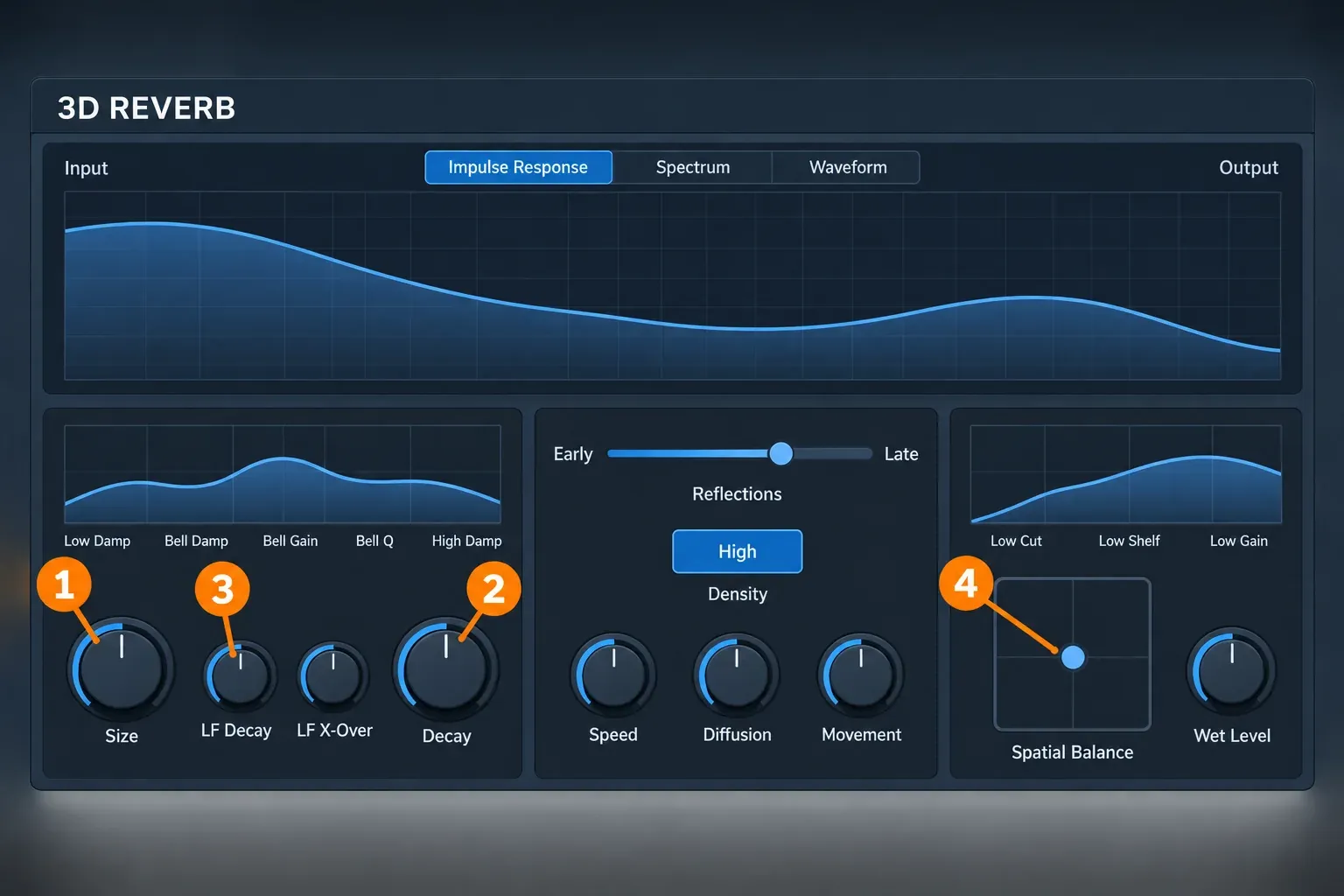
The 3D Reverb window overview lists a peak meter, a display that switches between impulse response, spectrum and waveform, and sections for Room, Color, Output, and presets and settings. Color processes the late reflections and holds the crossfader between early and late reflections. The help notes that Size, together with that early/late mix, can set how far away the source appears, which is why I'd set those two before anything else.
The Room controls page and the Output controls page document the four controls that shape most results, in the order I recommend:
- Size sets the room size and the timing of the early reflections.
- Decay sets the decay time of the tail.
- LF Decay scales the low-frequency decay from 25% to 400% of the main decay, and LF X-Over sets the crossover frequency for that low band. I would pull LF Decay below 100% first when a tail sounds muddy.
- Spatial Balance, in the Output section, positions the reverb signal in 3D space. Wet Level sets the reverb level independently of the dry/wet mix, and the lock symbol next to Mix keeps the mix fixed when you load presets.
Both sections also carry an EQ: the room EQ has a peak filter, and the output EQ has a low cut plus low and high shelves.
One naming quirk remains: the help still says 3D Reverb is only available in Sound Forge Pro Suite, a sentence carried over from the MAGIX era. The current pricing page places it in Sound Forge Plus, and for a purchase today the pricing page is the one to follow.
How to load third-party VST3 plug-ins in Sound Forge
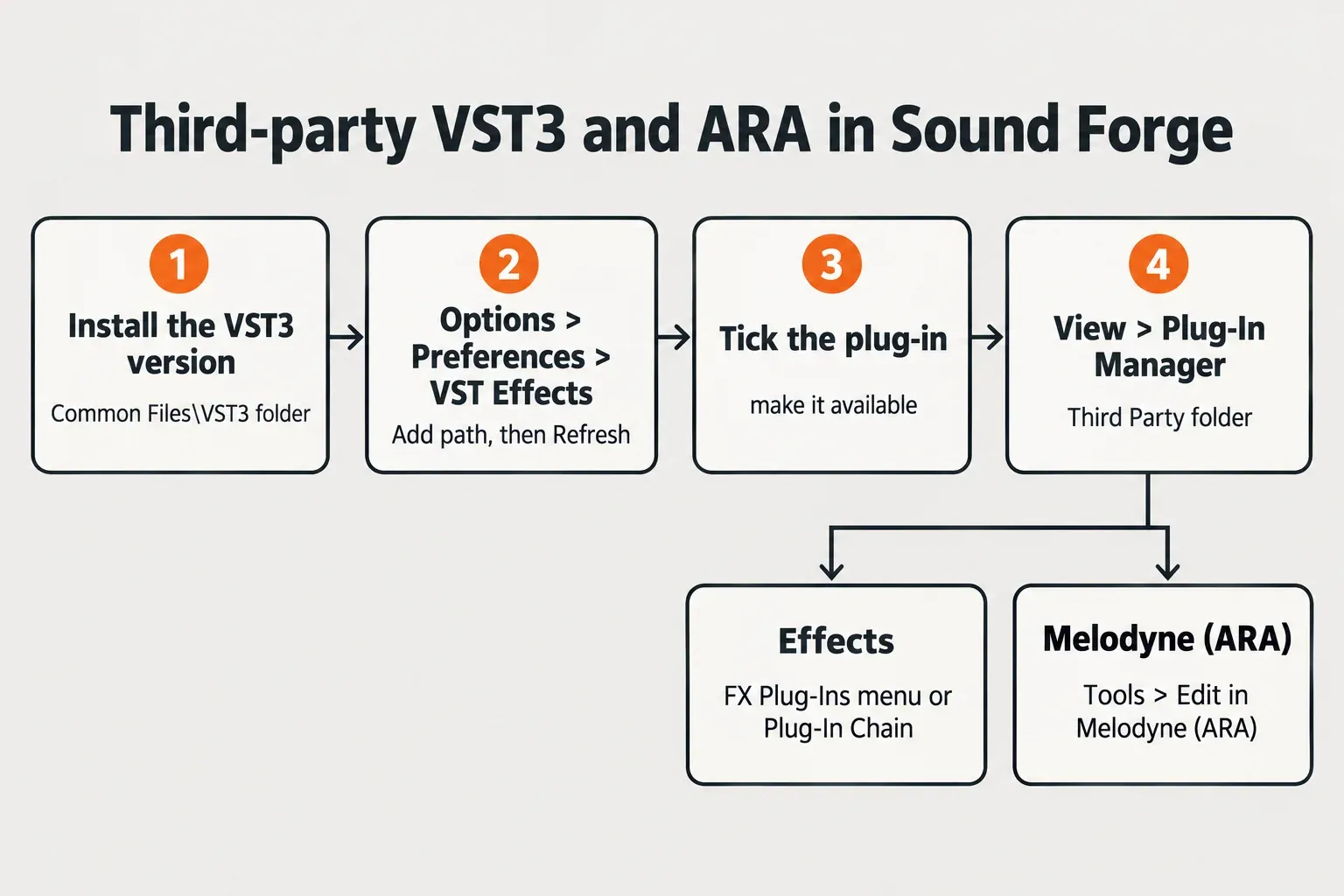
Sound Forge finds third-party plug-ins through the folders listed in its VST preferences, and nothing appears until a folder is listed and the plug-in is ticked. The VST Effects preferences page of the Sound Forge 2026 help documents each control; this is the order I recommend.
- Install the plug-in, choosing the VST3 version when the installer offers one. VST3 plug-ins usually land in
C:\Program Files\Common Files\VST3\. - In Sound Forge, open Options > Preferences and select the VST Effects tab.
- Click Add path and choose the plug-in folder. Edit path and Remove path change or drop existing entries.
- Click Refresh to rescan. Sound Forge also searches these folders every time it starts.
- Under Select VST effects to be available as audio plug-ins, make sure the new plug-in is ticked. A cleared box excludes it from Sound Forge.
- Apply the plug-in from the FX Plug-Ins menu, from the Plug-In Manager or through the Plug-In Chain.
The help page on applying processes and effects confirms those routes, adds the built-in Process and Effects menus, and lists third-party DirectX plug-ins as supported alongside VST. If a plug-in's own interface misbehaves, the Generic VST editor option in the same preferences tab switches it to a generic editor, which keeps the plug-in usable until its developer fixes the display.
Prefer VST3 for one more reason: the ARA route below needs the VST3 version. The guide What Is a VST Plugin? explains the formats and their compatibility, and free VST3 effects from the free plugins and trials hub load the same way. If a plug-in still does not appear after Refresh, work through the seven fixes in Sound Forge VST plugins not showing in order.
How to open Melodyne and other ARA editors
ARA editors open from the Tools menu, not from the effects chain. The ARA page of the Sound Forge 2026 help gives these steps for Melodyne:
- Install the VST3 version of Melodyne.
- In Options > Preferences > VST Effects, set the VST3 folder, usually
C:\Program Files\Common Files\VST3\, as the Alternate VST search folder. - Choose Tools > Edit in Melodyne (ARA). Melodyne analyzes the audio and shows the notes as blobs.
- Edit, then close the Melodyne window whenever you like. The Show Plug-In Window button on the Melodyne entry in the Plug-in Chain window opens it again.
The warning in the help matters more than the steps. Do not add Melodyne to the chain through the Plug-in Chooser: it loads that way, but without ARA integration, and a transfer button appears in its window. If you see that button, remove that instance and reopen Melodyne from the Tools menu.
SpectraLayers uses the same route through Tools > Edit in SpectraLayers (ARA); its VST3 version supports ARA2 from SpectraLayers 6 onward. Neither 2026 edition includes SpectraLayers, so this applies only if you own it separately. ARA2 itself is not new in Sound Forge: it has been there since Pro 13, so Pro 18 owners use the same menu.
Organize plug-ins in the Plug-In Manager
The Plug-In Manager keeps a growing collection usable. Open it with View > Plug-In Manager; the Plug-In Manager page of the help describes its folders:
- All: every plug-in Sound Forge has found.
- Boris FX: the plug-ins that ship with Sound Forge.
- Third Party: one subfolder per vendor.
- Packaged chains: saved Plug-In Chain presets.
- By category: effects grouped by the kind of processing.
- By Type: plug-ins sorted by VST version and by 32-bit or 64-bit.
The tree mirrors the FX Plug-Ins menu, so a tidy manager means a tidy menu, and the FX Favorites folder appears in the lower section of that menu. The search field filters by name and ignores case. Right-click Rename changes a plug-in's display name in both the manager and the FX Plug-Ins menu. Double-click applies a plug-in to the current selection, or to the whole file when nothing is selected; dragging it onto a data window adds it to that window's Plug-In Chain. Building and saving those chains is covered in the Plug-In Chainer guide for Sound Forge.
Use Hide for duplicates. The help's own example is a plug-in installed as both VST2 and VST3, where another application still needs the VST2 copy but you want only the VST3 copy in Sound Forge. Sound Forge asks you to confirm, because the hide is permanent. To bring hidden plug-ins back, the help says to delete the HKEY_CURRENT_USER\Software\BorisFX\Sound Forge Pro\2026.0\DXCache registry key, which forces a full rescan. Export that key or create a Windows restore point before you delete anything in the registry.
Test results: what published reports say about plug-ins in Pro 18
The composite result below counts dated user reports and bundle listings. None of the sources publishes numeric measurements such as load times or CPU figures, so it reads as reported outcomes with counts rather than a benchmark.
| Finding | Count | What the reports say |
|---|---|---|
| Third-party plug-ins behave better in Pro 18 than in versions 15 to 17 | 2 of 4 user reports | A long-time magix.info member wrote in April 2024 that 32-bit VST2 display problems from versions 16 and 17 were mostly fixed in 18 and that the VST3 plug-ins in use "seem to work in SFP-18". A user answering a prospective buyer in February 2025 said ARA plug-ins that had problems in 15 and 17 "loaded fine in my trial version 18". |
| Brand-specific failure | 1 of 4 user reports | An October 2024 report on Universal Audio plug-ins says UAD plug-ins reset to default settings when a saved plug-in manager preset was recalled; the MAGIX support reply quoted there says Pro 18 "does not support the latest version of UAD plugins." |
| General complaint about VST3 handling | 1 of 4 user reports | In the same April 2024 thread, another member called plug-ins, especially VST3, a Sound Forge problem, without naming plug-ins or a version. |
| Pro 18-era listings naming Ozone 11 Elements, RX 10 Elements and Melodyne essential 5 | 4 of 4 listings | proaudio.tech, Pro Video Coalition, gearnews and the Sonisto Sound Forge Pro 18 Suite listing all name the three. |
| Launch reports tagging Melodyne and dynamicEQ as Suite-exclusive | 2 of 3 reports | proaudio.tech and Pro Video Coalition tag both; gearnews does not split the editions. |
| Current Boris FX pages naming Ozone or RX | 0 of 2 pages | Neither the edition comparison nor the acquisition announcement names them. |
All four user reports date from the MAGIX era, April 2024 to February 2025, and none covers Sound Forge 2026. Two further items stay out of the count: a Cakewalk forum post whose text could not be read beyond a search snippet, and a magix.info crash thread that was not about plug-ins.
My verdict: plug-in hosting in the Pro 18 code base was reported as better than in versions 15 to 17, not flawless. For mainstream VST3 effects and for Melodyne through ARA, the reports point to a working setup. If you depend on UAD plug-ins or on saved chains, load that exact chain in the 15-day Sound Forge free trial and recall it once before you buy. And if your Pro 18 Suite came with Ozone and RX Elements, those belong to the old bundle; a 2026 licence does not add them.
Which edition to buy for plug-ins
Buy Sound Forge if your work runs on EQ, dynamics and delay plus your own VST3 collection. The comparison lists ARA support in both editions, so a Melodyne licence you already own opens through Tools > Edit in Melodyne (ARA) without Plus. Buy Sound Forge Plus when one of the four extras matches files you edit every week: vocal pitch and timing with Melodyne, DI guitar or bass with Vandal, or multichannel ambience with 3D Reverb. On October 20, 2026, the perpetual step-up was $100 ($399.95 against $299.95).
My pick is the base edition for dialogue, restoration and mastering, and Plus for vocal music editing or surround delivery. The full feature and price comparison is in Sound Forge vs Sound Forge Plus, and the Boris FX audio hub covers the company's other audio plug-ins.
FAQ
Do Sound Forge plug-ins work on a Mac?
No. Sound Forge 2026 requires Windows 11, so Mac plug-in formats such as AU do not apply to it. The guide to Sound Forge for Mac in 2026 covers what works for Mac users.
Can I mix plug-ins across tracks in Sound Forge like in a DAW?
No. Boris FX says Sound Forge intentionally does not work as a DAW; it is a specialist tool for working on a single audio file. Plug-ins process that file through the menus or its Plug-In Chain.