
iZotope Dialogue Match was a Pro Tools AudioSuite plug-in that learned the EQ, reverb and room ambience of one dialogue clip and applied them to another, and iZotope has withdrawn it from sale. Critical maintenance ended on September 24, 2026, and the current RX Post Production Suite 9 and Everything Bundle do not list it among their included products. Owners keep a working license. Everyone else replaces it module by module: RX 12 Advanced for EQ and ambience, a separate reverb matcher for the room, or DaVinci Resolve Studio's AI Dialogue Matcher if you cut inside Resolve.
I wouldn't start a new project on Dialogue Match, because nothing guarantees it on the next macOS or Pro Tools release now that iZotope's maintenance window has closed. If you already own it and run Pro Tools 2024 to 2025.6 on a supported OS, keep using it on current jobs and plan the move before your next system upgrade.
- Status: discontinued. Owners were told in September 2025, and critical maintenance ended September 24, 2026.
- Buying: withdrawn by iZotope, and not in RX Post Production Suite 9 or the Everything Bundle.
- Owners: the license stays active, and the 1.3.0 installers remain on iZotope's Legacy Products page.
- Replacement: RX 12 Advanced covers EQ and ambience, Accentize Chameleon or SpectraLayers Pro covers reverb, and DaVinci Resolve Studio's AI Dialogue Matcher does all three inside the editor.
What Dialogue Match did
Dialogue Match made two recordings of the same scene sound like one room. The Dialogue Match user guide describes an AudioSuite plug-in for Pro Tools that automatically matches EQ, reverb and ambience, listed under the EQ folder of the AudioSuite menu. It worked offline and could only see audio that was already in the Pro Tools session.
The workflow had four steps:
- Select the clip that sounds right, usually the location dialogue, and click Capture under Reference.
- Select the clip that has to change, such as an ADR line, and click Capture under Apply To.
- Preview the result. The Reference preview loops up to 5 seconds and plays only the most recently learned profile.
- Click Render in the Pro Tools AudioSuite window.
The guide asks for at least 3 seconds of reference audio, and anything shorter than 1 second isn't learned at all. Default Reference profiles ranged from small rooms to long hallways to vehicle interiors, and you could save your own learned references and Snapshots for a scene or performer.
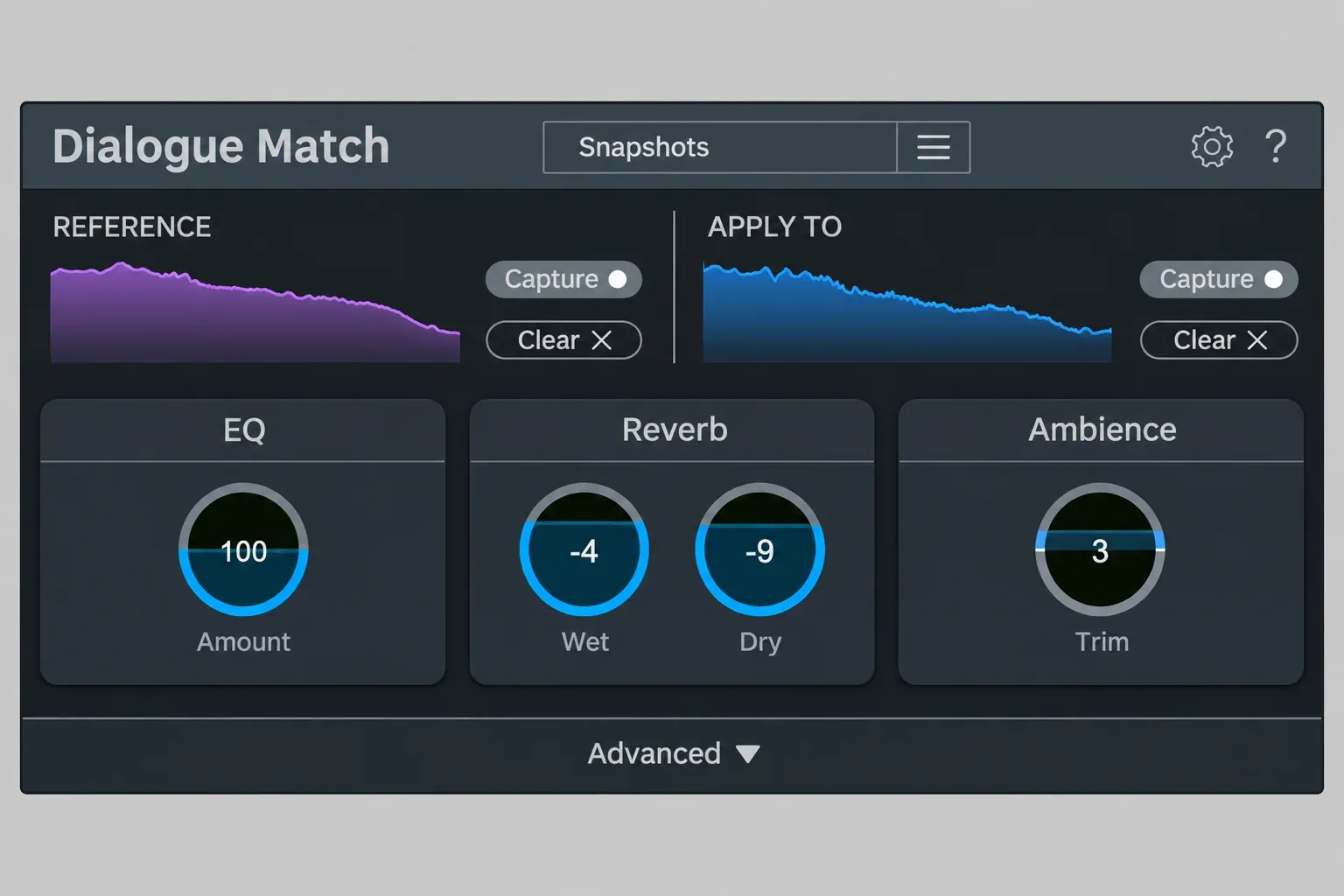
Three modules did the matching:
- EQ: up to 8 bands in five shapes (bell, low and high shelf, low and high pass), from 20 Hz to 20 kHz with a range of −10 to +10 dB. iZotope's launch post says the curve came from Ozone's EQ matching.
- Reverb: Wet and Dry levels, Early Reflections (Shape, Time), a Reverb Tail (Predelay, Attack, Time), Density, a Chamber, Plate or Hall type and a 6 or 12 dB output filter. It was the first product to combine iZotope and Exponential Audio technology, with reverb technology developed by Michael Carnes.
- Ambience: matched the room tone and noise floor of the Reference, with Trim and Listen controls and a spectrogram in the Advanced panel.
One limit shaped every session: the plug-in only adds reverb. It works best when a dry Apply To clip has to move toward a reverberant Reference. When the wet clip has to match a dry one, remove the room first with RX De-reverb and match afterwards. iZotope's own how-to article for Dialogue Match names the jobs it was built for: lav to boom, ADR to production sound, and localized or dubbed dialogue. Its 2019 pitch to RX owners, why you'd want Dialogue Match if you have RX, called the reverb matching an industry first; that's iZotope's marketing claim, and it's also the part RX never got.
Is iZotope Dialogue Match discontinued?
Yes. The Dialogue Match product page now says "This product is no longer available for purchase", and iZotope's support notice for Dialogue Match confirms that it isn't sold on iZotope.com, that owners can keep using it, and that iZotope.com buyers get technical support for up to 12 months from the purchase date.
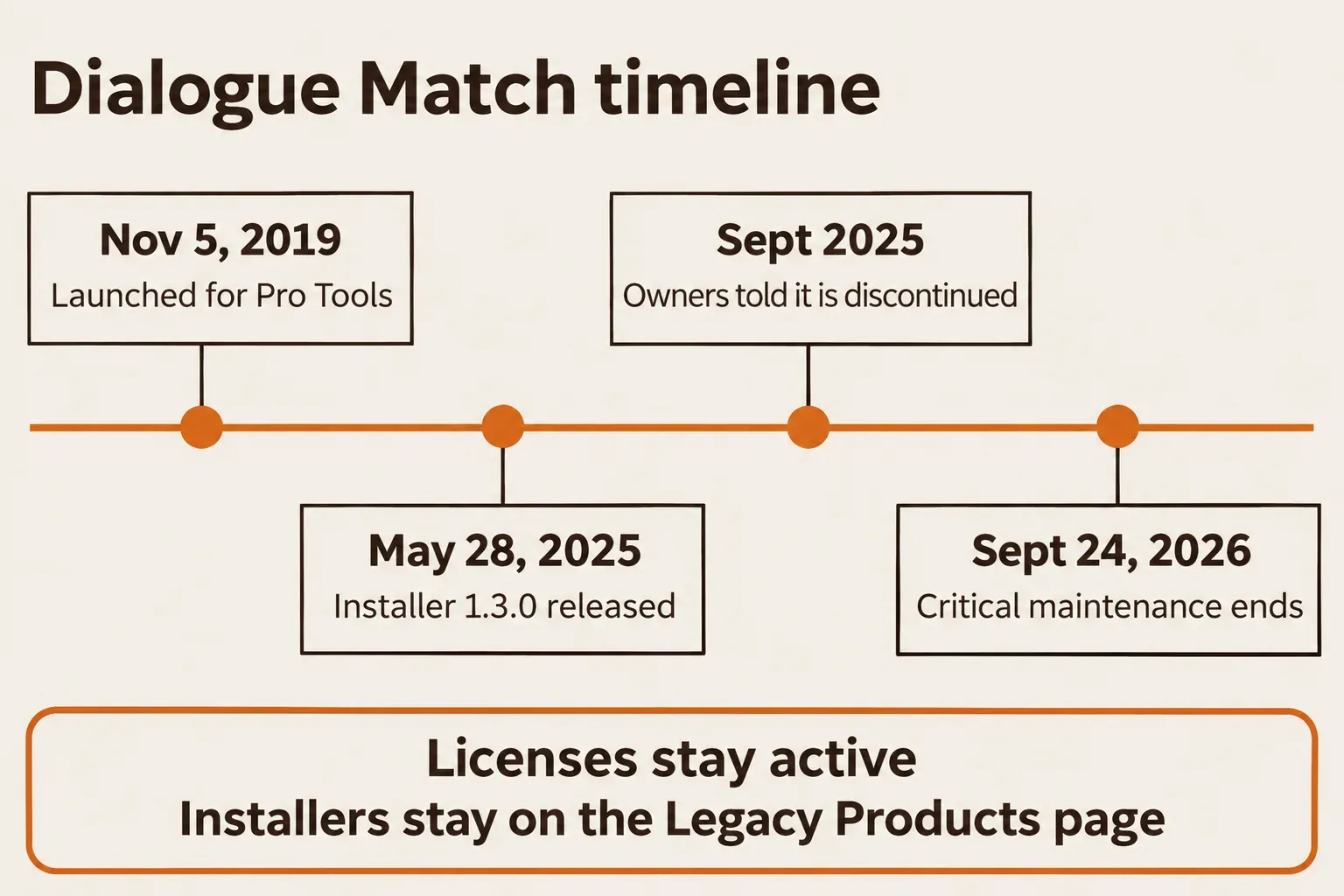
The dates line up like this. iZotope introduced the plug-in on November 5, 2019. The 1.3.0 installers on the Legacy Products page carry a release date of May 28, 2025. Production Expert reported the discontinuation email to owners on September 25, 2025. The support notice set September 24, 2026 as the end of critical maintenance for all users, and that date has passed: iZotope stopped compatibility testing against new operating systems and host versions at that point, and the system specification is frozen.
The notice gives a general reason rather than a product-specific one: iZotope occasionally retires older products to focus its resources on new ones. It also answers the question owners ask first. Existing licenses aren't deactivated.
Can you still buy it, and what did it cost?
iZotope no longer sells it. Its current product page and support notice are clear, but store pages give conflicting signals:
- The RX Post Production Suite 9 page still has FAQ answers naming Dialogue Match. Its included-products list names RX 12 Advanced, Neutron 5, Nectar 4 Advanced, Equinox, Tonal Balance Control 3 and Insight 2, plus Relay and Melodyne 5. I would use that current list and the retirement notice when choosing a bundle.
- Sweetwater still displays a $599 license offer, while Best Service says Dialogue Match is no longer available. A retailer offer does not extend iZotope's maintenance window. Before paying, confirm that the seller can supply an authorizable license, its refund terms and who provides support; iZotope's technical-support promise names iZotope.com purchases.
The Everything Bundle's included-products list does not name Dialogue Match either. I would buy a supported replacement for a new workflow instead of relying on an old listing.
For the historical price, RedShark News' 2020 review lists a $599 launch MSRP, the same figure SonicScoop and Music Connection reported. In 2020 it also came in the Post Production Surround Reverb Bundle at $1,199, the RX 7 Advanced Reverb Bundle at $1,499 and RX Post Production Suite 4 at $1,999. Those bundles are gone.
Today's money question is the replacement. At the US iZotope store list prices, RX 12 Advanced costs $1,399 and RX Post Production Suite 9 costs $1,799. Upgrade paths into Advanced from Elements or Standard are in the iZotope price and upgrade guide.
If you already own Dialogue Match
Keep using it. Your purchased serial still authorizes the plug-in and sits in the Purchase History section of your iZotope account. The Mac and Windows installers for version 1.3.0 remain on iZotope's Legacy Products page for past purchasers, which is the only download route I'd use.
The final supported system is fixed by the support notice:
| Item | Final supported spec |
|---|---|
| Format | AAX AudioSuite, 64-bit only |
| Host | Pro Tools 2024 to 2025.6; not supported in Avid Media Composer |
| macOS | Ventura 13.7.4, Sonoma 14.7.4, Sequoia 15.3.1; Intel and Apple silicon |
| Windows | Windows 10 22H2, Windows 11 24H2 |
| Apple silicon | Native AAX from version 1.1.0; Rosetta 2 from AAX 1.0.2 |
| Support | Up to 12 months from the purchase date for iZotope.com purchases |
macOS Tahoe needs one condition. iZotope's macOS 26 Tahoe compatibility statement lists Dialogue Match 1.3.0 as compatible. That listing does not extend the maintenance window or promise compatibility with later Tahoe updates or Pro Tools releases. The iZotope Apple silicon compatibility table confirms native support from AAX 1.1.0.
There's one documented quirk. The iZotope macOS compatibility article lists, under its macOS 11 Big Sur section, a known issue where the text you type while saving or renaming a Profile or Snapshot may be invisible, naming Dialogue Match as the example and giving no fix date.
I'd keep one machine on a Pro Tools version inside the 2024 to 2025.6 range for any project that depends on saved Dialogue Match Snapshots, because a host or OS update past the frozen spec is the most likely way to lose the plug-in mid-project. If a reinstall or authorization fails, start with these iZotope Product Portal install and authorization fixes.
Test results: what reviews of Dialogue Match reported
Five launch-era reviews describe listening results under different conditions. The table keeps each setup and its limitations beside the result; these reports do not share a numeric match-accuracy metric.
| Review and conditions | Reported result | Limit or follow-up |
|---|---|---|
| ProVideo Coalition, 2019: version 1.0.0 on a feature in progress | First guesses were "pretty spot on"; reverb got very close with a few clicks | EQ still needed adjustments by ear |
| RedShark News, 2020: three mic/room comparisons | Close matches reported in all three pairs | The tool did not align ADR length or timing |
| SonicScoop, 2020: feature ADR, two documentaries and a podcast | Useful on documentary edits; ADR reverb was hit or miss until a suitable reference was found | Trial and error; some re-renders after tweaks sounded different |
| Animation Magazine, 2020: voice-over from eight settings | Matching followed pre-repair in RX 7 | The outcome includes that preparation step |
| Music Connection, 2020: two verses from the same singer | The verses became "much closer in sound" | EQ and Reverb controls refined the match; this was a music use case |
In Woody Woodhall's ProVideo Coalition review on a feature in progress, the first guesses were "pretty spot on" in each module, the reverb got "very close with a couple of mouse clicks"; he still added or dipped EQ by ear. RedShark News ran three pairs (one mic in two rooms, two mics in one room, two mics indoors and outdoors) and got a close match in all three, singling out the Reverb module as the part that made the clips match. Music Connection's Barry Rudolph used it on two verses from the same singer and found them "much closer in sound than before", then refined the EQ and Reverb controls.
Preparation changed the outcome. Animation Magazine's review matched voice-over from eight recording settings, but only after some pre-repair in RX 7, and called the roughly $600 price "not an insignificant investment".
SonicScoop delivered the split verdict. Zach McNees' review for SonicScoop covers feature ADR, two documentaries and a podcast. He called it "incredibly useful" on documentary edits, found the ADR reverb "fairly hit or miss", heard some re-renders after tweaks come out "wildly different", and judged $599 a tough sell for RX owners who already had EQ Match and Ambience Match. RedShark added the limit nobody should forget: it doesn't fix ADR length or timing.
The Steinberg thread on Dialogue Match alternatives for Nuendo shows what users did when they couldn't run it. Later posts describe RX for noise and EQ matching plus Accentize Chameleon for reverb, and SpectraLayers' Ambience Match and EQ Match over ARA inside Nuendo.
The practical checks are the quality of the reference and the reverb match. SonicScoop's mixed ADR results matter as much as the close matches reported elsewhere: a useful starting point still needs an audition in the scene. I'd spend most of the replacement budget and listening time on the reverb half, because that's the one RX doesn't cover.
What replaces each module today
No single current iZotope product replaces Dialogue Match. RX 12 Advanced covers EQ and ambience, reverb needs Chameleon or SpectraLayers Pro, and DaVinci Resolve Studio's AI Dialogue Matcher does all three only if you cut in Resolve. RX 12's full module list, edition by edition, is on the iZotope RX hub.
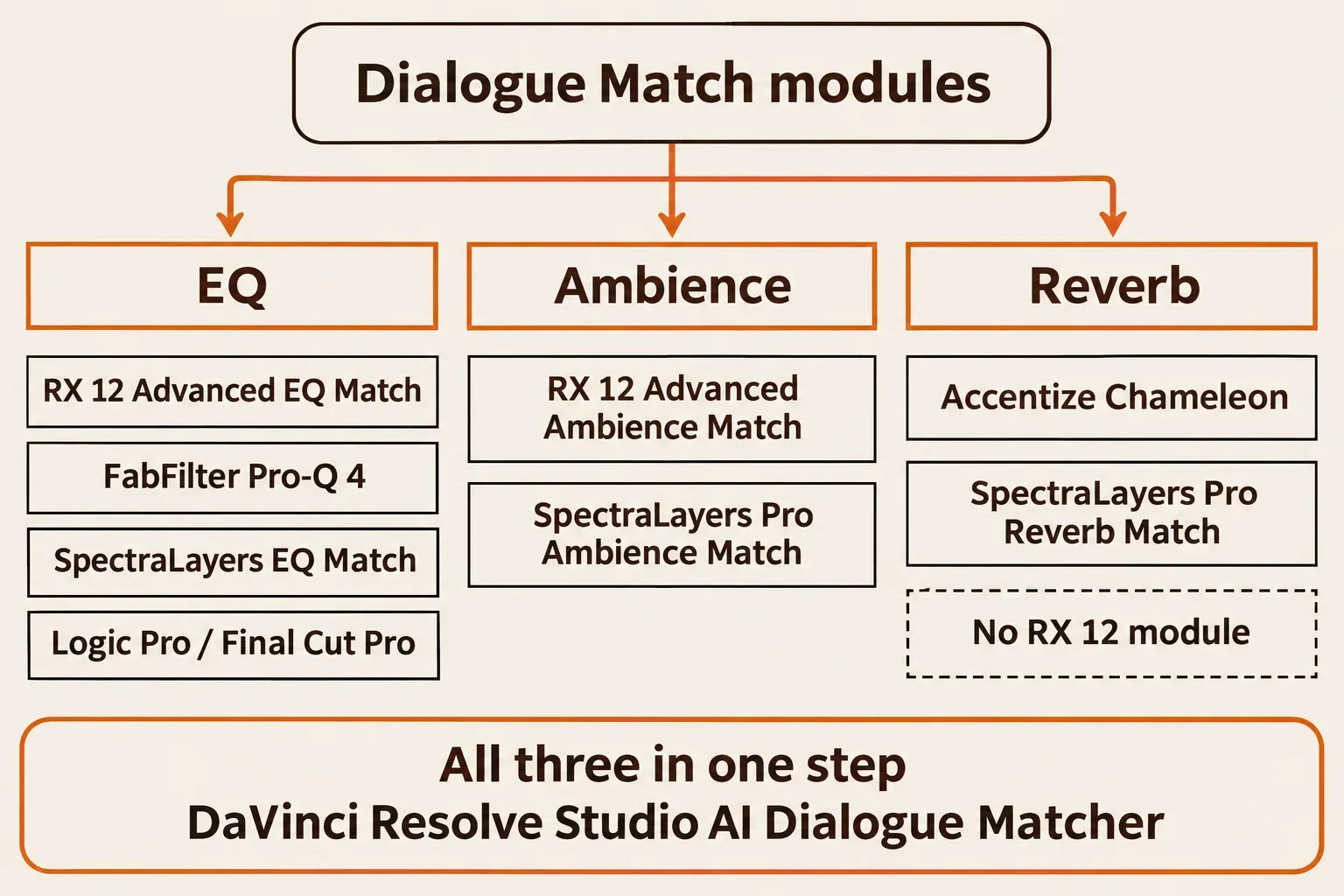
| Dialogue Match module | Current tool | Edition or price condition | Host and format |
|---|---|---|---|
| EQ | RX 12 EQ Match | RX 12 Advanced only, $1,399 | RX Audio Editor module, no plug-in |
| EQ | FabFilter Pro-Q 4 EQ Match | Part of Pro-Q 4 | VST, VST3, AU, CLAP, AAX Native, AudioSuite |
| EQ | SpectraLayers 13 EQ Match | Elements and Pro | Editor; ARA2 VST, ARA2 AAX, AAX plug-in |
| EQ | Logic Pro Match EQ | Built into Logic Pro | Logic channel strip plug-in |
| EQ | Final Cut Pro Match Audio | Built into Final Cut Pro | Final Cut Pro clip EQ |
| Ambience | RX 12 Ambience Match | RX 12 Advanced only | Audio Editor module; AudioSuite-only plug-in in Pro Tools and Media Composer |
| Ambience | SpectraLayers Pro 13 Ambience Match | Pro only | Editor and ARA mode |
| Reverb | Accentize Chameleon | 249 EUR; Surround 399 EUR, incl. VAT | VST3, AU, AAX |
| Reverb | SpectraLayers Pro 13 Reverb Match | Pro only | Editor |
| Reverb | RX 12 | No reverb-matching module | De-reverb and Dialogue Isolate reduce reverb only |
| All three | DaVinci Resolve Studio AI Dialogue Matcher | Studio version only; added in Resolve 20 | Inside Resolve |
This page covers matching tools only. If you need a full cleanup suite rather than a matcher, the best iZotope RX alternatives compares the repair editors.
The RX 12 Advanced route: EQ Match plus Ambience Match
RX 12 Advanced replaces two of the three modules. EQ Match takes over from Dialogue Match's EQ module: the RX 12 EQ Match documentation describes an Advanced-only Audio Editor module with no plug-in version, built for jobs like lav to boom and location dialogue to ADR.
Ambience Match stands in for the Ambience module. The RX 12 Ambience Match documentation lists it as Advanced-only, both as an Audio Editor module and as an AudioSuite-only plug-in for Pro Tools or Media Composer, with location ambience onto ADR as its example. It only adds ambience; it can't take away what's already in the clip.
Advanced is the entry price for both, and the RX Elements vs Standard vs Advanced comparison shows what else that edition adds. EQ Match always means a round trip through the RX Audio Editor, and Ambience Match does too outside Pro Tools and Media Composer; the RX in Premiere Pro guide shows how that hand-off works from a video timeline.
The RX 12 module list has no reverb-matching module. De-reverb and Dialogue Isolate reduce reverb, and the Dialogue Isolate documentation describes Voice, Reverb and Noise gains in Standard and Advanced. That cleans a line before you match it; it doesn't give it someone else's room. Modes and settings are in the RX Dialogue Isolate guide.
Matching the reverb: Chameleon or SpectraLayers Pro
The reverb half needs a tool outside RX, and two products cover it. Accentize's Chameleon page describes a plug-in that analyzes a room recording, recreates its impulse response and applies it to dry audio such as ADR or foley. It handles reverb only. Chameleon costs 249 EUR for mono and stereo with 27 presets and impulse-response export, and Chameleon Surround costs 399 EUR for formats up to 9.1.6 with 80 presets, both including VAT, in VST3, AU and AAX with a free trial. Accentize says it analyzed more than 30,000 room examples during development and that Chameleon won a 2026 Engineering, Science & Technology Emmy.
SpectraLayers Pro 13 covers all three jobs in one editor. Its Reverb Match registers a reverb profile from a selection "as large as possible", then applies it to a dry selection with a Match Ratio in percent; it arrived in SpectraLayers 10. Ambience Match adds a Match Ratio and a Replace or mix Mode, works in ARA mode and dates from SpectraLayers 8. The SpectraLayers edition comparison puts EQ Match in Elements and Pro, while Ambience Match and Reverb Match are Pro only; plug-in formats are ARA2 VST, ARA2 AAX and an AAX plug-in. How it compares with RX beyond matching is in the RX 12 vs SpectraLayers Pro 13 comparison.
My pick for Pro Tools post is RX 12 Advanced plus Chameleon, because Ambience Match runs as AudioSuite and Chameleon as AAX inside the session, while EQ Match requires a file round trip through the RX Audio Editor. For Nuendo or Cubase, I'd take SpectraLayers Pro over ARA, because it keeps the three matching modules in one editor. Steinberg's ARA integration manual documents the host connection. EQ, ambience and reverb matching remain separate operations.
Matching inside your editor or DAW
DaVinci Resolve Studio is the only editor here with a built-in tool that matches the room as well as the tone. Its AI Dialogue Matcher was added in Resolve 20: the DaVinci Resolve 20 New Features Guide lists it as Studio-only and says it matches tone, level and room reverberance or ambience. In that guide, you right-click the reference clip, choose Clip > AI Tools > Dialogue Matcher > Capture Dialogue Profile, then apply the profile to the target clip. The same release brought two Fairlight clip tools. The guide's AI EQ Matcher sits under Clip Operations > EQ Matching > Capture EQ Profile, and Blackmagic's DaVinci Resolve 20 announcement says that EQ match is dynamic and automated across the clip; the second tool, Level Matcher, matches clip levels for intercutting.
The other host tools match EQ only:
- Logic Pro: Apple's Match EQ overview describes a template of the average frequency spectrum, and Apple notes it doesn't match dynamic differences between the two signals. Logic can't load the AAX-only Ambience Match plug-in, so ambience goes through the RX Audio Editor; the RX in Logic Pro guide covers that Shift-W round trip.
- Final Cut Pro: Match Audio in Final Cut Pro uses EQ. Choose Modify > Match Audio (Shift-Command-M), click the clip to match, then Apply Match; the Flat setting removes it.
- FabFilter Pro-Q 4: Pro-Q 4's EQ Match takes its reference from a saved spectrum, the track's own input, another Pro-Q 4 instance or side chain, or an audio file. Averaging normally takes no more than 30 seconds, and a detail slider sets how many bands it adds.
- Ozone 12: the Ozone 12 Match EQ is a linear-phase EQ with over 8,000 bands and Reference and Apply To snapshots. I wouldn't reach for it on dialogue, because it's built for mastering a whole mix.
Every option in that list leaves room and reverb to you. Pair it with a reverb matcher or recorded room tone.
Matching dialogue in Sound Forge Pro
Dialogue Match never ran in Sound Forge, because it was an AAX AudioSuite plug-in for Pro Tools only. Four routes cover the same jobs:
- Process in RX: run EQ Match and Ambience Match in the RX 12 Advanced Audio Editor and bring the files back into Sound Forge.
- Use SpectraLayers Pro: its ARA host list includes Sound Forge Pro 14 and later. EQ Match, Ambience Match and Reverb Match give you the three operations in that editor.
- Load a VST3 matcher: Pro-Q 4 ships as VST3, so it loads like any third-party effect; the Sound Forge plugins guide covers VST3 loading by edition.
- Build the match by hand: shape the tone with the Sound Forge equalizer, add space with reverb in Sound Forge Pro, then record and place room tone by hand in Sound Forge.
Chameleon is the open question for Sound Forge users. It's VST3, but Sound Forge is not on the vendor's host list, so run Accentize's free trial on your own system before you buy.
Verdict: replace Dialogue Match by module, not by brand
My verdict: Dialogue Match did one thing nothing in RX does, the reverb half, so plan the replacement around reverb first. For Pro Tools post, RX 12 Advanced plus Chameleon covers all three modules, with EQ Match as the one trip out to the RX Audio Editor. For Nuendo or Cubase, SpectraLayers Pro over ARA keeps the three matching operations in one editor. Editors who cut in DaVinci Resolve Studio already have the AI Dialogue Matcher; everyone else can use their host's EQ match and a room-tone pass.
Owners can keep working on the frozen spec, licenses intact, with the listed OS versions and Pro Tools 2024 to 2025.6. Move the projects that matter before the next OS or Pro Tools upgrade. The rest of the current iZotope line is mapped on the iZotope hub.