

Ozone 12 is one of the most complete mastering suites for producers who master their own music, and Standard ($219 on the iZotope US store on October 20, 2026) is the edition most people should buy. Five published review scores put it at a median of 9.0 out of 10, with a range of 5 to 10. The catches recur across reviews: IRC 5 and the machine-learning modules are heavy on CPU, and the upgrade from Ozone 11 is not compelling for everyone.
My reasoning is simple. The two additions that change a self-mastered track the most, the IRC 5 Maximizer mode and the Bass Control module, are already in Standard. I would pay $499 for Advanced only if you regularly fix other people's mixes with Stem EQ and Unlimiter, or need every module as a separate plugin. Elements ($55) is the assistant on its own, with no access to the modules behind it. If you already own Ozone 11 Standard and your masters are not limited by low end or the limiter, I would wait for a sale or skip this one. If you are new to Ozone, I would buy Standard.
- Buy Standard if you master your own tracks and want IRC 5, Bass Control, Delta listening, Track Referencing and Dither.
- Buy Advanced if you master clients' stereo bounces and need Stem EQ, Unlimiter or the separate module plugins.
- Buy Elements only if you want a guided master and do not need to edit individual modules.
- Skip or wait if you own Ozone 11 Standard and your current masters already hold up.
This page is the verdict. For the rest of iZotope's mastering tools and how they fit together, start at the Ozone hub.
Ozone 12 review in short: which edition to buy
Standard is the value point because iZotope put the two headline sound changes in it, not only in Advanced. iZotope's Ozone 12 edition comparison table lists Bass Control and the IRC 5 Maximizer mode under both Standard and Advanced, and counts 14 editable modules in Standard against 20 in Advanced.
| Edition | US price, iZotope store, Oct 20, 2026 | What you get | Who it is for |
|---|---|---|---|
| Elements | $55 | Master Assistant (Assistant View and the Custom flow) and Assistive Vocal Balance. The individual modules cannot be opened. | Beginners who want a guided master and do not plan to edit the chain |
| Standard | $219 | 14 editable modules, including Bass Control and IRC 5 in the Maximizer, plus Delta buttons on every module, Track Referencing and Dither | Producers who master their own music |
| Advanced | $499 | 20 modules. Adds Stem EQ, Unlimiter, Clarity, Impact, Low End Focus, Spectral Shaper, Stem Focus, Codec Preview, the Relay plugin and every module as a separate plugin | Engineers who master other people's mixes or fix balance at the master stage |
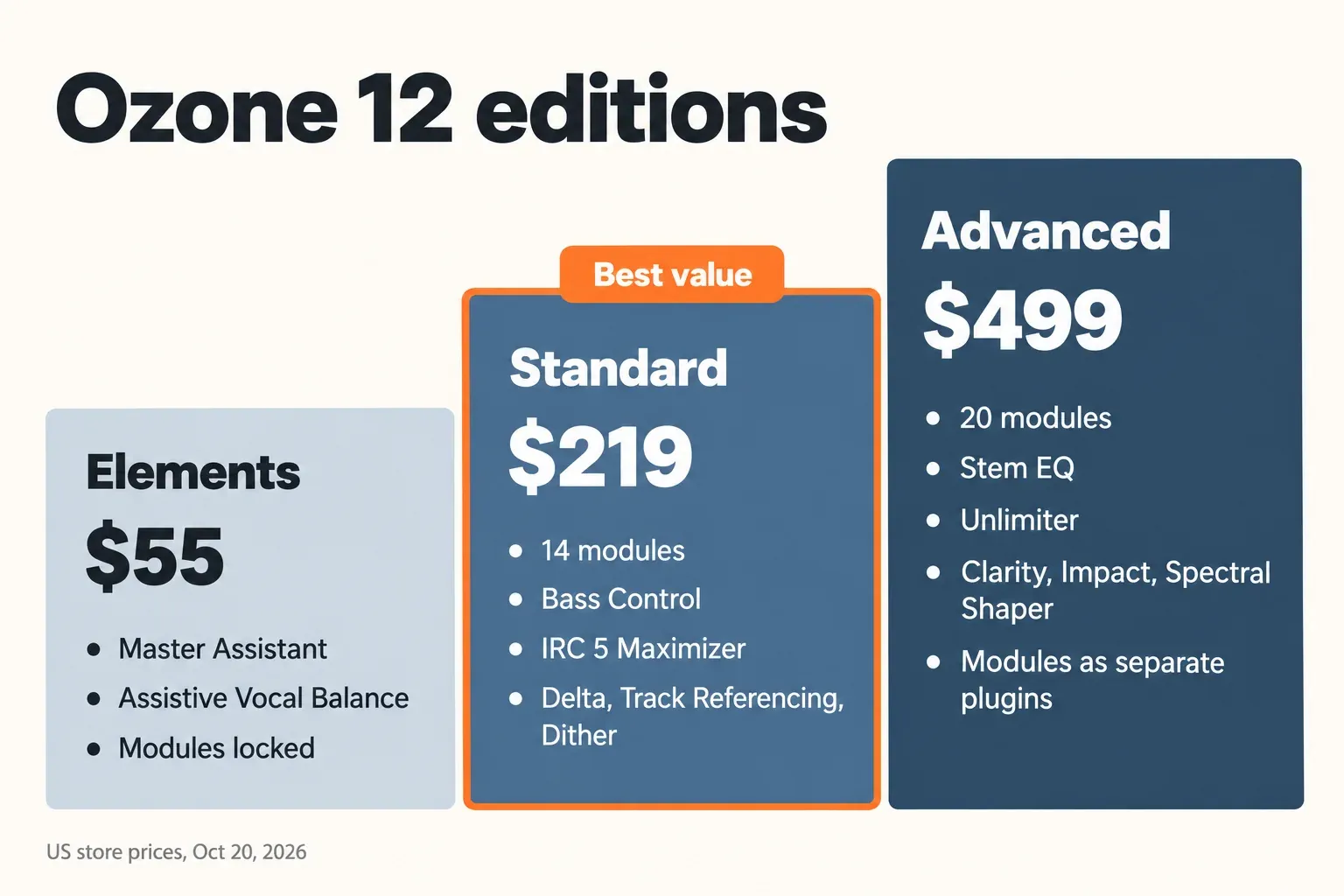
Sound On Sound called Elements an ideal choice for DIY mastering, while MusicTech wrote that it does not have much to offer anyone seeking a comprehensive mastering solution. Both are right, for different readers. If you want every module and bonus listed side by side, the Ozone 12 Elements vs Standard vs Advanced comparison goes edition by edition. Standard's Dither module also matters when you reduce bit depth for the final export.
Test results: what published reviews scored and found
The composite result is clear: across five reviews that published an overall score between September and December 2025, Ozone 12 lands at a median of 9.0 out of 10, a mean of 8.4 and a range of 5 to 10. Four of the five scores are 8 or higher. I normalized every score to a 10-point scale so they can sit in one column.
| Review | Published | Version reviewed | Score as published | Out of 10 |
|---|---|---|---|---|
| Sounds of Revolution | Sep 16, 2025 | Ozone 12, all editions described | 100% for sound, features and value | 10 |
| Gearnews | Sep 3, 2025 | Pre-release build | 5/5 | 10 |
| MusicRadar | Dec 28, 2025 | Advanced | 4.5/5 | 9 |
| MusicTech | Oct 10, 2025 | Ozone 12 | 8/10 | 8 |
| dxt3r | Oct 28, 2025 | Advanced | 2.5/5 | 5 |
Two conditions shape that spread. Gearnews worked with a pre-release build, so its performance notes may not match the shipping version. dxt3r, the only low score, sells its own Waves-based mastering chain, and its complaints center on CPU spikes and tonal coloration. These are editorial verdicts rather than lab measurements, so I read the median as the critical consensus and the disagreements as the useful part.
Four more reviews published a verdict without a number: Sound On Sound's Ozone 12 Advanced review, Gear Gods, matthewess and stickz. Counting all nine, this is where they agree and where they split:
| Finding | Reviews (of 9) | What it means for you |
|---|---|---|
| Overall verdict positive | 8 | Worth buying or upgrading for at least some users; dxt3r is the exception |
| The Custom Master Assistant flow is a real gain in control | 5 | The assistant is now a configurable starting point, not a black box |
| IRC 5 is louder and cleaner | 4 | The main sound upgrade, and it is in Standard |
| IRC 5 not always the preferred mode | 2 | Compare it with the older modes on every master |
| Stem EQ is the standout feature | 4 | The strongest argument for Advanced |
| CPU strain or playback dropouts | 4 | Plan buffer size and render rather than monitor in real time on older machines |
| Unlimiter is subtle | 4 | A finishing tool, not a rescue for destroyed mixes |
| Machine-learning tools show artifacts when pushed | 3 | Use Stem EQ and Unlimiter in small amounts |
| Upgrade from Ozone 11 not compelling for everyone | 3 | Owners of 11 should buy for a specific module, not the version number |
My verdict from the composite: Ozone 12 deserves its 9.0 median for the self-mastering producer. The one low score comes from a site that sells a competing chain, but its CPU complaint matches three other reviews, so take that part seriously. If your machine is modern and you buy Standard, you get most of what the high scores praise.
The new Maximizer: IRC 5 and the loudness question
IRC 5 is the reason to look at Ozone 12 if loudness without pumping matters to you. The Ozone 12 Maximizer guide describes it as the first multiband limiter design in Ozone: it splits the signal into four frequency bands, each with its own attack and release, and leaves the spectrum unaltered when no limiting is needed. The same guide warns that it can create a subtle tonal shift and that it is the most CPU-intensive IRC mode, with the most latency.
Reviewers mostly heard the upside. Sounds of Revolution reported much less audible pumping at the same LUFS, Gearnews found pumping and distortion much less noticeable, and Gear Gods called IRC 5 the best limiter it had put on a master bus. The pushback is specific. Sound On Sound found plenty of cases where it preferred other IRC modes, and dxt3r heard IRC 5 lift the upper mids and highs. Reviewers also pushed it hard: dxt3r reached around −6 LUFS on EDM, and matthewess took an electronic track to −9 LUFS without hearing strain. Those are single anecdotes, not targets.
My take: treat IRC 5 as a strong option to compare, not a new default. It is still a limiter, catching peaks band by band rather than reshaping the dynamics the way a multiband compressor does; if that difference is fuzzy, read compressor vs limiter first. Switch on True Peak for anything going to streaming, because the guide notes that the analog peak can exceed the digital peak by more than 3 dB; the explainer on true peak and inter-sample overs shows why. If you master inside Sound Forge Pro and only need a clean final limiter, the built-in Wave Hammer compressor and maximizer may already cover the job without Ozone. If the choice is between Ozone and FabFilter's Pro-L 2 for that last limiter, iZotope vs FabFilter compares the two.
Master Assistant's Custom flow: does it work?
Yes, as a starting chain. The Custom flow is the biggest workflow change in Ozone 12, and it is in every edition, including Elements. According to the Master Assistant chapter of the user guide, you choose which modules it may use, pick a target (a genre target or your own reference track, of which it analyzes the loudest eight seconds), set a loudness target and decide on True Peak. An Intensity control runs from Subtle through Transparent, Balanced and Bold to Transformative without changing loudness, and the analysis time can be extended to 60 seconds. You can save the setup as your default.
Two details matter for delivery. The Streaming option sets a −1 dB output ceiling with True Peak limiting on, while Full Scale sets −0.1 dB with True Peak off. The guide also says the final integrated loudness may differ from your target, because the assistant analyzes only part of the track. Check the bounce on a LUFS meter, and compare the number with the streaming loudness standards the platforms publish.
Five of the nine reviews praised the extra control the Custom flow gives. The useful warning comes from MusicRadar: the assistant can sometimes overburden a track with processing, particularly soundtrack and classical material. For dynamic orchestral or acoustic masters, I would start at Subtle, switch off the modules you do not want, and judge the result with the Delta buttons.
Bass Control: the best reason to choose Standard
Bass Control is the module I would buy Standard for. It works only below a single cutoff frequency and gives you meters and controls aimed at one problem: low end that is too heavy, too soft or too spiky for the rest of the master. The Bass Control chapter describes five parts:
- Cutoff Frequency: only frequencies below it are processed.
- Balance: a meter and control for how light or heavy the low end sits against the rest of the mix.
- Punch: a meter and control built around the low-end crest factor, the gap between peaks and average level.
- Sustain Power: upward compression for the low end, with a Dirty mode that adds harmonics and a Clean mode that stays transparent.
- Peak Control: a limiter for low-end transients, where Dirty clips and Clean limits.
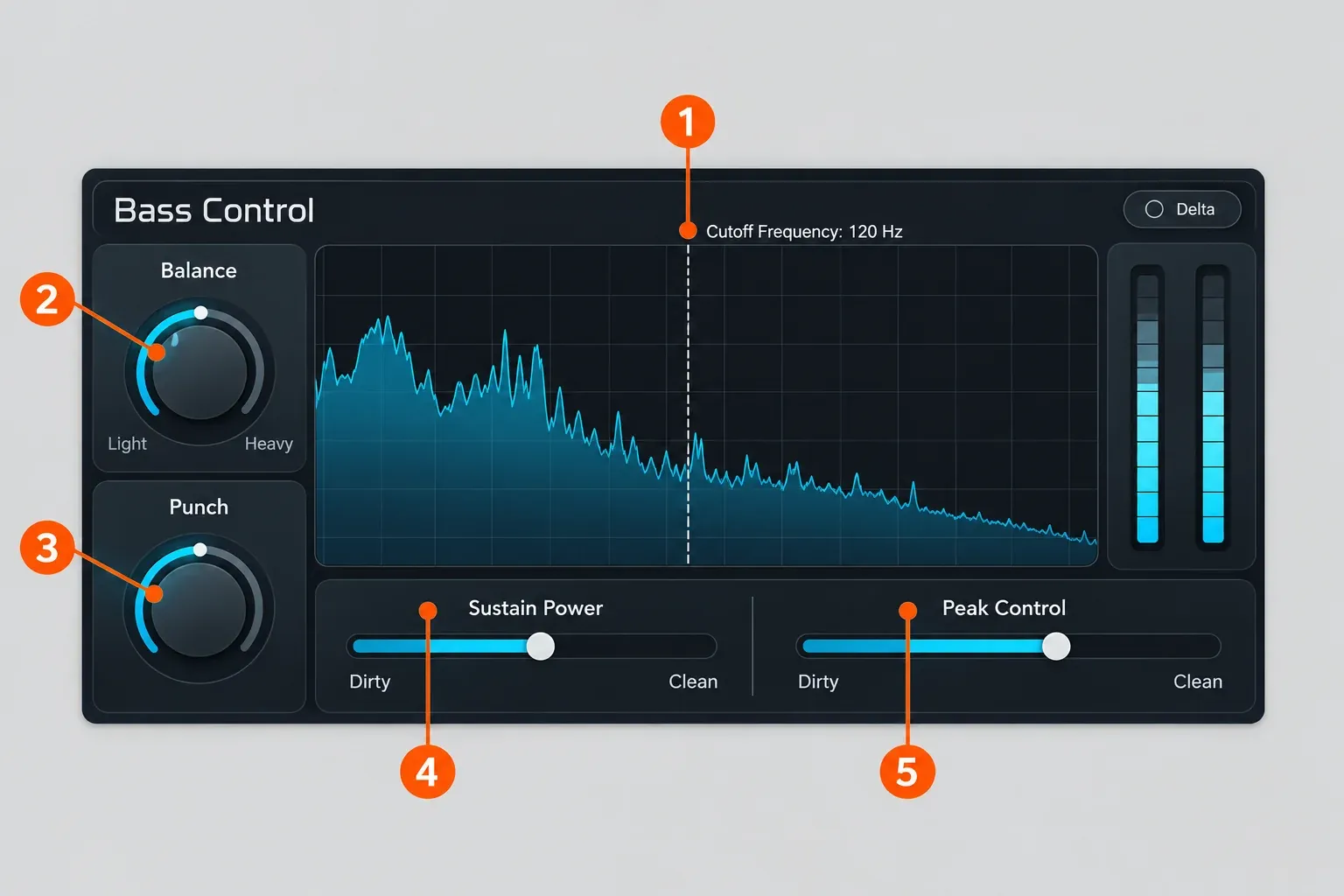
Sound On Sound singled the module out as particularly impressive and wrote that Advanced's older Low End Focus still does a good job, but Bass Control does it better. For a producer whose masters fall apart on small speakers or in the car, that is a more practical upgrade than anything in the Advanced-only list.
Advanced only: Stem EQ and Unlimiter
Advanced earns its $499 if you fix balance problems inside finished stereo mixes, and only then. Stem EQ separates a stereo bounce in real time into Vocals, Bass, Drums and Other and gives each stem its own EQ curve, up to eight bands per stem according to MusicTech. Four of nine reviews named it the standout feature. MusicTech called Advanced a no-brainer for those who master other people's music.
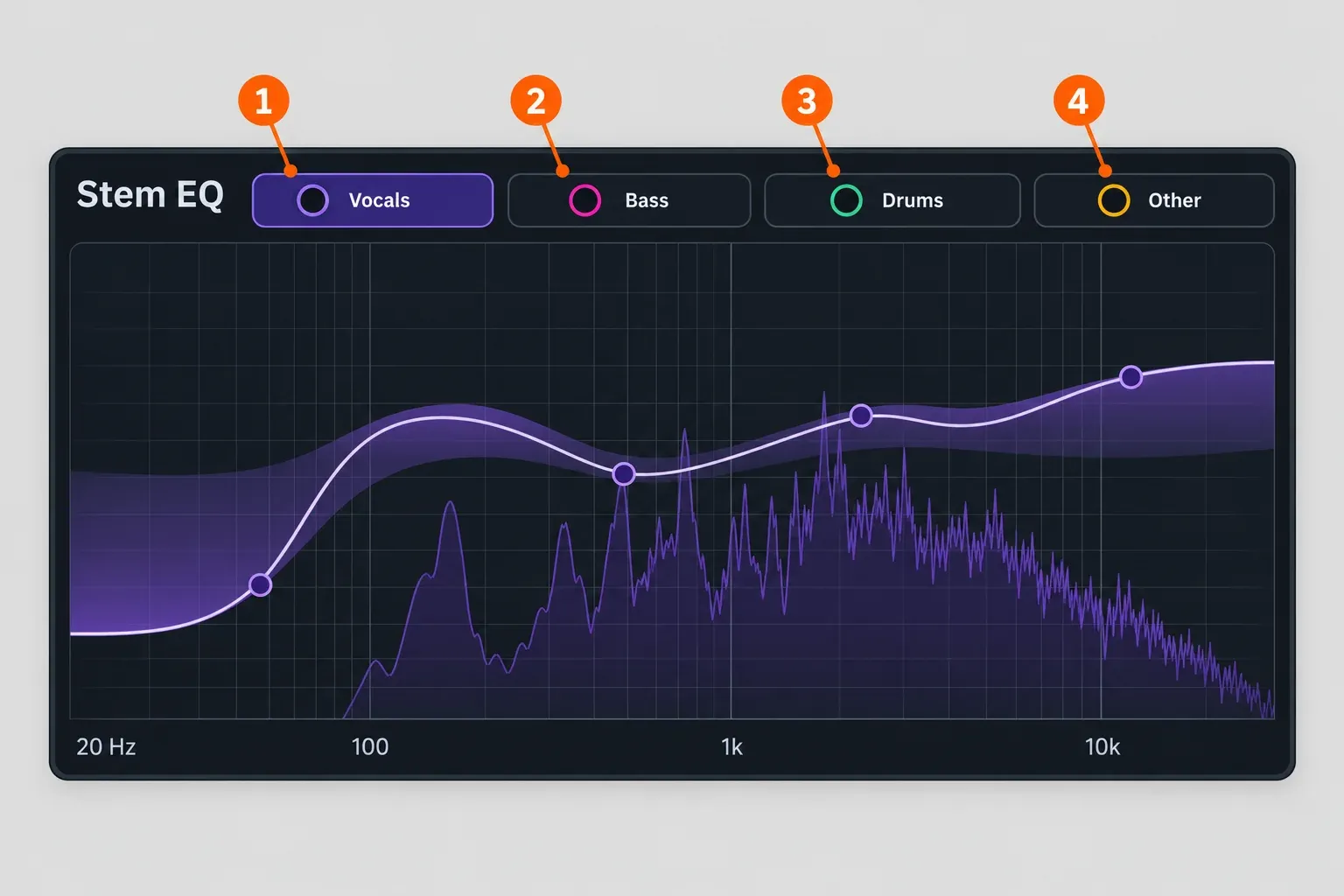
The limits are real. Sound On Sound reported a modest latency of 85 ms on its reviewer's system, so Stem EQ belongs at the mastering stage, not in a tracking session. Gear Gods warned that you hear artifacts if you push it hard, and MusicRadar found it less useful for soundtrack cues without vocals.
Unlimiter uses machine learning to rebuild transients lost to heavy limiting, with an Amount control up to 200% and a Learn Threshold button. Reviewers agree it is subtle: Sound On Sound found its audible effect can be pretty subtle in a busy, loud mix, and MusicTech found it less effective when a mix is more generally over-cooked. I would treat it as a finishing touch for slightly over-limited client mixes, not a reason to buy Advanced on its own.
The rest of the Advanced list (Clarity, Impact, Low End Focus, Spectral Shaper, Stem Focus and Codec Preview) adds depth for engineers, and the separate module plugins let you drop single Ozone tools into a mix or chain. If none of that sounds like your weekly work, Standard is the better buy.
Performance, compatibility and system requirements
Plan for CPU load before you plan anything else. Beyond the guide's own warning about IRC 5, four of nine reviews reported strain. Gear Gods' Ozone 12 review called IRC 5 the most CPU-heavy mastering algorithm it had used and raised its buffer size. Gearnews heard many audible dropouts during real-time IRC 5 playback on a Mac Studio M1 Max at only 20% CPU in its pre-release build, while rendering worked. dxt3r saw frequent CPU spikes on an M2 MacBook Pro and a Ryzen 9 desktop when combining IRC 5, Stem EQ and Unlimiter, and matthewess had Stem EQ glitches on a travel laptop.
The practical answer is the one Gear Gods suggests: raise the buffer, and on older hardware run IRC 5 only at the bounce stage. Never track or overdub through a mastering chain with Stem EQ or IRC 5 active.
According to iZotope's Ozone 12 Advanced product page, Ozone 12 needs macOS Sonoma 14.7.x, Sequoia 15.7.x or Tahoe 26.1.x on Intel or Apple silicon, or Windows 10 (22H2) or Windows 11 (24H2). It ships as AAX, AU and VST3 in 64-bit only, and VST2 is no longer supported, so a host that loads only VST2 plugins cannot run it.
For Sound Forge users: the current Sound Forge edition comparison lists VST2, VST3 and ARA support, so the VST3 build is the one Sound Forge would load. iZotope's compatible-host list for Ozone 12 names Logic Pro, Pro Tools, Ableton Live, Cubase, Reaper and others, but not Sound Forge Pro. Sound Forge can load VST3 plugins; iZotope does not list it as a tested host. Use the trial inside Sound Forge before you pay, and see how Sound Forge loads third-party plugins if the scan misses it.
Is Ozone 12 worth upgrading from Ozone 11?
Only if you want a specific new tool. Sound On Sound described Ozone 12 as evolution rather than revolution, and MusicRadar warned there might not be enough to tempt Ozone 11 owners while calling it a worthy upgrade for anyone coming from before Ozone 10. On the iZotope US store on October 20, 2026, the update variants were $129 from a previous Standard and $299 from a previous Advanced, with Standard to Advanced at $279; those prices appear after you log in and depend on your registered licenses. If you own Ozone 11 Standard and your masters are not limited by low end or the limiter, wait for a sale or skip this version. For a feature-by-feature view of what changed, read Ozone 12 vs Ozone 11 before you pay for the update.
Price, sales and the free trial
List price today is the same as at launch. On October 20, 2026, the iZotope US store showed Elements at $55, Standard at $219 and Advanced at $499 with no sale running. Production Expert's launch report from September 3, 2025, gives the same three prices, with an extra 25% introductory offer that ran until October 6, 2025.
Do not pay full price for Advanced if you can wait. The Ozone 12 Advanced price history on plugindeals records three sales in the past 12 months, starting in March, May and October, usually 22% off and at most 25% off, each lasting around 13 days. The lowest tracked price was $366 at Thomann in March 2026, shown without VAT, so your checkout price depends on region.
Other routes on the US store the same day included a $165 upgrade from Elements to Standard and crossgrades from any paid iZotope product at $199 for Standard or $449 for Advanced. Eligibility depends on what is registered to your account, so check the iZotope price and upgrade guide before buying, and time a purchase around iZotope's Black Friday and seasonal sales if you can.
Every edition can be tried first: iZotope offers a free 10-day trial, and Ozone 12 is also part of iZotope's subscription plans. Ten days is enough to run the Custom flow on a few finished mixes and watch your CPU meter with IRC 5 active.
Verdict: who should buy Ozone 12, and who should skip it
Ozone 12 is a 9-out-of-10 mastering suite with one practical catch, CPU, and one commercial catch, list price. Here is how I would decide:
- New to Ozone and mastering your own tracks: buy Standard. IRC 5 and Bass Control are the parts reviewers praise most for this job.
- Mastering other people's mixes or repairing stereo bounces: buy Advanced, ideally on sale, for Stem EQ, Unlimiter and the separate plugins.
- Beginner who wants a one-click result: try the trial first; if you never open a module, Elements at $55 is enough.
- Ozone 11 Standard owner: wait for a sale or skip, unless low end or limiting is the weak point of your masters.
- Older computer: try IRC 5 at your normal buffer during the trial before you buy anything.
If you would rather keep mastering in an editor, see how Sound Forge Pro handles mastering with its own tools, and add Ozone only for the modules you know you will use.