
Buy FabFilter if you mix track by track and want the sharpest single-purpose tool for each job; buy iZotope if you want one window that proposes a starting point, above all for mastering. The two catalogs overlap in five places: equalizer, limiter, multiband dynamics, compressor and saturation. The widest gap is limiting. Pro-L 2 works on the whole signal as a single band, while the IRC 5 mode in Ozone 12's Maximizer limits in four bands. Restoration is iZotope territory only, because FabFilter's catalog lists no noise-reduction or repair plug-in.
I would pick by the job, not the logo. For a first mixing purchase my pick is Pro-Q 4: one equalizer touches every track, and FabFilter calls its Zero Latency mode the most efficient option and enough for most work. If you master your own releases and want suggestions plus multiband limiting, I would start with Ozone 12 Standard at $219, since Master Assistant and IRC 5 are both in that edition. If you already hear what a master needs and only want a clean single-band limiter, Pro-L 2 next to Pro-Q 4 covers it without an assistant. If you are still mapping which iZotope product handles which task, the iZotope plug-in guides sort Neutron, Ozone, Nectar and RX by job.
Quick verdict: FabFilter or iZotope?
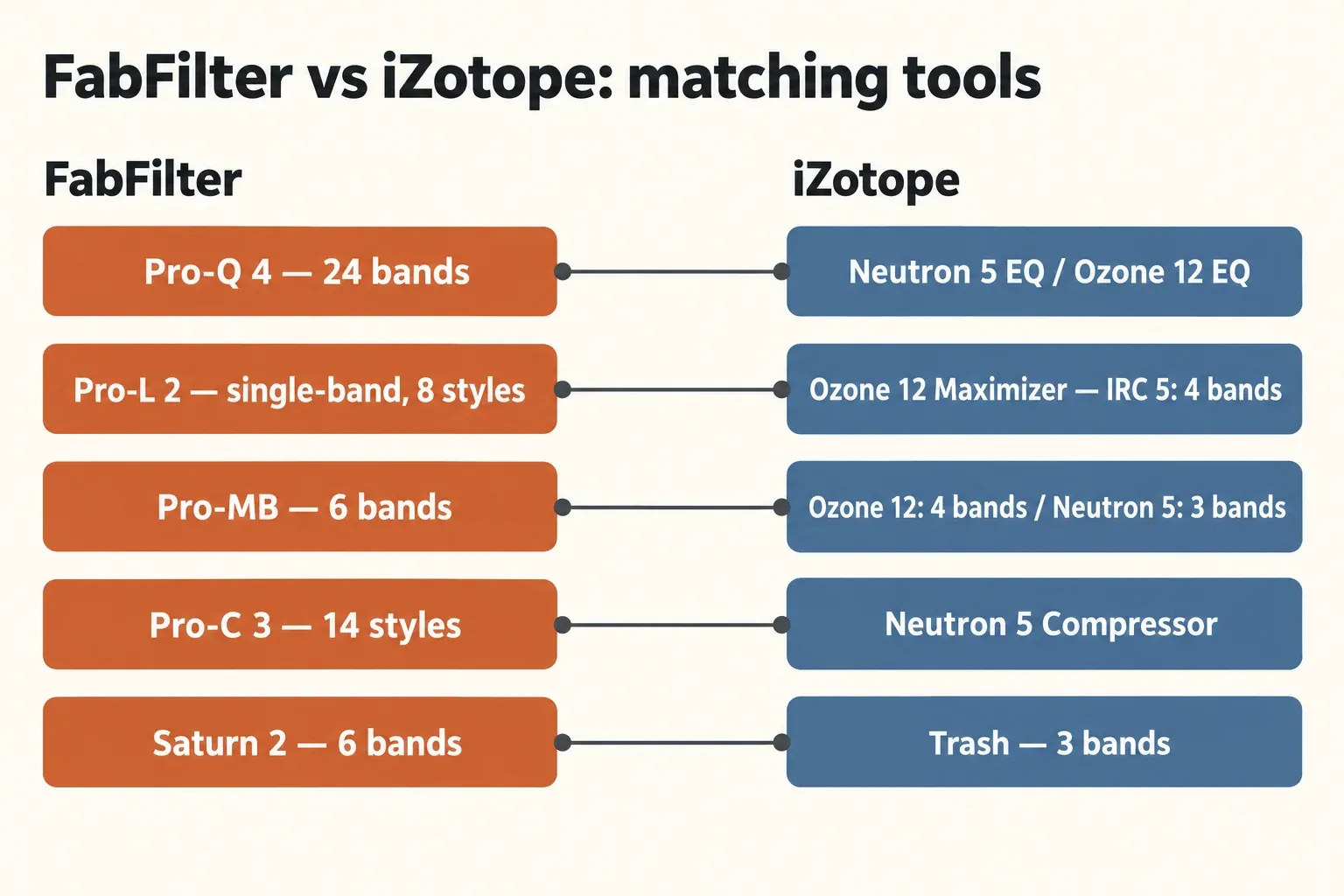
FabFilter wins on focused, visual tools you control by hand; iZotope wins on assistants, split-band limiting and restoration. The table pairs each FabFilter plug-in with the iZotope tool that does the same job and names the spec that decides it.
| Job | FabFilter | iZotope | What decides it |
|---|---|---|---|
| Equalizer | Pro-Q 4: up to 24 bands; Zero Latency, Natural Phase and Linear Phase modes; dynamic and spectral EQ | Neutron 5 EQ (dynamic bands, Masking Meter); Ozone 12 EQ (Analog or linear-phase Digital filters) | Linear phase on a mix track: the Neutron 5 EQ manual lists no linear-phase mode |
| Limiter | Pro-L 2: 8 algorithms, true peak limiting, up to 32x oversampling, single band | Ozone 12 Maximizer: IRC Low Latency through IRC 5, with IRC 5 limiting in four bands | Split-band limiting exists only on the iZotope side |
| Multiband dynamics | Pro-MB: up to 6 bands, zero-latency Dynamic Phase mode | Ozone 12: up to 4 bands; Neutron 5: up to 3 bands | Band count and latency favor Pro-MB |
| Compressor | Pro-C 3: 14 styles, up to 32x oversampling, 6-band side-chain EQ | Neutron 5 Compressor: Punch, Modern and Vintage modes; RMS, Peak or True detection | Style range favors Pro-C 3; Mix Assistant favors Neutron |
| Saturation | Saturn 2: 28 styles, up to 6 bands, modulation system | Trash: over 600 distortion types and impulse responses, up to 3 bands | Texture count favors Trash; bands and modulation favor Saturn 2 |
| Restoration | No tool in the catalog | RX | iZotope only |
Price favors iZotope at the mastering end. FabFilter's Mastering Bundle at Plugin Boutique (limiter, EQ, multiband dynamics and compressor) cost $519 on October 21, 2026, more than twice the $219 that iZotope charges for Ozone 12 Standard, whose 14 modules already include the IRC 5 Maximizer. The full price math is in the prices section below.
Pro-Q 4 vs the Neutron 5 and Ozone 12 EQ
Pro-Q 4 is the stronger stand-alone equalizer; the iZotope EQs make sense when you already own the suite they live in. FabFilter's Pro-Q 4 product page lists up to 24 bands, a Dynamic EQ mode on every band with Bell and Shelf shapes, spectral dynamics, Gentle and Warm Character modes and immersive formats up to 9.1.6. Its Instance List lets you control every Pro-Q 4, Pro-C 3, Pro-DS and Pro-G in the session from one overview.
Latency depends on the mode you choose. FabFilter's Pro-Q processing-mode help calls Zero Latency the most efficient mode and sufficient for most applications. Linear Phase costs time: the recommended Medium resolution adds 5,120 samples, about 116 ms at 44.1 kHz, and using left/right and mid/side bands together doubles that figure. Dynamic and spectral bands work in linear phase only up to High resolution, and spectral bands switch to linear-phase processing automatically. Sound On Sound's Pro-Q 4 review adds the catch: spectral processing introduces significant latency even with the plug-in in Zero Latency mode. Keep spectral bands off any track you are still recording through.
The iZotope side splits the job across two products. The Neutron 5 EQ documentation describes Analog, Vintage and Baxandall shelves, Bell, Proportional Q and Band shelf bells, a per-band Dynamic Mode with sidechain and a Masking Meter, but it lists no linear-phase mode. The Ozone 12 Equalizer documentation offers Analog (minimum-phase) and Digital (linear-phase) filters, with Digital costing more CPU, plus Stereo, Mid/Side, Left/Right and Transient/Sustain modes; the Phase and Surgical shapes exist only in Digital. Ozone 12 Advanced adds Stem EQ, which equalizes vocals, bass, drums and other instruments separated from a finished stereo bounce.
The reviews favor Pro-Q 4 with little hedging. Sound On Sound's reviewer concluded, "Hard as I've tried, I really can't fault it!" Production Expert's Pro-Q 4 review gave it a Gold Award and reported a few hundred instances handled smoothly in a busy film mix. All three are parametric equalizers, so if your question is really about EQ types, settle parametric vs graphic EQ first. If Neutron 5 already sits on your tracks for Mix Assistant, its EQ with dynamic bands and the Masking Meter covers corrective work. Pro-Q 4 earns its price when you want linear phase, spectral dynamics or immersive formats on a track, and that is why it is my first mixing buy.
Pro-L 2 vs the Ozone 12 Maximizer
This is the pair that differs most. Pro-L 2 limits the whole signal as one band, while Ozone 12's IRC 5 mode splits it into four frequency bands, each with its own attack and release. Split-band limiting lets a heavy low end take gain reduction without pulling the rest of the mix down with it; single-band limiting is the more direct choice when a master only needs its peaks caught cleanly.
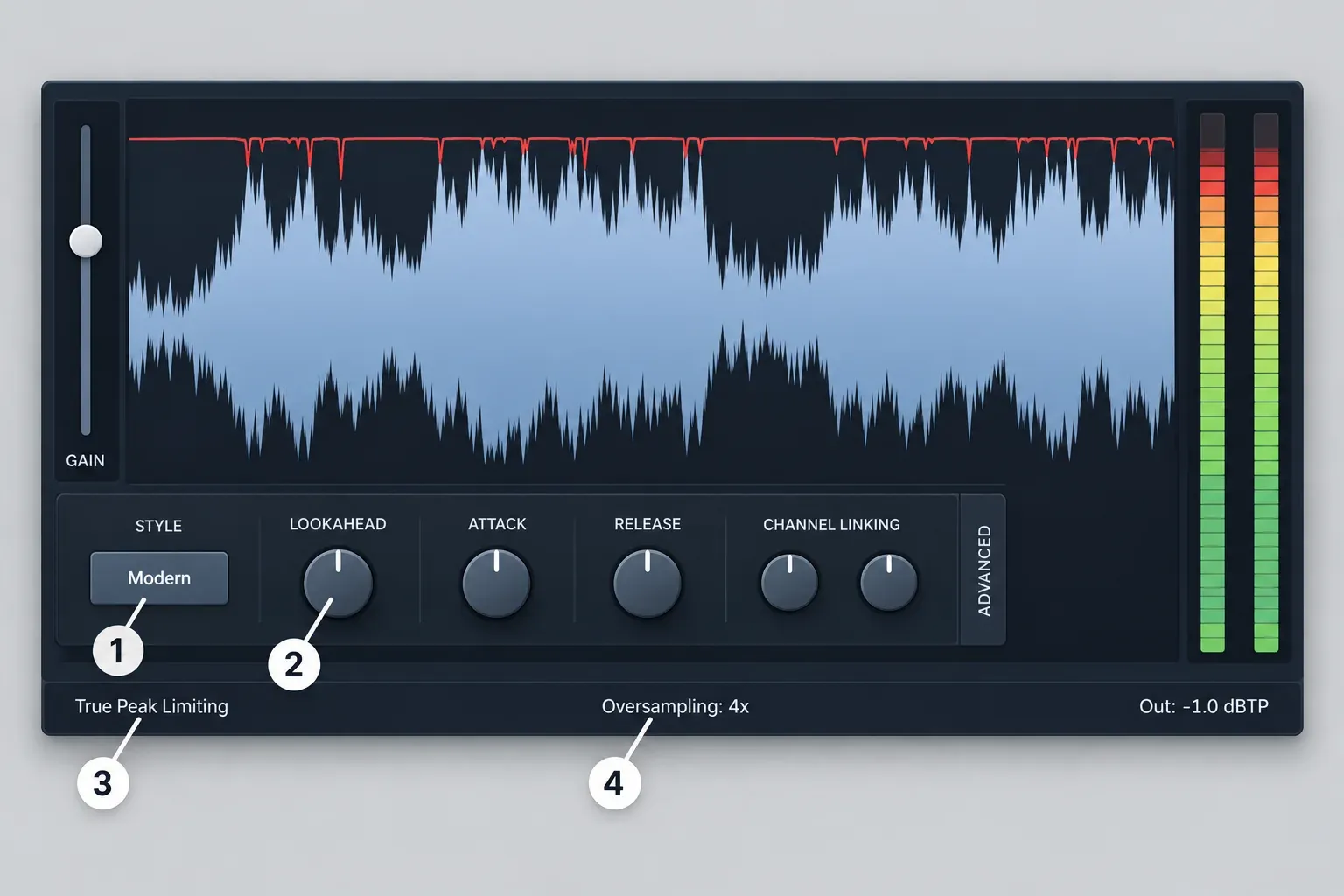
FabFilter's Pro-L 2 product page lists eight limiting algorithms, true peak limiting, up to 32x linear-phase oversampling, loudness metering to EBU R128, ITU-R BS.1770-4 and ATSC A/85, external side-chain triggering for stem mastering and a Unity Gain option. The Pro-L advanced-settings help names the styles Transparent, Punchy, Dynamic, Allround, Aggressive, Modern, Bus and Safe. Modern is the default and allows lookahead very near zero. For the lowest latency, FabFilter advises one of the first four algorithms with True Peak Limiting and oversampling switched off.
The Pro-L oversampling help recommends 4x or 8x for normal work and reserves 16x and 32x for offline rendering, since they are too taxing for real time on most systems. Oversampling also raises CPU use and adds a very slight pre-ring. If the reason for true-peak limiting is still fuzzy, the guide to true peak, dBTP and codec headroom covers it before you pick a ceiling.
Ozone's Maximizer is a ladder of IRC modes priced in CPU and latency. The Ozone 12 Maximizer documentation describes IRC Low Latency as the lightest mode. IRC 3 is very CPU-intensive with high latency and may not run in real time above 48 kHz. IRC 4 uses dozens of psychoacoustically spaced bands and is just as heavy. IRC 5 is the four-band limiter, with the highest CPU and latency of all the IRC modes and a possible subtle tonal shift. Around the IRC engine sit True Peak, Upward Compress, Soft Clip and Transient Emphasis controls. IRC 5 is not an Advanced upsell: the Ozone 12 Standard product page includes the Maximizer with IRC 5, and Master Assistant comes with every edition. The rest of Ozone's modules are covered in the Ozone mastering guides; here only the Maximizer matters.
The reviews agree on the trade-off. Sound On Sound's Pro-L 2 review found 4x oversampling "sonically invisible" and enough for almost all inter-sample peak problems, warned that asking the true peak limiter to do too much increases latency, and found Pro-L 2 lacking only "for the very demanding situations where the split-band offerings of a competitor were necessary." MusicRadar's Pro-L 2 review called the top setting "CPU-murdering 32x" and concluded, "What was already a first-choice limiter is now even more essential." Sound On Sound's Ozone 12 Advanced review called it "surely the most powerful and sophisticated software-based mastering environment currently available," and the Ozone 12 review covers the suite beyond the Maximizer.
My pick: Pro-L 2 for a clean final limiter you set by ear, starting from Modern with 4x oversampling. Ozone 12 Standard if your masters need split-band limiting or you want Master Assistant to propose a chain. The Ozone 12 Elements, Standard and Advanced comparison shows what Advanced adds beyond IRC 5, chiefly Stem EQ and 20 modules that also load as individual plug-ins.
Pro-MB vs Ozone and Neutron multiband dynamics
Pro-MB is the more flexible multiband processor: more bands, placed freely, with a zero-latency mode. FabFilter's Pro-MB product page lists up to six freely placed bands; a Dynamic Phase mode with zero latency, no static phase changes and no pre-ringing; Linear Phase and Minimum Phase alternatives; up to 4x oversampling; and lookahead up to 20 ms.
On the iZotope side, the Ozone 12 Dynamics documentation caps every multiband module at four bands. The Neutron 5 general-controls page caps Neutron's multiband modules, from Compressor and Exciter to Clipper and Transient Shaper, at three. Neutron's Zero Latency switch also locks those crossovers to Zero Latency (Analog) and disables Sculptor, Unmask and the limiter mode choice, so low latency costs features there. Multiband compression splits the signal at crossovers rather than reacting inside one EQ band, which is why band count matters here. My pick for multiband work on a bus you are still tracking through is Pro-MB in Dynamic Phase; inside a mastering chain, Ozone's four-band modules cover the usual split if you already own Ozone.
Pro-C 3 vs the Neutron 5 compressor
Pro-C 3 is the deeper compressor; Neutron 5's compressor is one module in an assistant-led channel strip. FabFilter's Pro-C 3 product page lists fourteen compression styles, six of them new (Versatile, Smooth, Vari-Mu, El-Op, Upward and TTM), up to 32x oversampling, optional lookahead up to 20 ms, a side-chain EQ with up to six bands and an Auto Threshold option. The Pro-C 3 launch announcement from January 2026 adds a Character Mode with Tube, Diode and Bright options.
The Neutron 5 Compressor documentation offers Punch, Modern and Vintage modes and RMS, Peak or True level detection. Its strength is context: iZotope's Neutron 5 page describes a suite of 10 intelligent mixing tools, and Sound On Sound's Neutron 5 review found that the refined Mix Assistant puts that power to work quickly and easily. The same review listed "Visual Mixer workflows could be better explained" as a con.
Sound On Sound's Pro-C 3 review called it "an immensely powerful and flexible compressor plug-in that can tackle everything from delicate mastering to destructive mangling," with one caveat: it is "not always easy to relate what you're hearing to what you're seeing in TTM mode," and the reviewer made the same point about Auto Threshold. If you are still deciding whether a track needs a compressor or a limiter at all, settle compressor vs limiter first. My pick: Pro-C 3 if you shape dynamics by hand; Neutron 5 if you want a suggested chain on each track and will adjust from there.
Saturn 2 vs Trash
Trash offers more raw textures; Saturn 2 offers more bands and modulation. FabFilter's Saturn 2 product page lists 28 distortion styles, up to six bands with optional linear phase and a modulation system with XLFOs, envelope generators and envelope followers. iZotope's Trash product page lists over 600 distortion types and impulse responses, more than 60 distortion types in the Trash module itself with up to four settings blended on an XY pad, low, mid and high band splitting and 4x oversampling for the Trash module.
Trash costs $99 on iZotope's store ($49 as an update from an earlier Trash); Saturn 2 was $149 at Plugin Boutique on October 21, 2026. The bigger practical difference is trying before buying: the Trash downloads page offers no trial or demo mode and points to the free Trash Lite instead, while FabFilter lets you evaluate Saturn 2 for 30 days. For sound design with movement I would take Saturn 2; for sheer variety of character, including impulse-response coloring, Trash. iZotope trials and free tools are collected on the free plug-ins and trials hub.
Prices, bundles and trials
iZotope is cheaper for a mastering chain; FabFilter's bundles cost more but buy single-purpose tools you keep using in every mix. The iZotope prices below come from iZotope's US store on October 21, 2026, with no sale running. FabFilter prices are its official launch prices plus same-day listings at the retailer Plugin Boutique.
| Setup | FabFilter (Plugin Boutique, Oct 21, 2026) | iZotope (US store, Oct 21, 2026) |
|---|---|---|
| Mastering chain | Mastering Bundle $519 (limiter, EQ, multiband dynamics, compressor) | Ozone 12 Standard $219 ($199 crossgrade); Ozone 12 Advanced $499 |
| Mix and master | Pro Bundle $769 (EQ, reverb, limiter, multiband, compressor, de-esser, gate/expander) | Mix & Master Bundle Standard $429 (Neutron 5 plus Ozone 12 Standard) |
| Large collection | Total Bundle $1,069 (every FabFilter plug-in) | Mix & Master Bundle Advanced $599; Music Production Suite 9 $799; Everything Bundle $2,999 |
| Single plug-in entry | Saturn 2 $149; Pro-Q 4, Pro-MB, Pro-C 3 and Pro-L 2 $199 each | Ozone 12 Elements or Neutron 5 Elements $55 each; Elements Suite 12 $149 |
Single FabFilter tools at Plugin Boutique were $199 for Pro-Q 4, Pro-MB, Pro-C 3 and Pro-L 2. The last two still showed $149 under a 25%-off banner dated until October 20, so treat $199 as the regular price. Buying FabFilter's limiter, EQ, multiband and compressor one at a time at $199 each comes to $796, which makes the $519 Mastering Bundle about a third cheaper. FabFilter's own launch prices were $179 for Pro-Q 4 in December 2024, per the Pro-Q 4 launch announcement, and $199 for Pro-C 3 in January 2026.
On the iZotope side, Neutron 5 lists at $299, or $199 as an update from an earlier Neutron or a crossgrade from any paid iZotope product; Ozone 12 Standard crossgrades at the same $199. Mix & Master Bundle Advanced pairs Neutron 5 with Ozone 12 Advanced, Neoverb, Nectar 4 Advanced and Tonal Balance Control 3. The iZotope upgrade and crossgrade price guide lists every path. Sale prices move on both sides, as the Plugin Boutique banner above shows, so check iZotope's past Black Friday discounts and the current plug-in deals before paying list price.
Trials favor FabFilter. FabFilter offers a free 30-day evaluation of all its plug-ins. The Neutron 5 trial runs unrestricted for 10 days, after which Demo mode inserts silence at regular intervals. The Ozone 12 trial gives 10 days of full function, then the plug-in window stays inaccessible until you authorize it. Trash has no trial at all. Plan a real project inside the window: 10 days is enough for one master, not for a month of mixes.
Test results: what published measurements show
No published same-machine benchmark pits FabFilter against iZotope, so this composite result combines the vendors' published latency figures with eight product reviews and four comparison pages dated May 2018 to March 2026. The pattern is consistent: all 8 reviews are positive, 6 of 8 flag a specific latency or CPU cost, and none of the 4 comparison pages crowns one brand overall: both articles split the work by task, while both forum threads lean FabFilter with many replies keeping both.
| Plug-in and mode | Published latency | Conditions |
|---|---|---|
| Pro-Q 4, Zero Latency | 0 | FabFilter help; spectral bands still add latency, per Sound On Sound |
| Pro-Q 4, Linear Phase Low | 3,072 samples (about 70 ms) | 44.1 kHz; doubles with left/right and mid/side bands together |
| Pro-Q 4, Linear Phase Medium (recommended) | 5,120 samples (about 116 ms) | 44.1 kHz; same doubling rule |
| Pro-Q 4, Linear Phase High / Very High | 9,216 / 17,408 samples (about 209 / 395 ms) | 44.1 kHz; same doubling rule |
| Pro-Q 4, Linear Phase Maximum | 66,560 samples (about 1.5 s) | 44.1 kHz; same doubling rule |
| Pro-MB, Dynamic Phase | 0 | FabFilter product page |
| Neutron 5 limiter, Zero-L | 0 | iZotope documentation, 48 kHz |
| Neutron 5 limiter, IRC LL | 120 samples (about 2.5 ms) | 48 kHz |
| Neutron 5 limiter, Hard | 198 samples (about 4.1 ms) | 48 kHz |
| Neutron 5 limiter, IRC II | 3,446 samples (about 71.8 ms) | 48 kHz |
| Ozone 12 Stem EQ | 85 ms | One Sound On Sound reviewer's host; sample rate and buffer not stated |
| Ozone 12 Maximizer, IRC 5 | Highest of the IRC modes; no sample figure in the docs | iZotope documentation |
| Pro-L 2 | Lowest with the first four algorithms, true peak and oversampling off; no sample figure in the help | FabFilter help |
These rows are not pooled into a median or an average. They are vendor specifications at two sample rates for different processes, plus one review measurement, and averaging an EQ's linear-phase delay with a limiter's lookahead would describe nothing real. The range runs from zero in Pro-Q 4's Zero Latency, Pro-MB's Dynamic Phase and Neutron's Zero-L to about 1.5 seconds in Pro-Q 4's Maximum linear-phase setting. The Neutron milliseconds are the published sample counts divided by 48,000; the samples-to-milliseconds latency calculator converts any of these figures at your own session rate. The 85 ms Stem EQ figure is the only measured value, taken by Sound On Sound on the reviewer's own system.
On CPU, three of eight reviews describe everyday load as light or manageable. Production Expert reported a few hundred Pro-Q 4 instances handled smoothly, Sound On Sound found a single Neutron 5 instance "not particularly onerous," and Gearnews' Ozone 12 hands-on found the load manageable with many instances, apart from IRC 5. The costs cluster at the top settings: spectral bands in Pro-Q 4, heavy true-peak limiting and 32x oversampling in Pro-L 2, Neutron 5 used across a whole session, Stem EQ, and IRC 5. In that same Gearnews piece, a pre-release Ozone 12 build gave audible IRC 5 dropouts on a Mac Studio M1 Max at only about 20% CPU while offline rendering worked; treat that as an early-build caveat rather than a release result. Sound On Sound also notes that Neutron adds latency, while its individual module plug-ins offer a zero-latency option.
The four comparison pages split the work rather than crown one brand, although the forum votes lean FabFilter. Produce Like A Pro's 2020 comparison asks "Why not both?", casting FabFilter's tools as workhorses and iZotope's as intelligent assistants, and calls Pro-Q one of the finest EQs available. In The Gear Forum's mixing thread, two of four replies vote FabFilter outright, one prefers FabFilter for mixing and iZotope for mastering, and one uses both and calls Pro-Q "the gold standard EQ." Page one of KVR's FabFilter-or-iZotope thread from March 2022, written in the Pro-Q 3 and Ozone 9 era, splits about five of 14 replies to FabFilter (one of them only if forced to choose), four to both, three to iZotope and two to neither. Pluginoise's January 2025 comparison gives FabFilter the EQ win with Pro-Q 4 and names iZotope the leader for audio cleaning and restoration. Three of the four single out Pro-Q, and all four credit iZotope for assistant-led work, mastering or restoration.
My verdict from that composite: FabFilter has the zero-latency modes and the EQ that comparison writers name first, so it is the safer buy for mixing. iZotope wins wherever you want an assistant, split-band limiting or restoration, so it is the better buy for mastering on your own. With either brand the published costs sit in the top modes, so plan sessions around them: track with Zero Latency and Dynamic Phase, and save long linear-phase settings, 32x oversampling and IRC 5 for the final bounce.
Verdict by use case
Start with the job, then the brand. Each line below is a first purchase, not a full rig.
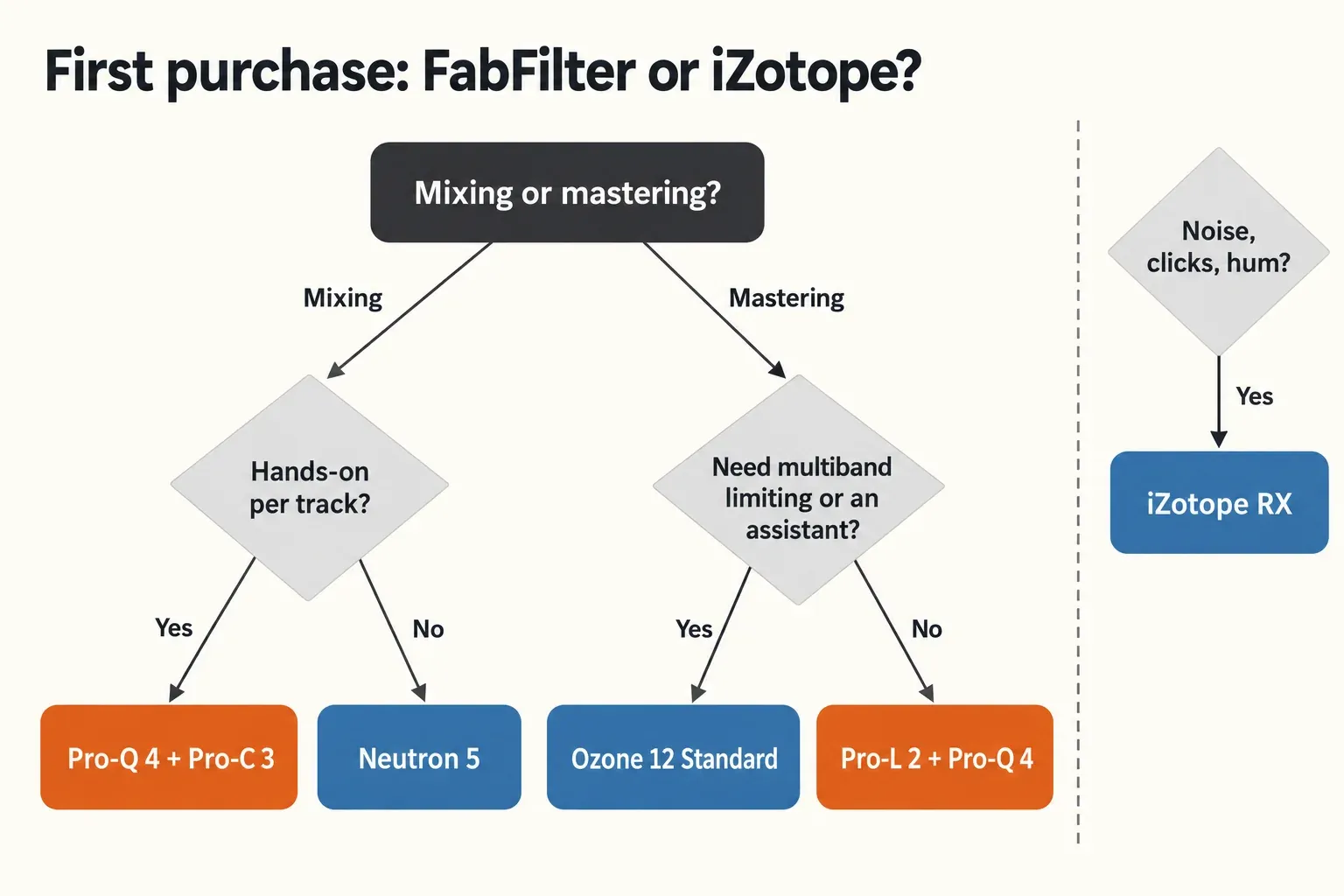
- Hands-on mixing: Pro-Q 4 first, Pro-C 3 second. Both are single-purpose and visual, and Pro-Q 4's Instance List shows them together.
- Guided mixing: Neutron 5 at $299, or $199 as a crossgrade. Mix Assistant gets its 10 tools working quickly, and the EQ adds dynamic bands and a Masking Meter.
- Mastering with help: Ozone 12 Standard at $219. Master Assistant's Custom flow lets you pick genre profiles, upload references, set a LUFS target and choose which modules it uses, and IRC 5 is included. Check the edition comparison above before paying for Advanced.
- Mastering by ear: Pro-L 2 plus Pro-Q 4. Start from Modern with 4x oversampling and true peak limiting, then confirm the result on Pro-L 2's loudness meters or a free LUFS and true-peak meter.
- Tracking and low latency: Pro-Q 4 in Zero Latency without spectral bands, Pro-MB in Dynamic Phase, or Neutron 5's Zero-L limiter. Leave IRC 3, IRC 4 and IRC 5 off while recording.
- Noise, clicks and hum: iZotope RX, because FabFilter has no restoration tool. Start with the iZotope RX guides and choose an edition with the RX Elements, Standard and Advanced comparison.
If you finish masters in Sound Forge, the guide to Sound Forge Pro for mastering covers the editor side of the job.
Common questions
Which is easier for a beginner?
iZotope, if easier means reaching a usable starting point fast: Master Assistant comes with every Ozone 12 edition, Neutron 5 has its Mix Assistant, and Ozone 12 Elements and Neutron 5 Elements cost $55 each. The catch is depth. Sound On Sound lists "a significant learning curve if you're to fully exploit the Advanced and Standard versions" of Ozone 12. FabFilter's plug-ins each do one job, which keeps the learning contained, and its 30-day evaluation is three times as long as iZotope's 10-day trials.
Do FabFilter and iZotope plug-ins work in Sound Forge?
Yes, within format limits. Current Sound Forge editions support third-party VST2, VST3 and ARA plug-ins, according to the Sound Forge editions and pricing page. FabFilter ships every plug-in as VST and VST3, alongside AU, CLAP, AAX Native and AudioSuite. Ozone 12 Standard ships as AAX, AU and VST3, 64-bit only, with VST2 no longer supported, so in Sound Forge it loads through VST3. On Windows, the Sound Forge Plug-In Chainer guide shows how to build and save a chain.
Does FabFilter make anything like iZotope RX?
No. FabFilter's product range covers mixing and mastering tools, creative effects and basic plug-ins, but lists no restoration or noise-reduction tool. For repair work, look at RX, or at the best iZotope RX alternatives if you want another vendor.