
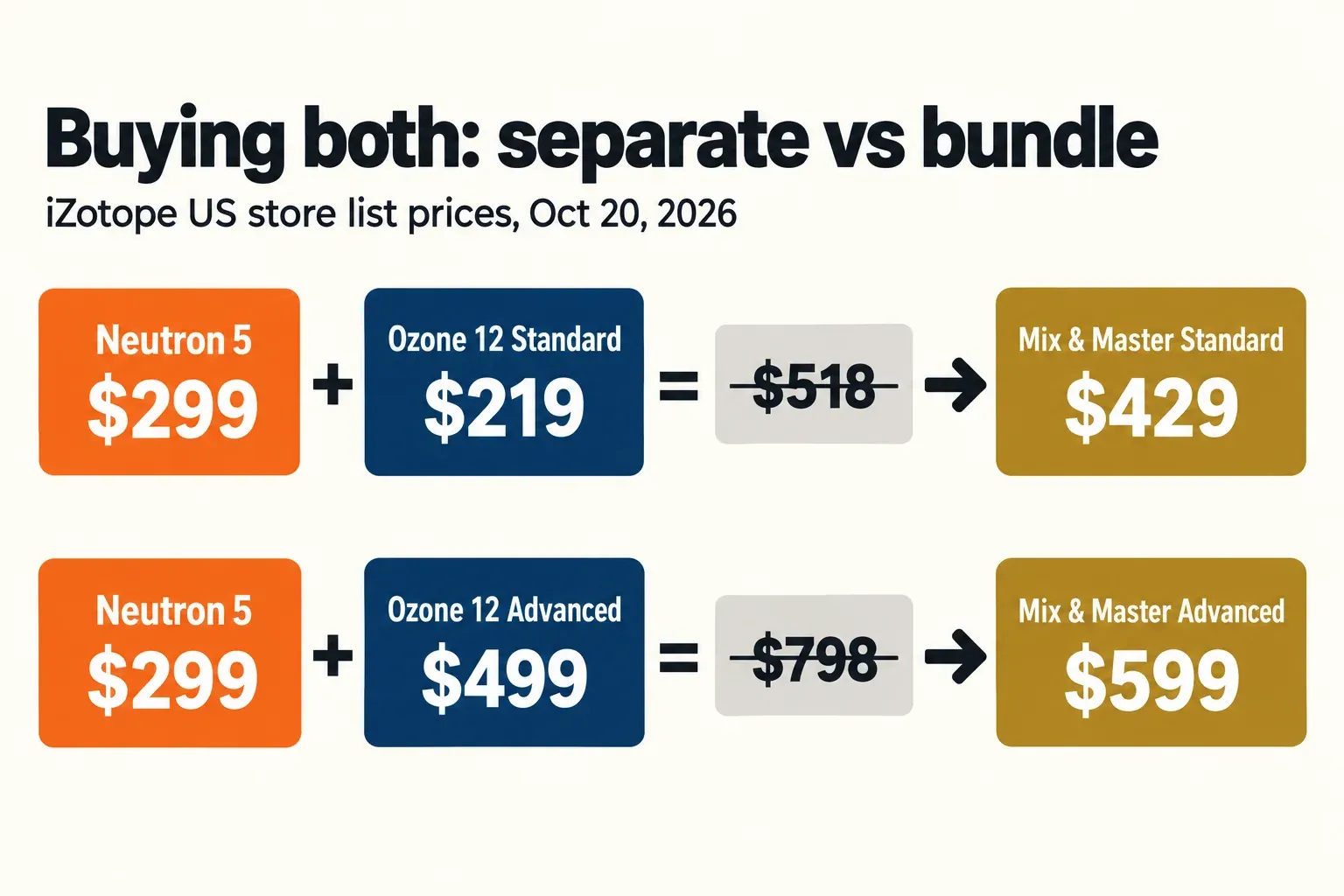
Neutron 5 is a mixing suite you put on individual tracks and buses; Ozone 12 is a mastering suite that goes last, on the finished stereo mix. You need both only if you mix and master your own songs, and in that case the Mix & Master bundles ($429 Standard, $599 Advanced) cost less than the $518 or $798 you would pay for the two separately at iZotope US store list prices on October 20, 2026.
I settle this with one question: who masters the song? If someone else does, buy Neutron 5 at $299 and leave the final limiter to them. If you only master stereo files, Ozone 12 Standard ($219) or Advanced ($499) is the whole job. If you do both, buy the bundle. The overlap that worries buyers is real but tuned for different signals: both suites have EQ, compression, an exciter and a limiter, yet Neutron's limiter is an output safety stage, while Ozone's Maximizer is where final loudness gets set. The one genuine crossover is Ozone 12 Advanced, the only edition whose modules load as separate plugins on any track or bus. The rest of the line-up, from RX to Nectar, is mapped on the iZotope hub.
Where each one goes in the chain
Neutron 5 lives on channels; Ozone 12 lives on the master. iZotope sells Neutron 5 as 11 plugins, a mothership plus ten component modules, and every module runs on its own or inside the mothership. That shape suits mixing: an EQ and compressor on a vocal, Unmask on a guitar that crowds it, Density on the bass. The exception is Neutron's Visual Mixer, which goes on the master bus, and the Neutron 5 manual's Assistant steps say it does not process audio there; it balances levels across the Neutron instances in your session.
Ozone 12 Advanced is a 20-module mastering suite, and iZotope's own Master Assistant instructions start with Ozone on the master channel or stereo output. It works on the finished stereo mix and shapes tone, width and final loudness. Every Ozone page on this site starts from the Ozone hub.
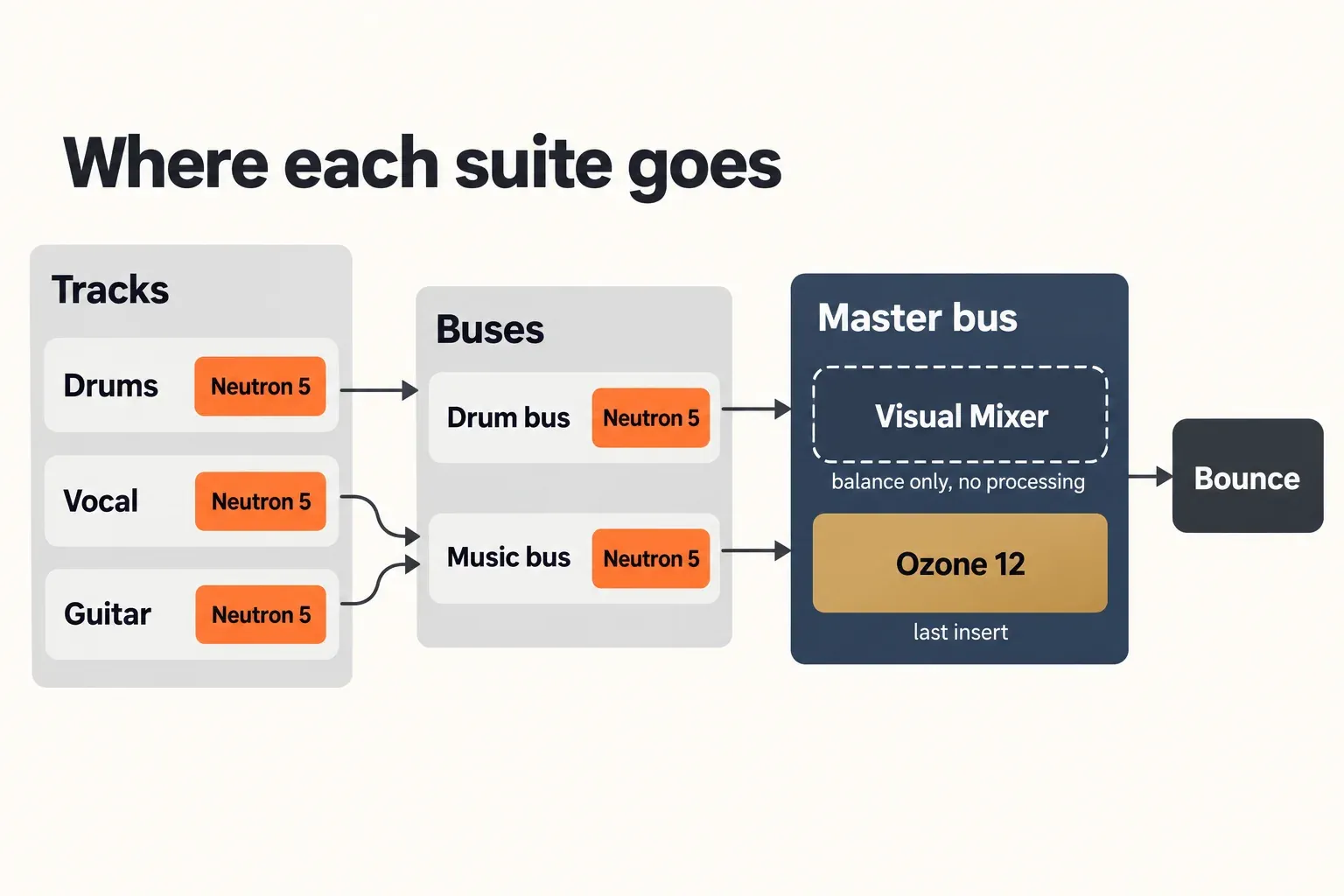
The practical consequence is about handoffs. If a mastering engineer will finish the song, bounce your mix with Ozone bypassed and Neutron's output limiter off, so they receive the dynamics you actually mixed. A compressor and a limiter do different jobs, and a limiter on a mix you hand off is a decision you are taking away from the next person.
Where the modules overlap, and where they don't
Most jobs exist in both suites, but the tools are built for different material. The table lines up the shared jobs, using iZotope's module lists for Neutron 5 and the Ozone 12 compare table.
| Job | Neutron 5 | Ozone 12 |
|---|---|---|
| EQ | Equalizer; Sculptor for dynamic tonal balance per instrument | Equalizer, Dynamic EQ, Match EQ, Vintage EQ; Stem EQ in Advanced |
| Dynamics | Compressor, Density (upward), Gate | Dynamics, Vintage Compressor |
| Saturation and clipping | Exciter; multiband Clipper | Exciter, Vintage Tape; Soft Clip inside the Maximizer |
| Transients | Transient Shaper | Transient Emphasis inside the Maximizer; Impact in Advanced |
| Stereo width | Global Width control in the I/O panel; no Imager module | Imager module (Standard and Advanced) |
| Limiting | Output True Peak limiter, ceiling 0 to -20 dB | Maximizer with IRC modes including IRC 5; Vintage Limiter |
| Only in this suite | Unmask, Phase, Visual Mixer, Relay, Mix Assistant, Tonal Balance Control 2 | Master Assistant, Master Rebalance, Bass Control, Stabilizer; Advanced adds Unlimiter, Clarity, Low End Focus, Spectral Shaper, Codec Preview and Stem Focus |
Limiting is the clearest split. The Neutron 5 General Controls page describes a BS.1770-compliant True Peak limiter on the output, with a ceiling between 0 and -20 dB. It protects the output of a channel or bus; it is not a mastering maximizer. Ozone's Maximizer is, and iZotope describes its IRC 5 mode as splitting the signal into four bands, each with its own attack and release. The same manual notes IRC 5 can cause a subtle tonal shift, because it works hardest on the bands that drive peak level, and leaves the spectrum alone when no limiting is needed. Both limiters can hold a true-peak ceiling; in Ozone that is the Maximizer's True Peak switch next to Output Level, the control earlier versions called Ceiling.
Width is the second trap. Neutron 5 has no Imager. Its width is one global control in the mothership's I/O panel, where -100% is mono. Ozone 12 Standard and Advanced carry a full Imager module, and the free Ozone Imager 2 covers simple width moves on any bus without either suite.
The mix-only tools are why Neutron exists. Sound On Sound's Neutron 5 review calls Sculptor a "smart" dynamic EQ for an instrument's tonal balance and Unmask a way to reduce frequency competition between two specific parts; it also points out that Neutron has no reverb or delay. iZotope pitches Density as a surgical upward compressor, and the Phase module as a tool that analyzes asymmetry in one signal and finds phase problems with other tracks. After a Phase fix on a multi-mic source, confirm the result on a phase correlation meter. Ozone has none of these; its exclusives work on the whole mix, such as Stem EQ, which iZotope says adjusts vocals, bass and drums inside a finished stereo file, and Unlimiter, pitched as undoing over-compressed audio. Both are Advanced-only.
Channel modes overlap too. Neutron 5's compare table marks Mid/Side processing on six modules and Transient/Sustain on four, and Ozone 12 Standard and Advanced offer Transient/Sustain channel modes as well. Elements editions of either product skip them.
Mix Assistant vs Master Assistant
Both assistants give you a starting point, but they listen to different things. Neutron's listens to one track at a time, or to the balance between tracks; Ozone's listens to the whole song. The Neutron 5 Assistant documentation recommends the mothership's Assistant for individual track processing and the Visual Mixer's Assistant for a multitrack starting point. Visual Mixer then sets static levels across every track running the Neutron 5 mothership, a Neutron component or Relay; feed it buses or individual tracks, not both. Set your DAW faders to unity before you run it, and put Relay in the last insert of each track if you want Visual Mixer alone to set pans and faders.
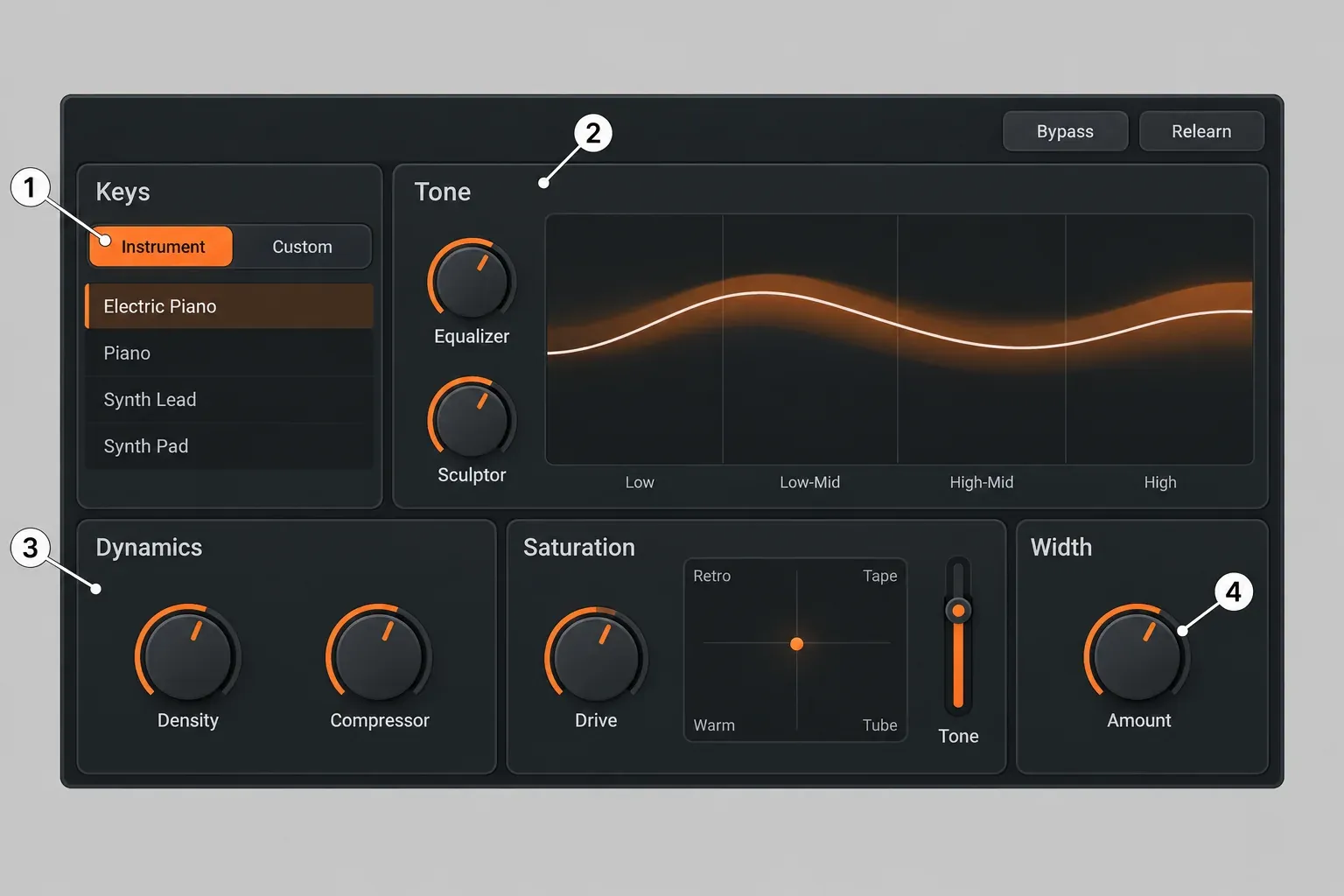
The Intent controls in that view exist only in the mothership's Assistant View, not in component plugins or Visual Mixer. Each one drives real module parameters: Equalizer Mix and Sculptor Amount under Tone, Density Range and Compressor Mix under Dynamics, Exciter Drive and Tone under Saturation, and the I/O panel Width.
Ozone 12's Master Assistant works on the master. According to the Ozone 12 Master Assistant manual, it needs at least 8 seconds of playback and analyzes up to 60, and because it hears only part of the song, the integrated loudness of the final master may miss the target. iZotope itself calls it a "second set of AI-powered ears", not a finished master. On the Ozone 12 product page, the Custom flow lets you pick a genre profile or your own reference, set a LUFS target, choose which modules it may use and set processing strength. Pick that target from the streaming loudness standards rather than chasing the loudest setting, and play the loudest, fullest section of the song during analysis.
The Elements editions are mostly these assistants. Neutron 5 Elements is the Mix Assistant with four Intent controls (Tone, Dynamics, Saturation, Width) for individual tracks, and Ozone 12 Elements is the Master Assistant plus Assistive Vocal Balance, with no individual modules.
Test results: what published reviews agree on
The two suites do different jobs, so the useful composite result is a count of verdicts across nine independent editorial sources: two Sound On Sound reviews, two MusicRadar pieces (one a three-song test), MusicTech, Sounds of Revolution, Gear Gods, Plugin Noise and one lower-weight comparison article. The agreement is strong.
| Finding | Sources that agree | Where to read it |
|---|---|---|
| Ozone 12 is the end-of-chain mastering tool | 8 of 9 | Sound On Sound's Ozone 12 Advanced review, MusicTech, Gear Gods |
| Neutron 5 is the per-track and per-bus mixer | 5 of 5 that cover Neutron | Sound On Sound, both MusicRadar pieces, Plugin Noise |
| The assistants are a starting point that still needs manual work | 7 of 9 | Plugin Noise's Neutron 5 review, MusicRadar, MusicTech |
| Neutron 5 is accessible to less experienced producers | 3 of 5 that cover Neutron | MusicRadar's Neutron 5 review, Sound On Sound, Plugin Noise |
| IRC 5 gets louder while staying clean | 4 of 4 Ozone 12 reviews | MusicTech's Ozone 12 review, Sound On Sound, Sounds of Revolution, Gear Gods |
The single-source results add the useful detail. In MusicRadar's three-song AI-versus-engineer test, Neutron 5's assistant mix was judged acceptable or better on 2 of 3 songs and weak on the third, and the engineer's mix won on the first and third songs, with the second called a draw; that test did not weigh the time saved. Sound On Sound found the Mix Assistant more convincing on individual tracks than on buses, where its drum-bus suggestions were sometimes too aggressive. Plugin Noise reports that it can misclassify a track. On the Ozone side, MusicTech rated Ozone 12 8 out of 10 and called its AI features assistive rather than prescriptive, and Sounds of Revolution calls the assistant's output an intuitive, balanced starting point, with instant results for beginners and surgical control for professionals.
The caveats are just as consistent. Sound On Sound says IRC 5 lets you push level a touch further while keeping the signal coherent, yet in plenty of cases across contrasting genres the reviewer preferred another IRC mode. The same review flags a significant learning curve in Standard and Advanced and positions Elements as the DIY starting point. Sound On Sound's Neutron review, for its part, captions Neutron, Ozone and Nectar together as "a very impressive mixing and mastering toolkit".
The composite result backs the split this page recommends: Neutron for the parts, Ozone for the whole, and neither assistant as a replacement for decisions. The full Ozone 12 review covers Stem EQ, Unlimiter and the Custom flow in depth.
CPU load and latency
Neutron's cost scales with track count; Ozone's cost lands on one master insert, mostly in IRC 5. Sound On Sound's Neutron review says Neutron 5 on every track of a complex project can be a heavy load, but a single instance is not onerous, and the module plugins offer a zero-latency option. The output limiter is where Neutron latency hides. The Neutron 5 limiter mode table lists these figures at 48 kHz:
| Neutron 5 output limiter mode | Latency at 48 kHz |
|---|---|
| IRC II | 3,446 samples, about 72 ms |
| Hard | 198 samples, about 4 ms |
| IRC LL | 120 samples, 2.5 ms |
| Zero-L | None added |
For a vocal you are still recording, use Zero-L or Neutron's Zero Latency mode. That mode disables Sculptor, Unmask and limiter mode selection, and locks multiband crossovers to the analog-style zero-latency type, so switch it off again for mixing.
On Ozone, iZotope's Maximizer documentation confirms IRC 5 is the most CPU-intensive mode with the highest latency of the IRC family. Gear Gods' Ozone 12 review calls it the most CPU-heavy mastering algorithm its reviewer has used, with a raised buffer needed on a few sessions while bouncing. Sound On Sound reported 85 ms of Stem EQ latency on its host system. You do not need Advanced for IRC 5: iZotope's compare table lists it in Ozone 12 Standard too. The Ozone 12 getting-started performance tips add one more saving: run modules in Stereo rather than Mid/Side, Left/Right or Transient/Sustain whenever you can.
My workflow advice follows from those numbers. Mix with a lighter Maximizer mode or Ozone bypassed, switch IRC 5 on for the final listening pass and the bounce, and raise the buffer at that stage rather than during tracking.
Do you need Neutron and Ozone?
You need both only when one person does both jobs. A mix engineer whose songs are mastered elsewhere gets nothing from Ozone that the mastering engineer will not redo. A mastering engineer working from other people's stereo bounces has no tracks to put Neutron on.
The middle case is Ozone 12 Advanced on its own. Its modules load as individual plugins, and MusicTech points out that many of them work during tracking and mixing, and that Advanced is the only edition with mix-fixing tools such as Stem EQ, Unlimiter and Stem Focus. That gives you EQ, dynamics, saturation and width on tracks. It does not give you a Mix Assistant, Visual Mixer, Unmask, Sculptor or a gate. Gear Gods even recommends Ozone 12 to a mix engineer who just wants the best limiter, which is a fair reason to own it without mastering anything.
Ozone Standard and Elements cannot do this; Standard's modules run only inside the main Ozone plugin, and Elements has no individual modules at all. If you own Standard and want track-level tools, I'd buy Neutron 5, the cheaper route.
Which one to buy: decision table
Prices are iZotope US store list prices on October 20, 2026; crossgrade eligibility is decided in the store cart, so confirm it there before paying.
| Your situation | Buy | Price | Why |
|---|---|---|---|
| You only mix; someone else masters | Neutron 5 | $299 | Ozone adds nothing to a mix you hand off |
| You only master stereo files | Ozone 12 Standard or Advanced | $219 / $499 | Advanced for Stem EQ, Unlimiter and Stem Focus |
| You mix and master your own songs | Mix & Master Bundle Standard or Advanced | $429 (vs $518) / $599 (vs $798) | The cheapest way to own both |
| You are starting out | Both Elements editions, or Elements Suite 12 | $55 each, or $149 | The suite adds RX Elements and Nectar Elements |
| You own any paid iZotope product | Neutron 5 crossgrade | $199 | The cheapest way to add the mixing side |
| You own Neutron and want Ozone 12 Advanced | Mix & Master Bundle Advanced crossgrade | $449 | Same price as the Ozone 12 Advanced crossgrade alone, plus Nectar 4 Advanced, Tonal Balance Control 3 and Neoverb |
| You own Neutron and want Ozone 12 Standard | Ozone 12 Standard crossgrade | $199 | Enough if you do not need module plugins or Stem EQ |
| You own Ozone 12 Standard and want Neutron plus Advanced | Mix & Master Bundle Advanced crossgrade | $449 | Versus $478 in two steps ($199 Neutron crossgrade plus $279 Advanced upgrade) |
| You would rather rent | iZotope Plus or Pro | $15/month or $150/year; $25/month or $250/year | Plus includes Neutron 5 and Ozone 12 Standard; Pro includes Neutron 5 and Ozone 12 Advanced; both add Nectar and RX |
| You want one suite for both jobs | Ozone 12 Advanced | $499 | Module plugins work on tracks, but there is no Mix Assistant, Visual Mixer, Unmask, Sculptor or gate |
Editions, prices and system requirements
Each product comes in a cheap assistant-only edition and a full edition, and Ozone adds a middle tier. The prices below are iZotope US store list prices on October 20, 2026, from the Neutron 5 page and the Ozone 12 Standard, Ozone 12 Elements and Elements Suite 12 pages.
| Edition | List price | What you get |
|---|---|---|
| Neutron 5 Elements | $55 | Mix Assistant with Tone, Dynamics, Saturation and Width for single tracks; no Visual Mixer or Relay |
| Neutron 5 | $299 | Mothership and ten component plugins, plus Visual Mixer, Relay and Tonal Balance Control 2 |
| Ozone 12 Elements | $55 | Master Assistant and Assistive Vocal Balance; no individual modules |
| Ozone 12 Standard | $219 | 14 modules inside the main Ozone plugin, including the Maximizer with IRC 5, Imager and Match EQ |
| Ozone 12 Advanced | $499 | 20 modules, each also a separate plugin; adds Stem EQ, Unlimiter, Clarity, Impact, Low End Focus and Spectral Shaper, plus Codec Preview and Stem Focus |
| Elements Suite 12 | $149 | Ozone 12 Elements, Neutron 5 Elements, RX Elements and Nectar Elements |
Students and teachers pay half of list: $149.50 for Neutron 5, $109.50 for Ozone 12 Standard, $249.50 for Advanced, and $214.50 or $299.50 for the two Mix & Master bundles. If you are only choosing between Ozone editions, the Elements vs Standard vs Advanced breakdown goes module by module. Still on Ozone 11 and wondering whether to move up? What Ozone 12 changes over Ozone 11 is a separate decision.
Both products are 64-bit AU, VST3 and AAX plugins. Neutron 5 lists macOS 14.7, 15.7 or 26.2 and Windows 10 or 11. The Ozone 12 requirements list macOS 14.7.x, 15.7.x or 26.1.x and Windows 10 22H2 or 11 24H2, and VST2 is no longer supported, so check your host before you buy either.
Bundles, crossgrades and subscriptions
If you want both, the bundle is the answer at list price. The Mix & Master Bundle Standard pairs Neutron 5 with Ozone 12 Standard for $429. The Mix & Master Bundle Advanced costs $599 and adds Tonal Balance Control 3, Neoverb and Nectar 4 Advanced to Neutron 5 and Ozone 12 Advanced. Tonal Balance Control 3 compares a mix or master with more than 30 genre targets, or with one you capture yourself.
Owners pay less. Neutron 5 costs $199 as a crossgrade from any paid iZotope product or as an update from an earlier full Neutron, and $245 as an upgrade from Neutron Elements or Elements Suite. Ozone 12 Standard costs $199 and Advanced $449 as crossgrades from any paid iZotope product, and Advanced is $279 as an upgrade from Standard. The Mix & Master Bundle Advanced crossgrade costs $449 from Ozone Standard, Nectar Standard or Neutron, and $359 from Ozone Advanced or Nectar Advanced. The store label says only "Neutron", so confirm which versions qualify in the cart. If you also want Nectar and the rest of the music tools, Music Production Suite 9 lists at $799, or $499 as a crossgrade from Ozone Advanced, Nectar Advanced or Neutron; iZotope bundles compared weighs it against the other suites. Every upgrade, crossgrade and education path is laid out in the iZotope price and upgrade guide.
Renting is the other route. The iZotope subscriptions page lists Plus at $15 a month or $150 a year with Neutron 5, Ozone 12 Standard, Nectar 4 Standard and RX 12 Elements among its plugins, and Pro at $25 a month or $250 a year with Neutron 5, Ozone 12 Advanced, Nectar 4 Advanced and RX 12 Standard. If you cancel, the plugins turn read-only, and the subscription needs a Native Access check once a month. I would rent only for a short project: at $150 a year, three years of Plus cost $450, more than the $429 Standard bundle you would own outright.
Street prices dip below list. The plugindeals tracker records lows of $131 for Neutron 5 (Thomann, March 2025), $366 for Ozone 12 Advanced and $163 for Ozone 12 Standard (both Thomann, March 2026). Ozone 12 Advanced went on sale three times in the past 12 months, usually 22% off. Past sale prices are no promise of the next one; check how these products were priced in previous events in the iZotope Black Friday history before paying list.
Is there a free version?
No. iZotope sells no free edition of Neutron 5 or Ozone 12; the no-cost routes are trials. The Neutron 5 trial runs without restriction for 10 days, then switches to a demo mode that inserts silence at regular intervals, and Relay comes with it even during the trial. The Ozone 12 trial gives full functionality for 10 days, after which its window and controls stay locked until you authorize a license. Both subscription plans also start with a 7-day free trial. For tools iZotope genuinely gives away, see free iZotope plugins.
My call
If you are new to mixing, I would buy Neutron 5 first, because almost every early problem lives inside the mix, and add Ozone 12 Elements or Standard when your songs are ready to release. If you mix and master your own music, the Mix & Master Bundle Standard at $429 is my pick, ideally bought in a sale, since at list price it saves only $89 against the two bought separately; move to the Advanced bundle only if Stem EQ, Unlimiter or Nectar 4 Advanced are on your list anyway. If you master other people's bounces, Ozone 12 alone is the right tool, Advanced if problem mixes call for Stem EQ or Unlimiter, and Neutron would sit unused. If Neutron is the one you are leaning toward, the Neutron 5 review goes module by module through what the $299 buys.
Before you pay, run both 10-day trials on the same song. Put Neutron on the drum bus and the lead vocal, put Ozone on the master with IRC 5 at your usual buffer size, and compare the bounces at matched loudness in a LUFS meter. Ozone's Maximizer has a Gain and Output Level Link for exactly this, so you hear the limiter rather than the extra level. If you finish masters in an audio editor rather than a DAW, here is how to master a track in Sound Forge Pro.