
Yes, iZotope Vocal Doubler is still free. On October 21, 2026, iZotope's US store lists version 1.4.0 at $0.00 under a "Free download" label. Add it to the cart, sign in with a Native ID and install it through Native Access. It is a plug-in only, so you open it inside your DAW or Sound Forge Pro, not as an app.
I would install it on any setup that records sung vocals. It does one job, a single natural-sounding double, with a pad, a level knob and one switch. The two places people stall are the account route and the edges of the pad, so this guide covers both, then shows where Nectar 4 or VocalSynth 2 earn their price instead. A double is a second, slightly different copy of the vocal that makes one take sound wider and thicker. Vocal Doubler sits among the free tools on the free plugins and trials hub.
Is iZotope Vocal Doubler still free?
Yes, and it is the full plugin, not a trial. iZotope's Vocal Doubler product page shows a $0.00 price, a "Free download" label and a standard Add to cart button, and the store marked it available on October 21, 2026. It also appears on iZotope's free plug-ins page next to Vinyl, Ozone Imager and Trash Lite.
- Current version: 1.4.0, released June 9, 2025, which added Windows HiDPI support according to the Vocal Doubler release notes.
- Price history: An October 2018 iZotope blog post already called it a free download, and it is still priced at zero.
- Subscribers: it is already part of both tiers on iZotope's list of products included with Plus and Pro, so there is nothing extra to claim.
- Ownership: iZotope announced in July 2026 that it is joining Boris FX and says existing products and licenses stay active with no action needed.
It is one of several tools iZotope gives away. The others, and which offers are only time-limited trials, are covered in our guide to the free iZotope plugins.
How to download and install it now
Claim it in the store at $0, then install it through Native Access. The old habit of grabbing an installer from iZotope's downloads page no longer works for this plugin.
- Open the product page and choose Add to cart. The price is $0.00.
- Sign in with a Native ID. iZotope now uses Native ID as its login, the same account used on native-instruments.com.
- Open Native Access. iZotope's subscriptions page says its tools are now activated and installed with the latest Native Access, and Native Instruments' list of iZotope products in Native Access includes Vocal Doubler.
- Install it, rescan plug-ins in your host and load it from the effects list. iZotope's install support article explains that most of its products install as plug-ins with no stand-alone app, and Vocal Doubler is not among the exceptions it lists.
Do not hunt for it on the downloads page. The Vocal Doubler downloads address now shows paid-product demos and the subscription trial, with no Vocal Doubler tile at all.
This route is where most frustration comes from. In iZotope's own store reviews, 17 of 69 reviewers say they could not find the download, install it or get it to load, and every one of the 12 one-star reviews is that kind of complaint. If the plugin never shows up or will not activate, work through the iZotope Native Access and authorization fixes before reinstalling anything. Skip third-party sites that rehost the installer: the official copy costs nothing, so a mirror adds risk and no benefit.
What Vocal Doubler actually does
It builds a convincing second performance out of one take: copies of your vocal with small timing and pitch differences, spread across the stereo field. iZotope describes it as a free plug-in that enhances a vocal "with a natural doubling effect."
The differences are the whole point. iZotope's guide to basic vocal doubling techniques explains that two identical copies of a vocal only make it louder and leave it in mono; a stereo double needs time and pitch displacement between the original and the copy. Its history of vocal doubling traces the technique to tape-era automatic double tracking: a delay of about 20 milliseconds reads as a natural double, while shorter, constantly varied delays of 1 to 10 ms turn into phasing and flanging. That is why the extreme corners of the plugin can sound like a modulation effect rather than a second singer.
Vocal Doubler packs those two differences into two values. iZotope's Vocal Doubler mixing tips define Separation as how far out of time the double sits and Variation as the subtle pitch fluctuation that makes the copy sound human, and iZotope's other posts add that Separation also widens the double in stereo.
A double is not the same as widening. A widener such as Ozone Imager spreads what is already in the stereo field; Vocal Doubler adds a new, performance-like layer. It is a music effect, too. On dialogue, podcasts or voice-over recorded in Sound Forge, a double sounds like a mistake, so I'd leave it off spoken word.
The controls: pad, Amount and Effect Only
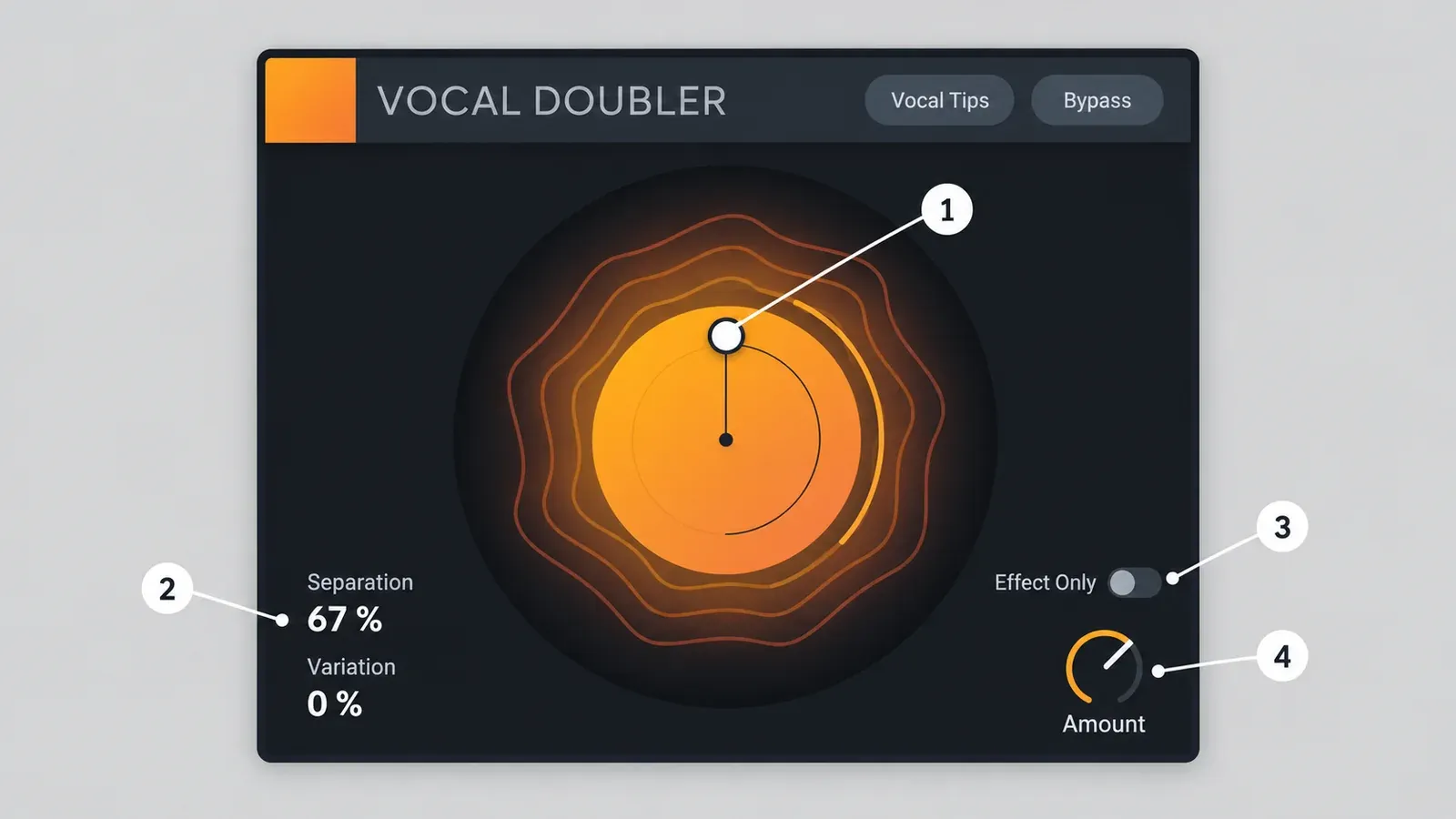
The pad sets Separation and Variation together, Amount sets the level of the doubles, and Effect Only removes your original vocal from the output. Vocal Tips and Bypass sit in the header; Bypass is your quick before-and-after.
| Control | What it changes | How to use it |
|---|---|---|
| Pad handle | Separation and Variation at the same time | Move it, then confirm both % readouts |
| Separation % | Timing offset and stereo spread of the double | Moderate for a natural double |
| Variation % | Subtle pitch fluctuation between original and double | Around 50% for lead vocals |
| Amount | Level of the doubles only; the dry vocal passes through | Under 100% on an insert |
| Effect Only | Mutes the original, so only the doubles come out | On for a send or bus, off on an insert |
| Bypass | Switches the effect out | Level-match and compare |
Expect the pad's directions to be described two ways. The product page says up and down sets separation and left and right sets variation, while iZotope's 2020 post on using Vocal Doubler beyond vocals describes moving the handle out from the center for Separation and clockwise for Variation. The readouts settle it. Trust the two percentages, not the handle's position.
Amount and Effect Only behave as a pair, according to that same 2020 post. Amount only changes the doubles, because your dry vocal always passes through unless Effect Only is on. Effect Only then turns the plugin into a doubles generator for a parallel bus.
Settings that sound like a real double
Start from a dry vocal, keep Separation moderate with Variation near 50%, hold Amount below 100%, then check the result in mono. The pad and Amount values come from the two sources that worked through settings with audio, and the mono check catches the phasing both of them warn about.
- Feed it a clean, dry vocal. iZotope's mixing tips advise running the doubler on dry vocals without reverb or other effects in front of it.
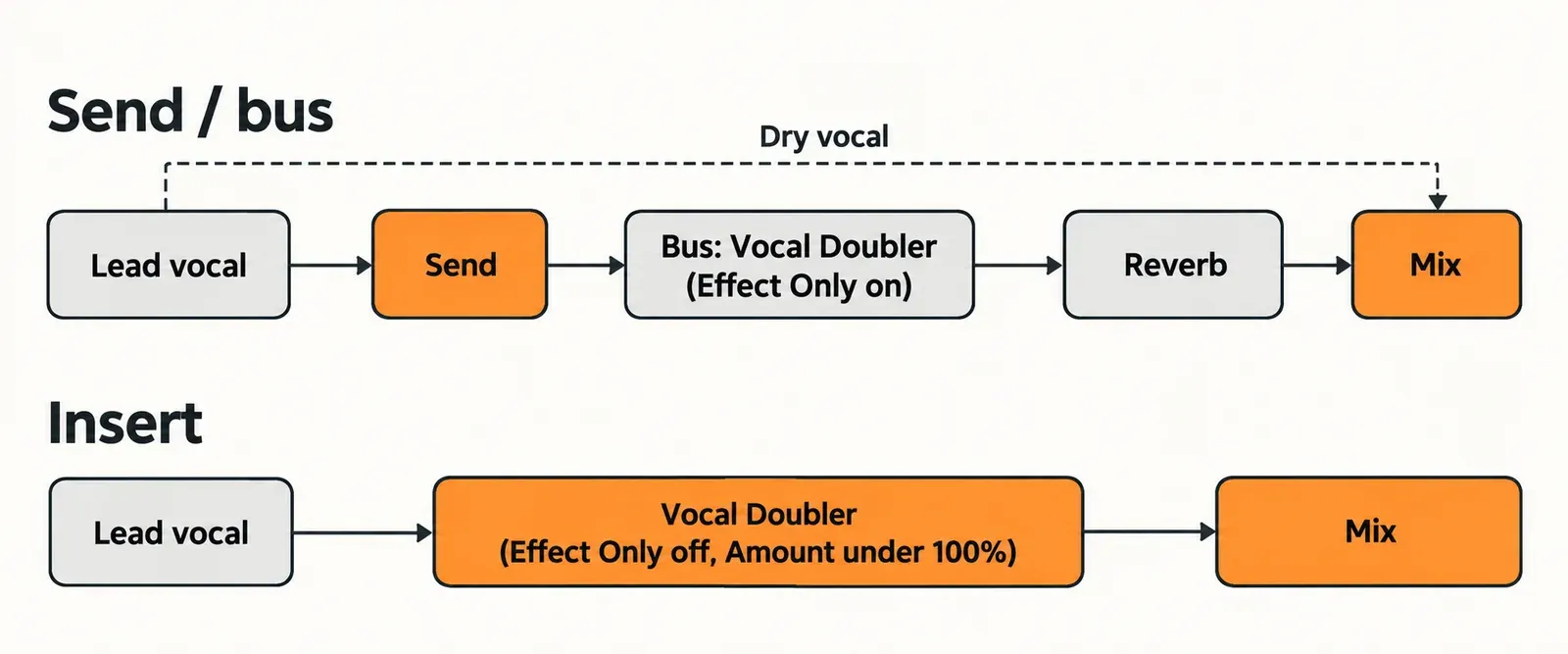
- Choose the route. In a DAW, iZotope's own tip is to send the lead to a bus with Vocal Doubler set to Effect Only and add reverb after it, so the reverb works on the widened copy. On an insert, keep Effect Only off and Amount under 100%, which iZotope calls usually more subtle and musical.
- Set the pad in the middle zone. Bedroom Producers Blog's review found moderate separation with modulation around 50% "convincing and natural" on lead vocals.
- Check it in mono. Fold the result to mono as shown in mono compatibility and phase correlation in Sound Forge and listen for the double collapsing into a comb-filtered smear, or drop a bounce into the phase correlation meter and watch the reading while it plays.
| Goal | Separation | Variation | Amount / Effect Only | Basis |
|---|---|---|---|---|
| Natural double on a lead vocal | Moderate | Around 50% | Under 100%, Effect Only off | BPB review; iZotope 2020 post |
| Doubles on a bus, reverb after | Moderate | Around 50% | Bus fader sets the blend, Effect Only on | iZotope mixing tips (routing); BPB review (pad) |
| Avoid: narrow and phasey | 0% | 0% | Any | iZotope guitar example |
| Wide stereo effect | 100% | 0% | To taste | iZotope guitar example |
| Pads, strings, sound design | Extreme | Extreme | To taste | BPB review; iZotope 2020 post |
The failure zones are documented by iZotope itself. In its guitar example, Separation and Variation at 0 produced "a narrow, phasing mass of guitars," and raising Separation to 50% eased the phasing. Separation at 100 with Variation at 0 gave a wide stereo guitar, while fully cranked settings were called potentially "jarring" in a musical context. BPB reached the same conclusion on vocals and kept the extremes for synth pads and strings.
Using Vocal Doubler in Sound Forge Pro
It should load as a VST3 effect in Sound Forge Pro, but Sound Forge is not on iZotope's supported-host list, so treat it as an off-list host and process a stereo copy of the file. Sound Forge's pricing and editions page promises full support for third-party VST2 and VST3 plug-ins; iZotope's product page lists twelve supported hosts, from Logic Pro 11 to Reason 13, and Sound Forge is not one of them.
- Use the VST3. Vocal Doubler still ships a VST2 version alongside it. Sound Forge's Plug-In Manager help shows how to hide it so only the VST3 appears; a forced rescan brings hidden plug-ins back. If Vocal Doubler does not appear in the FX Plug-Ins menu at all, rescan Sound Forge's VST folders.
- Convert a mono take to stereo first. Run Process > Channel Converter, explained step by step in our Sound Forge Channel Converter guide. Sound Forge's Channel Converter help gives the same advice before panning a mono file, and the logic carries over: a mono file has nowhere to keep a stereo spread.
- Apply it. Sound Forge's help on applying processes and effects lists the Process, Effects and FX Plug-Ins menus, drag-and-drop from the Plug-In Manager, and the Plug-In Chain. A Plug-In Chain lets the doubler and a reverb run in one pass, doubler first.
- Be careful with Effect Only. When you apply the effect to the file, Effect Only leaves only the doubles in the processed audio, and your original vocal is gone from that region. Keep it off for a single finished file. Turn it on only on a copy, when you want a doubles-only file to mix under the lead elsewhere.
- Add space last. Add reverb to the doubled result rather than feeding a reverberant vocal into the doubler.
For the other effects that behave well inside the editor, see what each Sound Forge Pro 18 edition includes and how to load VST3 plugins.
System requirements, formats and Apple silicon
You need macOS Sonoma, Sequoia or Tahoe on an Intel or Apple silicon Mac, or Windows 10 22H2 or Windows 11 24H2, and a 64-bit host that loads AU, AAX, VST2 or VST3. The product page lists these requirements; the version-specific rows below come from iZotope's support articles.
| Item | Requirement | What it means for you |
|---|---|---|
| macOS | Sonoma 14.7.x, Sequoia 15.7.x, Tahoe 26.1.x | Tahoe needs 1.4.0; Sequoia and Sonoma need at least 1.3.0, per iZotope's macOS compatibility table |
| Windows | Windows 10 22H2, Windows 11 24H2 | 1.4.0 added HiDPI support on Windows |
| Formats | AU, AAX, VST2, VST3; 64-bit only | The current 1.x build still ships VST2, per iZotope's VST versions list |
| Apple silicon | Native AU and VST3 since 1.2.0, native AAX since 1.3.0 | VST2 loads only in a host running under Rosetta, and iZotope's Apple silicon article says native VST2 will not come |
| Installer | Native on Apple silicon since 1.3.0 (September 22, 2023) | No Rosetta needed to install |
| Supported hosts | Logic Pro 11, Pro Tools 2024, Ableton Live 12, Cubase 14, Nuendo 14, Studio One 7, Reaper 7, FL Studio 2024, Audition 2025, Premiere Pro 2025, DaVinci Resolve 19, Reason 13 | Sound Forge is not listed; see the section above |
On an Apple silicon Mac, load the AU or VST3 and leave the VST2 alone. One store review reports stuttering playback in an 18-month-old Cubase version; with Cubase 14 on the supported list, update the host before you blame the plugin. If the format names blur together, what a VST plugin is and how VST2, VST3, AU and AAX differ sorts them out.
Vocal Doubler vs Nectar 4 and VocalSynth 2
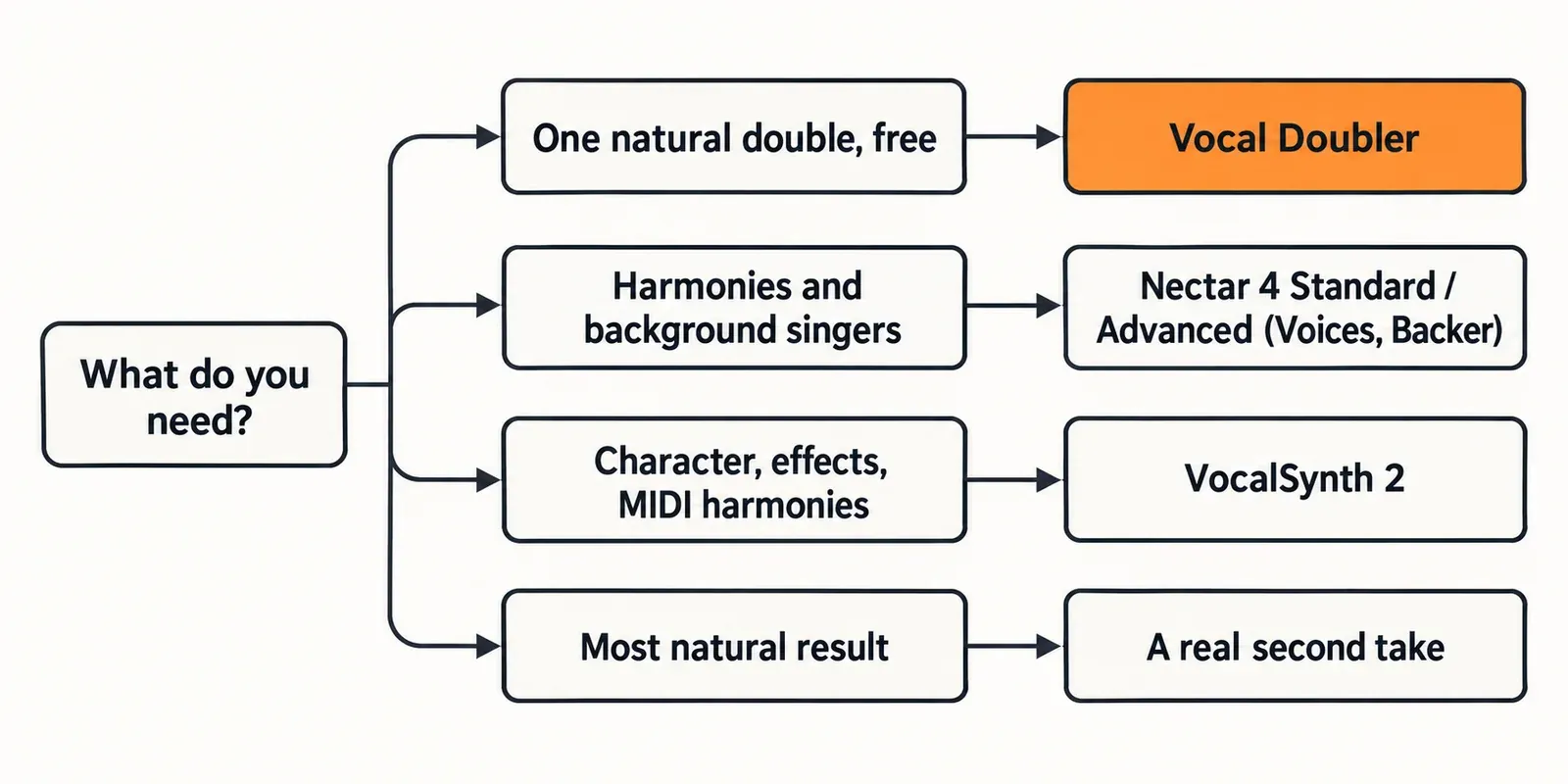
Vocal Doubler gives you one natural double for free. Nectar 4 Standard or Advanced adds harmonies and background singers; the Nectar 4 edition comparison shows which of the two has which module. VocalSynth 2 is for character, synthetic textures and harmonies you play from MIDI. A real second take is still the most natural double of all.
| Option | What it adds | Limits | US store price, Oct 21, 2026 |
|---|---|---|---|
| Vocal Doubler 1.4.0 | One natural double layer with stereo width | No voice count, harmony or presets to speak of | $0.00 |
| Nectar 4 Standard / Advanced | Voices module for layers and harmonies; Backer for background singers from eight styles or your own a cappella | Backer is trained only on English; VST3, AU and AAX, no VST2 | $199 / $299 |
| VocalSynth 2 | Five engines (Biovox, Vocoder, Talkbox, Polyvox, Compuvox), a seven-module effects chain and MIDI Mode | A creative effect rather than a transparent double | $199 |
| A real second take | Genuine differences in timing, pitch and phrasing | Costs a performance and editing time | Free |
Nectar 4 Standard's product page tags both Voices and Backer as Standard and Advanced modules, so Elements is not the tier for this job. VocalSynth 2's product page describes its MIDI Mode as playing harmonies and melodies with your voice as the oscillator. The prices above are from iZotope's US store on October 21, 2026; check current iZotope prices and upgrade paths or the audio software deals page before paying.
My pick: start with Vocal Doubler and move up only when you hear its ceiling. The three store reviews that ask for more want more voices for a choir-like stack, more control or more presets. Voices and stacks are Nectar 4 Standard's job. Pay for VocalSynth 2 only if the goal is an obviously processed voice.
Test results: what reviewers and users report
Published measurements of Vocal Doubler are thin, so the composite result here is a summary of six published sources: one review with a CPU figure, two rating pools, two iZotope posts with worked settings and a freeware catalog listing. Their verdict is consistent. The sound is rarely the complaint; getting the plugin installed is.
The only published CPU figure is from Bedroom Producers Blog, which read about 7% of available CPU on its Core i7 test machine in October 2018, on the launch build, with the host and buffer size not stated. The reviewer called that a bit higher than expected for this type of effect. iZotope's product page describes the plugin as light on CPU without giving figures. With a single data point from a 2018 build, treat 7% as one reviewer's result rather than a current benchmark.
Ratings split the same way. iZotope's store averages 4.03 from 69 customer reviews dated June 4 to October 19, 2026: 46 five-star, 4 four-star, 6 three-star, 1 two-star and 12 one-star. KVR shows 4.00 from a single user review from November 2023, which praises how easy it is to use.
| Finding | Count | Sources |
|---|---|---|
| Moderate settings give the most natural double | 2 of 2 settings sources | BPB review; iZotope 2020 post |
| Edge settings phase or get fiddly | 2 of 2 settings sources | iZotope guitar example at 0/0; BPB at 0% or 100% modulation |
| Could not find, install or load it | 17 of 69 store reviews, including all 12 one-star reviews | iZotope store reviews |
| Praised as simple or easy to use | 7 of 69 store reviews, plus KVR's single review | iZotope store; KVR |
| Makes vocals wider or fuller | 4 of 69 store reviews | iZotope store |
| Wants more voices, control or presets | 3 of 69 store reviews | iZotope store |
Two caveats keep the numbers honest. The store reviews are vendor-hosted, and their one-star tail is about delivery, not audio: none of the 12 criticizes the sound. And BPB's review covers the 2018 launch build: its note that the window could not be resized, which it still judged large enough for high-resolution screens, predates the Windows HiDPI support added in 1.4.0.
My verdict on the evidence: Vocal Doubler sounds right in the moderate zone and is easy to use. The one CPU reading is old and comes from a single review, so it should not drive the decision. Budget your patience for the Native Access route, not for the mix.
Verdict
Install it. For a quick, convincing single double on a dry lead vocal, a free plugin with three controls is hard to beat, and the current 1.4.0 build supports macOS Tahoe and Windows 11 and runs natively on Apple silicon in AU, VST3 and AAX.
- Get it the official way: $0 cart, Native ID, Native Access. If that stalls, use the authorization fixes linked above rather than a mirror.
- Set it in the middle: moderate Separation, Variation near 50%, Amount under 100%, then a mono check.
- In Sound Forge Pro: use the VST3 on a stereo copy, keep Effect Only off for a finished file, and put reverb after it.
- Upgrade only for a different job: Nectar 4 Standard for harmonies and background singers, VocalSynth 2 for a processed character. The best iZotope plugins for vocals guide picks the tool and edition for each vocal job, and the rest of iZotope's lineup is mapped on the iZotope hub.
FAQ
Is Vocal Doubler safe and legit?
Yes, when it comes from iZotope's own store at $0 and installs through Native Access. Copies offered on download catalogs and file-sharing sites are unnecessary for a free plugin and give you nothing the official route does not.
Why can't I find Vocal Doubler after installing it?
Because it has no app of its own. Look in your host's effects list after a plug-in rescan; in Sound Forge Pro that means the FX Plug-Ins menu or the Plug-In Manager. If it is still missing, the cause is usually the account or install step, which the Native Access fixes above cover.
Does Vocal Doubler work on instruments?
Yes. iZotope's 2020 post runs it on a clean guitar loop, on a drum and xylophone loop through two instances in series for a "wide-open, glitchy rhythm," and on a bass synth with two cranked instances. The same rule applies: moderate settings for realism, extremes for effect.