
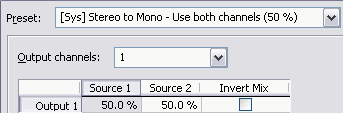
Quick answer: open Process > Channel Converter. For a normal stereo fold-down, start with the current system preset [Sys] Stereo to Mono - Use both channels (50%). It sends 50% of the left input and 50% of the right input to one mono output. Preview the most revealing section, watch the sample peaks, then compare the result with the original at matched loudness. Use a different matrix when you need one good channel, dual mono, an L/R swap, or a deliberate custom mix.
Each source percentage sets its amplitude contribution to an output. Enter 50.0% for half of an input, not −6 in a percentage box. A 50/50 fold gives 0.5L + 0.5R. The result depends on whether the inputs reinforce or cancel; it is not a fixed loudness change.
Choose the Job Before the Preset
| Source problem | Required output | Safe starting route |
|---|---|---|
| A finished stereo mix must be mono | One-channel mono | 50% L + 50% R, then check peaks and mono compatibility |
| A microphone exists on the left side alone | One-channel mono | 100% left + 0% right, provided the right side is genuinely unusable |
| A mono file must satisfy a two-channel delivery | Dual mono | Route the mono source to both outputs; decide the level from the delivery brief |
| Left and right were recorded backwards | Stereo with corrected orientation | Use Stereo to Stereo - Swap Channels |
| A centered element disappears in mono | Diagnosis before conversion | Inspect polarity and timing; do not compensate with gain |
Listen to each source channel before processing. A flat-looking side may still contain hiss, room sound, another microphone or a safety track. Check quiet passages before discarding it. Use the Sound Forge Statistics workflow to compare peak and RMS values, but let the delivery requirement decide whether you need one-channel mono, dual mono or stereo. The Core Editing guides cover the surrounding recording, editing and export steps.
Read the Channel Converter Matrix
The Sound Forge Pro 2026 Channel Converter help defines each row as an output. For stereo input, Source 1 is left and Source 2 is right. Output channels sets the output count: 1 for mono or 2 for stereo. Each source cell sets that input’s contribution to the row. Invert Mix reverses the polarity of the completed output mix. With mono input the help instead calls the per-channel gain field Output; there is only one source to distribute.
Read one output row at a time: which source should be audible, at what percentage, and with normal or inverted polarity? A stereo swap, for example, needs left input routed to right output and right input routed to left output, with no crossfeed left behind. A stereo-to-mono fold needs one output row fed by both sources. This input-to-output reading prevents accidental double routing.
The interface says Invert Mix, while the help talks about reversing phase. In audio-engineering terms the control flips polarity: every sample changes sign. It won't move the waveform in time, repair room reflections, or line up two microphones with different delays.
Convert Stereo to Mono in Sound Forge
- Protect the stereo source. Save a separate working copy. For a short experiment, make a separate file containing the test passage; do not depend on a channel-count change staying inside a selection.
- Choose a revealing selection. Include the loudest passage plus a section with wide ambience, hard-panned detail, or a centered vocal.
- Open Channel Converter. Choose Process > Channel Converter.
- Set the 50/50 fold. The current help illustration shows [Sys] Stereo to Mono - Use both channels (50%). If the preset is absent, set Output channels to 1, Source 1 to 50.0%, Source 2 to 50.0%, and Invert Mix off. Check the displayed values even when loading a preset.
- Preview and bypass. Use the processing dialog's Preview and Bypass controls to compare processed and unprocessed audio.
- Check cancellation and peaks. Listen for missing center content, hollow tone, or level jumps, and watch the channel meter for clipping.
- Apply and verify. After approving the test copy, return to the full working copy. Confirm the whole intended time range and both source channels before OK. Save to a different filename, reopen it, and verify the channel count, routing and peaks. Keep the untouched stereo source.
A 50% contribution is half amplitude, approximately −6.02 dB, calculated as 20 log10(0.5). The digital-level help rounds this to −6 dB. Identical in-polarity channels return to their original amplitude after a 50/50 sum. Material present on only one side is halved. Opposite-polarity identical channels cancel.
A pure 50/50 sum cannot exceed the larger input sample peak when both inputs are within full scale: |0.5L + 0.5R| ≤ 0.5|L| + 0.5|R| ≤ 1. By contrast, 100% + 100% can double identical inputs, a gain of about 6.02 dB, and exceed the integer PCM ceiling. This bound does not excuse an already clipped source, overrange floating-point samples, extra processing gain or later encoding peaks. Check the saved delivery and leave the headroom it requires.
Don't normalize before you've decided whether the fold-down is acceptable. A louder preview can sound more convincing while hiding a routing mistake. Approve the channel relationship first, then use the normalization workflow if the mono deliverable needs a separate peak target.
Check Mono Compatibility, Polarity, and Delay
A safe sum depends on how left and right relate. Similar, same-polarity waveforms reinforce each other. If one channel is the exact inverted copy of the other, equal contributions cancel outright. And if one channel is delayed or processed differently, some frequencies reinforce while others cancel, which gives you comb filtering rather than complete silence.
Sound Forge includes two useful checks. Its Mono-Compatibility Meter is designed to expose channel relationships that can cancel during a mono downmix. The Phase Scope visualizes the relationship in several plots. Neither meter replaces listening: inspect the passage where the meter turns suspicious, then compare stereo and mono at matched loudness.
To repair a confirmed polarity-reversed input before summing, invert only that source channel first. Invert Mix on the mono row would negate the already combined result: −(0.5L + 0.5R), not 0.5L − 0.5R. Flipping silence cannot recover cancelled content. If changing polarity helps one passage but hurts another, investigate timing and different source content. Gain alone cannot align delayed signals.
On a working copy, use the Edit tool to select the affected channel over the full intended range. Check Lock Channel Selection before adjusting the range so you do not accidentally change which channels are selected. Apply Process > Invert/Flip, then select both channels for the mono conversion. With no data selected, Invert/Flip affects the entire file. Confirm the highlighted channel and range rather than relying on a previous selection.
Subtracting one channel from the other also removes matching centered bass and drums. It is not source separation. Use the vocal-removal guide for that separate task rather than treating Invert Mix as a vocal-isolation switch.
Repair Audio Recorded on One Side
A mono microphone often arrives as a stereo file with speech on the left and silence on the right. First solo both channels. If the right side contains no useful programme, one-channel mono from the good side is usually the cleanest master: set one output, Source 1 to 100%, and Source 2 to 0% when the good signal is on the left. Reverse those values when the good signal is on the right.
There's no reason to sum both sides by habit. Mixing a clean voice with an apparently empty channel can add preamp hiss, electrical noise, or crosstalk. Do not overwrite a second microphone or ambience bed either. If the destination requires two channels, create dual mono from the good source after confirming that a one-channel file is unacceptable.
Channel conversion cannot repair distortion, hum or room echo already present in the retained source. Confirm the routing before restoration and level-dependent processing; a changed sum level can change how a compressor responds. Duplicating a missing stereo side does not recover the missing performance.
Convert Mono to Stereo Without Claiming New Width
Routing one mono source to both output channels creates dual mono. The two channels carry the same programme and reproduce a stable center image. It can satisfy a video, broadcast, or ingest system that expects two channels, but it contains no stereo information.
For unity-amplitude dual mono, set Output channels to 2, put 100.0% in each output’s gain field and leave both Invert Mix boxes off. Each output then matches the original mono samples; this does not promise the same perceived loudness through two speakers. The 2026 help illustration uses [Sys] Mono to Stereo - 50 % instead. At 50.0% per output, each channel is half the source amplitude, about 6.02 dB lower. Choose the gain deliberately rather than assuming that preset preserves per-channel level.
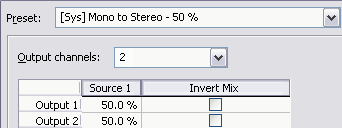
For simple duplication without building a matrix, the Mono to Stereo dialog offers Left Channel, Right Channel and Both Channels. The first two leave the opposite side silent; Both Channels copies the programme to both. Verify the saved levels and channel count rather than assuming a quick conversion uses your custom matrix.
Delaying, detuning, or filtering one copy may create apparent width, but it also creates a different mix and can weaken mono playback. That's a creative stereo process; it has nothing to do with channel-format repair. If the job is sample rate, bit depth, WAV, FLAC, MP3, or another encoding change, follow the Sound Forge audio conversion guide and leave routing untouched.
Swap Left and Right Channels
For a genuinely reversed stereo file, choose Process > Channel Converter and load Stereo to Stereo - Swap Channels. Verify two outputs: output 1 receives 0% Source 1 + 100% Source 2; output 2 receives 100% Source 1 + 0% Source 2. Leave both Invert Mix boxes off. This is L′ = R and R′ = L, with no added crossfeed or gain. Preview an obvious position cue before applying.
Rule out the playback chain before modifying the file. Reversed headphones, cables or player routing can make correct media sound backwards. Use the left/right speaker test through the same path, at a comfortable level. Correct the file only when the reversal follows the media to a known-correct playback system.
A 2023 community discussion about swapping two presenters reports a misleading selection warning in an older build. That is a historical report, not proof of current selection behavior. For a partial swap, test a disposable copy and inspect the audio before and after the selected range. Cancel if the dialog warns that it will change more than intended.
Build a Custom Matrix Without Losing the Original
Write the intended equation before entering custom values. A sum uses both inputs in normal polarity. A difference needs one source inverted before the sum; inverting the completed output row changes both contributions together. Multichannel routing follows the same input-to-output idea, but verify every channel’s identity and destination rather than assuming a stereo recipe is a surround downmix.
Synthetic routing checks, not a Sound Forge installation test: with normalized sample values L = 0.8 and R = 0.8, a 50/50 fold returns 0.8; a 100/100 sum returns 1.6 and needs attenuation before integer delivery. With L = 0.8 and R = 0, the 50/50 result is 0.4. With L = 0.8 and R = −0.8 it is 0; inverting the output still gives 0. Correcting the reversed input first gives 0.8. These arithmetic fixtures test the intended equations, not undocumented application rounding, selection handling or export behavior.
For a repeated job, test the matrix on three files before batching: the loudest, the noisiest, and the widest or least correlated. Record the input channel count, output count, every non-zero percentage, polarity state, and resulting sample peak. Then use the Sound Forge batch-processing workflow only for files that share the same structure.
Verify the Converted File
- Confirm the saved file has the intended number of channels.
- Solo each output and identify every audible input path.
- Compare original and converted files at matched loudness.
- Check sample peaks on the processed file and confirm that no clipping was introduced.
- Listen in mono for missing center content, hollow tone, or comb filtering.
- Check headphones and correctly wired speakers for left/right orientation.
- Review the beginning, loudest passage, quietest passage, and end.
- Save a new lossless master before lossy encoding.
The processing-dialog documentation explains Preview and Bypass. Extra wet/dry gain or fades, where available, change the result beyond the matrix. Inspect those controls rather than attributing an unexpected level change to the source percentages alone. Reopen the saved file for final checks; a preview is not proof of the exported delivery.
Common Channel Converter Mistakes
- Mono clips or jumps in level: inspect both source percentages and the actual correlation; do not assume a preset guarantees matched loudness.
- A centered vocal vanishes: investigate polarity, delay, or stereo processing before changing gain.
- Dual mono still sounds centered: that is correct; duplicated mono does not create width.
- A channel swap changes level: reset the matrix and confirm that each input has one matched route to the opposite output.
- One-sided repair adds hiss: route the good side alone instead of mixing in the noisy side.
- Invert Mix fails to restore a cancelled mono result: undo the fold and diagnose the individual sources. Output polarity inversion cannot undo cancellation.
Sound Forge Channel Converter FAQ
Where is Channel Converter in Sound Forge Pro 2026?
Open Process > Channel Converter. To convert channel count without specifying a custom mix, use Audio channels in File Properties or right-click the Channels box in the status bar.
What setting converts stereo to mono?
Start with [Sys] Stereo to Mono - Use both channels (50%). It creates one output from 50% left plus 50% right. Preview for cancellation and verify peaks because programme-dependent correlation controls the result.
Does mono to stereo create real stereo?
No. Sending one mono source to both outputs creates dual mono. It can meet a two-channel delivery requirement, but it adds no spatial information.
Can Channel Converter fix audio recorded on the left side?
Yes. If the right side has no useful content, route 100% of the left source to one mono output, or to both outputs when dual mono is required. Inspect the quiet side before discarding it.
Is Invert Mix the same as delaying a channel?
No. Invert Mix reverses sample polarity. It does not move the channel in time, align microphones, or correct frequency-dependent phase differences.
Trace the Route, Then Prove the Output
The reliable sequence is short: identify the required channel format, trace every active source-to-output path, preview a revealing section, apply once, and verify the saved file. Channel Converter can fold, duplicate, swap, and intermix channels precisely. It cannot recreate missing stereo information or turn a monitoring fault into a file repair.
Documentation and routing arithmetic reviewed September 14, 2026. UI labels and presets come from the current Boris FX online help and its illustrations. No local Windows Sound Forge execution or acoustic playback test is claimed.