
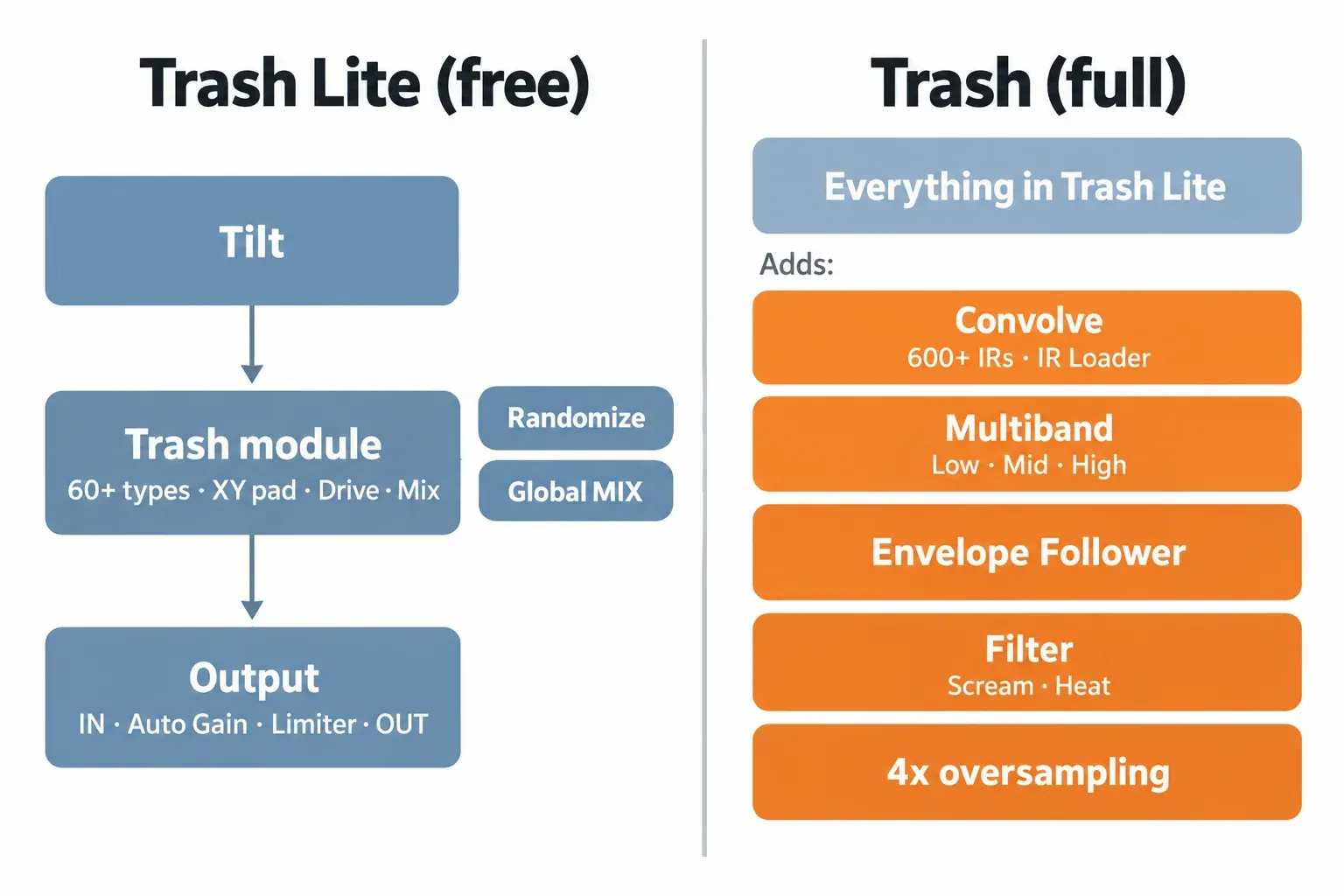
Yes, iZotope Trash Lite is free. It lists at $0.00 in iZotope's US store on October 21, 2026, and it is also free on iPad as an AUv3 plugin for Logic Pro for iPad. It is the full Trash plugin running in Lite mode. You get the Trash distortion module (60+ distortion types, a four-way XY pad, Drive, Tilt and Mix), plus Randomize, Auto Gain and the Limiter. Convolve, Multiband, the Envelope Follower, the post filter and 4x oversampling stay locked until you buy Trash, which costs $99.
My advice: install Lite first. It does the job most people want Trash for, which is grit on drums, bass, synths and the occasional vocal. The full Trash has no demo, so Lite is also iZotope's own way to try the engine. Pay for the full version only when you can name the missing tool. That usually means multiband distortion that leaves the low end alone, or convolution textures. Envelope-driven drive is the third reason.
Trash Lite belongs in the free plugins and trials hub, next to the other no-cost tools worth installing. This page treats distortion as a sound you want. If the distortion in a recording is a fault, diagnose and repair distorted audio instead.
Is Trash Lite really free?
Yes. It comes from iZotope directly at $0, and there are only three catches:
- You need an account.
- The plugin shows an Upgrade panel.
- Part of the window stays locked.
iZotope's Trash Lite page describes it as Trash's "Lite mode". Buying the full version and entering its serial number opens the rest of the same plugin. Native Instruments' store listing for Trash Lite also offers it as a free download that is available immediately.
The desktop route:
- Sign in to a free iZotope account, or create one. You have to be logged in to download.
- Add Trash Lite to the cart in the iZotope store and check out at $0. Bedroom Producers Blog's free distortion roundup describes the same account-and-checkout step.
- Download and run the installer. Bedroom Producers Blog's launch report gives the download as 174 MB in March 2024.
- Load Trash in your DAW or audio editor. On first load, it asks you to authorize with a serial number, as iZotope's Trash download page explains.
- Paste in the Trash Lite serial. The window opens in Lite mode.
Do not look for a plugin called "Trash Lite" in your plugin list. The Lite window itself is titled Trash. iZotope licenses now live in Native Instruments accounts, and NI's list of iZotope products shown in Native Access names Trash, with no separate Trash Lite entry. The serial decides how much of the window opens.
Trash Lite is one of five free iZotope plugins, and that page covers the other four. If the serial prompt or Native Access refuses your license, work through the iZotope install and authorization fixes before reinstalling.
What Trash Lite includes
Lite gives you one complete distortion stage: the Trash module with its XY pad, the gain and safety controls around it, and a dice for quick ideas. In window order:
- Distortion types. Over 60 types, including Rusty Bits, Cactus, Noise Art and Distropia. Each type is chosen with small arrows at a corner of the pad.
- XY pad. Blends up to four distortion settings. One type sits in each corner, and the puck position sets the mix between them.
- Drive. Sets the intensity of the distortion. The full version can move Drive dynamically with its Envelope Follower. In Lite, you move it by hand or draw host automation.
- Tilt. Carves frequencies before the distortion. It has an amount knob and a crossover slider, which reads 1000 Hz in iZotope's Lite image. MusicTech's Trash review notes that Tilt changes the audio going into the distortion, and with it the harmonics. That is why I treat Tilt as the first tone control, not an afterthought.
- Mix (module). The module's own wet/dry knob. It is separate from the global MIX slider in the header.
- Randomize. The dice icon on the pad. It rolls new XY pad settings.
- Output. IN and OUT gain sliders, an Auto Gain on/off switch, a Limiter on/off switch, and Bypass in the header.
- Presets. Bedroom Producers Blog describes a wide selection of presets.
- Locked panel. Three tiles, Multiband, Convolve and Effects, with an Upgrade button under them.
Lite is a mode of Trash, so it follows Trash's published system requirements:
- Formats: AAX, AU and VST3, 64-bit only. VST2 is no longer supported.
- macOS: Sonoma 14.7.x, Sequoia 15.7.x or Tahoe 26.1.x, on Intel or Apple silicon.
- Windows: 10 or 11.
Anyone on an older macOS should check the release notes before updating (see the version history below).
Trash Lite vs full Trash
The distortion engine is the same. The full version adds four kinds of tool around it:
- convolution and multiband processing
- modulation
- a post filter
- oversampling
iZotope's own FAQ calls Lite "the essential distortion engine". It also places the full Trash in its bundles and subscriptions.
| Feature | Trash Lite | Trash (full) |
|---|---|---|
| Trash distortion module: 60+ types, four-way XY pad, Drive, Tilt, Mix | Yes | Yes |
| Randomize, presets | Yes | Yes |
| IN/OUT gain, Auto Gain, Limiter, global MIX, Bypass | Yes | Yes |
| Convolve: 600+ impulse responses blended four at a time on an XY pad, plus an Impulse Response Loader for any audio file | Locked | Yes |
| Multiband: low, mid and high bands | Locked | Yes |
| Envelope Follower for dynamic distortion | No | Yes |
| Post low-pass filter with Scream resonance and Heat drive | Not in the Lite window | Yes |
| 4x oversampling for the Trash module | No | Yes, since version 1.2.0 |
| Desktop price, US store, October 21, 2026 | $0.00 | $99; $49 update from any earlier Trash; $49.50 EDU |
| iPad | Free app | $19.99 Trash Upgrade in-app purchase, sold separately |
Three notes on the table:
- iZotope's Trash product page lists Convolve, Multiband and the Envelope Follower.
- The post filter is documented in MusicTech's review, which places it after the distortion and convolution stages. iZotope does not say what the locked "Effects" tile contains, so I list only what iZotope and the reviews name.
- iZotope advertises "over 60" types and "over 600" impulse responses. MusicTech counted 69 types and 620 impulse responses in the full version.
How to use Trash Lite on drums, bass and vocals
Work in this order:
- Shape the input with Tilt.
- Choose the blend on the XY pad.
- Push Drive.
- Pull the module Mix back until the part still sounds like itself.
I would never start with Drive. With Tilt set first, you hear what the distortion is doing to the part instead of fixing harshness afterwards.
Drums and loops
I would learn the pad on drums first. Bedroom Producers Blog's launch write-up ran a drum loop through Trash Lite. It went heavy on drive, then eased the tone and mix back. The result was "more aggressive without being completely obliterated". I would follow the same route: overshoot first, then back off Tilt and Mix. Leave Drive where it is during that step, so you keep the character you chose.
Bass
Lite has no multiband, so the whole bass signal goes through the distortion. Two moves keep the low end usable:
- Tilt the input toward the upper range, so the distortion works on the harmonics more than the fundamental.
- Keep the module Mix well below full, so the clean low end stays in the blend.
If you need heavy distortion with untouched lows on every bass you mix, that is the case for the full version's low, mid and high split.
Vocals and parallel grit
For vocals I would start with light Drive and use the global MIX slider in the header as a parallel blend. Keep the Limiter on as a ceiling. The module Mix shapes the character inside the distortion stage, and the header MIX decides how much of the whole processed signal returns. Keeping those two jobs separate makes small vocal moves easier to judge.
Randomize and movement
The dice rolls new XY pad settings, and three of the four reviews in the test section below single it out as a quick idea generator. When a roll works, write down the four corner types or save the session, because the next roll replaces them. For drive that rises and falls with the song, automate Drive in your host. The Envelope Follower that does this automatically belongs to the paid version.
Auto Gain and Limiter: useful, not neutral
Leave Auto Gain on while you audition settings. Make the final keep-or-bypass decision with the levels matched, though, because published reviews disagree on how neutral Auto Gain is.
- Bedroom Producers Blog's 2026 roundup says heavy settings in Trash Lite do not cause volume jumps.
- MusicTech's review of the launch version found that Auto Gain acted like a compressor that emphasized the front of hits. It also was not global, so switching presets caused quick volume jumps. The reviewer switched it off and matched volume by hand.
Both can be true. Auto Gain holds the overall level, but it can still change the transients.
My routine:
- Set IN so the level arriving at the plugin matches your other tracks.
- Dial the sound with Auto Gain on.
- Turn Auto Gain off and set OUT by ear or meter until the bypassed and processed versions sit at the same loudness.
- Toggle Bypass.
The Limiter is a safety ceiling for the output, not a tone control. The compressor vs limiter guide explains how a limiter differs from a compressor.

Using Trash Lite in Sound Forge
Trash Lite should load in Sound Forge on Windows 11 as a VST3 effect. Neither vendor lists that pairing, though, so check it on a copy of your file before you commit.
- Sound Forge's system requirements call for Windows 11.
- Both current editions support VST2, VST3 and ARA plugins.
- Trash ships as VST3 on Windows.
- iZotope's tested-host list for Trash names Logic Pro, Pro Tools, Ableton Live, Cubase, Nuendo, Studio One, Reaper, FL Studio, Audition, Premiere Pro, DaVinci Resolve, Reason and Maschine. Sound Forge is not on it.
Here is the setup:
- Install Trash on Windows 11 and make sure the VST3 version is installed.
- In Sound Forge, open Options > Preferences > VST Effects. Make sure the folder holding your VST3 plugins is listed, then click Refresh. Boris FX's VST Effects preferences help covers both steps.
- Open the Plug-In Manager and drag Trash onto the data window. This adds it to that window's Plug-In Chain for real-time processing. You can also pick it from the FX Plug-Ins menu, as Boris FX's guide to applying effects describes.
- Enter the Trash Lite serial when the plugin asks for authorization on first load.
- Compare against Bypass at matched loudness, then apply. Keep the untouched original.
If Trash does not appear after Refresh, the VST plugins not showing checklist covers folder and format mismatches. For stacking Trash with an EQ or a limiter, the Plug-In Chainer walkthrough shows how the chain order works.
What each Sound Forge edition includes is broken down in Sound Forge plugins by edition. Sound Forge Plus already ships Vandal, an emulation of amplifier, speaker, cabinet and microphone models, according to the Sound Forge edition comparison. Trash Lite adds waveshaper grit to either edition at no cost.
Trash Lite on iPad
On iPad, Trash Lite is a free App Store app that runs as an AUv3 plugin inside Logic Pro for iPad. The full feature set is a separate purchase. The iZotope Trash App Store listing offers it as an in-app purchase called Trash Upgrade, at $19.99 in the US store. iZotope states that the iPad version is sold separately, so a desktop license does not carry over.
- iPadOS version. iZotope lists iPadOS 17 or later, while the App Store listing says iPadOS 15.0 or later. I would plan on 17, because that is the version iZotope supports.
- App version. The current iPad version is 1.2.0, from April 20, 2024. That update added 4x oversampling for the Trash module.
- User rating. The app holds 4.2 out of 5 from 14 ratings on the US App Store.
- Reviewer view. MusicRadar's Trash review calls it a must-have AUv3 for Logic Pro for iPad users and harder to justify on desktop.
Test results: what reviewers found
Four published write-ups from three outlets assess the current Trash:
- Bedroom Producers Blog's 2024 launch report and its October 2026 roundup cover the free version.
- MusicRadar and MusicTech review the paid version.
The composite is consistent. The free version tops the one free-distortion roundup that ranks it, and the paid version gets middling scores for depth rather than sound. No source publishes CPU or latency figures, so the composite counts reviewer verdicts.
| Finding | Sources | Who says it |
|---|---|---|
| The sound and range of distortion types are strong | 4 of 4 | BPB 2026, BPB 2024, MusicRadar, MusicTech |
| The interface is clear and easy to use | 4 of 4 | BPB 2026, BPB 2024, MusicRadar, MusicTech |
| Randomize is a useful idea generator | 3 of 4 | BPB 2026, BPB 2024, MusicTech |
| Depth falls short of Trash 2 or rival plugins | 2 of 4 | MusicRadar, MusicTech (both review the paid version) |
| Level stays under control at heavy settings | 1 of 4 | BPB 2026 |
| Auto Gain is not transparent; match levels by hand | 1 of 4 | MusicTech |
| The big Upgrade button in the free version is distracting | 1 of 4 | BPB 2026 |
| The strongest case is Logic Pro for iPad | 1 of 4 | MusicRadar |
The scores need their conditions next to them, because they rate different things:
| Source | Version assessed | Result |
|---|---|---|
| Bedroom Producers Blog roundup, October 10, 2026 | Trash Lite, M1 MacBook Air and a Windows 10 laptop in Studio One | "Best overall", first of 11 free distortion plugins |
| Bedroom Producers Blog launch report, March 12, 2024 | Trash Lite 1.0.0 on a drum loop | No score; "super happy with how it sounds and how versatile it is" |
| MusicRadar, August 1, 2024 | Paid Trash, desktop and iPad | 3 out of 5 |
| MusicTech, March 25, 2024 | Paid Trash 1.0 at launch | 5 out of 10, "a downgrade from Trash 2" |
| US App Store, October 21, 2026 | iPad app 1.2.0, mode not stated | 4.2 out of 5 from 14 user ratings |
Read the two low scores for what they are:
- Both judge the $99 product against Trash 2 and the paid market, not the free version against other freebies. MusicRadar's summary: "In its own right, Trash is a decent plugin. But in the wider context of the market and its own legacy, it's hard not to feel disappointed."
- MusicTech also reviewed version 1.0, before window resizing arrived in 1.1.0 and 1.2.0 and before oversampling arrived in 1.2.0.
My verdict from the composite: Trash Lite is an easy install for anyone who wants characterful distortion for free. The full Trash is a narrower purchase. Buy it for multiband and convolution, not for a different core sound: the distortion module is the same in both, apart from the full version's oversampling.
Trash 1, Trash 2 and today's Trash
There have been three generations, and only the current one is sold:
- The original Trash. A DirectX plugin for PC, reviewed by Sound On Sound in December 2003.
- Trash 2. Launched in 2012 and retired in 2022.
- The current Trash. Launched as version 1.0.0 on March 11, 2024. Reviewers often call it "Trash 3", but iZotope names it simply Trash.
Trash 2 is not free. iZotope's FAQ calls it a legacy product that is no longer sold individually, and existing owners can still reach it through their iZotope account. Owners of any earlier Trash pay $49 to move to the current version in the US store.
The new version is not a superset of Trash 2. MusicTech lists what was removed: drawing custom waveshapes, the Dynamics and Delay modules, and the pre- and post-effect EQs. If your sound depends on those, keep your Trash 2 install.
iZotope's Trash release notes record the changes since launch:
- 1.1.0, April 2, 2024. Fixed a cross-platform difference in 11 waveshapes: Rubber Hammer, Bad Breakup, Faulty Transistor, Uncontrolled Static, Acid, Iron, Citrus Pulp, Cracked Actor, Cracked Actress, Noise Art and Stomper. The fix can change sessions and custom presets that use them, and iZotope recommends rendering critical tracks before updating. This release also added window resizing for VST3.
- 1.2.0. Added resizing for AU and AAX, and 4x oversampling for the Trash module in the full version.
- 1.3.0, September 25, 2025. Changed the minimum macOS version and the supported host versions. Check the requirements above before updating an older Mac.
Trash is one of the smaller lines in iZotope's catalog. The iZotope hub maps the larger ones, such as RX, Ozone and Nectar.
Is the paid Trash worth it?
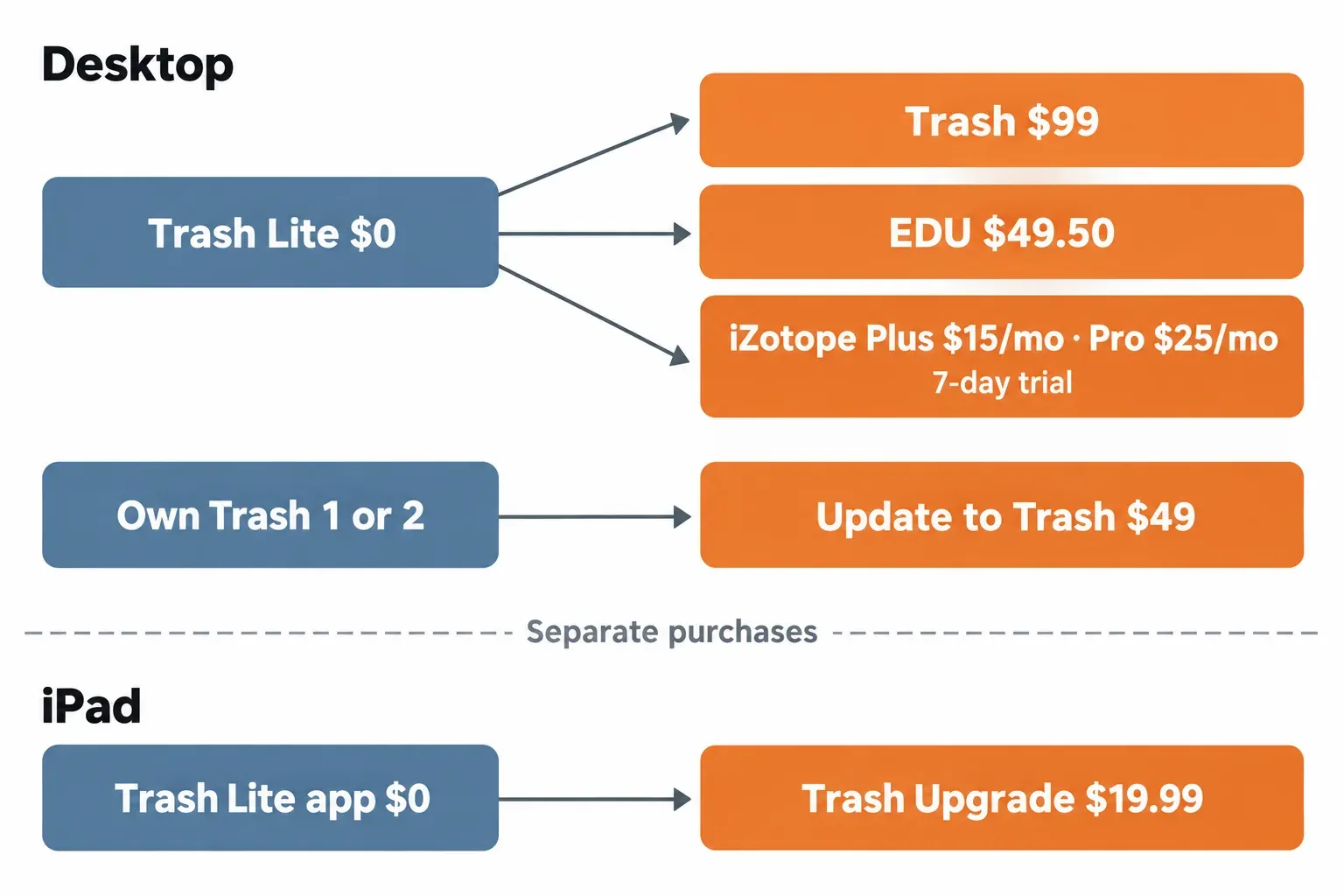
Stay on Lite unless you need multiband distortion, convolution textures or envelope-driven drive. Those are the main things the full version adds. The two scored reviews of the paid version found it short on depth against Trash 2 and rival plugins. Here are your options, with US store prices on October 21, 2026:
- Stay on Lite ($0). Single-band grit, the full XY pad and type list, Randomize, Auto Gain and the Limiter.
- Buy Trash. It costs $99 in the iZotope store. The update from any earlier Trash is $49, and the EDU price is $49.50. Outside the US, the same store lists Trash at EUR 109, GBP 95 and CHF 109.
- Subscribe. iZotope's subscription page lists iZotope Plus at $15 a month or $150 a year, and iZotope Pro at $25 a month or $250 a year. Both include Trash.
- The 7-day free trial renews monthly unless you cancel within the trial.
- Subscription tools work offline but must check in through Native Access once a month.
- The full Trash has no demo, so this trial is the only way to try every feature on desktop before paying.
- iPad only. The $19.99 Trash Upgrade in-app purchase, separate from any desktop license.
- Look elsewhere. MusicRadar names Output Thermal, Arturia ColdFire and FabFilter Saturn 2 as offering more creative depth than Trash.
Before paying list price, check the iZotope Black Friday price history first. For upgrade paths on Ozone, RX and Nectar, the iZotope upgrade price guide covers them.
My pick: keep Lite on every machine. Buy Trash outright only if multiband or convolution would change your mixes this month. If you just want to hear the full version, use the 7-day subscription trial and set a reminder to cancel.
FAQ
Is Trash 2 free?
No. Trash 2 is a legacy product that is no longer sold. Existing owners can still download it from their iZotope account. The free option today is Trash Lite.
Is there a free trial of the full Trash?
There is no demo mode; iZotope points people to Trash Lite instead. The only way to use every feature before paying is the 7-day free trial of iZotope Plus or Pro, which renews unless canceled within the trial.
Does Trash Lite need iLok?
iZotope's current Trash download instructions ask for a serial number when the plugin first loads, with no iLok step. NI's license-migration note keeps iLok activation for Exponential Audio products, not for Trash.
Does a desktop Trash purchase cover the iPad app?
No. iZotope sells the iPad version separately through the App Store, where the full feature set is the $19.99 Trash Upgrade.
What if Trash shows an error or will not authorize?
Authorization and Native Access errors have their own fixes. Start with the iZotope install and authorization troubleshooting guide before you reinstall.