
Yes, iZotope Vinyl is still free. On October 20, 2026 it was listed at $0 and available in iZotope's US store, at version 1.13.0 from May 15, 2025. Claim it with an iZotope account, install it through Native Access, Product Portal or the installer link in your account, authorize it with its serial number (iLok is not accepted), then rescan your DAW.
Vinyl does one job: it puts record dust, scratches, warp, turntable rumble and hum on whatever you feed it, plus a Lo-fi effect that imitates sampling a record on a vintage sampler. My advice is short. Install the VST3 (or the AU in Logic), set the era before the noise, keep the noise low, and run Vinyl on a send, because it has no dry/wet knob. Pay for XLN's RC-20 only when you also want saturation, flutter and bit-crushing in one plug-in. If you need to take crackle off real records rather than add it, the vinyl digitizing and restoration workflow is the page you want.
Is iZotope Vinyl still free in 2026?
Yes. iZotope's Vinyl product page offers it as a free download, and the US store data on October 20, 2026 showed a $0 price with the item available. There is no paid Vinyl edition and no paid upgrade, so a search for a Vinyl upgrade price leads nowhere: the free download is the current 1.13.0 build. The only other way to hold a Vinyl license is through a subscription, and iZotope's subscriptions page lists it in both iZotope Plus and iZotope Pro. For the iZotope products that do have paid tiers, the iZotope price and upgrade guide explains how the upgrade paths work.
Vinyl is its own plug-in, not a module inside Ozone, and it is older than most free plug-ins. Production Expert dates its original release to 2001, and in 2021 iZotope's NKS announcement called it the plug-in that got the company started, then 20 years old and still free. It is one of several no-cost iZotope tools; the list of free iZotope plug-ins covers the others and what each one is for.
Ownership changed in July 2026, when iZotope announced it is joining Boris FX. The announcement's FAQ says iZotope products and licenses remain fully active and accessible through the current downloads page and Product Portal, with no action needed from users. Three months later, Vinyl still listed at $0. The iZotope plug-in guide shows how the rest of the range is organized.
How to download and install Vinyl from official sources
Get Vinyl from iZotope or Native Instruments and nowhere else. The official copy costs nothing, so a repackaged installer from a download site adds risk without saving a cent. The whole route has four steps.
- Claim it. On iZotope's free plug-ins collection, click Vinyl's download button, sign up or sign in, and follow the instructions. iZotope.com and Product Portal now use a Native ID as your iZotope login.
- Install it through one of three routes. The routes are described below; all three are official.
- Authorize it with the serial number. iZotope's support note on iLok says iLok authorization is not available for Vinyl; you enter the serial from your account instead.
- Rescan your DAW. Vinyl has no standalone app. iZotope's article on products that seem missing after installation explains that plug-ins like Vinyl live inside your host, so you open it from the DAW's plug-in list after a scan.
The three install routes:
- Native Access. Vinyl is on Native Instruments' list of iZotope products available in Native Access after license migration, so once your licenses have moved over, it shows up there. Plus and Pro subscribers use this route anyway: the subscriptions FAQ says subscriptions install through Native Access and no longer use Product Portal.
- Product Portal. In iZotope Product Portal, open MY PRODUCTS, set the filter to INSTALL/AUTHORIZE and click INSTALL. iZotope recommends macOS Ventura 13.7 through Tahoe 26.1 or Windows 10 or 11 for the Portal, and on Apple silicon the Portal app itself runs only in Rosetta.
- The installer in your account. Sign in at account.izotope.com, open My Products, click Install & Activate, then click "Download the installer" under the "Install without Product Portal" text. The steps come from iZotope's macOS 27 note for Product Portal users, and iZotope's Installing Vinyl on Mac article confirms Vinyl installs either through Product Portal or from the download link in your account.
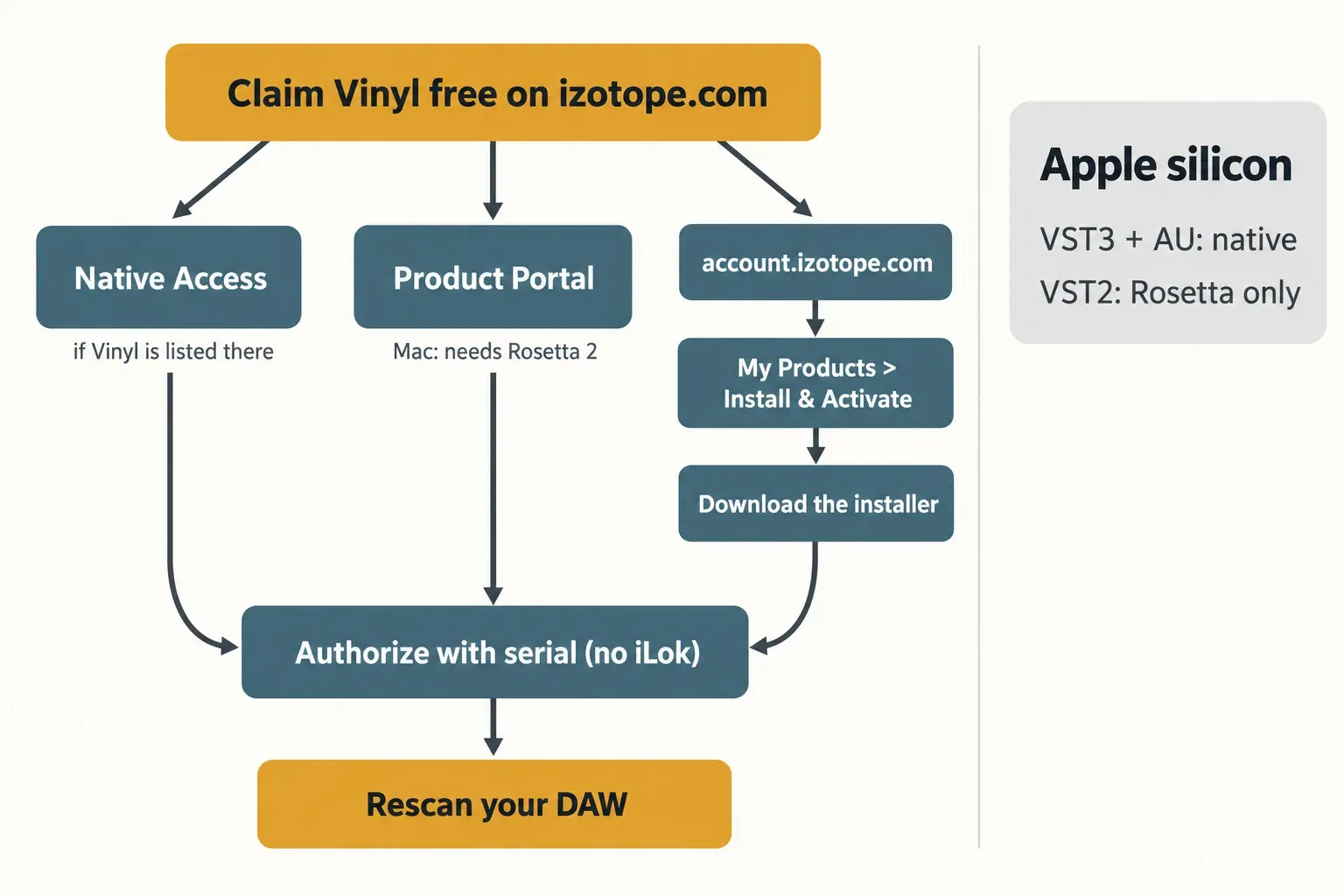
My pick: use Native Access if Vinyl is already listed there, since iZotope already routes subscription installs through it. Otherwise I would take the installer from your account. It skips the Portal entirely, and the Vinyl installer has run without Rosetta on Apple silicon since version 1.12.0, while the Portal app still needs it.
Formats, Apple silicon and macOS support
The product page lists AU, AAX, VST2 and VST3, all 64-bit only. If those format names are new to you, the VST plug-in primer explains what each one is. On an Apple silicon Mac, the format you load decides whether your host can run natively:
| Format | Apple silicon, native | Apple silicon, in Rosetta | Windows |
|---|---|---|---|
| VST3 | Yes, since 1.11.0 | Yes | Yes |
| AU | Yes, since 1.11.0 | Yes | Mac-only format |
| VST2 | No, and iZotope says native VST2 will not be added | Yes | Yes |
| AAX | Release notes say yes since 1.12.0 (Pro Tools 2023.3 and later); the compatibility table lists Rosetta only | Yes | Yes |
The table follows iZotope's macOS compatibility table, updated September 17, 2026, and the Vinyl release notes. Version 1.11.0 (October 6, 2022) added native Apple silicon support and noted that VST2 instances load only in hosts opened in Rosetta. Version 1.12.0 (September 15, 2023) added native AAX for Pro Tools 2023.3 and later and made the installer itself run without Rosetta. The two documents disagree on AAX, so if Pro Tools will not show Vinyl natively, check that you are on 1.13.0 before assuming a bug.
For macOS versions, Vinyl 1.13.0 raised the minimum to macOS Ventura, and the compatibility table names 1.13.0 as the first version that runs on macOS 26 Tahoe. The product page lists Sonoma 14.7.x, Sequoia 15.7.x and Tahoe 26.1.x on Intel and Apple silicon, so read Ventura as the floor and those three as the versions iZotope names. On Windows it lists Windows 10 22H2 and Windows 11 24H2. There is no Linux build.
Two dates matter for anyone planning ahead. As of the compatibility statement updated October 18, 2026, iZotope had not yet officially certified its products, Vinyl included, for macOS 27 Golden Gate. And Apple's Rosetta support article says Rosetta is available through macOS 27; from macOS 28 it remains only for certain older games that rely on Intel-based frameworks. Until then, softwareupdate --install-rosetta in Terminal installs it, and the "Open using Rosetta" setting in a Universal host's Get Info window lets that host load Intel-only plug-ins such as the VST2 build.
On any Apple silicon Mac, I would build new sessions on the VST3 or AU and treat the VST2 as a Windows or legacy-session format. Anything that depends on a host running in Rosetta has a stated end date.
What each Vinyl control does
Vinyl's manual is iZotope's online help page, Using Vinyl, and it documents every control. Here is what each one does and when to move it.
| Control | What it does | When to move it |
|---|---|---|
| I/O knob | One knob in the header; the I/O selector switches it between input gain and output gain | Input first, because Wear's distortion depends on input level; output last to match levels |
| Mono | Sums the output to mono | Phone, radio and bar-room scenes |
| Decade | Record-player filter response from 1930 to 2000; 2000 is very subtle, earlier decades limit the bandwidth more and also filter the dust and scratches | First, to set the era |
| RPM | Does not change pitch; sets how often warp, dust and scratches repeat (a scratch at 78 recurs more than twice as often as at 33) | Faster for busy crackle, slower for sparse ticks |
| Spindown | On/off switch for a slowdown that lowers pitch and speed over time | Endings and transitions |
| Lo-fi | Emulates the artifacts of sampling a record with a vintage sampler | Beats and loops that should sound resampled |
| Wear | High-frequency roll-off plus groove distortion; output drops slightly at extreme settings | To dull and roughen the source itself |
| Mechanical | Gain of turntable click and rumble | Lightly, set during a quiet passage |
| Electrical | Gain of preamp and circuit noise, mainly 60 Hz hum | Lightly, set during a quiet passage |
| Dust | Amount slider (how much dust) and Gain knob (how loud); crackle speed follows RPM | After the tone is right |
| Scratch | Amount slider (how many scratches) and Gain knob (how loud); repeat speed follows RPM | Sparingly; repeats are easy to hear |
| Warp | Two steps: Warp Model picks the warp shape, Warp Amount sets the depth of pitch variation | Model first, then raise Amount slowly |
The help adds one piece of advice worth following: mechanical and electrical noise are best used lightly. Set them while a quiet passage or the silence before the track plays, so they fill the intro and the gaps and disappear once the music starts. The Lo-fi switch has a specific lineage, too: in iZotope's story behind the Lo-fi mode, the developers describe modeling a 12-bit R-2R ladder converter as a nod to the E-mu SP-12.
Starting settings for lo-fi vocals, old radio and transitions
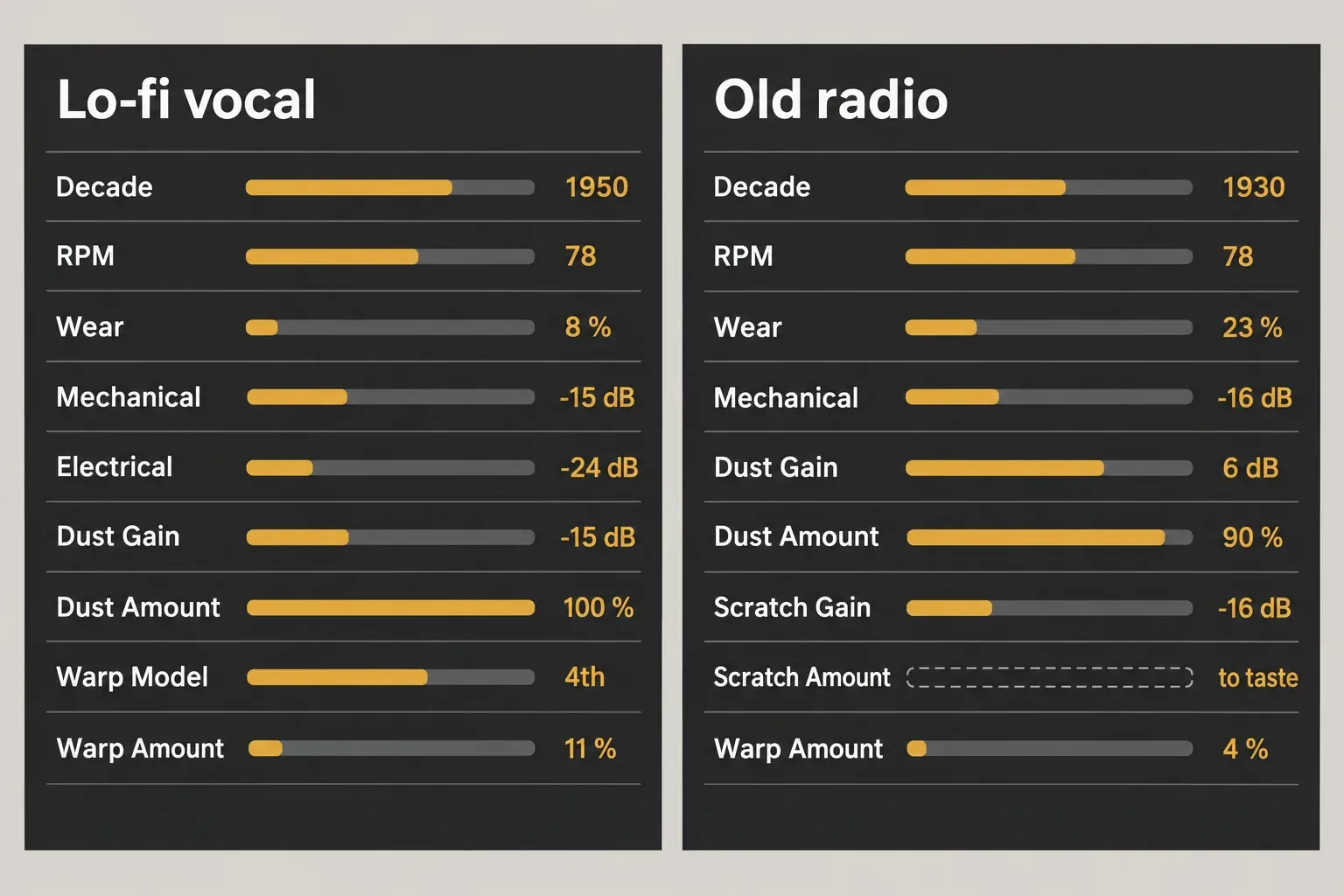
iZotope published two recipes that make good starting points. They were written for an older interface, so translate two names: Year is now Decade, and Warp Depth is now Warp Amount.
iZotope's lo-fi vocal recipe sets Mechanical to -15 dB, Wear to 8%, Electrical to -24 dB, Dust gain to -15 dB with Dust Amount at 100%, Warp Amount to 11% with the fourth Warp Model, Decade to 1950 and RPM to 78. iZotope's old radio recipe sets Mechanical to -16 dB, Wear to 23%, Dust to 6 dB with Dust Amount at 90%, Scratch gain to -16 dB, Warp Amount to 4%, Decade to 1930 and RPM to 78. That page leaves the Scratch Amount value blank, so start it at zero and raise it until the scratches are just audible. The same article suggests switching Vinyl to mono for a bar scene or the far end of a phone call.
For transitions, Spindown is a plain on/off switch with no time control. A 2017 review by Tyler Gunz describes a spin-up trick that works around it: reverse the clip, switch Spindown on at its very end, resample the result, then reverse it again so the record speeds up into the phrase. The same review, written on the 1.8 build, found that the two earliest Year settings summed the signal to mono. The current help does not say that, so if an early Decade setting sounds narrow on a stereo source, check it on a phase correlation meter rather than guessing.
For a flanger, iZotope's multiple-genres post ran two Vinyl instances, one on a drum track and one on its aux return, with heavy Warp, and the two warped copies moving against each other produced a flanger-like sweep.
On a full mix or a master, I would keep Vinyl on a send and bypass-compare often. Decade 2000 is very subtle by design, and the noise sections are meant to sit under the music, not on top of it.
Presets, NKS and the missing mix knob
Vinyl's help says it ships without factory presets and tells you to save presets in your DAW's plug-in wrapper. The release notes add a wrinkle: version 1.10 (May 28, 2021) brought NKS support and NKS presets. The NKS post sets two limits. The pre-mapped parameters work only when the VST version is loaded from the controller's plug-in browser, so an AU or an instance loaded from the DAW's own menu misses them. And MASCHINE+ cannot run Vinyl standalone; MASCHINE mk3 controls it only while connected to a computer.
In Sound Forge Pro, the cleanest way to keep a Vinyl setting is to put it in a Plug-In Chainer chain and save the chain.
The bigger gap is the mix control. Vinyl's control list has no dry/wet knob, and one store reviewer made the same complaint and built a separate source track to get around it. There are two clean fixes:
- Send and return. Put Vinyl on an aux or FX return, send the track to it, and blend with the return fader. The dry track stays untouched, and several tracks can share one Vinyl.
- Duplicate track. Copy the track, put Vinyl on the copy, and balance the two faders. This suits a single vocal or loop.
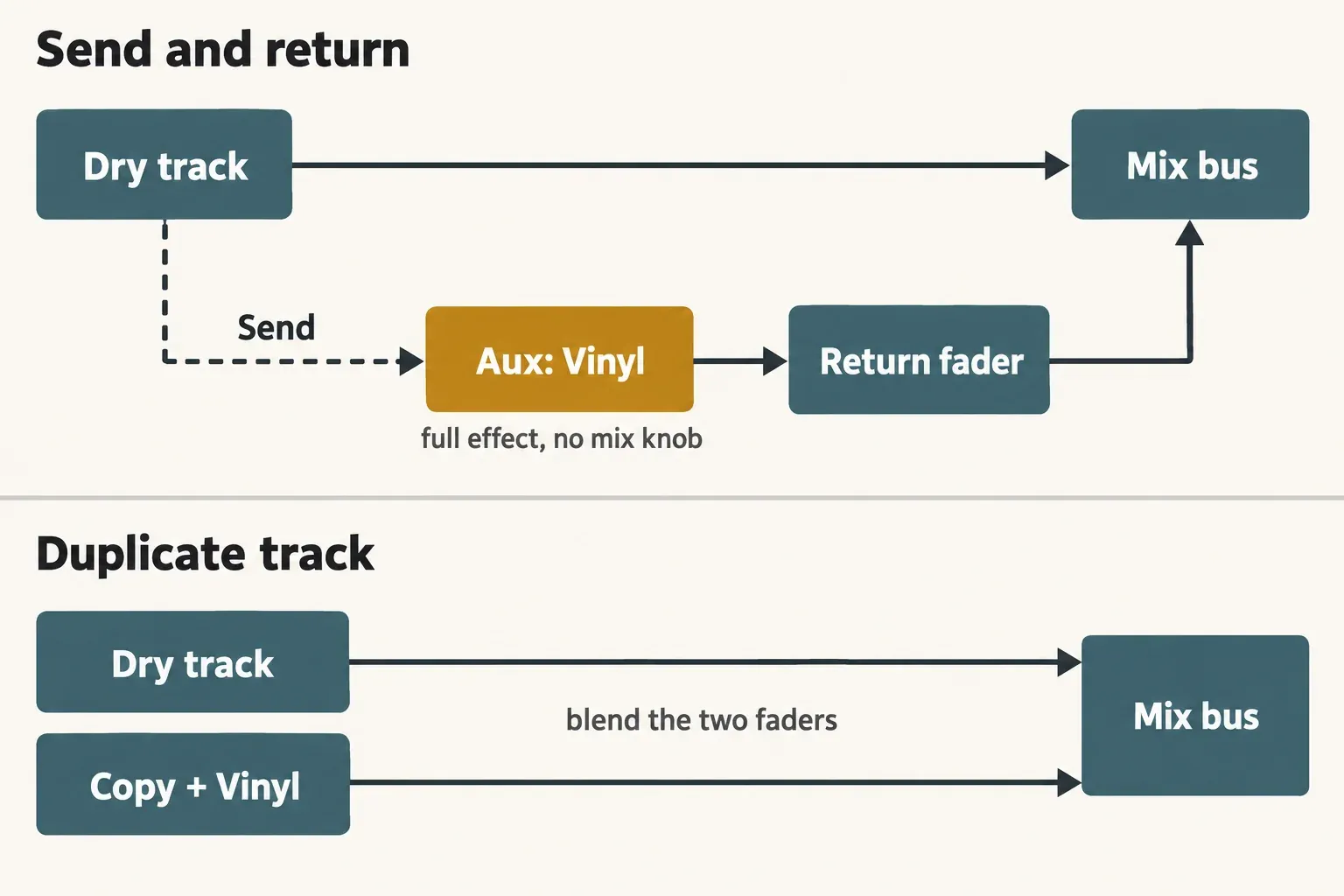
On a parallel path I would keep Warp low. iZotope's flanger trick is exactly a warped copy running against another copy, so a deep Warp setting on a send blended with the dry track can start to sweep in the same way.
Loading Vinyl in FL Studio, Pro Tools, Logic and Sound Forge Pro
The product page's host list names Logic Pro 11, Pro Tools 2024, Ableton Live 12, Cubase 14, Nuendo 14, Studio One 7, Reaper 7, FL Studio 2024, Audition 2025, Premiere Pro 2025, DaVinci Resolve 19 and Reason 13. If your host does not see Vinyl after installation, point its scanner at the right folder.
- FL Studio. iZotope's FL Studio article gives the steps: Options > Manage Plugins > Add path, then Start scan. The default Windows folders are C:/Program Files/Steinberg/VSTplugins for 64-bit VST2 and C:/Program Files/Common Files/VST3 for VST3. On a Mac they are /Library/Audio/Plug-ins/VST, /Library/Audio/Plug-ins/VST3 and /Library/Audio/Plug-ins/Components for the AU.
- Pro Tools. Pro Tools loads the AAX. The Vinyl FAQ puts it in Library > Application Support > Avid > Audio > Plug-ins on a Mac and in C: > Program Files > Common Files > Avid > Audio > Plug-ins on Windows, where the VST3 sits in its own iZotope subfolder under Common Files > VST3.
- Logic Pro. Logic uses the AU from the Components folder above, natively on Apple silicon.
- Sound Forge Pro. The Sound Forge Pro product page lists VST2 and VST3 support. Sound Forge is not on iZotope's host list, so iZotope does not certify Vinyl there; I would load it as an ordinary VST3 effect. If both the VST2 and VST3 appear, the Plug-In Manager help shows how to hide the VST2 copy while it stays installed for other hosts. If Vinyl does not appear after a rescan, follow the Sound Forge VST troubleshooting steps.
If the folders are right and the plug-in still does not show, the Vinyl FAQ says you may need to restart the computer to refresh the scan.
Vinyl errors and fixes
The Vinyl FAQ documents these messages:
| Message or symptom | What it means | Fix |
|---|---|---|
| "This serial number is in use by another account" | The email in the authorization window differs from the email the serial is registered to | Use the matching email, or redeem a new free Vinyl serial on a new account |
| "You have no remaining Challenge/Response authorizations..." | The serial has been used 5 times | Redeem a new free serial with a new email, or ask iZotope Customer Care to raise the limit |
| "No purchase matched this authorization request" | Product Portal cannot find your license | Get the serial from your purchase history at account.izotope.com and enter it |
| Installation error "1638 c++" (Windows) | An installer message that does not stop the install | Press OK; Vinyl still installs its components |
| Vinyl missing from the DAW | The host is not scanning the folder Vinyl installed to | Check the folders above, rescan, then restart the computer |
| Install problems on a Mac | Usually an older installer, per iZotope's Mac install article | Download a fresh installer from your account |
Two items in the Options menu are worth knowing before you click them. Check for Updates opens Product Portal, and Remove Authorization returns Vinyl to demo mode.
Some problems come from user reports rather than iZotope documentation:
- VST2 missing after an update. In a November 2023 KVR forum thread, users reported that the VST2 build disappeared after Native Access updated Vinyl to 1.12.1. The first page of the thread never settles the cause; one poster says iZotope's own Windows installer has a VST2 checkbox. If you need the VST2 on Windows, rerun the installer from your iZotope account and look for that option. Otherwise, load the VST3.
- Noise while the transport is stopped. One June 2026 store reviewer reports Vinyl kept playing in Pro Tools with the session stopped. iZotope documents no setting for this; bypassing the plug-in or muting its return silences it.
- Stuttering. Two store reviewers report stutter, while another runs Vinyl in a many-track Reaper session on a second-generation Intel i3 without trouble. iZotope describes Vinyl as light on CPU.
Searches for a numbered "Vinyl error 1" or "error 2" have no matching entry in iZotope's Vinyl FAQ. If your message is not in the table above, work through the general Product Portal and authorization fixes, which cover sign-in, Portal and authorization problems across iZotope products.
Old Vinyl versions: v1.80 and what changed
iZotope's legacy products page still hosts Vinyl v1.80 installers for Mac and Windows. Its date label says November 19, 2020, which is the day 1.90 replaced it; the release notes show 1.80 itself shipped on February 2, 2016, the release that added Spin Down. Here is what changed since:
| Version | Released | What changed |
|---|---|---|
| 1.80 | February 2, 2016 | Added Spin Down |
| 1.90 | November 19, 2020 | Added Lo-fi; 64-bit only; dropped 32-bit formats, RTAS and 32-bit AAX, macOS 10.12 and earlier, Windows 7 and earlier |
| 1.10 | May 28, 2021 | NKS support and NKS presets |
| 1.11.0 | October 6, 2022 | Native Apple silicon; VST2 only in hosts opened in Rosetta |
| 1.12.0 | September 15, 2023 | Native AAX for Pro Tools 2023.3 and later on Apple silicon; installer runs without Rosetta |
| 1.12.1 | November 1, 2023 | Fixed a Native Access and NKS bug |
| 1.13.0 | May 15, 2025 | Windows HiDPI support; minimum macOS raised to Ventura |
I would install 1.80 only to reopen an old project on an old system that cannot run the current build. It predates the Lo-fi mode, Apple silicon support and every current macOS minimum, and the legacy page is the only place to get it. Third-party mirrors of old versions are exactly where unofficial installers hide.
Test results: what published ratings and reviews show
The composite result combines three published ratings: two user-review averages and one editorial score. They put Vinyl between 3.64 and 4.5 out of 5, with a median of 4.5:
| Source | Rating | Basis | Dates |
|---|---|---|---|
| iZotope store reviews | 3.64 / 5 | 50 user reviews of the current version | June 2 to October 11, 2026 |
| KVR Audio user reviews | 4.50 / 5 | 4 user reviews of versions 1.71 to 1.8 | 2006 to 2021 |
| Audio Sorcerer lo-fi roundup | 4.5 / 5 | Editor's rating; RC-20 gets 5 / 5 in the same list | Undated, read October 20, 2026 |
The store average is the outlier, and the reviews explain why. Of the 50 store reviews, 13 are about getting or installing Vinyl rather than its sound: 8 say the download link or the software never arrived, and others object to the installer manager, the registration step or the missing Linux installer. Those account for 11 of the 13 one-star ratings. Only one review calls the sound average. One reviewer also notes that the review form pre-selects five stars, so I read 3.64 as a measure of the claim process as much as the plug-in.
The KVR reviews, all on versions 1.8 and older, are about the sound. A 2006 reviewer called the sound surprisingly authentic but missed MIDI-clock sync for the static and scratches and a way to pitch the noise; a 2018 reviewer reported no crashes but found all the noises too much even at 30%. That matches the help's advice to keep the noise low. I found no published CPU measurement: iZotope calls Vinyl light on CPU, one store reviewer agrees, and two report stuttering. The only numbers on tone come from the 2017 Tyler Gunz review, which put maximum Wear's high cut at about 6 kHz and Year 1930's at about 10 kHz on the 1.8 build, without stating a method. They stay out of the composite because they are approximate readings of a pre-1.9 version.
Both editorial roundups cited here, 2 of 2, reach the same split. Internet Tattoo calls Vinyl the best free choice for dusty character while noting it has no saturation or deeper effects, and names RC-20 the best all-round lo-fi tool; Audio Sorcerer scores them 4.5 and 5.
My verdict on the evidence: Vinyl's sound earns the 4.5. Its weak spots are access and control depth, not tone. Claim it through the official flow, set the noise low, and it does exactly what reviewers credit it with.
Vinyl vs RC-20 and other options
XLN's RC-20 Retro Color is the paid tool both roundups set against Vinyl. The RC-20 product page lists six modules (Noise Generator, Wobble & Flutter, Saturation & Distortion, Degrader & Bitcrusher, Reverb and Volume Drops) plus one slider that scales them all, and offers a free 10-day trial. On October 20, 2026, XLN's euro storefront priced it at €99.00 or €4.99 a month for 20 months; check XLN's site for the price in your own currency.
| You need | Vinyl | RC-20 |
|---|---|---|
| Noise and pitch movement | Dust, scratches, warp, rumble and hum | Noise Generator and Wobble & Flutter modules |
| Saturation and distortion | Only Wear's groove distortion | Dedicated module |
| Bit-crushing | Lo-fi sampler emulation only | Dedicated Degrader & Bitcrusher module |
| One control for overall intensity | No; no dry/wet knob either | Yes, one master slider |
| Cost | $0 | €99.00 on the euro store, 10-day trial |
For other free iZotope tools, go back to the free iZotope plug-ins overview. For free and trial tools from other developers, start at the free plug-ins and trials hub.
Erick Finn's verdict
Install Vinyl if you want believable record crackle, wear, warp and hum without paying for it. It is the right first lo-fi plug-in, and the official route is free, so there is no reason to touch a mirror. Pick the VST3 or AU on Apple silicon, and keep the VST2 for Windows or old sessions only, because Rosetta has a stated end after macOS 27. Set Decade and Wear first, bring the noise up from a quiet passage, and use a send or a duplicate track in place of the missing mix knob.
Buy RC-20 when a track needs saturation, flutter and bit-crushing together under one intensity control; take the 10-day trial first. And if the real job is cleaning crackle off records you own, Vinyl is the wrong tool: go to the click and pop removal guide for Sound Forge Pro instead.