
SpectraLayers Pro 13 is the better buy for most music work: at $359.99 it costs less than RX 12 Standard at $399, it edits several layers of audio at once and it splits a song into more kinds of stems. RX 12 Standard is the better buy for dialogue and quick fixes inside a DAW, because its click, sibilance and reverb tools lead in published comparisons and it ships 19 plug-ins. Both are US store prices on October 21, 2026. If you already own RX 8 or later in Standard or Advanced, you do not have to pick one: Steinberg's SpectraLayers edition and upgrade pages list a $279.99 crossgrade to SpectraLayers Pro 13 for those owners.
My pick follows two questions: what do you fix most, and what do you already own? If you own neither program and mostly repair or remix music, I would start with SpectraLayers Pro and spend its 60-day trial on your own files. If your work is mostly spoken word, podcasts or post dialogue, I would buy RX 12 Standard and keep RX 12 Advanced for jobs that need its extra post-production tools. If RX Standard or Advanced is already installed, I would add SpectraLayers Pro through the crossgrade rather than replace anything. The sections below compare the editing model, the repair tools, stem splitting, DAW routes, prices and what six published sources concluded.
RX 12 vs SpectraLayers 13 at a glance
Both programs are spectral editors. They draw audio as frequency over time, so you can select a click, a cough or a hum by its shape and repair only that part. Both also lean on machine-learning modules for separation work. The table puts the current versions side by side; the full RX 12 review covers what changed inside RX itself.
| Item | iZotope RX 12 | Steinberg SpectraLayers 13 |
|---|---|---|
| Current release | RX 12.1.0, October 15, 2026 (12.0.0 shipped April 28, 2026) | SpectraLayers 13, July 1, 2026 |
| Developer | iZotope, part of Boris FX since July 2026 | Steinberg |
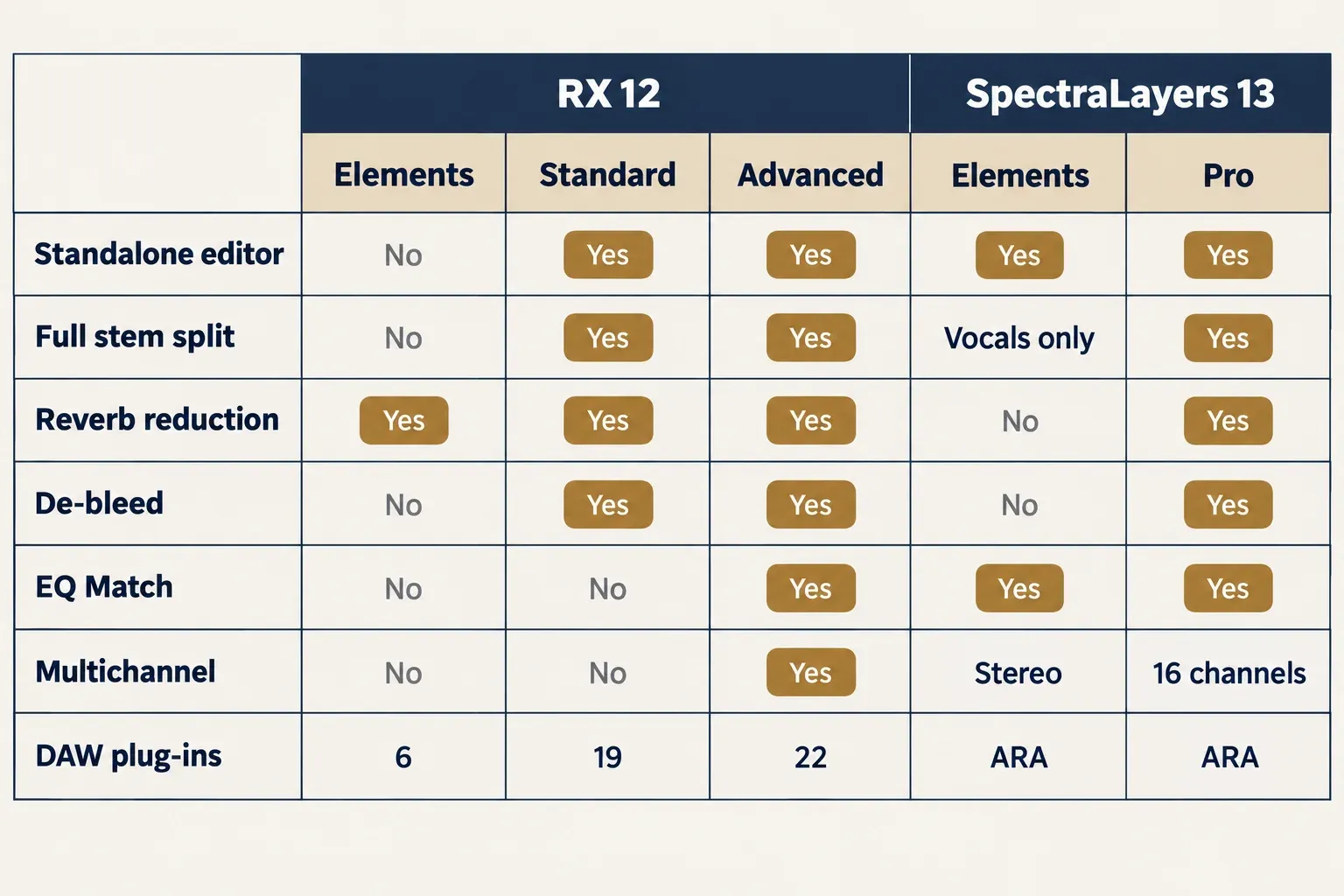
| Editions and US prices | Elements $99, Standard $399, Advanced $1,399 | Elements 13 $89.99, Pro 13 $359.99; Go comes bundled with some DAWs |
| Standalone editor | Standard and Advanced; Elements is six plug-ins with no editor | Elements and Pro, and the same editor runs inside a DAW through ARA |
| DAW plug-ins | 6, 19 or 22 plug-ins by edition; AU, AAX, AAX AudioSuite, VST3 and ARA formats | The editor as an ARA2 VST, ARA2 AAX and AAX plug-in in every edition |
| Channels and sample rate | Multichannel processing in Advanced only | Pro up to 384 kHz and 16 channels on Steinberg's chart (8 in the SpectraLayers 13 manual's table); Elements and Go stop at 96 kHz stereo |
| Full song split | Music Rebalance: vocals, bass, percussion, other (Standard, Advanced) | Unmix Song: vocals, drums, bass, guitar, piano, sax and brass, other (Pro only) |
| Free trial | 10 days from first launch, then Demo mode | 60 days with all features; a Steinberg ID is required |
| Operating systems | macOS 14.7, 15.8 and 26.x; Windows 10 22H2 and Windows 11 24H2 | macOS 14, 15 and 26; 64-bit Windows 10 or 11, version 21H2 or later |
| Hardware and activation | Authorization online, offline or with iLok | 8 GB RAM (16 GB recommended), 8 GB of disk; internet needed to activate |
iZotope's RX product page lists Elements as a $99 set of six plug-ins, so it is a DAW toolkit rather than a rival to SpectraLayers Elements as an editor. The 12.1.0 update, per iZotope's RX release notes, adds Boris FX license activation and new branding. Boris FX announced its purchase of iZotope on July 2, 2026 and said existing licenses and subscriptions stay active. The same company owns Sound Forge, Samplitude and Sequoia, all gathered on the Boris FX product hub.
SpectraLayers 13 is the newer major version. The SpectraLayers 13 new-features list adds Reconstruct, Voice DeClick, Voice DeCrosstalk, Unmix Two Voices and Unmix Sound Effects, plus batch processing of project tabs and an AudioSuite Bridge for Pro Tools that edits several clips at once, up to 16 channels. Pro 12 owners pay $89.99 to move up. According to Sonicstate's SpectraLayers 13 release report, anyone who activated Pro or Elements 12 or earlier from June 3, 2026 gets version 13 as a free grace-period update.
One clip at a time vs a stack of layers
The deepest difference is how each program holds audio. RX works on one file or clip at a time: you select a region, run a module such as De-click or De-ess and judge the result on that same clip. SpectraLayers keeps audio in layers, much like a photo editor. You can lift a sound onto its own layer, edit, mute or solo it there and leave the rest of the recording alone. MusicRadar's RX 11 vs SpectraLayers 11 comparison named this the most fundamental difference between the two.
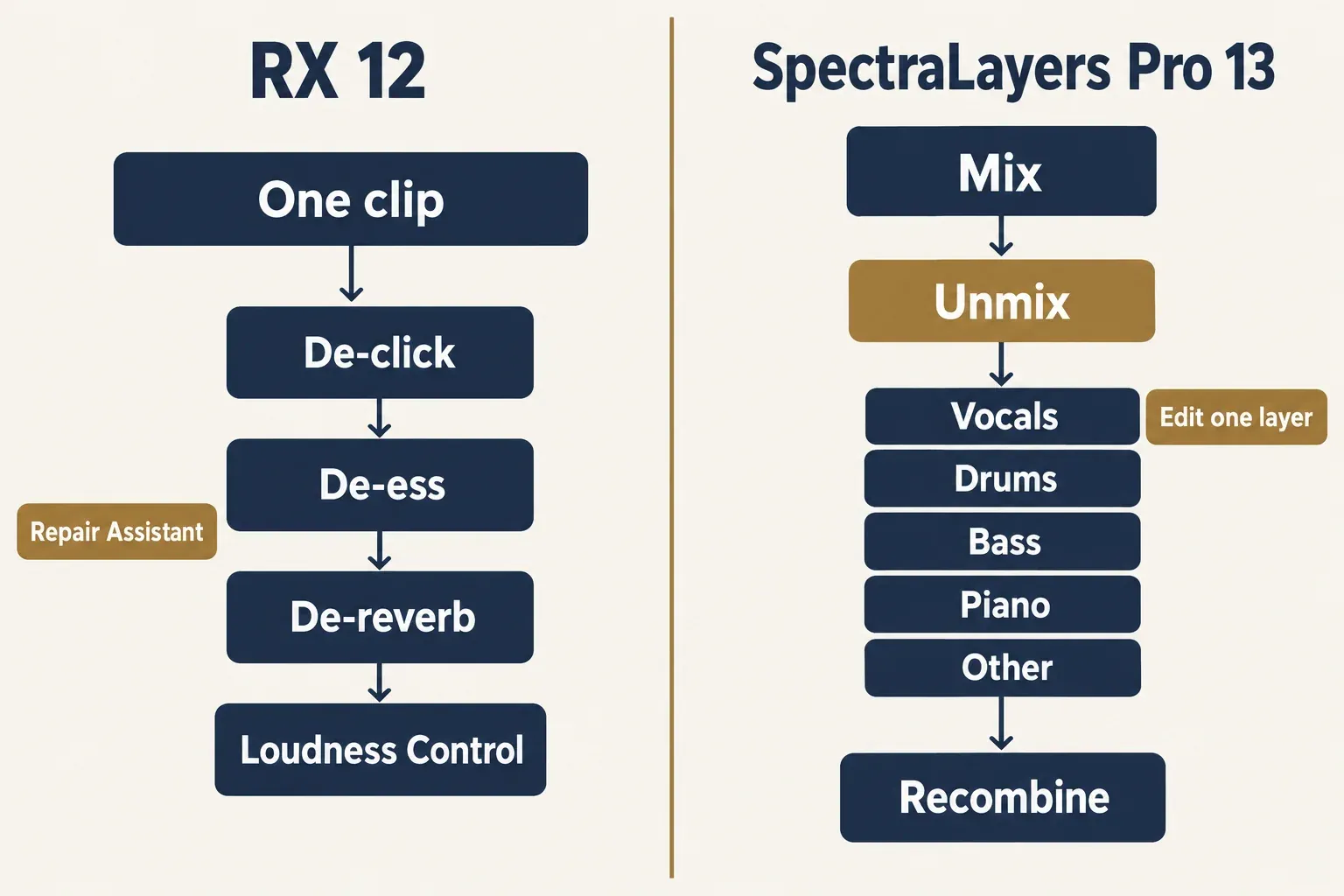
The editing tools follow from that model. Inside SpectraLayers, Pro is the edition with the full toolset: Heal, Transform, Lasso, Magic Wand, harmonic and transient selection and Clone Stamp are Pro-only, and Pro keeps 64 undo levels against 8 in Elements and Go. MusicRadar gave its spectrogram and cursor-tools round to SpectraLayers, and MusicTech's 2026 RX 12 vs SpectraLayers 13 comparison did the same for its layers and wider choice of mouse tools. RX answers with convenience in the display: MusicRadar noted that it adjusts spectrogram resolution to the zoom level for you, while SpectraLayers can tilt its spectrogram into a quasi-3D view.
Module design differs too. MusicTech found RX modules more tweakable, while SpectraLayers keeps parameter counts low and gets to a result faster. MusicRadar saw the same split in general noise reduction: RX gave better results when its extra controls were tuned, and SpectraLayers was quicker with its single-slider modules.
I would settle this point before reading any module list. If your day is a queue of single files with one known fault each, the one-clip model costs you nothing and RX's extra controls pay off. If you often need to lift one sound out, fix it and drop it back, such as a cough under a sung note or one drum hit in a loop, layers save the most steps.
Clicks, sibilance, noise, reverb and bleed: which tools lead
Most repair jobs exist in both programs under similar names, so the useful question is which version of each tool reviewers preferred. In RX, every module below sits in the RX Audio Editor in both Standard and Advanced, with EQ Match the Advanced-only exception, per the RX 12 edition tables. In SpectraLayers, Click Repair, Noise Reduction and EQ Match are in Elements and Pro, while Clip Repair, DePlosive, De-Esser, Reverb Reduction, De-Bleed and the Voice modules are Pro-only.
| Problem | RX 12 tool | SpectraLayers 13 tool | What reviewers found |
|---|---|---|---|
| Clicks, crackle and clipping | De-click, De-clip | Click Repair, Clip Repair | RX the easy victor (MusicTech 2026); SpectraLayers clip repair only slightly better on a completely trashed file |
| Mic pops | De-plosive | DePlosive (Pro), plus manual tools on a layer | Very little to separate the two modules (MusicTech 2026); removing pops by hand was easier in SpectraLayers for MusicTech and easy for MusicRadar |
| Sibilance | De-ess | De-Esser | RX De-ess in Spectral mode clearly ahead (MusicTech 2026) |
| Steady hiss and broadband noise | Spectral De-noise, Voice De-noise | Noise Reduction | RX better once tuned, SpectraLayers quicker (MusicRadar 2024) |
| Voice in loud, shifting noise | Dialogue Isolate | Voice DeNoise, Unmix Noisy Speech | SpectraLayers ahead in MusicRadar 2024 and MusicTech 2026; behind RX in Production Expert's 2025 shootout |
| Room reverb | De-reverb, Dialogue Isolate | Reverb Reduction | RX consistently cleaner (MusicRadar 2024) |
| Mic bleed | De-bleed, with a new ML mode in RX 12 | De-Bleed working across layers | Closely matched; RX's ML mode the easiest (MusicTech 2026) |
| Matching two microphones | EQ Match (Advanced) | EQ Match | Neither convincing; RX wins only by default (MusicRadar 2024) |
The pattern is consistent. RX leads on surgical fixes of one known fault: clicks, sibilance and room reverb. For mouth noise in voice work, the site's guide to removing mouth clicks from audio shows where a de-click pass fits. SpectraLayers leads when a voice has to be pulled out of loud, changing noise, where its machine-learning separation did better in both the MusicRadar and the MusicTech comparisons. On RX, that job belongs to Dialogue Isolate, and the guide to RX Dialogue Isolate settings covers its faders and Standard versus Advanced behavior.
Reverb is the reverse case. MusicRadar found RX's reverb removal consistently cleaner, and a 2024 user reply on the Steinberg forum thread about moving from RX also gave RX a slight edge on de-click and de-reverb, while calling SpectraLayers clearly superior for manual spectral repair. That is one user's view, but it matches the editorial reviews. If the problem is a roomy recording rather than a choice of software, removing echo from audio walks through the options.
Bleed is close. MusicTech reports that RX 12 gave De-bleed a new ML mode that recognizes vocals, guitars, pianos and drum-kit pieces, and found it the easiest and generally the best, while RX's Classic mode was on par with SpectraLayers' layer-based De-Bleed. Neither removes spill completely; both reduce it. Fixing it at the source is still the cheapest route, as the guide to reducing headphone bleed in vocal recordings explains.
Each program also has tools the other lacks. MusicTech lists SpectraLayers' Reverb Match and Voice Enhance with no RX equivalent, and RX's Loudness Control, Loudness Optimize and Streaming Preview with no SpectraLayers equivalent. It put RX marginally ahead on processing chains because Repair Assistant and Guitar De-noise wrap several fixes into one module. In its separate review, MusicTech found the new Voice DeCrosstalk and Unmix Two Voices slow to process but very accurate and clean.
Unmixing and stems
Both programs can split a finished mix. RX's Music Rebalance, in Standard and Advanced, separates vocals, bass, percussion and other instruments, offline or in real time, and RX 12 adds a Stems view and a Stem Split pane to work with the results. The RX Music Rebalance guide covers its settings and the vocal workflow.
SpectraLayers goes wider. The SpectraLayers Pro 13 Unmix Song manual page lists vocals, drums, bass, guitar, piano, sax and brass, and other, each placed on its own layer. The full Unmix Song is Pro-only; Elements and Go unmix vocals only. Pro also adds dedicated unmix modules for crowd noise, soundtrack, instrument, two voices, chorus, drums, noisy speech and multiple voices, and version 13 adds Unmix Sound Effects.
Reviewers agree on the winner. MusicRadar gave stem separation to SpectraLayers by a country mile in 2024. MusicTech gave it the 2026 round as well, for the wider range of separation tools, while rating extraction quality on par with RX. One caveat: MusicTech's SpectraLayers Pro 13 review notes that stem separation itself was not updated from version 12.
Plan for the hardware as well. SpectraLayers can use a GPU for its AI processing on Windows only, with an NVIDIA GeForce 900 series or newer, AMD Radeon RX or Intel Arc card and at least 6 GB of video memory, according to the SpectraLayers 13 system preferences page. A user in the Steinberg forum thread added that unmixing practically needs a PC with a suitable graphics card to run fast. For remix splits, karaoke versions or pulling one instrument out of a stereo file, I would choose SpectraLayers Pro.
What published comparisons found
Six independent sources from 2024 to 2026 weigh the two against each other: MusicRadar's eight-round RX 11 vs SpectraLayers 11 comparison (July 2024), MusicTech's five-round RX 12 Advanced vs SpectraLayers Pro 13 comparison (July 2026), MusicTech's SpectraLayers Pro 13 review (July 2026), Production Expert's dialogue noise shootout (June 2025), Production Expert's guide to RX alternatives (February 2026, updated April 2026) and one Steinberg forum thread (September 2024). None publishes a repeatable numeric quality score, so the composite below counts how many sources back each verdict.
| Job | Leader | Sources in agreement (of 6) |
|---|---|---|
| Layered and manual spectral editing | SpectraLayers | 3 |
| Voice in loud environmental noise | SpectraLayers, contested | 3, with 1 against |
| Stem separation | SpectraLayers | 2 |
| Clicks, sibilance and small glitches | RX | 2 |
| Reverb removal | RX | 2 |
| Finely tuned broadband noise reduction | RX | 2 |
| Convenience: plug-ins, Repair Assistant, loudness tools | RX | 2 |
| Overall capability | Close, with value to SpectraLayers | 4 |
The one hard contradiction is dialogue noise. In the Production Expert 2025 dialogue noise shootout, eight tools ran through four noise scenarios with settings chosen by ear. RX Dialogue Isolate placed second, third, third and fourth. SpectraLayers' Unmix Noisy Speech, run as the ARA version inside Pro Tools, landed at or near the bottom and never reached the top three. Neither iZotope nor CEDAR led: the winners were Hush Pro, dxRevive Pro and Supertone Clear. Those dedicated dialogue tools are compared in the roundup of the best iZotope RX alternatives.
Production Expert's 2026 view is kinder to Steinberg. Its guide to RX alternatives for restoration and dialogue cleanup calls SpectraLayers Pro a very viable alternative to RX Advanced and finds its modules often more capable than their RX counterparts, with fewer artifacts. It also notes that SpectraLayers has no dedicated De-wind or De-rustle, though Unmix Noisy Speech can usually handle that kind of noise.
On the overall verdict the sources line up. MusicTech called the 2026 comparison a draw on capability and gave SpectraLayers Pro the crown once price is counted, as long as you do not need RX-only tools. Its SpectraLayers Pro 13 review saw very little between SpectraLayers Pro 13 and RX 12 Advanced and called SpectraLayers the best price-to-performance spectral editor. MusicRadar concluded that neither is better overall, rated SpectraLayers slightly better value and found RX leaning slightly towards TV and film post and SpectraLayers towards music.
Conditions matter here. MusicRadar tested version 11 of both, and Production Expert's 2025 shootout did not state versions. Only MusicTech compared RX 12 with SpectraLayers 13, and it warns that results depend heavily on the specific recording and fault. My reading of the composite is simple: SpectraLayers leads when the job is separation, RX leads when the job is a precise fix of one known problem, and on dialogue in heavy noise neither one is the clear category leader.
Inside your DAW: plug-ins, ARA and round trips
RX's advantage in a session is its plug-ins. Elements ships 6, Standard 19 and Advanced 22, in AU, AAX, AAX AudioSuite and VST3, so many fixes run on a track without opening the editor. For bigger jobs, the RX Connect manual page describes a plug-in that sends one or more clips to the RX Audio Editor and back; it sits in the AudioSuite menu in Pro Tools and loads as an AU or VST3 plug-in elsewhere. The same page notes that some hosts do not support that round trip, and for Logic Pro, Premiere Pro and DaVinci Resolve it sets RX up as an external audio editor instead. Its RX Connect walkthroughs cover Audition, Pro Tools, and Cubase and Nuendo, and the RX 12.1.0 release notes fix an RX Connect message in Fender Studio Pro 8. The manual gives no round-trip workflow for Ableton Live, FL Studio or Reaper, so the chart below lists only the plug-ins for those hosts.
The RX Spectral Editor is RX's ARA plug-in, with Attenuate, Replace, Gain, De-click and De-hum modes. iZotope's product page lists it for Logic Pro 10.7 or later and for Studio One 7 and Studio Pro 8. Per the RX 12 Spectral Editor manual page, it also works in Pro Tools 2024.6 or later, and in Logic it runs only as an ARA 2 plug-in under Rosetta on Apple silicon. Avid's 2024 page on the RX Spectral Editor says Pro Tools users with an active subscription or upgrade plan can download it through Avid Link, so check that before buying anything.
SpectraLayers works the other way round: the whole editor opens inside the DAW. The SpectraLayers ARA host list includes Cubase and Nuendo 10.0.30, Pro Tools 2024.10, Samplitude Pro X5, Sequoia 16, Sound Forge Pro 14, Studio One 4.6, Reaper 5.98, Cakewalk 2019.05, Digital Performer 11.2 and LUNA 2.1, in each case that version or later. In Ableton Live, Final Cut Pro, Logic Pro, Reaper, DaVinci Resolve, FL Studio, ACID Pro and Vegas Pro, the SpectraLayers external editor manual page has you send audio across and return it with File > Replace Project Audio. Pro Tools 12 and later can also reach it through the SpectraLayers AudioSuite bridge.
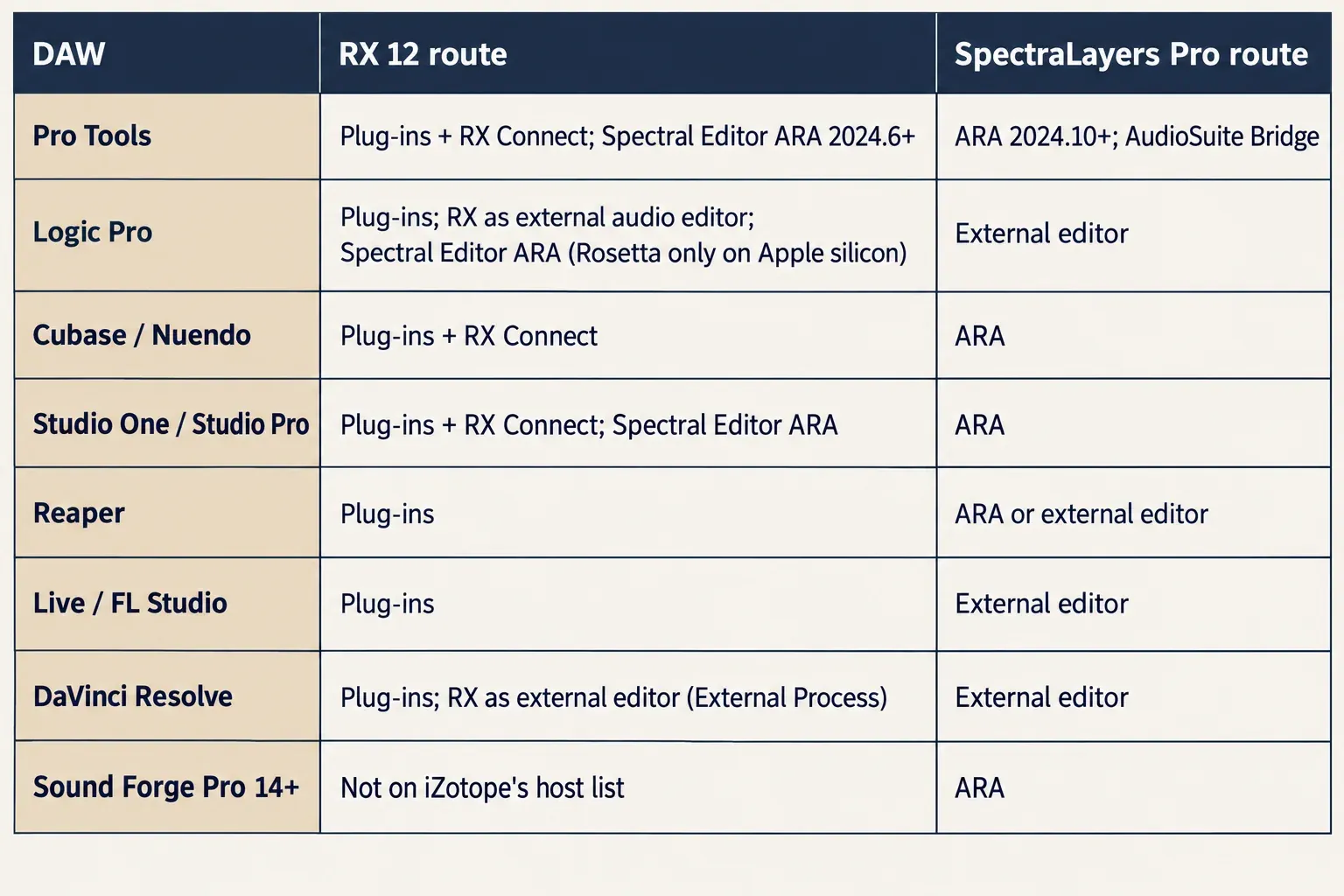
Sound Forge users have a clear answer. SpectraLayers Pro runs as an ARA plug-in in Sound Forge Pro 14 and later, while Sound Forge is not on the host list that iZotope confirms for RX 12 plug-ins. That does not prove RX plug-ins fail there, only that iZotope does not list it. If you want to pull a vocal out inside Sound Forge itself, the guide to removing vocals in Sound Forge covers that route. MusicRadar called DAW integration a dead heat in 2024, but host lists have changed since, so check your own DAW in the chart above.
Editions, prices, crossgrades and trials
Prices below are US store prices observed on October 21, 2026; they change, so check the store before you buy. MusicRadar argues that the fair match is SpectraLayers Pro against RX Standard, because RX Advanced adds tools aimed at TV and film post. MusicTech judged RX Standard's higher price justified by its standard plug-in versions of many modules.
| Purchase | iZotope RX 12 | SpectraLayers 13 |
|---|---|---|
| Entry edition | Elements $99 (six plug-ins, no editor) | Elements 13 $89.99 |
| Main edition | Standard $399 | Pro 13 $359.99 |
| Top edition | Advanced $1,399 | Pro is the top edition |
| Education | Advanced EDU $699.50 | Pro 13 EDU $199.99 |
| Update from the last version | RX 11 Advanced to RX 12 Advanced $269 | Pro 12 to Pro 13 $89.99 |
| Step up within the line | RX 12 Standard to Advanced $999 | Elements 13 to Pro $279.99; from Go, Cubase Pro or Artist 14 or 15, or Nuendo 14 or 15 to Pro $319.99 |
| Crossgrade into SpectraLayers Pro | RX 8 or later Standard, Advanced or Post Production Suite qualifies; Elements does not | $279.99; Adobe Audition and Acoustica 7 Premium or Post Production Suite also qualify |
| Rent instead | iZotope Plus $15/mo or $150/yr with RX Elements; iZotope Pro $25/mo or $250/yr with RX Standard | Pro 365: $169.99 for 365 days |
| Bundle | Post Production Suite $1,799, includes RX 12 Advanced | Go comes with Cubase Pro, Nuendo and Pro Tools, per Sonicstate |
| Free trial | 10 days, then a limited Demo mode | 60 days, all features |
A few details change the math. RX Elements has no editor at all, so it competes with SpectraLayers Elements only as a set of plug-ins; the RX Elements vs Standard vs Advanced comparison lists every module by edition. Elements 13 itself gets Click Repair, Noise Reduction, EQ Match and vocal-only unmixing, but stops at 96 kHz stereo. The iZotope Pro and Plus iZotope subscription plans start with a 7-day trial, and SpectraLayers Pro 365 is a 365-day license, not a perpetual one. The Go bundle detail comes from Sonicstate's release report rather than a Steinberg store page.
The trials are not equal either. RX gives 10 days from the first launch of the editor or a plug-in, then switches to Demo mode, where playback and automation still work but every control is disabled, per the RX 12 authorization guide. The RX 12 Standard download page describes Demo mode as periodic silence in the output instead, so I would judge the edition inside the 10 days rather than count on Demo mode for real work. SpectraLayers gives 60 days with no feature limits, per the SpectraLayers trial page, and you need a Steinberg ID for the activation code. The RX price, trial and license guide covers RX activation in more depth, and upgrade paths across iZotope products are in the iZotope upgrade pricing guide.
Which one to buy
Here is how I would decide, by the kind of work you do.
- Music producer or remixer: SpectraLayers Pro 13. It wins stems and layered editing in the reviews and costs less than RX Standard.
- Podcasts, voice-over and post dialogue: RX 12 Standard. Its de-click, de-ess and de-reverb tools lead, and the plug-ins run on tracks. Move to Advanced only for location dialogue that needs its extra post tools, such as Ambience Match, Dialogue Contour, de-rustling and multichannel processing.
- Loudness delivery for streaming or broadcast: RX 12 Standard, for Loudness Control, Loudness Optimize and Streaming Preview.
- You already own RX 8 or later Standard or Advanced: keep it and add SpectraLayers Pro through the $279.99 crossgrade. The two cover each other's weak spots.
- Tight budget: SpectraLayers Elements 13 at $89.99 if you want a standalone editor; RX Elements at $99 if you only want six repair plug-ins in your DAW.
- Pro Tools user: check what you already have first. SpectraLayers Go is reported as included with Pro Tools, and Avid's 2024 page offers the RX Spectral Editor to subscribers.
- Logic Pro user: RX's Spectral Editor ARA runs only under Rosetta on Apple silicon, so RX set up as an external audio editor (the route iZotope documents for Logic) or SpectraLayers as an external editor is the cleaner choice.
- Cubase or Nuendo user: SpectraLayers, which opens on the timeline through ARA; the step from Go or Cubase to Pro is $319.99.
- Sound Forge Pro 14 or later user: SpectraLayers Pro, which runs there through ARA.
- Prefer to rent: iZotope Pro at $25 a month includes RX Standard; SpectraLayers Pro 365 costs $169.99 for a year.
- Still undecided: run both trials on the same three or four problem files you deal with most often.
If your real shortlist is RX or Sound Forge rather than RX or SpectraLayers, the Sound Forge Pro vs iZotope RX comparison covers that choice. For a wider view across restoration tools, see the roundup of audio restoration software, and the iZotope RX hub collects every RX guide on the site.
FAQ
Does SpectraLayers replace RX for dialogue work?
Not completely. SpectraLayers' voice separation did very well in two editorial comparisons, but it placed at or near the bottom in Production Expert's 2025 dialogue shootout, and RX still leads on de-ess and de-reverb. For daily dialogue cleanup I would keep RX Standard as the main tool.
Which RX edition should I compare with SpectraLayers Pro?
RX 12 Standard. It is the closest in price and features, while RX Advanced adds post-production tools aimed at TV and film work.
Can RX owners get SpectraLayers Pro for less?
Yes. Owners of RX 8 or later Standard, Advanced or Post Production Suite qualify for the $279.99 competitive crossgrade. RX Elements does not qualify.
Which one has the longer free trial?
SpectraLayers, with 60 days and no feature limits. The RX trial lasts 10 days from first launch.