

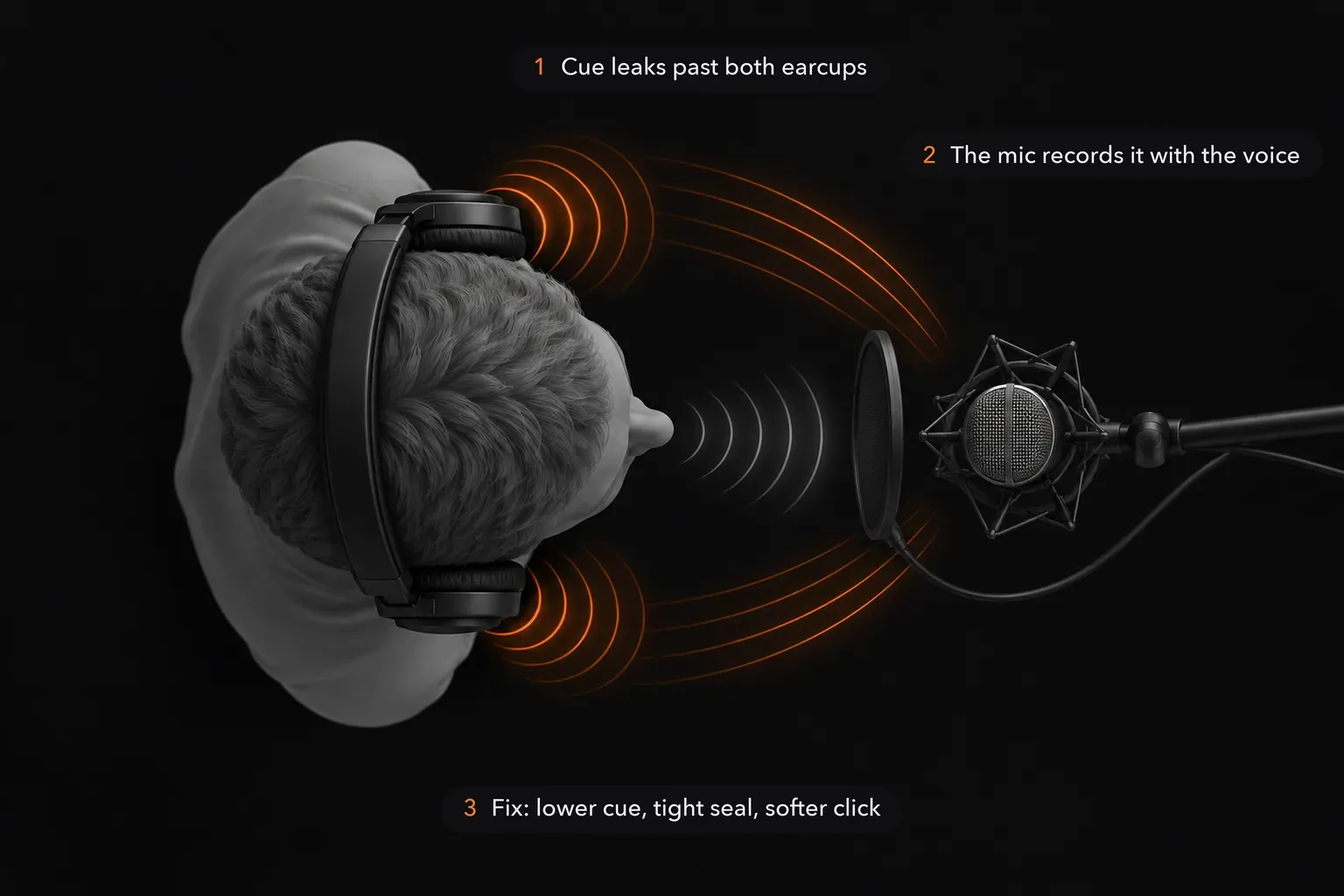
To reduce headphone bleed on the next take, lower the cue mix and check the seal around both ears. In an existing recording, reduce leaked clicks or music between phrases. If they overlap a word, a gate cannot separate them from the voice; compare another take or a specialist de-bleed tool before damaging the performance.
Keep the original take and work on a copy. Play a few seconds before and after each problem at the level you'll use for the finished vocal. If the click is audible only between phrases, you have room to edit it. If it lands on a consonant or a held note, turning down that moment turns down the performance too.
First, make sure it is headphone bleed
Listen to a section where the performer isn't singing. A regular tick that follows the cue click, or faint music that matches the headphone mix, points toward leakage from the earcups. An irregular tap may instead be handling noise or a physical knock; a constant electrical hum is another problem. Compare the timing with the original cue track if you have it. Don't label every sharp peak in the waveform as a leaked click until you hear it.
Also check whether the leaked sound is in the raw vocal file or only in a monitor or mix bus. Editing the vocal cannot fix a click that was added later in the playback chain. The recording troubleshooting guide is useful when the captured signal itself seems wrong.
Then decide whether the leak matters. In an r/audioengineering thread on headphone bleed, one reply warns that bleed which sounds offensive in a soloed vocal may be a non-issue in context, and another recordist says their headphones bleed noticeably yet it has never been a problem once the track is mixed. Some bleed even survives on finished records: Wikipedia's article on spill quotes engineer Dave Pensado, who called the headphone spill on a Christina Aguilera vocal “honest” and suited to the song. Find the leak with the vocal soloed, then judge any edit with the backing track playing.
Prevent the next take from leaking
Start with closed-back headphones that sit securely around both ears. Turn the cue down until the performer can still hear pitch and timing without a loud click escaping into the room. A softer click sound or a cue mix that needs less overall level may be easier to sing against. If the performer moves one cup off the ear, ask for a quick check: the exposed driver can become the loudest source in front of the mic.
Shape the cue as well as its level. In the same thread, one reply suggests EQing the headphone monitor mix so the singer gets enough to follow without feeding the mic, and another lowers or mutes the drum track because its sharp transients always poke through. Look at the earpads too: one recordist there found that very soft, wrinkled cushions leak more because they don't seal against the head. If closed-back headphones still leak, earbuds are the next step. In a HomeRecording.com thread about headphone bleed, one member wears cheap earbuds under unplugged closed-backs for an extra barrier. A singer who switched to in-ear monitors, though, found that the closed-in occlusion effect affected their phrasing and breathing; another member suggested a little sidetone, some of the singer's own voice in the ears, without overdoing it.
Record a few seconds with the headphones playing and the performer silent, then listen to the mic track alone. Repeat after any change to the cue level, fit or mic position. Distance and microphone orientation can help, but avoid moving the mic so far away that the voice becomes thin or the room takes over. A clean capture matters more than an elaborate repair later.
Choose the edit by where the leak lands
In a silent gap: reduce the short section or replace a suitable gap with ambience from the same recording. Leave enough of the natural breath and room sound for the phrase to flow.
At the edge of a word: use a very short level shape and audition the consonant in context. A click and a crisp consonant may occupy the same instant; the aim is a less distracting phrase, not an empty-looking waveform.
Under the voice: compare another take or arrange a pickup if possible. A gate responds to overall level; it cannot tell the headphone music from a simultaneously sounding vocal. Specialized de-bleed processing is a separate option, but check whether it improves the actual words before keeping it.

Reduce a click between phrases in Sound Forge
Select the affected gap in your working copy. Sound Forge Pro 2026 documents Process → Volume: a negative Gain value attenuates the selected audio. Make the selection before opening it, because with nothing selected the command changes the entire file. Try a modest reduction and listen across both joins. Muting every gap can make the room suddenly disappear.
For a more gradual dip, the documented Process → Fade → Graphic command lets you shape the level of the selection with an envelope. Keep its low point around the click and return to the original level before the next syllable. The room-tone guide covers filling a pause when a deep dip leaves an obvious hole.
A Noise Gate can suppress signal below a set threshold during breaks. That is helpful only when the leak is quiet enough and the voice or desired breaths stay above the threshold. If the click remains above it, the gate opens on the click; if a word tail falls below it, the tail can vanish. For threshold, attack and release decisions, use the separate Noise Gate guide. For a few isolated ticks, a local edit is often easier to judge than gating the whole take.
What if the click or music is under a word?
Listen for the vowel, consonant and timing you need to keep. A negative gain change to the whole section reduces both the voice and the leak. Heavy broadband cleanup may make a click less obvious while softening the singer's diction. If an alternate line exists, compare its tone and phrasing; if a pickup fits, that may preserve the performance better than processing. Don't splice fragments into a different statement in spoken-word material.
For a valuable take, iZotope lists De-bleed in RX Standard and Advanced. According to the RX 12 De-bleed documentation, the module's main mode now uses machine learning and asks which source to keep, such as Vocals, while Classic mode keeps the RX 11 method: it learns the leak from a separate bleed-source track, such as the clean click, which must match the vocal's sample rate and line up with it within a few milliseconds. SpectraLayers Pro 13 also lists DeBleed among its repair processes, as the restoration software comparison notes. These are external restoration products, not Sound Forge features, and the result still needs a before-and-after listen at matched level. A clear rhythm in the background is not proof that the overlapping vocal can be perfectly separated. Check consonants, breaths and word endings against the original; the AI audio restoration guide explains how to compare a processed voice.
Listen once more after the mix changes
Check the edit with the backing track, then solo the vocal again. Compression or a louder final balance can expose a faint click you did not notice in the raw take; an overdone gap can also sound more conspicuous once the track is mixed. Stop when the cue no longer draws the ear and the line still sounds like a person singing, not a row of disconnected syllables.