
Acid Pro 2026 is worth buying if you build music from loops on Windows: it is still the quickest way to paint key- and tempo-matched loops onto a timeline and lock them to picture, and the Boris FX US store sells it for $149.95 perpetual with one year of upgrades, $69.95 a year or $12.95 a month (prices on October 21, 2026). Acid Pro 11 owners who bought from MAGIX on or after January 1, 2026 get the 2026 version free; earlier buyers pay $89.95. Skip it on a Mac, and run the trial before paying if your sessions lean on third-party instruments.
My rule is simple. Buy Acid Pro when loops come first and your plug-in list is short, because that is where every review since 2009 agrees it shines. If your music depends on a dozen third-party synths, spend the 15 trial days loading exactly those synths before you spend money. Acid Pro now sits in the same Boris FX family as Sound Forge, Samplitude and Sequoia, and the Boris FX audio hub shows which of those tools covers which job.
Verdict: who should buy Acid Pro 2026
Acid Pro 2026 is a buy for loop-first producers and for anyone scoring short videos on Windows. For everyone else, the decision turns on platform, purchase history and plug-ins.
| Buyer | Verdict | Why |
|---|---|---|
| Loop and beat makers on Windows | Buy | Acidized loops follow the project key and tempo, and the Chopper, MPC slicing and grooves cover beat building without extra tools. |
| Music for video, trailers and intros | Buy | Hit-point markers make Acid Pro adjust the tempo so musical moments land on picture events. |
| Acid Pro 11 owner, MAGIX purchase on or after January 1, 2026 | Upgrade (free) | Boris FX gives a complimentary upgrade on request with MAGIX proof of purchase. |
| Acid Pro 11 owner, earlier purchase | Upgrade for $89.95 only if you want the new content | The 2026 additions listed by Boris FX are loops, songs and sound sets, not new engine features. |
| Producer with a heavy third-party VSTi session | Trial first | Owner reports from the MAGIX era tie crashes to third-party instruments, effects and VST3. |
| Producer settled in Ableton Live, Bitwig Studio or FL Studio | Skip | Reviewers have named these as Acid's competition for years, and Computer Music judged Acid unlikely to convert users of other DAWs. |
| Mac user | Skip | Acid Pro is Windows only; the current requirements list Windows 11. |
My pick for a new buyer is the perpetual license. If you skip renewals, it costs less than the annual plan from the third year on, and you decide when an upgrade is worth paying for.
Acid Pro 2026 vs Acid Pro 11: what actually changed
The biggest change is the owner, not the engine. Boris FX announced its acquisition of Vegas Pro, Sound Forge and Acid Pro from MAGIX on March 30, 2026, and the development teams in Madison, Wisconsin, and Germany stayed with the products. In its follow-up post, Boris FX placed Acid Pro in its Pro Audio division alongside Sequoia, Samplitude, CrumplePop and Music Studio. That is the program's third home: Acid started at Sonic Foundry, moved to Sony Creative Software, and went to MAGIX in 2016, as Sound On Sound's Acid Pro 8 review recounts.
Acid Pro 2026 is the version Boris FX sells now. Every item in the "What's new in Acid Pro 2026" block of the Acid Pro product page is content: nearly 1,000 loops, one-shots and songs; 15 produced songs with more than 1,100 editable MIDI parts and more than 90 DLS instrument patches; and the Essential Sounds I, II and III collections with more than 800 Acidized elements. The product page lists no engine changes alongside that content.
| Item | Acid Pro 11 (MAGIX, 2022) | Acid Pro 2026 (Boris FX) |
|---|---|---|
| Seller | MAGIX | Boris FX |
| Editions | Acid Pro 11, Acid Pro 11 Suite, Acid Pro 365 monthly and yearly | One product: perpetual license, annual or monthly subscription |
| Included loops | 9 GB; up to 15 GB in Suite | Nearly 3 GB of royalty-free loops per the product page; the requirements reserve up to 16 GB for included instruments and loops |
| Third-party plug-ins in the box | Brainworx effects by edition; Ozone 9 and Melodyne 5 Elements or Essential in some editions | None listed on the product page; the online help says Melodyne Essential is included |
| Windows | Windows 10 and 11 | Windows 11 |
The Acid Pro 11 column comes from Gearnews' Acid Pro 11 launch report. Do not budget for those 2022 bundles: the current product page does not list Brainworx or Ozone, so treat them as part of Acid Pro 11's history. The two content figures for 2026 also differ because they measure different things, the loops advertised on the product page and the disk space reserved for everything installed.
The engine has moved in small steps for a while. In a 2023 MAGIX forum thread comparing versions 10 and 11, the accepted answer said there was not much difference: bug fixes, more store content and the Brainworx plug-ins. If your copy of 11 runs your plug-ins without trouble, 2026 is a content refresh and a new support home, not a new program.
Test results: what six published reviews and owner threads show
In a composite of six published sources, four editorial reviews and two owner threads from 2022 and 2023, the result is consistent: the loop workflow is Acid's strength, slow core development is its weakness, and stability depends on your third-party plug-ins. No scored review of Acid Pro 2026 has been published, and the only published score is Computer Music's 7/10 for Acid Pro 7 in 2009, so this is a count of reviewer verdicts rather than an average.
| Finding | Agreement | Evidence |
|---|---|---|
| Painting loops onto a timeline with automatic key and tempo matching is the core strength | 4 of 4 editorial sources | Sound On Sound (2019): nothing else does this "in quite the same way or as quickly"; Sound On Sound (2018): "a worthy contender" for a first serious DAW; Computer Music (2009): "a great update to a solid app"; Filmora: loop drag-and-drop "still one of the smoothest in any DAW" |
| Core development is ageing or slow | 4 of 4 editorial sources | Sound On Sound (2019): most core features apart from Stem Maker and MPC "now quite old"; Sound On Sound (2018): nearly ten years since the previous major update; Computer Music (2009): "playing catch-up"; Filmora: "slower updates, outdated interface" |
| Instability is tied to third-party instruments, effects or VST3, not the loop engine | 3 of 4 sources that discuss stability | KVR (2022): 4 of 8 posts report crashes or bugs, a fifth advises avoiding VST3; MAGIX forum (2023): one reply warns of instability with VST instruments and effects; Filmora: most crashes come from poorly optimized third-party VSTs; Sound On Sound (2018): no obvious problems |
| Little core difference between Acid Pro 10 and 11 | 2 of 2 direct comparisons | MAGIX forum (2023): bug fixes, store content and Brainworx plug-ins |
| Ableton Live is the main rival | 3 of 4 editorial sources | Sound On Sound (2018) names Ableton Live, Bitwig Studio and FL Studio; Computer Music (2009) rates Beatmapping below Live's; Filmora says Acid may feel dated next to Ableton Live or FL Studio |
| Value is good for a first DAW; upgrade structure draws criticism | 2 of 4 editorial sources discuss value | Sound On Sound (2018): "good value for money"; Sound On Sound (2019): "complicated version structure, with no affordable upgrade path" |
The strongest single line comes from Sound On Sound's 2019 review of Acid Pro Next: if you make music by painting loops onto a multitrack timeline, nothing else does it in quite the same way or as quickly. The same review called the core program "still" the best approach to loop-based composition while listing its old core features and complicated versions as the main cons. Three years later, MusicRadar's Acid Pro 11 launch coverage described it as still one of the easiest options for sequencing audio loops of different tempi and pitches.
The historical score is Computer Music's 7/10 for Acid Pro 7, published in January 2009. Its summary still reads true: a great update to a solid app that is unlikely to convert users of other DAWs. It also listed Beatmapping as inferior to Live's.
Stability is where owners disagree, and the pattern is clear. In a 2022 KVR thread about Acid Pro 11, four of eight posts reported crashes or plug-in bugs, a fifth said it runs fine only if you avoid VST3, and two reported stable older versions. Wondershare's Filmora review calls Acid Pro stable overall and blames most crashes on poorly optimized third-party VSTs; give it low weight, since a competing vendor published it. On the other side, Sound On Sound's 2018 review of Acid Pro 8 reported no obvious technical difficulties with included or third-party plug-ins. Every one of these reports covers MAGIX-era versions that predate the Boris FX release.
My verdict from that evidence: Acid Pro is the most direct loop arranger on Windows and a mature, slow-moving DAW around it. These reports rarely blame the loop engine itself. Your plug-in set is the variable, and the 15-day trial is where you settle it.
How the loop workflow works
Acid's core idea has not changed since 1998: drop a loop on the timeline and it plays in your project's key and tempo. Boris FX's product page describes every included Acid loop as "acidized," meaning it automatically matches the key and tempo of the project. Live preview lets you audition loops in real time while the song plays, so you choose by ear in context rather than in isolation.
The Acid Pro 2026 help on media types separates four kinds of material, and knowing them avoids most early confusion:
- Loops repeat and follow the project tempo and key.
- One-shots do not change tempo or key, and they stream from disk instead of loading into RAM, which suits long hits, effects and spoken parts.
- Beatmapped clips are longer files, such as full songs, mapped so they can follow tempo changes.
- MIDI clips drive soft synths and external instruments.
The Beatmapper Wizard opens by default for files longer than 30 seconds; you can change that threshold in the Audio tab of Preferences. The project tempo range is 40 to 300 BPM. If you only know a reference track by ear, a tap tempo counter gives you a starting BPM before you set the project tempo.
The product page describes the included library as nearly 3 GB of royalty-free loops, and the 2026 additions bring nearly 1,000 more loops, one-shots and songs covering drums, guitars, synths, vocals and effects. That is enough material to sketch full tracks before you buy a single sample pack.
Chopper, MPC, grooves and the included instruments
Beat building happens in three tools. The Chopper lets you select parts of a clip and place them as events or turn them into new loops, which is how you make stutters and new lines from a single phrase. The MIDI Playable Chopper (MPC) plays those slices from a keyboard or pad controller while the Chopper window is open, starting at C4 (MIDI note 48) for the first slice.
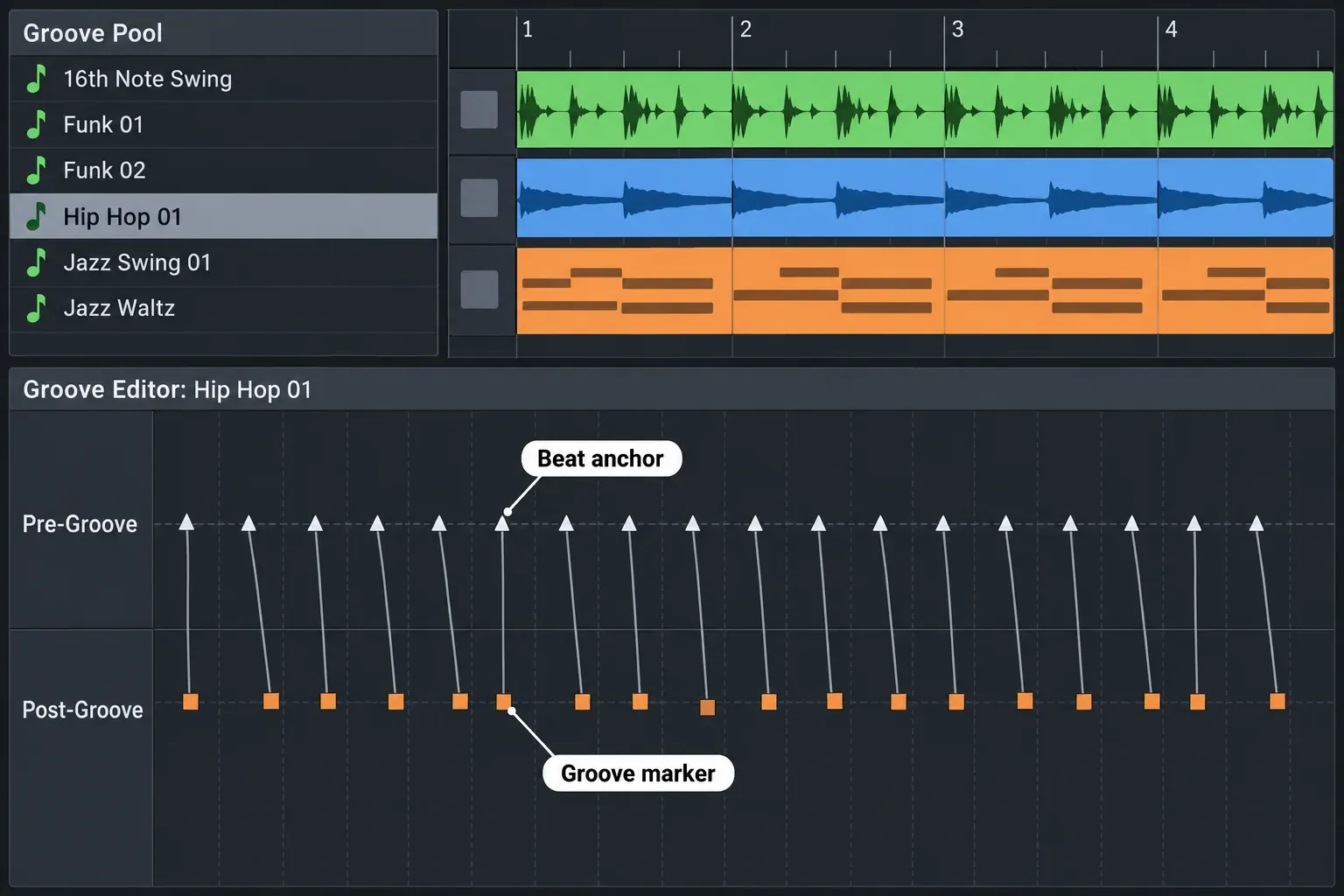
Grooves handle feel. In the Groove Pool, opened from the View menu, groove maps change timing nondestructively and in real time. You can apply one groove to a whole track or part of it, extract a groove from an existing audio file, or create one from scratch. One limit matters: grooves cannot be applied to tracks that contain Beatmapped clips, so keep full-song material on its own track.
The included instruments cover the basics. Vita Sampler slices samples across eight drum pads and loads WAV, AIFF, OGG and MP3 files. Vita is a sample-based instrument for realistic acoustic sounds, and DN-e1 is a subtractive virtual analog synth. If pad-based chopping is your main job, compare Vita Sampler with the dedicated tools in the sampler software guide before you decide it is enough.
For performance effects, Morph Pads hold up to 12 multi-effect pads, each assigned to tracks or the master and controlled from X-Y pads. They arrived with Acid Pro 11 in 2022, so they are not a reason for an 11 owner to upgrade.
Plug-ins, VST3 and Melodyne
Acid Pro hosts DirectX, VST2 and VST3 effects and VST instruments, and plug-ins are where your trial should focus. VST instruments run on MIDI tracks. The Plug-In Manager organizes DirectX and VST plug-ins and ReWire devices. Anything that fails or times out during scanning goes to the Failed folder, cannot be used there, and can be rescanned from the right-click menu. VST3 support arrived in an Acid Pro 8 update. If formats are new to you, the guide to what a VST plugin is explains instruments, effects and compatibility.
Melodyne works differently from an ordinary insert. Since Acid Pro 9, Melodyne integrates through ARA2, and it needs Melodyne 4 or later. You open it on an event with Edit Event with Melodyne or Shift+M; the help states that you cannot load the Melodyne VST plug-in through the Plug-in Chooser. The same help page says Melodyne Essential is included with Acid Pro, while the product page does not mention it, so check your Boris FX account after installing before you count on it. Sound On Sound's 2019 review found Essential bundled only as a conventional plug-in without ARA in Acid Pro Next; the 2026 help describes the ARA2 route instead. To see which Melodyne edition fits your editing, read the Melodyne Essential vs Assistant comparison.
Three more details help heavy sessions:
- Freeze works only on MIDI tracks routed to soft synths; it is unavailable for tracks routed to MIDI or ReWire devices.
- ReWire: Acid Pro can act as a ReWire mixer or as a ReWire 1.0 device.
- Buffers: the troubleshooting help warns that very high buffer values can cause latency that looks like an application crash. Before you blame a plug-in, check the buffer, and use the audio latency calculator to see what a setting costs in milliseconds.
One older interface limit is worth checking in the trial: Sound On Sound's 2018 review of Acid Pro 8 noted that only one plug-in's parameters could be edited at a time, so two tracks' effects chains could not sit side by side.
Recording, mixing and loudness delivery
Acid Pro covers a full mix, not only loop arranging. It records multiple mono or stereo tracks while playing back audio and MIDI, including punch-in recording into a time selection, and the product page lists advanced bussing and unlimited audio, loop and MIDI tracks. Sidechaining uses the SidechainSender plug-in, does not work in surround projects, and expects third-party compressors to take the sidechain on inputs 3/4. Acid Pro also creates and renders 5.1 surround mixes.
The Loudness Meters read the master channel's momentary loudness (400 ms window), short-term loudness (3 s window), integrated loudness and loudness range. In EBU R 128 mode the integrated target is −23 LUFS with a −1.0 dBFS true-peak maximum; in ATSC A/85 mode it is −24 LUFS with −2.0 dBFS. Those are broadcast targets. For music releases, check the streaming loudness standards platforms publish, read what true peak means for codec headroom, and confirm a finished file with a free online LUFS meter.
For delivery, Render As can save each track as a separate file, which gives you stems for a mix engineer or a video editor. Detailed editing of a single file belongs in an audio editor: with Sound Forge set as the editor in Preferences, Tools > Edit in Sound Forge opens the clip there. The Acid Pro vs Sound Forge comparison explains how the two programs split the work.
Scoring to video with hit points
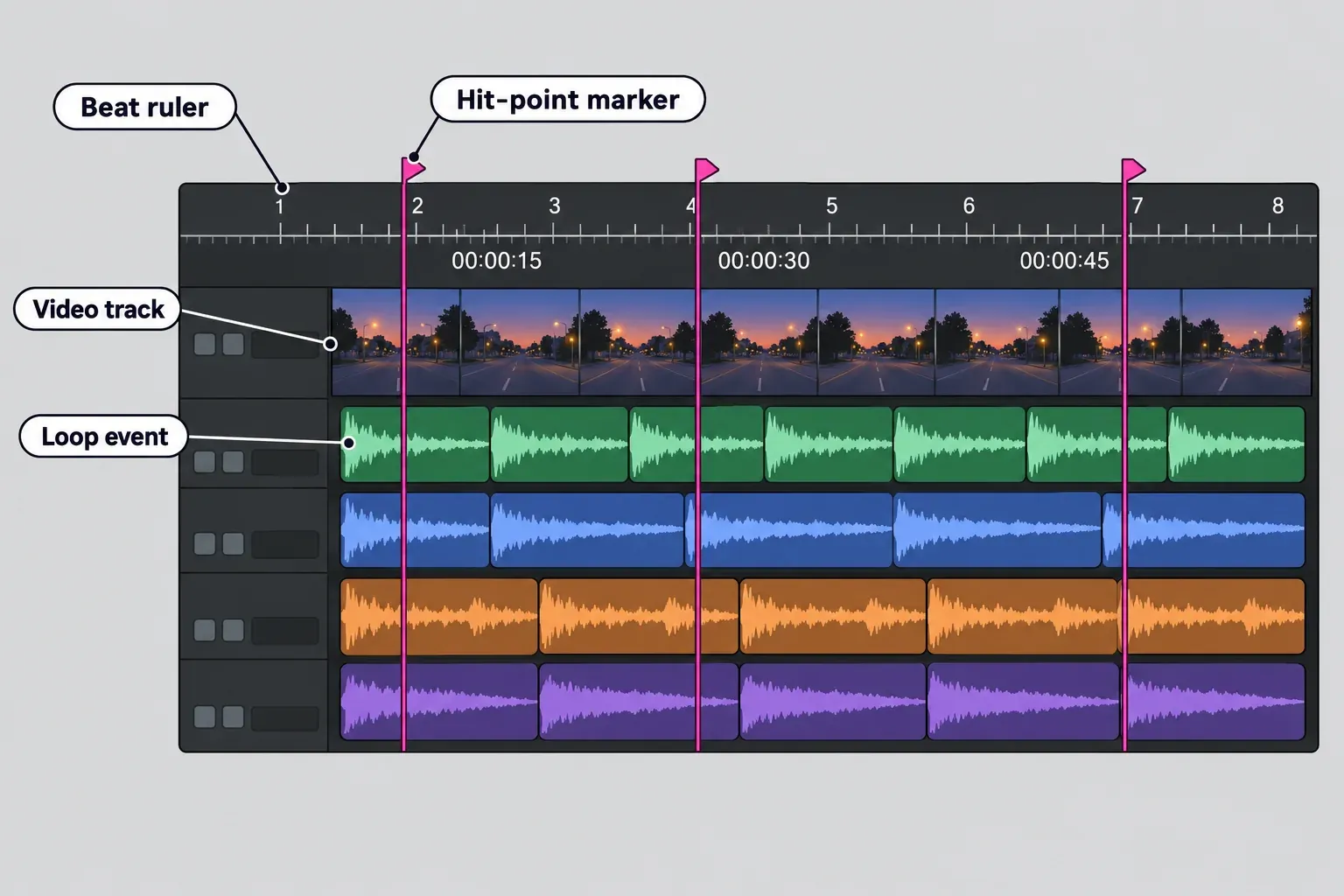
Acid Pro is a practical scoring tool for short videos because it bends the music to the picture. According to the help on the video track, video always goes on the top track, and the file's own audio lands on the timeline as a one-shot. You drop hit-point markers on the moments that matter in the audio and the video, and Acid Pro adjusts the tempo automatically to keep them in sync.
The Acid Pro system requirements list AVI, WMV and MP4 (H.264) video for import, and the export column shows no video format. Plan to render the music as a mix or as stems and place it in your video editor. If that editor is Vegas Pro, the Sound Forge and Vegas Pro workflow covers the dialogue and effects side of the same edit.
Acid Pro price and licensing in 2026
Acid Pro costs $149.95 for a perpetual license with one year of upgrades and support, $69.95 a year or $12.95 a month in the Boris FX US store on October 21, 2026. These are the same figures Boris FX published at the March 30 launch, and the Acid Pro pricing page pulls from the same store.
| Option | US price, October 21, 2026 | What you get |
|---|---|---|
| Perpetual license | $149.95 | Permanent license with one year of upgrades and support |
| Annual subscription | $69.95 a year | Current version while you subscribe |
| Monthly subscription | $12.95 a month | $155.40 over 12 months, more than twice the annual plan |
| Upgrade & Support renewal | $89.95 | Another year of upgrades for a perpetual license |
| Upgrade & Support reinstatement | $109.95 | Restarts a plan that has lapsed |
| Upgrade from a MAGIX serial | $89.95 | Acid Pro 2026 for owners of a qualifying MAGIX Acid Pro 11 license |
Over three years, the annual plan costs $209.85. The perpetual license costs $149.95 if you never renew and $329.85 with two Upgrade & Support renewals. If you never renew, the annual plan is cheaper only for the first two years.
My pick is the perpetual license, renewed only when an upgrade brings something you will use. Letting the plan lapse costs $20 more when you come back ($109.95 instead of $89.95), which is cheap insurance against paying for years with no changes you need. Take the monthly plan only for a project shorter than five months. For current Boris FX audio promotions, check the deals page before you buy.
Upgrading from Acid Pro 11
Your MAGIX purchase date decides the route. The FAQ on the Boris FX Acid Pro page sets out three cases:
- Bought Acid Pro 11 from MAGIX on or after January 1, 2026: email sales@borisfx.com with your MAGIX proof of purchase for a complimentary upgrade to Acid Pro 2026.
- Bought before January 1, 2026: in the Boris FX store, choose Upgrade, sign in or create a Boris FX account with the same email address as your MAGIX purchase, then select your Acid Pro 11 serial number. The MAGIX-serial upgrade costs $89.95.
- Acid Pro 11 subscription through MAGIX: Boris FX says it is transitioning these subscriptions to Acid Pro 2026 "over the coming weeks," without a completion date; email sales if you need help sooner.
Do not wait for the MAGIX-owner offer that runs until December 5, 2026. The acquisition announcement names Vegas Pro and Sound Forge owners for that offer; Acid Pro is not named.
My call: take the free upgrade if you qualify. If you pay $89.95, do it for the new loops, songs and sound sets or for support from the new owner. If your 11 install is stable and you do not need the content, there is no rush.
Trial and system requirements
Boris FX offers a 15-day full-featured Acid Pro trial, installed through the Boris FX Hub, where you choose "Request an Unrestricted Trial of Acid Pro after installation" and then "Start Free Trial." The bundled loops and content come only with the full version, so during the trial you work with your own audio, VSTs and MIDI. That makes the trial a test of your plug-ins and workflow, not of the loop library.
| Requirement | Acid Pro 2026 |
|---|---|
| Operating system | Microsoft Windows 11 (no Mac version) |
| Processor | 1 GHz; multicore or multiprocessor recommended |
| RAM | 1 GB minimum, 8 GB recommended |
| Graphics | Onboard, minimum 1024 x 768 |
| Storage | 700 MB for the program, plus up to 16 GB for included instruments and loops |
| Audio formats | AIFF, FLAC, MP3, OGG, W64, WAV and WMA, import and export |
| Video formats | AVI, WMV and MP4 (H.264) import |
The listed minimums are low; treat the recommended 8 GB of RAM as your floor if you plan to run several VST instruments. Plan where the content goes, too: Sound On Sound's 2019 review complained that the Acid Pro Next installer put about 24 GB of loop content on the system drive. That was a MAGIX-era installer, but a small system SSD still deserves a check before the full install.
Use the 15 days on the things that decide the purchase:
- Load your three most important instruments and effects, including any VST3 versions, in one project.
- Open the Plug-In Manager and check the Failed folder; rescan anything that landed there.
- Run a full-length song through the Beatmapper and change the project tempo.
- Import a short video, place hit points on two cuts and confirm the music lands on them.
- Render the project with Render As, one file per track, and open the stems in your editor.
Who should skip Acid Pro
Skip Acid Pro if any of these describe you:
- You work on a Mac. Acid Pro is Windows only.
- Your sessions depend on many third-party instruments and the trial is not clean. The owner reports point at that path, and a fast loop engine does not help if your main synth crashes.
- You are already productive in Ableton Live, Bitwig Studio or FL Studio. Sound On Sound named those three as Acid's competition in 2018, and Computer Music judged in 2009 that Acid was unlikely to convert users of other DAWs. Nothing in the 2026 content list changes that.
- Your real job is editing single files. Restoration, detailed waveform edits and mastering a finished file belong in an audio editor such as Sound Forge.
FAQ
Is Acid Pro free?
No. Acid Pro is a paid product with a 15-day full-featured trial, and the bundled loops come only with the full version.
Is there a Mac version of Acid Pro?
No. Boris FX lists Acid Pro as Windows only, with Windows 11 in the system requirements.
Is Acid Pro 11 still the latest version?
No. Acid Pro 2026 is the current version, sold by Boris FX since it acquired the product from MAGIX in 2026. Acid Pro 11 owners have free or $89.95 upgrade routes depending on their purchase date.
Does Acid Pro support VST3?
Yes. Acid Pro has hosted VST3 plug-ins since version 8, alongside VST2, DirectX effects and VST instruments.
Is Melodyne included with Acid Pro 2026?
The Acid Pro 2026 online help says Melodyne Essential is included and integrates through ARA2, but the product page does not list it. Check your Boris FX account after installation before you plan around it.