

Quick answer: Sound Forge Pro can reduce a lead vocal when that vocal sits in the shared center of a true stereo mix. The native method uses Channel Converter to subtract one channel from the other. It can be useful for a rough practice track, but it also removes any kick, bass, snare, lead instrument, or other sound that matches in both channels. For a more selective split, use a compatible, separately installed SpectraLayers edition through Sound Forge’s ARA command. Elements 13 and Go offer a vocal/instrumental split; Pro 13 adds the full set of instrument stems.
Choose the Vocal-Removal Method by the Required Result
| Required result | Best starting point | Main compromise |
|---|---|---|
| Professional remix or release | Licensed original stems | Requires source access and permission |
| Clean ready-made backing track | Official instrumental | May not exist for the song |
| Editable vocal and instrumental split | SpectraLayers Unmix Song | Bleed and resynthesis artifacts |
| Fast rehearsal or rough karaoke file | Channel Converter center cancellation | All matching center content is affected |
| Mono or heavily widened source | Stem separation or a better source | Center cancellation cannot identify the vocal |
For karaoke, you need less audible singing. For an acapella, you need the opposite output: voice without backing. Channel subtraction does not identify either source. Use source separation when you need independently editable vocal and instrumental layers.
How Center Cancellation Works
Many stereo masters place the lead vocal at similar level and polarity in the left and right channels. Write the channels as L = C + SL and R = C + SR, where C is content shared by both channels and S is the channel-specific content. Subtraction gives L - R = SL - SR. The identical center term disappears.
The equation explains the loss of center content. It removes matching information, not “the vocal.” A centered kick can disappear while a stereo vocal reverb remains. If L and R are identical, as in a mono recording copied to two channels, their mathematical difference is zero. Near-identical channels leave a quiet residual.
Sound Forge Pro's current Channel Converter help documents source gain, output routing, and Invert Mix controls. It doesn't name the old Stereo to Stereo - Vocal Cut factory preset repeated in many legacy tutorials. Treat that name as historical guidance, not a guaranteed 2026 preset. The 2004 Sound On Sound explanation of the karaoke effect supports the subtraction principle, not a current Sound Forge menu label.
Old Audio Studio tutorials may instead mention Vocal Eraser. A 2014 MAGIX forum discussion distinguishes that historical plug-in from Sound Forge Pro 10. It is not evidence of a bundled 2026 tool. If Channel Converter is absent, check your installed edition against its own manual rather than following a Pro menu path.
Remove a Centered Vocal with Channel Converter
- Preserve the original. Make an untouched copy outside Sound Forge before processing. Use a separate working file so an accidental Save cannot overwrite the only source.
- Start with a stereo lossless source. Use the best WAV or FLAC available. Saving decoded MP3 audio as PCM WAV avoids another lossy encode at that save; it cannot restore discarded detail.
- Confirm true stereo. Check that there are two channels. Similar-looking waveforms are only a warning, not proof that the samples match. Test the difference on a separate short file before deciding whether the mix is suitable.
- Invert the right channel first. Open a separate short stereo test file. With the Edit tool, unlock Lock Channel Selection if needed, then drag within the right channel only over the entire test. Confirm that only the right channel and the complete time range are highlighted, then choose Process > Invert/Flip. With no data selected, the entire file is inverted, which will not create the required difference.
- Create one mono difference output. Select the complete test and both channels; unlock channel selection if necessary and drag along the channel divider. Choose Process > Channel Converter, set Output channels to 1, Source 1 to 50.0% and Source 2 to 50.0%, and leave Invert Mix off. These are percentage gains as shown in the current help illustration. Click OK. Because the right source was already inverted, the intended output is 0.5 × (L − R), not the usual 0.5 × (L + R).
- Test several difficult sections. Repeat the test on separate copies of a dry vocal line, dense chorus, bass-heavy passage, cymbal hit and reverb tail. One easy verse is not enough evidence.
- Render and run mono QA. Save the mono test as a new PCM WAV and reopen it. Compare at matched listening level, keeping playback volume comfortable. If acceptable, repeat both operations on an untouched full-length working copy: invert only the right channel over the entire song, then convert both channels. Do not invert an already processed test again.
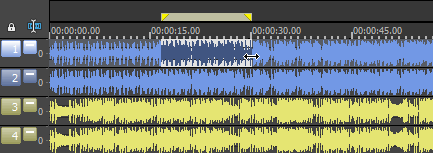
The channel-selection instructions show how to select the right channel without selecting the left. Invert/Flip changes that selected data before the mix. A negative gain value in dB is attenuation, not negative polarity; do not try to create subtraction merely by entering a minus sign in a gain field.
The Sound Forge Channel Converter guide covers matrix gain, polarity, headroom, and channel conversion in more detail. Hold off on raising the level until you've accepted the cancellation character. A quieter result can hide problems until it is level matched. For hiss, clicks or other damage rather than music separation, use the Sound Forge restoration guides to choose the relevant repair.
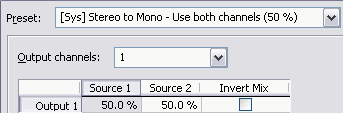
Check the Difference Signal in Mono
L - R and R - L contain the same information with opposite polarity. A preset can write one to the left channel and the other to the right. Headphones then produce an exaggerated sense of width, but summing the file to mono can cancel almost everything.
For predictable practice playback, keep one difference signal as mono or duplicate it into both channels with the same polarity. Then test the phone, speaker, venue system, or broadcast path that will actually play the file; a wide headphone preview doesn't prove mono compatibility.
Why the Bass, Drums, and Reverb Change
A subtraction matrix knows channel similarity. Centered bass, kick, snare, lead guitar, and synth parts can leave with the lead vocal. Stereo chorus, delay, reverb, backing vocals, and doubled takes differ between channels and can survive as quiet words or ghostly ambience. A vocal panned away from center may remain almost intact.
A mono source is the limiting case because left and right are identical. A heavily widened master can fail for the opposite reason: vocal doubles, harmonizers, and stereo effects deliberately make the vocal different across the two channels. Neither outcome means the matrix is broken. The mix is incompatible with that method.
Can Filtering Restore the Lost Low End?
Some vocal-cut workflows blend low frequencies from the original back into the difference signal. The idea can restore weight because the fundamental energy of bass and kick often sits below much of the lead vocal. It remains a compromise. Vocals contain low mids, and bass instruments extend well above a single crossover point.
A limited low-frequency blend may be acceptable for rehearsal, but it isn't a reconstruction of the removed center. If preserving the rhythm section matters, go back to the untouched source and use stem separation. Aggressive EQ or stereo widening can't recreate instruments that the subtraction removed.
Use SpectraLayers 13 Through Sound Forge ARA
SpectraLayers estimates separate sources from a finished mix. The SpectraLayers Pro 13 operation manual lists Vocals, Drums, Bass, Guitar, Piano, Sax & Brass, and Other for Unmix Song. Its quality choices are Fast, Balanced, and High. The manual says Balanced applies more advanced vocal, drum, and bass processing, while High adds finer vocal processing and improves overall separation. Those settings describe processing depth; they aren't a promise that High will sound best on every song.
The SpectraLayers edition comparison, reviewed September 14, 2026, lists full song unmixing for Pro 13 and vocals-only song unmixing for Elements 13 and Go. SpectraLayers is installed separately from Sound Forge, and Pro 13 is needed for the full instrument-stem set, not merely to separate vocals from the backing. The matrix lists ARA in all three editions; check how Go is supplied with your licensed product rather than assuming it is a free standalone download. Sound Forge supplies the host connection: its current product comparison lists VST2, VST3, and ARA support as third-party plug-in support rather than bundling SpectraLayers.
Sound Forge's 2026 ARA integration help gives the setup sequence. Install the SpectraLayers VST3 component, set its folder as an Alternate VST search folder under Options > Preferences > VST Effects, and launch it with Tools > Edit in SpectraLayers (ARA). Use the dedicated ARA command rather than treating the installed component as an ordinary chain effect. The help explicitly warns about this distinction for Melodyne and documents the dedicated SpectraLayers command.
- Open an untouched source. Select the complete song or a representative test range from a lossless copy.
- Launch the ARA editor. Choose Tools > Edit in SpectraLayers (ARA).
- Run Unmix Song. Select the source layer. In Pro 13, choose Modules > Unmix > Unmix Song. For a vocal/backing split, check Vocals and uncheck the other instrument classes so they remain in Other. In Elements 13 and Go 13, the documented module is Unmix Song Vocals under Modules > Unmix; it creates Vocals and Other layers.
- Mute before deleting. In the Layers panel, use Mute on the resulting vocal layer and keep the instrumental layer or stems audible. Use Solo on the vocal to inspect leakage, then clear Solo before judging the backing.
- Judge the recombined instrumental. Listen for damaged cymbals, guitars, piano and reverb in Other. If you generated individual instrument stems in Pro, solo those layers as well, then clear Solo and listen to all retained stems together.
- Compare processing depths. In Pro, compare the available Fast, Balanced and High settings on the same untouched excerpt. Keep the least objectionable recombined result; do not rerun the module on a previous output merely to compare quality settings.
- Return and verify the render. Close the SpectraLayers window without removing or bypassing the ARA effect, and audition the Sound Forge playback. Use File > Save As and choose Sound Forge Pro Project File (*.frg) for the working project. Keep its companion folder, then use File > Render As for a new lossless delivery. Reopen that delivery separately and confirm the vocal mute, start time, duration and channels; a flattened WAV does not retain editable stems.
In ARA mode, SpectraLayers has no File menu: the host handles its state. Do not look for the standalone Save Project command in that window. Retain the Sound Forge project, referenced media and untouched source separately from the rendered delivery, then reopen the project to verify that the editing state was retained.
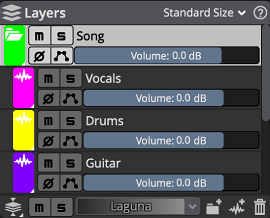
The Elements 13 Unmix Song Vocals help and Go 13 equivalent confirm the two-layer output. Boris FX’s project-saving instructions explain why the FRG file and its companion folder must stay together.
What Stem Separation Gets Wrong
A separation model estimates sources that overlap in time and frequency. When a sung consonant shares the same region as a cymbal or distorted guitar, there may be no clean boundary to recover from the stereo master. Common failures include faint words in the instrumental, watery cymbals, softened drum attacks, unstable ambience, missing bass harmonics, and metallic reverb.
In a July 2026 Steinberg forum reply about versions 12 and 13, Robin Lobel described direct Unmix Song improvements as marginal, while pointing to other modules that can help later repair. Do not buy an upgrade assuming that its version number alone guarantees a cleaner vocal split.
When a Dedicated Stem Separator Is the Better Tool
If SpectraLayers is not licensed and center cancellation destroys the rhythm section, Sound Forge is no longer the efficient place to perform separation. A desktop or browser separator can estimate sources, then Sound Forge can handle trimming, cleanup, fades, and delivery. The Sound Forge alternatives guide distinguishes full audio editors from specialist repair and separation tools.
Before uploading client, copyrighted, or unreleased music, read the service's current retention, model-training, privacy, and commercial-use terms. Test one difficult excerpt before paying or processing an album. Download lossless stems when offered, preserve the untouched source, and avoid making claims such as “studio quality” until the actual file passes your checks.
Before delivery, check the complete song for vocal bleed, missing bass, damaged attacks and stereo changes. Compare at matched listening level and check mono playback. Approve separation before normalization or the mastering workflow, which can make quiet remnants more obvious. Keep a lossless master before following the MP3 export steps.
Rights Still Apply to a Vocal-Reduced File
Technical ability to reduce a vocal does not grant permission to distribute, monetize, remix, or publicly use the recording. The U.S. Copyright Office explains that a musical composition and its sound recording are separate works. The permissions or exceptions required for a particular use depend on the rights involved and the jurisdiction. Resolve that question before publishing or delivering the processed audio.
Describe the output accurately. A file generated from a commercial master is a vocal-reduced or stem-separated version, not an “official instrumental.” Keep the source, method, software version, and processing notes with the project.
Vocal Removal FAQ
Can Sound Forge remove vocals from any song?
No. The native center-cancellation method requires useful parts of the vocal to match between left and right. Mono, widened, reverberant, and densely overlapping mixes are poor candidates. SpectraLayers can estimate stems, but the output still needs listening checks.
Why did the bass, kick, or snare disappear with the vocal?
Those instruments were mixed into the same center information as the lead. Channel subtraction cannot tell a singer from a centered drum or bass part, so it removes all matching left-right content.
Can I remove vocals from a mono file?
Not with center cancellation. If left and right are identical, subtracting them removes almost everything. Use stem separation, an official instrumental, or original multitrack stems.
Can Sound Forge isolate vocals for an acapella?
Center cancellation produces the opposite type of signal: it rejects matching center content. Use SpectraLayers or another stem separator for a vocal layer, then inspect that layer for instrumental bleed and resynthesis artifacts.
Why can I not find the Vocal Cut preset?
The preset name appears in legacy Sound Forge tutorials, but the current Sound Forge Pro 2026 Channel Converter help does not list it. The checked documentation does not establish which installations retain that preset. Use the two-stage method above: invert the right channel only, then mix both sources at equal gain into one mono output. Invert Mix by itself reverses the combined output and does not remove the center.
Is SpectraLayers included with Sound Forge?
Do not assume it is included. SpectraLayers is a separate installation. Pro 13 is required for full instrument stems, while Elements 13 and Go can split vocals from the remainder. All three list ARA support; verify the licence and how your edition is supplied. Sound Forge Pro provides ARA integration when the compatible SpectraLayers VST3 component is installed and found.
Should I start from MP3 or WAV?
Use the best lossless source available. Saving decoded MP3 audio as PCM WAV avoids another lossy encode at that save but cannot restore information already discarded by the codec.
What gives the cleanest instrumental?
An official instrumental or licensed original stems. Every process applied to a finished stereo master must cancel or estimate information that has already been mixed together.
Should I process the whole album after one good test?
No. Test each mix or mix family. Vocal placement, widening, mastering, and arrangement can change between tracks, so a method that works on one song can fail on the next.
Documentation reviewed September 14, 2026. The native sequence combines the documented single-channel selection, Invert/Flip and Channel Converter operations. It has not been verified in a locally installed Sound Forge 2026 session; test the disposable excerpt and reopened output before applying it to a complete song.