
The best audio restoration software is whichever tool matches the damage and lets you hear the moment cleanup starts removing wanted sound. It also has to fit the way you deliver files. If you want one broad specialist before a specific job forces a different choice, iZotope RX 12 Standard is my first shortlist choice for its repair coverage. Acon Digital Acoustica Premium is the better value if you also need a conventional editor, SpectraLayers Pro 13 is stronger when one unwanted sound must be separated visually, and Audacity 4.0.0 is still the sensible free starting point.
That short answer hides the important part: steady hiss, electrical hum, isolated clicks, clipped peaks, room reflections and a voice buried under another sound are not variations of one problem. They call for different repair methods. This guide compares eight current audio restoration and audio repair tools by damage type, platform, workflow and cost. Versions and vendor pricing were reviewed on September 13, 2026; Sound Forge plan figures below are identified as published list prices, not live checkout quotes. Subscriptions, sales, regional pricing and taxes can change.
If noise is the only damage, narrow the purchase before paying for a full restoration suite: compare dedicated audio noise-reduction software by job. That comparison separates steady hiss, changing ambience, speech cleanup and live-microphone processing instead of treating every repair tool as though it solved the same problem.
Audio Repair Software or Corrupted File Repair?
Use audio restoration or audio repair software when the file plays but contains hiss, hum, clicks, clipping, room reflections or another unwanted sound. That’s signal repair: the tools below analyze or rebuild audible material.
- File plays, but sounds damaged: use the restoration comparison below.
- File will not open, is truncated or has a broken header: preserve the original and use a container- or file-repair workflow; a denoiser cannot restore bytes that are not present.
- The file is healthy, but playback is silent or distorted: check the output device, driver and monitoring chain before processing the audio.
If the failure is still unclear, diagnose whether it is in the signal, file or playback path before buying software.

The Shortlist: Choose by Repair Job
- Best overall specialist: iZotope RX 12 Standard: a broad combination of automatic modules, detailed spectral repair and plugin delivery without paying for Advanced.
- Best value all-in-one editor: Acoustica 8 Premium: editing, spectral repair and restoration plugins for $299 list.
- Best for separating one sound: Steinberg SpectraLayers Pro 13: layer-based spectral selection, unmixing and repair for material that ordinary broadband processing cannot isolate.
- Best for mastering and archives: Steinberg WaveLab Pro 13: restoration, batch processing, metering, metadata and final delivery in one environment.
- Best for Creative Cloud teams: Adobe Audition: convenient round-trips from Premiere Pro, waveform and multitrack work, diagnostics and spectral repair.
- Best Windows single-file workflow: Sound Forge 2026: precise editing, restoration processing and repeatable batch delivery without turning the job into a multitrack session.
- Best free option: Audacity 4.0.1: capable for constant noise, basic click work and manual edits, with clear limits around deep spectral reconstruction.
- Best low-cost Windows editor: GoldWave 7.09: practical tape and vinyl cleanup, batch work and command-line control for $59 lifetime or $19 for one year.
Audio Restoration Software Comparison
The matrix covers the currently documented desktop products; historical editions aren’t included. “Plugin” means the package can supply restoration processing inside a compatible host, which doesn’t mean every listed module is available in every edition. Prices are vendor-listed US figures reviewed September 13, 2026; Acoustica Premium’s $299 list price was rechecked October 17, 2026. Regional storefronts and tax can produce a different total.
| Software | Best fit | Platform | Workflow | Checked price |
|---|---|---|---|---|
| RX 12 Standard | Broad specialist repair | Windows, macOS | Standalone + 18 plugins | $399 perpetual |
| Acoustica 8 Premium | Editor plus restoration value | Windows, macOS | Standalone + plugins + ARA2 | $299 list |
| SpectraLayers Pro 13 | Spectral isolation and layers | Windows, macOS | Standalone + ARA | $359.99 perpetual |
| WaveLab Pro 13 | Archive, mastering, delivery | Windows, macOS | Standalone editor | $499.99 perpetual |
| Adobe Audition | Video and podcast teams | Windows, macOS | Waveform + multitrack | $22.99/mo annual plan |
| Sound Forge 2026 | Single-file and batch work | Windows | Standalone editor | $299.95 perpetual |
| Audacity 4.0.1 | Free basic restoration | Windows, macOS, Linux | Standalone editor | Free, open source |
| GoldWave 7.09 | Budget Windows cleanup | Windows | Standalone + batch/CLI | $59 lifetime |
Price alone can mislead. RX Elements costs less than Standard, but it isn’t a cheaper route to the same module set, and SpectraLayers Elements omits many Pro repair modules. WaveLab Elements is useful software, but the full restoration, spectrum and batch workflow described below belongs to WaveLab Pro. Check the exact edition matrix before comparing products by name.
Why are two familiar names missing from the eight? The Waves Restoration bundle remains a host-based set for profile noise, hum, clicks and crackle, but it isn’t a standalone inspection editor and there’s no declipper in the bundle. CEDAR Retouch is a serious specialist spectral editor with a 14-day trial, aimed at selecting and rebuilding discrete events. Both belong in narrower plugin or spectral-editing comparisons; neither is a like-for-like replacement for every editor above.
How This Shortlist Was Built
This shortlist matches documented repair tools to the jobs they are designed to handle. It considers edition limits, workflow, platform, cost and the amount of control available when a repair starts changing wanted sound. It is not a listening test, and we did not measure these tools. Use the trial protocol below to decide which option preserves your own material best.
Each placement was checked against seven practical criteria:
- Repair coverage: which documented damage classes the current edition can address.
- Inspection and control: waveform, spectrum, spectrogram, selection, bypass and residual monitoring.
- Workflow fit: standalone editing, plugin use, ARA, multitrack or cloud processing.
- Repeatability: presets, batch processing, file naming, metadata and export verification.
- Platform and custody: operating-system support and whether the source must leave the workstation.
- Edition clarity: whether the advertised repair tool is actually in the priced edition.
- Current cost and trial: vendor price, license model and a usable way to test the real file.
The order therefore answers “Which tool is the safest first purchase for this repair job?” It doesn’t declare that an automatic result from one product will beat a careful manual repair in another. The trial protocol later in the guide is the tie-breaker for your own recordings.
What Audio Repair Software Must Actually Do
A credible restoration tool should help with at least three stages: identify the fault, control the repair and verify the result. The first stage may use a waveform, spectrum, spectrogram, loudness meter or a difference monitor. For the second you need a useful selection model, adjustable processing and a reversible audition, and the third comes down to level-matched bypass, lossless export and a way to inspect what changed.
The damage determines the essential module:
- Constant hiss or fan noise: noise profiling or adaptive spectral denoise.
- Mains hum and harmonics: de-hum or narrow harmonic filtering.
- Clicks, pops and crackle: local interpolation, de-click and de-crackle.
- Flattened peaks: de-clip, followed by a check for distortion that remains below the peak.
- One cough, horn or chair squeak: detailed spectral selection and replacement.
- Speech in noise or room reflections: dialogue isolation or de-reverberation, tested carefully for consonant damage.
- Hundreds of similar files: batch processing, presets, file naming and verified export.
No product restores information with certainty after it has been overwritten or discarded. For vocal removal and stem separation specifically, start with the dedicated workflow before choosing a restoration suite. A declipper estimates a plausible peak. A source-separation model estimates components of a mixture, and a de-reverb processor tries to reduce the reflections that overlap the direct voice. Those can be valuable results, but “reconstructed” is more honest than “recovered.”
1. iZotope RX 12 Standard: Best Overall Specialist
Best for: editors who regularly receive several kinds of damage and need both a standalone repair bench and restoration plugins inside a DAW or video editor.
RX 12 Standard is my starting recommendation for mixed repair work because it combines local spectral repair with dedicated damage-specific modules. The current edition includes the standalone Audio Editor and 18 plugins. Its documented repair set covers De-click, De-clip, De-crackle, De-hum, De-reverb, Dialogue Isolate, Spectral De-noise and Spectral Repair. That combination matters: automatic modules handle repeatable faults, while Spectral Repair gives you a local tool when one event needs attention rather than the whole file.
The checked US price is $399 for RX 12 Standard. Elements is $99, but it is a smaller entry edition; Advanced is $1,399 and adds specialist post-production modules such as De-rustle, De-wind, Dialogue Contour, Ambience Match and Scene Rebalance. Don’t pay for Advanced because a comparison labels it “best.” Pay for it only when those modules belong to your actual delivery work.
Avoid it if: your jobs are mostly clean single-file edits, trims and exports. RX can do detailed repair, but it isn’t the cheapest ordinary waveform editor and it’s no full music-production DAW either. For the exact tradeoff with this site’s core editor, use our Sound Forge vs iZotope RX comparison.
2. Acon Digital Acoustica Premium: Best Value All-in-One
Best for: someone who wants a conventional audio editor and a serious restoration bundle under one perpetual license.
Acoustica 8 Premium combines spectral editing with DeNoise 3, Extract:Dialogue 2 and dialogue-cleaning tools. Acon lists the Premium license at $299 on its product page, checked October 17, 2026. It is a perpetual editor-and-plugin package, not just a set of effects that needs another editor.
Choose the edition carefully: Standard provides stereo editing and in-app restoration; Premium adds DAW plugins, Extract:Dialogue 2 and support up to 7.1.2. Ultimate adds DeVerberate 3, DeFilter and 9.1.6 support. All three include ARA2 integration with compatible hosts.
Try another option if your job depends on a specific RX Advanced module such as Dialogue Contour or Ambience Match. Acoustica’s Remix provides stem separation alongside its repair tools. Compare its editing workflow with SpectraLayers’ layers on your own file; the Acoustica trial lasts 30 days and requires no card.
3. SpectraLayers Pro 13: Best for Visual Spectral Isolation
Best for: a repair where the unwanted event can be seen and selected as an object or layer, such as a cough under music, bleed between sources, a tonal intrusion or a sound that overlaps in time but occupies a distinct spectral shape.
SpectraLayers approaches audio more like an image editor than a conventional waveform tool. Pro 13 combines manual spectral selection with DeNoise, DeReverb, DeHum, DeClick, DeClip, DeBleed, voice repair and batch processing. Its layer model is the reason to buy it: you can separate, inspect and rebalance components rather than committing every decision to one rendered waveform.
SpectraLayers Pro 13 lists at $359.99; Elements 13 is $89.99 but omits many of the Pro repair and unmixing modules. Steinberg offers a 60-day Pro trial, which is long enough to test several representative failures rather than one flattering demo.
Avoid it if: most of your work is straightforward trimming, level correction and batch conversion. Spectral layers are powerful, but they introduce a different editing model and more decisions than a simple denoise-and-deliver job needs.

4. WaveLab Pro 13: Best for Restoration Through Delivery
Best for: mastering engineers, archive transfers and long-form delivery work where restoration must continue into sequencing, metadata, loudness control, batch rendering and quality assurance.
WaveLab Pro is not merely a repair suite. The current version combines RestoreRig, full restoration functions, a Spectrum Editor, wavelet display, batch processing, external-editor integration and mastering/delivery tools. That wider chain is its advantage: an archive project can move from cleanup to file naming, metadata and final derivatives without pretending restoration ends when the noise disappears.
WaveLab Pro 13 lists at $499.99. Steinberg’s release notes list version 13.0.30 dated July 22, 2026. Elements starts at $99.99 and includes RestoreRig, but its restoration functions are limited and it lacks the Pro batch processor, Spectrum Editor and wavelet display. Confirm the edition comparison before treating Elements as a lower-priced substitute.
Avoid it if: you need only occasional dialogue cleanup or one troublesome sound. Its cost and mastering depth make more sense when restoration is one stage in a repeatable production or preservation pipeline.
5. Adobe Audition: Best for Video and Podcast Teams
Best for: editors already paying for Creative Cloud who need waveform repair, multitrack assembly and an efficient path between audio and Premiere Pro.
Audition’s official restoration documentation covers spectral-frequency editing, Diagnostics, DeClipper, DeHummer, adaptive noise reduction, DeReverb, DeNoise and Sound Remover. The combination of waveform and multitrack views makes it practical for podcasts and video post: repair a source destructively in the Waveform Editor, then return to the mix and automation in Multitrack.
The current US single-app offer is $22.99 per month with an annual commitment billed monthly, with a seven-day full-app trial. That is attractive when Audition is already part of the team’s Adobe plan. As a standalone long-term restoration purchase, the subscription can cost more than a perpetual specialist editor.
Avoid it if: you want a perpetual license, Linux support or the newest specialist source-separation modules. Audition remains useful, but its strongest buying argument is workflow integration, rather than a claim that every restoration algorithm beats a dedicated current suite.
6. Sound Forge 2026: Best for Windows Single-File and Batch Work
Best for: Windows users who receive one finished WAV, voice recording, vinyl side or folder of similarly prepared files and want fast, exact waveform editing plus repeatable processing.
Sound Forge’s strength is focus. It records and edits one file closely, hosts processing chains, supports restoration work and turns a verified setup into repeatable batch output. Boris FX describes the current product around sample-accurate editing, recording up to 32 channels, restoration tools, WaveColor and batch processing. Boris FX acquired Sound Forge from MAGIX on March 30, 2026, so older MAGIX pricing and trial articles should not be treated as current.
Boris FX’s published launch list prices are $299.95 for Sound Forge and $399.95 for Sound Forge Plus; annual plans were listed at $149.95 and $199.95. Check the current offer before buying; those launch figures do not establish today’s discounted checkout total. The official trial is currently 15 days, Windows only, and does not require a credit card. Our Sound Forge pricing guide explains the editions, while the 2026 Sound Forge review separates its excellent single-file work from the multitrack and deep-spectral jobs it should not own.
Avoid it if: you work on macOS or Linux, need a full multitrack production environment, or routinely paint around complex interference in a spectrogram. A specialist plugin can extend Sound Forge; that doesn’t make the base editor identical to RX or SpectraLayers.
7. Audacity 4.0.1: Best Free Audio Restoration Software
Best for: learning the repair order, cleaning constant background noise, fixing isolated defects manually and completing occasional work without a license cost.
The current Audacity 4.0.1 download is free and open source on Windows, macOS and Linux. Its current manual documents Noise Reduction for steady backgrounds, Click Removal for longer selections, Clip Fix, the tiny-selection Repair effect, spectral selection and ordinary editing. That is a useful basic repair bench, provided you test the exact workflow rather than assuming every Audacity 3 feature carried into the first 4.0 release.
Those repair limits still matter. Audacity’s Noise Reduction guidance says the method suits constant background sound, not one-off events. Clip Fix is most likely to help lightly clipped audio, while Repair accepts at most 128 samples—enough for a tiny click, not a missing phrase. Audacity 4.0.0 became current on September 3, 2026 and saves new .aup4 projects. It opens .aup3 projects and converts them without changing the original, but cannot save the converted project back to .aup3. The official compatibility notes also list Time Tracks, Note/MIDI tracks, Mixer, Macro Manager and the scripting pipe, VAMP/LADSPA hosting and Play-at-speed as unavailable in 4.0, with some exporting, rendering, analyzer and effect features still missing. If one of those paths is essential, keep a tested Audacity 3.7.9 workflow until a 4.x release supplies it.
Avoid it if: deadlines depend on dialogue isolation, advanced de-reverb, deep batch automation or fast repair of many unrelated faults. “Free” becomes expensive when manual work or failed processing consumes the project budget. Start with our noise-reduction workflow and move to a trial only after you can name the missing capability.
8. GoldWave 7.09: Best Low-Cost Windows Editor
Best for: Windows users restoring tape or vinyl, processing many files or building a repeatable low-cost workflow with batch and command-line options.
GoldWave 7.09, released September 29, 2026, is the current Windows desktop release; its official product page lists Windows 10 and 11. It includes noise reduction, pop/click filtering, batch processing, command-line control and the recording, editing and format tools needed around restoration. The current licenses are $19 for one year or $59 lifetime. Both include GoldWave Infinity, the separate browser-based cross-platform version. The evaluation mode is not a permanently free edition.
GoldWave is less glamorous than the spectral specialist tools, but the practical feature mix is useful for transfers and repetitive cleanup. Its official restoration tutorial also gives buyers a clearer idea of the intended workflow than a generic marketplace description.
Avoid it if: you need a mature native macOS/Linux desktop editor, modern dialogue separation or detailed layer-based spectral repair. GoldWave 7.08 itself requires 64-bit Windows 10 or later and AVX2; Infinity broadens platform access but is a separate browser application. Buy the desktop editor for efficient conventional restoration. A low lifetime price doesn’t imply every advanced module is included.
Standalone Editor, DAW Plugin or Cloud AI?
Use a standalone editor when you need to inspect a whole file, mark test passages and save successive repairs. Plugins make more sense when processing must follow clips inside an existing mix or video timeline. Packages that offer both let you choose the workflow without changing the repair method.
Cloud AI services solve a different workflow. Uploading speech and receiving an enhanced file can be convenient, particularly for a one-off interview. But the service may give you less control over the residual, processing order, model version and revision history. File custody also matters for unreleased music, client interviews, medical material or legal evidence. Read retention and model-training terms before uploading, and keep the original outside the service.
For a controlled comparison, run the same source through every candidate. Never compare a vendor demo cleaned by an expert with your own untreated problem file. The separate AI audio restoration guide explains how model-based and one-click services change the workflow, where they can save time and where limited control or file custody should change the decision. It is a guide to that category, not evidence that one desktop suite beats another.
A Trial Protocol for Your Own Files

- Use the same damaged file. Choose one normal passage, one worst-case passage and one quiet passage. A tool that fixes the easy section may fail on the material that matters.
- Match output loudness. Attenuate whichever version is louder until bypass and processed playback have comparable loudness. Otherwise a level change can masquerade as a cleaner result.
- Listen to the residual. Where available, audition the difference or removed-noise output. Wanted consonants or attacks can warn of overprocessing, but changed reverb or reconstructed peaks may legitimately appear there. Judge the repaired signal too, and turn diagnostic monitoring off before export.
- Repeat the job. Save the chain, reopen the project and process several representative files. Check whether batch output preserves names, sample rate, bit depth, channels and metadata as expected.
- Verify a lossless export elsewhere. Open the rendered WAV in a second player or editor. Check the beginning, end, loudest passage and silence. Never discover a truncated render after deleting the session.
Run the trial on the computer that must deliver the work. Plugin formats, operating systems, graphics requirements and copy protection are all part of the purchase. A theoretically stronger processor is the wrong choice if it can’t open the session reliably or if its batch path removes required metadata.
When Software Cannot Restore the Original
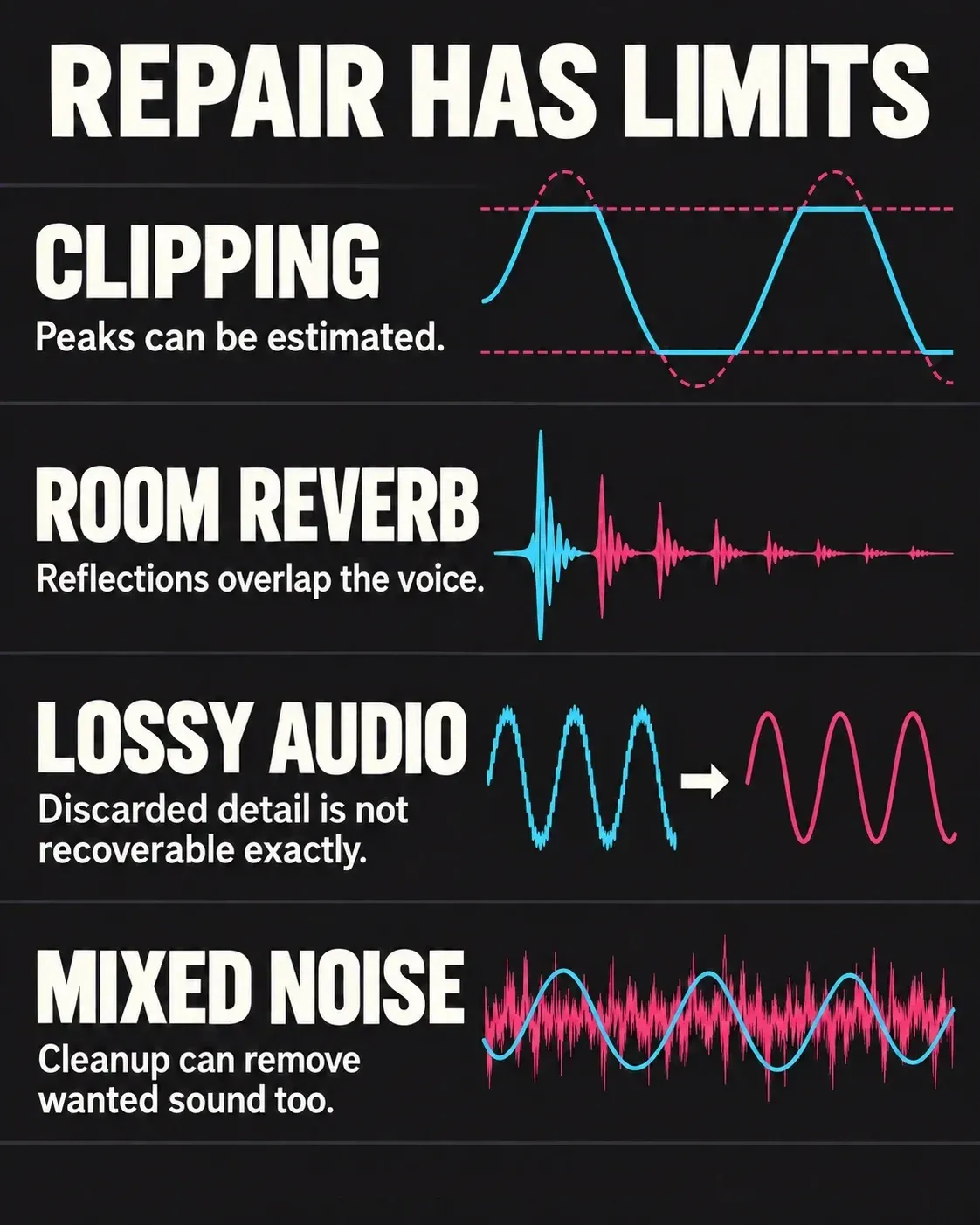
Missing information is the hard limit. Clipping removes the original peak contour; room reflections overlap the direct voice; lossy codecs discard detail. Repair can estimate a useful result, but cannot certify the exact original. Noise removal has a different limitation: a profile-based processor needs a usable noise sample, while adaptive and model-based tools may not. Either method can remove wanted sound when it cannot distinguish that sound from the noise.
Re-record when the performance can be repeated more cheaply than it can be repaired. If a lossless master, camera original or earlier export exists, go back to that source. Use a transfer specialist when the carrier is fragile, moldy, mechanically damaged or irreplaceable. For signal damage that remains repairable, our guides to reducing echo and room reflections and diagnosing distorted audio show where common one-button claims stop matching the evidence.
Audio Restoration Software FAQ
What is the best audio repair software?
For mixed audible defects, iZotope RX 12 Standard is our broad specialist recommendation; Acoustica Premium is the better-value editor-and-restoration bundle, and Audacity 4.0.1 is the free starting point. If the audio file will not open or is missing data, use a container- or file-repair workflow instead—restoration processing cannot recreate absent bytes. For module-level detail, see the full RX 12 review on izotoperx.net.
What is the best free audio restoration software?
Audacity 4.0.1 is our free starting recommendation across Windows, macOS and Linux. It can reduce constant noise, support spectral selections and repair short local defects, but it does not replace current specialist dialogue isolation, de-reverb or deep spectral reconstruction tools.
Can audio restoration software fix clipping?
A declipper can estimate rounded peaks when clipping is moderate and enough surrounding information remains. It cannot guarantee the exact original waveform after repeated flat plateaus have discarded the peak shape, and it cannot remove distortion created elsewhere in the signal chain.
Do I need a standalone editor or an audio restoration plugin?
Use a standalone editor for diagnosis, local spectral work, versioned repair and final-file inspection. Use a plugin when restoration must remain inside a DAW or video timeline and follow editorial changes. Packages such as RX Standard provide both, so the same repair can move between workflows.
Is cloud AI safe for confidential recordings?
That depends on the service’s retention, access and model-training terms. For confidential, unreleased, medical or legal material, prefer an offline tool unless the organization has approved the service. Keep the untouched original locally and document the model or service version used.
Which audio restoration software works on Linux?
Audacity is the established native Linux option in this shortlist. Acoustica also lists Linux support in public beta testing; assess that beta separately from a production-support promise. The current desktop versions of RX, SpectraLayers, WaveLab and Audition target Windows and macOS, while Sound Forge and GoldWave 7.09 are Windows-only. A GoldWave license also includes the browser-based Infinity app for Linux and other platforms. Verify current system requirements before buying because platform support can change.
Should I buy software before diagnosing the recording?
No. First confirm that the problem is in the audio signal rather than the file container, playback device or monitoring chain. Then identify whether the damage is steady noise, impulses, clipping, reverberation, interference or missing data and trial the tool that owns that repair class.
What software should I use to clean up old recordings?
Start with the carrier and the damage. For a tape or vinyl transfer with steady hiss, hum and isolated clicks, Audacity or GoldWave can be enough for a careful low-cost pass; Acoustica Premium adds a stronger editor-and-restoration bundle. Choose RX Standard when the archive also contains clipping, changing noise, room sound or discrete events that need local spectral repair. Preserve the raw transfer before processing, and use a transfer specialist for fragile or irreplaceable media.