
iZotope Aurora is worth $49 (US iZotope store, October 23, 2026) if you want one clean mix reverb that gets out of the way of the part it sits on. It has six reverb types and an Unmask section that ducks the reverb's frequencies wherever they clash with the dry signal, while the dry track passes through at full level. Reverb Amount sets the reverb's gain, not a wet/dry blend. The current version is 1.1.0 from July 2025.
I'd buy it for one job: a reverb you put straight on a vocal, instrument or group bus without building a send and an EQ after it. Neoverb at $99 is the better buy if you want a Reverb Assistant, a blend of up to three reverbs or tempo-synced pre-delay, because Aurora has none of the three, and Equinox at $249 only makes sense for surround and immersive mixes. Check your account before paying anything: Music Production Suite 9, the Everything Bundle, iZotope Plus and iZotope Pro all include Aurora, while Mix & Master Bundle Advanced and Elements Suite do not.
No outlet has published a numeric score, so the evidence is a count. All five readable reviews come out positive, four of them call the unmasking useful, and the main caveat is Barry Rudolph's finding that Unmask values above about 18 just turn the whole reverb down. Six of nine Reddit owners are positive too, with one CPU complaint while tracking.
What iZotope Aurora is
Aurora is a reverb that reacts to the audio coming into it and carves space out of its own tail as the part plays, which iZotope's Aurora product page calls dynamic unmasking. It offers six reverb types (Hall, Chamber, Room, Plate, Ambience and Cathedral) and more than 60 presets, and iZotope says the engine is powered by Exponential Audio algorithms, the same lineage behind Neoverb and Equinox.
The plugin belongs to iZotope's Catalyst Series with FXEQ, Plasma, Cascadia and Velvet, and Rekkerd's launch report placed it as the second Catalyst release after Plasma, announced on October 1, 2024. The Aurora release notes date version 1.0.0 to September 27, 2024 and list 1.1.0 from July 29, 2025 as the latest: a maintenance update with a Windows HiDPI scaling fix and new minimum macOS and DAW versions.
Two notes on names and ownership. Boris FX now owns iZotope, and MusicTech's report on the acquisition says existing licenses and subscriptions stay active; a forum thread about "Aurora" may also concern Tapesignal's unrelated delay plugin. Within iZotope's reverb lineup, Aurora is the $49 entry point below Neoverb and Equinox.
Controls: Reverb, Display, Unmask and Header
The Aurora manual's overview splits the window into four zones: Reverb controls on the left, the Display in the center, Unmask controls on the right and the Header across the top. Everything that shapes the space lives on the left; everything that decides when the space steps aside lives on the right.
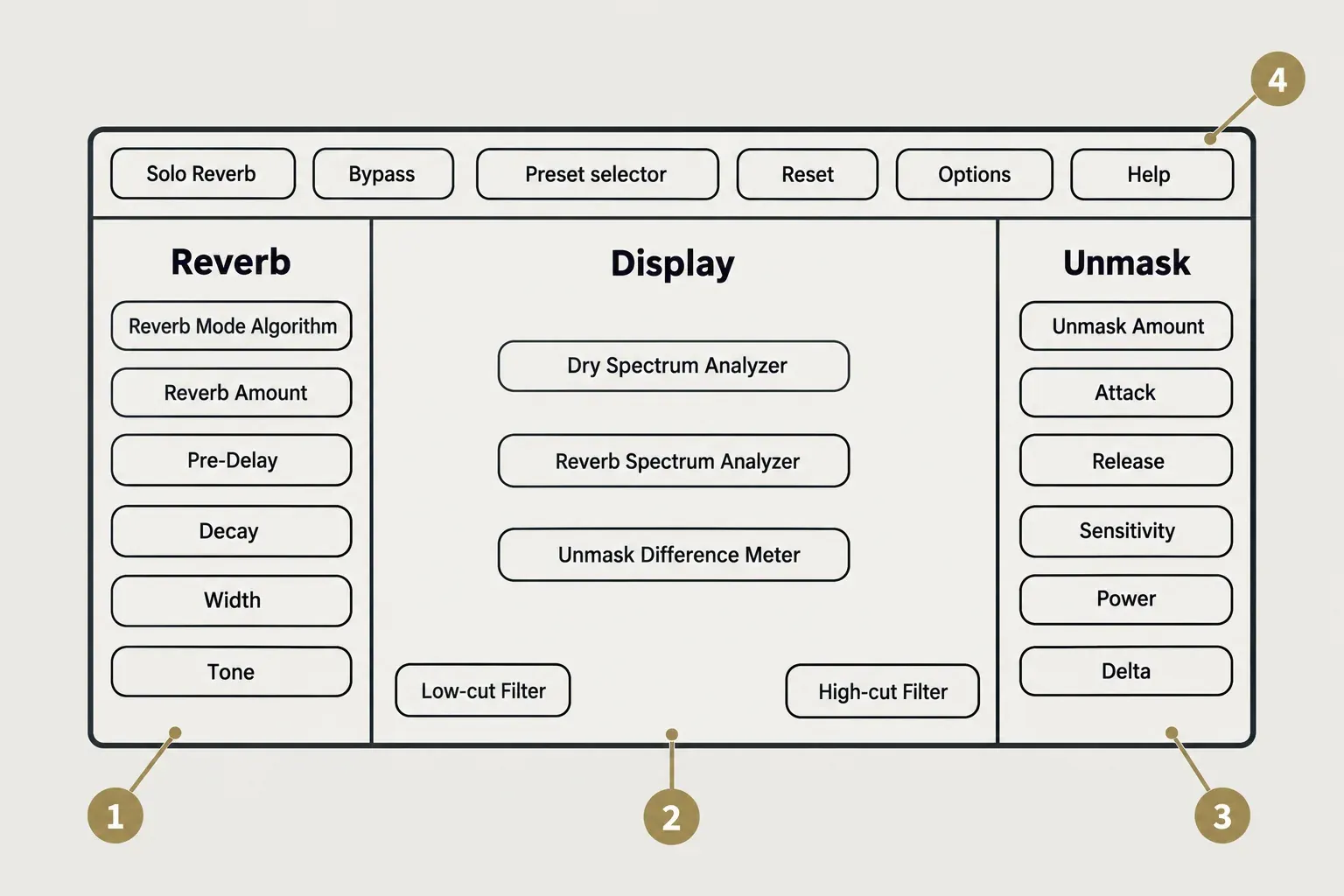
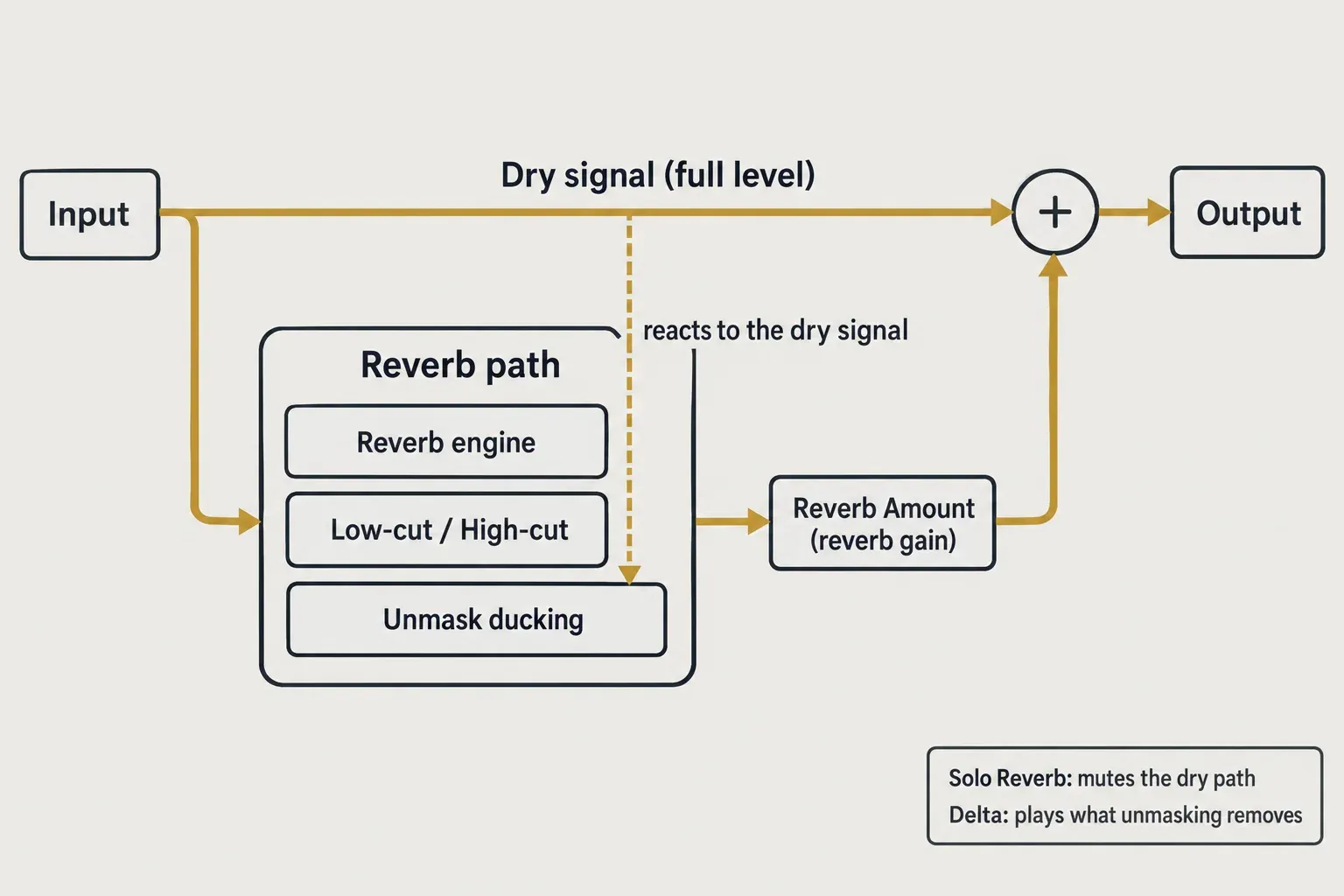
Reverb Amount doesn't work like a typical mix knob. According to the manual's reverb controls page, it sets the internal gain of the reverb bus while the dry signal passes through at full level. At 50% the reverb sits about 6 dB down, 0% mutes it and 100% passes it at 0 dB. Turning it up adds space without thinning the dry track, and that design is what lets Aurora sit on an insert without a send.
The other reverb controls behave as you'd expect. Pre-Delay is set in milliseconds and Decay in seconds, Width sets the stereo spread of the tail, and Tone tilts it toward Dark or Bright. Barry Rudolph, reviewing version 1.0.386 in his hands-on Aurora review, observed Pre-Delay reaching a full second and Decay (RT60) reaching 15.30 seconds.
Two of those controls have consequences outside the plugin. Pre-Delay has no tempo sync, so use the BPM delay and reverb time guide to turn a song tempo into milliseconds. High Width settings are less audible in mono playback; Rudolph found about halfway gave convincing imagery with acceptable mono on his material, and a mono compatibility check shows where your own mix lands.
The Display section shows a Dry Spectrum Analyzer, a Reverb Spectrum Analyzer and the Unmask Difference Meter, and the ducking it displays applies to the reverb only. Its Low-cut and High-cut filters are 24 dB per octave and also act on the reverb alone, so you can trim mud and fizz from the tail without touching the source.
The Header holds Solo Reverb, Bypass, the Preset selector, Reset, Options and Help, and user presets are saved to Documents/iZotope/Aurora/Presets on macOS and Windows. Rudolph also describes stereo and mono-to-stereo versions of the plugin. There's no assistant either, so a starting point comes from the presets.
How the unmasking works and how to set it
Unmasking ducks the reverb's frequencies in real time wherever they collide with the dry signal, then lets the tail back in when the part moves away. iZotope's guide to its reverbs says Aurora introduced this dynamic spectral unmasking to its reverb line and contrasts it with a static cut on a reverb return or a dynamic EQ parked on one band. Its own example: if the build-up moves from 300 Hz in a verse to 430 Hz in a chorus, Aurora follows it, where a fixed band would miss one of the two. The same guide recommends Aurora when you want the vibe of a long or dense reverb without losing mix clarity.
Four controls set the effect, per the Unmask controls page. Unmask Amount sets how deep the ducking goes. Attack and Release set how quickly it reacts and recovers. Sensitivity sets the masking threshold and depends on input level, so a quiet source or a low send may need a higher setting before anything happens. Power switches unmasking off for a before-and-after check, and Delta plays only what unmasking removes; Delta is silent while Power is off.
Rudolph gives the clearest warning about overdoing it. Above about 18 on the Unmask control, he found it stopped carving targeted space and just lowered the whole reverb, and he preferred values up to 10 on instruments. On a dense 12-string guitar bus he settled on Unmask at 9.4, the main Reverb knob at 44, Decay at 1.41 s, filters at 66 Hz and 12 kHz and Sensitivity at 100%, and each guitar kept its dynamics and brightness. Those are one reviewer's settings for one source, useful as a starting point rather than a rule.
I'd start low: Unmask Amount well under Rudolph's 10, then switch Delta on to hear what is being taken out. If Delta is nearly silent on a quiet vocal or a low send, raise Sensitivity before Amount, because Sensitivity is the level-dependent control. Finish with Power for the before-and-after, and stop when the part reads clearly; past Rudolph's range, more Amount only makes the reverb quieter.
Insert or send: where Aurora belongs
Aurora is meant to be an insert. The reverb controls page says iZotope's intention is to make it easy to use on channels and summing busses without setting up a reverb bus, and Rudolph recommends inserting it directly on the track to get the full benefit of its analysis. On a vocal or a group bus, that removes the usual send, return and cleanup EQ after the reverb.
A send still works with two changes. Turn on Solo Reverb so the dry signal is muted and Reverb Amount acts as the return's gain, which the manual recommends for a send bus. Then revisit Sensitivity, because the plugin now hears the send level, and a low send may need a higher setting before any unmasking happens. Rudolph adds one trap on an aux: Bypass passes the input signal through, so the return jumps sharply in level when you bypass it to compare. Mute the return instead.
The insert result is easy to recognize. A Reaper user on Reddit describes the reverb on a vocal appearing mostly in the gaps, with little or none under the words. That's the unmasking doing its job; if you want some tail under the line, keep Amount moderate or lower Sensitivity.
System requirements, hosts and formats
Aurora runs as AAX, AU and VST3 in 64-bit hosts only; there's no VST2 version. These are the current requirements from the Aurora product page:
| Item | Current requirement |
|---|---|
| Plugin formats | AAX, AU, VST3; 64-bit only, no VST2 |
| macOS | Sonoma 14.7.x, Sequoia 15.7.x, Tahoe 26.1.x; Intel and Apple silicon, native or under Rosetta |
| Windows | Windows 10 22H2, Windows 11 24H2 |
| Listed hosts | Logic Pro 10.8–11, Pro Tools 2024–2025, Ableton Live 12, Cubase 14, Nuendo 14, Studio One 7, Reaper 7, FL Studio 24–25, Audition CC 2025, Premiere Pro CC 2025 |
| Not listed | Sound Forge (covered in the Sound Forge section below) |
macOS Tahoe needs Aurora 1.1.0, according to iZotope's macOS 26 Tahoe compatibility statement. The macOS 27 Golden Gate statement says Aurora isn't supported there yet, so keep a production Mac on Tahoe until that page changes. Apple silicon has been native since 1.0.0, per iZotope's macOS compatibility list.
Ignore spec boxes on older retailer pages and launch reviews: several still print the 1.0.0 minimums, such as macOS Ventura 13.6.9, Cubase 13 and FL Studio 21. KVR's Aurora listing gives online activation as the copy protection; if authorization or Native Access gets stuck, iZotope authorization and install fixes covers the repair steps.
CPU and limits
iZotope doesn't publish CPU or latency figures for Aurora, and none of the five reviews in the composite below measured them. The one concrete report is a December 2024 r/musicproduction thread: an owner on an M1 Pro MacBook Pro with 16 GB of RAM and macOS Sonoma 14.5 called Aurora a "CPU pig" while tracking and had to keep raising the buffer size, which added recording latency. Replies advised tracking dry or with a simple reverb and adding Aurora at mix time. iZotope's reverb guide, for its part, points CPU-limited sessions to Neoverb rather than Aurora, without figures.
That's one user on a launch-era build and one relative statement from the vendor, not a measurement, and it doesn't settle Aurora's CPU use either way. I'd load it into your heaviest session during the trial before relying on it while recording, because no published source gives a figure for any machine.
The functional limits are easier to pin down. Aurora runs one reverb type at a time and has no tempo sync and no assistant; Neoverb covers all three. Two early bug reports exist, each from a single user. A launch-day comment on r/iZotopeAudio describes the trial pop-up hidden inside a plugin window that couldn't be resized, and a Pro Tools user on Reddit traced a startup crash on their PC to Aurora in February 2025. Both predate version 1.1.0.
Test results: what reviewers and owners report
No outlet has published a numeric score for Aurora, so the composite result here is a count of verdicts across five readable reviews published between October 2024 and October 2025, plus a separate tally of Reddit owners. All five reviews are positive overall, and none publishes a CPU or latency figure.
| Finding | Reviews (of 5) | Which reviews |
|---|---|---|
| Unmasking is audible and useful in a mix | 4 | Rudolph, Music Connection, Owsinski, Kocis |
| Sound quality praised | 3 | Rudolph, Music Connection, benonistudio |
| Good value at $49 | 2 | Music Connection, Owsinski |
| Simple controls save time over a reverb bus plus EQ | 3 | Owsinski, Kocis, benonistudio |
| Heavy unmasking just lowers the reverb | 1 | Rudolph |
| Publishes a CPU or latency figure | 0 | None |
| Gives a numeric score | 0 | None |
Rudolph's review carries the most detail. He calls all six types "spot on with realistic emulations," found more stereo width at the same RT60 than other plugins in its price class and much smoother tails than a 1980s hardware reverb, yet says he's still learning where and when to use it. Music Connection's Michael Stern found the difference between unmasking on and off "quite dramatic" and said Aurora stands up to reverbs costing hundreds if not thousands of dollars more. Bobby Owsinski called it a time-saver that adds unmasking only when it's needed and "well worth checking out." Greg Kocis reports that it loaded quickly in Logic Pro with no glitches; his post carries affiliate links, so it counts for less here. benonistudio calls it a go-to reverb and singles out bass.
Owners on Reddit lean the same way. Of nine distinct users with first-hand use between October 2024 and July 2026, six are positive or kept using it and one stayed with FabFilter Pro-R after a trial. The complaints are the CPU report and the two bug reports above, and two users single out the unmasking for praise. The most measured voice, in a r/musicproduction thread asking what people think of Aurora, calls it a "nice addition" on instrument and group buses that creates "a little more room," and recommends it while advising others to temper expectations. If Pro-R is your alternative, iZotope vs FabFilter compares the two brands more widely. KVR's listing has no user reviews yet.
For a buyer, the composite settles three things. The three reviews that describe the sound praise it, four of five hear the unmasking working, and the one documented limit is that heavy unmasking stops being targeted and just gets quieter. No published source measures its CPU load, so your own session in the trial is the only CPU check that counts.
Aurora vs Neoverb (and where Equinox fits)
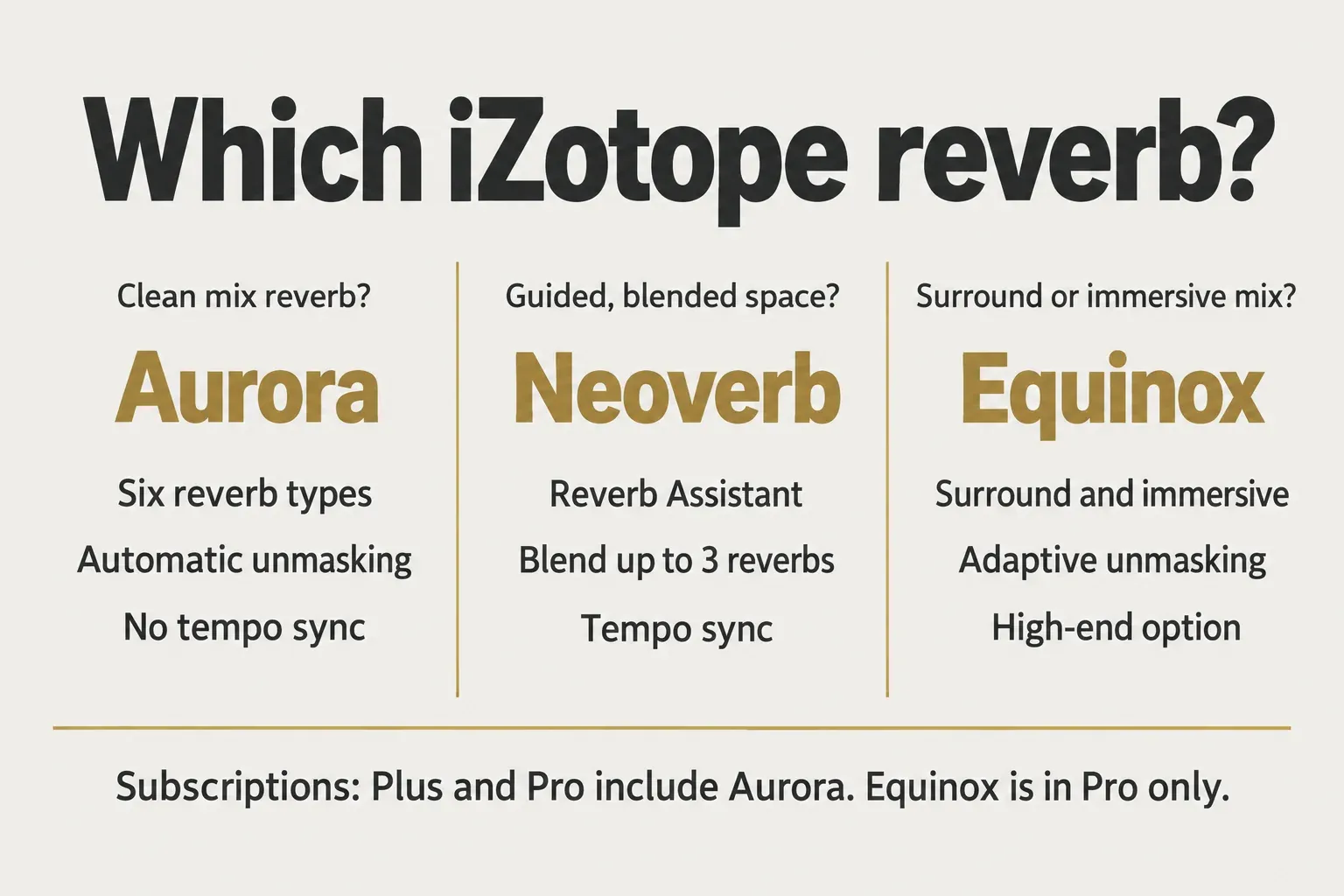
Pick by how you want to build the space. Aurora gives you one reverb type at a time, set by hand, with automatic unmasking against the dry track. Neoverb costs $99, is still sold and reached version 1.4.0 in March 2025, according to its release notes. It adds a Reverb Assistant, a Blend Pad that mixes up to three reverbs, a Pre EQ with Auto Cut, a Reverb EQ with a Masking Meter and an Unmask button, tempo sync for pre-delay and reverb time, and an Advanced Panel.
iZotope's reverb guide frames the split the same way: Neoverb for creative efficiency, Aurora for intuitive clarity and Equinox as the high-end choice, with all three tracing back to Exponential Audio. I'd pick Aurora when the reverb's job is to sit behind a part without a cleanup EQ, and Neoverb when you want to blend engines, start from an assistant or lock pre-delay to the tempo.
For vocals specifically, the best iZotope plugins for vocals picks Neoverb as the vocal reverb, and that pick stands. Aurora is the insert and bus option there, and the cheaper one if your plan already includes it.
Equinox is the step up. iZotope says it layers in the adaptive unmasking that Aurora introduced, markets it as its immersive and surround reverb, and lists it at $249, or $149 as a crossgrade, on the Equinox product page. It's part of iZotope Pro but not Plus. I wouldn't pay for Equinox unless you deliver surround or immersive mixes; for stereo work, the unmasking idea is already in Aurora.
Price, bundles and subscriptions
Aurora costs $49 on the iZotope store and $24.50 with education pricing, and Native Instruments sells Aurora at the same $49. Past deals went lower, all of them now ended: a $39 launch crossgrade for owners of a paid iZotope product until October 15, 2024, a 40% reverb sale from October 8 to 31, 2025, $29 at Plugin Boutique until March 1, 2026 and a Trash and Aurora bundle for $69 until February 28, 2025.
iZotope's general sale pattern is tracked in iZotope Black Friday sale history, and current discounts sit on the deals page. Whether you need to buy at all depends on what you already own:
| Product | Price | Includes Aurora |
|---|---|---|
| Music Production Suite 9 | $799 | Yes |
| Everything Bundle | $2,999 | Yes |
| iZotope Plus | $15/month or $150/year | Yes |
| iZotope Pro | $25/month or $250/year | Yes |
| Mix & Master Bundle Advanced | $599 | No (includes Neoverb) |
| Elements Suite 12 | $149 | No |
| RX Post Production Suite 9 | $1,799 | Not listed |
My rule is simple. A year of Plus at $150 costs about three times Aurora's $49 list price, so subscribe for what else the plan covers, not for this reverb alone. iZotope bundles compared does the full math across the catalog, and crossgrade pricing for the rest of it is in the iZotope price and upgrade guide.
Subscriptions start with a 7-day free trial and connect through Native Access once a month, and iZotope still sells perpetual licenses, per the subscriptions page. The plugin has its own trial too: iZotope's demo instructions say an unauthorized Aurora runs in Trial mode for 10 days after installation, after which Demo mode inserts periodic silence. Before installing anything, the Listen tab on the product page plays audio examples.
Using Aurora in Sound Forge
Sound Forge isn't on iZotope's host list for Aurora. It loads as a VST3 on Windows; confirm it in your own setup during the 10-day trial. Sound Forge 2026 and Sound Forge Plus host VST2, VST3 and ARA plugins and run on Windows only. After installing Aurora, set the VST folders under Options > Preferences > VST Effects and click Refresh to rescan, as Sound Forge's VST Effects preferences describe. If it still doesn't appear, the VST-not-showing checklist covers the usual causes.
Rendering works differently from a DAW, because Sound Forge writes the effect into the file. Load Aurora through FX Plug-Ins > Apply Plug-In Chain, covered step by step in the Plug-In Chain guide, and pick how the tail is handled: Mix overlaps it with the audio that follows, Insert pushes later audio back, and Ignore cuts it at the selection end. Keep Solo Reverb off and set the level with Reverb Amount, since the dry signal already passes at full level; switch Solo Reverb on only for a wet-only render. Sound Forge's own Wet Gain and Dry Gain under More sit on top of that, so set the balance in one place to keep the two from fighting.
For the full reverb workflow inside the editor, how to add reverb in Sound Forge Pro walks through it. A voice file that only needs a room may not need a plugin purchase at all, because Sound Forge Plus already ships VariVerb II and 3D Reverb, as the Sound Forge plugin guide shows. If the job is the opposite, taking room sound out of a recording, that's RX De-reverb territory rather than Aurora's.
Verdict
My verdict: buy Aurora at $49 if you want one clean mix reverb for a vocal, instrument or group bus insert, with no send and no cleanup EQ, and you're fine setting pre-delay in milliseconds. The evidence supports that job: four of five reviews call the unmasking useful, and the one hands-on review with settings shows it working at moderate values. Choose Neoverb if you want an assistant, blended engines or tempo sync, and Equinox only for surround or immersive delivery. Check your iZotope account first, since MPS 9, the Everything Bundle, Plus and Pro already include Aurora, and put the 10-day trial on your heaviest session before you track through it.
Common questions about iZotope Aurora
Is iZotope Aurora included in iZotope Plus?
Yes. Both iZotope Plus and iZotope Pro include Aurora, while Equinox needs Pro.
Does Aurora have tempo sync?
No. Pre-Delay is set in milliseconds and Decay in seconds, so convert the song tempo yourself or use Neoverb, which syncs both to tempo.
Is Aurora the same as Neoverb?
No. Aurora is one reverb type at a time with automatic unmasking against the dry track, while Neoverb blends up to three reverbs and adds a Reverb Assistant and tempo sync.
Does Aurora work on macOS Tahoe and macOS 27?
macOS Tahoe needs Aurora 1.1.0. iZotope's macOS 27 Golden Gate statement doesn't list it as supported yet.