
iZotope VEA is a $29 voice plug-in (iZotope US store price on October 29, 2026) that listens to a recording and sets three knobs for you: Clean for noise reduction, Shape for tone and Boost for level. It's worth buying for a decent, fairly quiet room and a supported host, because that's the one situation where all three published reviews say it helps. It's the wrong tool for echo or heavy noise: there's no de-reverb control, no threshold and no loudness meter, and RX 12 Elements ($99) adds De-reverb while RX 12 Standard ($399) adds Dialogue Isolate. The Podcast Host scored VEA 3.6/5, and Plugin Boutique buyers average 4.6/5 from 238 ratings.
I'd buy VEA for one job: polishing a voice that's already decent. The design explains why. It analyzes the voice and suggests noise reduction, EQ and dynamics in one pass, so a podcaster gets a cleaner, fuller, more even sound without learning three processors. What it can't do is remove room sound or pull a voice out of loud noise, and no knob changes that, so I wouldn't buy it to save a roomy or noisy recording.
- Buy VEA if you record in a quiet, soft-furnished room, edit in one of iZotope's listed hosts and want a quick polish.
- Buy RX 12 Elements instead if the problem is echo, because its De-reverb plug-in targets exactly what VEA leaves alone.
- Go straight to RX 12 Standard if the noise is loud, changing or full of other voices, which is the job of Dialogue Isolate.
- You already own it with the Everything Bundle. iZotope Plus and Pro don't include it.
- Check the host first if you stream from OBS or edit in Sound Forge or Final Cut Pro. None of them is on iZotope's host list, and OBS's built-in filter takes VST2 plug-ins only.
The current build is 1.1.0, released on September 24, 2025. Its release notes list two changes, a new minimum macOS version and updated supported host versions, so the 2024 reviews further down still describe the processing you'd buy today. The first release was 1.0.2 on January 16, 2024. iZotope became part of Boris FX in July 2026 and says existing products and licenses stay fully active, with no action needed from users.
This page covers VEA on its own. For where it sits next to RX, Ozone, Nectar and the rest of the range, start at the iZotope plug-in hub.
What iZotope VEA is (and isn't)
VEA stands for Voice Enhancement Assistant. iZotope sells it as an AI voice enhancer plug-in for podcasters and content creators, and the VEA product page files it in the audio repair category for voice and dialogue, with the site menu placing it beside the three RX 12 editions. That's a generous label for a tool with no reverb control, as the list below shows. The current page says VEA is built with technology from RX, Ozone and Nectar; the January 2024 launch post named RX, Neutron and Ozone. Either way, it borrows parts of larger tools and hides them behind three knobs.
It's a plug-in only. There's no standalone app: after installing, you load VEA in a host, where it asks for a serial number or starts a free trial, as the VEA download page explains. It comes in AAX, AU and VST3, 64-bit only, with no VST2 version.
- No reverb control. Nothing in VEA targets room echo or reflections, and every review below says so.
- No loudness meter. Boost raises the level, but VEA shows no reading of how loud the result is.
- No threshold or ratio. Boost is a single knob, so you can't set where its compression starts.
- Host-only processing. There's no standalone editor, so everything happens inside the host.
iZotope has acknowledged the reverb gap. In answers relayed by Tansy Aster Academy in 2024, the company said removing reverb was something it hoped to handle better in VEA in the future. No release since then lists such a change.
Clean, Shape and Boost: what each knob does
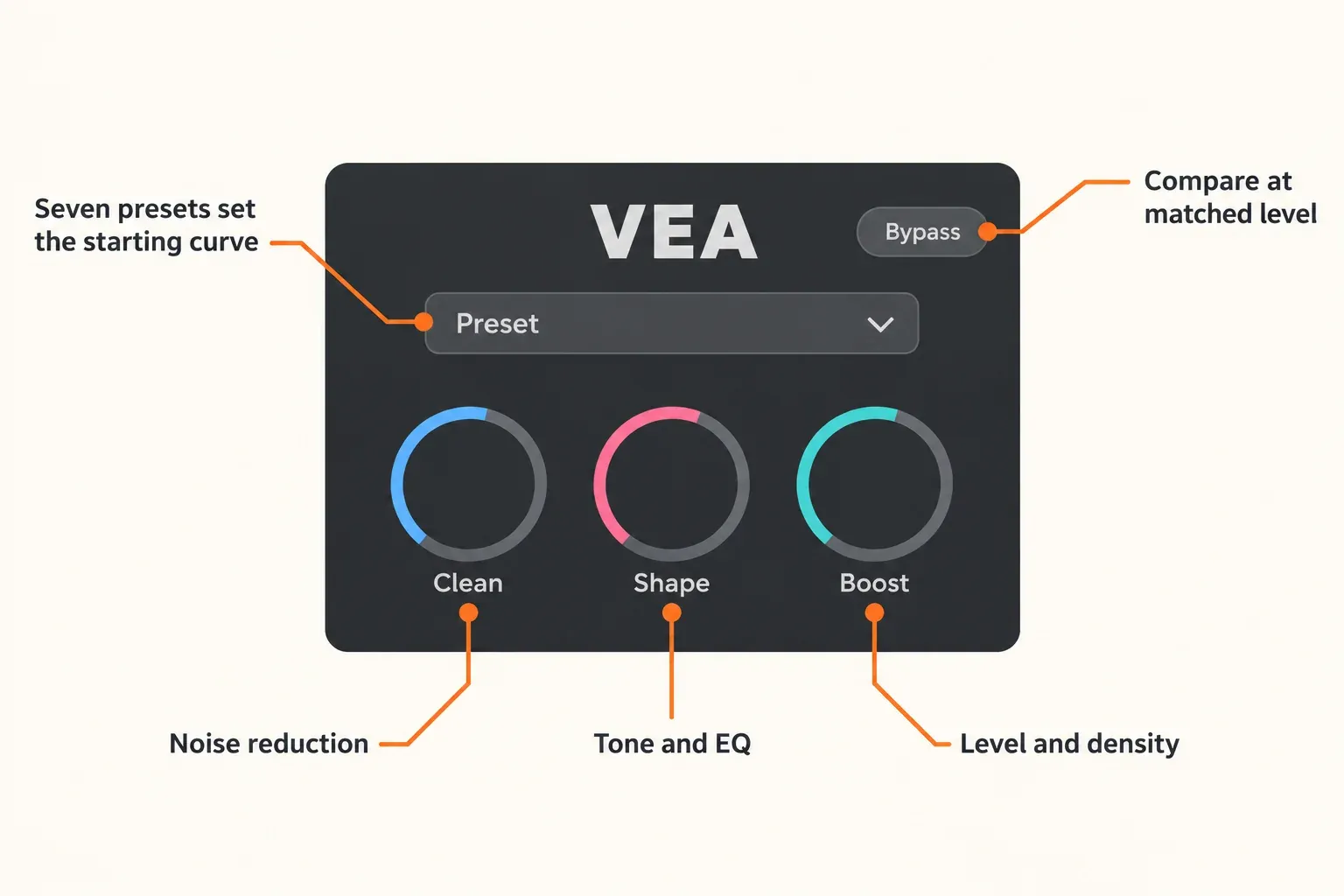
The workflow starts with listening. iZotope's getting-started guide for VEA says the plug-in analyzes the voice while audio plays and then recommends noise reduction, EQ and dynamics settings. You can run it as an insert on the voice track or, in Pro Tools, as an AudioSuite process. After the analysis, three knobs scale that suggestion up or down.
| Control | What it changes | What to listen for |
|---|---|---|
| Clean | The amount of de-noising | Breaths between phrases, where over-processing shows first |
| Shape | How far VEA pushes the EQ curve it recommended | Bass and presence building up as the curve gets stronger |
| Boost | Level and density: louder peaks come down and quieter sections come up | Crunch on loud syllables, and extra loudness swaying your judgment |
| Preset menu | Which EQ curve and compression character the knobs start from | Whether the preset suits the voice and the program |
The Podcast Host describes the knobs on a 0–100 scale, where its comparison product, Supertone Clear, works in decibels. A setting is a position on the dial rather than a decibel amount, so copying someone else's numbers tells you little about your own voice.
Seven presets set the starting point: Default, Beautiful Planet, Garage Pod, Public Radio, Sung Vocals (High), Sung Vocals (Low) and True Crime. Each has its own EQ curve. iZotope's guide gives two examples of how far apart they sit: Public Radio leans on lower frequencies with heavier compression, while Sung Vocals (High) uses gentler compression and a brighter tone.
Launch coverage also describes reference matching inside Shape. The January 2024 launch post said you could match a favorite creator's tone with Audiolens referencing, using target audio or references saved in the Audiolens app. That app has since been sunset. The Audiolens product page says it's no longer available for purchase and that its defining features moved to Tonal Balance Control 3, and iZotope's support notice gives existing owners critical maintenance updates until March 18, 2027. The current VEA product page doesn't mention referencing, so confirm what Shape offers during the trial rather than buying VEA for that feature.
Plugin Boutique's product copy also mentions two color palettes for personalizing the window or telling speakers apart.
How to set VEA up without fooling yourself
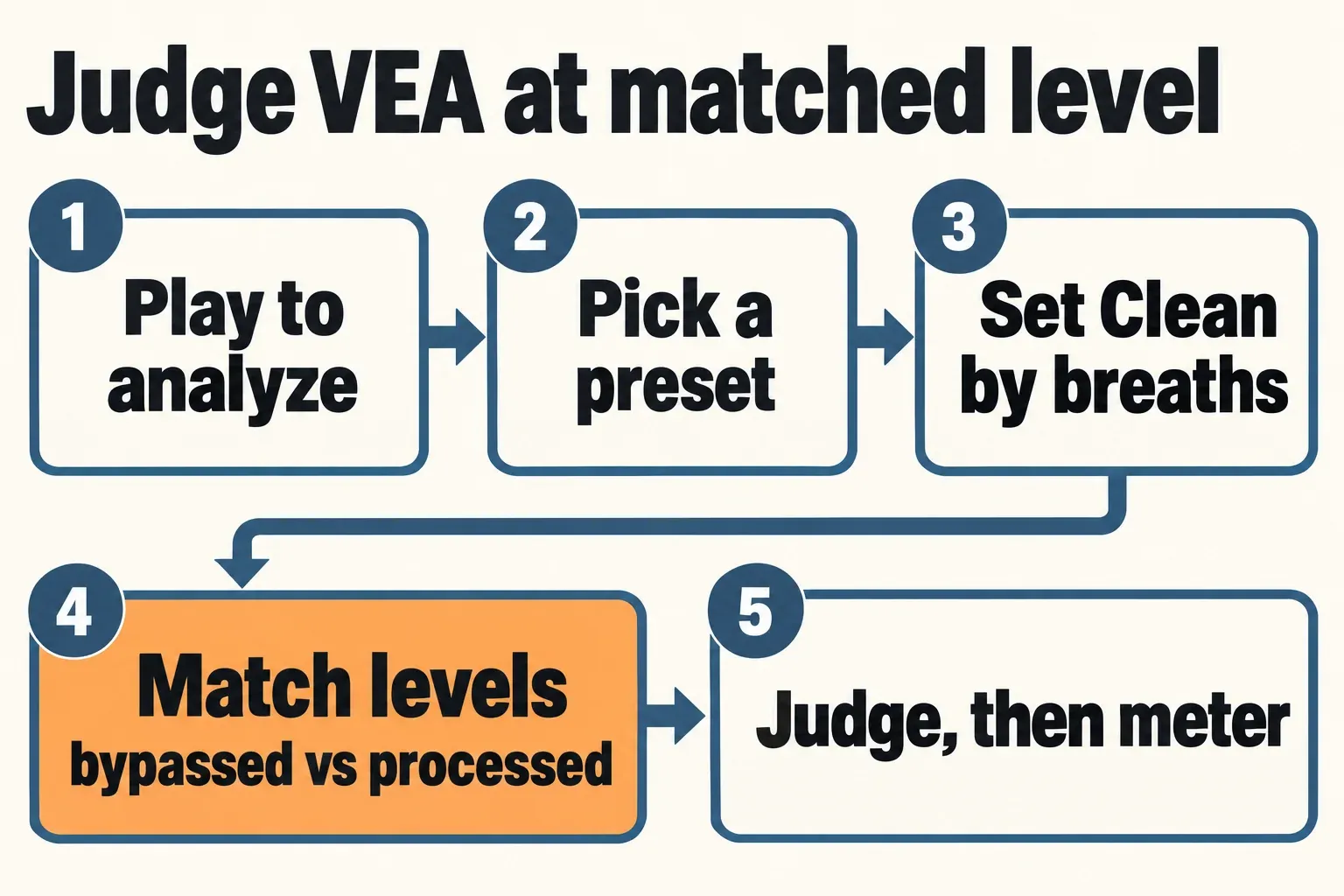
The trap here is loudness. Boost makes the processed voice louder, and the louder version tends to win a quick A/B. Tansy Aster Academy found that iZotope's own before-and-after demos weren't gain-matched, and that once the files were level-matched, much of the apparent improvement turned out to be loudness. My rule is to match levels before deciding anything.
- Insert VEA on the voice track. In Pro Tools you can also run it as AudioSuite. Keep it ahead of anything that sets final loudness.
- Play a representative passage. Pick a section with normal speech and a few pauses, and let VEA analyze it.
- Choose the closest preset. Start from Default, then try Public Radio for a heavier, lower sound or Sung Vocals (High) for a lighter, brighter one.
- Set Clean by the breaths. Raise it until the background drops, and back off as soon as breaths or room tone start to warble. The Podcast Host's fan-noise recording at Clean 50 left the remaining noise "wobbly", which is the artifact to listen for.
- Match levels, then compare. Bounce the same short section bypassed and processed, normalize both to the same integrated loudness, and compare those two files. If the processed one only wins before matching, VEA was adding level, not quality.
- Check the finished file with a separate meter. VEA has no loudness reading, so measure the export against your platform's own spec. The podcast loudness standard guide lists common targets, and Sound Forge's loudness meters show integrated LUFS and true peak.
Getting VEA running takes an iZotope account, since the download page requires a login. Unauthorized, VEA runs in Trial mode without restriction for 10 days. After that it switches to Demo mode and inserts silence at regular intervals, so an export made after day 10 without a license carries gaps. When the installer or authorization stalls, the iZotope Product Portal and authorization fixes cover the usual causes.
Test results: what the published reviews found
Composite result: three independent editorial reviews agree that VEA improves a decent voice recording and can't rescue a bad one, and none of them found a fix for room reverb. The two numeric ratings are different kinds of score, an editorial 3.6/5 from The Podcast Host and a 4.6/5 buyer average from 238 ratings on Plugin Boutique, so they sit side by side here rather than in one average.
| Source | Setup | Result | What it reports |
|---|---|---|---|
| The Podcast Host's VEA vs Clear review, Sarah Buchynski, January 2024, updated February 2025 | Head-to-head with Supertone Clear on Windows and Pro Tools, including a deliberately noisy bathroom-fan recording | 3.6/5: interface 5, performance 2, CPU use 4 (Clear 4.3/5) | Clean at 50 left the fan noise "wobbly"; Shape couldn't help with room reverb; Boost "a tad on the crunchy side"; lighter on CPU than Clear |
| postPerspective's double review, Cory Choy, October 2024 | Bad amateur, decent and studio recordings, the last with an Earthworks Ethos microphone | No score | A bad recording became "a LOUD bad recording"; decent recordings are "where VEA really shines"; Clean weak on complicated, tonal or uneven noise; nothing for reverb |
| Tansy Aster Academy, part 1, January 2024 | Comparison with Supertone Clear, Accentize dxRevive and CEDAR VoicEx, with raw and processed audio gain-matched | No score | Much of the improvement is loudness; noise reduction "ok, but not great"; not recommended for professional podcast editing |
| Tansy Aster Academy, part 2 | Good recordings: Earthworks Ethos in a treated room, Shure MV7 over USB in a minimally treated office | No score | "More than capable for the average content creator" with low to moderate noise and little reverb; still not a restoration tool; no loudness meter |
| Plugin Boutique buyer ratings | Store ratings on the current listing | 4.6/5 from 238 ratings | Praise for speed, the clean interface, three-knob control, presets and de-noising; the main complaint is a wish for deeper adjustable settings |
Counting the three editorial reviews, with Tansy Aster's two parts as one source, the agreement looks like this:
| Finding | Reviews that report it |
|---|---|
| No fix for room reverb or reflections | 3 of 3 |
| Helps a decent recording, can't rescue a bad one | 3 of 3 |
| Clean struggles with heavy, tonal or uneven noise | 3 of 3 |
| Boost makes the voice louder and more compressed | 3 of 3 |
| Worth it when the room is adequate | 2 of 3 (Tansy Aster rules it out for professional podcast editing) |
| Too little control over the processing | 2 of 3 |
| Very easy to use | 1 of 3 (The Podcast Host's 5/5 interface score) |
| Judge it gain-matched, or loudness misleads you | 1 of 3 |
| No loudness meter | 1 of 3 |
| Lighter on CPU than Supertone Clear | 1 of 3 |
Every review here covers the 2024 releases. Version 1.1.0 changed compatibility only, so the findings on noise, tone and level still apply, while host-specific bugs reported at launch don't carry over and are left out. iZotope's own before-and-after demos aren't counted, because they're vendor material and, according to Tansy Aster, weren't level-matched.
VEA vs RX: pick by what's wrong with the recording
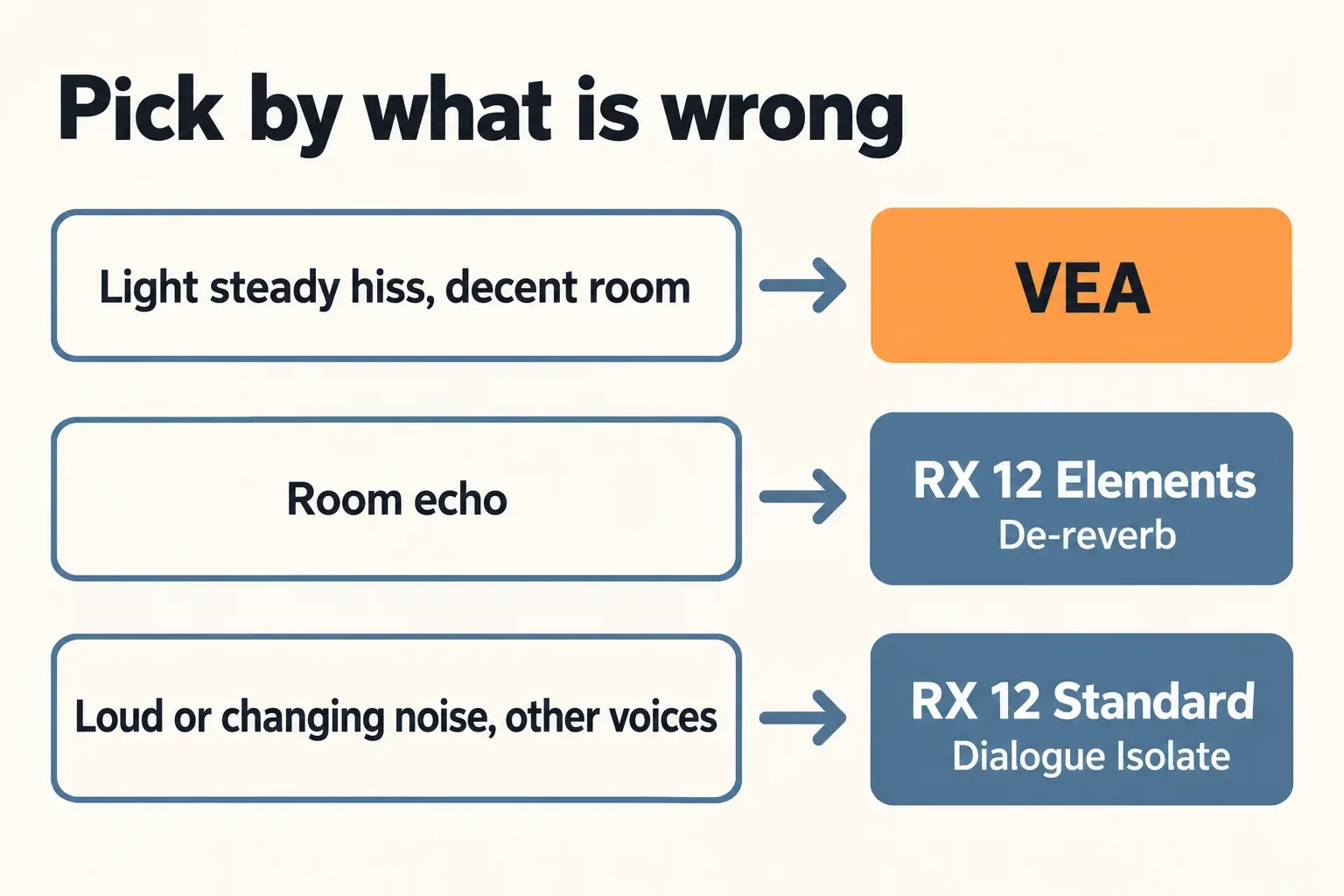
Pick by the fault, not by the price. VEA is a polish for light, steady noise in a decent room. Echo needs a de-reverb tool and loud or changing noise needs dialogue separation, and both live in RX 12. The RX 12 overview sets out what each edition holds: Elements is six plug-ins (De-click, De-clip, De-hum, De-reverb, Repair Assistant and Voice De-noise) without the RX Audio Editor, Dialogue Isolate starts at Standard, and Advanced adds a high-quality offline mode and multi-band processing to Dialogue Isolate.
| What's wrong | Pick | Why |
|---|---|---|
| Light, steady hiss in a decent room | VEA, $29 | Clean handles light noise, and Shape and Boost add polish in the same insert |
| Room echo or reflections | RX 12 Elements, $99 | Its De-reverb plug-in targets room sound, which VEA can't touch |
| Loud, changing or tonal noise, or other voices | RX 12 Standard, $399 | Dialogue Isolate separates speech from noise, and it isn't in Elements |
| Noise on a live or monitored signal | Voice De-noise, in all three RX 12 editions | The RX 12 Voice De-noise module is a zero-latency adaptive de-noiser |
| Several faults in one file | RX 12 Standard | It includes the RX Audio Editor, which Elements lacks |
For a roomy recording, I'd spend the extra $70 on RX 12 Elements. VEA's three knobs have nothing aimed at reverb, and all three reviews confirm it, so buying VEA first and RX later costs more than going straight to the tool that fixes the fault. The RX De-reverb guide shows how to learn, set and check it.
Heavy noise is a Standard job. Dialogue Isolate separates speech from the background, the work that Cory Choy at postPerspective found VEA's Clean weak at when noise was "complicated, tonal or uneven". An iZotope/Native Instruments support representative said in May 2026 that the Dialogue Isolate plug-in isn't recommended for live work and is best used offline, so treat it as an editing tool. Its controls and settings are on the RX Dialogue Isolate page, the RX 12 Elements vs Standard vs Advanced comparison goes through the editions, and removing background noise in iZotope RX covers the noise tools step by step. The iZotope RX hub collects the rest.
One pricing detail matters for anyone planning to move up later. The US store offers RX 12 Standard as a $349 crossgrade "from any paid iZotope product". It doesn't say whether a VEA license qualifies, so check the price shown in your logged-in account before treating VEA as a step toward RX. A copy from the Japan giveaway was free, not paid. The iZotope price and upgrade guide explains how crossgrades and upgrades are priced.
Price, trial and where VEA is included
The price hasn't moved since launch. Sound On Sound's VEA launch news listed it at $29 or £29 including VAT in January 2024, and the US store still shows $29 with no markdown. Plugin Boutique lists it at $31.
| Where | VEA | Notes |
|---|---|---|
| iZotope US store | $29 | No sale price shown; 10-day trial from inside the host |
| Plugin Boutique | $31 | Buyer rating 4.6/5 from 238 ratings |
| iZotope Plus subscription | Not included | $15/month or $150/year, with RX 12 Elements |
| iZotope Pro subscription | Not included | $25/month or $250/year, with RX 12 Standard |
| Everything Bundle | Included | $2,999 |
| Music Production Suite 9, RX Post Production Suite 9, Elements Suite | Not included | $799, $1,799 and $149 |
Subscribers are the group most likely to assume they already have it. The What's Included table on the iZotope subscriptions page lists RX 12, Ozone 12, Nectar 4 and other plug-ins, and VEA isn't among them. Of the bundles in the table, only the Everything Bundle includes it. The iZotope bundle comparison shows what else each bundle carries.
There's no free VEA right now. iZotope Japan gave it away until July 31, 2026 at 23:59 Japan time as part of a Japan-only Mix & Master Sale 2026 that ran from July 24 to August 16, and that page now sits under ended sales. iZotope Japan's X account announced one more 12-hour window on August 3. Pages that still call VEA free are describing that offer. Current free iZotope tools are collected in the free iZotope plug-ins guide.
Hosts, formats and Sound Forge
On the system side, VEA runs on macOS Sonoma 14.7.x, Sequoia 15.7.x and Tahoe 26.1.x, and on Windows 10 and 11. Intel and Apple silicon Macs are both supported, natively and under Rosetta. The host list on the product page is specific, so read it before you buy.
| Host | Status on iZotope's list |
|---|---|
| Logic Pro 10.7–11, Pro Tools 2025, Ableton Live 11–12 | Listed |
| Cubase 14, Nuendo 14, Studio One 7, Reaper 7, FL Studio 25, Reason 13 | Listed |
| Adobe Audition 2025, Premiere Pro 2025, DaVinci Resolve 19 | Listed; the FAQ adds Audition CC 2022 and later |
| Audacity | Not listed; the FAQ says it needs a version that supports VST3 plug-ins |
| Final Cut Pro | Not listed |
| Sound Forge | Not listed |
| OBS Studio | Not listed; the built-in VST filter takes VST 2.x only |
Streamers hit a format wall. As of OBS Studio 33.0.0, released on October 23, 2026, the OBS VST 2.x plug-in filter supports VST2 plug-ins and lists VST3 as unsupported, and a VST3 host filter is still an open pull request. If your plan is OBS's built-in filter, VEA has no VST2 build for it to load. Any other route needs a VST3 host in the signal chain, and neither iZotope nor OBS lists such a pairing, so prove it during the trial. No published review gives latency or CPU figures for VEA in a live chain, which is why I'd clean recordings after the stream rather than build a broadcast around it.
Sound Forge users need a trial-first plan. Sound Forge isn't on VEA's host list, although both current editions, Sound Forge and Sound Forge Plus, support VST2, VST3 and ARA plug-ins according to the Sound Forge edition page. Current Sound Forge (2026.0.0.76) is a Windows 64-bit application, so this route is Windows-only. Install the VEA trial, add its VST3 folder under Options > Preferences > VST Effects as the Sound Forge VST Effects preferences describe, and confirm that VEA appears and processes cleanly before you pay. I wouldn't buy it for Sound Forge on any other basis, because neither iZotope nor Boris FX lists the pairing.
When the plug-in doesn't appear after a rescan, the fixes for VST plug-ins not showing in Sound Forge go through the common causes. For the rest of a spoken-word workflow in the editor, see Sound Forge Pro for podcast editing.
Who should buy VEA, and who should skip it
- Podcaster in a decent room: buy it. A quiet space is the condition every favorable review describes, and VEA gives a fair polish there for $29.
- Podcaster in a roomy or noisy space: skip it. Go to RX 12 Elements for echo or RX 12 Standard for loud or changing noise.
- Streamer on OBS: the built-in filter takes VST2 only. Try the trial in a VST3 host you already run, or clean recordings after the stream.
- Voice actor or audiobook narrator: VEA has no meter, so check the finished file's loudness separately against the platform's own spec. The voice-over recording guide covers the recording side.
- Sound Forge user: trial first, on Windows, and buy only once it loads and processes.
- Video editor: Premiere Pro 2025 and DaVinci Resolve 19 are listed. Final Cut Pro isn't, and Audacity needs a VST3-capable version.
- iZotope Plus or Pro subscriber: VEA isn't in either plan, and the RX 12 edition you already have covers the noise and echo side.
- Everything Bundle owner: it's already in your account.
- Hoping for a free copy: the Japan giveaway ended in early August 2026, so the 10-day trial is the only free route.
Verdict
My verdict: VEA is a fair $29 polish for a voice that's already in good shape, and a poor buy for a recording with real problems. I'd buy it for a podcaster or YouTuber in a quiet, soft-furnished room who wants a cleaner, fuller and more even voice without learning EQ and compression, because that's where all three reviews found it works. I wouldn't buy it to fix echo or loud noise: RX 12 Elements' De-reverb is the cheapest real fix for a roomy recording, and Dialogue Isolate in RX 12 Standard is the tool for heavy noise. Whichever you choose, match levels before you judge, since Boost's extra loudness is the easiest way to fool yourself. Everything Bundle owners can skip the decision, because they already have it.
FAQ
Is iZotope VEA free?
No. It costs $29 on the US store. The download runs as a 10-day trial without restrictions, then switches to Demo mode, which inserts silence at regular intervals. A Japan-only giveaway ended in early August 2026.
Does VEA remove reverb?
It doesn't. There's no de-reverb control, and The Podcast Host found Shape couldn't help with the room's natural reverb. RX 12 Elements, at $99, includes De-reverb.
Is VEA included in iZotope Plus or Pro?
No. Neither subscription lists it. The Everything Bundle includes VEA, while Music Production Suite 9, RX Post Production Suite 9 and Elements Suite don't.
Does VEA work in OBS?
Not directly. As of OBS Studio 33.0.0, the built-in VST filter supports VST 2.x only, and VEA ships as AAX, AU and VST3 with no VST2 build. Any other route needs a VST3 host that neither iZotope nor OBS lists, so try it during the trial.
Does VEA work in Sound Forge or Audacity?
Sound Forge isn't on iZotope's host list, even though Sound Forge supports VST3, so check it on Windows during the trial before buying. iZotope's FAQ says VEA works in Audacity only in a version that supports VST3 plug-ins.
What happened to Audiolens referencing in VEA?
Launch material described Audiolens referencing inside Shape. Audiolens has since been sunset and is no longer sold, its defining features moved to Tonal Balance Control 3, and the current VEA page doesn't mention referencing. Check what Shape offers in the trial.
Is VEA still supported after iZotope joined Boris FX?
iZotope says its products and licenses remain fully active after joining Boris FX. The latest VEA release is 1.1.0 from September 24, 2025, a compatibility update.