
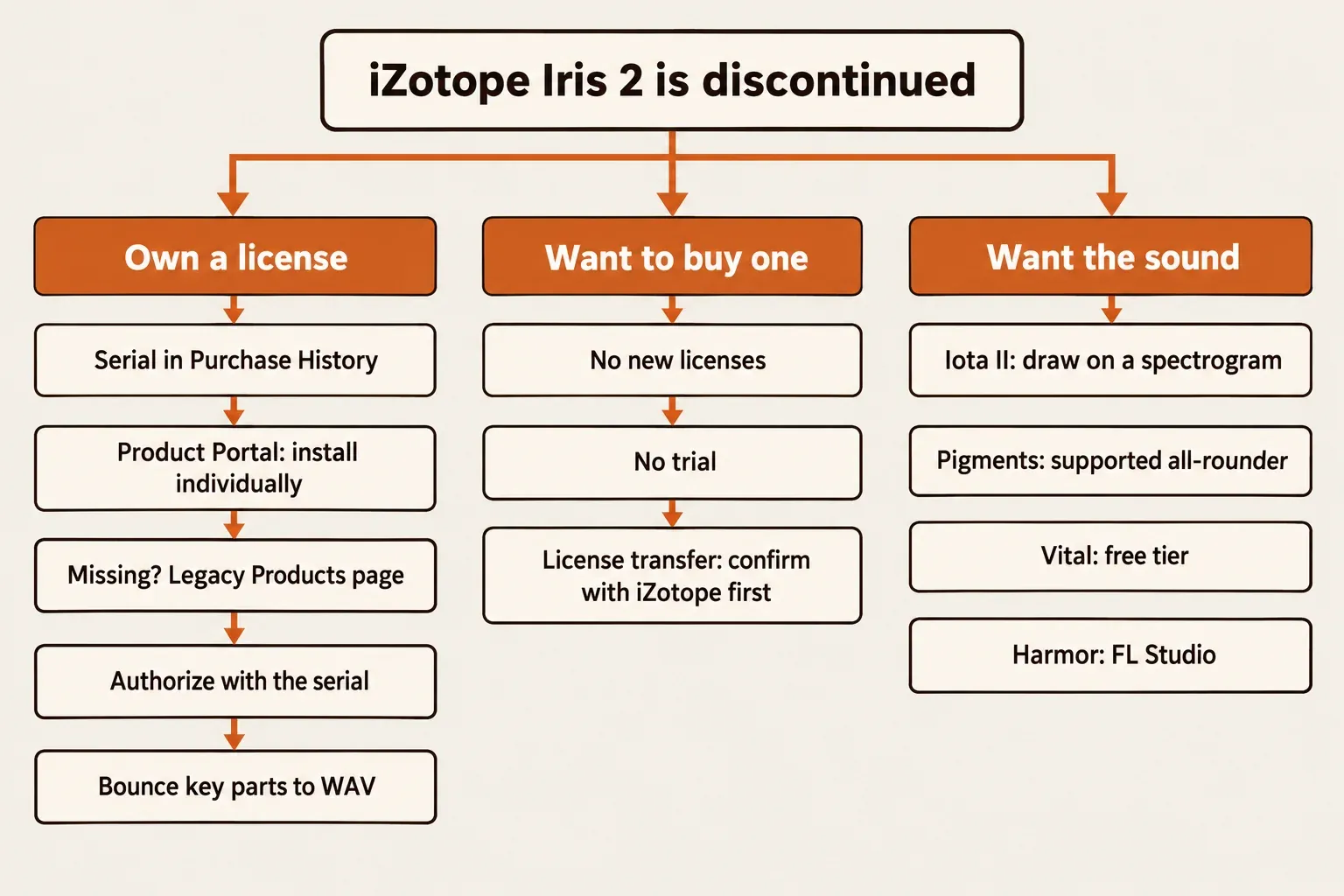
iZotope Iris 2 is discontinued. iZotope announced in late October 2022 that it had discontinued its sample-based synth, it's no longer sold on iZotope.com, and support ended on October 27, 2023. Owners can still download, install and authorize it with their serial number through iZotope's own routes, but there's no official way to buy a new license.
My advice depends on which side of that line you're on. If you own Iris 2, I'd reinstall it from your iZotope account, bounce every part you care about to audio, and stop starting new projects on it, because it has no native Apple silicon build and iZotope says macOS 27 is the last macOS with Rosetta 2. If you don't own it, I wouldn't chase a license: Dillon Bastan's Iota II covers drawing on a spectrogram, Arturia Pigments is the supported all-rounder, and Vital's free tier costs nothing. The rest of the current lineup is mapped on the iZotope hub.
- Status: not sold on iZotope.com, support ended October 27, 2023, and compatibility testing stopped after October 27, 2022.
- Owners: the serial in Purchase History still authorizes, and installers come from Product Portal or the Legacy Products page.
- Final spec: macOS 10.15.7 to 12.6 (Intel, or Rosetta on Apple silicon) and Windows 10–11.
- Reviews: a positive verdict in 4 of 7 published sources, pads and textures as its strongest ground, and CPU load as its main cost (4 of 7).
Is iZotope Iris 2 discontinued?
Yes. iZotope's support notice for Iris 2 says it's no longer sold on iZotope.com, support ended on October 27, 2023, and iZotope stopped testing it on new operating systems and host versions after October 27, 2022. The system specification won't change from here. The Iris 2 page on iZotope's store still loads and states that the product is no longer available for purchase.
The retirement was announced in late October 2022, and MusicTech's report on the discontinuation followed on October 27, 2022. Iris 2 left the catalog together with two other iZotope plugins. It had launched in late November 2014, according to SonicScoop's Iris 2 launch news.
| Question | What iZotope says |
|---|---|
| Can I buy a new license? | No. Iris 2 isn't sold on iZotope.com. |
| Is it still supported? | No. Support ended October 27, 2023. |
| Will it be updated for new systems? | No. The final system specification won't change. |
| Does my license still work? | Yes. Licenses aren't deactivated, and purchased serials keep authorizing. |
| Can I still download it? | Owners can, through Product Portal or the Legacy Products page. |
| Is there a trial? | No. iZotope's current Product Downloads page doesn't offer one. |
Iris 2 download: the official routes for owners and buyers
Only past purchasers can download Iris 2, and only from iZotope. Everyone else has one legitimate route to a license, a transfer from an existing owner, and it needs iZotope's cooperation.
If you own it
iZotope's notice says owners can still download, install and authorize Iris 2, and the serial you bought keeps working. Work through it in this order:
- Find the serial. Sign in to your iZotope account and open Purchase History, where Iris 2 serial numbers are listed.
- Try Product Portal. Find Iris 2 and install it on its own rather than with Install All, because iZotope's Product Portal guide says some legacy products don't support Install All. Portal runs on Windows 10 and 11 and on macOS Ventura 13.7 through Tahoe 26.1.
- Use the Legacy Products page when Portal isn't an option. iZotope's Legacy Products page keeps Iris 2 installers for Mac and Windows for past purchasers. iZotope also documents an account route without Portal (My Products > Install & Activate > Download the installer), provided Iris 2 shows that option in your account.
- Download the sound library. The Iris 2 reference manual describes the sound content as a separate download from your iZotope account after authorization, split into category installers.
- Authorize with the serial. Unauthorized, Iris 2 runs a 10-day trial and then a demo mode that mutes audio at intervals. When the sound drops out every so often, the authorization didn't take.
The Mac catch sits in step 2. Product Portal's listed macOS range starts at Ventura 13.7, while Iris 2's final spec stops at Monterey 12.6. On a Mac inside Iris 2's spec, the Legacy Products page or the account download is the realistic route; on a newer Mac, Portal runs but Iris 2 itself is outside iZotope's spec.
iZotope's Product Portal FAQ excludes the original Iris (version 1) from Portal support but not Iris 2. That isn't a promise Iris 2 appears in every account, so when it's missing or won't authorize, work through these Product Portal and authorization fixes before contacting support. For authorization itself, I'd use the serial rather than an iLok, because iZotope says iLok authorization is no longer supported for certain older products, and the serial route is the one the Iris 2 notice confirms.
If you want to buy it
iZotope doesn't sell new Iris 2 licenses, and there's no trial. The store record shows $0.00 with an EOL tag, but that's a placeholder for a retired product, not a free download: the page has no purchase or download action. The retailer listings that still turn up in search are marked sold out, so treat any price you see there as history.
That leaves a license transfer from an existing owner. iZotope's license transfer policy covers purchased full licenses: the original owner contacts iZotope Account Support with the new user's name, e-mail address and the serial number. It excludes time-limited, educational and NFR licenses, licenses that were already transferred, Elements editions and older versions owned through an upgrade. Discontinued products aren't mentioned either way, so I'd get iZotope's confirmation that an Iris 2 transfer will go through before paying a private seller anything.
Copies offered anywhere outside your iZotope account, Product Portal and the Legacy Products page aren't a safe or legitimate way to get Iris 2, whatever the download page promises.
Will Iris 2 run on a current Mac or PC?
Officially, Iris 2 runs on macOS Catalina 10.15.7 through Monterey 12.6 and on Windows 10 and 11, and nothing newer will be added. On Apple silicon it runs only through Rosetta, and macOS Ventura or later is outside iZotope's support lists.
| Area | Final official spec | What it means now |
|---|---|---|
| macOS | Catalina 10.15.7 to Monterey 12.6 | Ventura and later aren't on iZotope's lists, and its macOS 26 Tahoe statement doesn't name Iris 2. |
| Apple silicon | Rosetta only, version 2.0.2 | No native build. iZotope says macOS 27 is the last macOS with Rosetta 2. |
| Windows | Windows 10 to 11 | The spec is final. |
| Formats | AU, AAX (64-bit), VST2, VST3, RTAS (32-bit) and a standalone app | On Apple silicon: AAX, AU, VST2 and VST3 under Rosetta. |
| Hosts | Ableton Live 10.1–11, Cubase 12, Digital Performer 11, FL Studio 20, Logic Pro, Nuendo 12, Pro Tools 2022, Reaper 6, Reason 11, Studio One 5 | Sound Forge isn't on iZotope's host list. |
iZotope's Apple silicon compatibility table lists Iris 2 version 2.0.2 as running under Rosetta only. iZotope also released an updated installer for macOS 11 Big Sur, including Apple silicon in Rosetta mode, while warning that Big Sur could give unoptimized performance and playback. One forum user reported in April 2023 that Iris still worked on an M1 Mac, presumably in Rosetta, which is a single report rather than an iZotope statement.
The longer-term problem is in iZotope's macOS 27 compatibility note: macOS 27 is the last macOS that supports Rosetta 2. On an Apple silicon Mac, a later macOS without Rosetta leaves an Intel-only plugin like Iris 2 nothing to run on. When an unfinished project depends on Iris 2, I'd keep it on a computer inside the final spec and hold that system's OS where it is until every Iris 2 part is bounced.
Not sure which of those formats your host loads? The guide to what a VST plugin is explains VST2, VST3, AU and AAX and which hosts take each.
If Iris 2 runs but struggles
iZotope's Iris 2 CPU optimization article warns that it can tax a computer substantially and lists these fixes:
- Freeze or bounce Iris 2 tracks. iZotope calls this the biggest CPU gain.
- Hide the Iris 2 window during playback, which saves 2–3% of CPU.
- Raise the buffer to 2,048 samples for playback.
- Pick filter models other than New York and Tokyo, which can use up to 4% more CPU than the rest.
- Keep pitch within an octave of the root note, where both Radius RT and the Resampler perform best.
One more owner fix: when Iris 2 refuses to save presets, iZotope's fix for presets that won't save is to move the Iris 2 Library folder from Macintosh HD > Library > Application Support > iZotope > Iris 2 to Documents > iZotope, then point Iris 2 at the new location with the wrench icon.
What Iris 2 did, and why people still look for it
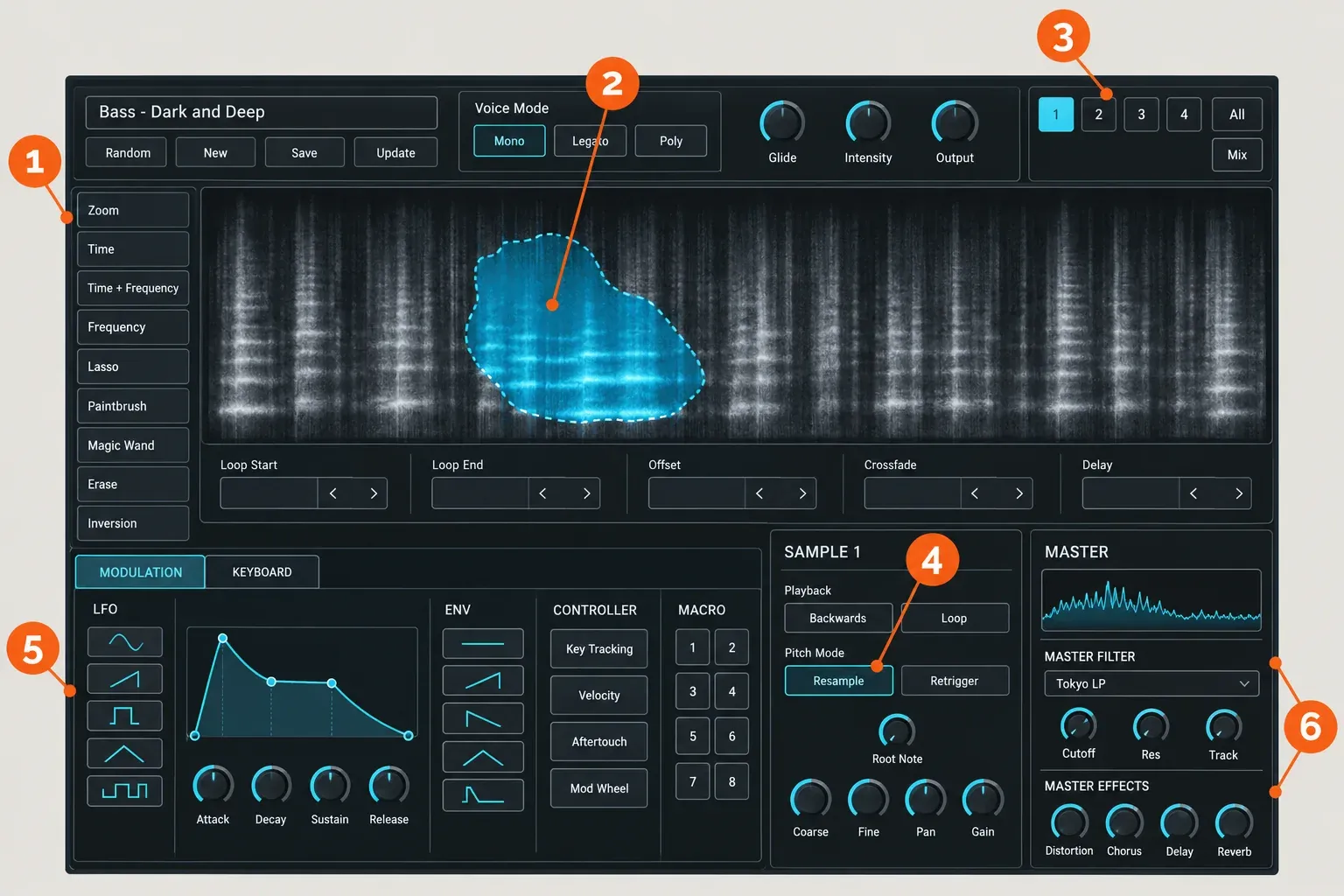
Iris 2 is a sample-based synth that shows each sample as a spectrogram and plays only the parts you select. Up to four sample layers can come from its analog oscillator waveforms, its 11 GB library or your own files, and iZotope built the selection on its RX Spectral Filtering technology, according to the Iris 2 reference manual.
In that spectrogram, time runs left to right, frequency runs bottom to top and brightness shows level. Anything you don't select is filtered out, as Computer Music's Iris 2 review on MusicRadar explains. Draw around one bright harmonic of a piano note, and that harmonic is all the layer plays.
| Area | What it does |
|---|---|
| 1. Tools Panel | Icon buttons, top to bottom: Zoom, the Selection tools (Time, Time and Frequency, Frequency, Lasso, Paintbrush, Magic Wand), Erase and Inversion. |
| 2. Spectrogram | Shows the layer's sample; only the selected region plays. |
| 3. Layers 1–4 | Four identical sample layers, which replaced Iris 1's three layers plus a sub oscillator. |
| 4. Pitch Mode | Resample (the default), Radius RT (pitch changes while speed stays, at a much higher CPU cost) or Fixed. |
| 5. Modulation | Five LFOs, five envelopes, Key Tracking, Velocity, Aftertouch, Mod Wheel and eight macros, routed to over 100 parameters. |
| 6. Master Filter and effects | 17 filter models, then distortion, chorus, stereo delay and reverb. |
The library is 11 GB of 24-bit WAV files, and the manual says they're meant for use in any sampler, which gives owners a second life for those sounds outside Iris 2. Your own .WAV and .AIF files load by dragging them onto a Sample area or the spectrogram. Iris 2 runs as a plug-in or as a standalone application. What it can't do is time-stretch: Sound On Sound's Iris 2 review notes there's no time-stretching, so Radius RT can change pitch without changing speed, but nothing changes a sample's length.
People still search for it because spectral selection on a playable sample is rare, and the results suit atmosphere. Audio UX built soundscapes for its RUIN EP from field recordings played through Iris 2, as iZotope's post on the Audio UX presets describes.
Iris 2 test results: what reviews and users reported
Across seven published reviews, news reports and forum threads, Iris 2 comes out as a strong pad and texture instrument with a heavy CPU bill. Four of the seven give a positive overall verdict, four call it CPU-heavy, and only two publish scores: 5 out of 5 from Computer Music and sub-scores averaging 4.4 of 5 from Resident Advisor. Two scores and one published CPU reading are too few for a meaningful median, so the composite result counts what the sources agree on.
| Finding | Sources (of 7) | What they reported |
|---|---|---|
| Positive overall verdict | 4 | Sound On Sound called it "unsurpassed for ambient sound sculptures, textural synthesis and otherworldly effects"; Computer Music gave 5/5; Resident Advisor's review scored Sound 4.6, Cost 4.3, Versatility 4.7 and Ease of use 4.1; Chillout with Beats recommends it for organic or experimental sound. |
| Heavy on CPU | 4 | Sound On Sound found it CPU-greedy with all four layers and Radius RT; Computer Music listed "CPU hit can be hefty"; Chillout with Beats measured about 15–18% at three notes; a KVR user reported heavy load on a polyphonic pad. |
| Best at pads, ambient beds and textures | 3 | Sound On Sound, Synth Anatomy's discontinuation report and the KVR thread, where one user said it excels at "glassy, evolving, shimmering pads". |
| Clear step up from Iris 1 | 3 | Four equal layers, richer modulation and a friendlier interface, though Sound On Sound said it "doesn't quite feel like a major increment". |
| Learning curve or interface friction | 3 | Three KVR users, an Elektronauts user who didn't enjoy the interface, and a warning from Chillout with Beats for anyone unwilling to learn a new workflow. |
| No time-stretching | 2 | Sound On Sound and Chillout with Beats. |
| Library usable in other samplers | 2 | Sound On Sound and Resident Advisor. |
| Some users dislike the sound | 2 | The KVR and Elektronauts threads. |
The only published CPU figure comes from a Japanese review on Chillout with Beats: about 15–18% CPU with three simultaneous notes, depending on the preset, on a Core i7-4770K at 3.5 GHz, climbing more slowly as more notes were added. The same review found some presets heavier than Avenger or Massive X and saw memory rise by about 370 MB after loading Iris 2. Host and buffer size weren't stated, so read it as that one system's result. A 2021 KVR thread on Iris 2 fits the pattern, with one user reporting lag on an older dual-core 3.4 GHz PC that went away on a 4.3 GHz machine. iZotope's own CPU guidance agrees with the reviewers and puts freezing or bouncing first.
The seven sources first appeared between March 2015 and April 2023. All four reviews came out before the discontinuation, and none of the seven sources covers macOS Ventura or later. The sound and the CPU cost are well documented; behavior on current systems is set by iZotope's final spec above.
Legitimate alternatives you can get today
For Iris-style drawing on a spectrogram, Dillon Bastan's Iota II is the closest match. Arturia Pigments is the supported all-rounder that also works with your own samples, Vital covers a zero budget, and Image-Line's Harmor fits only inside FL Studio. Prices are from each vendor's page on October 30, 2026.
| Tool | How it uses your samples | Price | Platforms and formats | Pick it if |
|---|---|---|---|---|
| Iota II | Draws playback paths on a sample's spectrogram, with Classic, Spectral and Resynth algorithms, up to 12 paths and six samples | $60, free trial | VST3, AU, LV2 and standalone on Windows, Mac and Linux; the standalone needs macOS 11; no AAX listed | You want Iris-style drawing on a spectrogram |
| Pigments | Six synthesis types, including Sample, Granular and Harmonic, and it can process external audio | $199; Pigments Play is free with 100 presets and limited controls | Standalone, VST, AAX, AU and NKS; Windows 10+ 64-bit (not Windows ARM), macOS 11+ including M1 | You want a supported synth with AAX |
| Vital | Turns your samples into wavetables with its pitch-splice or vocode converter | Basic tier free, and it's the full synth | Windows 10+, macOS 10.15+ on Intel or Apple Silicon, Ubuntu 18.04+ | Your budget is zero |
| Harmor | Subtractive synthesis plus audio resynthesis and image synthesis | See Image-Line's shop | Sold as an FL Studio plugin | You already produce in FL Studio |
My pick for anyone who loved Iris 2's spectrogram is Iota II, because you still draw on a sample's spectrogram to decide what plays, and Dillon Bastan's Iota II page offers a free trial before the purchase. Its store lists no AAX version, so Pro Tools users should look at Arturia's Pigments, which lists AAX alongside its Sample, Granular and Harmonic engines. Pigments Play is free, but it has no modulation control, so treat it as a preset player rather than a sound-design tool.
Vital's free Basic tier is the full synth, not a cut-down demo, and its sample-to-wavetable converter is the nearest free route to building sounds from your own recordings. More no-cost instruments and effects are collected on the free plugins and trials hub. Image-Line's Harmor manual describes resynthesis from audio and images, but Image-Line sells it as an FL Studio plugin, so it only makes sense when FL Studio is already your host.
Forum users point the same way. In a 2023 Elektronauts thread on sample resynthesis synths, Pigments was the replacement named most often (three users), followed by Harmor and VirSyn Cube (two each). Owners who only want the Iris 2 library as plain multisamples can load those WAV files in any sampler, and the sampler software guide sorts the options by workflow.
Using Iris 2 sounds with Sound Forge Pro
Sound Forge Pro isn't on iZotope's Iris 2 host list, so treat the two as halves of one workflow: prepare samples in Sound Forge, play them in Iris 2 inside a supported host or its standalone app, then bring the bounced audio back for editing.
- Prepare the source. Iris 2 imports ordinary .WAV and .AIF files, so clean up the sample, cut and trim it in Sound Forge, and normalize it before saving a copy.
- Set length and tempo before import. Iris 2 can't time-stretch, so make those changes with Sound Forge's time-stretch and pitch-shift tools and save a new file.
- Load and play it in Iris 2. Drag the file onto a Sample area or the spectrogram, select the region you want, and play it from a supported host or the standalone app.
- Bounce and edit. Render the part to WAV, which also follows iZotope's CPU advice, then open the file in Sound Forge Pro for fades, edits and final level.
Maybe what you liked about Iris 2 was selecting sound on a spectrogram rather than playing it from a keyboard. The tools for that now live in audio editors: RX's spectral repair tools select and process regions of a spectrogram in audio files, and SpectraLayers Pro 13 builds a whole editor around spectral selection and unmixing.
My verdict
My verdict: Iris 2 was a distinctive pad and texture synth, and the published reviews back that up, but its compatibility stopped moving in October 2022 and it's heavy on CPU. Owners should keep it, reinstall it the official way with the serial from Purchase History, and bounce the parts that matter while their computer still runs it. The clock is real on Apple silicon, since Iris 2 has no native build and macOS 27 is the last macOS with Rosetta 2.
Non-owners shouldn't chase a license. Get Iota II to draw on a spectrogram, Pigments for a supported synth with AAX and plenty of depth, Vital when the budget is zero, and Harmor only when you already work in FL Studio. When someone offers you their Iris 2 license, get iZotope's confirmation of the transfer before money changes hands.
Iris 2 quick answers
Does Iris 2 open original Iris patches?
Not always like for like. Computer Music's review advised Iris 1 owners to keep Iris 1 installed for that reason. Iris 1 is a separate legacy product, and iZotope's Product Portal FAQ excludes it from Portal support.
Are there free presets for Iris 2?
Yes. Luftrum's free Luftrum 10 bank holds 74 Iris 2 presets, 34 of them ambient pads, and it needs Iris 2 version 2.02. It's a preset bank only, so you still need an authorized Iris 2.
Where does Iris 2 keep its sound library?
By default in Documents\Iris 2\Iris 2 Library on Windows and in /Library/Application Support/iZotope/Iris 2/Iris 2 Library on a Mac, per the manual. If you moved it to fix preset saving, point Iris 2 at the new folder with the wrench icon.