

Quick answer: choose delay time by where the repeat should land. For a dry hit on a quarter-note beat, a quarter-note delay lands on the next beat and an eighth-note delay lands halfway between them. A dotted eighth lasts three-quarters of a quarter note; an eighth-note triplet lasts one-third. Set feedback, filtering, wet level, reverb pre-delay, and decay separately. If a synced effect masks the next note or creates an unwanted echo, change it.
Already know the tempo? Use the BPM to milliseconds calculator for the exact straight, dotted, or triplet value. If the tempo is unknown, measure it first with Tap Tempo. This guide begins after the arithmetic: it is about choosing and checking the result.
At 120 quarter-note BPM, a quarter note is 500 ms, an eighth is 250 ms, a dotted eighth is 375 ms, and an eighth-note triplet is about 166.7 ms. These are placement options, not recommended reverb settings. Check the beat unit first: in compound meter such as 6/8, you may tap dotted quarters. A dotted-quarter pulse of 80 means quarter-note BPM of 120, not 80. Entering 80 in a quarter-note calculator would make every result 50% too long.
Choose the delay by where the repeat lands
A tempo-synced delay is a rhythmic layer. The dry performance supplies one pattern and the repeats add another, so auditioning the effect on a held note tells you less than playing the real phrase. Start with one exposed bar, then add the rhythm section and the next vocal or instrumental entrance.
| Starting division | What to listen for | Reject it when |
|---|---|---|
| Quarter note | Repeats reinforce the main beat and leave broad space between echoes. | The repeat competes with the next downbeat or makes the phrase feel slower. |
| Eighth note | The echo fills the midpoint between quarter-note beats. | Fast material becomes a continuous wash instead of a readable pattern. |
| Dotted eighth | The repeat lands three sixteenth-note steps after the source, creating syncopation against straight playing. | The played rhythm already occupies that gap or the repeats disguise the intended accent. |
| Eighth-note triplet | The first echo arrives one-third of a quarter note after the source; three such intervals fill one quarter note. | The song is straight and the triplet pull sounds like a timing error rather than deliberate tension. |
Apple describes Delay Designer as a rhythmic multitap effect with synchronization and quantization, while Ableton's current Delay can switch between beat divisions and millisecond Time mode. Those controls place the repeat; they don't decide whether it belongs in the arrangement.
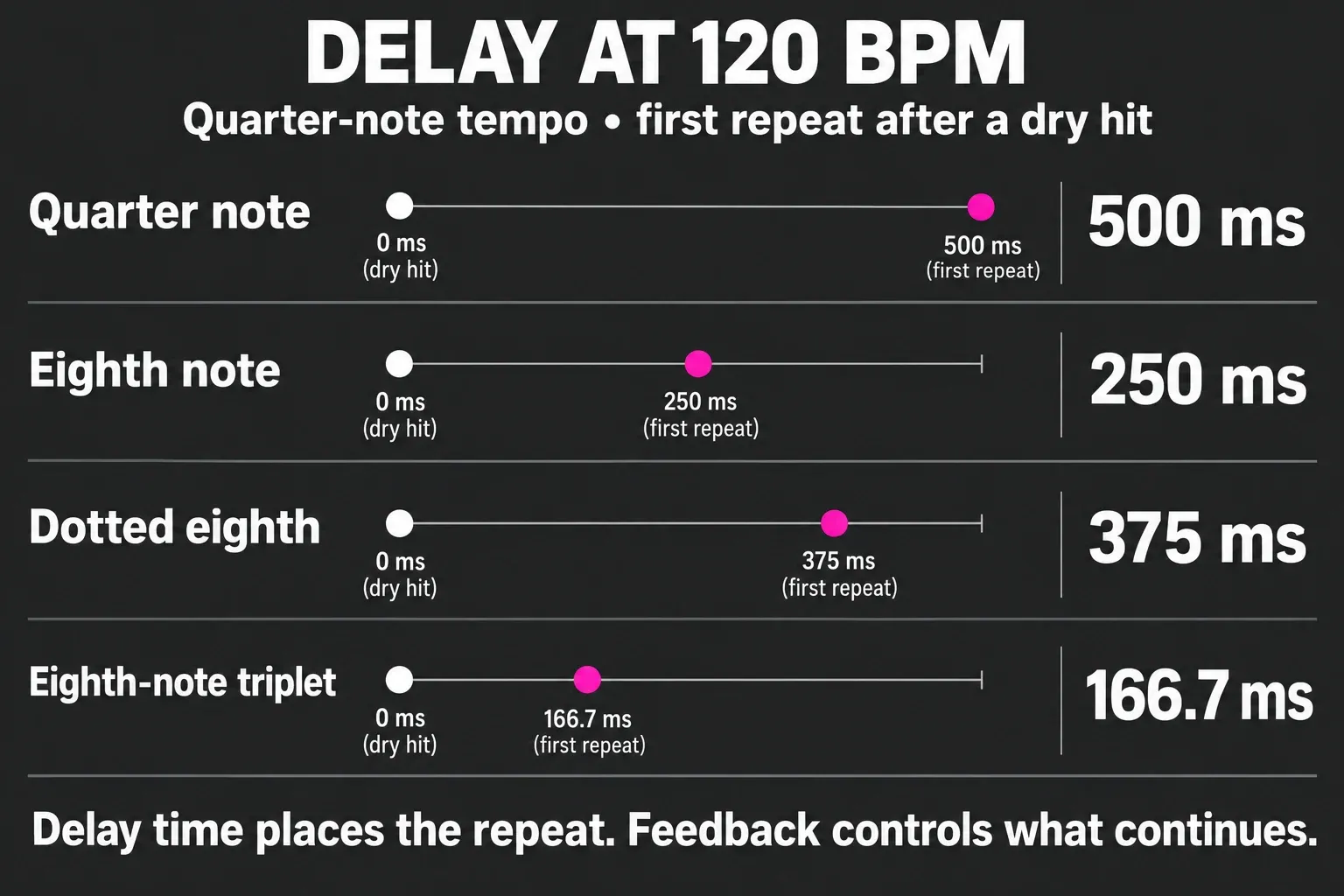
Hear straight, dotted, and triplet as different grids
A dot adds half the original note value: a dotted eighth is an eighth plus a sixteenth. The Soundbrenner dotted-note lesson illustrates this rule. An eighth-note triplet instead fits three equal notes into one quarter note, as the Dolmetsch grouping lesson explains. These are different timings, not interchangeable labels for an offbeat echo.
For dotted-eighth guitar delay, play the intended picking pattern while adjusting the repeat. The effect is the composite rhythm made by the pick attack and echo, not a magic setting produced by the delay alone. The practical lesson in GuitarPlayer's delay-pedal guide is useful here: delay time follows both tempo and the rhythmic value you want to generate.
If the plugin already has a reliable Sync mode, I'd use it when the project changes tempo. Enter milliseconds when the device has no sync, when a fixed time is intentional, or when you need an offset that the note menu cannot express. Ableton's current manual also exposes fractional offsets around the synced division, which is a reminder that strict grid placement and musical feel are not always identical.
Set feedback, filtering, and wet level after delay time
Delay time answers when the first repeat arrives. Feedback answers how much delayed output returns to the input, so it controls the continuation and density of the echo pattern. Wet level sets how prominent that pattern is, and filtering decides which parts of each repeat survive. One correct BPM value can't set those three controls for you.
Begin with one or two clearly audible repeats. Add feedback only until the last useful echo survives, then lower the wet level in the full arrangement. Check the effect in mono and through a small speaker: a wide, filtered repeat can feel unobtrusive in headphones while masking the center of the mix elsewhere. If the delay starts to oscillate or build unexpectedly, mute the effect output and reduce feedback before continuing; stopping the source alone may leave a feedback loop running.
Treat reverb pre-delay as a gap, not reverb length
Apple defines Space Designer pre-delay as the time between the original signal and the first early reflections. That gap can help the source attack remain identifiable, but longer is not automatically clearer. Apple's current guidance says the suitable value depends on the envelope of the source; too much can become an audible echo or separate the source unnaturally from its reflections.
Ableton's Hybrid Reverb supports both time-based and beat-synced pre-delay. Its manual cites 1–25 ms as typical for natural sounds in that product context. A strict note division may be much longer than that, especially at a slow tempo. Use the calculator to obtain the number, then compare it with a shorter unsynced setting. Keep the synced option only if the gap supports the groove without announcing itself as a separate repeat.
Compare two settings on the same phrase, keeping the reverb level unchanged. First try a short unsynced gap; then try the note value you calculated. Listen to the consonant or pick attack and the space before the next note. I'd choose the clearer result unless a distinct echo is the effect you want.
Do not turn reverb decay into a fake formula
Pre-delay and decay are different controls: pre-delay postpones the onset of the early reflections, while decay describes how the reverberant energy falls away. Plugin labels and algorithms vary, and convolution reverbs inherit the behavior of their impulse responses. A bar-length number can be an audition point, but it isn't proof that the audible tail ends cleanly on that boundary. For example, Ableton Reverb defines Decay as the time for the level to fall by 60 dB, not the instant when the sound is cut off.
Set decay while listening to the next phrase rather than only the tail in solo. Shorten it when consonants, snare hits, bass movement, or a scene cut lose definition; lengthen it only when the arrangement has room for the tail and the transition benefits from the added sustain. If the reverb is on a send, I'd check the send level before changing decay. A tail can feel too long simply because too much signal is feeding it.
For the actual desktop steps, use the Sound Forge reverb workflow. It covers selection boundaries, tail handling, preview, rendering, and verification: the parts a BPM formula can't answer.
A repeatable seven-step timing check
- Confirm the pulse. Confirm which note value the tempo represents. The calculator expects quarter-note BPM; in 6/8, a dotted-quarter pulse of 80 corresponds to quarter-note BPM of 120.
- Choose the intended placement. Decide whether the first repeat should reinforce the beat, fill a midpoint, or create dotted or triplet syncopation.
- Set sync or enter milliseconds. Use plugin sync when it follows the project correctly; otherwise copy the exact value from the BPM-to-milliseconds calculator.
- Reduce the pattern. Start with low feedback and a modest wet level so the first repeat can be judged.
- Play the real phrase. Include the rhythm section and the next entrance; do not approve the effect from a held note in solo.
- Set reverb separately. Compare synced and shorter unsynced pre-delay, then adjust decay against the next phrase.
- Bypass and verify. Match apparent level, check mono and a small speaker, and keep the effect only when the groove is clearer or intentionally transformed.
Four mistakes that make synced effects sound wrong
- Choosing by the label alone. “Dotted eighth” describes timing, not suitability for every guitar, vocal, or synth part.
- Using feedback to repair the wrong time. More repeats cannot make a badly placed first repeat fit the phrase.
- Equating pre-delay with decay. Moving the start of the reflections does not set how long the reverberant tail lasts.
- Approving in solo. A beautiful isolated tail can erase the next lyric or drum accent in context.
Tempo-synced delay and reverb FAQ
Should delay always be synced to BPM?
No. Sync is useful when the repeat should follow the song grid or tempo automation. Milliseconds are appropriate for fixed slapback, intentional offsets, unsynced hardware, and effects that should not move with tempo.
What is the difference between dotted-eighth and triplet delay?
A dotted eighth lasts three sixteenth-note steps, or three-quarters of a quarter-note beat. An eighth-note triplet divides one quarter-note beat into three equal parts. They place repeats on different grids.
Does more feedback change the delay time?
No. Delay time places the first repeat. Feedback sends some delayed output back into the delay input, changing how many repeats continue and how dense or unstable the pattern becomes.
Should reverb pre-delay match the song BPM?
It can be a useful audition point, but it is not compulsory. Compare the synced value with a shorter unsynced gap and keep the setting that preserves the source attack without producing an unwanted echo.
Is reverb decay the same as pre-delay?
No. Pre-delay is the gap before early reflections begin. Decay describes how the reverb tail falls away after it starts. Set and verify them separately.