
No. iZotope Audiolens is a standalone desktop app for Mac and Windows, not a plugin, so it never shows up in a DAW or in Sound Forge's plug-in list. It listened to whatever your computer played, saved that song's tonal profile as a reference target, and handed the target to the Assistants in Ozone, Neutron and Nectar. iZotope has since sunset it: new users can't get it, existing copies keep working, and critical maintenance runs until March 18, 2027. Its capture workflow now lives in Tonal Balance Control 3.
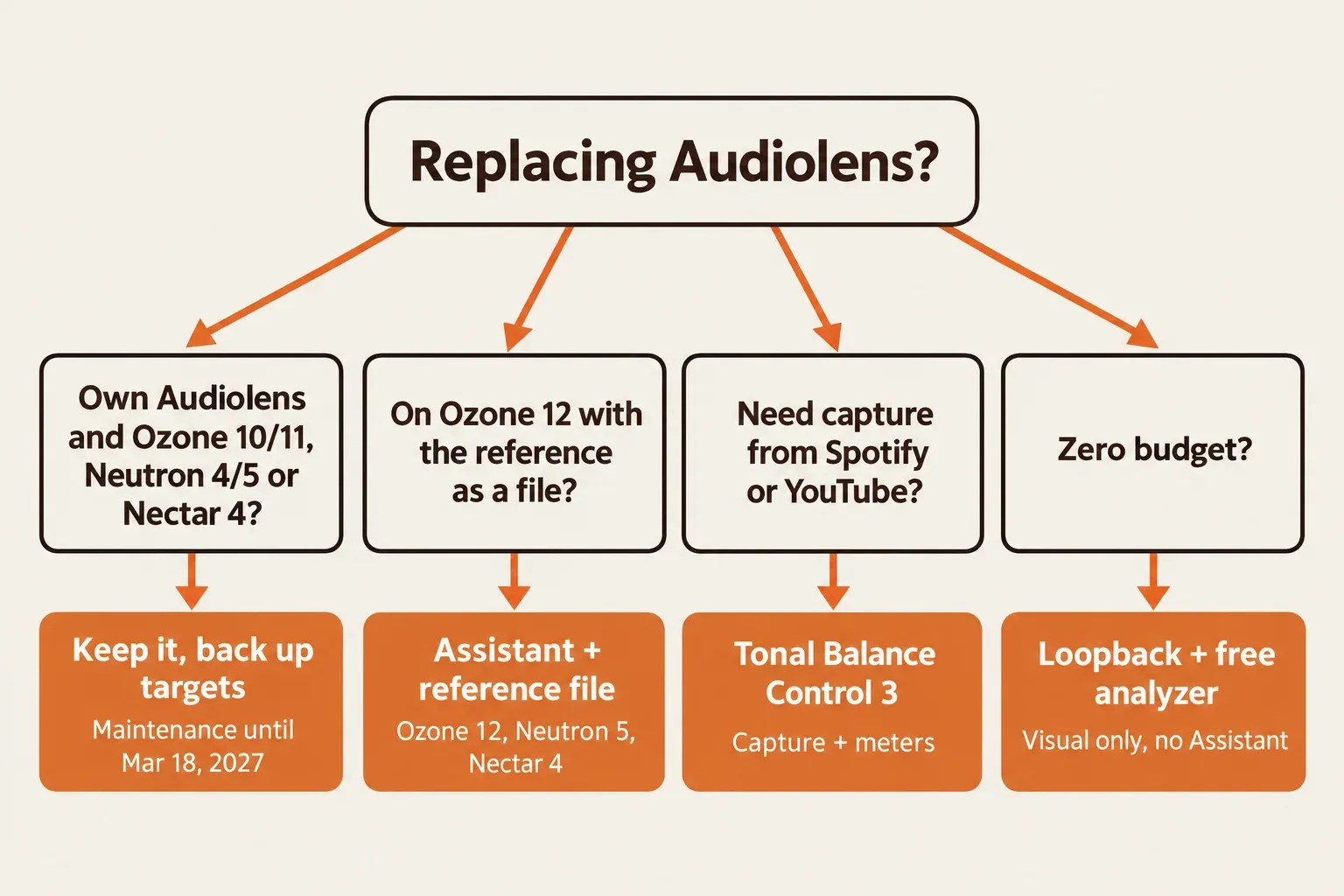
If you already own Audiolens and mix with Ozone 10 or 11, Neutron 4 or 5, or Nectar 4, I'd keep using it and copy your targets folder to a backup drive, because iZotope won't deactivate it and still maintains it until March 2027. On Ozone 12, or starting from scratch, I wouldn't chase an installer. Ozone 12 isn't on the Audiolens compatibility list, its Master Assistant already learns from a reference file you import, and Tonal Balance Control 3 earns its price only if you want capture from streaming plus its meters. The rest of iZotope's current line is mapped on our iZotope hub.
- What it is: a separate app that analyzes system playback and stores a target curve. It doesn't record audio.
- Status: sunset and no longer sold. Owned copies aren't deactivated, and testing on new operating systems stops after March 18, 2027.
- Works with: Ozone 10 and 11, Neutron 4 and 5, and Nectar 4. Ozone 12 and Tonal Balance Control 3 aren't on that list.
- Replacements: Tonal Balance Control 3 for streaming capture, or the reference-file import already built into Ozone 12, Neutron 5 and Nectar 4.
Is Audiolens a plugin? No, it's a standalone app
iZotope's Audiolens FAQ settles it in two sentences: Audiolens is a standalone desktop application, and it isn't a plug-in that can be opened in your DAW. Plugin Boutique's 2022 listing carries the same warning. No plugin rescan will ever make it appear in a host's list.
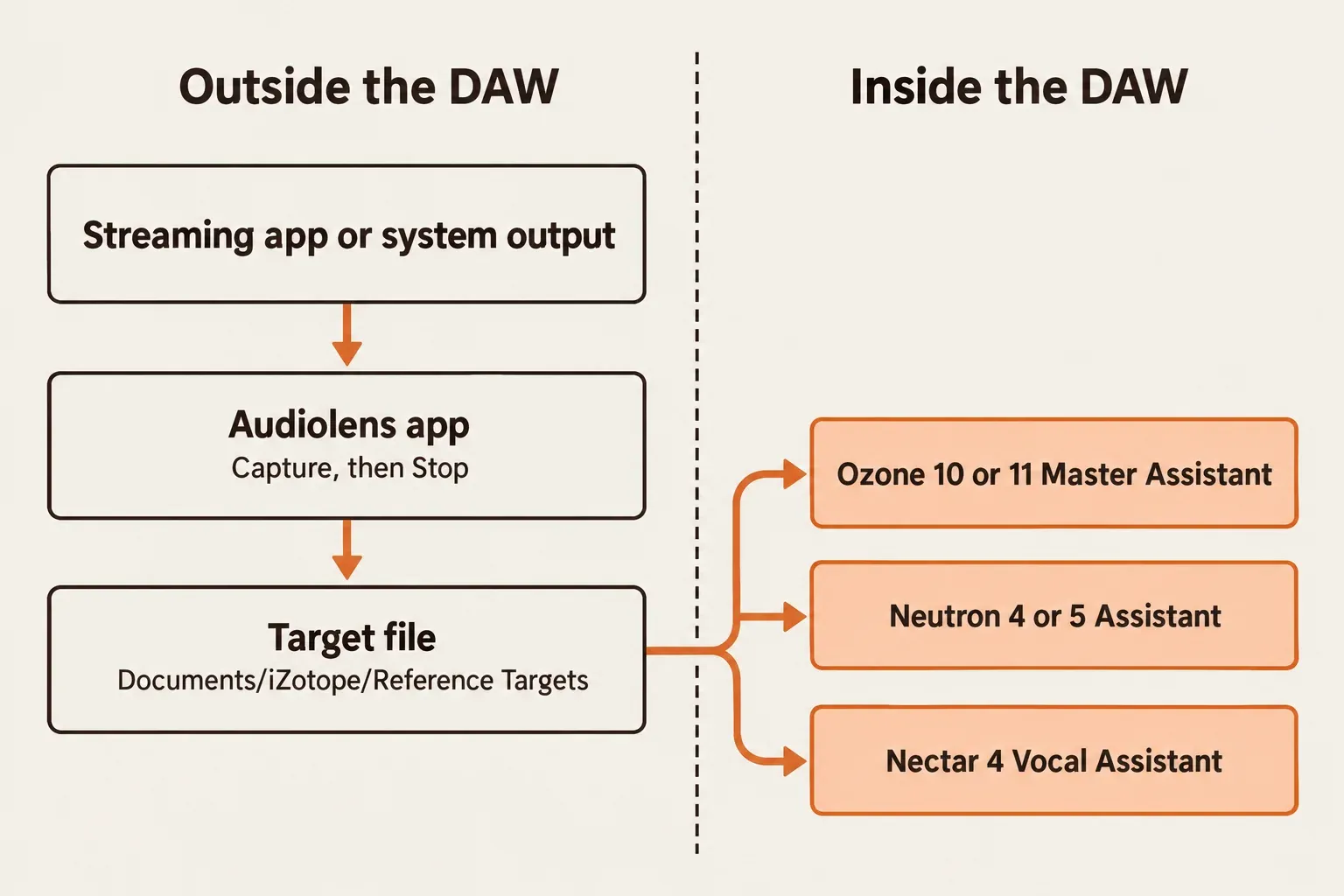
The split of work explains the confusion. Audiolens sat outside the host and listened to the computer's system output, through Rogue Amoeba's ACE capture engine on a Mac and the WASAPI driver on Windows, according to the Audiolens user manual. The plugins inside the DAW did the processing. Ozone, Neutron and later Nectar picked up the saved target, and their Assistants built a chain toward it.
| Audiolens (standalone app) | Ozone, Neutron or Nectar (plugins) | |
|---|---|---|
| Where it runs | Its own window on Mac or Windows, outside any host | Inside a DAW or audio editor, on a track or the master |
| What it hears | Whatever the computer plays through its system output, such as Spotify or YouTube | Only the audio on the track or bus it's inserted on |
| What it produces | A reference target file. No audio is recorded | Processed audio, with an Assistant-built chain matched toward the target |
| Appears in a plugin list | Never | Yes |
If the line between an app and a plugin still feels blurry, our explainer on what a VST plugin is covers how hosts find and load them.
What Audiolens did: capture, Target Library, Assistant
iZotope introduced Audiolens on November 8, 2022 as a desktop app tied into Ozone 10 and Neutron 4. The pitch was simple. Play a song you'd like your track to resemble, press Capture, and get a target without downloading or ripping the file. A capture collects loudness, frequency balance, dynamics and stereo width, and the manual is explicit that Audiolens doesn't record any audio.
A few capture rules decide whether a target is any good. The manual asks for at least 8 seconds of audio for mastering targets and ends a capture on its own after 3.5 minutes. Playback level changes the result, so iZotope says to raise the playing app's volume to maximum, and on Windows the system output volume counts too. There's no sample-rate setting: Audiolens follows the selected system audio device, and room correction software doesn't touch its input. iZotope's launch video covers the same volume, sample-rate and room-correction tips.
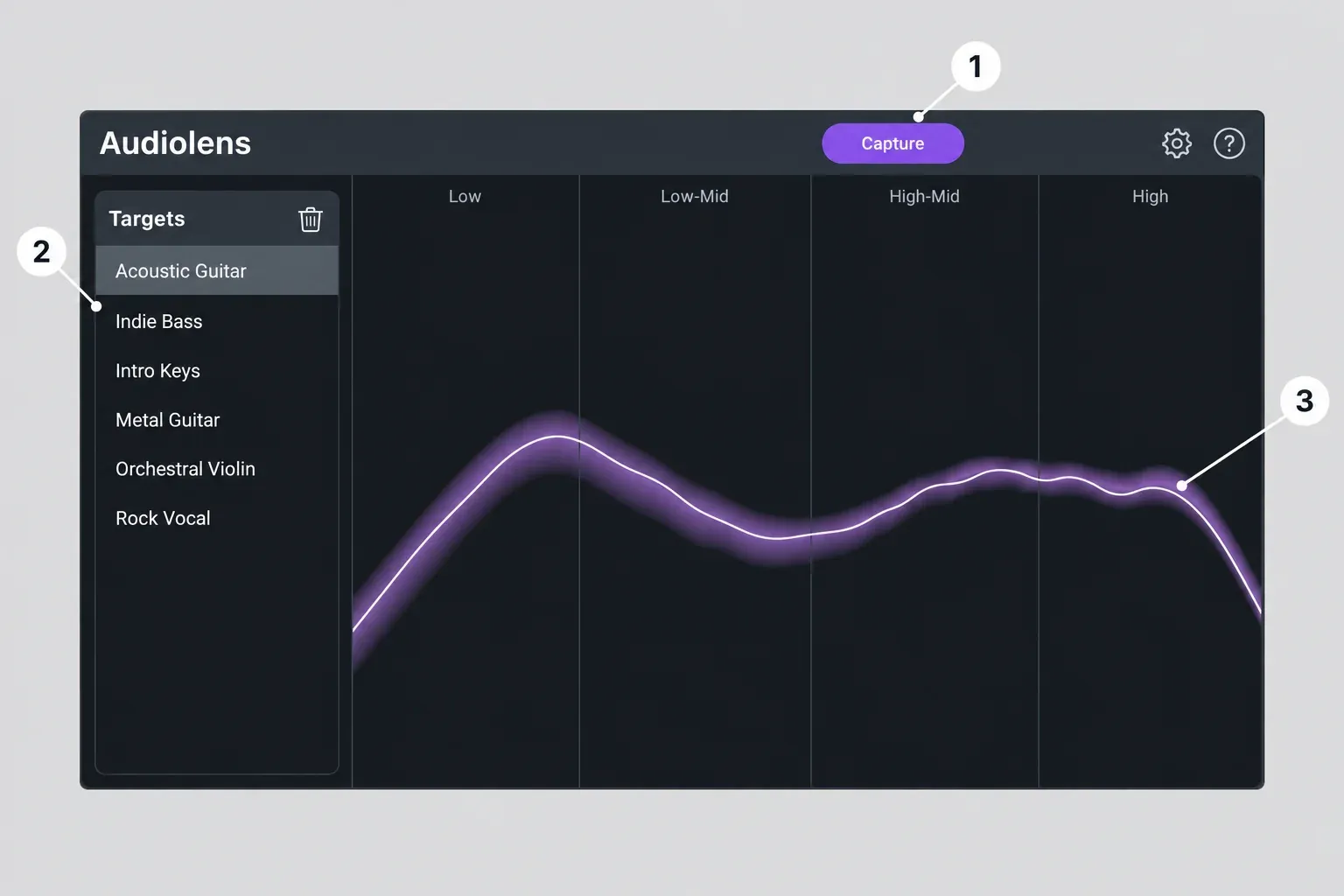
The window has three parts. The Application Header holds Capture, which turns into Stop while a capture runs, plus Settings and Help. The Target Library lists saved targets, and clicking one draws its curve in the meter. The Tonal Balance Target Meter splits the spectrum into Low (20 Hz–250 Hz), Low-Mid (250 Hz–2 kHz), High-Mid (2 kHz–8 kHz) and High (8 kHz–20 kHz), with the target in purple and your live input as a thin white line.
Sending a target to Ozone 10 or 11
- Start the reference track in your streaming app and turn that app's volume all the way up.
- Click Capture in Audiolens, let it run for at least 8 seconds, then click Stop.
- Type a name in the Target Library and click Save.
- Open Ozone on your master and run Master Assistant.
- When it finishes, click the Targets from Reference Files icon in Ozone's Target Library and select the Audiolens target. Master Assistant rebuilds the chain toward it.
Neutron works the same way from the other end: run the Assistant, select the Custom Target icon in its Target Library and pick the capture, and the Assistant uses it to Tone Match. On vocals, the Nectar 4 manual says Audiolens is fully compatible and separates the vocal from the reference track, which gives the Vocal Assistant its starting point.
Two housekeeping details matter now that the app is retired. Targets live in ~/Documents/iZotope/Reference Targets/ on a Mac and C:\Users\username\Documents\iZotope\Reference Targets\ on Windows. Deleting a target with the trash icon in Audiolens removes the file from disk and from Ozone, Neutron and every other supported product, and renaming it renames it everywhere.
It also helps to know what Audiolens never owned. Even in 2022, iZotope's Elements Suite FAQ said references could be imported into Ozone 10 and Neutron 4 Elements from audio files without Audiolens. What the app added was capture from streaming, so you didn't need the file at all.
Is Audiolens discontinued? Yes, iZotope has sunset it
Yes. The Support Notice for Audiolens says the app has been sunset from the iZotope product catalog, and the Audiolens product page now says it's no longer available for purchase and that its defining features are in Tonal Balance Control 3. iZotope's store data still lists it at $0.00 with an end-of-life tag, which records the shutdown rather than an offer.
| When | What happened |
|---|---|
| November 8, 2022 | Launch as a desktop companion to Ozone 10 and Neutron 4 |
| Until November 22, 2022 | Free launch giveaway, then $25 in the holiday sale |
| Later | iZotope offered it as a free download from its own product page |
| March 17, 2026 | Tonal Balance Control 3.0.0 released |
| Spring 2026 | Owners told by email that Audiolens is being discontinued |
| March 18, 2027 | Critical maintenance ends, and testing on new operating systems and hosts stops |
The giveaway terms come from iZotope's FAQ, and MusicTech's launch report said the same: free with an iZotope account until November 22, 2022, paid after that. The shutdown arrived by email, telling owners that Audiolens "is being discontinued from the iZotope product line". Community posts date that email to early April 2026: a r/iZotopeAudio thread on the discontinuation opened on April 7, and KnowsAudio reported it on April 11.
Owners get clear terms. You keep using the app, technical support runs for up to 12 months from your download date, and critical maintenance updates continue until March 18, 2027. Your copy won't be deactivated or changed. After that date iZotope stops testing Audiolens on new operating systems and host versions, and its system specifications stay frozen. The notice also says the referencing workflow now lives in the Tonal Balance Control 3 standalone desktop app.
iZotope retired its free Neutrino plugin the same quiet way, and Audiolens no longer belongs among the free iZotope plugins you can still download. One trap remains. Plugin Boutique's Audiolens page still shows FREE, a 4.4 rating from 3,309 ratings and a Log In to Download button, with 2022 copy that names Ozone 10, Neutron 4 and macOS Big Sur to Monterey. iZotope's own page contradicts it, so that listing isn't a route to the app.
Already own Audiolens: reinstall, compatibility and backups
Owners are in the best position, as long as they protect what they have. Work through it in this order.
- Keep the working install. iZotope says owned copies won't be deactivated, so there's no reason to remove a copy that runs.
- Back up the Reference Targets folder. Copy the whole folder from the paths above to an external drive or cloud storage. Those files are your captures, and a delete inside Audiolens removes them from Ozone and Neutron too.
- Stay on a listed plugin version. Targets are supported in the products in the table below. If captures don't show up in Ozone or Neutron, update both through Product Portal first, which is what fixed it for users in 2022.
- Reinstall through your account, not a download site. The support notice says installers sit on the Legacy Downloads page and serial numbers in Purchase History, and the manual installs and authorizes through Product Portal. On October 29, 2026, neither iZotope's Product Downloads page nor its Legacy Products page listed Audiolens. Sign in, check Product Portal and Purchase History, and contact iZotope Customer Care if the installer isn't there. Our Product Portal authorization and install fixes cover the sign-in side.
- Clear a broken install the documented way. If Audiolens reports "We have detected a missing or faulty installation", iZotope's fix for that error is to run the uninstaller from the root-level
/Library/Application Support/iZotope/Audiolensfolder on a Mac, or use Control Panel > Uninstall a program on Windows, then restart and reinstall from Product Portal. - Read the Mac capture step before reinstalling. It's covered just below.
| Product | Audiolens targets | What to do |
|---|---|---|
| Ozone 10 | Listed: Elements, Standard, Advanced | Keep using Audiolens |
| Ozone 11 | Listed: Elements, Standard, Advanced | Keep using Audiolens |
| Neutron 4 | Listed: Neutron 4 Elements and Neutron 4 | Keep using Audiolens |
| Neutron 5 | Listed | Keep using Audiolens, or import files in the Assistant |
| Nectar 4 | Listed: Elements, Standard, Advanced | Keep using Audiolens for vocal targets |
| Ozone 12 | Not listed | Import a reference file in Master Assistant |
| Tonal Balance Control 3 | Not listed. Its legacy import names only Tonal Balance Control 1 and 2 targets | Capture new targets in the Tonal Balance Control 3 app |
For Ozone 12 and Tonal Balance Control 3, iZotope documents nothing either way. The Ozone 12 Master Assistant manual doesn't mention Audiolens targets, and neither does the Tonal Balance Control 3 Target Library manual. I'd treat both as unsupported rather than broken, and wouldn't build a session around them.
The Mac capture step and its trade-off
On a Mac, the installer triggers a "System Extension Blocked" dialog for ACE. On Intel Macs running Ventura, Sonoma or Sequoia, enabling it takes the Enable System Extensions button in Privacy & Security, your admin password and a restart. Apple silicon asks more. iZotope's ACE install steps have you boot into Recovery, open Startup Security Utility, choose Reduced Security and tick "Allow user management of kernel extensions from identified developers", then allow Rogue Amoeba's software after the restart.
That lowers the Mac's startup security level. iZotope's position is that Reduced Security still lets only Apple-approved operating systems run, and that ACE is "a standard audio plug-in, not a kernel extension" that gets extra privileges to reach system audio. Some Mac owners in the 2022 launch thread refused the step anyway. I wouldn't lower startup security just for Audiolens on a Mac that doesn't already run that way, since Tonal Balance Control 3's capture needs only the Screen & System Audio Recording permission.
Which macOS and Windows versions it covers
The support notice lists macOS Ventura (13.6.x), Sonoma (14.4.x) and Sequoia (15) on Intel and Apple silicon, native or under Rosetta, plus Windows 10 and 11. iZotope's separate macOS 26 Tahoe compatibility statement lists Audiolens 1.5.0, so the two pages don't line up: the notice stops at Sequoia, while the Tahoe page names a minimum version. The macOS compatibility table gives 1.1.0 for Ventura, 1.2.0 for Sonoma and 1.4.0 for Sequoia, with native Apple silicon support since 1.0.1. On Tahoe, check that the installed copy is 1.5.0 or later.
Test results: what reviewers and users reported
Seven independent sources describe Audiolens in use: a Native Instruments community review, the r/AudioProductionDeals launch thread, a Cakewalk forum thread, MusicTech's launch report, Audio Newsroom's Tonal Balance Control 3 coverage, the r/iZotopeAudio discontinuation thread and KnowsAudio's shutdown report. None of them publishes a measured capture accuracy, CPU load or match quality, so this composite counts how many sources agree on each finding.
| Finding | Sources agreeing (of 7) |
|---|---|
| Its job is capturing a reference from system playback and handing the target to Ozone or Neutron | 7 |
| Praised for pulling references from streaming without downloading or ripping files | 4 |
| Without Ozone or Neutron, it's little more than a spectrum view | 3 |
| The 2026 shutdown reads as a push toward the paid Tonal Balance Control 3 | 3 |
| Routing workarounds named (BlackHole, Loopback, VSTHost) | 3 |
| The standalone view still helps if the DAW plays through system output | 2 |
| Targets missing in Ozone until both products were updated | 2 |
| Setup friction (Reduced Security on Mac, DAW audio on Windows) | 1 |
The strongest endorsement came from a Native Instruments community review, which called Audiolens "an absolute no-brainer" for anyone already on Ozone 10 or Neutron 4. The reviewer, who disclosed a free copy of Ozone 10 Advanced, also hit the most common bug: targets didn't appear in Ozone until both products were updated through Product Portal. The same review found ACE capture worked out of the box and kept a standalone use for the app, as long as the DAW plays through system output, with a warning that CPU load can cause stutters unless you raise the buffer.
Skeptics judged the app on its own. In the r/AudioProductionDeals launch thread, one user called it "basically a standalone spectrum analyser", another found little use for it with older Ozone and Neutron versions, and a Windows 10 user couldn't get it to hear Ableton. In 2026, a member of the r/iZotopeAudio thread said the curve had no numbers on it and described a free chain of VSTHost, SystemAudioBridge, a LUFS meter and Voxengo SPAN as a fallback.
The shutdown split opinion along price lines. Audio Newsroom's Tonal Balance Control 3 coverage says the new app absorbs Audiolens' streaming capture into a $129 product and calls it a "nice-to-have" luxury for anyone happy with the free Audiolens workflow. The r/iZotopeAudio thread and KnowsAudio read the move as a push toward the paid app. The only rating figure is a 4.4 average from 3,309 ratings on Plugin Boutique's still-live 2022 listing.
All seven tie Audiolens' value to an iZotope Assistant; without one, it was mostly a reference spectrum view. That's the test I'd apply to any replacement. Does it get a reference into the Assistant you already own, and does it ask for anything you'd rather not do to your Mac?
Audiolens alternatives that work today
Pick by the plugins you own and by whether the reference exists only on a streaming service.
| Route | What you need | Captures streaming audio | Feeds an Assistant | Cost | Best for |
|---|---|---|---|---|---|
| Tonal Balance Control 3 | The app and plugin | Yes, any system audio | Yes: Ozone, Neutron and Nectar | $129.00 new, $99.00 as an update from any previous version (US iZotope store, October 29, 2026) | Streaming references plus extra meters |
| Reference file in the Assistant | Ozone 12, Neutron 5 or Nectar 4, plus the track as a file | No, files only | Yes | Included with the plugin | Ozone 12 users who have the reference file |
| Loopback plus a free analyzer | BlackHole or another routing tool, plus Voxengo SPAN | Yes, as a live curve | No | Free (BlackHole asks for an optional donation) | Visual checks on zero budget |
| Keep Audiolens | An existing license and a listed plugin version | Yes | Yes, for listed versions | Nothing more to pay | Owners, until March 18, 2027 |
Tonal Balance Control 3, the official successor
The Tonal Balance Control 3 product page describes a standalone app plus a plugin. The app turns any system audio, from Spotify, Apple Music or YouTube, into a target, and those targets load into the Ozone, Neutron and Nectar Assistants or connect to their EQs. It can also build a target from one audio file or average a whole folder into a single curve.
Two differences from Audiolens matter. The standalone app is analysis only, with no EQ, so correction still happens in a plugin. On a Mac, capture needs the Screen & System Audio Recording toggle in Privacy & Security rather than a system extension, as the getting-started guide explains. The plugin runs in AAX, AU and VST3 hosts (64-bit only) on macOS Sonoma 14.8, Sequoia 15.8 and Tahoe 26.x, and on Windows 10 22H2 and Windows 11 24H2. Version 3.0.0 shipped on March 17, 2026, and the release notes list 3.4.0 from October 20, 2026. Capture steps, the meters and the full price table are in our Tonal Balance Control 3 guide.
Reference files in Ozone 12, Neutron 5 and Nectar 4
When you have the reference as a file, this route costs nothing extra. Ozone 12's Master Assistant builds a custom target from an audio file you add with the + button and learns its loudest eight seconds. Two limits apply: it won't create a vocal balance target from a custom reference, and it leaves out the Master Rebalance module while one is selected. Neutron 5 takes files through the (+) button in the Custom area of its Assistant's Target Library, and iZotope's Nectar 4 comparison chart lists Vocal Assistant Custom Referencing in Elements, Standard and Advanced.
My pick for most Ozone 12 owners is this route first, because it needs no extra app, no capture permission and no new license. Our Ozone 12 review, Neutron 5 review and Nectar 4 edition comparison show what each Assistant does with a reference.
Free routing plus an analyzer
The zero-budget route copies the Audiolens meter, not its link to the Assistants. On a Mac, BlackHole is a virtual loopback driver that passes audio between applications, offered with an optional donation. Send the streaming app through it into a host running Voxengo SPAN, a free real-time FFT analyzer in VST, VST3, AU and AAX formats, and you can watch the reference curve beside your own mix. On Windows, the r/iZotopeAudio member mentioned above runs VSTHost with BirdsThings SystemAudioBridge, a LUFS meter and SPAN, with Spotify's volume normalization switched off. Nothing on this route feeds an iZotope Assistant. Our roundup of free metering plugins and the browser-based audio spectrum analyzer cover more of the visual side.
Reference targets in Sound Forge Pro
Audiolens never appears in Sound Forge's plug-in chooser because it isn't a plugin. Sound Forge and Sound Forge Plus host third-party VST2, VST3 and ARA plugins, so the Tonal Balance Control 3 VST3 is the kind of plugin Sound Forge loads, but Sound Forge isn't on iZotope's tested host list. The Tonal Balance Control 3 standalone app needs no host at all and can run beside Sound Forge. For a visual look at a master's frequency balance inside Sound Forge itself, the built-in Spectrum Analysis tool is there, though it has no link to iZotope's Assistants. If a VST3 refuses to appear, start with our fixes for VST plugins not showing.
Verdict: keep it if you own it, skip the hunt if you don't
My verdict: Audiolens was a useful bridge between streaming playback and iZotope's Assistants, and that bridge is now closed to anyone who doesn't already own it. Owners on Ozone 10 or 11, Neutron 4 or 5, or Nectar 4 should keep it, back up the Reference Targets folder and settle on a replacement before March 18, 2027. On Ozone 12, I'd import the reference file into Master Assistant first and buy Tonal Balance Control 3 only if streaming capture and its meters earn a place in your weekly work. Nobody needs an installer from a download site: Product Portal, Purchase History and iZotope Customer Care are the routes worth using. Upgrade prices for Ozone 12, Nectar and the suites are in our iZotope upgrade price guide.
FAQ
Can I still download Audiolens?
Only if it's already in your iZotope account. The product page says it's no longer available, and it's missing from the public download pages listed above, so owners should check Product Portal and Purchase History, then contact Customer Care.
Do Audiolens targets work in Ozone 12?
Ozone 12 isn't on iZotope's compatibility list for Audiolens, and its Master Assistant manual doesn't mention Audiolens targets. Import the reference track as a file in Master Assistant instead.
Was Audiolens free?
It was free during the November 2022 launch giveaway, cost $25 in that year's holiday sale, and later became a free download from iZotope's own page. The store now lists it at $0.00 with an end-of-life tag, but it's no longer available to new users.
Does Audiolens record the songs I capture?
No. It stores loudness, frequency, dynamics and stereo-width data as a target file, not audio.