
Sound Forge 2026 has a short official requirements list: Windows 11, a 1.4 GHz processor, onboard graphics, 2 GB RAM, and 1.1–1.4 GB for the application. Read that 2 GB line carefully: Microsoft lists at least 4 GB as the Windows 11 memory minimum. This guide separates the Boris FX application specification, the Windows baseline and practical audio-workstation advice.
This guide is part of the Sound Forge Pro Start Here hub. Use it if you need the full order: trial, install, system requirements, review, pricing and legacy Pro 18 decisions.
Before you start the official 15-day trial, gather your interface driver, the plug-ins you rely on and one representative audio file. Then install Sound Forge through Boris FX Hub and check that whole setup works. An installer that finishes cleanly is only the first step.
Sound Forge Pro System Requirements — Full Specs
These are the official minimum requirements from Boris FX:
| Component | Boris FX minimum | Editorial guidance |
|---|---|---|
| Operating system | Windows 11 | Use a fully updated Windows 11 installation supported by your interface and plug-ins. |
| Processor | 1.4 GHz; multicore or multiprocessor recommended | Prefer a current multicore CPU and test your real effects chain. |
| Graphics | Onboard; 1024 × 768 minimum resolution | No dedicated GPU is required by the published spec. |
| RAM | 2 GB; 8 GB recommended | Windows 11 itself requires at least 4 GB. Use the vendor-recommended 8 GB as the practical baseline; consider 16 GB for long files, multiple applications, or heavy plug-ins. |
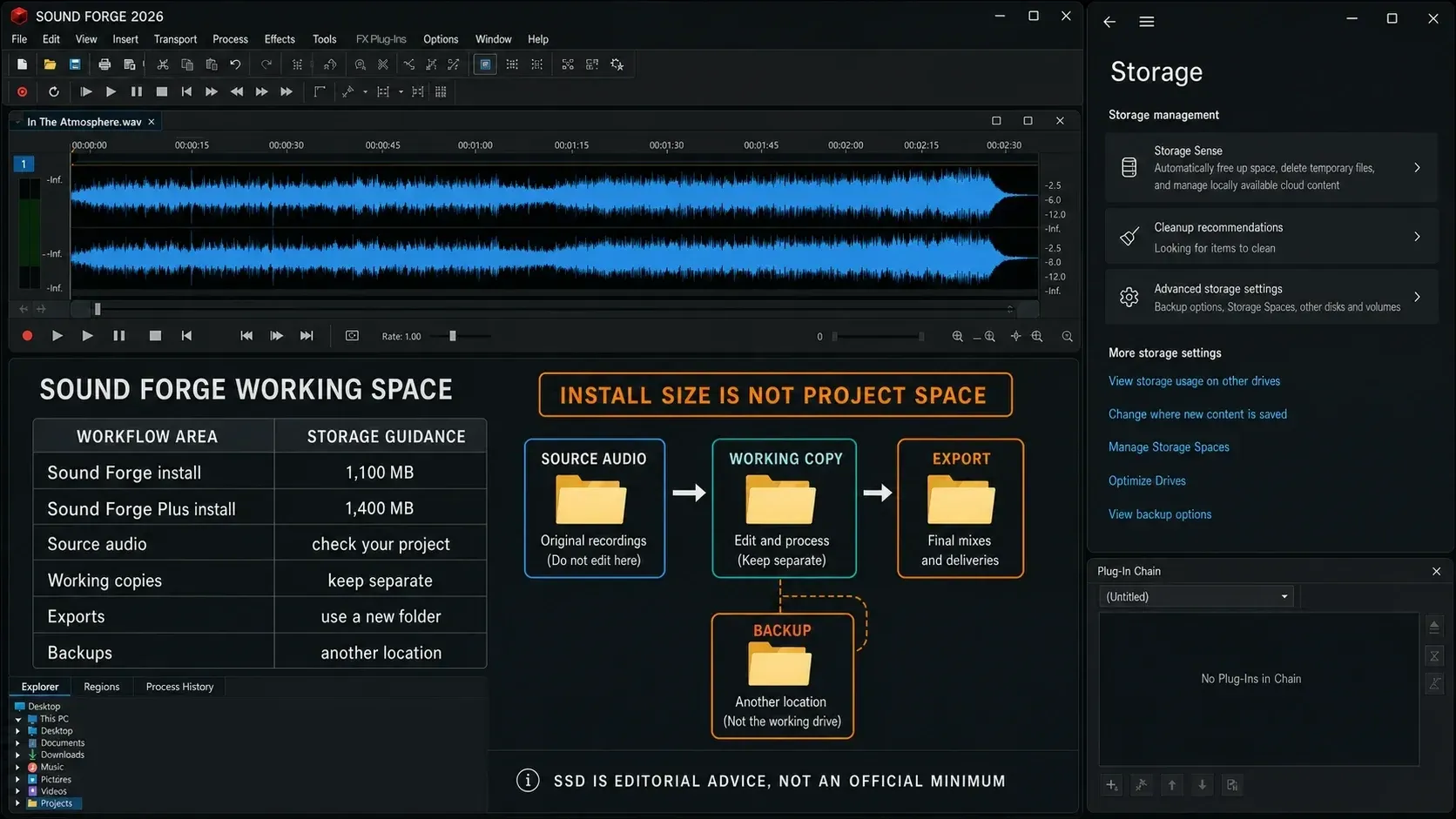
| Program storage | 1,100 MB Sound Forge; 1,400 MB Sound Forge Plus | Reserve separate space for source audio, working copies, exports, and backups. |
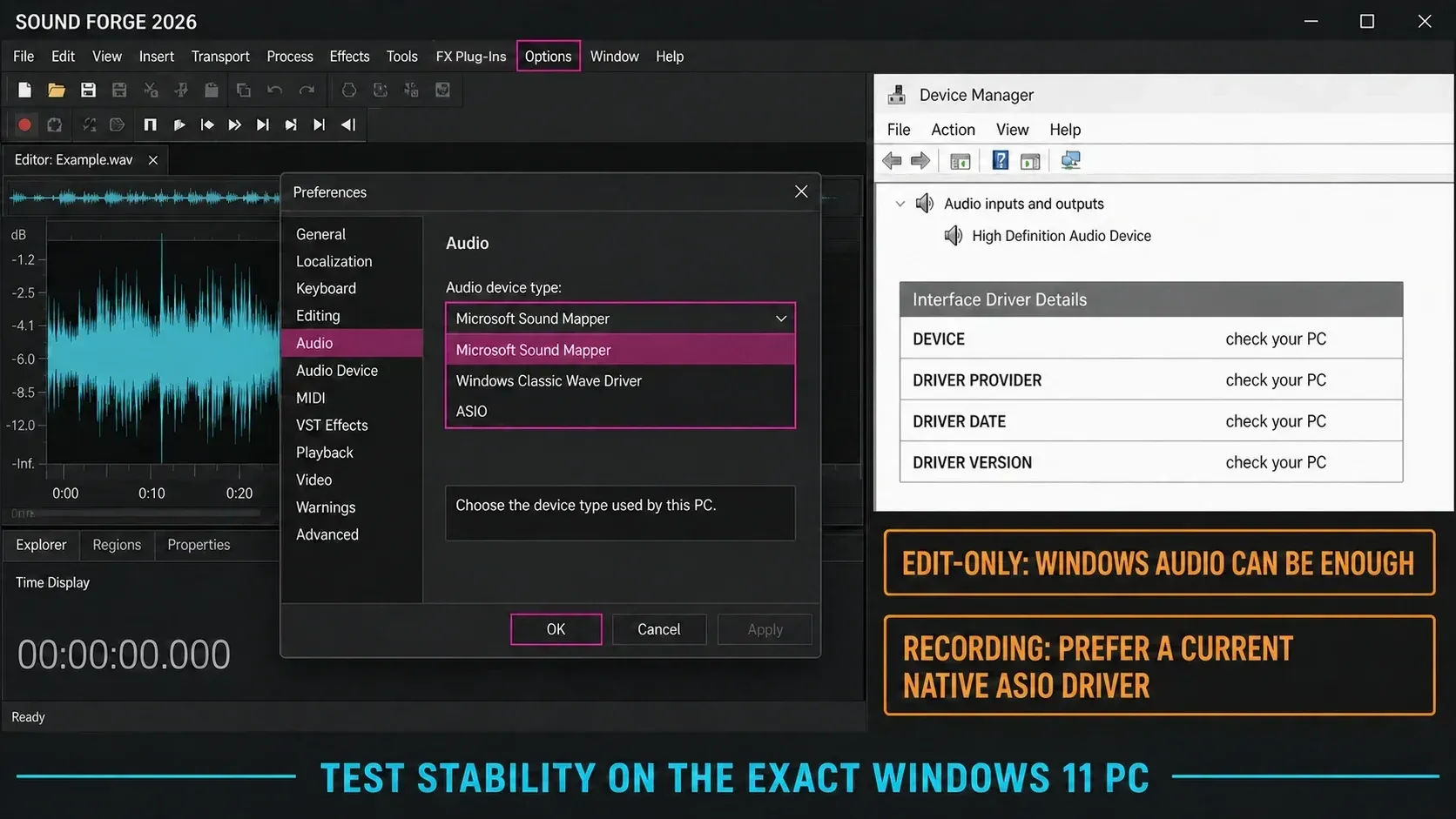
| Audio device | Not specified on the requirements page | For recording, prefer an interface with a current native Windows 11 ASIO driver. |
Values labeled “Boris FX minimum” are the vendor specification. “Editorial guidance” contains the buying advice, not additional official requirements.
Windows 11 Is the Only OS Boris FX Lists
The current Boris FX requirements page lists Windows 11; it doesn't list Windows 10, macOS, or Linux. That makes Windows 11 the documented baseline for Sound Forge 2026, even if an installer happens to launch somewhere else.
I wouldn't buy the current version for a Windows 10 workstation and hope undocumented compatibility holds. Boris FX makes no support promise for that configuration. Run the trial on the exact machine, interface, drivers and plug-ins you plan to keep using.
For an older workstation, check the requirements of the exact Sound Forge version you already own, since the 2026 specification doesn't cover earlier releases. Whether your Windows version still gets security updates is a separate question from application compatibility.
What the RAM Requirement Actually Means
Boris FX lists 2 GB minimum and 8 GB recommended for Sound Forge. Microsoft separately lists 4 GB or more as the Windows 11 memory minimum, the only operating system Boris FX lists. That makes the 2 GB figure an application-spec line rather than a viable whole-PC buying target. For a current Windows 11 machine, 4 GB is the OS floor and 8 GB is the Sound Forge vendor recommendation.
Calculate the size of your source audio before you choose storage. Uncompressed 24-bit/96 kHz stereo PCM takes 34.56 MB per minute in decimal units, or about 1.38 GB for 40 minutes, excluding file headers and metadata. That's disk space. It says nothing about RAM use, and the application, plug-ins and other open programs need memory too.
My recommendation: start at the official 8 GB recommendation for ordinary editing. Choose 16 GB when you regularly keep several applications open, use memory-heavy third-party plug-ins, or handle long high-resolution files. That 16 GB figure is editorial headroom; it isn't a Boris FX requirement or a measured Sound Forge threshold.
Processor: Minimum Spec vs. Your Actual Workload
The published CPU minimum is 1.4 GHz, with multicore or multiprocessor recommended. Boris FX doesn't name a processor generation, core count, benchmark score, or a separate CPU target for restoration and batch work.
For a useful trial test, open a copy of a file you normally edit, add your usual effects and play the section that puts the most demand on the chain. If you use batch processing, time a small representative batch as well. Record the settings so that you can compare another PC fairly.
I'd put a current multicore CPU ahead of clock speed alone. The 1.4 GHz figure is a compatibility minimum rather than a performance rating, and meeting it tells you nothing about how quickly your particular files and plug-ins will process.
Storage: Install Size vs Working Space
The 1,100 MB figure for Sound Forge and 1,400 MB figure for Sound Forge Plus cover program installation. They don't cover source audio, working copies, renders, undo data, or backups.
A 24-bit/192 kHz stereo PCM file is about 69.1 MB per minute, or roughly 4.15 GB per hour in decimal units, with both stereo channels already counted. Then add working copies, undo data, renders, source downloads and backups. The listed 1,100/1,400 MB covers program installation; a usable project drive needs far more.
For the active working drive I'd recommend an SSD, though that's my advice and not a Boris FX minimum. Budget for backups separately, because a faster drive is no substitute for a second copy of your recordings.
Sound Card and ASIO: What You Actually Need
The current system-requirements page doesn't publish a sound-card minimum. The current Sound Forge 2026 Audio Preferences help does document ASIO, Windows Classic Wave, and Microsoft Sound Mapper device types, and that's the right source for audio-device compatibility claims.
Sound Forge describes ASIO as the low-latency option, but that doesn't guarantee single-digit latency. Round-trip performance depends on the interface, its native driver, buffer size, sample rate, USB or PCIe path, plug-in chain, and the rest of the PC.
For recording or input monitoring, check that the interface manufacturer provides a driver for your Windows 11 setup. Try its native ASIO driver if available and check for dropouts at the buffer size you intend to use. For edit-only work, test Sound Mapper or Classic Wave before assuming you need to buy a new interface.
Supported Audio Formats
Start with the formats you actually exchange. For less common formats, consult the vendor table and test a sample through editing and export before committing a project.
The official format table has two limitations worth knowing: its import row omits WAV, and its export row includes an unexplained “VC” entry. Neither is a reason to infer a restriction or guess a codec. Use the application help and an actual sample file to resolve your case.
AIFF, OGG, RAW, PCA and W64 are among the other audio formats Boris FX lists. An extension on its own doesn't guarantee support for every bit depth, channel layout or metadata field.
For video work, the vendor lists MPEG-1/2, MOV and MXF among the supported import and export formats. Check the exact codec inside the file; the extension alone won't tell you.
If a delivery format is mandatory, export a short test and reopen it in the receiving application. Confirm the channel count, duration and any metadata you need to preserve.
DSF appears in both published audio lists, but the table alone doesn't document every processing or conversion step. If DSD is central to your workflow, test one representative DSF file from import through final delivery rather than inferring a fully native path from the extension list.
For ordinary editing, WAV, FLAC and MP3 are the useful starting formats. The current Open-file help explicitly documents WAV; FLAC and MP3 appear in both import and export rows of the vendor specification. For each, test the required bit depth, sample rate, channel layout and metadata through a complete open–edit–export cycle. The audio conversion guide covers that delivery workflow.
Does Sound Forge Pro Run on Mac?
The current Sound Forge 2026 requirements list Windows 11 and no macOS version. Don't buy it for a Mac on the assumption that Apple silicon, Rosetta, or a compatibility layer is supported. Use a documented Windows 11 environment, or compare current Sound Forge alternatives for Mac.
Can My Machine Run It? Quick Reference
Check the processor and installed RAM in Windows Settings → System → About, then compare the table above with Microsoft’s Windows 11 requirements. Meeting the operating-system requirements doesn't confirm that Sound Forge supports every processor architecture, interface driver or third-party plug-in, so for an unusual setup get compatibility confirmed before you buy.
For ordinary single-file editing: go with the official 8 GB RAM recommendation and a current multicore CPU. Run the trial on one real project before purchase; “meets the spec” is not the same as “runs every plug-in chain smoothly.”
For long files or batch work: 16 GB RAM and an SSD are sensible editorial upgrades rather than official minimums. Benchmark your own chain, because codec, plug-ins, file count, and storage can all move the bottleneck.
For recording with software monitoring: use an interface with a maintained native Windows 11 ASIO driver and choose the lowest buffer that stays stable on your system. There's no universal under-10-ms requirement in the Sound Forge specification.
Frequently Asked Questions
Does Sound Forge Pro support Windows 10?
Boris FX lists Windows 11 as the minimum operating system for Sound Forge 2026. The requirements page does not document Windows 10 as supported, so treat Windows 11 as the purchase and support baseline.
How much RAM does Sound Forge Pro need?
Boris FX lists 2 GB minimum and 8 GB recommended for Sound Forge, while Microsoft requires at least 4 GB for Windows 11 itself. Use 8 GB as the practical baseline and consider 16 GB when large files, several plug-ins or other applications stay open. The 16 GB figure is editorial headroom, not an official requirement.
Does Sound Forge Pro work with any audio interface?
Sound Forge 2026 can use ASIO, Windows Classic Wave, or Microsoft Sound Mapper devices. ASIO is the documented low-latency choice for recording and monitoring; the result still depends on the interface, driver, buffer, sample rate, and PC.
What audio formats does Sound Forge Pro support?
Sound Forge documents opening WAV, and the current vendor lists include FLAC, MP3, OGG, DSF, RAW, SFA, PCA and W64. The displayed import table omits WAV and has other ambiguities, so use the current help and test the exact import/export combination rather than treating that table as exhaustive.
Does Sound Forge Pro need a dedicated graphics card?
No dedicated GPU is listed as a minimum. Boris FX specifies onboard graphics with a minimum 1024 × 768 resolution. That is the published compatibility floor, not a promise about every display, plug-in, or high-DPI setup.
How long is the Sound Forge Pro free trial?
Boris FX currently offers a full-featured 15-day trial with no credit card required, and the official trial page labels it Windows-only. Use the trial guide to plan a compatibility test, then recheck the official offer before downloading because trial terms can change independently of hardware requirements.
Do Sound Forge and Sound Forge Plus use the same minimum requirements?
Boris FX publishes one minimum-requirements block for both editions. The listed program-installation space is 1,100 MB for Sound Forge and 1,400 MB for Sound Forge Plus; your audio files and backups need additional space.