

Buy Ozone 12 Standard if you master your own music. At $219 on the iZotope US store (October 20, 2026) it is the cheapest edition with modules you can open and edit: 14 of them, including the new Bass Control and the IRC 5 limiting mode. Elements ($55) fits only if you want Master Assistant to make the decisions. Advanced ($499) earns its price when you repair finished stereo mixes with Stem EQ, Unlimiter and Stem Focus, or want every module as a separate plug-in.
I would buy Standard for most self-mastering work, because it is the first edition that lets you change what the Assistant did instead of only nudging it. Starting lower costs almost nothing extra later: on the same store, Elements plus the $165 upgrade to Standard comes to $220, one dollar more than Standard outright, and Standard plus the $279 step to Advanced is $498 against Advanced's $499. So buy for the work you do now, not for the work you might do in two years. For the rest of the lineup, from the Maximizer to Tonal Balance Control, start at the iZotope Ozone hub.
Which Ozone 12 edition should you buy?
Pick by the job, not by the module count. One question settles most cases: when a mix arrives with a buried vocal or a crushed limiter, can you send it back, or do you have to fix it inside the master?
| Edition | US list price (Oct 20, 2026) | Who it fits | What you cannot do |
|---|---|---|---|
| Elements | $55 | Musicians who want a finished master from Master Assistant, with a few macro controls | Open or edit modules; use Dither, Track Referencing or Delta listening |
| Standard | $219 | Producers who master their own tracks and want hands-on control | Use Stem EQ, Unlimiter, Stem Focus, Codec Preview or the modules as separate plug-ins |
| Advanced | $499 | Engineers who master other people's mixes or build chains from single modules | Nothing in iZotope's comparison chart is missing |
If you can send the mix back, Standard covers you. If you master files you cannot reopen, Advanced is the edition built for that work. Elements is for people who want a release-ready result from the Assistant and do not plan to learn what each module does.
Ozone 12 modules and features by edition
Standard has 14 editable modules, Advanced has all 20, and Elements has none you open yourself. That split comes straight from iZotope's Ozone 12 edition comparison chart, which also lists the workflow features attached to each tier.
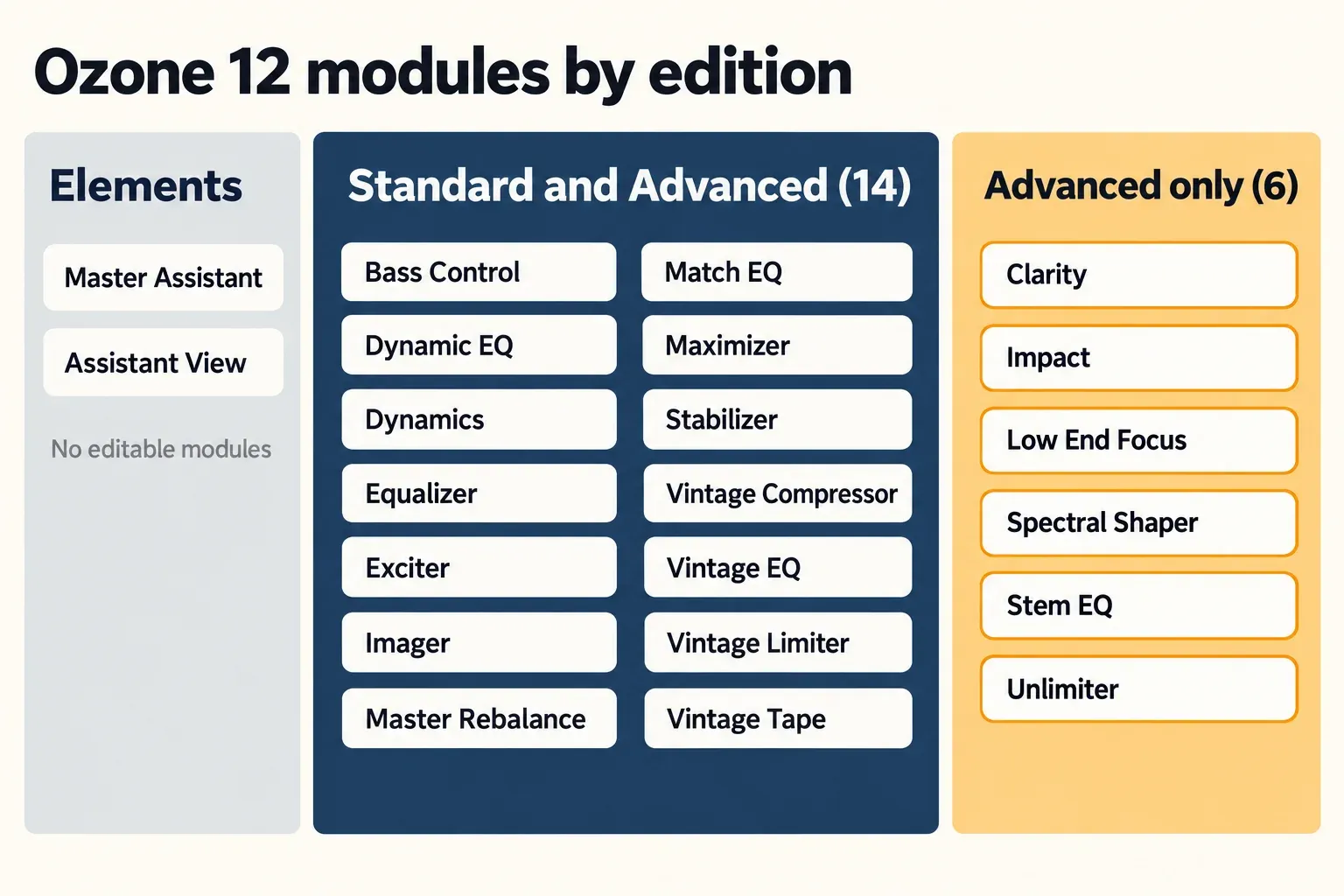
| Module or feature | Elements | Standard | Advanced |
|---|---|---|---|
| Master Assistant: Custom Flow (new) and Assistant View | Yes | Yes | Yes |
| Assistive Vocal Balance | Yes | Yes | Yes |
| Bass Control (new) | No | Yes | Yes |
| Maximizer, including the IRC 5 mode (new) | No | Yes | Yes |
| Stabilizer (25 new genre targets) | No | Yes | Yes |
| Dynamic EQ, Dynamics, Equalizer, Exciter, Imager | No | Yes | Yes |
| Master Rebalance, Match EQ | No | Yes | Yes |
| Vintage Compressor, Vintage EQ, Vintage Limiter, Vintage Tape | No | Yes | Yes |
| Delta buttons in all modules, Dither | No | Yes | Yes |
| Track Referencing, Transient/Sustain channel modes | No | Yes | Yes |
| Stem EQ (new), Unlimiter (new) | No | No | Yes |
| Clarity, Impact, Low End Focus, Spectral Shaper | No | No | Yes |
| Stem Focus (improved), Codec Preview | No | No | Yes |
| Relay bonus plug-in | No | No | Yes |
| Modules as separate component plug-ins | No | No | Yes |
Two details trip people up. First, Bass Control is new in Ozone 12 and sits in both Standard and Advanced; some launch coverage filed it under Advanced only, but the chart is clear. Second, Elements still runs processing under the hood. Its Vocal Balance control adjusts the Master Rebalance module and its Equalizer amount scales the Assistant's EQ, yet you never open those modules or change their individual settings.
What Ozone 12 Elements does, and what it leaves out
Elements is Master Assistant with a short list of controls: you choose a target, let it analyze the track, then trim three things. The Elements chapter of the Ozone 12 user guide lays out the whole workflow, and it is short by design.
Before analysis: the Custom workflow
- Target. Ten genre targets, or a custom target built from reference files on your computer.
- Intensity. Five settings: Subtle, Transparent, Balanced (the default), Bold and Transformative. It scales how hard the Assistant processes and leaves loudness alone.
- Loudness, Output Level and True Peak. The target loudness, the peak ceiling after limiting, and true-peak limiting on or off.
- Analysis Time. Up to 60 seconds, set in seconds or, with Tempo Sync, in bars. You can also switch off modules you do not want the Assistant to apply.
Give the Assistant at least 8 seconds of playback, keep the mix from peaking above 0 dBFS, and play the loudest, fullest section, such as the last chorus. iZotope gives the same advice, and it is the cheapest quality gain Elements offers.
After analysis: the Assistant View
Once the chain is built, Elements leaves you one control per section, plus a destination switch:
- Tonal Balance: an Equalizer amount from 0% to 200%, with curve metering that draws the target as a blue tunnel and your track as a white line.
- Loudness: Maximizer gain within plus or minus 4 dB, and a choice of Full Scale (output at -0.1 dB, True Peak off) or Streaming (output at -1 dB, True Peak on).
- Vocal Balance: one Level control that moves the Master Rebalance module. It is not added when you master against a custom reference.
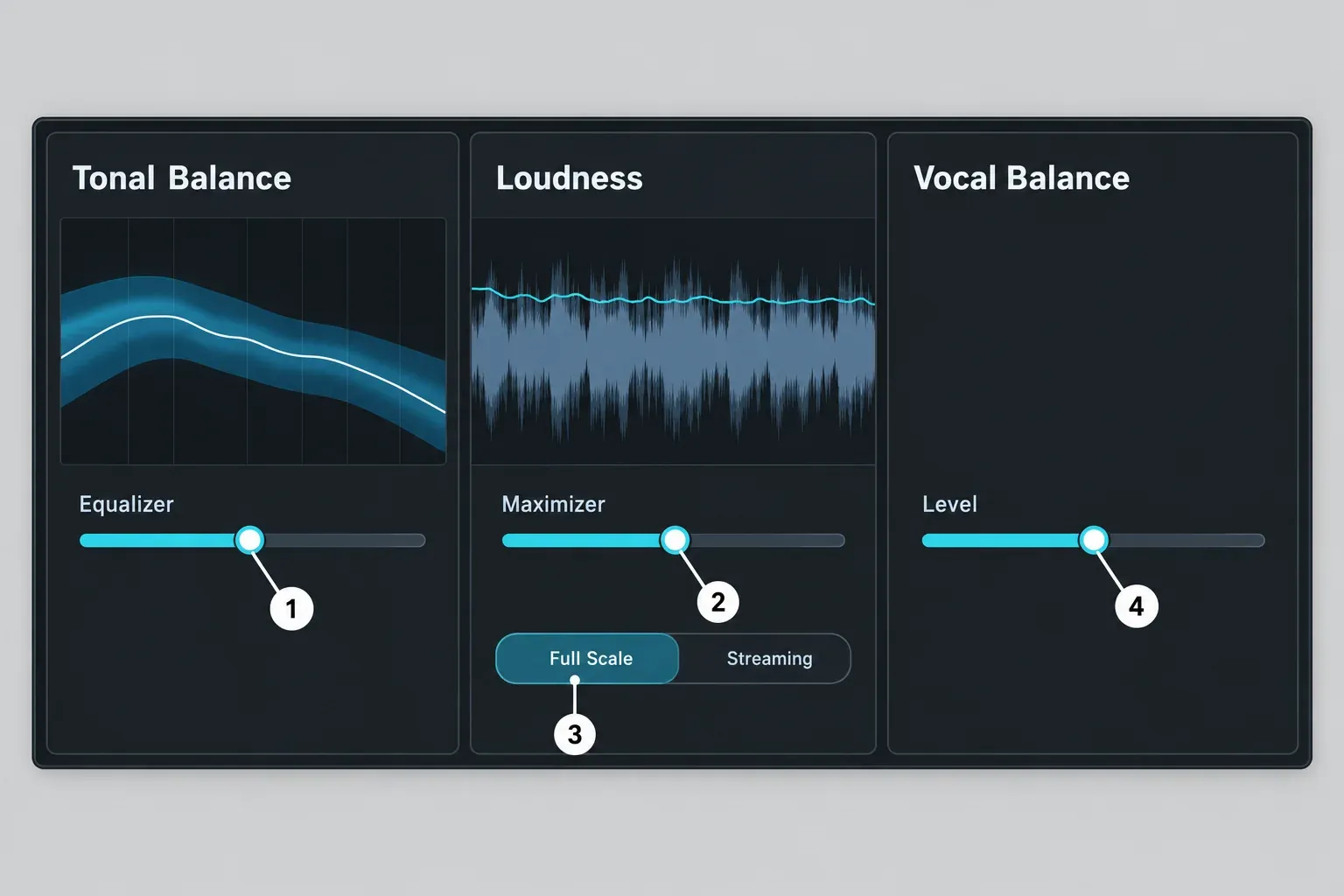
Pick Streaming for anything headed to a streaming service: iZotope designed it for audio played back with lossy encoding and loudness normalization, and the -1 dB ceiling leaves room for the codec. Our guide to true peak and codec headroom explains why that margin matters.
One limit matters before you deliver. Master Assistant sets loudness from the analyzed section only, so the integrated LUFS of the whole master can land somewhere else; iZotope's own advice for precise compliance is RX Loudness Control. At minimum, measure the bounced file with a free LUFS and true-peak meter and compare it with the loudness figures streaming platforms publish.
iZotope is candid about the ceiling: the user guide says Elements does not include all the controls and customization options of Standard and Advanced. My pick for Elements is the songwriter who needs a clean master of their own song, has no interest in learning compression or limiting, and is happy to trust a genre target. If you already want to move a single EQ band, you will outgrow Elements quickly, and the $165 upgrade path is waiting.
Standard vs Advanced: what the extra $280 buys
The $280 list-price gap ($499 against $219) buys six extra modules, three Advanced-only features and the right to load every module as its own plug-in. For mastering your own mixes, Standard is complete. Advanced earns the money on files you did not mix and cannot reopen.
What Standard gained in Ozone 12
Three Ozone 12 additions landed in Standard, so Advanced owners get them too: Bass Control, 25 new genre targets for Stabilizer, and the IRC 5 limiting mode in the Maximizer. The Maximizer chapter of the Ozone 12 user guide describes IRC 5 as Ozone's first multiband limiter mode, with four bands, and as the most CPU-intensive, highest-latency IRC mode. Use it on the final pass, not while you are still recording into the session.
The six Advanced-only modules
Clarity, Impact, Low End Focus, Spectral Shaper, Stem EQ and Unlimiter. Stem EQ and Unlimiter are new in Ozone 12; Impact first appeared in Ozone 10 Advanced and Clarity in Ozone 11 Advanced. Stabilizer also debuted in Ozone 10 Advanced and is now part of Standard.
- Stem EQ equalizes Vocals, Bass, Drums and Other separately from a stereo bounce, as the Stem EQ chapter of the user guide describes. It works in real time during playback with a modest latency: Sound On Sound's Ozone 12 Advanced review reports 85 ms on its reviewer's host system.
- Unlimiter is aimed at premasters that arrive over-limited. Sounds of Revolution's Ozone 12 review says it brings back some dynamics and transient punch but behaves like a subtle transient restorer, and it will not remove distortion already printed into the file.
- Stem Focus (with improved neural nets in Ozone 12), Codec Preview and the bonus Relay plug-in are also Advanced-only.
Component plug-ins: the quiet Advanced advantage
Only Advanced makes the modules available as separate component plug-ins, and iZotope says all 20 work that way. That matters in an editor or DAW where you want one Maximizer on a file without loading the whole Ozone chain. The getting-started chapter of the Ozone 12 user guide lists what stays inside the main Ozone plug-in: Master Assistant, Stem Focus, the signal chain, Referencing and Codec Preview. Dither also lives in the Maximizer component, and Sum to Mono and Swap Channels in the Imager component.
The Imager module is part of Standard and Advanced. The free Ozone Imager plug-in is a separate $0 product, not a slimmed-down edition of Ozone 12. If you own Ozone 11, the Ozone 12 vs Ozone 11 comparison shows what each tier gained in this version.
My rule is simple. Buy Advanced when part of your work is mastering other people's stereo files, or when you build chains from single modules. Otherwise, keep the $280.
Ozone 12 prices and upgrade paths (US store, October 20, 2026)
On October 20, 2026 the iZotope US store listed Ozone 12 Elements at $55, Standard at $219 and Advanced at $499, all perpetual licenses, with no Ozone 12 discount running. Check the live figure on the product pages for Ozone 12 Elements, Ozone 12 Standard and Ozone 12 Advanced before you buy.
| Purchase path | US price |
|---|---|
| Ozone 12 Elements, full version | $55 |
| Ozone 12 Standard, full version | $219 |
| Ozone 12 Advanced, full version | $499 |
| Standard: upgrade from Ozone Elements or Elements Suite | $165 |
| Standard: update from any previous Ozone Standard | $129 |
| Standard: crossgrade from any paid iZotope product | $199 |
| Advanced: upgrade from Ozone 12 Standard | $279 |
| Advanced: upgrade from Ozone Elements or Elements Suite | $445 |
| Advanced: upgrade from any previous Ozone Standard | $399 |
| Advanced: update from any previous Ozone Advanced | $299 |
| Advanced: crossgrade from any paid iZotope product | $449 |
| Advanced: crossgrade from Komplete 2-15 (STD, ULT, CE) | $399 |
| EDU: Elements / Standard / Advanced | $27.50 / $109.50 / $249.50 |
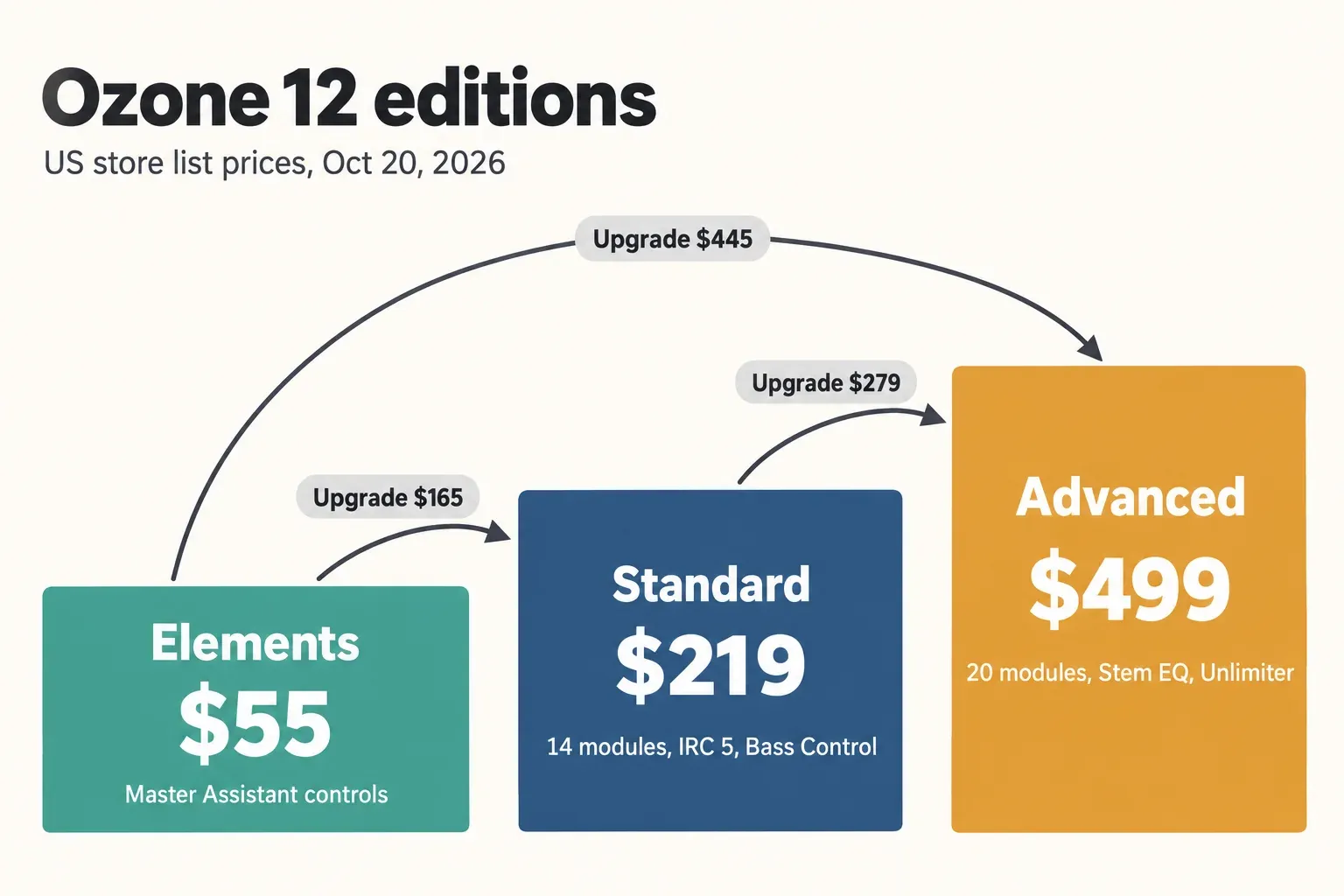
The ladder has no penalty for starting low. Elements plus the $165 upgrade comes to $220, one dollar over Standard; Standard plus the $279 step is $498, one dollar under Advanced; Elements plus the $445 jump is $500. Those sums use list prices and leave out sales and tax. The same three US prices appear in Sound On Sound's and stickz's launch-era reviews.
Two cautions. EDU pricing has its own eligibility rules, so read them on the store before you pick that path. And if your Elements license came bundled with other software, confirm that the $165 or $445 offer appears in your own iZotope account or Native Access before you pay: the store names the path "Upgrade from Ozone Elements or Elements Suite" without spelling out how bundled licenses are treated. Bundles that include Ozone 12 Advanced, such as Music Production Suite and Mix & Master, are priced in the iZotope pricing and upgrade guide.
Test results: what published reviews and measurements show
The composite result across four published Ozone 12 reviews is consistent: Elements is the assistant-led entry point, Standard is the pick for your own music, and Advanced is the repair kit for other people's mixes. The four are Sound On Sound (December 2025), MusicTech (October 10, 2025), Sounds of Revolution (September 16, 2025, updated March 2026) and stickz (September 14, 2025). Published measurements that compare the editions are scarce, so this is a summary of reviewer verdicts with counts, plus the one hard number in the set.
| Finding | Reviews in agreement | Which reviews |
|---|---|---|
| Elements is the assistant-led entry tier, not a full mastering toolkit | 4 of 4 | Sound On Sound, MusicTech, Sounds of Revolution, stickz |
| Advanced's distinct value is Stem EQ, Unlimiter, Stem Focus and the component plug-ins | 4 of 4 | Sound On Sound, MusicTech, Sounds of Revolution, stickz |
| Standard is the edition for mastering your own music | 3 of 4 | Sound On Sound, MusicTech, stickz |
| Advanced is aimed at professionals and people mastering others' mixes | 3 of 4 | Sound On Sound, MusicTech, stickz |
| Bass Control is in both Standard and Advanced, matching iZotope's chart | 2 of 4 | Sound On Sound, Sounds of Revolution |
| IRC 5 is not always the best-sounding limiter mode | 1 of 4 | Sound On Sound |
| Stem EQ latency on the reviewer's host system | 85 ms (one measurement) | Sound On Sound |
Sound On Sound's John Walden calls Elements a sensible choice for newcomers to DIY mastering because it delivers solid results without the user having to learn how to master, says Standard gives much of the Advanced experience at a lower price, and places Advanced with professional mastering engineers. MusicTech's Ozone 12 review says Standard has everything needed to add the final polish to your own tracks and calls Advanced "a no-brainer for those who master other people's music". stickz's Ozone 12 review lands in the same place, calling Standard "the sweet spot for many self-mastering producers" and Elements intentionally limited. Sounds of Revolution's edition summary is the most compact: Elements is the entry tier with the Assistant, Standard adds IRC 5 and Bass Control, and Advanced brings Stem EQ, Unlimiter and the component plug-ins.
The one dissent is about sound, not tiers. Sound On Sound's reviewer compared IRC modes on mixes in contrasting genres and preferred other modes to IRC 5 in plenty of cases, so Standard's headline limiter mode is an option to audition, not an automatic upgrade. The 85 ms Stem EQ figure is a single data point from one host system, not a range, so treat it as a sign that Stem EQ is a playback-time mastering tool rather than something to leave running while you record.
My verdict: the reviews and the module chart point the same way, and so do I. Standard is the edition I would buy for self-mastering; it gets every Ozone 12 addition except Stem EQ, Unlimiter and the improved Stem Focus. Advanced is worth $499 when you master mixes you cannot reopen or want single modules as plug-ins. Elements is a $55 way to hear what the Assistant does with your music. For the overall verdict on the release itself, read the Ozone 12 review.
Sales, trials and the subscription route
Trial first, then buy in a sale if you can wait: tracked sale lows since September 2025 sit well under list, and iZotope's subscriptions cover Standard or Advanced from $15 a month.
Trials
The Ozone 12 Advanced product page offers a free 10-day trial, and the Elements chapter of the user guide notes that both Standard and Advanced come with free trials. Run Advanced on your own material for those ten days. If you never reach for Stem EQ or Unlimiter, buy Standard.
Tracked sale prices
Plugindeals' Ozone 12 Elements price history records a low of $26 (Plugin Boutique, May 2026) and three sales in 12 months, typically 46% off. The Ozone 12 Standard price history shows a low of $163 (Thomann, March 2026) and two sales, typically 22% off and at most 24%. The Ozone 12 Advanced price history shows a low of $366 (Thomann, March 2026) and three sales, typically 22% off and at most 25%; the most recent one had just ended when the tracker was read on October 20, 2026. Thomann's figures are shown without VAT, so compare like with like.
Black Friday 2025 was shallow for the bigger editions. Between November 24 and December 3, the lowest tracked prices were $26.93 for Elements, $214.45 for Standard and $488.64 for Advanced, all at Best Service. On October 20, 2026 the iZotope US store had no Ozone 12 discount running. Past sale depths across the iZotope range are tracked in the iZotope Black Friday guide, and current offers sit on the SoundForgePro deals page.
Subscription
iZotope's subscription plans page lists iZotope Plus at $15 a month or $150 a year with Ozone 12 Standard, and iZotope Pro at $25 a month or $250 a year with Ozone 12 Advanced. Both start with a 7-day free trial, need a Native Access check once a month, and switch the tools to read-only if you cancel. Perpetual licenses stay on sale. The plain arithmetic at those list prices: two years of Plus on the annual plan ($300) cost more than Standard outright ($219), and two years of Pro ($500) match Advanced ($499) without leaving you a license. I would subscribe only for a defined job, such as one album that needs Stem EQ. If restoration is on the same shopping list, the RX Elements vs Standard vs Advanced comparison applies the same tier logic to RX.
Using Ozone 12 in Sound Forge Pro
Sound Forge hosts VST3 plug-ins and Ozone 12 ships as VST3, so the edition decides only whether you load the whole Ozone chain or single modules as well. The Sound Forge edition comparison lists VST2, VST3 and ARA plug-in hosting. Ozone 12 comes as AAX, AU and VST3, 64-bit only, and iZotope no longer supports VST2. iZotope's list of compatible hosts does not include Sound Forge, so treat it as a VST3 host that iZotope has not listed rather than an officially supported one.
- Elements and Standard load as the full Ozone plug-in. Master Assistant always lives there, whichever edition you own.
- Advanced adds the component plug-ins, so you can put just the Maximizer or the Imager on a file and keep the rest of your chain native. Build and save that chain with the Sound Forge Plug-In Chainer.
- If Ozone 12 does not appear after installation, make sure Sound Forge scans your VST3 folder, because Ozone 12 installs no VST2 version. The fixes for Sound Forge plug-ins that do not show walk through the scan settings.
If you bought Sound Forge Pro 18 Suite, you may already own an Ozone Elements license. Pro Video Coalition's Sound Forge Pro 18 launch report notes that the Pro 18 Suite shipped with Ozone 11 Elements and RX 10 Elements in 2024. Before paying full price for Standard, check whether your account offers the $165 Elements upgrade. What ships with each Sound Forge edition today is listed in the guide to Sound Forge's bundled plug-ins, and the full pass inside the editor is laid out in the 5-step workflow for mastering a track in Sound Forge Pro.
System requirements (all editions)
All three editions share the same requirements: macOS Sonoma 14.7.x, Sequoia 15.7.x or Tahoe 26.1.x on Intel or Apple silicon (native and Rosetta), or Windows 10 22H2 or Windows 11 24H2. Formats are AAX, AU and VST3, 64-bit only. The hosts iZotope lists on its Ozone 12 product pages are Logic Pro 10.8-11, Pro Tools 2024-2025, Ableton Live 12, Cubase 15, Nuendo 14, Studio One 7, Reaper 7, FL Studio 25, Reason 13, Audition CC 2025, Premiere Pro CC 2025 and Maschine 3. The Ozone 12 user guide covers every workflow, feature and control across the editions.
FAQ
Is Ozone 12 Elements free?
No. It lists at $55 on the iZotope US store, and the lowest tracked sale price is $26. Older Elements versions have come bundled with other software, such as Ozone 11 Elements in Sound Forge Pro 18 Suite at its 2024 launch. For tools that cost nothing, see the guide to free iZotope plug-ins.
Is there a separate manual for Ozone 12 Advanced?
No. iZotope publishes a single Ozone 12 user guide for all of the product's workflows, features and controls, with a separate chapter for Elements. Use the module table above to see which chapters apply to the edition you own.