
Ocenaudio is the better choice when you want a free editor for fast cuts, level changes, spectral inspection and occasional VST effects on Windows, macOS or Linux. Sound Forge Pro makes more sense when audio editing is part of a repeatable Windows workflow built around batch processing, restoration, mastering and a larger plug-in collection.
My short answer: start with Ocenaudio if one file at a time describes most of your work. Pay for Sound Forge when the surrounding workflow—not the basic cut or fade—is the reason you need a stronger editor.
Ocenaudio vs Sound Forge at a glance
| Decision | Ocenaudio | Sound Forge Pro |
|---|---|---|
| Best fit | Quick editing, speech cleanup, spectral inspection and occasional effects | Detailed restoration, mastering, batch jobs and repeatable production work |
| Platforms | Windows, macOS and Linux | Windows; check the current system requirements before buying |
| Price position | Free download | Commercial product; editions and offers change |
| Effects | Native effects, VST support and real-time preview | VST workflow with a dedicated Plug-In Manager and room for larger chains |
| Spectral work | Real-time configurable spectrogram for inspection | Better fit when spectral work belongs to a wider restoration process |
| Batch and automation | Choose it for direct single-file work; verify any repeatable bulk task you depend on | Documented batch and scripting path for repeated processing |
| Learning curve | Usually easier to approach for occasional editing | More workspace, routing and plug-in organization to learn |
Choose Ocenaudio when the edit should stay simple
Ocenaudio's strongest case is not that it is free. It is that the editor keeps the path from opening a file to finishing a correction short. The official feature page documents VST support, real-time effect preview, multi-selection, long-file editing and a configurable spectrogram. Those are useful tools, not a stripped-down toy set.
Multi-selection is especially practical for speech. You can mark several non-adjacent regions and apply the same change without rebuilding the selection each time. Real-time preview also helps with EQ, gain and filtering because you hear the result while adjusting the control instead of processing, undoing and trying again.
The spectrogram gives Ocenaudio a clear role in cleanup work. It can help you locate a whistle, hum band, click cluster or other visible anomaly before deciding what to change. That does not make every repair automatic. It gives you a faster way to find the part of the file that deserves attention.
If your normal job is trimming an interview, cleaning a voice note, checking a suspicious frequency or converting a finished edit, Ocenaudio may already be enough. It also belongs on the shortlist in our broader guide to the best Sound Forge alternatives.
Choose Sound Forge when the workflow repeats
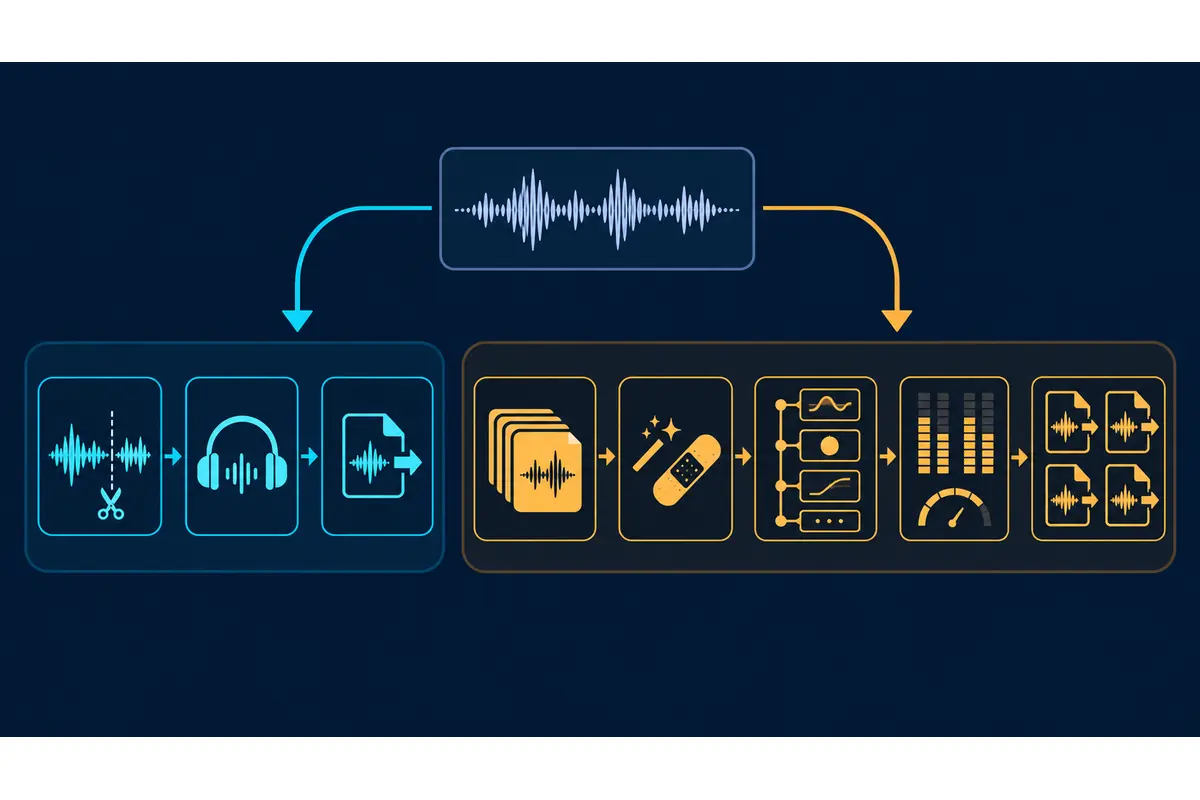
Sound Forge earns its place when the same kinds of files arrive every week and the processing chain has to remain organized. The distinction appears in three areas: batch work, specialist restoration and plug-in management.
A folder of files is a different problem from one waveform. If you need to apply a known chain, preserve naming rules and deliver consistent formats, use the Sound Forge batch-processing workflow as the deciding reference. The value is not merely saving clicks. It is reducing the chance that file seven receives a different setting from file one.
Restoration and mastering also benefit from a workspace that can hold a deeper chain. Our audio restoration guide covers the order of diagnosis and repair, while the mastering workflow explains where metering, processing and export checks fit. Ocenaudio can make individual edits inside those jobs; Sound Forge is the stronger center for the complete process.
The official Sound Forge Plug-In Manager documentation describes a dockable tree view, favorites and categories by VST version and 32/64-bit type. That organization matters after your plug-in list stops fitting comfortably in one menu. It also gives you a clearer route when a plug-in is missing, alongside our VST troubleshooting guide.
Where the two editors genuinely overlap
Both products can sit in front of a waveform and handle the work most people picture when they hear “audio editor”: selecting a region, cutting, fading, changing gain and applying an effect. Both can also take VST effects, although exact plug-in compatibility still depends on the plug-in format, architecture, operating system and current application build.
This overlap is why a raw feature checklist produces the wrong purchase. If all you need is an EQ adjustment and a clean export, Sound Forge's larger environment may not improve the result. If every edit must feed a named chain, several output formats and an archive routine, Ocenaudio's direct interface may leave you rebuilding process decisions outside the editor.
Audio quality is not settled by the price tag. A careful gain change or fade should not become “better” because it came from a more expensive application. Choose the environment that helps you make the right edit, repeat it when necessary and verify the export.
Platform and cost may settle the choice first
Ocenaudio currently offers builds for Windows 10+ 64-bit, current and legacy macOS, and several 64-bit Linux package formats. The download page listed version 3.21.3 when this comparison was checked on September 19, 2026. Treat that number as a point-in-time check; use the download page for the latest build and platform details.
If you edit on macOS or Linux, Ocenaudio wins this comparison before the deeper workflow questions begin. Sound Forge is a Windows choice. A Mac user who needs something closer to a full production environment should compare several alternatives rather than trying to make a Windows-only purchase fit the machine.
For Windows users, cost should follow the bottleneck. A free editor is the sensible choice when it completes the job. Sound Forge becomes easier to justify when batch processing, restoration chains, mastering tools or plug-in organization save real production time. Check the maintained Sound Forge pricing guide because editions and offers can change.
Which editor fits your work?
| Your regular job | Better starting point | Reason |
|---|---|---|
| Trim interviews, remove pauses and adjust speech levels | Ocenaudio | Fast selection, multi-selection and effect preview cover the core task without a larger workspace |
| Edit on macOS or Linux | Ocenaudio | It has current cross-platform builds; Sound Forge is Windows software |
| Inspect a problem frequency in a long recording | Ocenaudio | The real-time spectrogram and long-file focus suit diagnosis and local repair |
| Process a recurring folder of files with the same chain | Sound Forge Pro | Batch and scripting workflows are closer to the actual requirement |
| Restore vinyl, tape or damaged archival recordings | Sound Forge Pro | A larger restoration chain and plug-in workspace are more useful as the job grows |
| Prepare masters with repeatable metering and export checks | Sound Forge Pro | The editor is better positioned as the center of a broader mastering process |
| Occasionally repair one file | Ocenaudio | Buying a larger environment does not solve a problem you do not have |
Run this trial before you commit
- Open one easy file and one awkward file from your real workload.
- Check whether the editor reads the format, channel layout and metadata you need.
- Apply the effect chain you use most often and confirm every essential plug-in appears.
- Make three separate corrections in the same long recording.
- Repeat the job on five files without relying on memory for each setting.
- Export the required formats and reopen them to verify duration, channels, metadata and audible boundaries.
- Count the steps that exist only because the editor cannot preserve your process.
The fifth step is the dividing line. If the work remains quick and obvious, Ocenaudio is doing its job. If repetition turns into manual housekeeping, Sound Forge's batch and organizational tools have a concrete purpose.
Sources and scope
This comparison uses the current Ocenaudio features and download pages, plus Sound Forge Pro 2026 documentation for the Plug-In Manager and scripting. The recommendations compare documented capabilities and workflow fit. They are not a claim that we installed either application, ran a benchmark or measured output quality for this article. Confirm your exact formats, drivers and plug-ins with the current builds before committing a production workflow.