
Sound Forge has no current native Mac version. The Boris FX editor requires Windows 11. Sound Forge Pro Mac 3 did exist, but it's a discontinued, separate product, and you can't download it as a Mac edition of Sound Forge 2026.
If you need Sound Forge itself, start with a Windows 11 PC that meets the application, operating-system and audio-hardware requirements. If what you need is the editing job done on a Mac, pick a current Mac editor. Parallels is worth investigating, but it isn't a confirmed Sound Forge configuration: emulating Windows applications doesn't guarantee support for the installer, activation, plug-ins or interface drivers.
Documentation checked September 14, 2026. This is a compatibility decision guide, not a report of hands-on Sound Forge testing in a virtual machine.
What Boris FX actually supports in 2026
The current Sound Forge requirements name Windows 11, with no mention of macOS, and the official 15-day trial also says Windows only. Neither page documents Sound Forge support in Parallels or on Windows 11 on Arm. That silence doesn't prove it can never work, but it gives no basis for promising compatibility either.
Don't read “Windows 11” as a blessing for every Windows computer. Check the processor architecture, the audio interface and the plug-ins along with the OS. Our Sound Forge system requirements guide separates the application's specification from Windows' own minimum requirements.
Apple's Rosetta guidance is about Intel-based Mac apps, and Rosetta won't turn the current Windows Sound Forge installer into a macOS application. A similarly named App Store product doesn't mean Boris FX has released a Mac version either.
Five routes from a Mac
| Route | Current status | Best fit | Main risk |
|---|---|---|---|
| Windows 11 PC | Matches the named OS; verify hardware and architecture | Sound Forge recording and file editing | Separate computer and peripheral checks |
| Remote Windows PC | Editor runs on the Windows host, not macOS | Offline edits and renders | Network delay, audio redirection and file transfer |
| Apple silicon + Parallels | Windows on Arm route; Sound Forge support unconfirmed | A bounded compatibility trial | Activation, plug-ins and audio-device paths |
| Current Mac editor | A replacement, not Sound Forge for Mac | A Mac-first production workflow | Rebuilding processing chains and checking plug-ins |
| Intel Mac + Boot Camp | Apple documents Windows 10, not a current Sound Forge match | Preserving an existing legacy setup | Ended normal OS support; ESU eligibility is separate |
What happened to Sound Forge Pro Mac 3?
Old Mac product pages and retail boxes describe a real historical editor. They don't point to a current download, a supported upgrade or modern macOS compatibility. A pinned MAGIX Community notice from April 2020 reproduces a Sound Forge Support response saying there were no plans to make the Mac product compatible with Catalina. A later MAGIX Community discussion quotes MAGIX's notice that development had stopped and the product was taken out of its range.
That discussion also records a “Bad Crumb” failure after a macOS upgrade. Participants disagree about the underlying architecture and suspect the authorizer. Treat that as an unresolved community diagnosis; it doesn't confirm the whole editor is 32-bit. Apple confirms that Catalina 10.15 dropped 32-bit app support, but that general OS fact can't tell you which Sound Forge component fails.
If you own Mac 3, protect a working installation before you change anything. Back up the machine and the audio, keep your legitimate installer and entitlement records, and export important work into formats your replacement can reopen. A serial number alone won't guarantee an old authorizer will activate today. Ask MAGIX about your entitlement, and don't count on a mirror, an activation bypass or an OS downgrade to fix it.
Windows PC or remote access: keep the editor on Windows
A local Windows workstation skips the virtualization and network layers entirely. It's my first choice when Sound Forge has to record through a particular interface or reuse an established Windows plug-in chain. That recommendation still depends on the exact computer, drivers and plug-ins being supported, and a clean OS installation isn't an audio-workstation acceptance test.
A Mac can instead control a remote Windows machine. Keep source files and processing on the host, then transfer the finished export back for verification. Remote control can suit trimming or batch renders; redirected playback is a poor reference for judging latency or subtle repair artifacts. Record and monitor at the machine connected to the interface rather than assuming that remote audio preserves the same behavior.
Remote access needs its own host/client setup and licensing checks. Microsoft's Windows-on-Mac guidance also describes Windows 365 Cloud PCs, but a cloud desktop doesn't show that your physical interface or Sound Forge workflow is supported there.
Apple silicon and Parallels: emulation is not product support
Microsoft's linked guidance specifically names Parallels Desktop 18, 19 and 20 with Windows 11 Pro or Enterprise on M1, M2 and M3 Macs. Parallels' current page also lists support for newer M4 and M5 hardware. Check the exact Mac, macOS, Parallels release and guest OS combination rather than extending an older authorization statement to every configuration.
Microsoft's Windows on Arm FAQ says Windows 11 can emulate x64 and x86 applications, with performance overhead. It separately requires kernel-mode drivers to be native Arm64. A compatible application, a compatible installer and a compatible driver package are three different questions.
Third-party compatibility entries for an older Sound Forge release don't certify Sound Forge 2026 inside Parallels. Check the editor, Hub, account sign-in, activation and every required plug-in before you rely on it.
Budget for separate entitlements. Parallels does not include a Windows license. Microsoft's guidance requires a unique eligible Windows 11 Pro license for each running instance; Enterprise use has additional organizational licensing terms. Sound Forge is another license after its trial. Check transfer rights before reusing a Windows key, and compare the current Sound Forge license options rather than assuming a Mac 3 serial covers the current Windows product.
Three audio paths with different driver requirements
Shared host audio: macOS owns the physical device and Windows uses a virtual audio device. The Parallels sound troubleshooting guide starts with working Mac-side sound and the Parallels audio controller. It distinguishes a USB device attached to macOS from one connected directly to the guest. Start here for an offline-editing trial, then verify recording, channels and monitoring rather than assuming pro-audio performance.
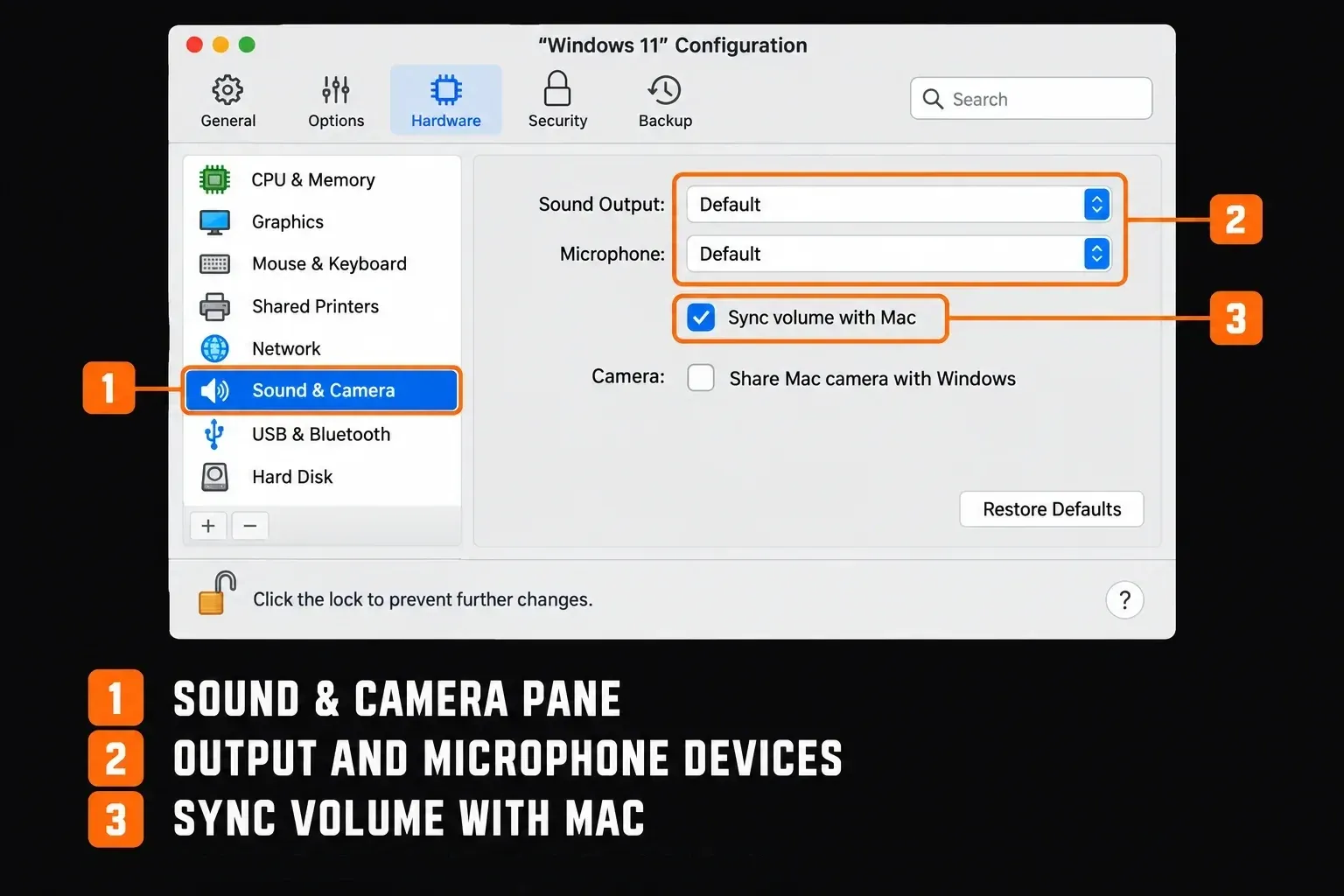
Class-compliant USB attached to Windows: a compatible device may use Microsoft's in-box USB Audio 2.0 class driver instead of a vendor driver. The documentation describes limits around clock selection and device topology. Class compliance doesn't promise that every control, channel or USB-passthrough behavior works in your VM.
Vendor-specific interface package: any kernel-mode component loaded by the Arm guest has to be Arm64. A user-mode ASIO component or control app is a separate compatibility question, so don't call the entire package a kernel driver. Ask the manufacturer about the complete package, including its installer, routing and clock controls.
ASIO4ALL 2.22, released July 23, 2026, adds Arm64/EC support, including an ASIO route for USB Audio Class-compliant devices that lack vendor Arm64 drivers. That doesn't certify Sound Forge in Parallels, and it won't bring back unsupported hardware controls. Install a different audio layer only if your actual workflow needs it, then test again.
Which Mac alternative fits your work?
A Mac application avoids the Windows guest, though its own OS, architecture and plug-in requirements still matter. Treat these as starting points by task. No single editor wins every comparison.
- Waveform editing and restoration: Acoustica 8. My first comparison for a Sound Forge-style file workflow. Acon lists macOS 12 or later and native Apple silicon and Intel support. It offers spectral editing and restoration in a standalone editor. Check the edition for the tools you need.
- Album mastering: WaveLab. Start with our Sound Forge versus WaveLab comparison. Steinberg's current Tahoe compatibility matrix lists WaveLab Pro/Elements 13.0.30 as Intel-compatible and Apple-silicon native. Check your precise build and delivery features, especially if you depend on physical CD functions.
- Difficult repair: iZotope RX. Compare the restoration workflows in Sound Forge and RX. The RX 12 Standard release notes list Intel and native Apple-silicon support on specified macOS releases. They also list a Rosetta-only exception for Spectral Editor AU ARA; standalone support does not certify every integration.
- Free basic editing: Audacity. Its Mac download page offers Intel, Apple-silicon and universal builds. At the time of this check, the ARM64 download carries a “No plugin support” warning. Read that before choosing a build for an effects-dependent workflow, because a native build doesn't automatically mean plug-in parity.
Use the broader Sound Forge alternatives guide to narrow the workflow category, then confirm current versions, requirements and checkout terms with the developer. Rebuild processing chains on copies of representative files and reopen exports in the destination app. Our Sound Forge comparisons collect the longer editor-by-editor trade-offs.
Intel Mac and Boot Camp: a legacy Windows 10 path
Apple's Boot Camp instructions cover Windows 10 on listed Intel Macs and leave Apple silicon out. That documented route doesn't meet Sound Forge 2026's Windows 11 requirement, and internet instructions for bypassing Windows 11 checks carry no Apple or Boris FX support.
Normal Windows 10 support ended October 14, 2025. Microsoft's Consumer ESU program gives eligible enrolled devices critical and important security updates, but no feature upgrades or full technical support. It excludes commercial scenarios and has regional terms. ESU doesn't make Windows 10 a supported Sound Forge 2026 platform.
For an existing older Sound Forge installation, make a recoverable backup before any OS changes and plan the migration. Don't wipe a working Mac or Windows partition to follow a workaround nobody has verified.
How to evaluate a Parallels setup before relying on it
Use this as an acceptance checklist. The official Sound Forge trial is full-featured for 15 days and needs no credit card. Read the current Parallels trial and Windows licensing terms as well, since a free application trial doesn't license the whole system.
- Preserve the working system. Back up source files and use disposable copies. Keep a fallback editor available.
- Check the exact VM combination. Verify your Mac, macOS, Parallels version, Windows edition and license. Install applicable Windows and Parallels Tools updates before the trial.
- Verify installation and authorization. Follow the official Boris FX trial flow through Hub, sign-in, installation and trial activation. Restart the VM and confirm the editor still opens.
- Test representative files and plug-ins. Use the formats, channel counts and processing chains required by your work. Save, close and reopen to check plug-in state.
- Choose and test one audio route. Begin with shared host audio. If direct USB or vendor ASIO is required, verify that package separately. Check input, output, channels, clocking and a recording as long as your normal job.
- Export, restart and repeat. Reopen the rendered file in another application. Verify duration, channels and audible results. Restart Windows and macOS, then repeat activation, plug-in and device checks.
Stop if activation fails after a restart, plug-in state disappears, channels go missing, exports differ unexpectedly or recording drops out. Don't buy an interface or change your production machine because of one successful launch. For deadline work, a supported local Windows setup or a compatible Mac editor is the safer bet.
Frequently Asked Questions
Does Sound Forge have a Mac version in 2026?
No current native Mac edition is listed. Boris FX Sound Forge requires Windows 11. Sound Forge Pro Mac 3 was a separate historical product whose development was discontinued.
Can Rosetta run the current Windows Sound Forge installer?
No. Rosetta translates Intel-based Mac apps for Apple silicon. It does not make the Windows installer a macOS application.
Does Sound Forge work in Parallels Desktop?
We have no vendor-confirmed result for Sound Forge 2026 in Parallels. Windows 11 on Arm can emulate x64 and x86 apps, but installation, activation, plug-ins and audio devices require separate checks.
Do I need an Arm64 audio-interface driver in Parallels?
Kernel-mode components loaded by the Arm guest must be Arm64. Shared host audio uses a virtual device; compatible class-compliant USB hardware may use an in-box driver. User-mode ASIO components and control apps need their own compatibility checks.
Does a Parallels license include Windows or Sound Forge?
No. Windows and Sound Forge entitlements are separate from Parallels. Check the Windows edition, per-instance license and transfer rights, and use the official Sound Forge trial before buying.
Can I use Boot Camp for Sound Forge 2026?
Apple's documented Boot Camp route is Windows 10 on listed Intel Macs. It does not match the current Sound Forge Windows 11 requirement. ESU enrollment does not change that application requirement.
Can I still activate Sound Forge Pro Mac 3?
That depends on the old installer, entitlement, authorizer and operating system. A valid serial is not a current activation guarantee. Preserve a working system and contact MAGIX rather than treating an OS downgrade as a verified fix.
What is a good Mac alternative to Sound Forge?
Start with Acoustica for file editing and restoration, WaveLab for mastering, RX for specialist repair or Audacity for free basic editing. Verify the chosen version's macOS, processor and plug-in requirements before migrating.