
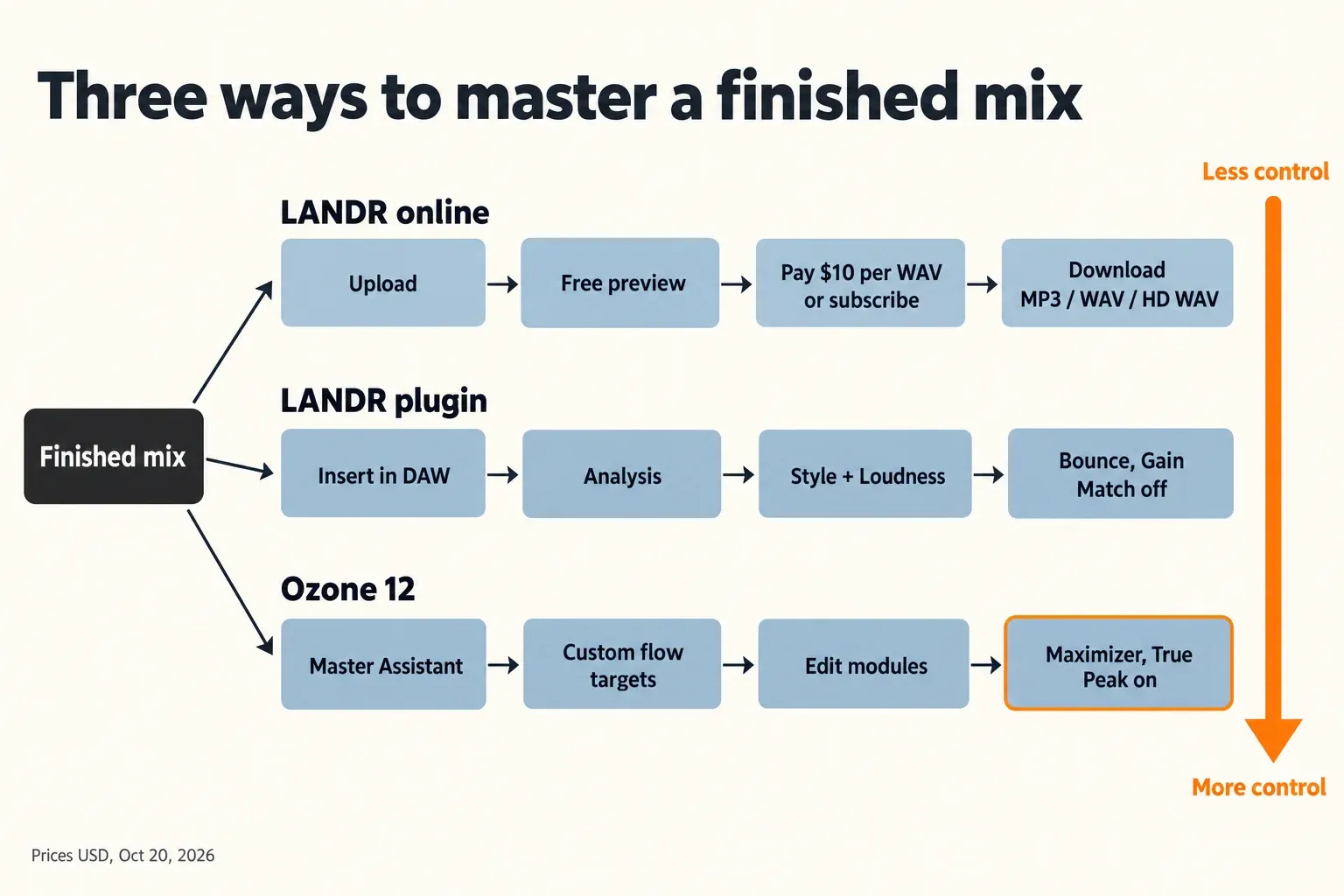
LANDR is the fast, hands-off route to a finished master, and Ozone 12 is the route to choose if you want control. LANDR's online service lets you preview masters for free and pay $10 for one WAV, and its Mastering Plugin costs $299 outright. Ozone 12 costs $55, $219 or $499 for Elements, Standard or Advanced on the iZotope US store (October 20, 2026). It lets you set an exact true-peak ceiling and edit every module the assistant picks. Published reviews agree on the main trade-off: LANDR's plugin puts true peaks at about −0.2 to −0.1 dBFS and has no ceiling setting, so a −1 dBTP streaming master takes extra work.
My choice comes down to two things: how often you release, and how much you want to change after the analysis. If you release a few singles a year and just want a solid master, I would start with LANDR's online previews and pay per track. If you master regularly, care about hitting −1 dBTP and want to fix what the assistant does, I would buy Ozone 12 Standard. The LANDR plugin sits between the two. It is quicker than Ozone, but you have to manage its peaks yourself.
- Pick LANDR online if you want a master without opening a mastering plugin and are happy to judge by ear from the previews.
- Pick the LANDR plugin if you want the same one-pass approach inside your DAW session, with a few tone and width controls.
- Pick Ozone 12 if you want the assistant as a starting point, followed by exact control over EQ, dynamics, width and the limiter.
This page compares the two brands head to head. For the rest of iZotope's mastering tools, start at the Ozone hub.
Ozone vs LANDR in short
The table puts three options side by side, because "LANDR" can mean either the website or the plugin, and the two behave differently.
| Question | LANDR online | LANDR Mastering Plugin | Ozone 12 |
|---|---|---|---|
| What you get | Upload a mix, preview masters in the browser, download the one you pay for | A mastering processor in your DAW that analyzes the track and sets itself up | A full mastering suite; Master Assistant builds a chain of modules you can edit |
| Control after the analysis | 3 styles, 3 loudness levels, revisions, reference mastering | Style and Loudness; Pro adds EQ, Presence, De-Esser, Stereo Width and Dynamics | Every module parameter; 20 modules in Advanced |
| True-peak ceiling | Loudness level only (Low, Medium, High) | No ceiling setting; reviews measured −0.2 to −0.1 dBFS | Output Level plus a True Peak switch; the Streaming destination sets −1 dB with True Peak on |
| Price (USD, Oct 20, 2026) | $10 per WAV master, or LANDR Studio from $99 a year | $299 perpetual, or with Studio Pro at $25 a month | $55 / $219 / $499 perpetual (US store), or iZotope Plus at $15 a month with Standard |
| Try before paying | Unlimited free previews | 3-day trial | 10-day trial; 7-day trial on iZotope subscriptions |
| Best for | A few releases a year | Quick masters inside a session | Producers who master their own music regularly |
LANDR is two products with three ways to pay
LANDR's online mastering and the LANDR Mastering Plugin share a name, but you buy and use them differently. You can pay per master online, subscribe to LANDR Studio, or buy the plugin outright.
Online mastering: preview free, pay to download
LANDR's online mastering page accepts WAV, AIFF, FLAC and MP3 mixes. It delivers MP3 at 320 kbps, 16-bit WAV or 24-bit HD WAV. Previews are free and unlimited, and you pay only when you download, either per master or through a subscription. A single WAV master costs $10 without a subscription. MusicRadar's online mastering comparison describes three styles (Warm, Balanced or Open) and three loudness levels (Low, Medium or High). The service also offers revisions, album mastering, reference mastering and volume matching. LANDR's mobile app covers the same loop of upload, preview and download, for MP3 or WAV.
If you release EPs, album mastering is the feature I would weigh most. It masters the tracks as a set so they sit together. A one-track-at-a-time plugin workflow leaves that job to you.
The Mastering Plugin: the same idea inside your DAW
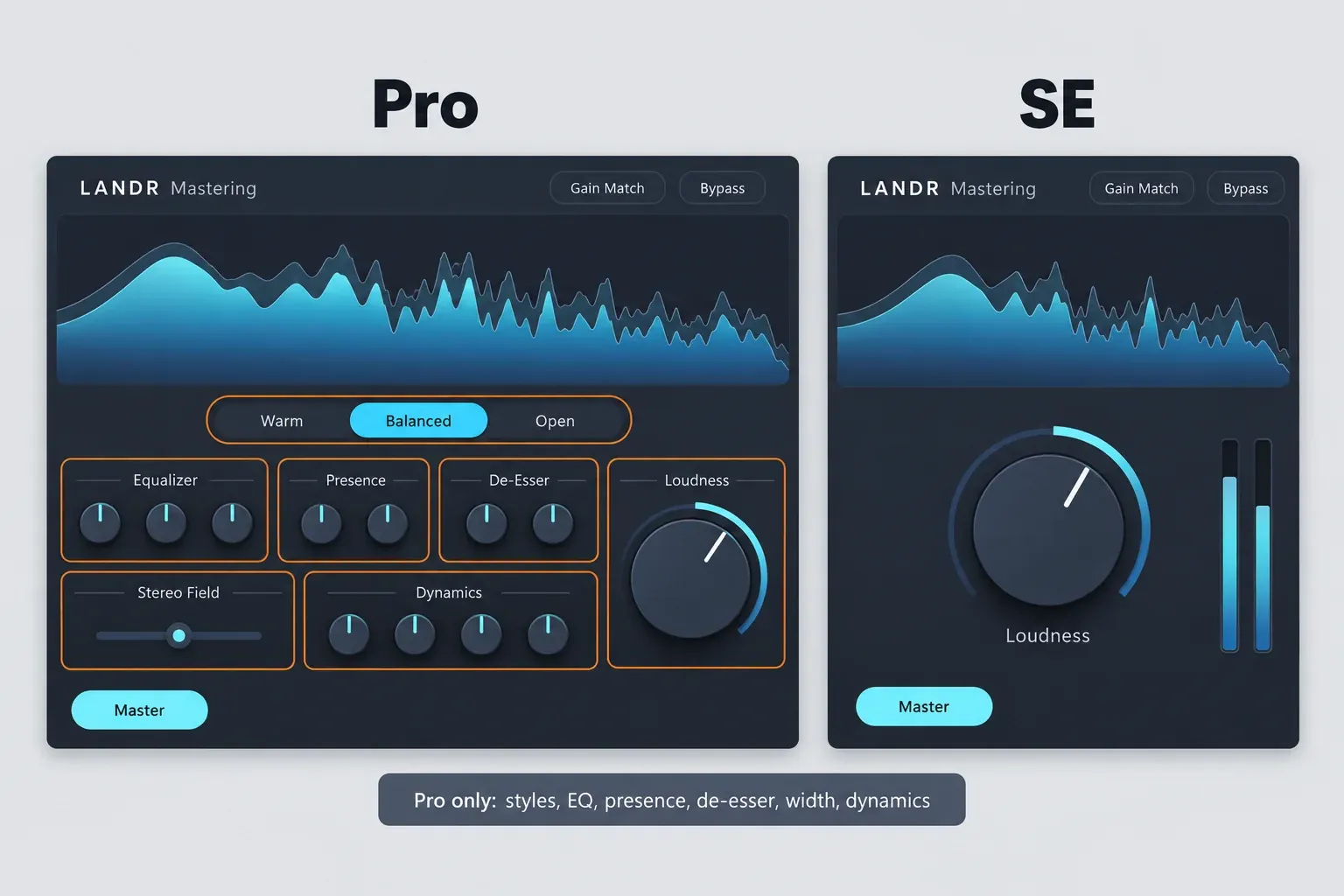
The plugin runs its analysis locally, in your DAW. LANDR's Mastering Plugin page sells it outright or as part of a LANDR Studio subscription, with a 3-day trial, in two editions:
- Pro has the three Mastering Styles (Warm, Balanced and Open) plus EQ, Presence, De-Esser, Stereo Width and Dynamics controls.
- SE keeps the analysis, the Loudness control, the loudness and output meters, Input Trim, the visualizer, Bypass and Gain Match, and drops everything else.
The perpetual Pro license is $299. Studio Pro is the only subscription that clearly includes the plugin. LANDR lists the SE plugin with Studio Standard; confirm at checkout, because LANDR's own pricing data disagrees on whether Standard includes it. The same data lists a $199 perpetual SE license that the plugin page does not show, so check the cart before you count on that price.
Price: perpetual, subscription or per master
On price alone, LANDR wins if you only need a handful of masters. Ozone wins once you master often, because an Ozone license has no per-track cost. The table lists what each option cost in US dollars on October 20, 2026, taken from the iZotope US store's Ozone 12 pages, iZotope's subscription page and LANDR's pricing page. The iZotope store shows higher list prices in some other markets, so check the store for your region.
| Option | Price (USD, Oct 20, 2026) | What it covers |
|---|---|---|
| Ozone 12 Elements | $55 perpetual | Master Assistant with fewer controls |
| Ozone 12 Standard | $219 perpetual | Master Assistant plus editable modules |
| Ozone 12 Advanced | $499 perpetual | All 20 modules, also usable as separate plugins |
| iZotope Plus | $15 a month or $150 a year | Includes Ozone 12 Standard |
| iZotope Pro | $25 a month or $250 a year | Includes Ozone 12 Advanced |
| LANDR online, per master | MP3 $6, WAV $10, HD WAV $20; 10-packs $45, $79 and $99 | One master per purchase, no subscription |
| LANDR Studio Essentials | $13 a month or $99 a year | Unlimited MP3 masters only; no plugin |
| LANDR Studio Standard | $20 a month (3 WAV credits) or $144 a year (36 WAV credits) | Unlimited MP3, WAV credits, extra WAV masters at $7; LANDR's own pages disagree on HD WAV and plugin access |
| LANDR Studio Pro | $25 a month or $300 a year | Unlimited MP3, WAV and HD WAV masters plus the Mastering Plugin |
| LANDR Mastering Plugin | $299 perpetual | Pro edition, used in your DAW |
Take one common case: ten WAV masters a year.
- LANDR 10-pack: $79, or $7.90 a master.
- Studio Standard: $144 a year, covering up to 36 WAV masters.
- Ozone 12 Elements: $55 once, with no per-track cost, though you do the work in your own session.
Standard at $219 equals about 28 masters at the 10-pack rate ($219 ÷ $7.90 ≈ 27.7). If you will master more than two or three dozen tracks over the life of the license, Ozone costs less per master than paying LANDR track by track. On subscriptions the two brands meet at the same number: iZotope Pro with Ozone 12 Advanced and LANDR Studio Pro with unlimited masters and the plugin both cost $25 a month. That choice is about workflow, not money.
LANDR's pricing data lists a STUDIOPRO36 code for 36% off Studio Pro yearly until June 15, 2027, which works out to about $192 a year.
If you are choosing between Ozone editions rather than between brands, the Elements vs Standard vs Advanced breakdown lists every module. Upgrade and crossgrade prices depend on what is registered to your account, so read the iZotope price and upgrade guide first. If you are not in a hurry, look at iZotope's seasonal sales before paying list price.
Test results: what published reviews and studies found
The composite result is consistent. LANDR's plugin produces loud masters quickly, with peaks close to full scale and no ceiling setting. Ozone 12's assistant can hit a set ceiling and get close to its loudness target, but its result still needs a check by ear and on a meter. I could find no published shootout of LANDR and Ozone 12 on the same mix with LUFS and true-peak readings. This composite therefore draws on ten sources:
- five reviews of LANDR's plugin and online service;
- one Ozone 12 review;
- a KVR user thread;
- two reports on one blind listening study, from MusicTech and Gearnews;
- iZotope's own user guide.
| Source | Published | Product | Conditions | Result |
|---|---|---|---|---|
| Sound On Sound's LANDR plugin review | Nov 23, 2023 | LANDR plugin, launch version | Rock and pop mixes, default analysis; peaks rechecked on a third-party meter at 32x oversampling | True peak −0.1 dBFS; loudness peaking around −9 to −8 LUFS, with lower integrated LUFS |
| Mix's real-world review | Dec 14, 2023 | LANDR plugin, launch version | Automatic setting on the reviewer's tracks | True peak about −0.2 dBFS; analysis about 30 seconds |
| MusicRadar's plugin review | Feb 13, 2024 | LANDR plugin | Reviewer's mastering sessions | No target true-peak control, no low- or high-cut; analysis around 45 seconds; CPU load 2 to 3 times its heaviest mastering chains; 4/5 |
| MusicRadar's online mastering comparison | Dec 1, 2023 | LANDR online vs CloudBounce, eMastered and Masterchannel | Default settings, no revisions | 8.5/10 and overall winner; loudness "just right", EQ leaning thin |
| Sounds of Revolution's review | Apr 5, 2026 | LANDR plugin | Reviewer who has mastered with Ozone | Loudness control not finely scaled for exact, repeatable targets; no module-by-module access |
| WeRaveYou's Ozone 12 review | Sep 17, 2025 | Ozone 12 Master Assistant | "Classic Hip-Hop" target at −8 LUFS, 60-second analysis, one track | About −8 LUFS |
| KVR forum thread | Apr–May 2026 | Ozone 12 Master Assistant | User reports | LUFS target missed, bright defaults, IRC 5 not chosen by the assistant |
| Benn Jordan's blind study, reported by MusicTech | Oct 29, 2024 | LANDR online, Ozone 11 and other services and engineers | 472 listeners, one track | LANDR disqualified before the final; one-click Ozone 11 last of seven finalists |
Read together, the findings fall into six points:
- Hot peaks, no ceiling (all 3 plugin reviews that measured peaks). The two published true-peak readings are −0.1 and about −0.2 dBFS, a range of 0.1 dB. MusicRadar found no way to set a target peak level. Mix got below −1 dBFS only by backing off the input gain.
- Loud by default (2 of 3 plugin reviews). MusicRadar found the plugin's baseline tends toward very high loudness, depending on the source. Sound On Sound saw rock and pop masters peaking around −9 to −8 LUFS, with a lower integrated figure. MusicRadar also heard brief garbling when switching styles during playback.
- Fast, but heavy (2 reviews). Analysis took about 30 seconds in Mix and around 45 seconds in MusicRadar, while MusicRadar put the CPU load at two to three times its most elaborate mastering chains.
- The online service scores well with defaults (1 four-service comparison). LANDR won MusicRadar's comparison overall at 8.5/10. Its lowest sub-score was value, at 6/10.
- Ozone's assistant is a starting point (1 review, 1 user thread, iZotope's guide). WeRaveYou set −8 LUFS and got about −8 LUFS on one track. Users on KVR report missed targets and a bright default. iZotope's guide warns that the final integrated loudness may differ from the target.
- Humans still win (1 study). Two human engineers took the top two places in Benn Jordan's study, LANDR did not make the final, and one-click Ozone 11 came last of the finalists. The study used Ozone 11, and the changes in Ozone 12 include the IRC 5 Maximizer mode, so treat that ranking as a pointer, not a verdict on 12.
Two conditions shape these results. The plugin reviews cover the 2023–24 launch versions, and the KVR posts are user anecdotes rather than measurements. My verdict from this evidence: LANDR is the better pick for speed and a finished sound with no decisions, and its online service has the strongest independent score in this set. Ozone 12 is the better pick for delivery, because it is the only one of the three with a ceiling setting. Neither replaces a mastering engineer on a record that really matters.
Control: what you can change after the analysis
Ozone gives you far more to change once the analysis is done, and that is the main reason to pay for it. LANDR's controls are broad by design.
LANDR: steer the result
With LANDR you steer the result rather than build it. Online, you pick a style and a loudness level, then use revisions or a reference track to nudge the master. In the plugin, Pro adds macro controls for EQ, presence, de-essing, stereo width and dynamics. Sounds of Revolution's plugin review found the loudness control too coarse for exact, repeatable targets and noted that you cannot open the chain module by module. MusicRadar wanted low- and high-cut filters. If the analysis makes a choice you dislike, you can move it with those macros, but you cannot reach the processor that made it.
Ozone 12: edit the chain the assistant builds
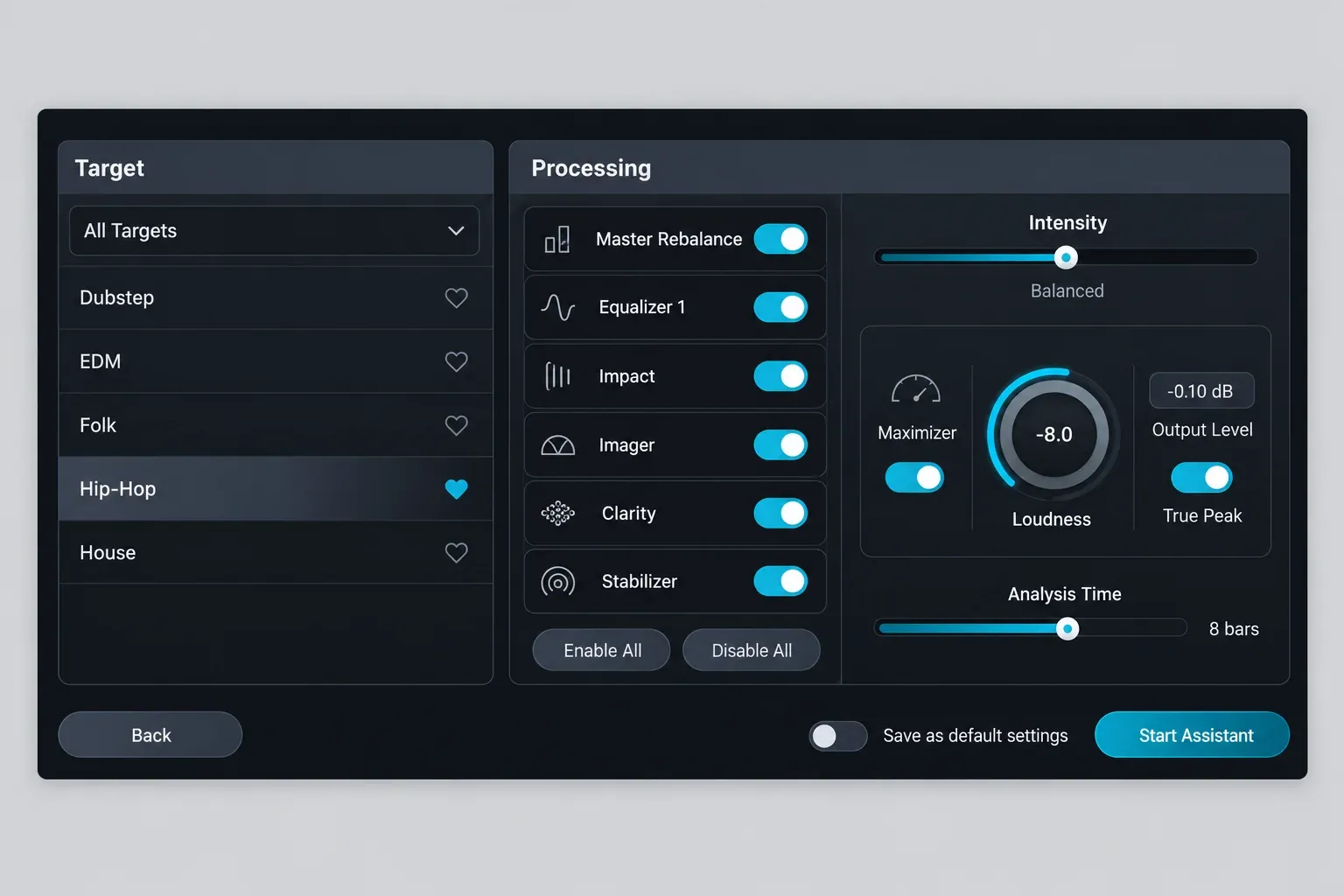
iZotope's Master Assistant guide describes two workflows, One-Click and Custom. In the Custom flow you:
- choose a genre target or load your own reference;
- set a LUFS target;
- switch individual modules on or off;
- set the Intensity, which changes how much processing is applied but not the loudness.
The analysis needs at least 8 seconds of playback and can run for up to 60 seconds, and iZotope suggests playing the loudest, fullest section. A reference track teaches the assistant from its loudest eight seconds. After that, every module the assistant set up is open for editing, and Advanced lets you use its 20 modules as separate plugins.
Start with the Maximizer. Ozone 12 includes the IRC 5 limiting mode, and KVR users report that the assistant does not always choose it on its own, so try it by hand. I cover how the Maximizer and the assistant hold up in the full Ozone 12 review.
Delivering to streaming: the −1 dBTP problem
If your distributor or platform wants peaks at or below −1 dBTP, Ozone handles it with a setting, and LANDR's plugin needs a workaround. A sample peak at −0.1 dBFS can still overshoot once the file is converted, which is why true peak matters for streaming masters.
Ozone 12: set the ceiling in the assistant
In the Custom flow, Master Assistant shows an Output Level, which is the maximum peak in dBFS after limiting, and a True Peak switch for the Maximizer. The Streaming destination sets −1 dB with True Peak on. Full Scale sets −0.1 dB with True Peak off. The loudness target is less exact. Because only part of the song is analyzed, iZotope warns that the final integrated LUFS may differ, and it points to RX Loudness Control, a separate product, for exact compliance.
LANDR: work around the peaks
Both plugin reviews that measured true peak put it at −0.2 to −0.1 dBFS, and the plugin has no ceiling setting. Mix's reviewer got below −1 dBFS only by backing off the input gain (Input Trim in LANDR's feature table) below its optimal level. Mix also warns that Gain Match must be off before you bounce, or the file comes out too quiet.
LANDR's position, as reported by Mix, is that many mastering houses accept true peaks up to 0.0 dBFS. I would not rely on that for streaming. Start at −1 dBTP, as the streaming loudness standards guide explains, and change it only if your distributor asks for something else. If lowering the input changes the sound more than you like, the other route is a separate true-peak limiter after the plugin, set to −1 dBTP. For LANDR's online service, the loudness level is the only lever, so check every download.
Whichever tool you pick, check the finished file on a LUFS and true-peak meter instead of trusting the target field.
Ozone Elements vs LANDR: the budget picks
For under $60, Ozone 12 Elements is the better long-term buy if you are willing to work in your own session. A single $10 LANDR master is the better buy if you only need one or two tracks finished.
iZotope's Elements guide says it has the Master Assistant workflows but not all the controls of Standard and Advanced. On October 20, 2026, the US store listed an Elements-to-Standard upgrade at $165, with eligibility checked against your registered license. That path costs $220 in total ($55 + $165), a dollar more than buying Standard outright. If you already know you want module control, skip Elements.
On the LANDR side, the cheapest options are:
- a $10 WAV master;
- Studio Essentials at $99 a year, for unlimited MP3 masters only;
- the SE plugin, which keeps the analysis and the Loudness control but drops styles, EQ, presence, de-essing, width and dynamics.
I would not pick Essentials for releases, because it gives you MP3 masters only, and I would want a WAV for distribution.
Using Ozone or the LANDR plugin in Sound Forge Pro
Both plugins come in VST3, which is the build to use in Sound Forge Pro. Ozone 12 ships as AAX, AU and VST3, 64-bit only, with no VST2. LANDR's plugin installs as VST3 and AAX on Windows. Sound Forge Pro 2026 loads the VST effects you point it to on the VST Effects tab of Options > Preferences, as Sound Forge's VST Effects preferences help describes, and a Refresh button picks up newly installed plugins. Sound Forge Pro is not among the 12 hosts on iZotope's tested list for Ozone 12, and LANDR's plugin page does not name it either. I would run the trial in Sound Forge before paying.
If a plugin does not appear after install, the fix for VST plugins not showing in Sound Forge Pro walks through the folders and the rescan. To compare a LANDR result with an Ozone result fairly, load them in the Plug-In Chainer and match the loudness before you judge. Switch LANDR's Gain Match off before you render.
Then read the render on Sound Forge's loudness meters and run it through an export QA checklist before you upload it. If you would rather not add either tool, see how far Sound Forge Pro's own mastering tools can take you.
Which should you buy?
Match the tool to how you release, not to the hype around automated mastering.
- You release one or two singles a year: use LANDR online and pay per master. Preview for free, then pay $10 for the WAV you like.
- You release steadily and want speed: take LANDR Studio Pro at $25 a month for unlimited WAV and HD WAV masters plus the plugin. If you prefer to own it, buy the $299 plugin. Either way, plan a peak check for streaming.
- You master your own music and want control: buy Ozone 12 Standard at $219. Use the Streaming destination, then edit what the assistant did.
- You master other people's stereo mixes: buy Ozone 12 Advanced at $499 for all 20 modules and the separate module plugins.
- You are a beginner on a budget: use the free options first: LANDR's previews, the plugin's 3-day trial and Ozone's 10-day trial. Then choose between Elements at $55 and paying per master.
- You only need a final limiter in Sound Forge: the built-in Wave Hammer may already cover you.
For most self-releasing producers who already work in a DAW, my default is Ozone 12 Standard. It costs less than the LANDR plugin, it can set a −1 dBTP ceiling, and nothing it does is locked away from you.
FAQ
Is LANDR better than Ozone?
Not overall. LANDR is better for speed and for a finished sound without decisions, and MusicRadar named its online service the best of four it compared. Ozone is better for control and for exact delivery targets. In Benn Jordan's blind study, neither beat the human engineers.
Can I use LANDR without a subscription?
Yes. Online previews are free, and you can buy single masters at $6 for MP3, $10 for WAV or $20 for HD WAV, or buy the Mastering Plugin outright for $299.
Does Ozone keep working if I cancel the iZotope subscription?
No. If you cancel iZotope Plus or Pro, the plugins go read-only after the expiration date, so iZotope recommends bouncing affected tracks first. The subscription also needs a Native Access check-in once a month. iZotope says perpetual licenses will remain available, so buy one of those if you want to own Ozone.
Does LANDR or Ozone support VST2?
Neither does. Ozone 12 ships as AAX, AU and VST3 with no VST2. The LANDR Mastering Plugin lists VST3, AU and AAX on macOS 10.14 or later, and VST3 and AAX on 64-bit Windows 10 or later.