
A breath can tell you where a thought ends and the next one begins. If every inhale disappears, spoken audio may sound hurried even when each word is clean. If one inhale jumps out, it can distract more than a small mouth click. Decide phrase by phrase: keep it, turn it down, or replace the damaged part while keeping the pause.
Listen before selecting anything
Play the sentence before the inhale and the one after it at normal listening level. Ask whether the breath gives the listener a useful beat, whether it's simply louder than the surrounding speech, or whether it contains a click, rustle, bump or other damage. The waveform helps locate the event, but a quiet-looking breath can still be conspicuous after compression. If nearly every inhale jumps out, the cause may be upstream: heavy compression, or a microphone placed directly in the speaker's breath stream. Correcting that before the next session saves editing every inhale by hand.
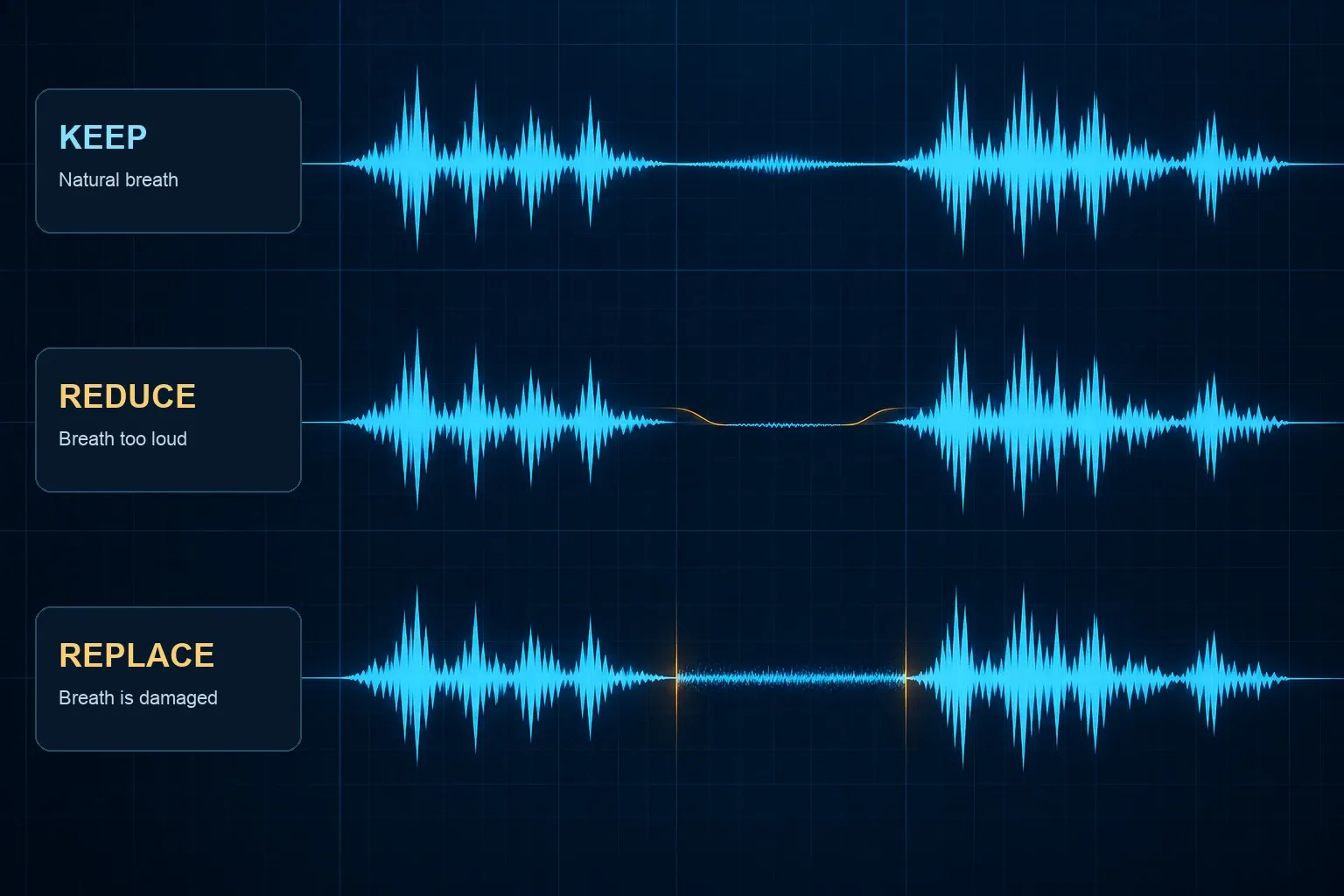
| What you hear | First choice | Listen for afterward |
|---|---|---|
| A natural inhale that supports the phrasing | Keep it | Does the next sentence start comfortably? |
| An otherwise clean inhale that draws attention | Reduce its level | Can you still hear a human taking a breath? |
| An inhale with a rustle, lip noise or bump | Repair the event or replace that part | Do both joins and the background sound continuous? |
If the unwanted sound is a single dry tick rather than the inhale itself, use a local repair. The mouth-click guide covers that narrower problem. You may be able to leave most of the breath alone.
Make a working copy and mark the whole breath
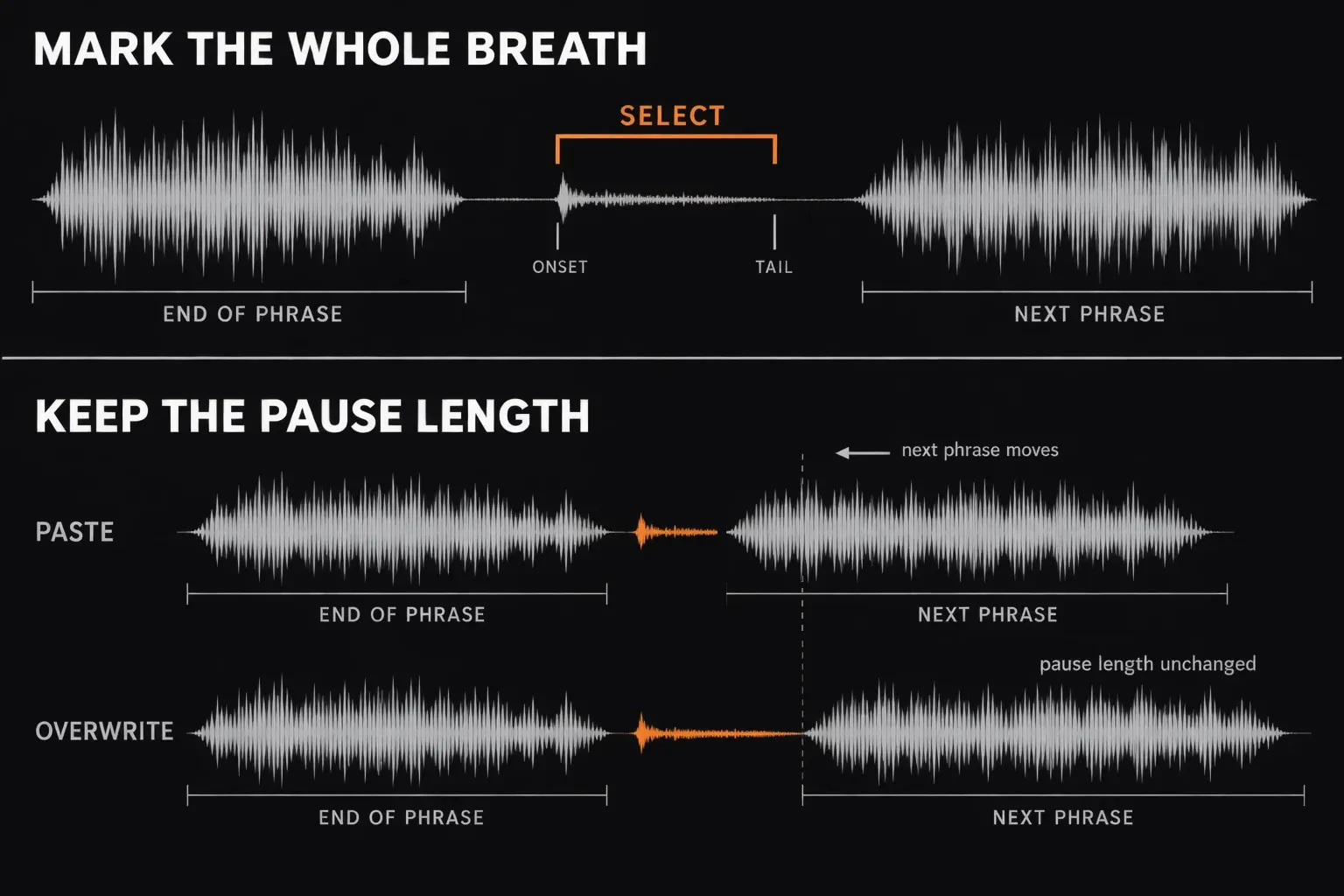
Save a separate working version first. Find the start of the inhale after the previous phrase and the point where it settles before the next phrase. Avoid selecting the end of a consonant or the start of a vowel along with it. Zoom in to place the boundaries, then zoom out to check their position in the sentence. A breath may have a sharp onset followed by a soft tail. Treating only the loudest spike can leave the rest sounding oddly detached.
Keep the original pause length in mind before you cut anything. In Sound Forge Pro 2026, ordinary Paste deletes a current selection and inserts the clipboard contents. If the replacement is shorter or longer, the next phrase moves. That can be intentional, but it should be a listening decision, never an accidental side effect of replacing audio. When the pause must keep its length, use Edit → Paste Special → Overwrite instead. It replaces the selected audio without moving what follows, but if the clipboard is shorter than the selection, only the clipboard's length is overwritten and the rest of the original stays. Copy a replacement at least as long as the part you're covering.
Reduce a loud but clean inhale
Select just the distracting breath. The documented Process → Volume dialog uses negative Gain values to attenuate selected audio. Preview a modest reduction and replay the full phrase. If the breath vanishes into a sudden pocket of silence, undo and use less. There's no fixed reduction that suits every voice or microphone.
Watch the selection before you confirm: with no selection, Volume affects the whole file. If a straight level change makes either edge obvious, Effects → Envelope lets you shape a gradual dip across the breath and return to the original level. Keep the transition inside the breath rather than fading the neighboring words. You can also use the documented Graphic Fade where a short transition is needed. Check the result by ear, because the right curve depends on the recording.
Long narration can hold hundreds of breaths. Once one reduction sounds right, select the next breath and use Edit → Repeat, which runs the last operation again with the same dialog settings. Hold Shift when you choose it to reopen the dialog and adjust the amount for a louder or softer inhale. Each repeat is still a listening decision, not a batch job.
Replace a breath only when the breath itself is spoiled
For a rustle or bump throughout an inhale, look first for a clean breath from the same speaker and recording setup. A mismatched inhale may be more conspicuous than the original flaw. If no suitable breath exists and the phrase reads naturally without one, use a segment of the recording's own room tone to keep the pause from dropping into digital silence. The room-tone guide explains how to choose a matching source.
- Choose a clean source. Listen for hum, speech tails and chair noise before copying it. Match the channel layout and general background character of the destination.
- Match the time. Measure the portion you are replacing and prepare a source of suitable length. Overwrite keeps the pause length fixed; with ordinary Paste, a different length moves the next phrase, so check where it lands.
- Join both ends. Inspect the entry from speech into the replacement and the exit into the next phrase. Shape brief transitions as needed so neither edge clicks or makes the room suddenly change.
- Replay in context. The replacement is successful when the pacing and background feel ordinary, not when the waveform looks perfectly flat.
A short clean breath often works better than room tone because it preserves the speaker's phrasing. Room tone is most useful when the damaged breath must go and the pause still needs a continuous background. If the noise sits on just one part of a breath, replace or repair that part instead of discarding the whole inhale.
Why a noise gate rarely solves this by itself
Sound Forge's Noise Gate removes signals below a threshold. It has no way to know that one low-level sound is a useful inhale and another is unwanted noise. A threshold that catches quiet breaths may also make the gaps between words unnaturally empty. Use a gate for a threshold problem when that behavior serves the file, and make breath decisions in the sentence. If you do need one, the noise gate guide explains how to set it and when gentler expansion or controlled room tone sounds more natural.
Dedicated breath processors work differently from a level gate. Waves describes its DeBreath plug-in as letting you control how much breath remains on a vocal track and add room tone where breaths have been reduced. On a long narration that can handle the first pass, but audition the result with the same sentence-level checks.
Check the edit after your later processing
Replay a few normal breaths, the strongest inhale and the two words around every repaired join. Listen at conversational volume and compare with the unedited copy at similar loudness. Compression or limiting later in the chain can bring a remaining breath forward again, so repeat this check after those steps. Don't keep lowering every breath just because you can see it. How much breathing sounds right also depends on the delivery. For interview shows, the podcast editing workflow shows where breath edits sit among the other passes. For audiobooks, long-time helpers in an Audacity forum thread about removing breath sounds warn that the human quality check at ACX, Audible's audiobook marketplace, can reject narration with pulsing backgrounds or other signs of heavy processing, which is one more reason to keep pauses natural.
For the larger sequence from recording through delivery, see the voice-over workflow. The export checklist helps catch a bad join before the file leaves your desk. A listener should hear the thought and its timing, not the repair.