
Pick ACID Pro if you build songs by dragging loops onto a timeline, or score music to picture, on a Windows 11 PC. Pick FL Studio if you make beats from patterns and the piano roll, work on a Mac, or want lifetime free updates, and start at Producer (US$179), because the US$99 Fruity edition cannot record audio. ACID matches loops to your project's tempo and key on its own, keeps hit points locked to video, and costs US$149.95 perpetual with a year of updates, or US$12.95 a month, on Boris FX's ACID Pro pricing page (US store, October 20, 2026). FL Studio's editions run from US$99 to US$449 on Image-Line's FL Studio pricing page (October 21, 2026).
If I were choosing for someone who records guitar or vocals over loops, I would set ACID against FL Studio Producer, not Fruity. The cheapest FL edition has no audio recording, so the fair price comparison is $149.95 against $179. The longer-term difference is the update model: ACID asks for a renewal to keep upgrades coming after the first year, while FL updates stay free inside your edition. If you also need to edit the finished stereo file, my ACID Pro vs Sound Forge comparison covers where the arranger stops and the editor takes over.
ACID Pro or FL Studio: the short answer
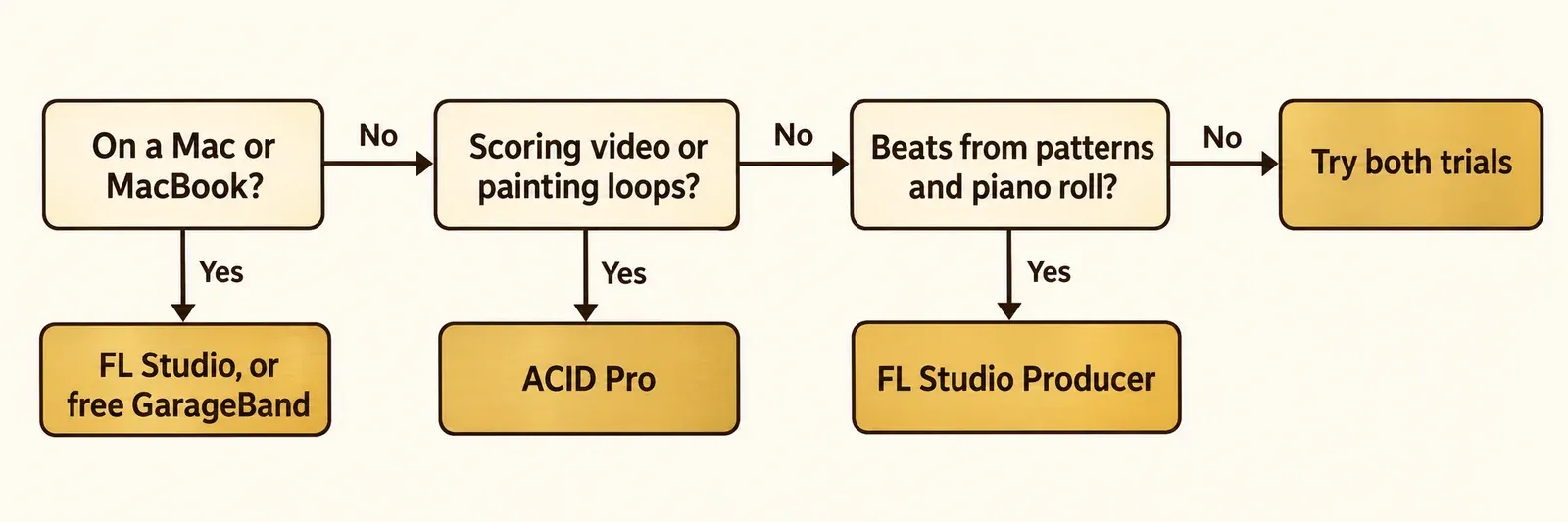
The choice comes down to how your ideas start and which computer you own. Here is how I would decide:
- Choose ACID Pro if your songs start as loops you want to hear together right away. Loops follow the project tempo and key, and you paint them straight onto a linear timeline.
- Choose ACID Pro if you write music to video. Hit points in audio and video pull the tempo into sync, while FL Studio offers only a basic add-on video module.
- Choose FL Studio if you build beats note by note in patterns and the piano roll, or if you use macOS. One FL Studio license covers Windows and Mac.
- Choose FL Studio if you never want to pay for updates. Image-Line gives every future update to your edition free.
- Skip FL Studio Fruity if you plan to record a voice or an instrument. Recording starts at Producer.
ACID Pro 2026 vs FL Studio 2026 at a glance
ACID Pro is the cheaper way into a recording-capable DAW on Windows; FL Studio is the more flexible license. Prices are from the vendors' US stores, read October 20-21, 2026.
| Feature | ACID Pro 2026 | FL Studio 2026 |
|---|---|---|
| Maker and version | Boris FX, Pro Audio division | Image-Line, version 26.1.7 (October 12, 2026) |
| Platforms | Windows 11 only | Windows 10 or later, macOS 10.15 or later; one license for both |
| Lowest price that records audio | $149.95 perpetual | $179 (Producer) |
| Subscription | $12.95 a month or $69.95 a year | None; one-time purchase |
| Updates | First year included; $89.95 renewal | Free for life within your edition |
| Audio recording | Multiple tracks at once, punch-in takes | Producer and up; Fruity has none |
| Plugin formats | VST instruments; DirectX and VST effects in the 2026 docs | VST 1/2, VST3 and CLAP; AU on macOS |
| Bundled content | Nearly 3 GB of royalty-free loops; 15 songs with 1,100+ MIDI parts | 82 to 118 instruments and effects, by edition |
| Video | Imports AVI, WMV and MP4 (H.264); hit points sync tempo to picture | Add-on floating video module |
| Stem separation | Not listed by Boris FX | Producer and up |
| Trial | 15 days, full-featured, Windows only | No time limit; saved projects reopen only after purchase |
| RAM and disk | 8 GB RAM recommended; 700 MB plus up to 16 GB of content | 4 GB RAM or more; 4 GB disk |
The ACID rows come from Boris FX's ACID Pro product page and ACID Pro system requirements. The FL Studio rows come from the FL Studio download page, the pricing page and Image-Line's edition comparison.
How each one builds a song
ACID is a loop-first timeline; FL Studio is a pattern-first sequencer. That difference decides which one feels easier, more than any feature list.
Boris FX calls ACID "the blueprint for loop-based production since 1998," and the core idea has not changed. You audition loops in real time while the project plays, then paint them onto tracks. Each loop matches the project's tempo and key automatically, so a drum loop at one tempo and a guitar loop in another key simply fit. If you want the theory behind that, my guide to time stretching and pitch shifting explains what the software is doing to the audio. The Chopper slices a loop so you can rearrange the pieces into stutters, repeats or new melodies, and grooves add swing to loops, MIDI and audio without changing the original file. For your own samples that arrive without a tempo, a tap tempo counter gives you the BPM before you bring them in.
Reviewers have long treated this as ACID's defining strength. Sound On Sound's ACID Pro Next review (July 18, 2019) said the core program "still offers the best approach to loop-based composition," and that if you paint loops onto a multitrack timeline, "nothing else does this in quite the same way or as quickly as ACID."
FL Studio starts somewhere else. In the FL Studio manual's Channel Rack page, the Channel Rack holds your instruments, a pattern stores Step Sequencer, Piano roll and automation data, and patterns are arranged in the Playlist as Pattern Clips to build the song. MusicTech's FL Studio 2025 review (July 17, 2025) called the piano roll "frictionless" and found the workflow exceptionally well suited to trap, hip-hop and EDM, to the point that it tends to steer you that way. MusicRadar's FL Studio 21 review (May 24, 2023) noted the other side: keeping mixing, arranging and looping in separate environments can make the program feel "more disjointed."
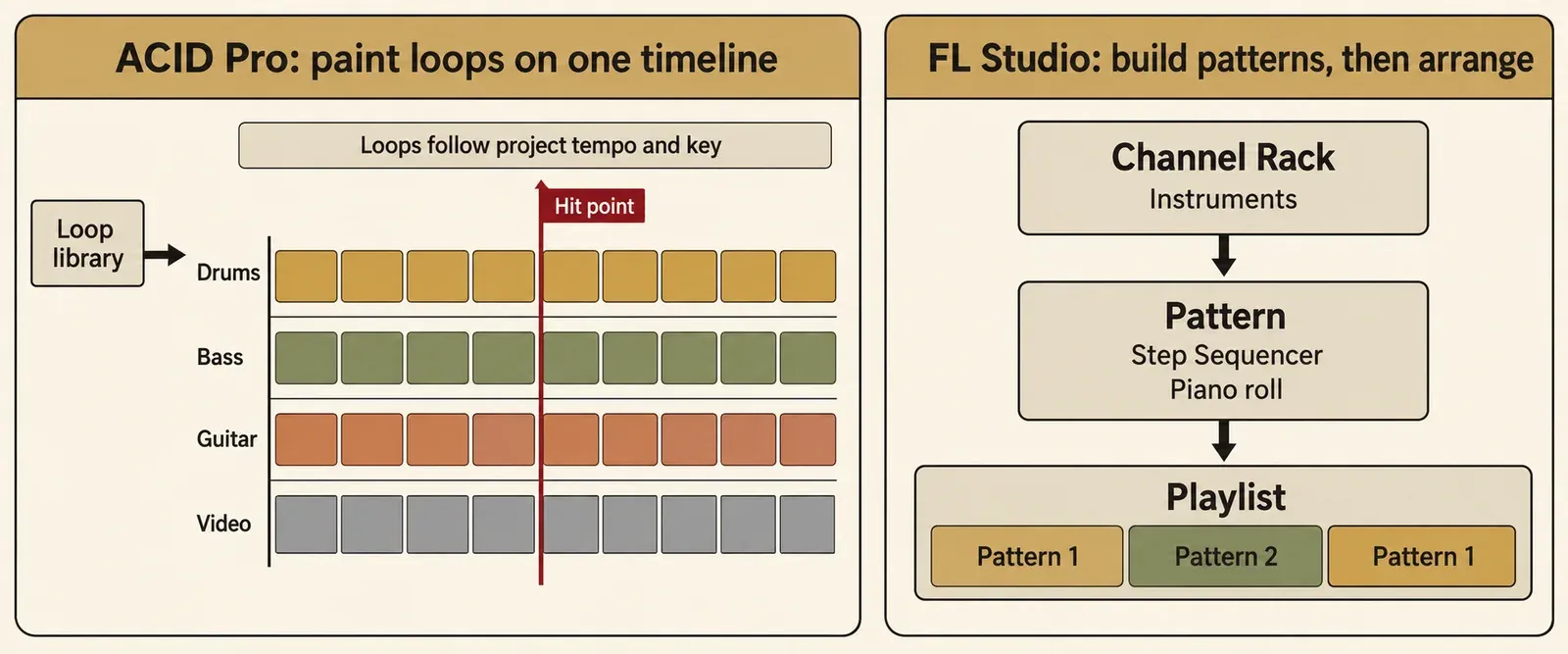
My read: if your ideas start as a drum loop and a bass loop you want to hear together within seconds, ACID's timeline is the shorter path. If they start as a beat you program step by step, FL Studio's pattern model is built for exactly that.
Recording audio and MIDI
ACID records audio in its only edition; FL Studio records audio from Producer upward, and reviewers rate its recording as its weak side.
Boris FX says ACID can record multiple tracks at once, set up bussing and mix unlimited audio, loop and MIDI tracks. You can punch into a track to record another take, and you get MIDI sequencing with VST instruments. For the final check before export, ACID's Loudness Meters read loudness, dynamics and true peak in real time; my LUFS meter guide explains what those numbers mean for streaming.
FL Studio Fruity cannot record audio at all. The FL Studio features-by-edition page describes Fruity as the edition for users who don't need more than 8 Audio Clips or audio recording. Producer adds recording, and the reviews are lukewarm about it even there:
- MusicTech's 2025 review found recording "…meh" and wrote that "even recording MIDI is a chore."
- MusicTech's FL Studio 2024 review (September 4, 2024) asked whether you could record an orchestra in it: "Technically yes, but really there are better options." It found FL more performer-oriented, built for putting beats, songs and patterns together quickly.
- MusicRadar's FL Studio 21 review called the missing recording in Fruity "a significant omission."
That is the fork Fruity owners hit the day they want to add a vocal: upgrade to Producer, or buy a second program. For a singer-songwriter who records over loops, I would lean toward ACID, because multitrack recording and punch-in come in the one edition there is.
VST plugins and compatibility
Both programs host VST plugins, but only FL Studio documents VST3 and CLAP for its current version, so test your key ACID plugins during the trial.
ACID supports MIDI sequencing and VST instruments. The ACID Pro 2026 plug-in documentation describes the Audio Plug-In window as the place to add and remove DirectX and VST effects, and notes that ACID can also run as a ReWire device. It does not name VST3. Older reviews disagree on the point: Sound On Sound's ACID Pro 8 review (June 21, 2018) said VST3 was not yet supported, while its 2019 ACID Pro Next review said ACID 8 brought VST3 support. The practical answer is to load the VST3 and VST2 plugins you depend on during ACID's 15-day trial, before you pay.
FL Studio is unambiguous. Its plugin standards page lists 32- and 64-bit VST 1/2, VST3, CLAP and Image-Line's native format on Windows, and 64-bit VST 1/2, VST3, AU, CLAP and native plugins on macOS. If a plugin goes missing after an update, Image-Line's advice is Options > File Settings > Manage plugins > Verify plugins. If the format names are new to you, start with what a VST plugin is and how the formats differ.
Two tools often come up in this comparison. FL Studio Producer and up include stem separation. Boris FX's current ACID pages do not list stem separation, Melodyne or ARA. Sound On Sound's 2019 review described Melodyne Essential running as a conventional plug-in in ACID Pro Next, without ARA, but that describes the 2019 release, not ACID Pro 2026. If pitch correction is the reason you want Melodyne, my Melodyne Essential vs Assistant comparison explains which edition covers what.
Scoring to video
This is ACID's clearest win. It was built to lock music to picture, and MusicTech's 2024 FL Studio review lists scoring as a gap.
ACID imports AVI, WMV and MP4 (H.264) video and previews it directly on the timeline, so you write soundtracks, trailers and intros against the picture. You can drop hit point markers in audio and video, and ACID adjusts the tempo to keep them in sync, including complex tempo maps. A cut, a door slam or a logo reveal lands on the beat because the music bends to it.
MusicTech's FL Studio 2024 review listed "No scoring" and "Basic support for video and surround" among the minuses. Video in FL Studio comes through an add-on floating module, and the reviewer fairly added that this is true of most competitors too. If you cut picture in VEGAS Pro and finish dialogue in Sound Forge, my Sound Forge and VEGAS Pro workflow for video editors covers that side of the job.
Loops, sounds and who owns the results
ACID ships a large royalty-free loop library that you own the results of; FL Studio puts its value into instruments and effects instead.
Boris FX lists nearly 3 GB of royalty-free loops, nearly 1,000 loops, one-shots and songs, and 15 song projects with more than 1,100 editable MIDI parts and 90+ DLS instrument patches on the ACID Pro product page. Its wording on rights is direct: you own everything you create with ACID's royalty-free loops and can publish it with no extra fees. Plan disk space accordingly; the requirements call for up to 16 GB for instruments and loops. One trial detail matters here: per the ACID Pro trial page, bundled loops and content are included with the full version, and during the trial you create with your own audio, VSTs and MIDI.
Image-Line counts FL Studio's content differently: 82 instruments and effects in Fruity, 93 in Producer, 103 in Signature Bundle and 118 in All Plugins. If loops are the reason you are buying, ACID gives you more ready-to-paint material on day one. If synths and effects are the reason, FL Studio's higher editions pile them up.
Prices and licenses (US stores, October 20-21, 2026)
ACID costs less up front than FL Studio Producer; FL Studio costs less to keep current. Watch current Boris FX audio deals before you buy, since sale prices change often.
| ACID Pro option | US price | What you get |
|---|---|---|
| Perpetual license | $149.95 | Includes 1 year of upgrades and support |
| Renewal | $89.95 | Another period of upgrades and support |
| Reinstatement | $109.95 | Restores lapsed upgrades and support |
| Annual subscription | $69.95 a year | Pay yearly |
| Monthly subscription | $12.95 a month | Pay monthly |
| Upgrade from MAGIX ACID | $89.95 | ACID Pro 2026 for owners of a MAGIX serial |
| FL Studio edition | US price | What it adds |
|---|---|---|
| Fruity | $99 | 82 instruments and effects; no audio recording, up to 8 Audio Clips |
| Producer | $179 | 93 instruments and effects; audio recording and stem separation |
| Signature Bundle | $269 | 103 instruments and effects |
| All Plugins | $449 | 118 instruments and effects |
FL Studio's license terms are generous. Image-Line's edition comparison promises all future updates to your edition free, and moving up an edition costs only the price difference. The FL Studio download page adds that one license works on both Windows and macOS, and that you can install it on several computers as long as they are for your own personal use.
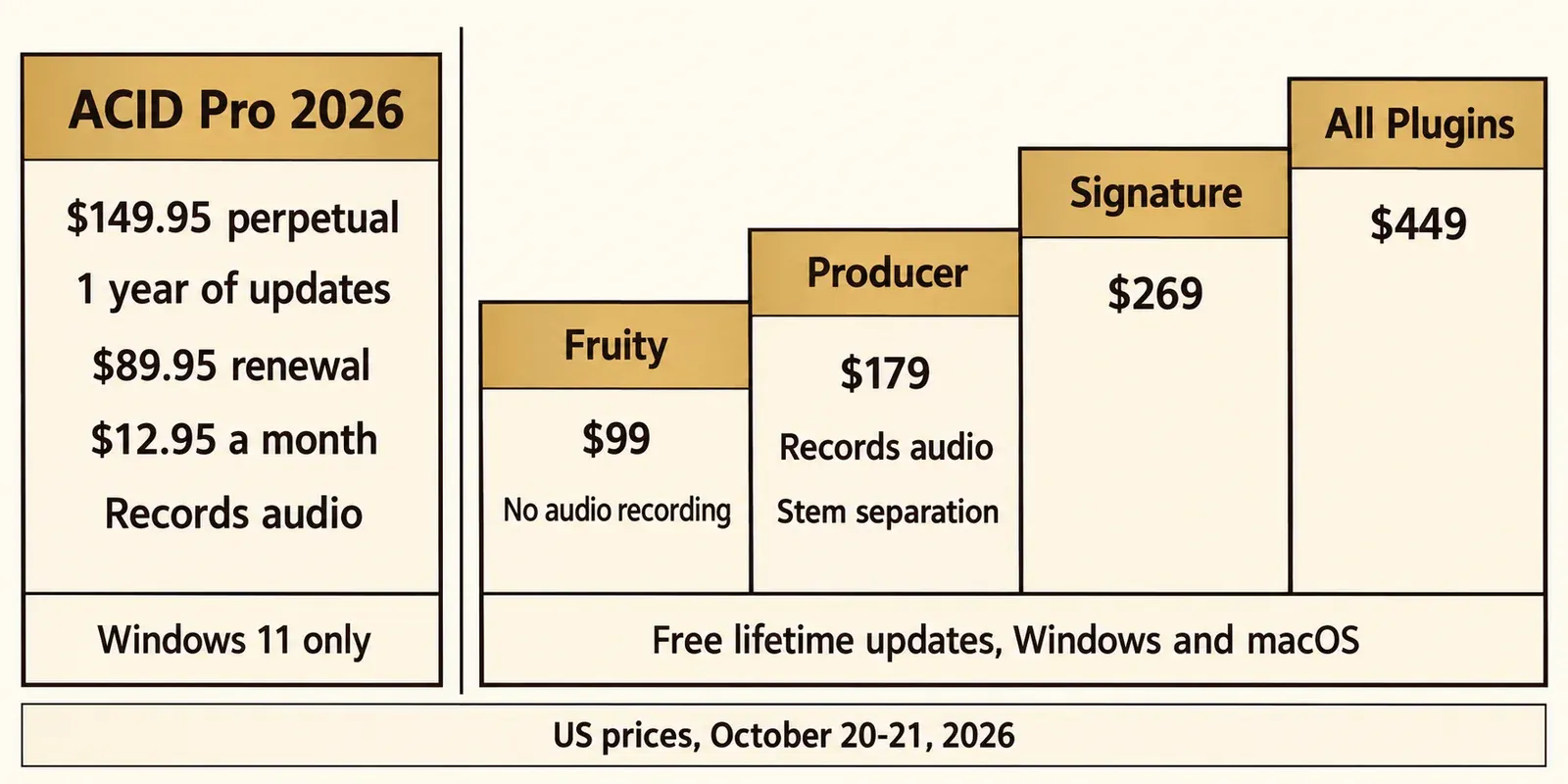
The arithmetic is simple. ACID's perpetual license is $29.05 cheaper than FL Studio Producer on day one. One $89.95 renewal brings ACID to $239.90, while FL Studio Producer stays at $179 for every future update to that edition. The monthly plan adds up to $155.40 over twelve months, so the $69.95 annual plan is the better subscription if you know you will use ACID all year. Whether an ACID renewal is worth paying depends on what Boris FX ships in that period; with FL Studio the question never comes up.
On a Mac, MacBook or iPad
ACID Pro does not run on a Mac, a MacBook or an iPad. The current ACID system requirements list Windows 11 and no macOS version, and the trial is Windows only. At least one software directory still lists ACID for Mac; the vendor's own requirements page is the one to trust.
On a Mac, your realistic options are these:
- FL Studio runs on macOS 10.15 or later, and the same license moves with you if you switch between Windows and Mac.
- GarageBand is free on the Mac App Store and needs macOS 15.6 or later. It also connects to the iPad: Apple's GarageBand page explains that iCloud lets you add tracks to a Mac song from an iPhone or iPad.
- Cubase 15 and REAPER also run on macOS; both are covered in the alternatives section below.
Image-Line's requirements for FL Studio name Windows and macOS only, so the desktop program compared here is not an iPad app either. Sound Forge users face a similar platform question, and my guide to Sound Forge for Mac covers what actually works there.
Trying both before you buy
FL Studio's trial never expires; ACID's lasts 15 days, so start ACID's clock only when you have a project and your plugins ready.
- ACID Pro: a 15-day, full-featured trial for Windows only. It installs through the Boris FX Hub and needs a Boris FX account. Bundled loops come with the full version, so use your own audio, VSTs and MIDI.
- FL Studio: Image-Line's trial FAQ says the trial has no time limit. You can save projects but cannot reopen them until you buy, and the trial can render WAV, MP3, OGG and MIDI files.
- Ableton Live: Ableton's trial terms give you Live 12 Suite for 30 days; after that, your Sets still open but you cannot save or export.
- REAPER: a 60-day evaluation with full functionality.
The FL save limit has a practical side effect: finish and export whatever you start in a single session, because you will not get back into that project until you own a license.
Test results: what published reviews conclude
Five editorial reviews published between 2018 and 2025 point the same way: ACID is the faster loop arranger, FL Studio the deeper beat-making environment with weaker recording. The composite below covers workflow, recording, video and update value. No source publishes level-matched audio, CPU or latency measurements that compare the two, so those are outside its scope.
| Review | Date | Score | Key finding |
|---|---|---|---|
| Sound On Sound, ACID Pro 8 | June 21, 2018 | No score | "a worthy contender for a first serious DAW" |
| Sound On Sound, ACID Pro Next | July 18, 2019 | No score | "the best approach to loop-based composition"; most core features "now quite old" |
| MusicRadar, FL Studio 21 | May 24, 2023 | 4.5/5 (90%) | Looping "excellent, intuitive, and inspiring"; Fruity without recording "a significant omission" |
| MusicTech, FL Studio 2024 | September 4, 2024 | 8/10 (80%) | "No scoring"; "Basic support for video and surround" |
| MusicTech, FL Studio 2025 | July 17, 2025 | 8/10 (80%) | Piano roll "frictionless"; "goes deep but not necessarily wide" |
Across those five reviews, the composite result looks like this:
- 2 of 2 ACID reviews put loop-based composition first. The 2018 Sound On Sound review also called it a good loop production tool to run alongside another DAW.
- 3 of 3 FL Studio reviews praise its pattern, piano-roll and loop workflow.
- 3 of 3 FL Studio reviews highlight lifetime free updates; MusicTech 2024 called the policy "generous."
- 3 of 3 FL Studio reviews flag audio recording as weak or limited by edition.
- 1 of 3 FL Studio reviews lists no scoring and basic video support, the exact area where ACID's hit points stand out.
- 1 of 2 ACID reviews says most of its core features are "now quite old."
Scores exist for FL Studio only: 8/10, 8/10 and 4.5/5, which normalize to a median of 80% and a range of 80-90% across three reviews from 2023 to 2025. Sound On Sound does not publish scores. The only scored ACID review is MusicRadar's ACID Pro 7 review from January 14, 2009 (3.5/5), which is too old to set beside FL Studio 2025, so I give no head-to-head score.
Does FL Studio sound better?
A long-running forum claim says FL Studio sounds "more full and fat" than ACID. No published source compares the two at matched levels, so nothing measured backs it up. If two projects sound different to you, check the obvious variables first: the samples, the plugins, the default levels and the gain staging. I would pick on workflow and let the sound come from what you put into the project.
My take on the composite: the reviews agree with the workflow split above. ACID wins on speed with loops and picture, FL Studio wins on depth and license value, and neither review set gives a reason to pick against your own workflow.
ACID Pro vs Ableton Live
Ableton Live is ACID's closest loop rival, and it costs more for unlimited tracks. Sound On Sound's 2018 review named Ableton Live, Bitwig Studio and FL Studio as ACID's direct competition for loop-based work.
Per Ableton's edition comparison, every Live 12 edition, Intro included, has advanced warping and real-time time-stretching. Intro is limited to 16 tracks, Standard and Suite have unlimited tracks, and Max for Live comes only with Suite. Ableton's store is geo-priced; in the US the three editions cost about $99, $349 and $749. Ableton also offers rent-to-own for Suite, and its trial gives you Suite for 30 days.
ACID gives you unlimited audio, loop and MIDI tracks at $149.95, well below Live Standard, plus hit-point scoring to video. Live's warping has a long head start: MusicRadar's 2009 ACID Pro 7 review already listed "Beatmapping inferior to Live's" as a reason to avoid ACID, although that verdict is about a much older version. I would choose Live if stretching your own recordings is central to your music, and ACID if you arrange loops in a straight line, often against video, on Windows.
ACID Pro vs GarageBand
The choice between ACID and GarageBand follows the computer you own: GarageBand is free on the Mac, and ACID requires Windows 11.
GarageBand needs macOS 15.6 or later and costs nothing. Apple includes thousands of loops and a Drummer virtual session player with 28 drummers and three percussionists, and iCloud lets you start ideas on an iPhone or iPad and finish them on the Mac. ACID cannot run on any of those devices. If you are on a Mac, start with GarageBand and move to FL Studio when you outgrow it. If you are on Windows, GarageBand is not an option, and ACID is the closest equivalent for painting loops.
Cubase, Mixcraft, REAPER and Music Maker
Four more programs come up in ACID searches. Each fits a different reader, and my roundup of Sound Forge alternatives covers more of the wider field.
Cubase
Cubase 15 comes in Pro, Artist and Elements editions and runs on Windows 10 22H2 or Windows 11 24H2 and later, plus macOS 14, 15 and 26, according to Steinberg's Cubase page. US list prices run from about $99.99 (Elements) to $579.99 (Pro); check Steinberg's shop for your region before buying. It is the pick if you want a traditional linear recording DAW on either platform rather than a loop tool.
Mixcraft
Mixcraft is the closest thing to ACID's mix of loops and video on Windows. Acoustica's Mixcraft page lists Mixcraft 10.6 Recording Studio from $79 and Pro Studio at $149, a Performance Panel for loop-based composition, video editing and scoring, and a library of more than 7,500 loops, music beds, sound effects and samples.
REAPER
REAPER costs $60 with the discounted license or $225 commercial, includes free upgrades through version 8.99, and offers a 60-day evaluation with full functionality. It runs on Windows, macOS and Linux. It is a deep, inexpensive general DAW rather than a loop arranger; my Sound Forge Pro vs REAPER comparison goes further into how it works.
MAGIX Music Maker
MAGIX describes Music Maker as beginner music software built on virtual instruments and loops, in Premium, ULTIMATE and Unlimited editions. Read the license terms: MAGIX says its included loops and Soundpools are typically for personal use only, while editions such as ULTIMATE include Soundpools with full commercial rights. ACID's royalty-free loops are the safer choice if you plan to release what you make.
Already own ACID 11 from MAGIX?
Your upgrade path depends on when you bought ACID Pro 11. ACID now sits in Boris FX's Pro Audio division alongside Sound Forge, Sequoia, Samplitude, CrumplePop and Music Studio, as the Boris FX announcement explains, and you can browse that family in my Boris FX audio hub.
- Bought from MAGIX before January 1, 2026: choose Upgrade in the Boris FX store, signed in with the same email address. The upgrade from a MAGIX serial costs $89.95.
- Bought on or after January 1, 2026: you are eligible for a complimentary upgrade to ACID Pro 2026; email Boris FX sales with proof of purchase.
- MAGIX subscription: Boris FX says it will move ACID Pro 11 subscriptions to ACID Pro 2026 "over the coming weeks," per the FAQ on the ACID Pro product page.
Should you stay or switch? If your work is loops, video and a few recorded parts, staying costs $89.95 and keeps your workflow. Switching to FL Studio makes sense if you want macOS, free updates, or a deeper piano roll for programmed beats, and you accept weaker recording. Sound On Sound's 2019 view that most of ACID's core features were "now quite old" is worth weighing, but it describes ACID Pro Next, not the 2026 release. The ACID Pro 2026 review weighs what the current release does well and what to load during the 15-day trial.
My verdict
ACID Pro and FL Studio solve different problems, so the right pick depends on who you are:
- Beginner on Windows who thinks in loops: ACID Pro at $149.95. You get recording, a big royalty-free loop library and the fastest loop timeline in this comparison.
- Beat maker who programs drums and melodies: FL Studio Producer at $179. The piano roll and pattern workflow are the reason to buy it, and updates stay free.
- Mac user: FL Studio, or GarageBand if you want to start free. ACID requires Windows 11.
- Composer for video, trailers or intros: ACID Pro. Hit points that pull the tempo into sync with picture cover the scoring gap MusicTech's 2024 FL Studio review flagged.
- Existing ACID 11 owner: take the upgrade path that matches your purchase date before you think about switching.
If you are still unsure, install FL Studio's trial first, since it never expires, and start ACID's 15 days when you have a real project and your plugins ready to test.
ACID Pro vs FL Studio FAQ
Can ACID Pro open FL Studio projects?
Neither vendor lists the other's project format. Move work between them as WAV stems and MIDI files: ACID imports and exports WAV and MIDI, and FL Studio renders WAV and MIDI.
Is FL Studio Fruity enough to start?
It is enough for beats made entirely inside the computer. It cannot record audio and the manual caps it at 8 Audio Clips, so anyone planning vocals or guitar should start at Producer. Moving up later costs only the price difference.
Can I rent ACID Pro instead of buying it?
Yes. Boris FX sells ACID Pro at $12.95 a month or $69.95 a year in its US store, alongside the $149.95 perpetual license. FL Studio has no subscription.