
To change duration without changing pitch, use Process > Time > Time Stretch. In Process > Time > élastique Timestretch, change time while keeping the pitch adjustment at zero. To transpose without changing length, use Effects > Pitch > Shift with duration preservation enabled. Pitch Bend follows an envelope. Rate-only resampling changes speed and pitch together.
These steps use Sound Forge Pro 2026 documentation, not a hands-on Windows or listening test. Older editions and other Sound Forge products may expose different controls. Keep the original untouched and save a working copy under a different name before applying any process.
Calculate Duration, Speed and BPM Separately
Duration ratio = target seconds ÷ original seconds. Multiply by 100 for a duration percentage. The speed ratio is its reciprocal: original seconds ÷ target seconds. A field measured in seconds needs a duration, not a percentage.
To shorten 30.000 seconds to 27.500 seconds, use a duration ratio of 0.916667, or about 91.6667% of the original length. That is about 109.0909% speed. Keep more digits during calculation and verify the final endpoint; a rounded percentage does not guarantee an exact delivery time.
For a fixed musical span, new duration = old duration × old BPM ÷ new BPM. An eight-second phrase at 120 BPM becomes 7.5 seconds at 128 BPM: 93.75% duration, or about 106.6667% speed. Use the same beat unit and beat count. Extra silence, a half-time estimate or tempo drift defeats that simple calculation. The tap-tempo tool can estimate a pulse; it does not prove an exact recording tempo.
Change Duration Without Changing Pitch
- Preserve the source. Save a separate working copy. Preview and Undo are not backups.
- Select the passage. Use a data selection and include the channels that must stay together. With no data selected, the documented time-stretch commands process the entire file.
- Open the effect. Choose Process > Time > Time Stretch or Process > Time > élastique Timestretch.
- Set the output target. Enter the calculated duration in the effect’s displayed units. In élastique, keep pitch adjustment at zero and recheck it after loading a preset or moving the Pitch/Time point. Use the dialog’s ? help for its controls.
- Preview difficult material. Compare exposed speech, an attack and a sustained note where present. Use Bypass to hear the unprocessed signal and pre/post-roll to hear the joins.
- Apply and verify. Check the resulting duration, peaks, boundaries and downstream references. Save under a new name, reopen the result and inspect the actual delivery file.
The current Time Stretch help confirms both menu commands and the no-selection scope, but delegates effect-specific controls to the dialog’s ? button. Do not import a mode, maximum ratio, formant percentage or shortcut from VEGAS, Cubase, Mac or an older Sound Forge build.
Shorter duration makes speech faster; longer duration slows it down. For narration, remove unnecessary pauses before stretching every syllable. For music, confirm the start transient and final beat. Compare each setting from the same original rather than repeatedly processing a stretched result.
Input Selection Is Not Output Duration
In the processing-dialog controls, More exposes Start, End and Length for the input selection. Shortening Length there selects less audio; it does not specify the stretcher’s destination length. Set the passage first, then the effect’s output target.
With the Event tool, those documented controls differ: Start, Length and Channels are locked, End is unavailable, and previous/next event controls navigate selected events. The Event tool documentation says to preserve editable events in a Sound Forge project. For the single-clip and rate-only recipes here, use a separate audio copy rather than treating an event layout as one data selection.
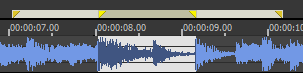
Bypass auditions the original; it does not undo an applied process. If real-time preview stutters, try the documented non-real-time preview and check the saved result before blaming the stretcher.
Check Both Joins and Later Timing
A processed passage joins untouched audio at each end. Listen across both boundaries. A click suggests a discontinuity, but compare the source first: it may already contain the fault. If the join causes it, try a short fade or a controlled Sound Forge crossfade. Do not hide a smeared attack inside the selection with an unrelated boundary fade.
Changing a passage’s length can move later audio in a waveform edit. Do not assume events or every marker type follow the same rule. Record the intended start, end and downstream references; inspect them after processing. The markers and regions workflow helps document those positions. For picture sync, verify the changed copy before replacing material in the session.
Change Pitch Without Changing Duration
Select the note or phrase, choose Effects > Pitch > Shift, enter the interval in the units offered by the installed effect, and enable duration preservation. Preview the exposed note and both joins, then check tuning, length and peaks. The current Pitch help explicitly says Shift works with or without preserving duration. Selecting Shift alone does not keep edit points fixed.
In twelve-tone equal temperament, 12 semitones make an octave and 100 cents make a semitone. Frequency ratio = 2^(semitones ÷ 12); one octave doubles frequency and one semitone multiplies it by about 1.05946. For positive measured frequencies, cents = 1200 × log₂(target frequency ÷ source frequency). The note frequency chart supplies tuning references, not automatic key detection.
Formants are resonant regions that shape timbre, not the fundamental or individual harmonics. A correctly transposed voice can still sound unnatural. If the installed effect offers formant preservation, compare it using that effect’s help. Preserving pitch, duration and formants are separate goals; no checkbox guarantees unchanged vocal identity.
Use Pitch Bend for a Changing Interval
Choose Effects > Pitch > Bend for a rise, fall or return over time. The current Pitch help documents a semitone range, selectable curve types and up to 16 envelope points. Preserve original duration keeps length fixed; the vendor says it works best for small corrections up to about ±2 semitones. That guidance concerns Bend, not a universal limit for Shift or élastique.
The Bend graph’s waveform display is unavailable above 300,000 selected samples. That is a display restriction, not a maximum processable file length. It corresponds to 6.25 seconds at 48 kHz or about 6.803 seconds at 44.1 kHz.
Correct a Constant Speed-and-Pitch Error
A record captured at the wrong constant speed needs linked correction. Pitch-only processing leaves duration wrong; time-only stretching leaves pitch wrong. Establish the intended and captured speeds first. A drifting tape needs changing correction, not one averaged ratio.
- Keep the capture. Work on a separate audio copy and note the current sample rate.
- Calculate the speed ratio. Divide intended speed by captured speed. A 45 RPM record captured at 33⅓ RPM needs 45 ÷ (100/3) = 1.35. Reverse the situation and reverse the ratio.
- Calculate the temporary rate. Multiply the current rate by the ratio: 44,100 × 1.35 = 59,535 Hz in this hypothetical example.
- Change playback rate only. Open Process > Resample > Resample, enter 59,535 in New sample rate and enable Set the sample rate only. The existing samples now play faster and higher without being recalculated.
- Verify the correction. Duration becomes 1 ÷ 1.35, about 74.07% of the capture. Pitch rises 12 × log₂(1.35), about 5.20 semitones. Check the intended speed and tuning, not just the displayed rate.
- Convert for delivery. Run Resample again to the required 44,100 or 48,000 Hz with Set the sample rate only off. Normally leave Allow aliasing/imaging above 3dB off. This preserves corrected pitch and duration, subject to whole-sample rounding.
- Reopen the saved result. Save under a new name; verify duration, pitch, rate, peaks and both ends before delivery encoding.
The 2026 Resample documentation includes both the full submenu path and the shortened Process > Resample wording. It describes rate-only changes using close sample rates. The larger example above is derived arithmetic, not a tested transfer or a quality promise. Check whether the installed dialog accepts the temporary rate and the playback path can audition it. If not, preserve the capture and audition a separately converted delivery copy rather than substituting an arbitrary rate.
Normal sample-rate conversion recalculates samples without intentionally changing pitch or duration. Do not use the rate-only checkbox merely to meet a delivery specification.
Reject Artifacts Before Export
Level-match the source and candidate. Listen for metallic consonants, softened or doubled drum attacks, unstable bass, and pulsing ambience. Compare the source, preview and saved output before assigning a cause. Inspect peaks and listen in mono as well as stereo. Reprocessing can add artifacts; make alternative renders from the original.
DSP developer Stephan Bernsee’s time/pitch overview explains signal-dependent smearing, tonal artifacts and formants. It is background theory, not a current Sound Forge benchmark. There is no verified universal artifact-free percentage here. If the result fails, reduce the change, tighten pauses, recut at a phrase boundary or return to individual tracks.
For note- or source-level edits, compatible Melodyne or SpectraLayers editions may be more suitable. The Sound Forge ARA help requires the VST3 installation/search path and uses Tools > Edit in Melodyne (ARA) or Tools > Edit in SpectraLayers (ARA). Ordinary Plug-In Chain loading does not provide that Melodyne integration. Editing capabilities depend on the external edition and material; integration alone proves neither licensing nor polyphonic note-editing rights.
Once the edit passes, use the Core Editing workflows for surrounding edits and exports. Keep a processed master and derive delivery formats from it.
Time Stretch and Pitch Shift FAQ
Can Sound Forge slow audio without lowering pitch?
Yes. Lengthen the target duration with Time Stretch, or adjust élastique time while keeping pitch adjustment at zero. Check source selection, units and the saved result.
Does Pitch Shift always preserve length?
No. The documented Shift effect supports both behaviors. Enable duration preservation when the selection must keep its length, then verify the endpoint.
Why is my BPM result wrong?
Check for an inverted duration ratio, mismatched beat units, a half-time estimate, extra silence or tempo drift. For the same beat count, target duration equals original duration multiplied by original BPM divided by target BPM.
Why does stretched speech sound metallic?
It can be a processing artifact, but compare the source and saved output first. A source fault or struggling real-time preview can mislead you. Reduce the change or compare another method from the untouched file.
Why use two Resample passes for varispeed?
The rate-only stage changes linked speed and pitch without recalculating samples. A subsequent normal conversion returns the corrected audio to the required delivery rate. Leave Set the sample rate only off for that second stage.
Should I stretch in several small passes?
Not by default. Reprocessing can add artifacts and obscures which setting caused a fault. Compare one-pass renders from the same original instead.
Documentation checked September 15, 2026. Calculations are illustrative; no physical Windows, acoustic or plugin-performance test is claimed.